founder-ai-os
 wibnf asygguu
Build a SaaS prototype called **Founder AI OS**. This is an AI-powered operating system for a solo founder. The Founder is the final decision maker, while AI workers prepare and execute delegated work. The first project managed by the system is **Kawasan Masjid 1.000 Ha**, but the platform must be reusable for multiple future projects. ## CORE PURPOSE The system should help a Founder manage: * Projects * Opportunities * Experts * AI Workers * Research * Knowledge * Tasks * Approvals * Decisions * Activity * Metrics The central principle is: **AI has hands, but the Founder holds the keys.** Consequential decisions must require human approval. ## MAIN MODULES ### 1. Founder Dashboard Show: * active projects * pending approvals * opportunities * experts * AI workers * tasks * recent activity * project health * key metrics The interface must be professional, clean, modern, mobile-first, and responsive. Avoid a generic admin-dashboard appearance. ### 2. Project Registry Projects contain: * name * description * vision * status * priority * goals * milestones * tasks * risks * notes * related opportunities * related experts * activity Create the first project: **Kawasan Masjid 1.000 Ha** Status: Research & Prototype. ### 3. Opportunity Radar Track potential opportunities. Fields: * title * problem * target users * category * source * evidence * potential value * difficulty * urgency * score * status * next action Statuses: Discovered, Researching, Validated, Rejected, Selected, Archived. ### 4. Expert Radar Track relevant experts. Fields: * name * discipline * expertise * organization * profile/source * evidence * relevance score * related project * collaboration status * notes Possible disciplines: Software, AI/ML, Data, Database, GIS, UI/UX, Energy, Agriculture, Sustainability, Finance, Urban Planning, Cybersecurity, Business, Legal, Research. Never invent expert credentials. Evidence should be recorded. ### 5. AI Worker Registry Initial workers: * Researcher * Opportunity Radar * Expert Radar * Project Manager * System Architect * Software Engineer * Data Operator * Knowledge Manager * Content Operator * Finance Assistant * QA/Reviewer Each worker needs: * role * purpose * responsibilities * inputs * outputs * permissions * KPI * status * project assignment No worker without a clearly defined job, input, output, permission boundary and KPI. ### 6. Approval Queue AI recommendations or consequential actions can become approval items. Show: * title * type * AI worker * project * explanation * evidence * proposed action * risk * impact * timestamp * status Actions: Review, Accept, Reject, Request Revision. Statuses: Pending, Accepted, Rejected, Revision Requested, Executed, Cancelled. The Founder remains the final authority. ### 7. Knowledge Base Support: * research * notes * decisions * assumptions * evidence * documents * links Each item should have: title, type, source, content, confidence, project, tags, timestamps. Do not present assumptions as facts. ### 8. Tasks Tasks contain: * title * description * project * AI worker * priority * status * due date * dependency * output * approval requirement Statuses: Backlog, Planned, In Progress, Review, Approved, Completed, Blocked. ### 9. Activity Log Record: * actor * action * object * project * timestamp * result Actors: Founder, AI Worker, System. ### 10. Decisions Record important Founder decisions: * decision * context * alternatives * reasoning * evidence * project * date * outcome ## DATA ARCHITECTURE Design a scalable relational model suitable for PostgreSQL/Supabase. At minimum: users projects project_members opportunities experts ai_workers tasks approvals knowledge_items activity_logs decisions milestones Use relationships rather than unnecessary duplication. Do not hard-code the mosque project into application logic. ## PERMISSIONS Founder: full control and approval authority. AI Worker: limited delegated permissions; may create research, recommendations and tasks, but cannot make irreversible strategic decisions. Viewer: read-only. Do not implement autonomous financial transactions, identity verification, legal declarations, or irreversible external actions. ## FUTURE INTEGRATIONS Prepare modular architecture for future integration with: * GitHub * Supabase * Canva * AI APIs * research sources * social media * finance tools Do not require these integrations for v0.1. ## FUTURE WORKFORCE Architecture should eventually support: Researcher → evidence Opportunity Radar → opportunities Expert Radar → experts Project Manager → work Architect → systems Engineer → software QA → testing Knowledge Manager → validated knowledge Finance Assistant → financial records Founder → approval and strategic decisions Do not implement autonomous versions of all workers now. ## NAVIGATION Dashboard Projects Opportunities Experts AI Workers Research Knowledge Tasks Approvals Decisions Activity Settings ## DEVELOPMENT STRATEGY Do NOT immediately build the entire system. First generate: 1. Requirements 2. User flows 3. Information architecture 4. Database/data model 5. System architecture 6. Design system 7. Main screen designs 8. Task breakdown Then STOP for Founder review. After approval, build the smallest useful vertical slice: **Dashboard + Projects + AI Workers + Approval Queue + Activity Log** Do not deploy yet. ## CREDIT LIMIT The Founder currently has only **14 free credits**. Treat credits as scarce. Before expensive execution, show the estimated credit cost and expected result. Do not perform unnecessary design generation, implementation, integrations or deployment. Preserve credits for the highest-value implementation and fixing. Deployment should NOT be performed at this stage. ## SUCCESS CRITERIA The result must be a credible foundation for a real Founder AI OS, not merely a visual demo. It must have: * coherent architecture * reusable data model * useful dashboard * project registry * AI worker registry * approval workflow * activity/audit trail * mobile-first UX * multi-project architecture * clear future expansion path Start with **Requirements, User Flows, Information Architecture and Architecture Blueprint**. Do not deploy. Do not begin large implementation tasks until the Founder approves the plan.

Comments (0)
Sign in to leave a comment
System Requirements
System Requirements Document for founder-ai-os
1. Introduction
Founder AI OS is a SaaS prototype: an AI-powered operating system for a solo founder. The Founder is the final decision maker; AI workers prepare and execute delegated work. The central principle is "AI has hands, but the Founder holds the keys" — consequential decisions must require human approval.
The system helps a Founder manage Projects, Opportunities, Experts, AI Workers, Research, Knowledge, Tasks, Approvals, Decisions, Activity, and Metrics. The first project managed by the system is Kawasan Masjid 1.000 Ha (status: Research & Prototype), but the platform must be reusable for multiple future projects and must not hard-code the mosque project into application logic.
The audience is a single technical, self-directed founder running a long-horizon land/mosque development project plus future projects, who needs a legible instrument of control — not a corporate dashboard or a hype-tech launch. The interface must be professional, clean, modern, mobile-first, and responsive, and must avoid a generic admin-dashboard appearance.
The result must be a credible foundation for a real Founder AI OS, not merely a visual demo: coherent architecture, reusable data model, useful dashboard, project registry, AI worker registry, approval workflow, activity/audit trail, mobile-first UX, multi-project architecture, and a clear future expansion path.
2. System Overview
Founder AI OS is a multi-project operating system in which the Founder delegates work to named AI workers, reviews their recommendations and consequential actions in an Approval Queue, and records the resulting decisions. Every module is a first-party application surface; the current delivery is a prototype with no deployment.
Actors. The Founder holds full control and approval authority. AI Workers hold limited delegated permissions and may create research, recommendations, and tasks, but cannot make irreversible strategic decisions. Viewers are read-only. The System is a non-persona actor that records activity.
Accepted behavior. The system provides a Founder Dashboard; a reusable Project Registry; an Opportunity Radar; an evidence-based Expert Radar; an AI Worker Registry; an Approval Queue; a Knowledge Base; Tasks; an Activity Log; Decisions; and Settings. It is backed by a scalable relational model suitable for PostgreSQL/Supabase.
Ownership. All current modules are application-owned custom pages. Future integrations (GitHub, Supabase, Canva, AI APIs, research sources, social media, finance tools) are prepared for modularly but are not required for v0.1.
Narrow exclusions. No autonomous financial transactions, identity verification, legal declarations, or irreversible external actions. No autonomous versions of all workers now. No deployment at this stage. No large implementation tasks until the Founder approves the plan.
2a. Product Interpretation and Delivery Boundary
Founder AI OS is delivered as a first-party web application with application-owned identity. A visitor first meets the product on the Landing page, which explains the founder-controlled AI model and operational scope. Because no invitation or provisioning boundary is established, an independently starting actor establishes identity through Sign Up, and returning actors verify through Login before protected records are available. The Founder role assignment and authorization gate the approval, strategic decision, and worker-administration controls; AI Worker provisioning with explicit permissions and KPI gates delegated work; Viewer access is read-only.
Current scope is the v0.1 prototype: the eleven modules, the reusable data model, the permission boundaries, and the mobile-first UX. The development strategy is staged: first produce Requirements, User Flows, Information Architecture, Database/data model, System architecture, Design system, Main screen designs, and Task breakdown, then STOP for Founder review. Only after approval is the smallest useful vertical slice built — Dashboard + Projects + AI Workers + Approval Queue + Activity Log. Deployment is not performed at this stage. Future integrations and the full autonomous workforce are explicitly out of current scope and are prepared for only at the architecture level.
2b. Source Content Inventory
Not applicable — no reference directive with content_source was supplied.
2c. Page Content and Component Coverage
Landing
- Information/state: Anonymous first impression explaining Founder AI OS, its founder-controlled AI model ("AI has hands. You hold the keys."), and its operational scope before sign-in.
- Primary actions: Enter the product via Sign Up or Login.
- Supporting actions: Read the founder-control principle and module scope.
- Domain entities: None persisted.
- Component responsibilities: Founder headline spanning the content grid; three-readout instrument strip (Pending Approvals, Active Projects, AI Workers Online) on ruled dividers; module scope summary; entry controls.
- States: Loading (initial paint), empty (no live readouts available pre-auth — readouts render as static instrument placeholders), success (entry controls available), error (entry unavailable — retry), recovery (return to Landing).
Login
- Information/state: Returning verification for Founder, AI Worker, and Viewer access to durable application records.
- Primary actions: Submit credentials to verify identity.
- Supporting actions: Navigate to Sign Up.
- Domain entities: users.
- Component responsibilities: Credential fields, submit control, error region, link to Sign Up.
- States: Loading (verifying), empty (fields blank), success (redirect to Dashboard), error (invalid credentials — inline message), recovery (retry).
Sign Up
- Information/state: Self-service enrollment for an independently starting Founder or other application actor.
- Primary actions: Submit enrollment details to establish identity.
- Supporting actions: Navigate to Login.
- Domain entities: users.
- Component responsibilities: Enrollment fields, submit control, error region, link to Login.
- States: Loading (creating identity), empty (fields blank), success (identity established — proceed to Dashboard), error (enrollment rejected — inline message), recovery (retry).
Dashboard
- Information/state: Founder overview of active projects, pending approvals, opportunities, experts, AI workers, tasks, recent activity, project health, and key metrics; also routes to planning review.
- Primary actions: Open the Approval Queue; open a project; open a worker; open activity.
- Supporting actions: Review planning deliverables; review credit estimate before expensive execution.
- Domain entities: projects, approvals, opportunities, experts, ai_workers, tasks, activity_logs, milestones.
- Component responsibilities: Founder status strip; 2-up metric tile grid with mono numerals; Approval Queue as the dominant module; worker status row; activity ticker; planning-review entry.
- States: Loading (staggered tile fade-in on first load only), empty (no records — ruled empty rows), success (metrics and queue populated), error (module failed to load — inline retry), recovery (reload module).
Projects
- Information/state: Project Registry browse and overview destination for reusable multi-project records.
- Primary actions: Open a project; create a project.
- Supporting actions: Filter and sort by status and priority.
- Domain entities: projects, project_members, milestones.
- Component responsibilities: Title + record count; filter chip row; dense ruled table on desktop reflowing to outlined record cards on mobile; project glyph (schematic site-plan diagram).
- States: Loading, empty (no projects — create prompt), success (list populated), error (load failed — retry), recovery (reload).
Project Details
- Information/state: Focused project workspace for creating and maintaining project fields, milestones, risks, notes, and relationships.
- Primary actions: Edit project fields; add milestones, risks, and notes; link opportunities and experts.
- Supporting actions: View project activity; view related tasks.
- Domain entities: projects, milestones, tasks, risks, notes, opportunities, experts, activity_logs.
- Component responsibilities: Field editor; milestone timeline; risk list; notes; related-opportunity and related-expert lists; project activity feed.
- States: Loading, empty (new project — guided field entry), success (fields saved), error (save failed — inline retry), recovery (revert to last saved).
Opportunities
- Information/state: Opportunity Radar for browsing, evaluating, and updating opportunity lifecycles.
- Primary actions: Create an opportunity; update status; set next action.
- Supporting actions: Filter by status; view evidence.
- Domain entities: opportunities.
- Component responsibilities: Title + record count; filter chip row; ruled table/cards with title, problem, target users, category, source, evidence, potential value, difficulty, urgency, score, status, next action; radar quadrant schematic; opportunity-status marks.
- States: Loading, empty (no opportunities — create prompt), success (list populated), error (load failed — retry), recovery (reload).
Experts
- Information/state: Evidence-based Expert Radar and collaboration record destination.
- Primary actions: Create an expert record; record evidence; update collaboration status.
- Supporting actions: Filter by discipline; view related project.
- Domain entities: experts, projects.
- Component responsibilities: Title + record count; filter chip row; ruled table/cards with name, discipline, expertise, organization, profile/source, evidence, relevance score, related project, collaboration status, notes; 14 discipline icons.
- States: Loading, empty (no experts — create prompt), success (list populated), error (load failed — retry), recovery (reload).
AI Workers
- Information/state: Registry and management destination for delegated workers, permissions, KPIs, and assignments.
- Primary actions: Create a worker; define role, purpose, responsibilities, inputs, outputs, permissions, KPI, status, and project assignment.
- Supporting actions: Filter by status; view worker tasks.
- Domain entities: ai_workers, projects, tasks.
- Component responsibilities: Title + record count; filter chip row; ruled table/cards; 40x40 square icon tile with 2px inset outline and 20px pictogram per worker role; permission boundary display; KPI display.
- States: Loading, empty (no workers — create prompt), success (list populated), error (load failed — retry), recovery (reload).
Research
- Information/state: Research workspace for evidence and research outputs supporting the operating system.
- Primary actions: Create a research item; attach evidence.
- Supporting actions: Link research to a project; filter by type.
- Domain entities: knowledge_items, projects.
- Component responsibilities: Title + record count; filter chip row; ruled table/cards; evidence attachment region.
- States: Loading, empty (no research — create prompt), success (list populated), error (load failed — retry), recovery (reload).
Knowledge
- Information/state: Knowledge Base for research, notes, decisions, assumptions, evidence, documents, and links.
- Primary actions: Create a knowledge item; set type, source, content, confidence, project, and tags.
- Supporting actions: Filter by type and project; view timestamps.
- Domain entities: knowledge_items, projects.
- Component responsibilities: Title + record count; filter chip row; ruled table/cards with title, type, source, content, confidence, project, tags, timestamps; assumption-vs-fact visual distinction.
- States: Loading, empty (no items — create prompt), success (list populated), error (load failed — retry), recovery (reload).
Tasks
- Information/state: Task planning and lifecycle destination for Founder and delegated AI work.
- Primary actions: Create a task; assign to a project and AI worker; set priority, status, due date, dependency, output, and approval requirement.
- Supporting actions: Filter by status; view dependency lines.
- Domain entities: tasks, projects, ai_workers.
- Component responsibilities: Title + record count; filter chip row; ruled table/cards with title, description, project, AI worker, priority, status, due date, dependency, output, approval requirement; dependency lines between tasks.
- States: Loading, empty (no tasks — create prompt), success (list populated), error (load failed — retry), recovery (reload).
Approvals
- Information/state: Approval Queue where the Founder reviews and decides on consequential AI recommendations and actions.
- Primary actions: Review, Accept, Reject, Request Revision.
- Supporting actions: Filter by status; view evidence and proposed action.
- Domain entities: approvals, ai_workers, projects.
- Component responsibilities: Title + record count; filter chip row; ruled table/cards with title, type, AI worker, project, explanation, evidence, proposed action, risk, impact, timestamp, status; stamped Accept/Reject/Request Revision controls; amber seal on executed decisions.
- States: Loading, empty (no pending approvals — ruled empty rows), success (queue populated), error (load failed — retry), recovery (reload).
Decisions
- Information/state: Founder decision record destination containing reasoning, alternatives, evidence, and outcomes.
- Primary actions: Record a decision with context, alternatives, reasoning, evidence, project, date, and outcome.
- Supporting actions: Filter by project; view linked evidence.
- Domain entities: decisions, projects, knowledge_items.
- Component responsibilities: Title + record count; filter chip row; ruled table/cards with decision, context, alternatives, reasoning, evidence, project, date, outcome; amber seal on executed decisions.
- States: Loading, empty (no decisions — create prompt), success (list populated), error (load failed — retry), recovery (reload).
Activity
- Information/state: Readable audit trail of Founder, AI Worker, and System activity.
- Primary actions: Filter by actor, action, object, and project.
- Supporting actions: View timestamps and results.
- Domain entities: activity_logs, projects.
- Component responsibilities: Title + record count; filter chip row; chronological ruled ticker with monospace timestamps in a fixed left gutter and actor icons (Founder / AI Worker / System) as the row's leading glyph; new entries slide in at the top.
- States: Loading, empty (no activity — ruled empty rows), success (ticker populated), error (load failed — retry), recovery (reload).
Settings
- Information/state: Operational settings destination including review of scarce credit cost before expensive execution.
- Primary actions: Review estimated credit cost and expected result before expensive execution.
- Supporting actions: View current credit balance.
- Domain entities: users.
- Component responsibilities: Credit balance display in mono numerals; credit-estimate review region; expected-result display.
- States: Loading, empty (no estimate requested — prompt), success (estimate displayed), error (estimate unavailable — retry), recovery (reload).
3. Functional Requirements
FR-01 — Founder Dashboard overview (explicit) As a Founder, I should see a dashboard showing active projects, pending approvals, opportunities, experts, AI workers, tasks, recent activity, project health, and key metrics, so that I have a single command deck for the operating system.
- Trigger: Founder opens Dashboard.
- Observable result: All listed sections render with current values; pending-approval count shows in amber.
- Access: role_restricted (Founder, Viewer).
- Failure/recovery: Module load failure shows inline retry; reload restores.
- Continuation: Founder opens the Approval Queue or a project from the dashboard.
FR-02 — Dashboard presentation quality (explicit) As a Founder, I should see a professional, clean, modern, mobile-first, and responsive interface that avoids a generic admin-dashboard appearance, so that the OS reads as a legible instrument rather than enterprise chrome.
- Trigger: Any viewport (375px, 768px, 1280px).
- Observable result: Layout reflows per the direction; readable text and controls stay whole at every viewport.
- Access: role_restricted.
- Failure/recovery: N/A (presentation).
- Continuation: Founder continues working.
FR-03 — Project Registry fields (explicit) As a Founder, I should create and maintain projects containing name, description, vision, status, priority, goals, milestones, tasks, risks, notes, related opportunities, related experts, and activity, so that each project is a complete reusable record.
- Trigger: Founder creates or edits a project.
- Observable result: All listed fields persist and render.
- Access: role_restricted (Founder, Viewer).
- Failure/recovery: Save failure shows inline retry; revert to last saved.
- Continuation: Founder opens Project Details.
FR-04 — First project seed (explicit) As a Founder, I should have the first project Kawasan Masjid 1.000 Ha created with status Research & Prototype, so that the system starts with the real project.
- Trigger: System initialization.
- Observable result: Project exists with the exact name and status.
- Access: role_restricted.
- Failure/recovery: N/A (seed).
- Continuation: Founder opens the project.
FR-05 — Multi-project reusability (explicit) As a Founder, I should be able to manage multiple future projects without the mosque project being hard-coded into application logic, so that the platform is reusable.
- Trigger: Founder creates additional projects.
- Observable result: New projects behave identically to the first.
- Access: role_restricted.
- Failure/recovery: N/A.
- Continuation: Founder switches between projects.
FR-06 — Opportunity Radar fields (explicit) As a Founder, I should track opportunities with title, problem, target users, category, source, evidence, potential value, difficulty, urgency, score, status, and next action, so that potential opportunities are evaluated consistently.
- Trigger: Founder or AI Worker creates or updates an opportunity.
- Observable result: All listed fields persist and render.
- Access: role_restricted (Founder, Viewer).
- Failure/recovery: Save failure shows inline retry.
- Continuation: Founder sets next action.
FR-07 — Opportunity statuses (explicit) As a Founder, I should move opportunities through Discovered, Researching, Validated, Rejected, Selected, and Archived, so that the opportunity lifecycle is explicit.
- Trigger: Founder updates status.
- Observable result: Status chip updates with the fixed legend color.
- Access: role_restricted.
- Failure/recovery: Invalid transition shows inline message.
- Continuation: Founder continues evaluation.
FR-08 — Expert Radar fields (explicit) As a Founder, I should track experts with name, discipline, expertise, organization, profile/source, evidence, relevance score, related project, collaboration status, and notes, so that relevant experts are recorded with evidence.
- Trigger: Founder or AI Worker creates or updates an expert.
- Observable result: All listed fields persist and render.
- Access: role_restricted (Founder, Viewer).
- Failure/recovery: Save failure shows inline retry.
- Continuation: Founder updates collaboration status.
FR-09 — Expert disciplines (explicit) As a Founder, I should select from disciplines including Software, AI/ML, Data, Database, GIS, UI/UX, Energy, Agriculture, Sustainability, Finance, Urban Planning, Cybersecurity, Business, Legal, and Research, so that experts are categorized consistently.
- Trigger: Founder sets discipline.
- Observable result: Discipline renders with its 14-discipline icon.
- Access: role_restricted.
- Failure/recovery: N/A.
- Continuation: Founder filters by discipline.
FR-10 — No invented credentials (explicit) As a Founder, I should never see invented expert credentials, and evidence should be recorded, so that the Expert Radar remains trustworthy.
- Trigger: Expert record created or edited.
- Observable result: Evidence field is present and required for credential claims.
- Access: role_restricted.
- Failure/recovery: Missing evidence shows inline prompt.
- Continuation: Founder records evidence.
FR-11 — AI Worker Registry fields (explicit) As a Founder, I should define each AI worker with role, purpose, responsibilities, inputs, outputs, permissions, KPI, status, and project assignment, so that every worker has a clearly defined job.
- Trigger: Founder creates or edits a worker.
- Observable result: All listed fields persist and render.
- Access: role_restricted (Founder, Viewer).
- Failure/recovery: Save failure shows inline retry.
- Continuation: Founder assigns the worker to a project.
FR-12 — Initial workers (explicit) As a Founder, I should have the initial workers Researcher, Opportunity Radar, Expert Radar, Project Manager, System Architect, Software Engineer, Data Operator, Knowledge Manager, Content Operator, Finance Assistant, and QA/Reviewer available, so that the registry starts populated.
- Trigger: System initialization.
- Observable result: All eleven workers exist with their authored 20px pictogram tiles.
- Access: role_restricted.
- Failure/recovery: N/A (seed).
- Continuation: Founder reviews worker definitions.
FR-13 — No worker without definition (explicit) As a Founder, I should not be able to create a worker without a clearly defined job, input, output, permission boundary, and KPI, so that no worker operates undefined.
- Trigger: Founder attempts to save an incomplete worker.
- Observable result: Save is blocked with an inline message naming the missing fields.
- Access: role_restricted.
- Failure/recovery: Founder completes the missing fields.
- Continuation: Worker is saved.
FR-14 — Approval Queue fields (explicit) As a Founder, I should see approval items showing title, type, AI worker, project, explanation, evidence, proposed action, risk, impact, timestamp, and status, so that I can review consequential actions.
- Trigger: AI recommendation or consequential action becomes an approval item.
- Observable result: All listed fields render on the approval card.
- Access: role_restricted (Founder, Viewer).
- Failure/recovery: Load failure shows inline retry.
- Continuation: Founder reviews the item.
FR-15 — Approval actions (explicit) As a Founder, I should Review, Accept, Reject, or Request Revision on approval items, so that I remain the final authority.
- Trigger: Founder acts on a pending item.
- Observable result: Status chip flips with the 90ms one-frame stamp; accepted records keep a permanent amber seal in the activity trail.
- Access: role_restricted (Founder).
- Failure/recovery: Action failure shows inline retry; item remains pending.
- Continuation: Founder records a decision or continues to the next item.
FR-16 — Approval statuses (explicit) As a Founder, I should see approval items in Pending, Accepted, Rejected, Revision Requested, Executed, or Cancelled, so that the queue state is explicit.
- Trigger: Status changes.
- Observable result: Status chip renders with the fixed legend color.
- Access: role_restricted.
- Failure/recovery: N/A.
- Continuation: Founder filters by status.
FR-17 — Founder final authority (explicit) As a Founder, I should remain the final authority on all consequential decisions, so that AI never executes irreversible strategic decisions autonomously.
- Trigger: Any consequential action.
- Observable result: Action is gated behind an approval item until the Founder acts.
- Access: role_restricted (Founder).
- Failure/recovery: N/A.
- Continuation: Founder acts.
FR-18 — Knowledge Base support (explicit) As a Founder, I should store research, notes, decisions, assumptions, evidence, documents, and links, so that knowledge is centralized.
- Trigger: Founder or AI Worker creates a knowledge item.
- Observable result: Item persists with its type.
- Access: login (Founder, AI Worker, Viewer).
- Failure/recovery: Save failure shows inline retry.
- Continuation: Founder links the item to a project.
FR-19 — Knowledge item fields (explicit) As a Founder, I should see each knowledge item with title, type, source, content, confidence, project, tags, and timestamps, so that items are fully described.
- Trigger: Item created or edited.
- Observable result: All listed fields persist and render.
- Access: login.
- Failure/recovery: Save failure shows inline retry.
- Continuation: Founder filters by type.
FR-20 — Assumptions not presented as facts (explicit) As a Founder, I should never see assumptions presented as facts, so that the Knowledge Base remains trustworthy.
- Trigger: Item rendered.
- Observable result: Assumption-type items carry a distinct visual treatment from fact-type items.
- Access: login.
- Failure/recovery: N/A.
- Continuation: Founder reviews the item.
FR-21 — Task fields (explicit) As a Founder, I should create tasks with title, description, project, AI worker, priority, status, due date, dependency, output, and approval requirement, so that work is fully specified.
- Trigger: Founder or AI Worker creates a task.
- Observable result: All listed fields persist and render.
- Access: login (Founder, AI Worker, Viewer).
- Failure/recovery: Save failure shows inline retry.
- Continuation: Founder assigns the task.
FR-22 — Task statuses (explicit) As a Founder, I should move tasks through Backlog, Planned, In Progress, Review, Approved, Completed, and Blocked, so that task lifecycle is explicit.
- Trigger: Founder updates status.
- Observable result: Status chip updates with the fixed legend color.
- Access: login.
- Failure/recovery: Invalid transition shows inline message.
- Continuation: Founder continues the task.
FR-23 — Activity Log fields (explicit) As a Founder, I should see activity records with actor, action, object, project, timestamp, and result, so that the audit trail is complete.
- Trigger: Any recorded action.
- Observable result: Record renders in the chronological ruled ticker with mono timestamp and actor glyph.
- Access: login (Founder, AI Worker, Viewer).
- Failure/recovery: Load failure shows inline retry.
- Continuation: Founder filters the log.
FR-24 — Activity actors (explicit) As a Founder, I should see activity attributed to Founder, AI Worker, or System, so that responsibility is clear.
- Trigger: Record rendered.
- Observable result: Actor glyph renders as the row's leading glyph.
- Access: login.
- Failure/recovery: N/A.
- Continuation: Founder filters by actor.
FR-25 — Decisions fields (explicit) As a Founder, I should record decisions with decision, context, alternatives, reasoning, evidence, project, date, and outcome, so that important decisions are documented.
- Trigger: Founder records a decision.
- Observable result: All listed fields persist and render.
- Access: role_restricted (Founder, Viewer).
- Failure/recovery: Save failure shows inline retry.
- Continuation: Founder links the decision to evidence.
FR-26 — Relational data model (explicit) As a Founder, I should have a scalable relational model suitable for PostgreSQL/Supabase with at minimum users, projects, project_members, opportunities, experts, ai_workers, tasks, approvals, knowledge_items, activity_logs, decisions, and milestones, using relationships rather than unnecessary duplication, so that the data foundation is coherent.
- Trigger: Schema design.
- Observable result: All listed tables exist with relational links.
- Access: system_process.
- Failure/recovery: N/A.
- Continuation: Modules read and write through the model.
FR-27 — Founder permissions (explicit) As a Founder, I should have full control and approval authority, so that I can manage every module and gate every consequential action.
- Trigger: Founder acts.
- Observable result: All controls are available.
- Access: role_restricted (Founder).
- Failure/recovery: N/A.
- Continuation: Founder acts.
FR-28 — AI Worker permissions (explicit) As an AI Worker, I should have limited delegated permissions and be able to create research, recommendations, and tasks, but not make irreversible strategic decisions, so that delegated work stays within bounds.
- Trigger: AI Worker produces output.
- Observable result: Output is created as a draft, recommendation, or task; consequential actions become approval items.
- Access: login (AI Worker).
- Failure/recovery: Out-of-bound action is blocked and surfaced as an approval item.
- Continuation: Founder reviews in the Approval Queue.
FR-29 — Viewer permissions (explicit) As a Viewer, I should have read-only access, so that I can stay informed without altering records.
- Trigger: Viewer opens a module.
- Observable result: Records render without edit or approval controls.
- Access: login (Viewer).
- Failure/recovery: N/A.
- Continuation: Viewer continues reading.
FR-30 — Prohibited autonomous actions (explicit) As a Founder, I should not have the system implement autonomous financial transactions, identity verification, legal declarations, or irreversible external actions, so that the OS stays within safe boundaries.
- Trigger: Any such action attempted.
- Observable result: Action is not implemented; no autonomous execution occurs.
- Access: system_process.
- Failure/recovery: N/A.
- Continuation: Founder handles such matters outside the system.
FR-31 — Future integration readiness (explicit) As a Founder, I should have a modular architecture prepared for future integration with GitHub, Supabase, Canva, AI APIs, research sources, social media, and finance tools, without these being required for v0.1, so that expansion is possible later.
- Trigger: Architecture design.
- Observable result: Integration seams exist; no integration is required for v0.1.
- Access: system_process.
- Failure/recovery: N/A.
- Continuation: Integrations added in future.
FR-32 — Future workforce mapping (explicit) As a Founder, I should have an architecture that eventually supports Researcher → evidence, Opportunity Radar → opportunities, Expert Radar → experts, Project Manager → work, Architect → systems, Engineer → software, QA → testing, Knowledge Manager → validated knowledge, Finance Assistant → financial records, and Founder → approval and strategic decisions, without implementing autonomous versions of all workers now, so that the workforce can grow.
- Trigger: Architecture design.
- Observable result: Mapping is documented; autonomous versions are not implemented now.
- Access: system_process.
- Failure/recovery: N/A.
- Continuation: Workers added in future.
FR-33 — Navigation destinations (explicit) As a Founder, I should navigate to Dashboard, Projects, Opportunities, Experts, AI Workers, Research, Knowledge, Tasks, Approvals, Decisions, Activity, and Settings, so that every module is reachable.
- Trigger: Founder uses navigation.
- Observable result: Each destination opens its page; Approvals shows a live amber count badge.
- Access: login.
- Failure/recovery: N/A.
- Continuation: Founder continues.
FR-34 — Staged development strategy (explicit) As a Founder, I should first receive Requirements, User Flows, Information Architecture, Database/data model, System architecture, Design system, Main screen designs, and Task breakdown, then a STOP for my review, so that I approve the plan before implementation.
- Trigger: Development begins.
- Observable result: Deliverables are produced; implementation pauses for review.
- Access: role_restricted (Founder).
- Failure/recovery: N/A.
- Continuation: Founder reviews and approves.
FR-35 — Vertical slice after approval (explicit) As a Founder, I should have the smallest useful vertical slice — Dashboard + Projects + AI Workers + Approval Queue + Activity Log — built only after I approve the plan, so that implementation starts with the highest-value scope.
- Trigger: Founder approves the plan.
- Observable result: The five modules are built.
- Access: role_restricted (Founder).
- Failure/recovery: N/A.
- Continuation: Founder reviews the slice.
FR-36 — No deployment (explicit) As a Founder, I should not have the system deployed at this stage, so that credits are preserved and the plan is reviewed first.
- Trigger: Any deployment attempt.
- Observable result: No deployment occurs.
- Access: system_process.
- Failure/recovery: N/A.
- Continuation: Deployment deferred.
FR-37 — Credit scarcity (explicit) As a Founder, I should have credits treated as scarce, with the system showing estimated credit cost and expected result before expensive execution, so that my 14 free credits are preserved for the highest-value implementation and fixing.
- Trigger: Expensive execution requested.
- Observable result: Estimated credit cost and expected result are shown before execution.
- Access: role_restricted (Founder).
- Failure/recovery: N/A.
- Continuation: Founder approves or declines.
FR-38 — No unnecessary work (explicit) As a Founder, I should not have unnecessary design generation, implementation, integrations, or deployment performed, so that credits are preserved.
- Trigger: Any such work proposed.
- Observable result: Work is not performed unless necessary.
- Access: system_process.
- Failure/recovery: N/A.
- Continuation: Founder directs work.
FR-39 — Self-service enrollment (required_inference) As an independently starting application actor, I should be able to establish identity through Sign Up, so that I can access durable application records.
- Trigger: Actor opens Sign Up.
- Observable result: Identity is established; actor proceeds to Dashboard.
- Access: none.
- Failure/recovery: Enrollment rejected shows inline message; retry.
- Continuation: Actor proceeds to Dashboard.
FR-40 — Returning verification (required_inference) As a returning actor, I should verify through Login before protected records are available, so that my durable state remains bound to me.
- Trigger: Actor opens Login.
- Observable result: Identity verified; protected records available.
- Access: none.
- Failure/recovery: Invalid credentials show inline message; retry.
- Continuation: Actor proceeds to Dashboard.
FR-41 — Founder role assignment (required_inference) As a Founder, I should have my role assigned and authorized before approval, strategic decision, worker administration, or other restricted controls are available, so that approval authority is correctly bound.
- Trigger: Founder identity established.
- Observable result: Restricted controls become available.
- Access: role_restricted (Founder).
- Failure/recovery: Unauthorized access shows inline message.
- Continuation: Founder acts.
FR-42 — AI Worker provisioning (required_inference) As a Founder, I should provision AI Workers with explicit permissions and KPI before delegated work can be performed, so that no worker operates undefined.
- Trigger: Founder creates a worker.
- Observable result: Worker is provisioned with permissions and KPI; delegated work becomes possible.
- Access: role_restricted (Founder).
- Failure/recovery: Incomplete provisioning blocks save.
- Continuation: Worker performs delegated work.
FR-43 — Planning review gate (required_inference) As a Founder, I should review and approve planning deliverables before implementation begins, so that I control the build.
- Trigger: Planning deliverables complete.
- Observable result: Review gate is presented; implementation waits.
- Access: role_restricted (Founder).
- Failure/recovery: N/A.
- Continuation: Founder approves.
FR-44 — Credit estimate review (required_inference) As a Founder, I should review the credit estimate and expected result before expensive execution, so that I decide whether to spend.
- Trigger: Expensive execution requested.
- Observable result: Estimate and expected result are shown.
- Access: role_restricted (Founder).
- Failure/recovery: N/A.
- Continuation: Founder approves or declines.
FR-45 — Consequential approval gate (required_inference) As a Founder, I should have all consequential AI recommendations or actions require my approval before execution, so that AI never acts irreversibly without me.
- Trigger: Consequential action proposed.
- Observable result: Action becomes an approval item; execution waits.
- Access: role_restricted (Founder).
- Failure/recovery: N/A.
- Continuation: Founder acts.
4. User Personas
Founder
The Founder is the solo operator of Founder AI OS and the final decision maker. They run a long-horizon land/mosque development project (Kawasan Masjid 1.000 Ha) plus future projects, and they delegate preparation and execution to named AI workers while retaining every consequential key.
Product context: The Founder works across all eleven modules, moving between the Dashboard, the Approval Queue, project records, worker definitions, and the decision log. They are technical and self-directed, and they treat the OS as a legible instrument rather than a corporate dashboard.
Primary goal: A credible, reusable multi-project operating system where AI prepares and executes delegated work but the Founder holds the keys.
Distinct accepted responsibilities: Managing projects, opportunities, experts, AI workers, research, knowledge, tasks, approvals, decisions, activity, and metrics; reviewing AI recommendations and consequential actions in the Approval Queue (Review, Accept, Reject, Request Revision); recording decisions with context, alternatives, reasoning, evidence, and outcome; defining each worker's role, purpose, responsibilities, inputs, outputs, permissions, KPI, status, and project assignment; and controlling scarce credits by reviewing estimated credit cost before expensive execution.
Relevant inputs or decisions: Approval items with explanation, evidence, proposed action, risk, and impact; opportunity scores; expert evidence; worker KPIs; credit estimates and expected results; planning deliverables awaiting review.
Interactions with other accepted participants: The Founder receives prepared work from AI Workers and gates it through the Approval Queue; the Founder's decisions and activity are visible to Viewers; the Founder provisions AI Workers with explicit permissions and KPI before delegated work can be performed.
Observable success: The Dashboard shows current project health and pending approvals; the Approval Queue reflects the Founder's decisions with the amber seal on executed records; the Activity Log shows a complete audit trail; the plan is approved before implementation; credits are preserved.
AI Worker
The AI Worker is a delegated in-product actor with a defined role, purpose, responsibilities, inputs, outputs, permissions, KPI, status, and project assignment. The initial workers are Researcher, Opportunity Radar, Expert Radar, Project Manager, System Architect, Software Engineer, Data Operator, Knowledge Manager, Content Operator, Finance Assistant, and QA/Reviewer.
Product context: Each AI Worker is represented by an authored 20px pictogram in a 40x40 square tile, and the same tile appears in the worker registry, task rows, approval cards, and activity log, so a worker is recognizable by shape alone.
Primary goal: Complete assigned work with evidence and outputs that the Founder can review and approve.
Distinct accepted responsibilities: Producing research, recommendations, opportunities, expert records, tasks, and knowledge within limited delegated permissions; creating research, recommendations, and tasks; never making irreversible strategic decisions.
Relevant inputs or decisions: Assigned project, defined inputs, permission boundary, and KPI; task assignments with priority, due date, dependency, output, and approval requirement.
Interactions with other accepted participants: The AI Worker produces work that becomes approval items for the Founder; its activity is recorded in the Activity Log with the AI Worker actor glyph; its outputs are visible to Viewers.
Observable success: Assigned tasks move through Backlog, Planned, In Progress, Review, Approved, Completed, and Blocked; outputs appear as approval items or knowledge items; the worker's status and KPI are visible in the registry.
Viewer
The Viewer is a read-only participant who can view the system's projects, registries, queues, knowledge, and activity without making changes.
Product context: The Viewer sees the same records as the Founder but without edit or approval controls, and can read the fixed status color legend to interpret state at a glance.
Primary goal: Stay informed of project state, AI worker output, and Founder decisions without altering records or exercising approval authority.
Distinct accepted responsibilities: Reading projects, opportunities, experts, AI workers, research, knowledge, tasks, approvals, decisions, and activity.
Relevant inputs or decisions: The records rendered in each module; the status chips and actor glyphs.
Interactions with other accepted participants: The Viewer observes the Founder's decisions and the AI Workers' outputs but does not act on them.
Observable success: Records render without edit or approval controls; the Viewer can follow the audit trail.
5. Core User Flows
Flow 1 — Founder establishes identity and reaches the command deck
- The Founder opens Landing and reads the founder-control principle and module scope.
- The Founder selects Sign Up and completes enrollment on Sign Up.
- The system establishes identity and assigns the Founder role, making approval, strategic decision, and worker-administration controls available.
- The Founder lands on Dashboard, which shows active projects, pending approvals, opportunities, experts, AI workers, tasks, recent activity, project health, and key metrics.
- Next step: The Founder reviews the Approval Queue or opens a project.
Flow 2 — Returning Founder verifies and resumes
- The Founder opens Login.
- The Founder submits credentials; the system verifies identity.
- The Founder lands on Dashboard with durable records restored.
- Failure/recovery: Invalid credentials show an inline message; the Founder retries.
- Next step: The Founder continues work.
Flow 3 — Founder reviews and decides on a consequential action
- The Founder opens Approvals from the navigation (the Approvals row shows a live amber count badge).
- The Founder reviews an approval item showing title, type, AI worker, project, explanation, evidence, proposed action, risk, impact, timestamp, and status.
- The Founder selects Review, Accept, Reject, or Request Revision.
- The status chip flips with the 90ms one-frame stamp; an accepted record keeps a permanent amber seal in the activity trail.
- The Founder records the decision on Decisions with decision, context, alternatives, reasoning, evidence, project, date, and outcome.
- Failure/recovery: Action failure shows inline retry; the item remains pending.
- Next step: The Founder continues to the next item.
Flow 4 — Founder creates and maintains a project
- The Founder opens Projects and sees the Project Registry with the seeded Kawasan Masjid 1.000 Ha (status: Research & Prototype).
- The Founder creates a new project or opens an existing one on Project Details.
- The Founder edits name, description, vision, status, priority, goals, milestones, tasks, risks, notes, related opportunities, related experts, and activity.
- The system persists the fields and renders them.
- Failure/recovery: Save failure shows inline retry; the Founder reverts to last saved.
- Next step: The Founder links opportunities and experts.
Flow 5 — Founder defines an AI Worker
- The Founder opens AI Workers.
- The Founder creates a worker and defines role, purpose, responsibilities, inputs, outputs, permissions, KPI, status, and project assignment.
- The system blocks save if any required definition is missing, naming the missing fields.
- The worker is provisioned with its authored 20px pictogram tile.
- Failure/recovery: Incomplete provisioning blocks save; the Founder completes the missing fields.
- Next step: The worker performs delegated work within its permission boundary.
Flow 6 — AI Worker produces delegated work
- The AI Worker receives an assigned task on Tasks with title, description, project, priority, status, due date, dependency, output, and approval requirement.
- The AI Worker produces research, recommendations, opportunities, expert records, tasks, or knowledge within its limited delegated permissions.
- The output is created as a draft, recommendation, or task; any consequential action becomes an approval item.
- The AI Worker's activity is recorded in the Activity log with the AI Worker actor glyph.
- Failure/recovery: An out-of-bound action is blocked and surfaced as an approval item.
- Next step: The Founder reviews the output in the Approval Queue.
Flow 7 — Founder tracks an opportunity
- The Founder opens Opportunities.
- The Founder creates or updates an opportunity with title, problem, target users, category, source, evidence, potential value, difficulty, urgency, score, status, and next action.
- The Founder moves the opportunity through Discovered, Researching, Validated, Rejected, Selected, or Archived.
- The status chip updates with the fixed legend color.
- Failure/recovery: Invalid transition shows an inline message.
- Next step: The Founder sets the next action.
Flow 8 — Founder records an expert with evidence
- The Founder opens Experts.
- The Founder creates an expert with name, discipline, expertise, organization, profile/source, evidence, relevance score, related project, collaboration status, and notes.
- The Founder selects a discipline from Software, AI/ML, Data, Database, GIS, UI/UX, Energy, Agriculture, Sustainability, Finance, Urban Planning, Cybersecurity, Business, Legal, or Research.
- The system requires evidence for credential claims and never invents credentials.
- Failure/recovery: Missing evidence shows an inline prompt.
- Next step: The Founder updates collaboration status.
Flow 9 — Founder builds knowledge
- The Founder opens Knowledge.
- The Founder creates an item with title, type, source, content, confidence, project, tags, and timestamps, choosing from research, notes, decisions, assumptions, evidence, documents, or links.
- Assumption-type items carry a distinct visual treatment from fact-type items; assumptions are never presented as facts.
- The Founder links the item to a project.
- Failure/recovery: Save failure shows inline retry.
- Next step: The Founder filters by type.
Flow 10 — Founder plans and tracks tasks
- The Founder opens Tasks.
- The Founder creates a task with title, description, project, AI worker, priority, status, due date, dependency, output, and approval requirement.
- The Founder moves the task through Backlog, Planned, In Progress, Review, Approved, Completed, or Blocked.
- Dependency lines render between tasks.
- Failure/recovery: Invalid transition shows an inline message.
- Next step: The Founder assigns the task to an AI worker.
Flow 11 — Founder reviews the audit trail
- The Founder opens Activity.
- The Founder sees a chronological ruled ticker with monospace timestamps in a fixed left gutter and actor icons (Founder / AI Worker / System) as the row's leading glyph.
- The Founder filters by actor, action, object, and project.
- New entries slide in at the top.
- Failure/recovery: Load failure shows inline retry.
- Next step: The Founder continues monitoring.
Flow 12 — Founder reviews planning deliverables and approves the plan
- The Founder opens Dashboard and routes to planning review.
- The Founder reviews Requirements, User Flows, Information Architecture, Database/data model, System architecture, Design system, Main screen designs, and Task breakdown.
- The system pauses implementation and waits for the Founder's review.
- The Founder approves the plan.
- Next step: The smallest useful vertical slice — Dashboard + Projects + AI Workers + Approval Queue + Activity Log — is built.
Flow 13 — Founder reviews credit cost before expensive execution
- The Founder opens Settings.
- The Founder reviews the current credit balance in mono numerals.
- Before expensive execution, the system shows the estimated credit cost and expected result.
- The Founder approves or declines.
- Failure/recovery: Estimate unavailable shows inline retry.
- Next step: The Founder directs the highest-value work.
Flow 14 — Viewer reads the system
- The Viewer verifies through Login.
- The Viewer opens Dashboard, Projects, Opportunities, Experts, AI Workers, Research, Knowledge, Tasks, Approvals, Decisions, or Activity.
- Records render without edit or approval controls.
- The Viewer reads the fixed status color legend to interpret state.
- Next step: The Viewer continues reading.
6. Visuals Colors and Theme
Muse: Susan Kare. Headline: "AI has hands. You hold the keys." — charming clarity: pixel-perfect instruments for a founder's command deck.
Mode: Dark. Graphite command-deck ground, raised panels, hairline borders. No gradients. No blue.
Color tokens (by role):
| Role | Hex |
|---|---|
| Background | #14161A |
| Surface | #1D2026 |
| Text | #F2EFE6 |
| Primary (Founder's key colour) | #FFB020 |
| Accent (AI/system signal) | #5CE1C4 |
| Muted (meta labels only) | #8B8F98 |
| Border (hairline) | #2E323A |
| Blocked/rejected | #FF6B5A |
| Archived/dormant | #6E7480 |
Status color legend (fixed, used identically on every screen): amber = awaiting Founder; mint = AI/system; coral-red = blocked or rejected; slate = archived/dormant. Amber appears only on approval-gate affordances, the pending-approval count, and the seal on executed decisions — never as a generic button color.
Typography:
- Headings: Space Grotesk at 500–700, tight −0.02em tracking, sentence case for module titles; uppercase micro-labels at 11–12px with 0.16em tracking for field names and status chips.
- Body: IBM Plex Sans, 16/26.
- Numerals: IBM Plex Mono for all metrics, credit counts, scores, and timestamps; metric numerals 28–40px, tabular.
- Scale: 1.25 modular on a 4px baseline — 12 / 14 / 16 / 20 / 25 / 31 / 39 / 49 / 61. Display clamp:
clamp(32px, 7vw, 61px). Micro-label 11/14, 0.16em tracking.
Shape language: Pixel-derived geometry at interface scale — 2px corner radii on tiles and chips, 8px on panels, 12px on the single hero card. Chunky 1.5px outlines in #2E323A that become amber on focus/active. Icon tiles are square 40x40 with a 2px inset outline and a centred 20px pictogram. Status chips are stamped rounded-rectangles with a 1px outline and 11px uppercase label. No pills, no blobs, no soft offset shadows; depth comes from one-step surface lift and hairline borders only.
Spacing rhythm: 4px baseline; ruled dividers between instrument rows; dense ruled tables on desktop reflowing to outlined record cards on mobile with the same fields and order.
Imagery style: No photography, no stock people, no 3D renders. The visual subject is the interface itself plus one authored pictogram set: 11 AI-worker icons, 14 discipline icons for Expert Radar, 6 opportunity-status marks, and a project glyph for Kawasan Masjid drawn as a simple site-plan diagram (concentric site boundary rings, not a literal mosque illustration). Diagrams are schematic: ruled milestone timelines, dependency lines between tasks, a small radar quadrant for Opportunity Radar. One pixel-art detail is permitted as a deliberate accent only — a 16x16 pixel grid motif used as a section divider rule.
7. Signature Design Concept
The public entry is a Founder command deck, not a marketing hero.
On desktop, a fixed 232px graphite rail sits on the left; on the right, a full-bleed dark panel whose top band is a single oversized line of Space Grotesk at clamp(32px, 7vw, 61px) — "AI has hands. You hold the keys." — set flush left, spanning the content grid, with the second sentence in amber and the first in paper white. Directly beneath it, pinned as a horizontal strip, sit three live instrument readouts on ruled dividers: Pending Approvals (amber, large mono numeral), Active Projects, and AI Workers Online (mint). Below that, the Approval Queue renders as the dominant module — three outlined approval cards, each with a worker icon tile, proposed action, risk/impact ruled rows, and a stamped Accept / Reject / Request Revision control set.
On mobile the rail becomes a bottom bar, the headline wraps to a 32px three-line stack that stays fully inside the viewport, and the readout strip becomes a horizontally scrollable ruled row where each readout is fully readable as it passes. The dominant element is the headline and the amber approval strip, not an illustration or a gradient.
This concept recomposes only accepted content, states, and controls: the founder-control principle, the three readouts, and the Approval Queue actions.
8. Interaction Model & Motion Direction
Interaction Model: Static Motion Tempo: restrained Hero Dimensionality: flat
Landing Hero Motion Brief
- Focal subject: The Founder headline "AI has hands. You hold the keys." and the three-readout instrument strip on ruled dividers.
- Input → transformation → outcome thesis: On first load, the dashboard tiles fade in with a single 400ms staggered sequence and metric numerals count up over 180ms (no bounce), resolving to final state; thereafter, state changes resolve in 120–180ms ease-out. Approval actions flip the chip with a one-frame stamp effect (scale 1.06 → 1.00, 90ms). Activity log prepends new rows with a 120ms slide-down.
- Motion vocabulary: Restrained and functional, at the muse's ceiling — 120–180ms ease-out on state changes, a single 400ms staggered fade-in of dashboard tiles on first load only, a count-up on metric numerals (180ms, no bounce), a 90ms one-frame stamp on approval actions, and a 120ms slide-down on new activity rows. No parallax, no continuous loops, no particles.
- Composed first frame: The headline set flush left in paper white with the second sentence in amber, the three-readout strip beneath it, and the Approval Queue cards below — all at final state.
- Reduced-motion state: With
prefers-reduced-motion, all motion resolves instantly to final state.
9. Non-Functional Requirements
NFR-01 — Mobile-first responsive layout (explicit) The interface must be mobile-first and responsive, with a single column at 375px, two columns at 768px, and a fixed 232px left rail with a 12-column content grid at 1280px. Rationale: the Founder works across devices.
NFR-02 — Readable text and controls stay whole (explicit)
Headlines, wordmarks, labels, numbers, cards' text, and controls stay entirely inside the viewport and their container at 375px, 768px, and 1280px, wrapping or scaling to fit, and no other element covers any part of them. Moving and scrollable content may cross the viewport edge by design, judged by whether it actually moves or scrolls and whether every item becomes fully readable as it passes. With prefers-reduced-motion, it stops and shows whole items. Rationale: legibility is a hard constraint.
NFR-03 — Avoid generic admin-dashboard appearance (explicit) The interface must be professional, clean, modern, and must avoid a generic admin-dashboard appearance. Rationale: the OS must read as a legible instrument.
NFR-04 — No blue, no gradients (explicit) No blue, indigo, or violet anywhere in the palette, including default link and button colors; no gradients, glassmorphism, frosted panels, or neon glow effects. Rationale: the direction forbids the generic indigo/blue-on-white SaaS template.
NFR-05 — Scalable relational model (explicit) The data model must be a scalable relational model suitable for PostgreSQL/Supabase, using relationships rather than unnecessary duplication. Rationale: multi-project reusability.
NFR-06 — No hard-coded mosque project (explicit) The mosque project must not be hard-coded into application logic. Rationale: the platform must be reusable for multiple future projects.
NFR-07 — No autonomous prohibited actions (explicit) The system must not implement autonomous financial transactions, identity verification, legal declarations, or irreversible external actions. Rationale: safety boundary.
NFR-08 — No deployment (explicit) Deployment must not be performed at this stage. Rationale: credits are scarce and the plan must be reviewed first.
NFR-09 — Credit scarcity (explicit) Credits must be treated as scarce; the system shows estimated credit cost and expected result before expensive execution, and unnecessary design generation, implementation, integrations, or deployment must not be performed. Rationale: the Founder has only 14 free credits.
NFR-10 — No large implementation before approval (explicit) Large implementation tasks must not begin until the Founder approves the plan. Rationale: staged development strategy.
NFR-11 — Future integrations not required for v0.1 (explicit) GitHub, Supabase, Canva, AI APIs, research sources, social media, and finance tools must not be required for v0.1. Rationale: modular architecture prepared for future integration.
NFR-12 — No autonomous workers now (explicit) Autonomous versions of all workers must not be implemented now. Rationale: staged workforce growth.
NFR-13 — Evidence integrity (explicit) Expert credentials must never be invented, and evidence should be recorded. Rationale: trustworthiness.
NFR-14 — Assumptions not presented as facts (explicit) Assumptions must not be presented as facts. Rationale: trustworthiness.
NFR-15 — Worker definition completeness (explicit) No worker may exist without a clearly defined job, input, output, permission boundary, and KPI. Rationale: governance.
NFR-16 — Founder final authority (explicit) Consequential decisions must require human approval; the Founder remains the final authority. Rationale: the central principle.
10. Tech Stack
- Frontend: React (web application, mobile-first responsive).
- Backend: Python / FastAPI.
- Database: PostgreSQL / Supabase (scalable relational model).
- Containerization: Docker / docker-compose.
- Deployment: Not performed at this stage; Kubernetes is not required for the current prototype.
Future integrations (GitHub, Supabase, Canva, AI APIs, research sources, social media, finance tools) are prepared for modularly but are not required for v0.1.
11. Assumptions and Constraints
Assumptions
- A-01: The Founder is the sole operator of the prototype and holds full control and approval authority. (explicit)
- A-02: The first project, Kawasan Masjid 1.000 Ha, is seeded with status Research & Prototype. (explicit)
- A-03: The initial eleven AI workers are seeded with their definitions. (explicit)
- A-04: Self-service enrollment is the identity establishment path, since no invitation or provisioning boundary is established. (required_inference)
- A-05: The Founder role assignment gates approval, strategic decision, and worker-administration controls. (required_inference)
- A-06: The planning review gate pauses implementation until the Founder approves. (required_inference)
Constraints
- C-01: Consequential decisions must require human approval; the Founder remains the final authority. (explicit)
- C-02: AI Worker permissions are limited and delegated: AI workers may create research, recommendations, and tasks, but cannot make irreversible strategic decisions. (explicit)
- C-03: Viewer access is read-only. (explicit)
- C-04: Do not implement autonomous financial transactions, identity verification, legal declarations, or irreversible external actions. (explicit)
- C-05: Never invent expert credentials; evidence should be recorded. (explicit)
- C-06: Do not present assumptions as facts. (explicit)
- C-07: No worker without a clearly defined job, input, output, permission boundary, and KPI. (explicit)
- C-08: Do not hard-code the mosque project into application logic. (explicit)
- C-09: Do not immediately build the entire system: first generate Requirements, User Flows, Information Architecture, Database/data model, System architecture, Design system, Main screen designs, and Task breakdown, then STOP for Founder review. (explicit)
- C-10: Do not begin large implementation tasks until the Founder approves the plan. (explicit)
- C-11: Do not deploy yet; deployment should NOT be performed at this stage. (explicit)
- C-12: Do not require the future integrations (GitHub, Supabase, Canva, AI APIs, research sources, social media, finance tools) for v0.1. (explicit)
- C-13: Do not implement autonomous versions of all workers now. (explicit)
- C-14: The Founder currently has only 14 free credits; treat credits as scarce, show estimated credit cost and expected result before expensive execution, and do not perform unnecessary design generation, implementation, integrations, or deployment. (explicit)
- C-15: Preserve credits for the highest-value implementation and fixing. (explicit)
12. Glossary
- Founder AI OS: The SaaS prototype: an AI-powered operating system for a solo founder.
- Founder: The solo founder who is the final decision maker and holds approval authority.
- AI Worker: A delegated in-product actor with a defined role, purpose, responsibilities, inputs, outputs, permissions, KPI, status, and project assignment.
- Viewer: A read-only participant.
- System: A non-persona actor that records activity.
- Approval Queue: The module where AI recommendations or consequential actions become approval items for the Founder to Review, Accept, Reject, or Request Revision.
- Approval item: A record showing title, type, AI worker, project, explanation, evidence, proposed action, risk, impact, timestamp, and status.
- Opportunity Radar: The module tracking potential opportunities with title, problem, target users, category, source, evidence, potential value, difficulty, urgency, score, status, and next action.
- Expert Radar: The module tracking relevant experts with name, discipline, expertise, organization, profile/source, evidence, relevance score, related project, collaboration status, and notes.
- Knowledge Base: The module supporting research, notes, decisions, assumptions, evidence, documents, and links.
- Activity Log: The module recording actor, action, object, project, timestamp, and result.
- Decision: A record of an important Founder decision with decision, context, alternatives, reasoning, evidence, project, date, and outcome.
- Kawasan Masjid 1.000 Ha: The first project managed by the system, with status Research & Prototype.
- Credit: A scarce unit of execution cost; the Founder has 14 free credits.
- Vertical slice: The smallest useful implementation — Dashboard + Projects + AI Workers + Approval Queue + Activity Log — built only after the Founder approves the plan.
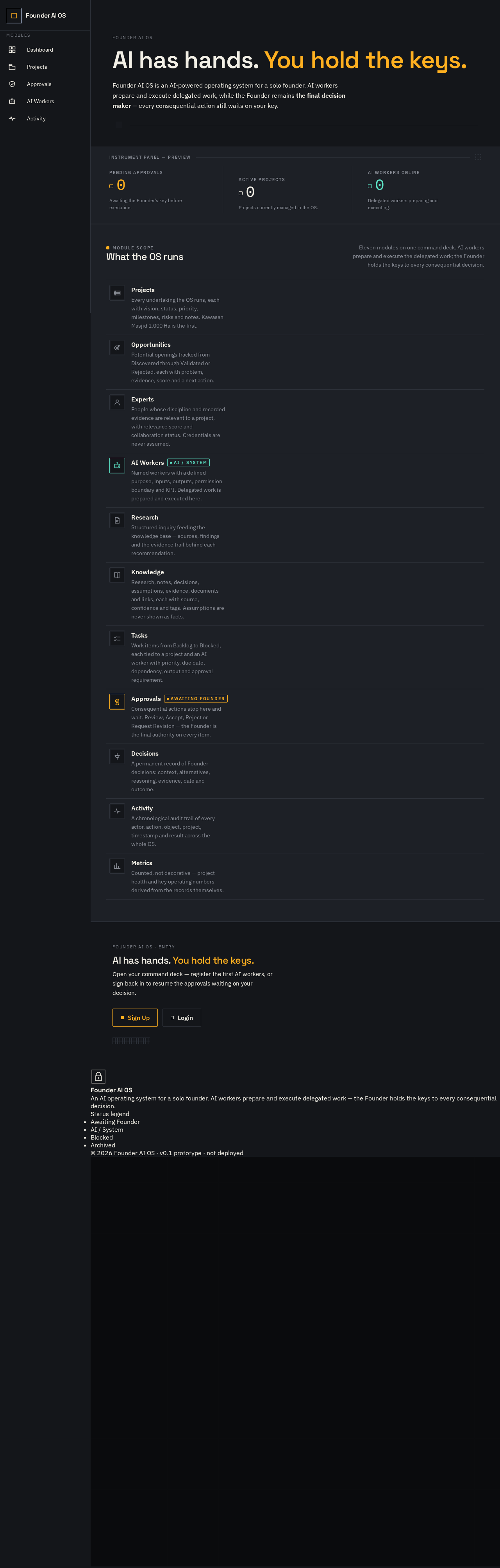
Founder AI OS
AI has hands. You hold the keys.
Founder AI OS is an AI-powered operating system for a solo founder. AI workers prepare and execute delegated work, while the Founder remains the final decision maker — every consequential action still waits on your key.
Pending approvals
Awaiting the Founder's key before execution.
Active projects
Projects currently managed in the OS.
AI workers online
Delegated workers preparing and executing.
What the OS runs
Eleven modules on one command deck. AI workers prepare and execute the delegated work; the Founder holds the keys to every consequential decision.
- Projects
Every undertaking the OS runs, each with vision, status, priority, milestones, risks and notes. Kawasan Masjid 1.000 Ha is the first.
- Opportunities
Potential openings tracked from Discovered through Validated or Rejected, each with problem, evidence, score and a next action.
- Experts
People whose discipline and recorded evidence are relevant to a project, with relevance score and collaboration status. Credentials are never assumed.
- AI WorkersAI / System
Named workers with a defined purpose, inputs, outputs, permission boundary and KPI. Delegated work is prepared and executed here.
- Research
Structured inquiry feeding the knowledge base — sources, findings and the evidence trail behind each recommendation.
- Knowledge
Research, notes, decisions, assumptions, evidence, documents and links, each with source, confidence and tags. Assumptions are never shown as facts.
- Tasks
Work items from Backlog to Blocked, each tied to a project and an AI worker with priority, due date, dependency, output and approval requirement.
- ApprovalsAwaiting Founder
Consequential actions stop here and wait. Review, Accept, Reject or Request Revision — the Founder is the final authority on every item.
- Decisions
A permanent record of Founder decisions: context, alternatives, reasoning, evidence, date and outcome.
- Activity
A chronological audit trail of every actor, action, object, project, timestamp and result across the whole OS.
- Metrics
Counted, not decorative — project health and key operating numbers derived from the records themselves.
Founder AI OS
AI has hands. You hold the keys.
Founder AI OS is an AI-powered operating system for a solo founder. AI workers prepare and execute delegated work, while the Founder remains the final decision maker — every consequential action still waits on your key.
Pending approvals
Awaiting the Founder's key before execution.
Active projects
Projects currently managed in the OS.
AI workers online
Delegated workers preparing and executing.
What the OS runs
Eleven modules on one command deck. AI workers prepare and execute the delegated work; the Founder holds the keys to every consequential decision.
- Projects
Every undertaking the OS runs, each with vision, status, priority, milestones, risks and notes. Kawasan Masjid 1.000 Ha is the first.
- Opportunities
Potential openings tracked from Discovered through Validated or Rejected, each with problem, evidence, score and a next action.
- Experts
People whose discipline and recorded evidence are relevant to a project, with relevance score and collaboration status. Credentials are never assumed.
- AI WorkersAI / System
Named workers with a defined purpose, inputs, outputs, permission boundary and KPI. Delegated work is prepared and executed here.
- Research
Structured inquiry feeding the knowledge base — sources, findings and the evidence trail behind each recommendation.
- Knowledge
Research, notes, decisions, assumptions, evidence, documents and links, each with source, confidence and tags. Assumptions are never shown as facts.
- Tasks
Work items from Backlog to Blocked, each tied to a project and an AI worker with priority, due date, dependency, output and approval requirement.
- ApprovalsAwaiting Founder
Consequential actions stop here and wait. Review, Accept, Reject or Request Revision — the Founder is the final authority on every item.
- Decisions
A permanent record of Founder decisions: context, alternatives, reasoning, evidence, date and outcome.
- Activity
A chronological audit trail of every actor, action, object, project, timestamp and result across the whole OS.
- Metrics
Counted, not decorative — project health and key operating numbers derived from the records themselves.
No comments yet. Be the first!