fluff-house-store
 Anas Kazim
https://fluff-house-store--anaskazim99.replit.app

Comments (0)
Sign in to leave a comment
System Requirements
System Requirements Document for fluff-house-store
1. Introduction
fluff-house-store is a fresh, first-party direct-to-consumer storefront for a plush and soft-goods boutique. The requester, Anas Kazim, asked for a new build that mirrors the premium 3D presentation and the same product lineup as the referenced live store at https://fluff-house-store--anaskazim99.replit.app. The reference site could not be read at build time (its HTML returned no readable content), so the product roster and presentation are carried by the accepted requirement thread and the project-wide creative direction rather than by scraped reference facts: the lineup is the house's plush roster — teddy bears, bunnies and soft companions in the house's signature colourways — presented as sculptural objects inside a gallery-vitrine storefront.
The audience is gift-buyers, collectors and design-conscious adults shopping for tactile toys. The emotional register is premium, sculptural and a little theatrical: the product is soft and cuddly, the storefront is architecture. The store is operated by a store owner who maintains the product catalog so the same products remain available in the premium 3D storefront.
This document is the System Requirements Document for that build. It covers the shopper's browse-to-purchase journey, the store owner's catalog administration, the identity boundary that protects catalog administration, the premium 3D presentation language, and the delivery boundary of a fresh application that does not edit or open the existing Replit site.
Success Criteria
- A shopper can move from the Landing entry through the Storefront, open a Product Details page, add items to the Cart, and complete a purchase, with the premium 3D presentation intact at every step.
- The storefront presents the plush lineup as sculptural objects on staggered plinths with a real-time 3D hero subject, not as a uniform card grid.
- A store owner can enroll, verify on return, and maintain the catalog so the storefront reflects the intended products.
- Readable text and controls remain whole and inside the viewport at 375px, 768px and 1280px, and all motion degrades to a usable static arrangement under
prefers-reduced-motion.
2. System Overview
fluff-house-store is a three-service application: a React frontend, a shared FastAPI backend that owns all application APIs and domain modules, and a MariaDB database for application-owned persistent data. The frontend renders the public storefront and the protected catalog administration; the backend serves the product catalog, cart and purchase state, and store-owner identity; MariaDB persists products, carts, orders and owner accounts.
Two active human personas use the system. The Shopper browses the premium 3D storefront anonymously and completes a purchase. The Store owner enrolls, verifies on return, and maintains the product catalog behind a protected surface. Anonymous shopping requires no account; catalog administration requires application-owned identity.
The current delivery is the fresh first-party application described here. The reference Replit site is a visual and product reference only; it is not edited, embedded, or opened by this build.
Removed from scope
- Editing or opening the existing Replit site (also: reference site,
fluff-house-store--anaskazim99.replit.appas a runtime dependency).
2a. Product Interpretation and Delivery Boundary
The product is a storefront, not a marketplace or a CMS. Its center of gravity is the shopper's encounter with the plush objects: a cinematic Landing entry, a staggered Storefront of sculptural plinths, a Product Details page with a sticky real-time 3D viewer, and a receipt-like Cart that completes a purchase. The store owner's work is deliberately narrow: keep the catalog truthful so the storefront stays presentable.
Access follows the accepted contract. Landing, Storefront, Product Details and Cart are public and require no identity. Catalog is role-restricted to the store owner. Login and Sign Up are the anonymous identity-access surfaces: Sign Up is first-use self-service enrollment, Login is returning verification. A protected destination does not own the interaction that establishes access to itself, so Catalog is reached only after identity is established through Sign Up or Login.
The premium 3D presentation is a current commitment, not a future idea. The hero carries a real-time WebGL plush subject; Product Details carries a per-product real-time viewer. The reference site's exact product names, prices and copy could not be verified, so the catalog is seeded with the house's plush roster as described in the creative direction and is maintained by the store owner thereafter.
2b. Source Content Inventory
The reference directive declares content_source with authoritative authority, but the verified source observations record that the reference URL returned no readable content. No product names, descriptions, prices, images, navigation items, or copy could be verified from the source. The inventory is therefore empty of verified reference facts, and no facts are invented to fill it. The product roster used by the build is the plush lineup named in the project-wide creative direction (teddy bears, bunnies and soft companions in the house's signature colourways), seeded as catalog data and editable by the store owner.
2c. Page Content and Component Coverage
Landing
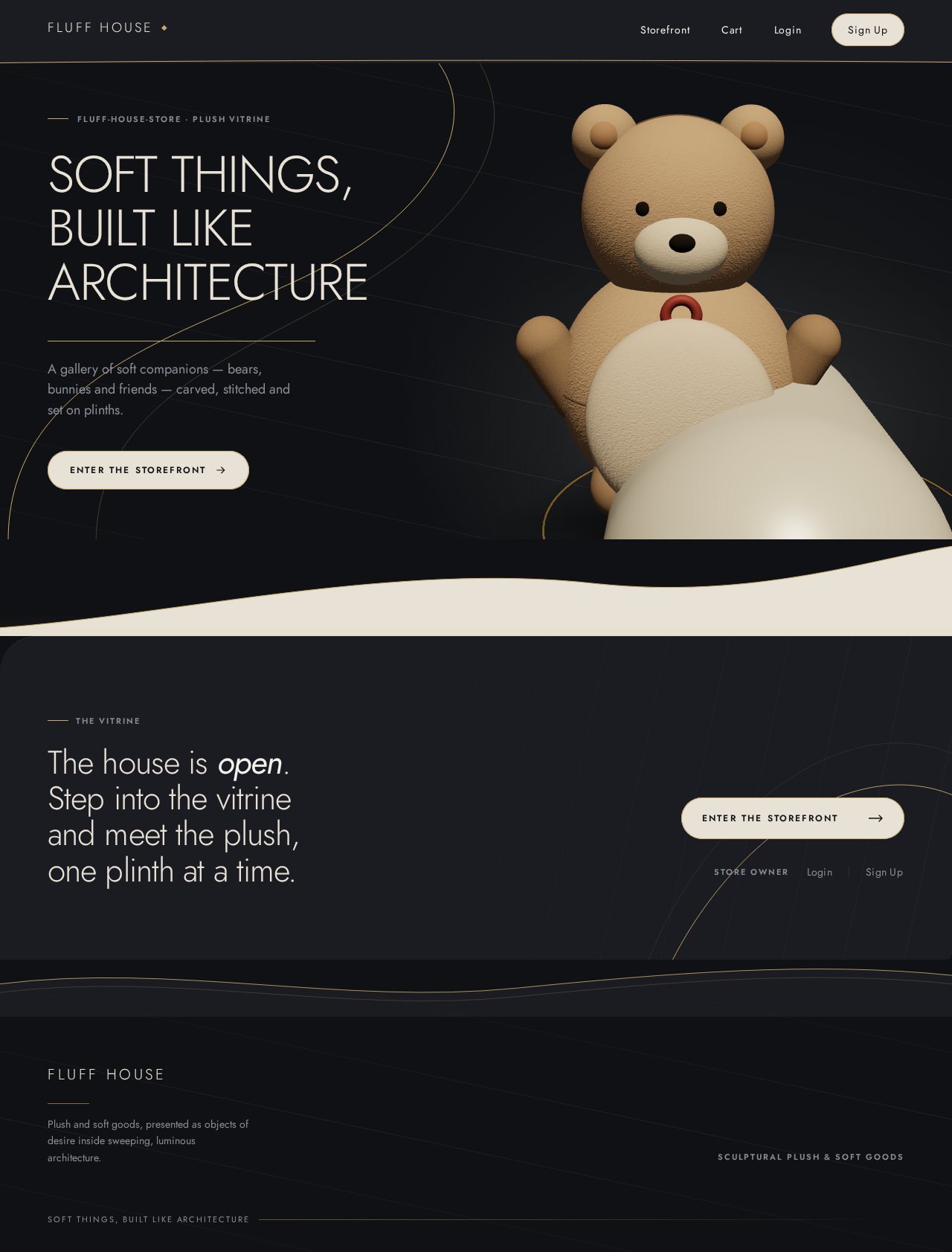
- Information and state: Anonymous public entry. Full-bleed charcoal stage split asymmetrically 5/7. Left column: oversized Jost 300 display headline "SOFT THINGS, BUILT LIKE ARCHITECTURE" at
clamp(2.75rem, 7vw, 6rem), a gold hairline rule, a one-line subtext, and a pearl capsule CTA. Right column: a single real-time 3D plush bear on a curved pearl plinth bleeding off the right and bottom edges, lit by a slow studio sweep, over a faint 12° diagonal flow-line scaffold. A thin gold arc sweeps from behind the plinth into the type column. - Primary action: Enter the Storefront via the pearl capsule CTA.
- Supporting actions: Navigate to Login or Sign Up for store-owner access; reach the Storefront from the header.
- Domain entities: None owned here; the hero subject is presentation, not catalog data.
- Component responsibilities: Hero stage (R3F canvas with the plush subject, plinth, light sweep, diagonal scaffold, gold arc); display type block with staggered fade-up reveal; header bar with wordmark and access links; asymmetric SVG arc boundary into the next section.
- States: Loading — the 3D canvas shows a charcoal ground with the plinth silhouette until the subject is ready, with the type block rendered immediately. Empty — not applicable. Success — hero renders with the orbit and light sweep running. Error — if WebGL is unavailable, the hero falls back to a static macro studio still of plush fabric on charcoal with the same type block and CTA. Recovery — the CTA and all text remain usable in every fallback. Reduced motion — the 3D subject freezes to a single hero angle with a drag-to-rotate control and the light sweep stops.
Storefront
- Information and state: Public catalog browse. Staggered two-column rhythm on a 12-column grid; each product plinth is offset vertically by 40–80px, with a 40px radius on one corner and 8px on the opposite. Each card shows the product name, a champagne-gold tabular price, and the product image or plinth render. Section boundaries are asymmetric SVG arcs.
- Primary action: Open a product's Product Details page.
- Supporting actions: Scroll the staggered grid; return to Landing; reach the Cart.
- Domain entities: Product (name, price, colourway, image or render reference, description).
- Component responsibilities: Staggered plinth grid; product card with one-corner-40px / opposite-corner-8px radius, 4px hover lift and 6% warmer plinth glow over 220ms ease-out; gold tabular price; arc section boundaries that morph subtly on scroll.
- States: Loading — staggered plinth skeletons in surface
#1A1C21with muted labels. Empty — a quiet charcoal panel with a muted line stating the house is preparing its plush collection, and a link back to Landing. Success — the full staggered grid renders. Error — a muted inline notice with a retry control; the header and Cart link remain usable. Recovery — retry reloads the catalog. Reduced motion — cards do not lift or glow on hover; the grid remains staggered and fully readable.
Product Details
- Information and state: Split layout: a large sticky real-time 3D viewer on the left, a narrow scrolling spec column on the right with ruled label/value pairs (label in 11px uppercase muted, value in tabular pearl numerals). Product name, colourway, price in champagne gold, and description.
- Primary action: Add the product to the Cart.
- Supporting actions: Drag to rotate the 3D viewer; return to the Storefront; reach the Cart.
- Domain entities: Product (name, price, colourway, description, render reference); Cart line (product, quantity).
- Component responsibilities: Sticky R3F viewer with drag-to-rotate; ruled spec column; pearl capsule add-to-cart control with a 1px gold inner hairline; quantity selector; arc boundary into the footer.
- States: Loading — the viewer shows the plinth silhouette and the spec column renders from cached product data. Empty — not applicable; an unknown product reference shows a muted notice and a link back to the Storefront. Success — the viewer renders the product and the add-to-cart control confirms the addition. Error — if the 3D viewer fails, a static macro studio still of the product's fabric replaces it and the spec column and add-to-cart remain usable. Recovery — the shopper can still add to cart from the fallback. Reduced motion — the viewer freezes to a single angle with drag-to-rotate available and no auto-orbit.
Cart
- Information and state: Single-column receipt-like sheet with hairline dividers and tabular numerals. Each line shows product name, quantity, unit price and line total; the sheet shows the order total in champagne gold.
- Primary action: Complete the purchase.
- Supporting actions: Adjust quantity; remove a line; return to the Storefront.
- Domain entities: Cart (lines, quantities, totals); Order (confirmed lines, total, confirmation reference).
- Component responsibilities: Receipt sheet with hairline dividers; quantity steppers; remove controls; pearl capsule checkout control; confirmation panel.
- States: Loading — the sheet renders with muted skeleton lines. Empty — a quiet charcoal panel stating the cart is empty with a link to the Storefront. Success — the confirmation panel shows the order reference and total. Error — a muted inline notice with a retry control if checkout fails; the cart lines are preserved. Recovery — retry re-submits the same cart. Reduced motion — no change to layout; transitions are instant.
Catalog
- Information and state: Protected store-owner surface. A list of products with name, price, colourway and description, and controls to add, edit and remove products. Access requires an established store-owner identity; an unauthenticated visit is redirected to Login.
- Primary action: Save a product change so the Storefront reflects it.
- Supporting actions: Add a product; edit a product; remove a product; sign out.
- Domain entities: Product (name, price, colourway, description, image or render reference).
- Component responsibilities: Product table or list; product form with labeled fields; save and remove controls; inline validation messages; sign-out control.
- States: Loading — muted skeleton rows. Empty — a charcoal panel inviting the owner to add the first product. Success — the saved product appears in the list and on the Storefront. Error — inline field validation for missing name or invalid price, and a muted notice with retry if the save fails. Recovery — the form retains entered values on failure. Reduced motion — no change.
Login
- Information and state: Anonymous identity-access surface for returning store owners. Email and password fields, a submit control, and a link to Sign Up.
- Primary action: Verify identity and continue to Catalog.
- Supporting actions: Navigate to Sign Up; return to Landing.
- Domain entities: Store-owner account (email, credential).
- Component responsibilities: Credential form; inline error region; submit control.
- States: Loading — the submit control shows a pending state. Empty — not applicable. Success — redirect to Catalog. Error — a muted inline message for invalid credentials without revealing which field failed. Recovery — the owner can retry or go to Sign Up. Reduced motion — no change.
Sign Up
- Information and state: Anonymous first-use enrollment surface for a store owner. Email, password and confirm-password fields, a submit control, and a link to Login.
- Primary action: Create the store-owner account and continue to Catalog.
- Supporting actions: Navigate to Login; return to Landing.
- Domain entities: Store-owner account (email, credential).
- Component responsibilities: Enrollment form; inline validation; submit control.
- States: Loading — the submit control shows a pending state. Empty — not applicable. Success — the account is created and the owner continues to Catalog. Error — inline validation for mismatched passwords or an already-registered email. Recovery — the owner can correct the form or go to Login. Reduced motion — no change.
3. Functional Requirements
FR-1 — Fresh build of the Fluff House store. As a Shopper, I should reach a fresh Fluff House store application that mirrors the referenced live store's premium presentation and product lineup, so that I can shop the same house in a new build. Provenance: explicit. Lifecycle: the anonymous visitor lands on Landing; the application renders the storefront; the observable result is a working store that is a new build and does not edit or open the existing Replit site. Failure: if the application is unreachable, the visitor sees the browser's own error; recovery is a reload. Continuation: the visitor enters the Storefront.
FR-2 — Premium 3D presentation. As a Shopper, I should experience the storefront in a premium 3D presentation matching the reference site's register, so that the plush products read as sculptural objects. Provenance: explicit. Lifecycle: the visitor lands on Landing and sees a real-time 3D plush subject on a curved pearl plinth with a slow studio light sweep; the Storefront presents staggered plinths; Product Details presents a sticky real-time 3D viewer. Observable result: the 3D presentation is present on Landing and Product Details and the staggered plinth rhythm is present on the Storefront. Failure: if WebGL is unavailable, static macro studio stills replace the 3D subjects and all text and controls remain usable. Recovery: the shopper continues browsing and purchasing from the fallback. Continuation: the shopper proceeds to Product Details and Cart. Reduced motion: the 3D viewer freezes to a single angle with drag-to-rotate and parallax is disabled.
FR-3 — Same product lineup. As a Shopper, I should see the same products the reference store offers — the house's plush roster of teddy bears, bunnies and soft companions in the house's signature colourways — so that the new store carries the same merchandise. Provenance: explicit. Lifecycle: the Storefront lists the catalog products; the shopper opens a product; the observable result is a product page with name, colourway, price and description. Failure: if the catalog cannot load, the Storefront shows a muted notice with retry. Recovery: retry reloads the catalog. Continuation: the shopper adds the product to the Cart.
FR-4 — Anonymous Landing entry. As an anonymous visitor, I should reach the Landing public entry before any identity establishment, so that I can understand the store before shopping or owner work. Provenance: required_inference. Lifecycle: the visitor opens the application root; Landing renders the hero, subtext and pearl capsule CTA without requiring identity; the observable result is a usable entry with a path into the Storefront and paths to Login and Sign Up. Failure: if the 3D hero fails, the static fallback renders with the same type block and CTA. Recovery: the CTA remains usable. Continuation: the visitor enters the Storefront.
FR-5 — Browse the Storefront. As a Shopper, I should browse the catalog in the premium 3D presentation, so that I can find a plush product to buy. Provenance: required_inference. Lifecycle: the shopper enters the Storefront from Landing; the staggered plinth grid renders with names and champagne-gold tabular prices; the observable result is a browsable catalog. Failure: a load error shows a muted notice with retry. Recovery: retry reloads. Continuation: the shopper opens a Product Details page.
FR-6 — View product details. As a Shopper, I should open an individual product to see its details, so that I can decide whether to buy it. Provenance: required_inference. Lifecycle: the shopper selects a product card; Product Details renders the sticky 3D viewer and the ruled spec column; the observable result is the product's name, colourway, price and description. Failure: an unknown product reference shows a muted notice and a link back to the Storefront; a 3D viewer failure falls back to a static still. Recovery: the shopper returns to the Storefront or adds to cart from the fallback. Continuation: the shopper adds the product to the Cart.
FR-7 — Add to cart and complete a purchase. As a Shopper, I should add products to a cart and complete a purchase, so that I can buy the plush products. Provenance: required_inference. Lifecycle: the shopper adds a product from Product Details; the Cart renders the receipt-like sheet with lines, quantities and totals; the shopper completes the purchase; the observable result is a confirmation panel with an order reference and total. Failure: a checkout failure shows a muted notice with retry and preserves the cart lines. Recovery: retry re-submits the same cart. Continuation: the shopper returns to the Storefront.
FR-8 — Store-owner self-service enrollment. As a Store owner, I should complete self-service enrollment before first catalog administration, so that I can establish the identity that protects the Catalog. Provenance: required_inference. Lifecycle: the owner reaches Sign Up anonymously from Landing or Login; submits email, password and confirm-password; the account is created; the observable result is access to the Catalog. Failure: mismatched passwords or an already-registered email show inline validation. Recovery: the owner corrects the form or goes to Login. Continuation: the owner enters the Catalog.
FR-9 — Store-owner returning verification. As a Store owner, I should complete returning verification to access the protected Catalog, so that only I can administer the catalog. Provenance: required_inference. Lifecycle: the owner reaches Login anonymously; submits credentials; the observable result is access to the Catalog. Failure: invalid credentials show a muted inline message without revealing which field failed. Recovery: the owner retries or goes to Sign Up. Continuation: the owner enters the Catalog.
FR-10 — Maintain the product catalog. As a Store owner, I should maintain the product catalog so that the same products remain available in the premium 3D storefront, so that the storefront stays presentable to shoppers. Provenance: required_inference. Lifecycle: the verified owner opens the Catalog; adds, edits or removes a product; saves; the observable result is the updated product list and the updated Storefront. Failure: missing name or invalid price shows inline validation; a save failure shows a muted notice with retry and retains entered values. Recovery: the owner corrects and retries. Continuation: the owner returns to the Storefront to confirm the change.
4. User Personas
Shopper
The Shopper is a gift-buyer, collector or design-conscious adult shopping for tactile plush toys. They arrive anonymously at the Landing entry and are met by a gallery-vitrine presentation: an oversized display headline, a real-time 3D plush bear on a pearl plinth, and a pearl capsule CTA into the Storefront. Their primary goal is to explore the plush lineup in the premium 3D presentation and complete a purchase.
Their distinct responsibilities are browsing the staggered Storefront, opening a Product Details page to inspect a product's colourway, price and description in the sticky 3D viewer, adding items to the Cart, and completing the purchase. Their inputs are product selection and quantity; their decisions are which product to open and whether to buy. They interact with the Store owner only indirectly: the products they see are the products the owner maintains. Their observable success is a confirmation panel with an order reference and total, reached without ever creating an account.
What makes the Shopper's work different from the Store owner's is that it is entirely public and ephemeral until purchase: no identity is established, no catalog state is authored, and the only durable state is the cart and the resulting order.
Store owner
The Store owner maintains the Fluff House store's product catalog so that the same products remain available in the premium 3D storefront. They are the only persona who establishes an application-owned identity, and they do so through self-service enrollment on Sign Up or returning verification on Login.
Their primary goal is that the catalog reflects the intended products and the storefront stays presentable to shoppers. Their distinct responsibilities are adding, editing and removing products, and saving changes so the Storefront reflects them. Their inputs are product name, price, colourway and description; their decisions are what the house sells and how each product is described. They interact with the Shopper by supplying the catalog the Shopper browses. Their observable success is a saved product that appears in the Catalog list and on the Storefront.
What makes the Store owner's work different from the Shopper's is that it is protected, durable and authorial: it requires established identity, it changes shared product state, and it is the only work in the system that writes catalog data.
5. Core User Flows
Flow A — Shopper browses and completes a purchase
- The Shopper opens the application root and lands on Landing anonymously. The hero renders the display headline, subtext and pearl capsule CTA, with the real-time 3D plush bear on its pearl plinth and the slow studio light sweep.
- The Shopper selects the pearl capsule CTA and arrives on Storefront. The staggered plinth grid renders with product names and champagne-gold tabular prices.
- The Shopper selects a product card and arrives on Product Details. The sticky 3D viewer renders the product; the ruled spec column shows name, colourway, price and description.
- The Shopper drags the 3D viewer to inspect the product, then selects the pearl capsule add-to-cart control. The control confirms the addition.
- The Shopper opens Cart. The receipt-like sheet lists the line with quantity, unit price and line total, and the order total in champagne gold.
- The Shopper adjusts quantity if needed and selects the checkout control. The confirmation panel shows the order reference and total.
- Failure and recovery: if the catalog fails to load on Storefront, a muted notice with retry appears; retry reloads. If the 3D viewer fails on Product Details, a static macro studio still replaces it and the spec column and add-to-cart remain usable. If checkout fails, a muted notice with retry appears and the cart lines are preserved; retry re-submits the same cart.
- Continuation: the Shopper returns to the Storefront to continue browsing.
Flow B — Store owner enrolls and maintains the catalog
- The Store owner opens the application and lands on Landing anonymously, then selects the Sign Up link.
- On Sign Up, the owner enters email, password and confirm-password and submits. The account is created.
- The owner arrives on Catalog. The product list renders with name, price, colourway and description.
- The owner selects add-product, enters the product fields, and saves. The saved product appears in the list.
- The owner opens Storefront and confirms the product appears in the staggered grid.
- Failure and recovery: if the passwords do not match or the email is already registered, Sign Up shows inline validation and the owner corrects the form or goes to Login. If a save fails, the Catalog shows a muted notice with retry and retains the entered values; the owner corrects and retries.
- Continuation: the owner signs out and returns to Landing.
Flow C — Store owner returns and verifies
- The Store owner opens the application and selects the Login link from Landing.
- On Login, the owner enters email and password and submits.
- The owner arrives on Catalog and edits a product's price, then saves. The updated price appears in the list and on the Storefront.
- Failure and recovery: invalid credentials show a muted inline message without revealing which field failed; the owner retries or goes to Sign Up.
- Continuation: the owner signs out and returns to Landing.
Flow D — Anonymous visitor reaches the public entry
- The visitor opens the application root and lands on Landing without any identity establishment.
- The hero renders with the display headline, subtext and pearl capsule CTA; the 3D plush bear orbits on its plinth with the studio light sweep.
- The visitor selects the CTA and enters Storefront, or selects Login or Sign Up to begin store-owner access.
- Failure and recovery: if WebGL is unavailable, the hero falls back to a static macro studio still with the same type block and CTA; the CTA remains usable.
- Continuation: the visitor browses the Storefront.
6. Visuals Colors and Theme
The muse is Zaha Hadid; the headline is "SOFT THINGS, BUILT LIKE ARCHITECTURE". The register is fluid parametric grandeur for a plush toy house: sweeping continuous surfaces, pearl-and-charcoal grounds, and calm light on curved forms.
Colour tokens (dark mode):
| Role | Hex | Usage |
|---|---|---|
| Background | #101114 | Dominant ground, roughly 70% of every screen |
| Surface | #1A1C21 | Raised product plinths and header bar |
| Text | #F3F1EC | Body and headline type |
| Primary | #E8E2D6 | Pearl headline type and primary CTA fill (charcoal text on pearl) |
| Accent | #C8A96B | Price, active swatch ring, hairline sweep along curved boundaries — never more than 5% of a view |
| Muted | #8A8F98 | Labels, captions, secondary metadata |
Contrast: #F3F1EC on #101114 and charcoal text on pearl CTAs both exceed 7:1 at body size.
Typography: Headings and body in Jost only. Display is Jost Light 300 at very large scale with -0.02em tracking and 1.05 line-height. Micro-labels are uppercase 11–12px with 0.18em tracking in muted grey. Weight contrast is the hierarchy tool: 300 display, 600 micro-labels, 400 body. Scale is a 1.25 modular with a display jump: display clamp(2.75rem, 7vw, 6rem); h2 28px → 48px; h3 20px → 28px; body 16px → 18px; label 11px → 12px uppercase.
Shape language: Sweeping parametric curves. Section boundaries are asymmetric arcs rendered as SVG masks, never straight horizontal rules. Product plinths are soft capsule or pebble forms with a single continuous curve radius of 32–48px. Cards use a 40px radius on one corner and 8px on the opposite. Buttons are full-capsule with a pearl fill and a 1px gold inner hairline. Diagonal flow lines (1px, #2A2D33) run behind the grid at 12°.
Layout: Asymmetric editorial grid on a 12-column base. The hero splits roughly 5/7 with type flush-left in the narrow column and the 3D stage bleeding off the right edge. The Storefront is a staggered two-column rhythm with each plinth offset vertically by 40–80px. Product Details is a split: a large sticky 3D viewer on the left and a narrow scrolling spec column on the right with ruled label/value pairs. The Cart is a single-column receipt-like sheet with hairline dividers and tabular numerals. Mobile collapses to one column with arcs flattened to gentle 24px curves and all type clamped to its mobile size.
Imagery: One crafted real-time 3D plush subject in the hero — a soft bear with a fabric-like normal map, sitting on a pearl plinth against charcoal — built in Three.js / React Three Fiber, plus per-product 3D viewers on Product Details. Supporting stills are macro studio photography of plush fabric: visible pile, stitched seams, felted eyes, shot on charcoal and pearl grounds. No stock people, no gradient blobs, no clip art.
Avoid: Any blue or indigo accent, especially #2563EB / #6366F1 on white; Inter, Roboto, Arial, Helvetica, Poppins or system-ui for headings or body; gradient-blob heroes, neon cyan/violet glows, or a candy-coloured toy palette; a uniform 3-card grid with identical hover-lift shadows; a centred headline + subtext + button stack; purple/violet gradients, glassmorphism panels, or frosted blur cards; fast bouncy or springy easing; photography of people or stock lifestyle scenes.
7. Signature Design Concept
The public entry is an architectural vitrine. The Landing hero is a full-bleed charcoal stage split asymmetrically 5/7: the left five columns hold the oversized Jost 300 headline "SOFT THINGS, BUILT LIKE ARCHITECTURE" at clamp(2.75rem, 7vw, 6rem), stacked over a one-line subtext and a pearl capsule CTA pinned beneath it, flush-left, with a gold hairline rule above the subtext. The right seven columns are dominated by a single real-time 3D plush bear on a curved pearl plinth that bleeds off the right and bottom edges, lit by a slow studio sweep against a faint 12° diagonal flow-line scaffold. A thin gold arc sweeps from behind the plinth into the type column, tying the two halves together.
The signature moves carry through the whole store: section boundaries are asymmetric SVG arcs that morph on scroll instead of straight rules, so the page reads as one continuous parametric surface from hero to footer; Storefront plinths are staggered on the 12-column grid with a one-corner-40px / opposite-corner-8px radius so no two cards sit on the same baseline; Product Details pairs a sticky real-time 3D viewer with drag-to-rotate against a narrow ruled spec column; and every price is set in champagne-gold tabular numerals as the only colour on the card besides the product.
8. Interaction Model & Motion Direction
Interaction Model: Animated Motion Tempo: cinematic Hero Dimensionality: webgl
Landing Hero Motion Brief
- Focal subject: the real-time 3D plush bear on its curved pearl plinth, bleeding off the right and bottom edges of the hero.
- Input → transformation → outcome thesis: as the visitor arrives, the plush subject orbits continuously at 0.04 rad/s while a soft studio light sweep crosses it every 12s; the display lines fade up 12px with a 400ms stagger; the gold arc holds the composition together. The outcome is a composed vitrine that invites the pearl capsule CTA into the Storefront.
- Motion vocabulary: continuous slow orbit, 12-second studio light sweep, 400ms staggered fade-up of display lines, scroll-linked camera dolly with parallax between plinth and product as the visitor moves into the Storefront, subtle morphing of section arcs on scroll, 220ms ease-out 4px card lift with 6% warmer plinth glow on hover.
- Composed first frame: charcoal ground, flush-left display headline and subtext with the gold hairline rule, pearl capsule CTA, the plush bear on its pearl plinth at a three-quarter angle, the gold arc sweeping into the type column, and the 12° diagonal scaffold faint behind the grid.
- Reduced-motion state: the 3D viewer freezes to a single hero angle with a drag-to-rotate control, the light sweep stops, parallax is disabled, and the type block renders without the fade-up stagger.
9. Non-Functional Requirements
- NFR-1 — Readable text and controls at every viewport. Headlines, wordmarks, labels, numbers, card text and controls stay entirely inside the viewport and their container at 375px, 768px and 1280px, wrapping or scaling with
clamp(...)to fit, and no other element covers any part of them. Imagery, decoration and motion may be cropped, bled off an edge, rotated, overlapped or cut as the direction asks, as long as they cover no readable text or control. Provenance: explicit (creative direction). - NFR-2 — Reduced-motion usability. With
prefers-reduced-motion, the 3D viewer freezes to a single hero angle with a drag-to-rotate control, parallax is disabled, and the layout remains a usable static arrangement. Provenance: explicit (creative direction). - NFR-3 — Contrast. Text
#F3F1ECon#101114and charcoal text on pearl CTAs exceed 7:1 at body size. Provenance: explicit (creative direction). - NFR-4 — Fresh build boundary. The application is a fresh build; it does not edit or open the existing Replit site. Provenance: explicit.
- NFR-5 — Protected catalog. Catalog is reachable only after store-owner identity is established through Sign Up or Login; an unauthenticated visit is redirected to Login. Provenance: required_inference.
- NFR-6 — Durable state. Products, carts, orders and store-owner accounts persist in MariaDB across sessions. Provenance: required_inference (planning scope
durable_state_required). - NFR-7 — Graceful 3D fallback. If WebGL is unavailable or the 3D viewer fails, static macro studio stills replace the 3D subjects and all text and controls remain usable. Provenance: required_inference.
10. Tech Stack
- Frontend: React application UI, with Three.js / React Three Fiber for the hero and per-product 3D viewers. Jost as the only typeface.
- Backend: shared FastAPI process for application APIs and domain modules — catalog, cart, orders and store-owner identity.
- Database: MariaDB for application-owned persistent data (products, carts, orders, store-owner accounts).
- Infrastructure:
docker-compose.ymlwith the three provisioned services —frontend,backend,database. No additional services are required for the current workflows.
11. Assumptions and Constraints
- A-1: The reference site's exact product names, prices and copy could not be verified; the catalog is seeded with the house's plush roster (teddy bears, bunnies and soft companions in the house's signature colourways) and is maintained by the store owner thereafter. Label: assumption.
- A-2: The premium 3D presentation is delivered with Three.js / React Three Fiber in the React frontend, with static macro studio stills as the fallback. Label: assumption.
- A-3: Store-owner identity is application-owned and established through self-service Sign Up or returning Login; no other account-management capabilities are in scope. Label: required_inference.
- C-1: The application is a fresh build; it does not edit or open the existing Replit site. Provenance: explicit.
- C-2: Jost is the only typeface for headings and body; blue, indigo, purple and violet accents, glassmorphism and candy-coloured palettes are excluded. Provenance: explicit (creative direction).
- C-3: The champagne-gold accent is reserved for price, active swatch ring and hairline sweeps, never more than 5% of a view. Provenance: explicit (creative direction).
12. Glossary
- Fluff House: the plush and soft-goods boutique this storefront sells for.
- Plinth: the soft capsule or pebble form on which a product is presented; staggered on the Storefront and curved in the hero.
- Parametric arc: the asymmetric SVG section boundary that replaces a straight horizontal rule and morphs subtly on scroll.
- Studio light sweep: the 12-second soft light pass across the hero's 3D plush subject.
- Spec column: the narrow ruled label/value column on Product Details, with 11px uppercase muted labels and tabular pearl numerals.
- Receipt sheet: the single-column Cart layout with hairline dividers and tabular numerals.
- Store owner: the persona who enrolls, verifies and maintains the product catalog behind the protected Catalog surface.
- Shopper: the anonymous persona who browses the premium 3D storefront and completes a purchase.
fluff-house-store · plush vitrine
SOFT THINGS,BUILT LIKEARCHITECTURE
A gallery of soft companions — bears, bunnies and friends — carved, stitched and set on plinths.
The Vitrine
The house is open. Step into the vitrine and meet the plush, one plinth at a time.
fluff-house-store · plush vitrine
SOFT THINGS,BUILT LIKEARCHITECTURE
A gallery of soft companions — bears, bunnies and friends — carved, stitched and set on plinths.
The Vitrine
No comments yet. Be the first!