flight-booking-mvp
 Rohan Somai
Implement this Flight booking app Core Features Flight Reservation Search Departure Airport (From) Destination Airport (To) Travel Date Selection One-way Ticket Selection Passenger Information Form Flight Availability Search Airline Selection Temporary / Onward Ticket Booking Generate verifiable flight reservation Reservation validity (48 hours / 14 days) PNR generation Airline booking reference generation PDF ticket generation Auto-cancellation after validity period User Checkout Passenger details First Name Last Name Email Nationality Order summary Coupon code support Multiple payment methods Tax calculation Payment Gateway Stripe PayPal Credit/Debit Cards International Payments Payment Success/Failure Handling ⸻ User Features Ticket Delivery Instant email delivery Download PDF ticket Booking confirmation page Reservation details page PNR verification instructions Order Management View booking status Re-send ticket email Download invoice Cancel request Extend validity User Account Registration Login Google Login Booking History Saved Passenger Profiles Account Settings ⸻ Admin Panel Features Dashboard Total Orders Revenue Analytics Daily Sales Active Reservations Cancelled Reservations User Statistics Reservation Management View all bookings Search bookings Filter by date Filter by status Manual cancellation Manual reissue Extend reservation validity Customer Management User list User activity logs Booking history Refund requests Fraud detection Coupon Management Create coupon Percentage discount Fixed amount discount Expiry date Usage limit ⸻ Support System Customer Support Live Chat Ticket System FAQ Section Contact Form Email Support WhatsApp Support OnwardTicket prominently advertises FAQ and 24/7 support options. ⸻ Visa & Travel Features Visa Reservation Service Flight reservation for visa application Reservation validity options Download visa-ready PDF Embassy-compatible format Travel Information Countries requiring onward tickets Visa guides Travel blogs Immigration requirements Entry rules by country ⸻ Automation Features Backend Automation Automatic reservation creation Automatic ticket PDF generation Email sending Reservation expiry tracking Auto cancellation Payment confirmation webhooks ------------------------------------------------ Attached are the MVP plan and QA that should pass


Comments (0)
Sign in to leave a comment
System Requirements
flight-booking-mvp System Requirements Document
1. Introduction
This document outlines the system requirements for the flight-booking-mvp, a Flight Booking Application designed to facilitate flight reservations, manage bookings, and provide a seamless user experience for both customers and administrators. The application will support core functionalities such as flight search, reservation management, payment processing, and customer support.
2. System Overview
The flight-booking-mvp will enable users to search for flights, book reservations, and manage their bookings through a user-friendly interface. The system will also provide an admin panel for managing reservations, customer interactions, and analytics. The application will support both guest and registered user interactions, with a focus on automation and efficient backend processing.
3. Functional Requirements as story points
Flight Search
- As a visa traveler, I want to submit a flight search with valid 3-letter airport codes and a future travel date, so that I can instantly review matching results.
- As a traveler, I want the form to block empty fields or past dates, so that I don't submit invalid parameters to the search service.
- As a QA tester, I want to check routing constraints, so that users cannot search for the same origin and destination.
Guest Checkout
- As a guest buyer, I want to fill in my full name, email, and nationality, so that my reservation ticket details match my passport information.
- As a guest checkout customer, I want validation errors for bad email addresses or empty names, so that I don't enter typos.
- As a QA tester, I want to check name string validation limits, so that extremely long names or names with accent marks are parsed safely.
- As a user, I want to enter my first name, last name, email, and nationality on the input form, so that my personal details are captured accurately.
- As a user, I want to authenticate myself during checkout, so that my booking is securely associated with my account.
Payment Processing
- As a buyer, I want to process payment securely using card details, so that the system immediately confirms my booking receipt.
- As a buyer, I want clear feedback when my transaction fails, so that I can correct it.
- As a developer, I want to handle webhook retries and duplicate callbacks, so that customers aren't double-billed or issued duplicate PNRs.
Reservation Generation
- As a customer, I want to download my PDF and receive a copy in my email within 5 minutes, so that I have immediate access to my reservation.
- As a customer, if the email delivery system fails, I want to still download my PDF ticket from the browser, so that I don't lose my booking.
Auto-Cancellation
- As a system administrator, I want inactive reservations to auto-cancel after 48 hours, so that we keep database tables clean.
User Features
- As a user, I want instant email delivery and the ability to download my PDF ticket, so that I can access my booking details immediately.
- As a user, I want to view my booking status, re-send ticket emails, download invoices, cancel requests, and extend validity, so that I can manage my reservations effectively.
- As a user, I want to register, log in, and view my booking history, so that I can manage my account and past bookings.
Admin Panel Features
- As an admin, I want to view total orders, revenue analytics, daily sales, active reservations, and cancelled reservations, so that I can monitor business performance.
- As an admin, I want to manage reservations, search bookings, filter by date and status, and manually cancel or reissue bookings, so that I can efficiently handle customer requests.
- As an admin, I want to manage users, view user activity logs, booking history, refund requests, and detect fraud, so that I can ensure secure and smooth operations.
- As an admin, I want to create and manage coupons with percentage or fixed amount discounts, expiry dates, and usage limits, so that I can offer promotions to customers.
Support System
- As a customer, I want access to live chat, a ticket system, an FAQ section, a contact form, email support, and WhatsApp support, so that I can get help when needed.
Visa & Travel Features
- As a traveler, I want a flight reservation service for visa applications with reservation validity options and embassy-compatible formats, so that I can meet visa requirements.
- As a traveler, I want access to travel information, visa guides, travel blogs, immigration requirements, and entry rules by country, so that I can plan my trips effectively.
Automation Features
- As a system, I want to automate reservation creation, ticket PDF generation, email sending, reservation expiry tracking, auto-cancellation, and payment confirmation webhooks, so that operations are efficient and require minimal manual intervention.
4. User Personas
- Visa Traveler: Individuals booking flights primarily for visa applications.
- Guest Buyer: Users who book flights without creating an account.
- Registered User: Users with accounts who manage their bookings and profiles.
- System Administrator: Personnel managing the backend operations, reservations, and customer interactions.
- QA Tester: Individuals responsible for ensuring the system meets quality standards.
5. Core User Flows
Flight Search and Booking
- User enters origin, destination, and travel date.
- System displays matching flights.
- User selects a flight and proceeds to checkout.
- User enters passenger details and payment information.
- System processes payment and generates a reservation.
Admin Reservation Management
- Admin logs into the admin panel.
- Admin views and filters reservations.
- Admin manages bookings, including cancellations and reissues.
6. Visuals Colors and Theme
- primary: #005f73 (Professional blue)
- primary_light: #0a9396 (Lighter teal)
- secondary: #94d2bd (Supporting teal)
- accent: #ee9b00 (Emphasis orange)
- highlight: #ca6702 (Notification red)
- bg: #e9d8a6 (Background cream)
- surface: #fefae0 (Card/panel background)
- text: #001219 (Primary text color)
- text_muted: #94a1b2 (Muted text color)
- border: #d3d3d3 (Subtle border color)
7. Signature Design Concept
- Interactive Flight Map: The homepage will feature an interactive flight map where users can visually explore flight routes. As users hover over different regions, flight paths animate dynamically, showcasing available routes. Clicking on a route will zoom in, providing detailed flight information and booking options. This concept will utilize
@react-three/fiberfor 3D map rendering andgsapfor smooth animations and transitions.
LANDING HERO MOTION BRIEF
- Concept: "Explore Your Journey" — A dynamic map where flight paths light up as users hover over them, symbolizing the journey from origin to destination. The map will animate continuously, with flight paths glowing and fading in a loop, inviting users to interact. The animation will pause when users click on a path, revealing detailed flight information.
- Libraries:
@react-three/fiberfor 3D rendering,gsapfor animations.
8. Interaction Model & Motion Direction
- Intended Interaction Model: Parallax
- The landing page will feature layered depth via scroll, with decorative elements like clouds and flight paths translating at different speeds to create a sense of depth and immersion. Real content will scroll naturally, enhancing the storytelling aspect of the user journey.
9. Non-Functional Requirements
- The system must handle high traffic volumes during peak booking periods.
- Ensure data security and compliance with relevant regulations.
- Provide 24/7 availability with minimal downtime.
10. Tech Stack
- Frontend: React.js
- Backend: Python + FastAPI
- Database: MySQL with Alembic migrations
11. Assumptions and Constraints
- The system will initially support one-way flight searches only.
- Payment processing will be limited to Stripe for the MVP.
- Multi-city and round-trip searches are out of scope for the MVP.
12. Glossary
- PNR: Passenger Name Record, a unique identifier for a flight reservation.
- MVP: Minimum Viable Product, the initial version of the application with core features.
- GDS: Global Distribution System, a network for booking airline tickets.
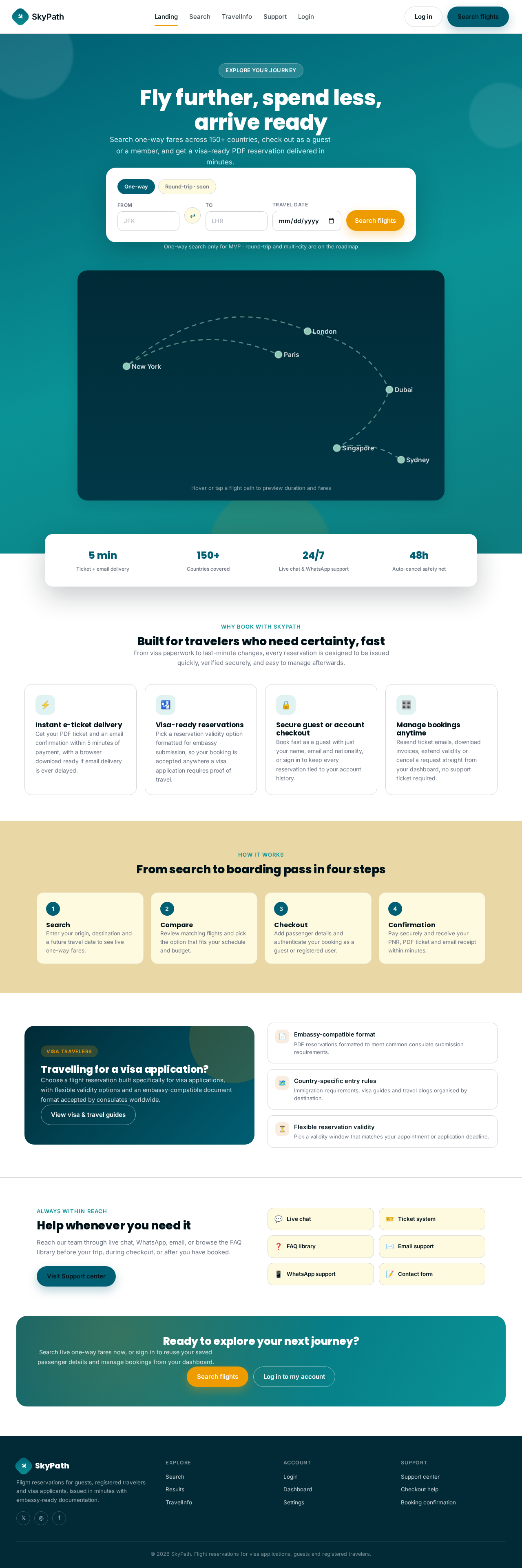
Fly further, spend less, arrive ready
Search one-way fares across 150+ countries, check out as a guest or a member, and get a visa-ready PDF reservation delivered in minutes.
One-way search only for MVP · round-trip and multi-city are on the roadmap
Built for travelers who need certainty, fast
From visa paperwork to last-minute changes, every reservation is designed to be issued quickly, verified securely, and easy to manage afterwards.
Instant e-ticket delivery
Get your PDF ticket and an email confirmation within 5 minutes of payment, with a browser download ready if email delivery is ever delayed.
Visa-ready reservations
Pick a reservation validity option formatted for embassy submission, so your booking is accepted anywhere a visa application requires proof of travel.
Secure guest or account checkout
Book fast as a guest with just your name, email and nationality, or sign in to keep every reservation tied to your account history.
Manage bookings anytime
Resend ticket emails, download invoices, extend validity or cancel a request straight from your dashboard, no support ticket required.
From search to boarding pass in four steps
Search
Enter your origin, destination and a future travel date to see live one-way fares.
Compare
Review matching flights and pick the option that fits your schedule and budget.
Checkout
Add passenger details and authenticate your booking as a guest or registered user.
Confirmation
Pay securely and receive your PNR, PDF ticket and email receipt within minutes.
Travelling for a visa application?
Choose a flight reservation built specifically for visa applications, with flexible validity options and an embassy-compatible document format accepted by consulates worldwide.
View visa & travel guidesHelp whenever you need it
Reach our team through live chat, WhatsApp, email, or browse the FAQ library before your trip, during checkout, or after you have booked.
Visit Support centerReady to explore your next journey?
Search live one-way fares now, or sign in to reuse your saved passenger details and manage bookings from your dashboard.
Fly further, spend less, arrive ready
Search one-way fares across 150+ countries, check out as a guest or a member, and get a visa-ready PDF reservation delivered in minutes.
One-way search only for MVP · round-trip and multi-city are on the roadmap
Built for travelers who need certainty, fast
From visa paperwork to last-minute changes, every reservation is designed to be issued quickly, verified securely, and easy to manage afterwards.
Instant e-ticket delivery
Get your PDF ticket and an email confirmation within 5 minutes of payment, with a browser download ready if email delivery is ever delayed.
Visa-ready reservations
Pick a reservation validity option formatted for embassy submission, so your booking is accepted anywhere a visa application requires proof of travel.
Secure guest or account checkout
Book fast as a guest with just your name, email and nationality, or sign in to keep every reservation tied to your account history.
Manage bookings anytime
Resend ticket emails, download invoices, extend validity or cancel a request straight from your dashboard, no support ticket required.
From search to boarding pass in four steps
Search
Enter your origin, destination and a future travel date to see live one-way fares.
Compare
Review matching flights and pick the option that fits your schedule and budget.
Checkout
Add passenger details and authenticate your booking as a guest or registered user.
Confirmation
Pay securely and receive your PNR, PDF ticket and email receipt within minutes.
Travelling for a visa application?
Choose a flight reservation built specifically for visa applications, with flexible validity options and an embassy-compatible document format accepted by consulates worldwide.
View visa & travel guidesHelp whenever you need it
Reach our team through live chat, WhatsApp, email, or browse the FAQ library before your trip, during checkout, or after you have booked.
Visit Support centerReady to explore your next journey?
Search live one-way fares now, or sign in to reuse your saved passenger details and manage bookings from your dashboard.
No comments yet. Be the first!