fiscal-sense
 Suthar Murugan
Sure machan 👍 If you want the short master feature list to give the new AI, use this: ERP Core 1. Multi-Tenant Management 2. Business Group Management 3. Multi-Company / Legal Entity 4. Multi-Branch Management 5. Department Management 6. Cost Centre Management 7. Profit Centre Management 8. Warehouse Management 9. Multi-Currency & Exchange Rates 10. Multi-Country & Tax Configuration 11. User, Role & Permission Management 12. Approval Workflow 13. Audit Trail & Activity Log 14. Document Numbering & Configuration Finance 15. Chart of Accounts 16. General Ledger 17. Journal Entry 18. Accounts Receivable 19. Accounts Payable 20. Customer & Supplier Statements 21. Cash Management 22. Bank Accounts 23. Bank Reconciliation 24. Recurring Transactions 25. Accruals & Prepayments 26. Fixed Assets 27. Depreciation 28. Budgeting 29. Period Closing 30. Financial Year Management Sales 31. Customer Master 32. Quotation 33. Sales Order 34. Delivery / Goods Issue 35. Sales Invoice 36. Receipt 37. Sales Return 38. Credit Note 39. Debit Note 40. Price Lists & Discounts 41. Customer Credit Limit 42. Salesperson Management Purchasing 43. Supplier Master 44. Purchase Request 45. Purchase Order 46. Goods Receipt 47. Supplier Invoice 48. Supplier Payment 49. Purchase Return 50. Debit Note 51. Supplier Terms & Approval Inventory 52. Product / SKU Master 53. Product Categories 54. Units of Measure 55. Multiple Warehouses 56. Stock In 57. Stock Out 58. Stock Transfer 59. Stock Adjustment 60. Stock Count 61. Batch Tracking 62. Serial Number Tracking 63. Reorder Level 64. Inventory Valuation 65. Stock Movement History Banking 66. Bank Statement Import 67. Bank API / Feed 68. Automatic Debit/Credit Detection 69. Customer/Supplier Detection 70. GL Account Suggestion 71. Invoice Matching 72. Duplicate Detection 73. AI Confidence Score 74. Manual Reconciliation 75. Automatic Reconciliation Rules HR & Payroll 76. Employee Master 77. Attendance 78. Leave Management 79. Salary 80. Allowances 81. Deductions 82. Claims 83. Salary Advance 84. Statutory Contributions 85. Payroll Processing 86. Payslip 87. Payroll Approval 88. Payroll Accounting MIS & Management 89. Management Dashboard 90. Revenue Dashboard 91. Profit Dashboard 92. Cash Dashboard 93. AR/AP Dashboard 94. Inventory Dashboard 95. KPI Dashboard 96. Actual vs Budget 97. Current vs Previous Period 98. Variance Analysis 99. Branch Profitability 100. Company Profitability 101. Department Profitability 102. Cost Centre Analysis 103. Product Profitability 104. Customer Profitability Reports 105. Trial Balance 106. General Ledger Report 107. Profit & Loss 108. Balance Sheet 109. Cash Flow Statement 110. AR Aging 111. AP Aging 112. Tax Reports 113. Sales Reports 114. Purchase Reports 115. Inventory Reports 116. Bank Reports 117. Payroll Reports 118. Fixed Asset Reports 119. Budget Reports Enterprise / SAP-Style 120. Drill-Down Reporting 121. Group Reporting 122. Multi-Company Consolidation 123. Intercompany Transactions 124. Intercompany Elimination 125. Foreign Currency Consolidation 126. Group P&L 127. Group Balance Sheet 128. Group Cash Flow 129. Central Approval Engine 130. Global Search 131. Dashboard Customization 132. Role-Based Dashboards 133. Complete Audit History 134. API Integration Framework 135. Peppol E-Invoicing 136. Bank Integrations 137. Attendance Machine Integration 138. Payment Gateway Integration 139. Subscription Management 140. SaaS Usage & Feature Limits The 5 things I would treat as the foundation, machan: Multi-Tenant → Multi-Company → Central Accounting Engine → MIS/Drill-down → Consolidation Everything else should be built around those five.


Comments (0)
Sign in to leave a comment
System Requirements
System Requirements Document for fiscal-sense
1. Introduction
Fiscal-sense is an ERP system designed to provide comprehensive financial and business management solutions. It is intended for multi-tenant environments, supporting multiple companies, branches, and departments. The system prioritizes foundational elements such as Multi-Tenant Management, Multi-Company Management, a Central Accounting Engine, MIS/Drill-down capabilities, and Consolidation. The target audience includes financial managers, accountants, and business administrators who require a clear, efficient, and structured interface to manage complex business operations.
2. System Overview
Fiscal-sense delivers a robust ERP solution with a focus on financial management and business operations. It supports multi-tenant environments and provides tools for managing multiple companies, branches, and departments. The system includes a wide range of features across ERP Core, Finance, Sales, Purchasing, Inventory, Banking, HR & Payroll, MIS & Management, and Reporting modules. The design is inspired by Dieter Rams' principles of functional clarity, ensuring a user-friendly interface that emphasizes usability and efficiency.
2a. Product Interpretation and Delivery Boundary
Fiscal-sense is delivered as a SaaS solution, supporting multi-tenant environments with a focus on financial management. The system is designed to integrate seamlessly with existing business processes, providing a comprehensive suite of tools for managing financial operations. The foundational elements of Multi-Tenant Management, Multi-Company Management, Central Accounting Engine, MIS/Drill-down, and Consolidation are prioritized, with all other features built around these core components. The system is designed to be accessed via a web interface, with role-based permissions ensuring secure access to sensitive financial data.
2b. Source Content Inventory
Not applicable as no content_source directive is provided.
2c. Page Content and Component Coverage
Multi-Tenant Management
- Information/State: Tenant details, subscription plans, usage limits.
- Primary Actions: Add tenant, edit tenant, delete tenant.
- Components: Tenant list, tenant details form, subscription management.
- States: Loading, empty, success, error, recovery.
Multi-Company Management
- Information/State: Company details, legal entities, intercompany transactions.
- Primary Actions: Add company, edit company, delete company.
- Components: Company list, company details form, intercompany transaction management.
- States: Loading, empty, success, error, recovery.
Central Accounting Engine
- Information/State: Chart of accounts, general ledger, journal entries.
- Primary Actions: Create journal entry, reconcile accounts, generate financial reports.
- Components: Ledger view, journal entry form, reconciliation tools.
- States: Loading, empty, success, error, recovery.
MIS/Drill-down
- Information/State: Management dashboards, KPI tracking, variance analysis.
- Primary Actions: Customize dashboard, drill-down into data, export reports.
- Components: Dashboard widgets, drill-down interface, report export tools.
- States: Loading, empty, success, error, recovery.
Consolidation
- Information/State: Group reporting, multi-company consolidation, foreign currency consolidation.
- Primary Actions: Consolidate financial data, generate consolidated reports, manage intercompany eliminations.
- Components: Consolidation tools, report generation interface, currency management.
- States: Loading, empty, success, error, recovery.
3. Functional Requirements
- As a financial manager, I should be able to manage multiple tenants to support different business units within the same system. (explicit)
- As a business administrator, I should be able to manage multiple companies and legal entities to ensure compliance and accurate financial reporting. (explicit)
- As an accountant, I should be able to use the central accounting engine to maintain the chart of accounts, general ledger, and perform journal entries. (explicit)
- As a manager, I should be able to access MIS and drill-down capabilities to analyze financial data and make informed decisions. (explicit)
- As a financial analyst, I should be able to perform financial consolidation across multiple companies and currencies to generate accurate group reports. (explicit)
4. User Personas
- Financial Manager: Oversees financial operations, manages multi-tenant environments, and ensures compliance.
- Business Administrator: Manages company and legal entity configurations, oversees intercompany transactions.
- Accountant: Maintains financial records, performs journal entries, and reconciles accounts.
- Manager: Uses MIS tools to analyze data and make strategic decisions.
- Financial Analyst: Conducts financial consolidation and generates group reports.
5. Core User Flows
-
Multi-Tenant Management Flow
- Initiator: Financial Manager
- Steps: Access tenant management → Add/Edit/Delete tenant → Confirm changes
- Outcome: Tenant details updated
-
Multi-Company Management Flow
- Initiator: Business Administrator
- Steps: Access company management → Add/Edit/Delete company → Manage intercompany transactions → Confirm changes
- Outcome: Company details and transactions updated
-
Central Accounting Engine Flow
- Initiator: Accountant
- Steps: Access accounting engine → Create journal entry → Reconcile accounts → Generate reports
- Outcome: Financial records maintained and reports generated
-
MIS/Drill-down Flow
- Initiator: Manager
- Steps: Access MIS dashboard → Customize dashboard → Drill-down into data → Export reports
- Outcome: Data analyzed and reports exported
-
Consolidation Flow
- Initiator: Financial Analyst
- Steps: Access consolidation tools → Perform consolidation → Generate consolidated reports
- Outcome: Consolidated financial data and reports
6. Visuals Colors and Theme
- Muse: Dieter Rams
- Palette:
- Background: #F9F9F9
- Surface: #FFFFFF
- Text: #333333
- Primary: #F57C00
- Accent: #43A047
- Muted: #E0E0E0
- Typography:
- Headings: Archivo, Medium weights, small caps
- Body: IBM Plex Sans
- Scale: 1.333 modular (48/36/24/18/16)
- Shape Language: Modular grid, rounded-rectangle controls
- Layout: Strict grid, horizontal rules, tabular alignment
7. Signature Design Concept
The public entry page features a modular grid hero with a prominent feature breakdown. A warm grey background is used with a bold primary orange CTA and aligned feature highlights. The design emphasizes clarity and efficiency, aligning with Dieter Rams' principles.
8. Interaction Model & Motion Direction
- Interaction Model: Static
- Motion Tempo: Restrained
- Hero Dimensionality: Flat
- Landing Hero Motion Brief: The hero section features a composed layout with instant, mechanical feedback for state changes. The primary CTA is highlighted in bold orange, and the layout is structured to guide the user through key features without unnecessary animations.
9. Non-Functional Requirements
- Performance: The system must handle concurrent access by multiple tenants without degradation in performance. (explicit)
- Security: Role-based access control must be implemented to ensure data security and compliance. (explicit)
- Scalability: The system must support scaling to accommodate additional tenants and companies as needed. (explicit)
10. Tech Stack
- Frontend: React
- Backend: Python/FastAPI
- Database: PostgreSQL
- Containerization: Docker
- Orchestration: Kubernetes (if required for deployment)
11. Assumptions and Constraints
- The system will be accessed primarily via web browsers.
- Users will have varying levels of technical expertise, requiring an intuitive interface.
- The system must integrate with existing financial and business management tools.
12. Glossary
- ERP: Enterprise Resource Planning
- MIS: Management Information System
- CTA: Call to Action
- SaaS: Software as a Service
- API: Application Programming Interface
This document outlines the system requirements for fiscal-sense, ensuring a comprehensive understanding of the product's capabilities, user interactions, and design principles.
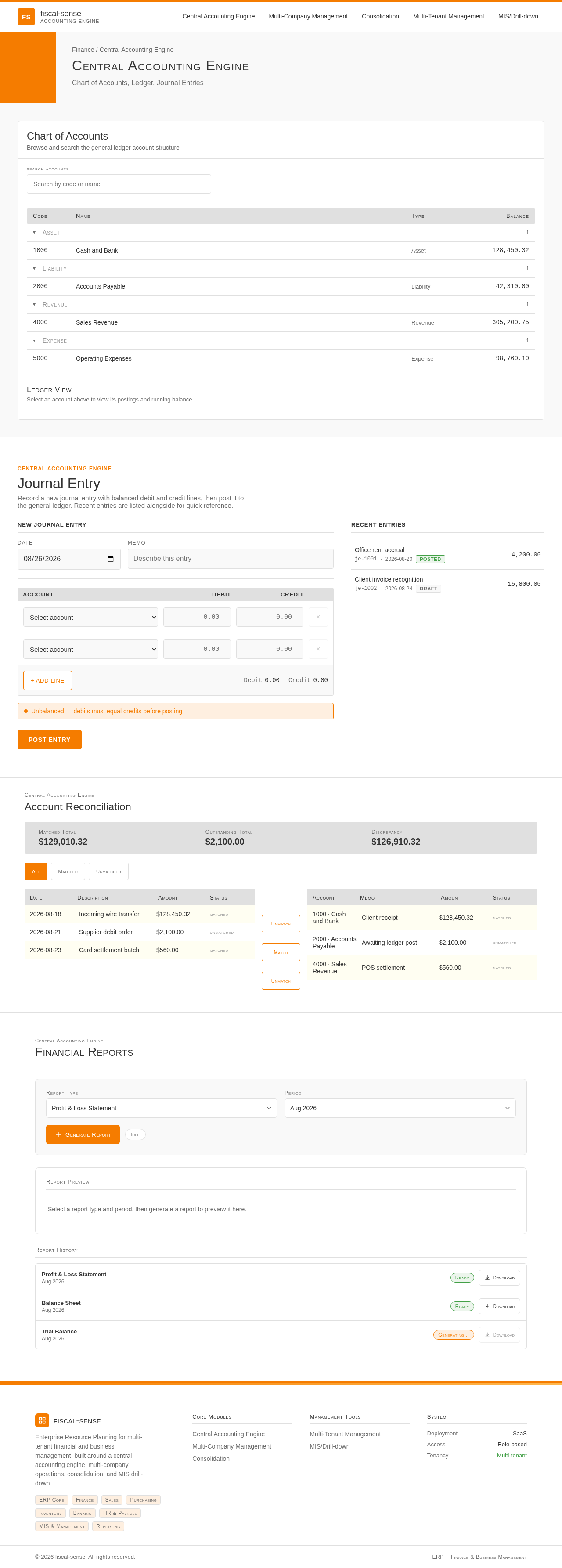
Central Accounting Engine
Chart of Accounts, Ledger, Journal Entries
Chart of Accounts
Browse and search the general ledger account structure
Ledger View
Select an account above to view its postings and running balance
Central Accounting Engine
Journal Entry
Record a new journal entry with balanced debit and credit lines, then post it to the general ledger. Recent entries are listed alongside for quick reference.
New Journal Entry
Recent Entries
Central Accounting Engine
Account Reconciliation
Central Accounting Engine
Financial Reports
Report Preview
Select a report type and period, then generate a report to preview it here.
Report History
- Ready
- Ready
Central Accounting Engine
Chart of Accounts, Ledger, Journal Entries
Chart of Accounts
Browse and search the general ledger account structure
Ledger View
Select an account above to view its postings and running balance
Central Accounting Engine
Journal Entry
Record a new journal entry with balanced debit and credit lines, then post it to the general ledger. Recent entries are listed alongside for quick reference.
New Journal Entry
Recent Entries
Central Accounting Engine
Account Reconciliation
Central Accounting Engine
Financial Reports
Report Preview
Select a report type and period, then generate a report to preview it here.
Report History
- Ready
- Ready
No comments yet. Be the first!