first-project

byPatrick N

BUILD ME A NEXT 1 MILLION WOTH IDEA , think of something build it and make sure it has potential and can survive , i mean an idea with strong MOA make it and tell me once done

Landing
Landing

Comments (0)

No comments yet. Be the first!

System Requirements

System Requirements Document for first-project

1. Introduction

first-project is a founder-facing product for validating a startup idea with evidence rather than enthusiasm. The requester, Patrick N, asked for a "next million" idea with strong market opportunity and a realistic chance to survive — an idea with a strong moat — and asked the builder to select the idea, build it, and report when the build is done. This document is the System Requirements Document for that product.

The product idea selected by the builder is Proofline, an evidence-led idea validation workspace. A founder records a candidate idea, then assembles the evidence that would prove or disprove it: market signals, competitive moat claims, and demand proof. Each piece of evidence is classified by strength — strong proof, weak proof, or missing — and the workspace computes a survival verdict from those classifications. The founder sees, at a glance, whether the idea has the market opportunity and durability to survive, and exactly which evidence is missing before committing further.

The audience is two roles. The Founder owns the idea, enters evidence, and reads the verdict. The End user is the operator who opens the built product, completes the main validation task on a shared idea, and receives a clear result. Both reach the product through a public Landing page, self-service Sign Up, and returning Login; the Founder additionally has a Build Status page that reports the build state and the done notice the requester asked for.

Page 1 of 23

Success Criteria and KPIs

  • Verdict coverage: every idea in the Workspace carries a computed survival verdict with a visible evidence-strength breakdown (strong / weak / missing counts).
  • Evidence completeness: the share of ideas whose evidence set contains at least one strong-proof item in each of the three evidence classes (market, moat, demand).
  • Time to first verdict: a newly enrolled Founder reaches a first computed verdict within one session.
  • Return rate: returning Founders and End users verify on Login and resume their idea rather than starting over.
  • Build completion signal: the Build Status page reaches the done state and states it plainly, satisfying the requester's "tell me once done."
Page 2 of 23

2. System Overview

first-project delivers Proofline as a web application with a React frontend, a shared FastAPI backend, and a MariaDB database for application-owned persistent data. The frontend is the only human-facing surface; the backend owns idea records, evidence records, verdict computation, and identity; the database persists all of it.

The active human actors are the Founder and the End user. The Founder selects and owns an idea, records evidence, and reads the survival verdict and build status. The End user works the same validation task on an idea and receives a clear result. Both enroll through self-service Sign Up and return through Login. The backend is a supporting system actor, not a persona: it computes verdicts and persists state but initiates no product goal of its own.

Current scope is exactly the five accepted pages — Landing, Sign Up, Build Status, Login, and Workspace — and the accepted capabilities of idea capture, evidence classification, verdict computation, build-status reporting, and self-service identity. There is no billing, no team collaboration, no third-party market-data integration, and no investor or marketplace surface.

Page 3 of 23

2a. Product Interpretation and Delivery Boundary

The requester did not specify the idea, so the builder selected it; that selection is a hard constraint of this project, not an open question for the product to resolve at runtime. Proofline is delivered entirely first-party: the application owns its identity, its idea and evidence records, and its verdict logic. No provider surface or external destination owns any accepted human step.

Access is split by lifecycle. Landing, Sign Up, and Login are anonymously reachable — a visitor can read the product explanation, create an account, or verify a returning account without already being signed in. Build Status and Workspace are protected: they require a verified session because they read and write durable, actor-specific state (the Founder's build state and the idea's evidence and verdict). A protected page never owns the interaction that establishes access to itself; Sign Up and Login are the distinct anonymous entry boundaries for that.

Everything described here is current. Nothing in this document is deferred to a future horizon.

2c. Page Content and Component Coverage

Page 4 of 23

Landing

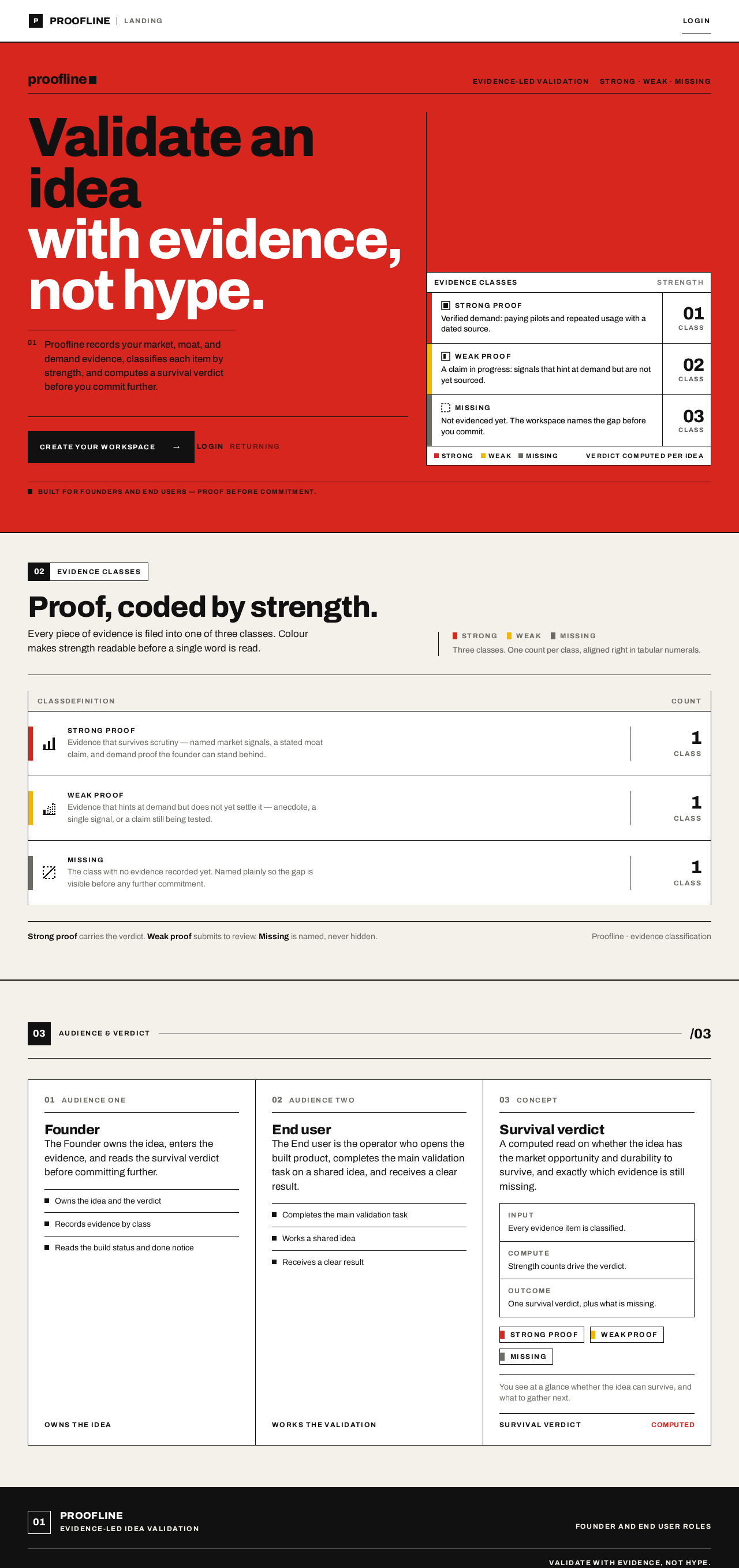
  • Information and state: the product name Proofline, a one-line statement of what it does (validate an idea with evidence, not hype), the two audiences (Founder, End user), and a coded preview of the evidence classes — strong proof (red bar), weak proof (yellow bar), missing (grey bar). Anonymous, no session required.
  • Primary action: a black CTA block, flush left, leading to Sign Up. Supporting action: a text link to Login for returning actors.
  • Domain entities shown: evidence class (strong / weak / missing), survival verdict concept.
  • Component responsibilities: full-width red hero band with stacked headline; ruled evidence table in the right five columns with coded rows and tabular numerals; numbered black square section openers with white caps labels.
  • States: loading — none required (static content); empty — not applicable; success — page renders fully; error — if the evidence preview cannot load, the coded rows render as grey "missing" placeholders with a plain note; recovery — the CTA and Login link remain usable regardless.
Page 5 of 23

Sign Up

  • Information and state: a self-service enrollment form for a new Founder or End user. Fields: name, email, password, and role selection (Founder or End user). Anonymous.
  • Primary action: create account, which establishes identity and a session. Supporting action: link to Login for actors who already have an account.
  • Domain entities: account (name, email, password credential, role).
  • Component responsibilities: ruled form blocks with 1px black dividers, caps labels at 12px, inline field-level validation messages, submit block in Vignelli red.
  • States: loading — submit disabled with a plain "creating account" label; empty — blank fields with labels; success — redirect to Workspace (End user) or Build Status (Founder) with a session established; error — duplicate email, invalid email format, or weak password shown inline against the field, form preserved so the actor can correct and resubmit; recovery — the actor can switch to Login without losing entered email.
Page 6 of 23

Build Status

  • Information and state: the Founder's view of the build state for the selected idea — current stage, the ordered list of completed build steps, and, when complete, an explicit done notice. Protected; requires a verified Founder session.
  • Primary action: none required beyond reading; a refresh control re-reads the current build state. Supporting action: link into Workspace to continue validation.
  • Domain entities: build record (stage, steps, done flag, timestamp).
  • Component responsibilities: numbered black square section opener, ruled stage list with tabular timestamps, a red status bar for in-progress and a solid black done block for the done notice.
  • States: loading — ruled skeleton rows with tabular placeholders; empty — no build record yet, shown as a plain "no build started" row with a link to Workspace; success — stage list plus done notice when the done flag is set; error — if the build state cannot be read, a plain error row with a retry control; recovery — retry re-reads without leaving the page.
Page 7 of 23

Login

  • Information and state: returning-actor verification form. Fields: email and password. Anonymous.
  • Primary action: verify and sign in, establishing a session. Supporting action: link to Sign Up for actors without an account.
  • Domain entities: account credential.
  • Component responsibilities: ruled form blocks, caps labels, inline error region, red submit block.
  • States: loading — submit disabled with a plain "verifying" label; empty — blank fields; success — redirect to the actor's protected destination (Founder to Build Status, End user to Workspace); error — incorrect credentials shown as a single plain message without revealing which field failed, form preserved; recovery — the actor can retry or move to Sign Up.
Page 8 of 23

Workspace

  • Information and state: the End user's (and Founder's) working surface for one idea — the idea statement, the evidence list grouped by class (strong proof, weak proof, missing), the computed survival verdict, and the evidence-strength counts. Protected; requires a verified session.
  • Primary actions: add an evidence item with a class and a short description; record or update the idea statement. Supporting actions: change an evidence item's class; remove an evidence item; read the recomputed verdict.
  • Domain entities: idea (statement, owner), evidence item (class, description, timestamp), verdict (result, counts).
  • Component responsibilities: 7/5 asymmetric split — idea and evidence entry in the left seven columns, coded evidence rows and tabular verdict counts in the right five; 8px colour bars per evidence class; a 160ms colour wipe on a saved verdict; numbered section openers.
  • States: loading — ruled skeleton rows; empty — no idea yet, shown as a plain prompt to record the idea statement, and no evidence rows; success — evidence rows render with their class bars and the verdict and counts update; error — a failed save shows a plain inline message and keeps the entered values so the actor can retry; recovery — retry the save, or remove and re-add the item.
Page 9 of 23

3. Functional Requirements

FR-1 — Select and present a product idea. As a Founder I should see the builder-selected idea presented as a concrete product with a stated market opportunity and moat, so that I can evaluate it rather than invent it. Provenance: explicit. Trigger: opening Landing. Observable result: the idea, its audience, and its evidence classes are stated. Access: anonymous. Failure/recovery: if the preview fails, coded rows fall back to grey "missing" placeholders and the page stays usable. Continuation: proceed to Sign Up.

FR-2 — Enroll as a Founder. As a Founder I should complete self-service enrollment, so that I own an idea and can read its build status and verdict. Provenance: required_inference. Trigger: submitting the Sign Up form with name, email, password, and role Founder. Observable result: an account and session exist; the Founder lands on Build Status. Access: anonymous entry. Failure/recovery: duplicate email, invalid email, or weak password shown inline with the form preserved. Continuation: correct and resubmit, or switch to Login.

FR-3 — Enroll as an End user. As an End user I should complete self-service enrollment, so that I can open the built product and complete its main task. Provenance: required_inference. Trigger: submitting Sign Up with role End user. Observable result: an account and session exist; the End user lands on Workspace. Access: anonymous entry. Failure/recovery: same inline validation and preserved form as FR-2. Continuation: correct and resubmit, or switch to Login.

Page 10 of 23

FR-4 — Verify a returning actor. As a returning Founder or End user I should verify my identity on Login, so that I reach my protected work and resume rather than restart. Provenance: required_inference. Trigger: submitting email and password on Login. Observable result: a session is established and the actor is routed to Build Status (Founder) or Workspace (End user). Access: anonymous entry. Failure/recovery: incorrect credentials produce one plain message that does not reveal which field failed; the form is preserved. Continuation: retry or move to Sign Up.

FR-5 — Read the build state and the done notice. As a Founder I should see the build state and an explicit done notice, so that I know when the build is finished. Provenance: explicit. Trigger: opening Build Status with a verified session. Observable result: the current stage, the ordered completed steps, and — when the done flag is set — a solid done notice. Access: login required. Failure/recovery: an unreadable build state shows a plain error row with retry. Continuation: retry, or continue into Workspace.

FR-6 — Record the idea statement. As an End user I should record or update the idea statement in the Workspace, so that the evidence and verdict are anchored to a concrete idea. Provenance: required_inference. Trigger: entering the idea statement and saving. Observable result: the idea statement is persisted and displayed. Access: login required. Failure/recovery: a failed save shows an inline message and keeps the entered text. Continuation: retry the save.

Page 11 of 23

FR-7 — Add classified evidence. As an End user I should add an evidence item with a class (strong proof, weak proof, or missing) and a short description, so that the idea's support is recorded explicitly. Provenance: required_inference. Trigger: entering a description and selecting a class, then saving. Observable result: the item appears in its class group with the matching 8px colour bar and a tabular timestamp. Access: login required. Failure/recovery: a failed save keeps the entered values and shows an inline message. Continuation: retry, or remove and re-add.

FR-8 — Change or remove an evidence item. As an End user I should change an evidence item's class or remove it, so that the record stays truthful as evidence improves or is disproven. Provenance: required_inference. Trigger: selecting a new class or removing an item. Observable result: the item moves between class groups or disappears, and the verdict recomputes. Access: login required. Failure/recovery: a failed change restores the prior class and shows an inline message. Continuation: retry.

FR-9 — Read the survival verdict. As a Founder or End user I should see the computed survival verdict and the evidence-strength counts, so that I get a clear result about whether the idea has strong market opportunity and a realistic chance to survive. Provenance: explicit (the idea must have strong market opportunity and a realistic chance to survive) with required_inference for the computation mechanics. Trigger: any change to the idea's evidence set. Observable result: the verdict and the strong/weak/missing counts update, with a 160ms colour wipe marking the saved verdict. Access: login required. Failure/recovery: if computation fails, the last verdict stays visible with a plain "not recomputed" note. Continuation: adjust evidence and re-read.

4. User Personas

Page 12 of 23

Founder

The Founder is the requester's own role: someone who wants a product idea with strong market opportunity that can survive, and who does not want to invent the idea from scratch. The Founder's context is a decision about whether to commit further to an idea, so the Founder's work is reading, not authoring — the Founder reads the build state, the done notice, and the survival verdict, and judges whether the evidence is strong enough.

  • Primary goal: confirm that the selected idea has strong market opportunity and a realistic chance to survive, and know when the build is done.
  • Distinct responsibilities: enroll as Founder; read Build Status including the done notice; read the survival verdict and evidence-strength counts in Workspace.
  • Inputs and decisions: the build stage list and done flag; the verdict and the strong/weak/missing counts. The Founder's decision is whether the evidence supports continuing.
  • Interactions: the Founder shares the idea and its evidence with the End user, who records the evidence the Founder reads. The Founder does not need to enter evidence to read the verdict.
  • Observable success: the Founder sees a done notice on Build Status and a verdict with a visible evidence breakdown on Workspace.
Page 13 of 23

End user

The End user is the operator who does the validation work. The End user's context is a concrete idea that needs its support made explicit, so the End user's work is authoring and correcting evidence — adding items, classifying them honestly, and removing what does not hold — and then reading the result.

  • Primary goal: complete the main validation task on the idea and get a clear result.
  • Distinct responsibilities: enroll as End user; record or update the idea statement; add classified evidence; change or remove evidence; read the recomputed verdict.
  • Inputs and decisions: the evidence description and its class (strong proof, weak proof, missing). The End user's decision is how to classify each item truthfully.
  • Interactions: the End user produces the evidence and verdict that the Founder reads. The End user does not see or control the build state.
  • Observable success: the evidence rows render with their class bars, the counts update, and the verdict reflects the current evidence set.

5. Core User Flows

Page 14 of 23

Flow A — Founder enrolls and reads the build state and done notice

  1. The Founder opens Landing anonymously and reads the selected idea, its audience, and the coded evidence classes.
  2. The Founder selects the black CTA block and arrives at Sign Up.
  3. The Founder enters name, email, and password, selects role Founder, and submits.
  4. On success, an account and session are established and the Founder lands on Build Status. On failure, the field-level error appears inline, the form is preserved, and the Founder corrects and resubmits.
  5. On Build Status, the Founder reads the current stage and the ordered completed steps.
  6. When the done flag is set, the Founder sees the solid done notice — the explicit "done" signal the requester asked for.
  7. If the build state cannot be read, the Founder sees a plain error row and selects retry; the page re-reads without leaving.
  8. The Founder continues into Workspace to read the verdict.
Page 15 of 23

Flow B — End user enrolls and completes the validation task

  1. The End user opens Landing anonymously and reads what the product does.
  2. The End user selects the CTA and arrives at Sign Up.
  3. The End user enters name, email, and password, selects role End user, and submits.
  4. On success, a session is established and the End user lands on Workspace. On failure, the inline error appears, the form is preserved, and the End user corrects and resubmits.
  5. On Workspace, with no idea yet, the End user sees the plain prompt and records the idea statement, then saves.
  6. The End user adds an evidence item: a short description and a class — strong proof, weak proof, or missing — and saves. The item appears in its class group with the matching colour bar and a tabular timestamp.
  7. The End user repeats step 6 for further evidence. To correct the record, the End user changes an item's class or removes it; the item moves or disappears and the verdict recomputes.
  8. The verdict and the strong/weak/missing counts update, with a 160ms colour wipe marking the saved verdict. This is the End user's clear result.
  9. If a save fails, the entered values are kept and an inline message appears; the End user retries, or removes and re-adds the item.
Page 16 of 23

Flow C — Returning actor verifies and resumes

  1. A returning Founder or End user opens Login anonymously.
  2. The actor enters email and password and submits.
  3. On success, a session is established and the actor is routed to Build Status (Founder) or Workspace (End user), resuming their prior state.
  4. On failure, one plain message appears that does not reveal which field failed, and the form is preserved.
  5. The actor retries, or selects the link to Sign Up if they have no account.

Flow D — Founder reads the survival verdict

  1. The Founder is signed in and opens Workspace.
  2. The Founder reads the idea statement, the evidence rows grouped by class with their colour bars, and the verdict with tabular counts.
  3. The Founder judges whether the evidence supports the idea's market opportunity and chance to survive.
  4. If the verdict cannot be recomputed, the last verdict stays visible with a plain "not recomputed" note; the Founder asks the End user to adjust evidence and re-reads.
Page 17 of 23

6. Visuals Colors and Theme

The muse is Massimo Vignelli; the headline is Systematic clarity. The feeling is ordered confidence: a dense validation tool made legible by colour codes and rules.

  • Mode: light only.
  • Colours by role: background #F4F1EA (warm paper ground); surface #FFFFFF; text #111111; primary #D7261E (Vignelli red — primary actions and live signal); accent #F2B705 (yellow — second data class, weak proof); muted #6B6B66 (grey — labels only, and missing evidence). Strong proof uses the red bar; weak proof the yellow bar; missing the grey bar.
  • Typography: headings Archivo, weight 800, flush left, tight tracking, sentence case. Body Archivo. Labels Archivo 700 caps at 12px with 0.12em tracking. Scale is a 1.333 modular progression: 96 / 64 / 40 / 24 / 17 / 14, plus 12px caps labels. All numerals are tabular.
  • Shape language: hard edges only, 0px radii. Thin 1px black rules divide every block. 8px-wide colour bars mark each evidence class.
  • Layout: strict 12-column grid with visible hairline rules; asymmetric split of 7 columns of type against 5 columns of coded data rows; tabular alignment for all numbers.
  • Imagery: diagrams and coded colour blocks only; no photography. Small pictograms mark each evidence class.
  • Readability: headlines, wordmarks, labels, numbers, and controls stay whole inside the viewport and their container at 375px, 768px, and 1280px, wrapping or scaling with clamp(...); decoration may bleed, text and controls may not.
Page 18 of 23

7. Signature Design Concept

The public entry is a full-width Vignelli red band spanning the viewport edge to edge. Inside it, a stacked 96px Archivo 800 headline sits flush left in black and white. Beneath the headline, flush left, a solid black CTA block leads to Sign Up. To the right, the ruled evidence table fills the right five columns: coded rows with 8px bars — red for strong proof, yellow for weak proof, grey for missing — and tabular numerals aligned in a right-hand data column. A visible 12-column grid with 1px black rules separates every section, never hidden. Section openers use a numbered black square with a white caps label, like a transit sign. The composition recomposes only accepted Landing content: the product statement, the two audiences, the evidence classes, the CTA, and the Login link.

Page 19 of 23

8. Interaction Model & Motion Direction

Interaction Model: Static (direction) Motion Tempo: still Hero Dimensionality: flat

Landing Hero Motion Brief

  • Focal subject: the red band with the stacked headline and the ruled evidence table beside it.
  • Thesis: the visitor reads the idea and its evidence classes (input), the coded rows show strong, weak, and missing proof at a glance (transformation), and the visitor understands what the product proves before selecting the CTA (outcome). No accepted behaviour is added.
  • Motion vocabulary: still. State changes are instant. The single permitted motion is a 160ms colour wipe marking a saved verdict in Workspace.
  • Composed first frame: red band edge to edge, black-and-white stacked headline flush left, black CTA block flush left beneath it, ruled evidence table in the right five columns with red, yellow, and grey bars and tabular numerals.
  • Reduced-motion state: identical static arrangement; the 160ms colour wipe is replaced by an instant colour change, and no content depends on motion to become readable.
Page 20 of 23

9. Non-Functional Requirements

  • Persistence: idea statements, evidence items, verdicts, accounts, and build records are durable in MariaDB. Provenance: explicit (durable_state_required).
  • Identity continuity: a verified session is required to read or write Build Status and Workspace state, so a Founder's build state and an idea's evidence remain bound to the correct actor. Provenance: required_inference.
  • Access boundary: Landing, Sign Up, and Login are anonymously reachable; a protected page never owns the interaction that establishes access to itself. Provenance: required_inference.
  • Verdict determinism: the same evidence set always yields the same verdict and counts. Provenance: required_inference, needed for the verdict to be trustworthy.
  • Readability: readable text and controls stay whole at 375px, 768px, and 1280px, per the creative direction. Provenance: explicit (design constraints).
  • Accessibility: colour is never the only signal — each evidence class also carries a pictogram and a text label. Provenance: required_inference from the direction's imagery rule.
  • No third-party data dependency: verdicts are computed from actor-entered evidence only. Provenance: explicit scope boundary.
Page 21 of 23

10. Tech Stack

  • Frontend: React application UI.
  • Backend: a single shared FastAPI process for application APIs and domain modules (ideas, evidence, verdict computation, identity, build status).
  • Database: MariaDB for application-owned persistent data.
  • Orchestration: docker-compose with the three services — frontend, backend, database. No additional infrastructure is required for the accepted workflows.
11. Assumptions and Constraints

  • Constraint (explicit): the product idea is not specified by the user; the builder selects it. Proofline is that selection.
  • Constraint (explicit): the idea must have strong market opportunity and a realistic chance to survive; the verdict and evidence classes exist to make that judgement visible.
  • Constraint (explicit): the requester must be told when the build is done; Build Status carries the done notice.
  • Assumption: the Founder and End user share one idea per account context; no multi-idea portfolio or team sharing is in scope.
  • Assumption: the build state is recorded by the build process into the same database; Build Status reads it and does not trigger builds.
  • Assumption: role selection at Sign Up (Founder or End user) determines the post-login destination; it is not a permission system over shared state.
  • Out of scope: billing, team collaboration, third-party market-data integrations, investor or marketplace surfaces, and any future-horizon features.
Page 22 of 23

12. Glossary

  • Idea: the builder-selected product concept being validated, anchored by an idea statement.
  • Evidence item: a recorded support or gap for an idea, classified as strong proof, weak proof, or missing.
  • Evidence class: one of strong proof (red bar), weak proof (yellow bar), missing (grey bar).
  • Survival verdict: the computed result stating whether the idea has strong market opportunity and a realistic chance to survive, with strong/weak/missing counts.
  • Build state: the recorded stage, ordered steps, and done flag for the selected idea.
  • Done notice: the explicit completion signal shown on Build Status when the done flag is set.
  • Moat: the durable advantage that makes an idea hard to copy; assessed through the evidence classes.
  • Founder: the persona who reads the build state, done notice, and verdict.
  • End user: the persona who records the idea statement and evidence and reads the recomputed verdict.
Page 23 of 23
Live
Landing design preview
Landing: Read product explanation and CTA
Sign Up: 1. Enter details and select End user role
Sign Up: 2. Correct inline validation error and resubmit
Workspace: Record idea statement and save
Workspace: 1. Add classified evidence item
Workspace: Change evidence class or remove item
Workspace: Read recomputed verdict and counts
Workspace: 2. Retry failed save with values kept
Login: 1. Verify returning account
Login: 2. Retry after incorrect credentials
Sign Up: Switch to Sign Up from Login
Live
Landing design preview
Landing: Read product explanation and CTA
Sign Up: 1. Enter details and select End user role
Sign Up: 2. Correct inline validation error and resubmit
Workspace: Record idea statement and save
Workspace: 1. Add classified evidence item
Workspace: Change evidence class or remove item
Workspace: Read recomputed verdict and counts
Workspace: 2. Retry failed save with values kept
Login: 1. Verify returning account
Login: 2. Retry after incorrect credentials
Sign Up: Switch to Sign Up from Login