fintech-ai-automations

byMarketing 8080AI

help us design, develop, and launch an innovative fintech platform with web and mobile applications, powered by intelligent AI automations. Responsibilities Web & Mobile App Development: Build scalable, responsive web applications and mobile apps for iOS and Android. AI Integration: Develop and integrate AI-powered features using OpenAI, LLMs, AI agents, and other relevant AI technologies. AI Automation: Design intelligent workflows to automate repetitive tasks, business processes, data processing, notifications, and decision-support operations. Full-Stack Engineering: Develop robust frontend interfaces, backend services, APIs, databases, and third-party integrations. Fintech Integrations: Implement financial APIs, payment gateways, transaction workflows, and other fintech-related services as required. Security & Reliability: Follow best practices for authentication, authorization, data protection, secure API design, and financial data handling. Deployment & Maintenance: Manage testing, bug fixing, cloud deployment, monitoring, and performance optimization. Required Skills & Experience Experience with fintech, payments, financial applications, or other security-sensitive platforms. Ability to translate business requirements into a practical technical architecture and deliver production-ready solutions. Nice to Have Experience with workflow automation platforms such as n8n, Make, or Zapier. Experience building AI agents, multi-step AI workflows, and tool/API-calling systems. Knowledge of financial data integrations, transaction reconciliation, fraud detection, or risk analytics. Experience with AWS, Google Cloud, Azure, Firebase, or Supabase.

LandingAutomation ReviewTransactionsAdministrationSign UpPaymentsLogin
Landing

Comments (0)

No comments yet. Be the first!

System Requirements

System Requirements Document for fintech-ai-automations

1. Introduction

fintech-ai-automations is an innovative fintech platform delivered as responsive web applications and native iOS/Android mobile apps, powered by intelligent AI automations. The product intent is to combine financial operations — payments, transaction workflows, and fintech integrations — with AI-powered features built on OpenAI, LLMs, AI agents, and related AI technologies, so that repetitive tasks, business processes, data processing, notifications, and decision-support operations are automated intelligently.

The platform serves three audiences: end customers who complete financial tasks and need clear, secure, fast transaction outcomes; fintech platform operators who run day-to-day financial operations and supervise AI-automated workflows; and platform engineers/administrators who configure integrations, AI automation workflows, access controls, and monitor deployment health and performance.

The platform must be built with production-ready full-stack engineering (frontend interfaces, backend services, APIs, databases, third-party integrations), follow security and reliability best practices for authentication, authorization, data protection, secure API design, and financial data handling, and be operated through testing, bug fixing, cloud deployment, monitoring, and performance optimization.

Page 1 of 34

2. System Overview

fintech-ai-automations is a full-stack fintech platform with:

  • Web application — scalable, responsive web experience for all three personas.
  • Mobile applications — iOS and Android apps delivering the end-customer financial journeys and operator/administrator visibility.
  • AI layer — OpenAI/LLM-backed features, AI agents, and multi-step AI workflows with tool/API calling that automate repetitive tasks, business processes, data processing, notifications, and decision-support operations.
  • Fintech integration layer — financial APIs, payment gateways, transaction workflows, and other fintech-related services implemented as required.
  • Backend services and APIs — robust services, databases, and third-party integrations supporting the above.
  • Security and reliability controls — authentication, authorization, data protection, secure API design, and financial data handling.
  • Operations — testing, bug fixing, cloud deployment, monitoring, and performance optimization.
Page 2 of 34

2a. Product Interpretation and Delivery Boundary

The platform is a first-party application with application-owned identity. Anonymous visitors reach a public Landing page that explains the platform, its audience, and its AI-powered financial capabilities. Self-service Sign Up establishes credentials before first protected use; returning users verify identity through Login before reaching any protected financial or operational state. Role-based authorization distinguishes end-customer, operator, and administrator control over shared durable state.

Current delivery covers: the public entry and identity surfaces (Landing, Login, Sign Up); the end-customer financial surfaces (Payments, Transactions); the operator workspace (Automation Review); and the administrator workspace (Administration). AI-powered features, AI automation workflows, fintech integrations, and background automation are current commitments and are exercised through these surfaces and their supporting backend services.

Out of scope for this document: no additional pages, modules, or capabilities beyond those accepted in the requirement thread and the page contract. Workflow automation platforms (n8n, Make, Zapier), specific cloud providers (AWS, GCP, Azure, Firebase, Supabase), and specific fraud-detection or risk-analytics products are listed as nice-to-have experience, not as mandated product features; the platform implements fintech integrations "as required" rather than as a fixed named set.

2b. Page Content and Component Coverage

Page 3 of 34

Landing

  • Purpose and access: Anonymous public entry surface. Explains the fintech platform, its audience, and its AI-powered financial capabilities before any identity establishment. No authentication required.
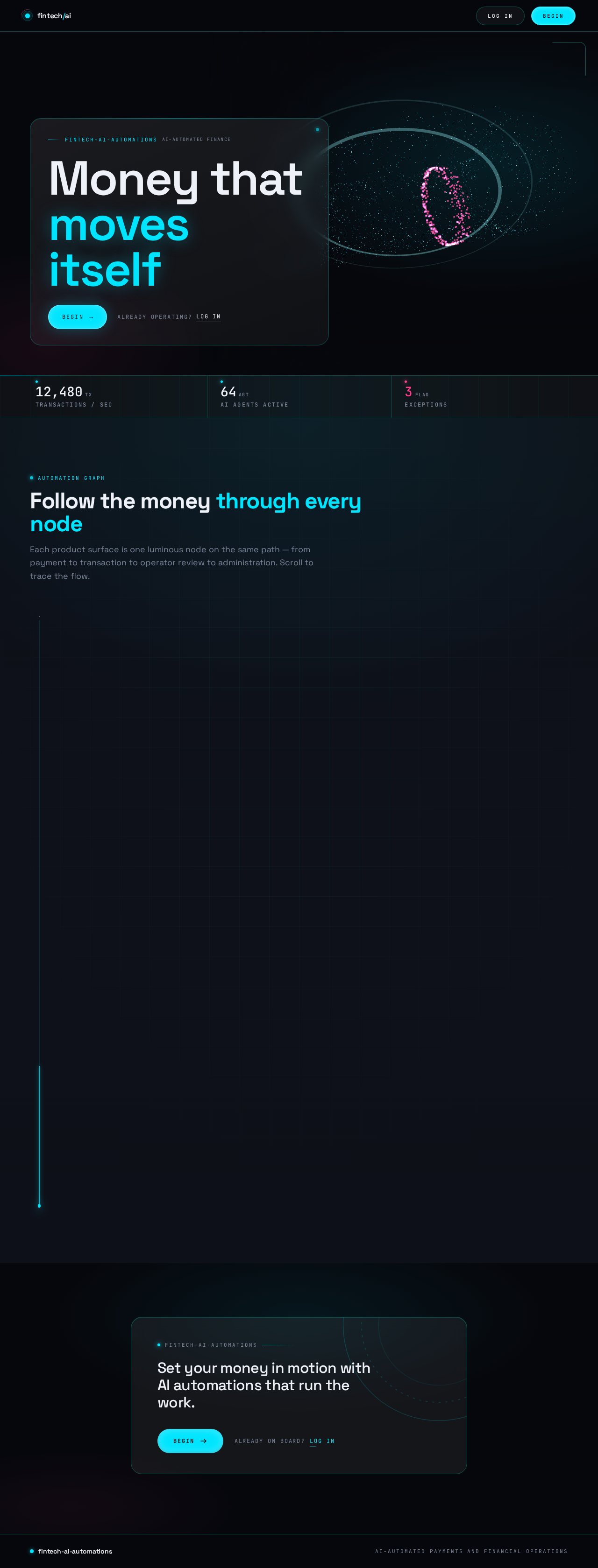
  • Information and state: Cinematic full-bleed hero with the headline "Money that moves itself"; HUD top strip with live monospace counters (transactions/sec, AI agents active, exceptions); product sections revealed as luminous nodes along a scroll-scrubbed workflow graph; primary CTA to begin (Sign Up) and secondary path to Login.
  • Primary actions: Navigate to Sign Up; navigate to Login.
  • Supporting actions: Scroll through product sections; observe live counters and the animated hero.
  • Domain entities: None persisted; counters and hero are presentational representations of platform activity.
  • Component responsibilities: WebGL hero (particle torus of transaction flow with magenta anomaly pulses); HUD counter strip (JetBrains Mono); glass hero panel with headline and CTA; scroll-scrubbed workflow-graph section sequence; sticky mobile bottom action bar.
  • States: Loading — hero scene initializes with a composed first frame; empty — not applicable (static marketing content); success — CTA navigates to Sign Up or Login; error — if the WebGL scene fails, a composed static still of the hero renders with all text and CTAs intact; recovery — reduced-motion mode freezes the orbit and replaces scroll-scrubbing with instant section reveals.
Page 4 of 34

Login

  • Purpose and access: Returning identity verification for all protected personas before reaching financial or operational state. Anonymous access to the form; protected destinations remain unavailable until verification succeeds.
  • Information and state: Credential entry form; validation and error messaging; post-verification routing to the persona's appropriate protected destination.
  • Primary actions: Submit credentials to verify identity.
  • Supporting actions: Navigate to Sign Up if not yet enrolled; recover from invalid credentials by re-entering.
  • Domain entities: User identity, session.
  • Component responsibilities: Credential form; inline validation; error banner; submit control; link to Sign Up.
  • States: Loading — submit disabled with progress indicator during verification; empty — blank form; success — session established and redirect to the correct protected destination; error — invalid credentials shown with a clear message and the form preserved for retry; recovery — retry or navigate to Sign Up.
Page 5 of 34

Sign Up

  • Purpose and access: Self-service enrollment establishing credentials before first protected use. Anonymous access.
  • Information and state: Enrollment form capturing the identity details required to create an account; validation; confirmation of successful enrollment.
  • Primary actions: Submit enrollment to create credentials.
  • Supporting actions: Navigate to Login if already enrolled.
  • Domain entities: User identity, credentials, role assignment.
  • Component responsibilities: Enrollment form; inline validation; submit control; confirmation state; link to Login.
  • States: Loading — submit disabled with progress indicator; empty — blank form; success — account created and the user proceeds to Login (or is taken directly into their protected destination); error — validation or enrollment failure shown with a clear message and the form preserved; recovery — correct and resubmit, or navigate to Login.
Page 6 of 34

Payments

  • Purpose and access: Role-restricted to End Customer. Focused owner where end customers initiate and complete payments and transaction workflows on web and mobile.
  • Information and state: Payment initiation form (amount, recipient/payee, and other required payment details); confirmation step; submission state; resulting transaction reference and status.
  • Primary actions: Initiate a payment; confirm and submit the payment.
  • Supporting actions: Review payment details before confirmation; view the resulting transaction reference; navigate to Transactions to follow status.
  • Domain entities: Payment, transaction, payee/recipient, payment gateway response.
  • Component responsibilities: Payment form; confirmation panel; submit control with progress; result panel showing transaction reference and status; error and retry controls.
  • States: Loading — submission in progress with the form locked; empty — no payment in progress, form ready; success — payment accepted, transaction reference shown, and the transaction appears in Transactions; error — gateway or validation failure shown with a clear message and the ability to retry without losing entered details; recovery — retry submission or correct details.
Page 7 of 34

Transactions

  • Purpose and access: Role-restricted to End Customer. Revisitable owner where end customers view transaction status and outcomes and receive AI-assisted notifications.
  • Information and state: List of the customer's transactions with status and outcomes; detail view for a selected transaction; AI-assisted notifications about transaction events.
  • Primary actions: Open a transaction to view its status and outcome.
  • Supporting actions: Read AI-assisted notifications; refresh to see updated status.
  • Domain entities: Transaction, status, notification.
  • Component responsibilities: Transaction list; status indicators; detail panel; notification feed; empty and error states.
  • States: Loading — list skeleton while transactions load; empty — clear message when no transactions exist yet, with a path to Payments; success — transactions and notifications displayed with current status; error — load failure shown with a retry control; recovery — retry loading.
Page 8 of 34

Automation Review

  • Purpose and access: Role-restricted to Fintech Platform Operator. Workspace to review AI-automated workflow results and decision-support outputs and handle surfaced exceptions.
  • Information and state: Queue of AI-automated workflow results and decision-support outputs; exception items flagged for operator attention; detail view of each item including the workflow state and a monospace timestamp.
  • Primary actions: Review an automated workflow result or decision-support output; handle a surfaced exception.
  • Supporting actions: Filter or select items; inspect detail; record the handling outcome.
  • Domain entities: Automation workflow run, decision-support output, exception.
  • Component responsibilities: Review queue; exception badges (magenta, pulsing once on entry to failed state); detail panel; handling controls; status indicators.
  • States: Loading — queue skeleton while items load; empty — message when no items require review; success — reviewed item leaves the queue with its handling recorded; error — load or handling failure shown with a retry control; recovery — retry the action.
Page 9 of 34

Administration

  • Purpose and access: Role-restricted to Platform Engineer / Administrator. Workspace to configure integrations, AI automation workflows, and access controls, and to monitor platform health and performance.
  • Information and state: Integration configuration; AI automation workflow configuration; access-control configuration; platform health and performance monitoring.
  • Primary actions: Configure an integration; configure an AI automation workflow; configure access controls.
  • Supporting actions: Monitor platform health and performance; review configuration state.
  • Domain entities: Integration configuration, automation workflow definition, access-control rule, health/performance metric.
  • Component responsibilities: Configuration panels for integrations, workflows, and access controls; monitoring panels; save/apply controls; status and error indicators.
  • States: Loading — panels load current configuration; empty — message when no configuration exists yet, with a path to create one; success — configuration saved and reflected in the panel; error — save or load failure shown with a clear message and the entered configuration preserved; recovery — retry saving or correct the configuration.
Page 10 of 34

3. Functional Requirements

FR-1 — Web and mobile delivery (explicit) As an End Customer, Fintech Platform Operator, or Platform Engineer / Administrator, I should use the platform through scalable, responsive web applications and native iOS and Android mobile apps, so that I can complete my financial and operational work on the device I choose.

  • Lifecycle: actor opens the platform on web or mobile → responsive layout adapts → the actor reaches the same accepted capabilities. Observable acceptance: every accepted page is usable on web and on iOS/Android; layouts remain readable and controls stay whole at 375px, 768px, and 1280px.
  • Failure/recovery: if a mobile layout cannot render a control, the control wraps or scales rather than being clipped; continuation is the same journey on the adapted layout.

FR-2 — AI-powered features (explicit) As an End Customer, Fintech Platform Operator, or Platform Engineer / Administrator, I should benefit from AI-powered features built with OpenAI, LLMs, AI agents, and related AI technologies, so that financial work is assisted intelligently.

  • Lifecycle: actor performs accepted work → AI features produce assistance (decision support, notifications, automation results) → the actor observes the result in the relevant surface. Observable acceptance: AI-assisted outputs appear in Transactions (notifications) and Automation Review (decision-support outputs and workflow results).
  • Failure/recovery: if an AI feature fails, the underlying financial action remains truthful and the failure is surfaced; continuation is retry or manual handling.
Page 11 of 34

FR-3 — AI automation of workflows (explicit) As a Fintech Platform Operator, I should rely on intelligent AI workflows that automate repetitive tasks, business processes, data processing, notifications, and decision-support operations, so that automated workflows complete without manual intervention.

  • Lifecycle: automation runs in the background → results and any exceptions are produced → the operator reviews results and handles exceptions in Automation Review. Observable acceptance: completed automations appear as reviewed results; exceptions appear flagged for operator attention.
  • Failure/recovery: a workflow entering a failed state surfaces a magenta exception badge with a monospace timestamp; the operator handles it in Automation Review.

FR-4 — Full-stack engineering (explicit) As a Platform Engineer / Administrator, I should have robust frontend interfaces, backend services, APIs, databases, and third-party integrations supporting the platform, so that the product is production-ready.

  • Lifecycle: the platform's services and integrations operate behind the accepted surfaces → configuration and monitoring are visible in Administration. Observable acceptance: accepted journeys execute end-to-end through backend services and persisted state.
  • Failure/recovery: service or integration failures surface as errors in the affected surface with retry; continuation is retry or configuration correction in Administration.
Page 12 of 34

FR-5 — Fintech integrations (explicit) As an End Customer, I should complete payments and transaction workflows through implemented financial APIs, payment gateways, and other fintech-related services as required, so that my financial tasks complete securely.

  • Lifecycle: customer initiates a payment in Payments → the payment gateway processes it → a transaction reference and status result → the customer follows status in Transactions. Observable acceptance: a submitted payment yields a transaction reference and a status visible in Transactions.
  • Failure/recovery: gateway failure is shown in Payments with entered details preserved; the customer retries or corrects details.

FR-6 — Security and reliability (explicit) As a Fintech Platform Operator and Platform Engineer / Administrator, I should have authentication, authorization, data protection, secure API design, and financial data handling follow best practices, so that financial data and operations are protected.

  • Lifecycle: identity is established at Sign Up or verified at Login → role-based authorization governs access to protected destinations → financial data is handled securely across APIs. Observable acceptance: protected destinations are unreachable without verified identity; End Customer surfaces are restricted to End Customers, Automation Review to Fintech Platform Operators, and Administration to Platform Engineers / Administrators.
  • Failure/recovery: unauthorized access attempts are rejected and the actor is returned to Login; continuation is verification.
Page 13 of 34

FR-7 — Deployment and maintenance (explicit) As a Platform Engineer / Administrator, I should have testing, bug fixing, cloud deployment, monitoring, and performance optimization managed for the platform, so that the system stays reliable and performant.

  • Lifecycle: the platform is deployed to the cloud → health and performance are monitored in Administration → issues are fixed and performance optimized. Observable acceptance: platform health and performance are observable in Administration.
  • Failure/recovery: degraded health is visible in Administration; continuation is remediation and redeployment.

FR-8 — Self-service enrollment (required_inference) As an End Customer, Fintech Platform Operator, or Platform Engineer / Administrator, I should enroll with credentials through Sign Up before my first protected use, so that my identity is established.

  • Lifecycle: anonymous visitor opens Sign Up → submits enrollment details → account is created → the actor proceeds to Login or into their protected destination. Observable acceptance: a created account can subsequently verify at Login.
  • Failure/recovery: validation or enrollment failure is shown with the form preserved; continuation is correction and resubmission.
Page 14 of 34

FR-9 — Returning identity verification (required_inference) As an End Customer, Fintech Platform Operator, or Platform Engineer / Administrator, I should verify my identity at Login before accessing protected financial or operational state, so that my durable state remains bound to me.

  • Lifecycle: returning actor opens Login → submits credentials → session established → routed to the appropriate protected destination. Observable acceptance: protected destinations are reachable only after successful verification.
  • Failure/recovery: invalid credentials are rejected with a clear message and the form preserved; continuation is retry or navigation to Sign Up.

FR-10 — Role-based authorization (required_inference) As a Platform Engineer / Administrator, I should have role-based authorization distinguishing end-customer, operator, and administrator control over shared durable state, so that each persona reaches only the surfaces their role owns.

  • Lifecycle: verified actor's role is resolved → access to Payments and Transactions is granted to End Customers, Automation Review to Fintech Platform Operators, and Administration to Platform Engineers / Administrators. Observable acceptance: role-restricted destinations reject actors outside the role.
  • Failure/recovery: an actor outside the role is denied and returned to an appropriate destination; continuation is verification with the correct identity.
Page 15 of 34

FR-11 — Payment initiation and completion (required_inference) As an End Customer, I should initiate, confirm, and submit a payment in Payments, so that my payment completes and I receive a transaction reference and status.

  • Lifecycle: customer enters payment details → reviews and confirms → submits → receives a transaction reference and status → follows status in Transactions. Observable acceptance: a submitted payment produces a transaction reference and appears in Transactions.
  • Failure/recovery: gateway or validation failure is shown with details preserved; continuation is retry or correction.

FR-12 — Transaction status and AI-assisted notifications (required_inference) As an End Customer, I should view my transaction status and outcomes and receive AI-assisted notifications in Transactions, so that I always know where my money stands.

  • Lifecycle: customer opens Transactions → sees their transactions with status → opens a transaction for detail → reads AI-assisted notifications. Observable acceptance: each transaction shows its current status and outcome; notifications appear alongside.
  • Failure/recovery: load failure is shown with retry; continuation is retry loading.
Page 16 of 34

FR-13 — Automation review and exception handling (required_inference) As a Fintech Platform Operator, I should review AI-automated workflow results and decision-support outputs and handle surfaced exceptions in Automation Review, so that automated financial operations run reliably.

  • Lifecycle: operator opens Automation Review → reviews queued results and decision-support outputs → handles exceptions → records the handling outcome. Observable acceptance: reviewed items leave the queue with their handling recorded; exceptions are visibly flagged.
  • Failure/recovery: load or handling failure is shown with retry; continuation is retry.

FR-14 — Integration, workflow, and access-control configuration with health monitoring (required_inference) As a Platform Engineer / Administrator, I should configure integrations, AI automation workflows, and access controls and monitor platform health and performance in Administration, so that the platform stays correctly configured, monitored, and performant.

  • Lifecycle: administrator opens Administration → configures an integration, workflow, or access control → saves → observes the saved configuration → monitors health and performance. Observable acceptance: saved configuration is reflected in the panel; health and performance are observable.
  • Failure/recovery: save or load failure is shown with the entered configuration preserved; continuation is retry or correction.

4. User Personas

Page 17 of 34

Fintech Platform Operator

  • Product context: Owns the day-to-day running of the fintech platform. Monitors transactions and payment workflows, reviews AI-automated processes and decision-support outputs, and handles exceptions or failures surfaced by automations.
  • Primary goal: Financial operations run reliably and automated workflows complete without manual intervention.
  • Distinct responsibilities: Reviews AI-automated workflow results and decision-support outputs; handles surfaced exceptions; monitors transaction and payment workflow health.
  • Inputs and decisions: Reviews queued automation results; decides how to handle each surfaced exception and records the handling outcome.
  • Interactions with other participants: Depends on End Customers' payments and transactions flowing through the platform; depends on Platform Engineers / Administrators keeping integrations, workflows, and access controls configured and the platform healthy.
  • Observable success: The Automation Review queue is cleared of handled items; exceptions are resolved; automated workflows complete without manual intervention.
Page 18 of 34

End Customer

  • Product context: Uses the web and mobile applications to complete financial tasks such as payments and transaction workflows, and receives AI-assisted notifications and support.
  • Primary goal: Transactions complete securely and quickly with clear status and guidance.
  • Distinct responsibilities: Initiates, confirms, and submits payments; follows transaction status and outcomes; reads AI-assisted notifications.
  • Inputs and decisions: Enters payment details; confirms before submission; decides whether to retry or correct on failure.
  • Interactions with other participants: Their payments and transactions are the operational state the Fintech Platform Operator monitors and the automations process.
  • Observable success: A payment completes with a transaction reference and a clear status visible in Transactions, with AI-assisted notifications keeping them informed.
Page 19 of 34

Platform Engineer / Administrator

  • Product context: Configures and maintains the platform's integrations, AI automation workflows, access controls, and deployment health.
  • Primary goal: Integrations, automations, and security controls are configured correctly and the system stays monitored and performant.
  • Distinct responsibilities: Configures integrations, AI automation workflows, and access controls; monitors platform health and performance; manages deployment and maintenance.
  • Inputs and decisions: Chooses and saves integration, workflow, and access-control configuration; reviews health and performance metrics.
  • Interactions with other participants: Their configuration enables the automations the Fintech Platform Operator supervises and the payment workflows End Customers use; their access controls govern which role reaches which surface.
  • Observable success: Saved configuration is reflected in Administration; health and performance are observable; role-based access behaves as configured.

5. Core User Flows

Page 20 of 34

Flow A — Anonymous visitor discovers the platform (End Customer, Fintech Platform Operator, Platform Engineer / Administrator)

  1. The visitor opens the Landing page anonymously.
  2. The hero renders with the headline "Money that moves itself", the HUD top strip ticking live counters (transactions/sec, AI agents active, exceptions), and the particle torus of transaction flow.
  3. The visitor scrolls; product sections are revealed as luminous nodes along the workflow graph.
  4. The visitor chooses the primary CTA to begin (Sign Up) or the secondary path to Login.
  5. Next step: Flow B (enrollment) or Flow C (returning verification).

Flow B — Self-service enrollment (any persona)

  1. The visitor opens Sign Up anonymously.
  2. The visitor enters the enrollment details required to create an account and submits.
  3. On success, the account is created and the visitor proceeds to Login (or directly into their protected destination).
  4. On validation or enrollment failure, the form is preserved with a clear message; the visitor corrects and resubmits.
  5. Next step: Flow C.
Page 21 of 34

Flow C — Returning identity verification (any persona)

  1. The returning actor opens Login.
  2. The actor submits credentials.
  3. On success, a session is established and the actor is routed to the protected destination their role owns: End Customer → Payments/Transactions; Fintech Platform Operator → Automation Review; Platform Engineer / Administrator → Administration.
  4. On invalid credentials, a clear message is shown and the form is preserved; the actor retries or navigates to Sign Up.
  5. Next step: the role-specific flow below.

Flow D — End Customer completes a payment (End Customer)

  1. The verified End Customer opens Payments on web or mobile.
  2. The customer enters payment details (amount, recipient/payee, and other required details).
  3. The customer reviews the details in the confirmation step and confirms.
  4. The customer submits; the form locks with a progress indicator while the payment gateway processes.
  5. On success, the customer sees the transaction reference and status; the transaction appears in Transactions.
  6. On gateway or validation failure, a clear message is shown with the entered details preserved; the customer retries or corrects.
  7. Next step: Flow E.
Page 22 of 34

Flow E — End Customer follows transaction status (End Customer)

  1. The verified End Customer opens Transactions.
  2. The customer sees their transactions with current status and outcomes, alongside AI-assisted notifications.
  3. The customer opens a transaction to view its detail and outcome.
  4. On load failure, a retry control is shown; the customer retries.
  5. Continuation: the customer returns to Payments to initiate another payment, or ends the session.

Flow F — Fintech Platform Operator reviews automations and handles exceptions (Fintech Platform Operator)

  1. The verified operator opens Automation Review.
  2. The operator sees the queue of AI-automated workflow results and decision-support outputs, with any exceptions flagged by a magenta badge and a monospace timestamp.
  3. The operator opens an item to inspect its detail and workflow state.
  4. The operator handles a surfaced exception and records the handling outcome.
  5. On success, the reviewed item leaves the queue with its handling recorded.
  6. On load or handling failure, a retry control is shown; the operator retries.
  7. Continuation: the operator continues reviewing remaining items until the queue is clear.
Page 23 of 34

Flow G — Platform Engineer / Administrator configures and monitors the platform (Platform Engineer / Administrator)

  1. The verified administrator opens Administration.
  2. The administrator configures an integration, an AI automation workflow, or an access-control rule.
  3. The administrator saves; on success the saved configuration is reflected in the panel.
  4. On save or load failure, a clear message is shown with the entered configuration preserved; the administrator retries or corrects.
  5. The administrator monitors platform health and performance in the monitoring panels.
  6. Continuation: the administrator returns to configuration or monitoring as operational needs require.
Page 24 of 34

6. Visuals Colors and Theme

Muse: Gleb Kuznetsov. Headline direction: "Cinematic automation: a fintech control room where AI moves money."

The emotional register is high-stakes but futuristic: money moves continuously, agents make decisions, and the interface must feel like a live, intelligent instrument rather than a static dashboard. Trust comes from visible system activity, not from conservative blue-and-white neutrality.

Colour tokens (dark mode):

RoleHexUsage
Background#06070CDeep near-black navy ground across every page
Surface#0E1119Elevated panels and workflow nodes
Text#EEF1F7Near-white primary text
Primary#00E5FFElectric cyan — live data, agent activity, primary CTAs
Accent#FF3D8BMagenta — reserved for risk, exceptions, high-priority alerts
Muted#7A8499Secondary labels
Glass panelrgba(255,255,255,0.04–0.08)Floating glass panels
Glass borderrgba(0,255,229,0.25)1px luminous cyan borders

No blue–indigo bootstrap hues on white. The generic indigo/blue-on-white SaaS template is forbidden.

Typography:

Page 25 of 34
  • Headings: Space Grotesk — wide geometric sans, medium-to-bold weights, tight tracking (-0.03em) on display sizes; uppercase micro-labels at 11px with 0.18em letterspacing.
  • Body: Space Grotesk.
  • Data labels: JetBrains Mono for numbers, transaction IDs, and workflow states.
  • Scale: 1.333 modular scale with mobile-first clamp — display 48px mobile → 128px desktop; h1 36 → 72; h2 28 → 48; h3 22 → 32; body 16 → 18; micro-label 11 → 12 uppercase mono.
  • Line heights: 0.95 for display, 1.5 for body.

Shape language: Full-bleed dark canvas with floating glass panels at 20–24px radii, thin luminous 1px strokes, and radial HUD rings. Data nodes are small glowing circles connected by 1.5px cyan paths. Buttons are pill-shaped with a subtle inner glow; cards have no drop shadows, only edge light. Decorative arcs and concentric rings echo orbital mechanics and instrument dials.

Layout: Full-viewport cinematic hero with a real-time 3D orbital data scene as the dominant element; content overlays in floating glass panels at the left and bottom. Below the hero, a scroll-scrubbed sequence where the camera pulls back through a workflow graph, revealing product sections as luminous nodes. Dashboard pages use a left rail of HUD icons, a central canvas of live automation streams, and right-side glass panels for transaction detail. Mobile collapses to a single vertical stream with the 3D scene cropped to a top band and a sticky bottom action bar.

Imagery: Abstract 3D objects — a luminous torus knot of transaction particles, glass workflow nodes connected by light filaments, and volumetric data ribbons. No stock photography, no flat clip art. All imagery is procedural or rendered in-scene, tinted with the cyan/magenta palette on the dark ground.

Page 26 of 34

Readable text and controls stay whole at every viewport: headlines, wordmarks, labels, numbers, cards' text and controls stay entirely inside the viewport and their container at 375px, 768px, and 1280px, wrapping or scaling (for example font-size: clamp(...) with its mobile size) to fit, and no other element covers any part of them. Imagery, decoration, and motion may be cropped, bled off an edge, rotated, overlapped, or cut as the direction asks, as long as they cover no readable text or control. Moving and scrollable content may cross the viewport or container edge by design; every item must become fully readable as it passes. With prefers-reduced-motion, provide a usable static arrangement: wrap items into rows or allow horizontal scrolling so each item can be brought fully into view.

Page 27 of 34

7. Signature Design Concept

The Live Instrument. The public entry is a full-bleed dark scene (#06070C) where a slowly rotating 3D torus of glowing cyan particles represents the flow of transactions; magenta filaments pulse through it when a simulated anomaly is detected. The headline "Money that moves itself" is set in Space Grotesk at clamp(48px, 8vw, 128px), flush left in a glass panel anchored to the lower-left third, with the cyan primary CTA pinned beneath it. A thin HUD strip across the top shows live counters (transactions/sec, agents active, exceptions) in JetBrains Mono that tick upward on load. The composition is asymmetric and cinematic — not a centred SaaS hero.

Signature moves carried through the product:

  • Full-bleed WebGL hero: a real-time particle torus of transaction flow that reacts to a simulated anomaly with magenta pulses, visible on first paint.
  • HUD top strip with live monospace counters that tick upward on load.
  • Scroll-scrubbed camera pull through a glowing workflow graph, with each product section revealed as a node on the path.
  • Glass panels with 1px cyan luminous borders and no drop shadows, floating over the dark canvas at 20px radii.
  • Magenta exception badges that pulse once when a workflow node enters a failed state, paired with a monospace timestamp.

This concept only recomposes accepted content, states, and controls (headline, CTA to Sign Up/Login, counters, product sections, exception badges); it introduces no new behaviour, page, or destination.

Page 28 of 34

8. Interaction Model & Motion Direction

Interaction Model: Animated Motion Tempo: cinematic Hero Dimensionality: webgl

Landing Hero Motion Brief

  • Focal subject: A luminous 3D torus of glowing cyan particles representing the flow of transactions, with magenta filaments pulsing through it when a simulated anomaly is detected.
  • Input → transformation → outcome thesis: On first paint, the torus begins a continuous slow orbit while the HUD counters tick upward; as the visitor scrolls, the camera pulls back through the workflow graph and each product section is revealed as a luminous node on the path — the visitor's motion through the page becomes motion through the platform's automation graph.
  • Motion vocabulary: Continuous slow orbit of the hero subject; light sweeps along data paths; scroll-scrubbed camera pulls through the workflow graph; staggered HUD panel entrances with 600–900ms cubic-bezier easing; counting numerals on transaction totals; magenta exception badges that pulse once when a workflow node enters a failed state.
  • Composed first frame: Full-bleed #06070C ground; the particle torus centred-right; the HUD strip across the top with monospace counters; the glass hero panel anchored to the lower-left third holding "Money that moves itself" and the cyan primary CTA beneath it; asymmetric and cinematic.
  • Reduced-motion state: The orbit freezes into a composed still of the torus; scroll-scrubbing is replaced with instant section reveals; counters render at their final values; all text and controls remain whole and readable.
Page 29 of 34

Landing Hero 3D Scene Brief — DIRECTION-DERIVED

A single crafted real-time object: a torus of ~thousands of glowing cyan particles orbiting on a slow continuous path, with a small set of magenta filaments that pulse through the ring when a simulated anomaly is triggered. The scene shows the product's defining state — continuous transaction flow with visible anomaly detection — on a #06070C ground with volumetric depth and no stock imagery. The scene must degrade gracefully to a composed static still when WebGL is unavailable or prefers-reduced-motion is set.

9. Non-Functional Requirements

Page 30 of 34
  • NFR-1 — Security and reliability (explicit): Authentication, authorization, data protection, secure API design, and financial data handling must follow best practices. Rationale: the platform handles financial data and payments in a security-sensitive domain.
  • NFR-2 — Dual delivery (explicit): The platform must be delivered for both web and iOS/Android mobile. Rationale: explicit hard constraint.
  • NFR-3 — Fintech integrations as required (explicit): Financial APIs, payment gateways, transaction workflows, and other fintech-related services are implemented as required rather than as a fixed named set. Rationale: explicit hard constraint.
  • NFR-4 — Scalability and responsiveness (explicit): Web applications must be scalable and responsive; mobile apps must be native iOS and Android. Rationale: explicit responsibility.
  • NFR-5 — Production readiness (explicit): The platform must be delivered as production-ready solutions translating business requirements into a practical technical architecture. Rationale: explicit required skill.
  • NFR-6 — Deployment and maintenance (explicit): Testing, bug fixing, cloud deployment, monitoring, and performance optimization must be managed. Rationale: explicit responsibility.
  • NFR-7 — Readable text and controls (explicit design constraint): Headlines, wordmarks, labels, numbers, and cards' text and controls stay entirely inside the viewport and their container at 375px, 768px, and 1280px; no other element covers any part of them. Rationale: explicit design constraint.
  • NFR-8 — Reduced motion (explicit design constraint): With prefers-reduced-motion, provide a usable static arrangement; the orbit freezes into a composed still and scroll-scrubbing is replaced with instant section reveals. Rationale: explicit design constraint.
  • NFR-9 — Durable state (required_inference): Financial and operational state must persist so that transactions, automation results, and configuration remain available across sessions. Rationale: indispensable for revisitable Transactions, Automation Review, and Administration.
Page 31 of 34

10. Tech Stack

  • Web frontend: React — scalable, responsive web application.
  • Mobile: React Native — native iOS and Android apps sharing the product's capabilities.
  • Backend: Python / FastAPI — backend services and secure APIs.
  • AI: OpenAI and LLM-backed features, AI agents, and multi-step AI workflows with tool/API calling.
  • Storage: A durable database for financial and operational state (transactions, automation results, configuration, identities).
  • Fintech integrations: Financial APIs and payment gateways implemented as required.
  • Deployment: Docker and docker-compose for local and service orchestration; cloud deployment for production.
  • Monitoring: Platform health and performance monitoring surfaced in Administration.
Page 32 of 34

11. Assumptions and Constraints

  • A-1: The platform is a first-party application with application-owned identity; anonymous visitors reach Landing, Login, and Sign Up without authentication, and protected destinations require verified identity. (required_inference)
  • A-2: Role-based authorization distinguishes End Customer, Fintech Platform Operator, and Platform Engineer / Administrator control over shared durable state. (required_inference)
  • A-3: Workflow automation platforms (n8n, Make, Zapier), specific cloud providers (AWS, GCP, Azure, Firebase, Supabase), and specific fraud-detection or risk-analytics products are nice-to-have experience, not mandated product features. (explicit)
  • A-4: Fintech integrations are implemented "as required" rather than as a fixed named set. (explicit)
  • A-5: The platform must be delivered for both web and iOS/Android mobile. (explicit)
  • A-6: Security and reliability follow best practices for authentication, authorization, data protection, secure API design, and financial data handling. (explicit)
  • A-7: The creative direction (dark palette, Space Grotesk / JetBrains Mono, glass panels, WebGL hero, cinematic motion) is authoritative for visual and motion design. (explicit)
  • A-8: The generic indigo/blue-on-white SaaS template is forbidden. (explicit)
Page 33 of 34

12. Glossary

  • AI agent: An LLM-backed component that performs multi-step work with tool/API calling on the platform's behalf.
  • AI automation workflow: An intelligent workflow that automates repetitive tasks, business processes, data processing, notifications, or decision-support operations.
  • Automation Review: The operator workspace where AI-automated workflow results and decision-support outputs are reviewed and surfaced exceptions are handled.
  • Decision-support output: An AI-produced recommendation or analysis surfaced for operator review.
  • End Customer: The persona who completes financial tasks such as payments and transaction workflows and receives AI-assisted notifications.
  • Exception: A workflow state requiring operator attention, flagged with a magenta badge and a monospace timestamp.
  • Fintech Platform Operator: The persona who runs day-to-day financial operations and supervises AI-automated workflows.
  • HUD: The heads-up-display visual language of the interface — live counters, radial rings, and luminous data paths.
  • Platform Engineer / Administrator: The persona who configures integrations, AI automation workflows, and access controls and monitors platform health and performance.
  • Transaction: A financial operation initiated by an End Customer, with a reference, status, and outcome.
  • WebGL hero: The real-time 3D particle torus of transaction flow on the Landing page.
Page 34 of 34
Landing design preview
Landing: Observe live counters
Landing: Scroll product sections
Sign Up: Submit enrollment
Sign Up: Correct and resubmit
Login: 1. Submit credentials
Login: 2. Retry credentials
Payments: 1. Enter payment details
Payments: 2. Review and confirm
Payments: 3. Submit payment
Payments: 4. Retry or correct
Transactions: 5. View transaction status
Transactions: 6. Open transaction detail
Transactions: 7. Read AI notifications
Transactions: 8. Retry loading
Payments: 9. Initiate another payment
Landing design preview
Landing: Observe live counters
Landing: Scroll product sections
Sign Up: Submit enrollment
Sign Up: Correct and resubmit
Login: 1. Submit credentials
Login: 2. Retry credentials
Payments: 1. Enter payment details
Payments: 2. Review and confirm
Payments: 3. Submit payment
Payments: 4. Retry or correct
Transactions: 5. View transaction status
Transactions: 6. Open transaction detail
Transactions: 7. Read AI notifications
Transactions: 8. Retry loading
Payments: 9. Initiate another payment