finance-expense-tracker
 Charan
Act as a Principal Full-Stack Engineer and Staff Product Designer (with Apple Design Award and flagship fintech design experience). Build a complete, production-grade, 100% offline, local-first personal finance and expense tracker web application called **"FinSight"** using **React, TypeScript, Tailwind CSS v4, Motion (`motion/react`), Lucide Icons, Recharts**, and client-side file parsing (**`papaparse`**, **`xlsx`**, **`pdfjs-dist`** with a local Vite-bundled worker—zero external CDN). --- ### 1. CORE ARCHITECTURE, MODULAR STRUCTURE & 100% LOCAL PRIVACY - **Strict Offline Persistence (`localStorage` + `IndexedDB` mirror):** Store all transactions, category budgets, savings goals, custom categories, and theme settings locally in the browser with automatic two-way sync between `localStorage` and an `IndexedDB` store (`finsight_db`). Zero backend API calls, zero external LLM calls, and zero user data leaving the device. - **Clean Modular File Architecture:** Organize cleanly into: - `src/types/finance.ts` (strict TypeScript interfaces for Transaction, Category, CustomCategory, Budget, SavingsGoal, ParsedStatementRow) - `src/data/seedData.ts` (6 months of realistic Indian Rupee demo transactions, budgets, goals, and sample custom category) - `src/utils/formatters.ts` (`en-IN` currency formatting, compact `₹1.2L` / `₹24k` chart helpers, date/time helpers) - `src/utils/statementParser.ts` (high-precision Indian Bank SMS / UPI receipt extractor + CSV, XLSX, and PDF coordinate-based row reconstructor) - `src/utils/insightsEngine.ts` (100% deterministic offline financial health scorer & rule-based coach) - `src/hooks/useFinanceStore.ts` (central state + `localStorage` & `IndexedDB` persistence + duplicate detection + backup/restore/reset) - `src/components/...` (modular UI components for TopBar, NavDrawer, HeroCard, Charts, Modals, and all 8 Views) - **INR Currency Only (`₹`):** Format every currency value in Indian Rupees (`₹`) using `en-IN` grouping (`₹1,24,500`), compact chart labels (`₹1.2L`, `₹24k`), and `tabular-nums lining-nums`. - **Pre-loaded 6-Month Demo Data:** Automatically seed 6 months of realistic Indian Rupee (`₹`) transactions (salary, freelance, dividends, rent, Swiggy/Zomato/Darshini, Uber/Metro, BESCOM/APEPDCL/Airtel, Netflix/Spotify/Apple One, impulse buys ⚡, plus a sample custom category `Coffee & Chai ☕`), category budgets, and savings goals on first load so every chart and metric looks alive immediately. - **Slide-Out Drawer Data Controls:** - `Backup data` — downloads a timestamped `.json` snapshot (`{ version: 2, exportedAt, transactions, budgets, goals, customCategories }`). - `Restore backup` — uploads, schema-validates, and restores both v1 and v2 `.json` backups. - `Reset demo data` — confirmation dialog that restores the 6-month `₹` demo dataset. - **Theme Support:** Dark mode by default (`class="dark"` on `<html>`, Tailwind v4 `@custom-variant dark (&:where(.dark, .dark *));`) with a smooth animated Dark/Light theme toggle in the top bar. --- ### 2. LUXURY FINTECH DESIGN SYSTEM & EDITORIAL TYPOGRAPHY - **Bespoke Typography (Load via Google Fonts in `index.html`, zero generic system-default UI):** - **Display & Editorial Serif (`Playfair Display`, weights 500, 600, 700, italic 500):** Brand wordmark (`FinSight`), top bar screen titles, hero headline (`Your money, in focus.`), card headers, modal/dialog titles, and section headings (`letter-spacing: -0.025em`, `line-height: 1.18`). - **Precision UI & Financial Numerals (`Inter`, weights 400, 500, 600, 700):** All body copy, form inputs, table rows, chips, and CTA buttons. Enforce `font-variant-numeric: tabular-nums lining-nums` on every `₹` amount, percentage, and chart axis so digits never jitter or misalign. - **Micro-Labels & Kickers:** `11px` uppercase `Inter` SemiBold with `letter-spacing: 0.10em` above every KPI and section. - **Layered Surface Architecture & Machined Depth (No Flat Boxes):** - *Dark Mode (Default):* Canvas `#080E10`, Primary Card `#0F191C`, Elevated Glass `#152328/80` with `backdrop-blur-xl`, Hairline Border `rgba(255, 255, 255, 0.07)`, Emerald Primary `#10B981`, Coral Expense `#F43F5E`, Amber Warning/Impulse `#F59E0B`, Text Primary `#F8FAFC`, Text Secondary `#94A8AF`, Text Muted `#60737A`. - *Light Mode:* Warm Alabaster Canvas `#F4F7F6`, Crisp White Card `#FFFFFF`, Elevated Surface `#EBF1EF`, Hairline Border `rgba(15, 23, 42, 0.08)`, Deep Emerald `#059669`, Coral `#DC2626`, Amber `#D97706`, Text `#0F172A`. - **1px Top Rim-Light & Glass Elevation:** Give primary cards a subtle top inner bevel (`shadow-[inset_0_1px_0_0_rgba(255,255,255,0.06)]` in dark mode) and soft layered drop shadows in light mode, plus a frosted-glass sticky top header (`backdrop-blur-md`). --- ### 3. FLAGSHIP INTERACTIVITY, MOTION & FLOATING TOASTS - **Atmosphere & Tactile Physics (`motion/react`):** - Subtle breathing radial emerald glow behind the Dashboard hero balance card (`prefers-reduced-motion` safe). - Tactile spring physics on interactive cards, filter pills, and buttons (`whileHover={{ y: -2 }}`, `whileTap={{ scale: 0.97 }}`, `stiffness: 420, damping: 28`). - Shared-element `layoutId` sliding highlight pills for segmented toggles and active filter tabs. - **Kinetic Data Visualizations:** - Smooth `requestAnimationFrame` count-up tickers for hero balance, KPI metrics, and health score on load/update. - Staggered spring entrance animations for dashboard cards, animated horizontal progress bars, custom frosted-glass Recharts tooltips, and an animated SVG semi-circular radial gauge sweep (`0–100`). - **Floating Pill Popup Toasts:** Top-center spring pill notifications with status icons when saving/editing/deleting transactions, creating custom categories, updating budgets/goals, importing statements/UPI messages, or backing up/restoring/resetting data. --- ### 4. ADD / EDIT TRANSACTION + CUSTOM CATEGORY DIALOG IN "OTHER" - Prominent emerald `+ Add transaction` pill button in the top bar opening an Add/Edit Transaction modal/sheet: - Expense / Income `layoutId` segmented toggle, numeric `₹` input, Category pill grid (emojis & accent colors), `datetime-local` Date & Time picker, Bank/Payment Source dropdown (`HDFC`, `SBI`, `ICICI`, `Axis`, `Kotak`, `IDFC`, `Union Bank`, `IPPB`, `GPay`, `PhonePe`, `Paytm`, `BHIM`, `CRED`, `Navi Pay`, `Cash`, preserving custom imported sources on edit), Note input, and checkboxes for `Recurring` and `Impulse buy ⚡`. - **Custom Category Dialog Inside "Other":** Tapping `Other` (or `Other Income`) opens a nested animated **Custom Category** dialog offering: - **Use Other / Other Income**, OR - **Add & Select** to create a custom category with **Name**, **Emoji picker**, and **Accent Color picker**. - Custom categories persist locally alongside built-in categories (`Food`, `Transport`, `Education`, `Rent`, `Bills`, `Shopping`, `Entertainment`, `Health`, `Travel`, `Subscriptions`, `Other` | `Salary`, `Freelance`, `Dividends`, `Other Income`) and propagate across **Budgets** (with a `Custom` badge), **Add/Edit Transaction**, **Transactions** filters, **Dashboard**, **Analytics**, **Waste Detector**, and **AI Insights**. --- ### 5. CORE FLAGSHIP FEATURE: AUTOMATIC INDIAN BANK SMS & UPI MESSAGE EXTRACTOR + STATEMENT IMPORTER - **One-Tap Access Everywhere:** Place a prominent **`Paste Bank SMS / UPI`** quick-action pill right next to `+ Add transaction` in the top bar (and on the Dashboard hero card) that opens/jumps straight to the SMS & UPI Extractor, alongside the dedicated **Import Statement** view. - **High-Precision SMS & Copied UPI Receipt Parser (`src/utils/statementParser.ts`):** - **Bulk & Multi-Line Support:** Users can paste a single SMS, 20+ mixed bank SMS alerts separated by blank lines, or multi-line copied receipts from **GPay, PhonePe, Paytm, BHIM, CRED, and Navi Pay**. - **Accurate Date & Time Extraction:** - Extracts exact dates across all Indian bank formats: `DD-MM-YYYY`, `DD/MM/YY`, `DD-MMM-YYYY` (e.g., `21-Nov-2026`, `21Nov26`), `YYYY-MM-DD`, and written receipt dates (`21 Nov 2026, 09:34 AM`). - Extracts exact timestamps (`HH:MM`, `HH:MM:SS`, `12-hour AM/PM` or `24-hour`) and combines them into ISO `YYYY-MM-DDTHH:mm` so transactions sort chronologically down to the minute. Falls back cleanly to the current date/time only when an SMS omits a timestamp. - **Accurate Amount, Direction & Balance Safety:** - Strips `Avl Bal`, `Avail Bal`, `Avl Limit`, `Clear Bal`, and `Total Bal` clauses **before** extracting the transaction amount so account balances are never recorded as expenses. - Parses `Rs.`, `Rs`, `INR`, and `₹` (both prefix `₹450.00` and suffix `450.00 INR`). - Enforces **debit-before-credit precedence**: messages like `"Your A/c X1234 is debited by Rs.320.00 and Swiggy UPI credited"` are strictly classified as **Expense (Debit)**, while `"credited by Rs.85,000"`, `"received Rs.500"`, or `"refund of Rs.299"` are classified as **Income (Credit)**. - **Merchant, Bank Source & Auto-Categorization Engine:** - Detects and tags the exact payment source (`HDFC`, `SBI`, `ICICI`, `Axis`, `Kotak`, `IDFC`, `Union Bank`, `IPPB`, `GPay`, `PhonePe`, `Paytm`, `BHIM`, `CRED`, `Navi Pay`). - Extracts clean merchant/payee names from `UPI/.../...`, `to VPA ...`, `at <Merchant>`, `Paid to <Name>`, or `Info: ...` and masks sensitive account/card digits (`••••1234`). - Maps merchants and keywords automatically to built-in or matching custom categories: - **Food:** *Swiggy, Zomato, Zepto, Blinkit, BigBasket, Domino's, McDonald's, KFC, Starbucks, Blue Tokai, Chai, Cafe, Bakery, Restaurant, Darshini* - **Transport:** *Uber, Ola, Rapido, Metro, BMTC, TSRTC, APSRTC, Petrol, HPCL, BPCL, IOCL, Shell, Fastag, Toll* - **Travel:** *IRCTC, IndiGo, Air India, Akasa, MakeMyTrip, Goibibo, RedBus, Hotel, OYO*


Comments (0)
Sign in to leave a comment
System Requirements
System Requirements Document for FinSight
1. Introduction
FinSight is a production-grade, 100% offline, local-first personal finance and expense tracker web application for people who want private, clear control of daily money. It records and imports income and expenses, presents financial activity and deterministic insights, and supports category budgets and savings goals. All currency is Indian Rupees (₹).
This document specifies the requested FinSight product, including its user-facing behavior, local data handling, page coverage, design system, and implementation stack.
2. System Overview
FinSight provides a browser-based personal finance experience with a public entry page and private, locally persisted finance views. Its single active human persona records and imports transactions, reviews financial summaries and insights, manages budgets and savings goals, and controls local data backups. Parsing, scoring, persistence, and data visualization run on the device.
The current product includes the Dashboard, Transactions, SMS Import, Import Statement, Waste Detector, Analytics, Budgets, Savings Goals, and AI Insights. It also includes the Landing page as the public entry surface. The application does not provide cloud sync, backend APIs, external LLM inference, or transfer of user data off the device.
2a. Product Interpretation and Delivery Boundary
FinSight is a client-side application. The Landing page is anonymously reachable; the finance views require login according to the supplied page access contract. The source also requires zero backend API calls and all user data to remain on the device. Therefore, login is an access boundary specified by the page contract, but no server-backed authentication service or account-management workflow is defined here. The application must not send finance data to a backend. The implementation must reconcile the login access requirement with offline-only delivery without adding an unrequested remote identity service.
Transactions, budgets, savings goals, custom categories, and theme settings are stored in browser localStorage and mirrored in IndexedDB database finsight_db. SMS/UPI parsing, statement parsing, duplicate detection, deterministic financial health scoring, and rule-based coaching are performed locally. The PDF worker is bundled locally with Vite. No external CDN is used.
The current delivery includes the requested eight finance views plus Landing. The source does not define a future delivery horizon or additional future features.
2c. Page Content and Component Coverage
Landing
- Information and state: Public entry for FinSight, with the product name and the hero copy “Your money, in focus.” and “Private, local-first finance tracking in Indian Rupees.”
- Primary actions: “Add transaction” is the specified call to action. The page must not imply that financial data is uploaded or cloud-synced. The action leads into the accepted transaction workflow and its access boundary.
- Supporting components: Editorial hero headline, concise product context, and a clear entry action. Use the approved dark editorial finance visual language; do not add unrelated stock photography or unsupported product claims.
- States: The page remains usable without motion under reduced-motion preferences. Any access transition must preserve the page contract’s anonymous Landing and login-required finance destinations.
Dashboard
- Information and state: All-time balance; current-month income, expenses, savings, and remaining balance; six-month cash-flow chart; financial health score; unnecessary-spending summary; top spending categories; total saved toward goals; and recent activity. Use locally stored transactions, budgets, goals, and custom categories.
- Primary actions: “Add transaction” and “Paste Bank SMS / UPI” quick actions; navigate to full analytics or unnecessary-spending breakdown where indicated.
- Supporting components: Hero balance card, KPI cards, six-month cash-flow chart, financial health gauge and supporting metrics, unnecessary-spending panel, category breakdown, and recent activity list. Custom categories appear in dashboard category data.
- States: Show seeded data on first load. Empty, loading, and error states must remain understandable if local data is unavailable or cannot be read; provide recovery through the local persistence mechanism without implying remote recovery. Animate figures and charts as specified, respecting reduced motion.
Transactions
- Information and state: Locally stored income and expense records, including amount, category, date and time, payment source, note, recurring status, and impulse-buy status. Custom categories are available in filters.
- Primary actions: Add, edit, and delete transactions; filter transaction records; open the transaction form from the top bar or this page.
- Supporting components: Transaction list, category and transaction filters, add/edit form, and status notifications. The payment source choices are
HDFC,SBI,ICICI,Axis,Kotak,IDFC,Union Bank,IPPB,GPay,PhonePe,Paytm,BHIM,CRED,Navi Pay, andCash. Preserve custom imported sources when editing. - States: Show a useful empty state when no records match. Validation or persistence failures must leave the user’s entered values available for correction or retry. Successful save, edit, and delete actions produce status toasts.
SMS Import
- Information and state: A local text-entry area for one bank SMS, 20 or more mixed bank SMS alerts separated by blank lines, or multiline copied receipts from GPay, PhonePe, Paytm, BHIM, CRED, and Navi Pay.
- Primary actions: Paste or enter messages, parse them locally, review parsed records, and import accepted records into Transactions.
- Supporting components: Message input, parsed-record review, detected source, merchant/payee, amount, direction, category, date/time, and import action. Mask sensitive account or card digits as
••••1234. - States: Parsing must identify records that cannot be interpreted rather than silently importing them as valid transactions. Show parse errors and allow correction or retry. Duplicate detection prevents duplicate records from being silently added. Successful imports produce a status toast.
Import Statement
- Information and state: Local statement-file import for CSV, XLSX, and PDF files selected from the device. PDF parsing reconstructs rows using coordinates.
- Primary actions: Select a supported file, parse it locally, review reconstructed records, and import them into local transactions.
- Supporting components: File selection, parsed-row review, and import status. Use
papaparse,xlsx, andpdfjs-distwith a locally bundled Vite worker. - States: Unsupported, unreadable, or malformed files produce an actionable error and allow retry. Parsed rows remain reviewable before import. Successful imports produce a status toast. No file or parsed data is sent off-device.
Waste Detector
- Information and state: Unnecessary-spending summary and related suggestions based on locally stored transactions, including custom categories.
- Primary actions: Review the spending breakdown and suggestions.
- Supporting components: Spending summary, category-level detail, and suggestion presentation.
- States: Show an empty or no-findings state when no unnecessary spending is identified. Suggestions are derived locally and do not imply external AI analysis.
Analytics
- Information and state: Detailed spending and financial analytics based on local transactions, including custom categories and six-month cash-flow context.
- Primary actions: Review financial charts and category breakdowns.
- Supporting components: Recharts visualizations, compact INR chart labels, and custom frosted-glass tooltips.
- States: Empty data and chart errors must be communicated clearly. Chart amounts use compact labels such as
₹1.2Land₹24k.
Budgets
- Information and state: Category budgets and locally calculated spending against them. Custom categories are available and carry a
Custombadge. - Primary actions: Review and update category budgets.
- Supporting components: Budget amounts, category labels, progress indicators, and custom-category badges.
- States: Show empty or unconfigured budget state where applicable. Successful updates produce a status toast; failures preserve the prior value and allow retry.
Savings Goals
- Information and state: Locally stored savings goals and their progress.
- Primary actions: Review and update savings goals.
- Supporting components: Goal amounts, progress indicators, and supporting status.
- States: Show an empty state if no goals exist. Successful updates produce a status toast; failures allow retry without losing the prior state.
AI Insights
- Information and state: Deterministic, offline financial health score and rule-based coaching based on local finance data. Custom categories are included where relevant.
- Primary actions: Review the score and coaching.
- Supporting components: Financial health score, supporting metrics, and rule-based insight presentation.
- States: Show a clear unavailable or insufficient-data state when the local data cannot support a result. Do not call an external LLM or imply generative cloud analysis.
3. Functional Requirements
-
As a Personal finance tracker user, I should be able to open FinSight’s public entry page and proceed to the finance experience.
Provenance:required_inferencefor the Landing page; page access is explicit in the page contract.
Lifecycle and acceptance: The user opens Landing anonymously, sees the FinSight product context and entry action, and proceeds toward the accepted finance workflow. Finance destinations remain unavailable until the page contract’s login access condition is met. The implementation must not add a backend API or send finance data off-device. If the access condition cannot be satisfied under offline-only delivery, the app must communicate the limitation rather than imply a successful remote login. -
As a Personal finance tracker user, I should see six months of realistic INR demo transactions, budgets, savings goals, and a sample custom category on first load.
Provenance:explicitfor the seed-data commitment;required_inferencefor executing the first-load seed.
Lifecycle and acceptance: On first use, the app seeds six months of demo data so charts and metrics are populated. The data includes salary, freelance income, dividends, rent, Swiggy/Zomato/Darshini, Uber/Metro, BESCOM/APEPDCL/Airtel, Netflix/Spotify/Apple One, impulse buys, budgets, savings goals, and sample custom categoryCoffee & Chai \xe2\x98\x95. The user can review the resulting data on the relevant views. If seeding or persistence fails, the app reports the local failure and offers retry; it does not claim data was saved.
-
As a Personal finance tracker user, I should be able to review my financial position on the Dashboard.
Provenance:explicitin Planning Scope.
Lifecycle and acceptance: The user opens Dashboard and sees all-time balance; current-month income, expenses, savings, and remaining balance; six-month cash flow; financial health score; unnecessary-spending summary; top spending categories; total saved toward goals; and recent activity. Values reflect local data and use INR. If data is empty or unavailable, the page communicates that state and provides a local recovery path. -
As a Personal finance tracker user, I should be able to add an expense or income transaction.
Provenance:explicit.
Lifecycle and acceptance: The user opens the add form from the top bar or Transactions, selects Expense or Income, enters a numeric rupee amount, selects a category, sets date and time, chooses a payment source, enters an optional note, and sets Recurring and Impulse buy status. Saving creates a locally persisted transaction and makes it available to Transactions and dependent summaries. Invalid input or persistence failure is shown without discarding the user’s values; the user can correct or retry. A successful save produces a status toast. -
As a Personal finance tracker user, I should be able to edit an existing transaction.
Provenance:explicit.
Lifecycle and acceptance: The user selects a transaction, edits its accepted fields, and saves. The updated record is reflected in Transactions and dependent summaries. Existing custom imported payment sources remain available when editing. Validation or persistence failure preserves the edit state for correction or retry. A successful edit produces a status toast.
-
As a Personal finance tracker user, I should be able to delete a transaction.
Provenance:explicitin the requested transaction-change notifications and store behavior.
Lifecycle and acceptance: The user initiates deletion from the transaction workflow; the record is removed from local state and dependent summaries update. A successful deletion produces a status toast. If persistence fails, the app reports failure and retains or restores the prior record. -
As a Personal finance tracker user, I should be able to use a built-in Other or Other Income category, or create and select a custom category.
Provenance:explicit.
Lifecycle and acceptance: In the transaction form, selectingOtherorOther Incomeopens the nested Custom Category dialog. The user can choose the built-in category or create and select a custom category by entering its name and choosing an emoji and accent color. The new category is stored locally and selected for the transaction. Invalid or failed creation is reported and can be corrected or retried. Successful creation produces a status toast. -
As a Personal finance tracker user, I should be able to use custom categories throughout FinSight.
Provenance:explicit.
Lifecycle and acceptance: Locally persisted custom categories are available in Budgets with aCustombadge, transaction entry, Transactions filters, Dashboard, Analytics, Waste Detector, and AI Insights. A category created or restored locally is reflected in those views. If local persistence fails, the app reports the failure and does not claim the category is available.
-
As a Personal finance tracker user, I should be able to paste and import bank SMS and copied UPI receipts.
Provenance:explicit; local parsing and storage arerequired_inference.
Lifecycle and acceptance: The user opens SMS Import from the top-bar quick action, Dashboard hero action, or page navigation; pastes one message, 20 or more mixed messages separated by blank lines, or multiline receipts from GPay, PhonePe, Paytm, BHIM, CRED, and Navi Pay; reviews parsed records; and imports them. Parsing and import occur locally. Unparseable records and duplicates are surfaced for review or correction. Successful imports update local transactions and produce a status toast; failures allow retry. -
As a Personal finance tracker user, I should receive accurate supported dates and times from parsed messages.
Provenance:explicit.
Lifecycle and acceptance: The parser supportsDD-MM-YYYY,DD/MM/YY,DD-MMM-YYYY(including21-Nov-2026and21Nov26),YYYY-MM-DD, and written receipt dates such as21 Nov 2026, 09:34 AM. It supportsHH:MM,HH:MM:SS, 12-hour AM/PM, and 24-hour times, combines date and time into sortable ISOYYYY-MM-DDTHH:mm, and uses the current date/time only when the message omits a timestamp. The user can review the resulting timestamp before import. Invalid dates or times are reported rather than silently treated as exact. -
As a Personal finance tracker user, I should not have account balances recorded as transaction amounts when importing messages.
Provenance:explicit.
Lifecycle and acceptance: Before amount extraction, the parser stripsAvl Bal,Avail Bal,Avl Limit,Clear Bal, andTotal Balclauses. It parsesRs.,Rs,INR, and₹, including prefix₹450.00and suffix450.00 INR. If no valid transaction amount remains, the record is flagged for review and is not silently imported as a valid amount.
-
As a Personal finance tracker user, I should receive the specified debit-before-credit classification for messages.
Provenance:explicit.
Lifecycle and acceptance: Debit takes precedence when both debit and credit wording appear. For example, “Your A/c X1234 is debited by Rs.320.00 and Swiggy UPI credited” is Expense (Debit). “credited by Rs.85,000”, “received Rs.500”, and “refund of Rs.299” are Income (Credit). The user can review the detected direction before import; ambiguous messages are flagged for review. -
As a Personal finance tracker user, I should be able to identify payment source, merchant/payee, and category from supported messages.
Provenance:explicit.
Lifecycle and acceptance: The parser detects the exact supported sourcesHDFC,SBI,ICICI,Axis,Kotak,IDFC,Union Bank,IPPB,GPay,PhonePe,Paytm,BHIM,CRED, andNavi Pay; extracts merchant/payee names fromUPI/.../...,to VPA ...,at <Merchant>,Paid to <Name>, orInfo: ...; and masks sensitive account/card digits as••••1234. It maps merchants and keywords to Food, Transport, Travel, or a matching custom category using the specified mappings. The user reviews the result before import; uncertain extraction is flagged rather than represented as certain.
-
As a Personal finance tracker user, I should be able to import statement files from my device.
Provenance:explicit; local parsing and storage arerequired_inference.
Lifecycle and acceptance: The user opens Import Statement, selects a CSV, XLSX, or PDF file, reviews locally parsed rows, and imports accepted records. CSV usespapaparse, XLSX usesxlsx, and PDF usespdfjs-distwith coordinate-based row reconstruction and a local Vite-bundled worker. Duplicate detection is applied. Unsupported or malformed files produce an error and allow retry. Successful imports update local transactions and produce a status toast. -
As a Personal finance tracker user, I should be able to review unnecessary spending and related suggestions.
Provenance:explicitin Planning Scope.
Lifecycle and acceptance: The user opens Waste Detector and reviews the locally derived unnecessary-spending summary and suggestions, including relevant custom categories. If no findings exist, the page shows a no-findings state. The user can continue to other finance views without an invented mandatory sequence. -
As a Personal finance tracker user, I should be able to review detailed financial analytics.
Provenance:explicitin Planning Scope.
Lifecycle and acceptance: The user opens Analytics and reviews locally derived spending and financial analytics, including custom categories and six-month cash-flow context. Charts use INR and compact chart labels. Empty or unavailable data is communicated clearly.
-
As a Personal finance tracker user, I should be able to review and update category budgets.
Provenance:explicitin Planning Scope.
Lifecycle and acceptance: The user opens Budgets, reviews category budgets and locally calculated spending, and updates a budget. Custom categories are available with aCustombadge. Successful updates persist locally and produce a status toast; failures are reported and allow retry. -
As a Personal finance tracker user, I should be able to review and update savings goals.
Provenance:explicitin Planning Scope.
Lifecycle and acceptance: The user opens Savings Goals, reviews goal progress, and updates a goal. Successful updates persist locally and produce a status toast; failures are reported and allow retry. -
As a Personal finance tracker user, I should be able to review deterministic offline financial health scoring and rule-based coaching.
Provenance:explicit.
Lifecycle and acceptance: The user opens AI Insights or reviews the Dashboard health summary. The score and coaching are calculated deterministically from local data, with no external LLM call. The user sees the score and supporting insights; insufficient data is communicated as such. -
As a Personal finance tracker user, I should be able to back up my local finance data.
Provenance:explicit.
Lifecycle and acceptance: From the slide-out drawer, the user selectsBackup data. FinSight downloads a timestamped.jsonsnapshot with{ version: 2, exportedAt, transactions, budgets, goals, customCategories }. The user receives a status toast. If the download cannot be created, the app reports failure and allows retry.
-
As a Personal finance tracker user, I should be able to restore a local JSON backup.
Provenance:explicit.
Lifecycle and acceptance: From the drawer, the user selectsRestore backup, chooses a.jsonfile, and FinSight schema-validates and restores supported v1 or v2 backups locally. Invalid files are rejected with an actionable error and do not replace current data. Successful restoration produces a status toast. -
As a Personal finance tracker user, I should be able to reset the application to demo data.
Provenance:explicit.
Lifecycle and acceptance: From the drawer, the user selectsReset demo data, confirms the action, and FinSight restores the six-month INR demo dataset, budgets, goals, and sample custom category. The user receives a status toast. Cancellation leaves current data unchanged; reset failure is reported without claiming success. -
As a Personal finance tracker user, I should be able to switch between dark and light themes.
Provenance:explicit.
Lifecycle and acceptance: FinSight starts in dark mode withclass="dark"on<html>. The user toggles dark/light mode in the top bar; the selected theme is stored locally and reflected across the application. Theme persistence failure is reported without implying the preference was saved.
- As a Personal finance tracker user, I should receive status notifications for accepted data changes.
Provenance:explicit.
Lifecycle and acceptance: Top-center floating pill notifications with status icons appear when saving, editing, or deleting transactions; creating custom categories; updating budgets or goals; importing statements or UPI messages; and backing up, restoring, or resetting data. Notifications communicate success or failure truthfully.
4. User Personas
Personal finance tracker user
Provenance: required_inference in Planning Scope. This is the sole accepted active human persona.
This user wants private, clear control of daily money and uses FinSight to record and import income and expenses, review financial position and spending, and manage budgets, savings goals, categories, and local backups. Their inputs include transaction amounts, categories, dates and times, payment sources, notes, recurring and impulse-buy choices, pasted bank or UPI messages, statement files, budget and goal updates, and backup files. They review parsed records and financial summaries, and decide whether to import or update data. Their work is distinct in that all finance activity remains on their device and insights are deterministic and offline. Success is observable when their local records, budgets, goals, and categories are reflected consistently across the relevant views and can be backed up or restored locally.
5. Core User Flows
1. Enter FinSight
- The user opens Landing anonymously.
- The user reads “Your money, in focus.” and “Private, local-first finance tracking in Indian Rupees.”
- The user selects the entry action to proceed toward the finance experience.
- The finance destinations remain subject to the page contract’s login requirement. No backend API or remote finance-data transfer is introduced. If the offline implementation cannot satisfy the login condition, it communicates that limitation rather than claiming access was established.
2. Review the Dashboard
- The user opens Dashboard after meeting its access condition.
- On first load, FinSight seeds the six-month demo dataset locally if no existing data is present.
- The user reviews balance, current-month income, expenses, savings, remaining balance, cash flow, health score, unnecessary spending, top categories, goal savings, and recent activity.
- The user can continue independently to Transactions, Analytics, Waste Detector, Budgets, Savings Goals, or AI Insights.
- If local data is unavailable, the Dashboard shows the failure or empty state and offers local retry or recovery.
3. Add or edit a transaction
- The user selects Add transaction from the top bar or opens Transactions and starts the form.
- The user selects Expense or Income and enters the amount, category, date and time, payment source, optional note, and Recurring and Impulse buy states.
- If the user selects
OtherorOther Income, the nested Custom Category dialog offers the built-in category or creation of a custom category by name, emoji, and accent color. - The user saves the transaction. FinSight validates and persists it locally.
- The transaction appears in Transactions and updates dependent summaries. A status toast confirms success.
- If validation or persistence fails, the user sees the error, retains the form values, and can correct or retry.
4. Delete a transaction
- The user opens Transactions and selects a transaction for deletion.
- FinSight removes it from local state and updates dependent summaries.
- A status toast confirms success. If persistence fails, the prior record remains or is restored and the user can retry.
5. Import bank SMS or UPI messages
- The user selects Paste Bank SMS / UPI from the top bar or Dashboard hero, or opens SMS Import.
- The user pastes one message, 20 or more mixed messages separated by blank lines, or multiline copied receipts from GPay, PhonePe, Paytm, BHIM, CRED, or Navi Pay.
- FinSight parses locally, strips balance clauses, extracts supported amount, direction, date/time, source, merchant/payee, and category, and masks sensitive digits.
- The user reviews parsed records and any warnings or unparseable entries.
- The user imports accepted records. Duplicate detection is applied; successful records are stored locally and a status toast appears.
- If parsing or import fails, the user can correct the input or retry. No data leaves the device.
6. Import a statement
- The user opens Import Statement and selects a CSV, XLSX, or PDF file from the device.
- FinSight parses the file locally; PDF rows are reconstructed using coordinates and the PDF worker is bundled locally.
- The user reviews parsed rows and any errors.
- The user imports accepted records; duplicate detection is applied and local transactions update.
- A status toast confirms success. Unsupported or malformed files produce an error and allow retry.
7. Review Waste Detector
- The user opens Waste Detector independently.
- The user reviews locally derived unnecessary spending and related suggestions, including custom-category data.
- If no findings are available, FinSight shows a no-findings state.
- The user may continue to another view; no mandatory sequence is imposed.
8. Review Analytics
- The user opens Analytics independently.
- The user reviews detailed spending and financial analytics, including custom categories and six-month cash-flow context.
- Charts display INR values and compact labels.
- If data is empty or unavailable, FinSight communicates that state and the user can continue to another view.
9. Update budgets
- The user opens Budgets and reviews category budgets and spending.
- The user updates a category budget, including a custom category where applicable.
- FinSight persists the update locally and reflects it in budget progress and dependent summaries.
- A status toast confirms success; on failure, the user can retry.
10. Update savings goals
- The user opens Savings Goals and reviews goal progress.
- The user updates a goal.
- FinSight persists the update locally and reflects the new progress.
- A status toast confirms success; on failure, the user can retry.
11. Review AI Insights
- The user opens AI Insights or reviews the Dashboard health summary.
- FinSight calculates the financial health score and rule-based coaching locally and deterministically.
- The user reviews the score and supporting insights.
- If data is insufficient, FinSight communicates that state. No external LLM is called.
12. Back up local data
- The user opens the slide-out drawer and selects Backup data.
- FinSight creates and downloads a timestamped v2 JSON snapshot containing
version,exportedAt,transactions,budgets,goals, andcustomCategories. - A status toast confirms success. If download creation fails, the user can retry.
13. Restore local data
- The user opens the drawer and selects Restore backup.
- The user selects a JSON backup file.
- FinSight validates the schema and supports v1 and v2 backups.
- A valid backup replaces the corresponding local data and produces a success toast. An invalid backup is rejected without replacing current data.
14. Reset demo data
- The user opens the drawer and selects Reset demo data.
- FinSight asks for confirmation.
- On confirmation, FinSight restores the six-month demo transactions, budgets, goals, and sample custom category locally.
- A status toast confirms success. Cancellation leaves current data unchanged; failure is reported.
15. Change theme
- The user selects the theme toggle in the top bar.
- FinSight switches between dark and light mode and stores the theme locally.
- The selected theme is reflected across the application. Persistence failure is reported truthfully.
6. Visuals Colors and Theme
Muse: Tobias van Schneider.
Headline: “Your money, in focus.”
FinSight uses a composed, precise, quietly confident dark editorial finance style. Financial data is the visual focus; do not use unrelated stock photography. The supplied images are style and visual-inspiration references for palette, typography mood, density, and component style, not instructions to copy their page structure.
- Dark mode (default): Canvas
#080E10; primary card#0F191C; elevated glass#152328at 80% opacity; primary text#F8FAFC; secondary text#94A8AF; muted text#60737A; emerald primary#10B981; coral expense#F43F5E; amber warning and impulse#F59E0B; hairline borderrgba(255, 255, 255, 0.07). - Light mode: Canvas
#F4F7F6; card#FFFFFF; elevated surface#EBF1EF; hairline borderrgba(15, 23, 42, 0.08); text#0F172A; primary emerald#059669; coral#DC2626; amber#D97706. - Typography: Playfair Display weights 500, 600, and 700 for brand wordmark, screen titles, hero headline, card headers, modal/dialog titles, and section headings; tracking
-0.025em, line-height1.18. Inter weights 400, 500, 600, and 700 for body copy, inputs, rows, chips, and buttons. Use tabular lining numerals for every currency amount, percentage, and chart axis. - Type scale: Hero 56px mobile to 112px desktop; section titles 32px; card titles 20px; body 16px; uppercase micro-labels 11px, Inter semibold, tracking
0.10em. - Shape and surfaces: Compact rounded panels with fine borders, subtle top rim-light, and pill-shaped controls. Use glass blur only for elevated surfaces. Primary dark cards use the specified subtle inset top bevel; light cards use soft layered shadows. The sticky header is frosted with
backdrop-blur-md. - Layout: Dense responsive dashboard, sticky frosted header, slide-out navigation, and responsive content grid. Stack panels on mobile. Keep all readable text, amounts, labels, and controls within their containers and viewport at 375px, 768px, and 1280px; wrap or scale content as needed.
- Motion and imagery: Financial data, chart lines, and small category icons provide visual focus. Do not use unrelated stock photography. Preserve the specified emerald and coral chart roles and amber health gauge.
7. Signature Design Concept
The public Landing hero uses the accepted entry copy and the visual language of the Dashboard balance panel without presenting invented financial data. Place the oversized Playfair headline above a wide dark glass panel with a thin emerald edge. The panel’s visual focus is the product’s accepted balance concept, but it must not fabricate a user balance before local data is available. Keep “Add transaction” as the entry action and do not imply that a transaction can be saved before the access condition is met. Use the accepted “Paste Bank SMS / UPI” action only where the user can proceed to its accepted workflow. The composition uses a restrained emerald glow behind the panel, with no gradient-blob artwork or unrelated photography.
8. Interaction Model & Motion Direction
Interaction Model: Animated
Motion Tempo: restrained
Hero Dimensionality: flat
Landing Hero Motion Brief
- Focal subject: The oversized editorial headline and dark balance-panel treatment, with financial data as the visual focus.
- Input → transformation → outcome: The user selects the accepted entry action; FinSight transitions toward the finance experience without implying remote data transfer or inventing a transaction.
- Motion vocabulary: Restrained spring feedback, count-up figures where actual local values exist, and a slow emerald hero glow. Use the requested spring parameters for interactive controls and cards; avoid making identical hover-lift cards the primary visual treatment.
- First frame: Composed dark canvas, headline, and emerald-edged glass panel; no fabricated balance or unrelated imagery.
- Reduced-motion state: Disable decorative movement and provide a static, usable layout. All text and controls remain fully readable and reachable.
9. Non-Functional Requirements
- Offline and privacy — explicit: FinSight makes zero backend API calls and zero external LLM calls. User data does not leave the device. SMS/UPI and statement parsing, financial health scoring, and rule-based coaching run locally.
- Local persistence — explicit: Store transactions, category budgets, savings goals, custom categories, and theme settings in
localStoragewith an IndexedDB mirror namedfinsight_db, with automatic two-way synchronization. - Currency and locale — explicit: Use INR only, format with
en-INgrouping such as₹1,24,500, and use compact chart labels such as₹1.2Land₹24k. - PDF worker and external resources — explicit: Bundle the
pdfjs-distworker locally with Vite. Use zero external CDN. - Deterministic insights — explicit: Financial health scoring and coaching are deterministic and offline; no external LLM inference.
- Responsive readability — explicit in Creative Direction: At 375px, 768px, and 1280px, readable text, amounts, labels, and controls remain wholly within the viewport and their containers. Content may wrap or scale. Reduced-motion layouts remain usable.
- Motion accessibility — explicit: Respect
prefers-reduced-motionby disabling decorative movement and retaining a usable static arrangement. - Local data failure handling —
required_inference: Report local read/write, parsing, import, backup, and restore failures truthfully; do not claim success when an operation fails. - Identity/access boundary — explicit page contract with unresolved delivery tension: Finance pages are marked login-required while the product is explicitly offline-only and prohibits backend API calls. No remote authentication implementation is specified or permitted by the data boundary. This document does not invent an identity provider or account-management capability; implementation must resolve the access condition without sending user data off-device.
10. Tech Stack
- Frontend: React and TypeScript.
- Styling: Tailwind CSS v4, including the specified dark-mode class variant.
- Motion: Motion (
motion/react). - Icons: Lucide Icons.
- Charts: Recharts.
- CSV parsing:
papaparse. - XLSX parsing:
xlsx. - PDF parsing:
pdfjs-dist, coordinate-based row reconstruction, and a locally Vite-bundled worker. - Persistence: Browser
localStorageand IndexedDB databasefinsight_db. - Architecture: Organize the requested modules as
src/types/finance.ts,src/data/seedData.ts,src/utils/formatters.ts,src/utils/statementParser.ts,src/utils/insightsEngine.ts,src/hooks/useFinanceStore.ts, and modularsrc/components/...for TopBar, NavDrawer, HeroCard, Charts, Modals, and views. - Provisioned infrastructure: The initial scaffold includes
frontend(React application UI),backend(shared FastAPI process for application APIs and domain modules), anddatabase(MariaDB for application-owned persistent data). These are provisioned services, not product requirements. FinSight’s explicit zero-backend-call and local-only data constraints mean the application must not use the backend or MariaDB for finance data or persistence. Preserve the provisioned services without connecting FinSight finance workflows to them.
11. Assumptions and Constraints
- Explicit: FinSight is a web application and must be 100% offline and local-first.
- Explicit: All currency values are INR; dark mode is the default.
- Explicit: The six-month demo dataset is seeded on first load and can be restored through the reset control.
- Explicit: The drawer provides backup, restore, and reset controls with the specified JSON schema and supported backup versions.
- Explicit: The supported transaction categories are expenses
Food,Transport,Education,Rent,Bills,Shopping,Entertainment,Health,Travel,Subscriptions, andOther; and incomeSalary,Freelance,Dividends, andOther Income. - Explicit: The payment-source list and parser source-detection list are as specified in the requirements.
- Explicit: The page contract is closed and ordered: Landing, Dashboard, Transactions, SMS Import, Import Statement, Waste Detector, Analytics, Budgets, Savings Goals, AI Insights. Access is anonymous for Landing and login-required for every other listed page.
- Constraint: The login-required page contract and strict offline/no-backend requirement do not specify a compatible identity mechanism. Do not add remote authentication, backend finance APIs, or account-management features; preserve the access boundary and communicate any unresolved access limitation.
- Constraint: The provisioned FastAPI backend and MariaDB are scaffold infrastructure only for this product’s finance workflows; they must not receive or persist FinSight user data.
- Default — not specified by user: Use semantic HTML, keyboard-accessible controls, visible focus states, and responsive layouts consistent with the specified visual system.
- Default — not specified by user: Use browser-native file selection and form validation where they satisfy the accepted workflows; do not add unrelated export formats or integrations.
12. Glossary
- INR: Indian Rupee, represented by
₹. - UPI: Unified Payments Interface, used for Indian digital payments.
- IndexedDB: Browser-local database used as the mirror for FinSight’s
localStoragedata. - Custom category: A user-created category with a name, emoji, and accent color, persisted locally and available across specified finance views.
- Impulse buy: The transaction flag labeled
Impulse buy \xe2\x9a\xa1. - Coordinate-based PDF row reconstruction: Rebuilding statement rows from PDF text positions rather than relying only on extracted text order.
- Deterministic offline insight: A financial health score or coaching result computed locally using fixed rules, without external LLM inference.
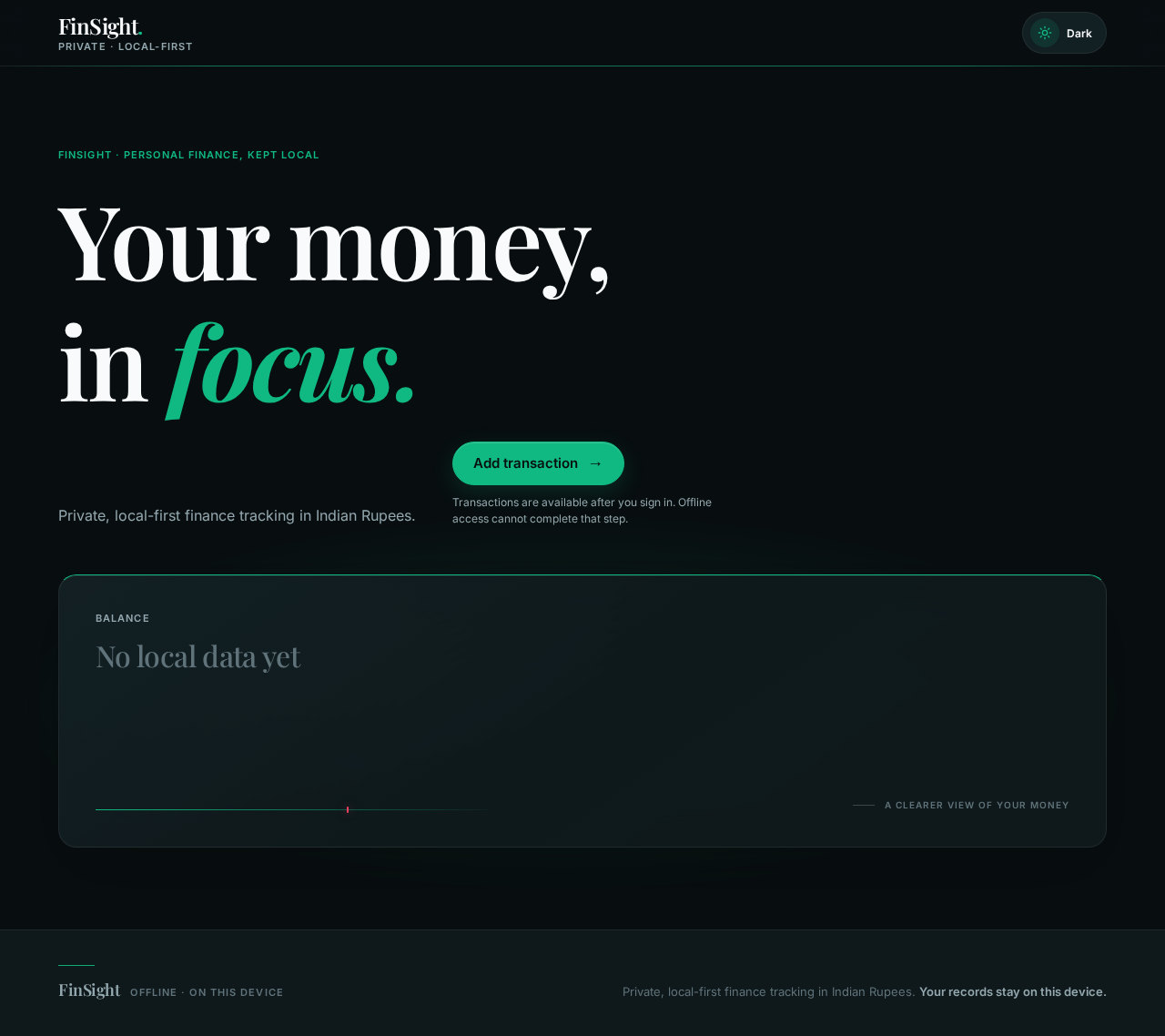
FinSight · Personal finance, kept local
Your money,
in focus.
Private, local-first finance tracking in Indian Rupees.
Transactions are available after you sign in. Offline access cannot complete that step.
Balance
No local data yet
No comments yet. Be the first!