fiery-students
 Manjot kaur
Act as a senior full-stack mobile app developer and UI/UX designer. I want to build a secure, modern, and scalable mobile application (Android/iOS or Flutter-based) designed for students to manage their academic workflow. The app should include the following core features: 1. Project Management: - Create, edit, and organize multiple projects - Add descriptions, deadlines, tasks, and progress tracking - Upload and store files (PDFs, PPTs, images, documents) 2. Presentation Hub: - Store and view presentation files (PPT/PDF) - Option to preview slides inside the app - Add notes for each presentation 3. Research Assistant: - Built-in browser or API integration for online research - Save links, articles, and notes - Categorize research by project 4. Notes & Task Manager: - Create quick notes - To-do lists with reminders and deadlines - Tagging and search functionality 5. Cloud Storage Integration: - Use Firebase Storage for file uploads - Real-time sync across devices using Firebase Firestore 6. Authentication & Security: - Firebase Authentication (Email/Password, Google Sign-In) - Implement HTTPS (SSL/TLS encryption) - Role-based access (optional) - Secure data handling and encryption for sensitive info 7. User Interface: - Clean, modern UI (Material Design or minimal theme) - Dashboard showing all projects and recent activity - Dark mode support 8. Notifications: - Push notifications for deadlines and reminders using Firebase Cloud Messaging 9. Offline Support: - Local caching using SQLite or Firebase offline persistence 10. Extra Features (Optional but recommended): - AI-based suggestions for project ideas - Voice notes support - Collaboration (share projects with friends) Tech Stack Requirements: - Frontend: Flutter (preferred) or React Native - Backend: Firebase (Firestore, Auth, Storage, FCM) - APIs: REST APIs for research integration - Security: HTTPS, Firebase rules, authentication tokens Deliverables: - Complete app architecture - Folder structure - Sample UI screens (code) - Firebase setup guide - Step-by-step implementation plan - Clean, well-commented code Ensure the app is beginner-friendly but scalable for future upgrades.
Comments (0)
Sign in to leave a comment
System Requirements
System Requirements Document (SRD) for Fiery-Students
1. Introduction
The Fiery-Students mobile application is designed to empower students in India and beyond to efficiently manage their academic workflows. This secure, modern, and scalable app will serve as a one-stop solution for project management, research, note-taking, and collaboration. By integrating advanced features like cloud storage, offline support, and AI-based suggestions, Fiery-Students aims to simplify academic life while fostering productivity and collaboration.
This document outlines the system requirements for Fiery-Students, ensuring a clear roadmap for development and implementation.
2. System Overview
Fiery-Students is a cross-platform mobile application (Android/iOS) built using Flutter for a seamless user experience. The app leverages Firebase for backend services, including authentication, real-time database, and cloud storage. Designed with scalability and security in mind, the app will cater to both individual students and collaborative groups, offering features like project management, research tools, and notifications.
The application will:
- Provide a clean, modern UI with dark mode support.
- Ensure data security through HTTPS, Firebase rules, and encryption.
- Offer offline functionality for uninterrupted access.
- Support real-time collaboration and file sharing.
The app will be tailored to the needs of students in India, considering local preferences, time zones (IST), and accessibility.
3. Functional Requirements
Core Features
-
Project Management
- As a User, I should be able to create, edit, and organize multiple projects.
- As a User, I should be able to add descriptions, deadlines, tasks, and track progress for each project.
- As a User, I should be able to upload and store files (PDFs, PPTs, images, documents) within projects.
-
Presentation Hub
- As a User, I should be able to store and view presentation files (PPT/PDF).
- As a User, I should be able to preview slides directly inside the app.
- As a User, I should be able to add notes for each presentation.
-
Research Assistant
- As a User, I should be able to perform online research using a built-in browser or API integration.
- As a User, I should be able to save links, articles, and notes for future reference.
- As a User, I should be able to categorize research by project.
-
Notes & Task Manager
- As a User, I should be able to create quick notes.
- As a User, I should be able to create to-do lists with reminders and deadlines.
- As a User, I should be able to tag and search notes and tasks.
-
Cloud Storage Integration
- As a User, I should be able to upload files to Firebase Storage.
- As a User, I should experience real-time sync across devices using Firebase Firestore.
-
Authentication & Security
- As a User, I should be able to sign up and log in using Email/Password or Google Sign-In.
- As a User, I should feel secure knowing my data is encrypted and handled securely.
-
User Interface
- As a User, I should experience a clean, modern UI with Material Design principles.
- As a User, I should be able to toggle between light and dark modes.
- As a User, I should see a dashboard summarizing all projects and recent activity.
-
Notifications
- As a User, I should receive push notifications for deadlines and reminders.
-
Offline Support
- As a User, I should be able to access my data offline using local caching.
Optional Features
- As a User, I should receive AI-based suggestions for project ideas.
- As a User, I should be able to record and store voice notes.
- As a User, I should be able to collaborate and share projects with friends.
4. User Personas
1. Individual Student
- Description: A student managing their own academic tasks and projects.
- Needs: Project organization, research tools, and reminders.
- Goals: Stay organized, meet deadlines, and improve productivity.
2. Collaborative Group Member
- Description: A student working on group projects with peers.
- Needs: Real-time collaboration, file sharing, and communication tools.
- Goals: Seamless teamwork and efficient project management.
5. Visuals Colors and Theme
Unique Color Palette
- Background: #F9F5E7 (Soft Cream)
- Surface: #FFFFFF (Pure White)
- Text: #2B2D42 (Deep Charcoal)
- Accent: #EF233C (Fiery Red)
- Muted Tones: #8D99AE (Cool Gray)
This palette reflects a balance of warmth and professionalism, aligning with the app's purpose of academic productivity.
6. Signature Design Concept
The Fiery-Students app will feature a "Dynamic Workspace Dashboard" as its signature design concept. Upon opening the app, users will be greeted with an interactive, animated dashboard that visually represents their academic workflow. Key elements include:
- Interactive Project Cards: Each project is displayed as a card that users can drag, drop, and rearrange. Cards will flip to reveal detailed information, such as tasks, deadlines, and progress.
- Animated Progress Rings: Each project card will feature a circular progress ring that dynamically updates as tasks are completed.
- Mood-Based Backgrounds: The dashboard background will subtly shift colors based on the time of day (e.g., warm tones in the morning, cool tones at night).
- Micro-Interactions: Smooth animations for transitions, button presses, and notifications will enhance the user experience.
This design will make the app visually engaging and intuitive, ensuring a memorable first impression.
7. Non-Functional Requirements
- Performance: The app must load within 2 seconds on standard devices.
- Scalability: The backend should support up to 10,000 concurrent users initially, with room for growth.
- Security: All sensitive data must be encrypted using industry standards.
- Localization: The app should support Indian time zones (IST) and regional preferences.
- Accessibility: Ensure WCAG 2.1 compliance for users with disabilities.
8. Tech Stack
Frontend
- Flutter for cross-platform mobile app development.
Backend
- Firebase for authentication, Firestore, and cloud storage.
- Firebase Cloud Messaging for push notifications.
Database
- Firebase Firestore for real-time database needs.
- SQLite for offline caching.
AI Tools
- GPT 5.4 for user-friendly responses.
- Claude 4.6 Opas for academic or coding assistance.
Orchestration
- Docker and docker-compose for local development.
9. Assumptions and Constraints
- The app will primarily target students in India but will be scalable for global use.
- Firebase will be the primary backend, limiting the need for custom server infrastructure.
- Collaboration features will be optional and can be phased in after the initial release.
10. Glossary
- Firebase: A platform developed by Google for building mobile and web applications.
- Firestore: A NoSQL cloud database for storing and syncing data in real-time.
- WCAG: Web Content Accessibility Guidelines, ensuring accessibility for users with disabilities.
- IST: Indian Standard Time, the time zone used in India.
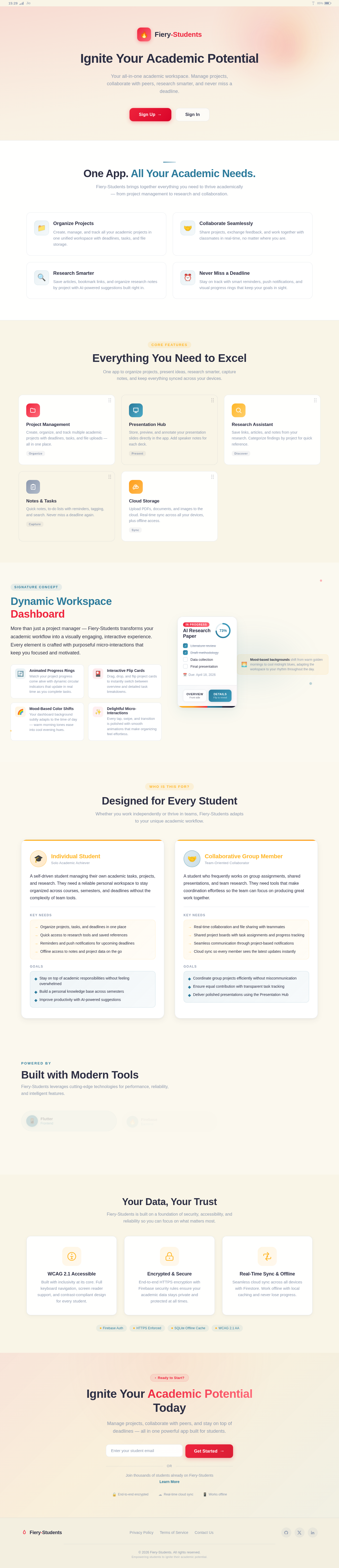
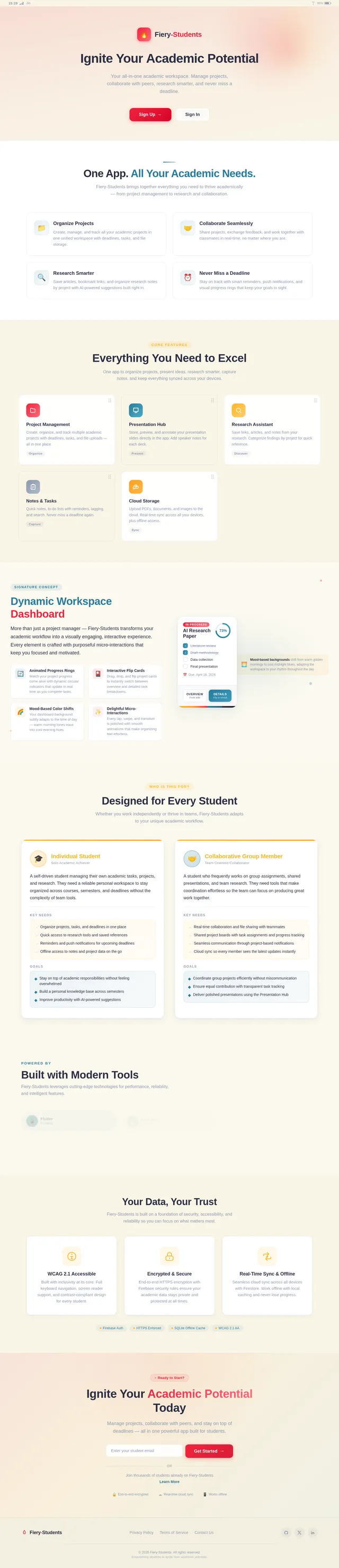
One App. All Your Academic Needs.
Fiery-Students brings together everything you need to thrive academically — from project management to research and collaboration.
Organize Projects
Create, manage, and track all your academic projects in one unified workspace with deadlines, tasks, and file storage.
Collaborate Seamlessly
Share projects, exchange feedback, and work together with classmates in real-time, no matter where you are.
Research Smarter
Save articles, bookmark links, and organize research notes by project with AI-powered suggestions built right in.
Never Miss a Deadline
Stay on track with smart reminders, push notifications, and visual progress rings that keep your goals in sight.
Everything You Need to Excel
One app to organize projects, present ideas, research smarter, capture notes, and keep everything synced across your devices.
Project Management
Create, organize, and track multiple academic projects with deadlines, tasks, and file uploads — all in one place.
OrganizePresentation Hub
Store, preview, and annotate your presentation slides directly in the app. Add speaker notes for each deck.
PresentResearch Assistant
Save links, articles, and notes from your research. Categorize findings by project for quick reference.
DiscoverNotes & Tasks
Quick notes, to-do lists with reminders, tagging, and search. Never miss a deadline again.
CaptureCloud Storage
Upload PDFs, documents, and images to the cloud. Real-time sync across all your devices, plus offline access.
SyncDynamic Workspace Dashboard
More than just a project manager — Fiery-Students transforms your academic workflow into a visually engaging, interactive experience. Every element is crafted with purposeful micro-interactions that keep you focused and motivated.
Animated Progress Rings
Watch your project progress come alive with dynamic circular indicators that update in real time as you complete tasks.
Interactive Flip Cards
Drag, drop, and flip project cards to instantly switch between overview and detailed task breakdowns.
Mood-Based Color Shifts
Your dashboard background subtly adapts to the time of day — warm morning tones ease into cool evening hues.
Delightful Micro-Interactions
Every tap, swipe, and transition is polished with smooth animations that make organizing feel effortless.
AI Research Paper
Mood-based backgrounds shift from warm golden mornings to cool midnight blues, adapting the workspace to your rhythm throughout the day.
Designed for Every Student
Whether you work independently or thrive in teams, Fiery-Students adapts to your unique academic workflow.
Individual Student
Solo Academic Achiever
A self-driven student managing their own academic tasks, projects, and research. They need a reliable personal workspace to stay organized across courses, semesters, and deadlines without the complexity of team tools.
Key Needs
- Organize projects, tasks, and deadlines in one place
- Quick access to research tools and saved references
- Reminders and push notifications for upcoming deadlines
- Offline access to notes and project data on the go
Goals
- Stay on top of academic responsibilities without feeling overwhelmed
- Build a personal knowledge base across semesters
- Improve productivity with AI-powered suggestions
Collaborative Group Member
Team-Oriented Collaborator
A student who frequently works on group assignments, shared presentations, and team research. They need tools that make coordination effortless so the team can focus on producing great work together.
Key Needs
- Real-time collaboration and file sharing with teammates
- Shared project boards with task assignments and progress tracking
- Seamless communication through project-based notifications
- Cloud sync so every member sees the latest updates instantly
Goals
- Coordinate group projects efficiently without miscommunication
- Ensure equal contribution with transparent task tracking
- Deliver polished presentations using the Presentation Hub
Built with Modern Tools
Fiery-Students leverages cutting-edge technologies for performance, reliability, and intelligent features.
Your Data, Your Trust
Fiery-Students is built on a foundation of security, accessibility, and reliability so you can focus on what matters most.
WCAG 2.1 Accessible
Built with inclusivity at its core. Full keyboard navigation, screen reader support, and contrast-compliant design for every student.
Encrypted & Secure
End-to-end HTTPS encryption with Firebase security rules ensure your academic data stays private and protected at all times.
Real-Time Sync & Offline
Seamless cloud sync across all devices with Firestore. Work offline with local caching and never lose progress.
Ignite Your Academic Potential Today
Manage projects, collaborate with peers, and stay on top of deadlines — all in one powerful app built for students.
No comments yet. Be the first!