fiery-ios
 Riley Musgrave
A app to help me on call of duty iOS to help with load mounts and other stuff like that


Comments (0)
Sign in to leave a comment
System Requirements
System Requirements Document for fiery-ios
1. Introduction
fiery-ios is a personal Call of Duty iOS companion app built for exactly one player: Riley Musgrave. It exists to answer the question "what should I run, and where should I stand?" without digging through Reddit threads or YouTube videos mid-session. The app is a reference library of weapon loadouts — attachments, perks, and equipment — plus related gameplay reference such as mounting and aiming positions.
The product intent is speed, swagger, and zero filler. It is a personal armory, not a social platform: there is no sharing, no community, no other players. The audience is the single dedicated player who consults builds and mount/aim spots during or around play sessions and wants the answer in seconds.
2. System Overview
fiery-ios is delivered as a first-party web application with a custom UI and an application-owned identity layer. A single human actor — the Solo Call of Duty Mobile Player — enrolls once, verifies on return, and then browses a durable personal library of loadouts and gameplay reference content.
Current accepted behavior:
- A public Landing page explains what the app is, who it is for, and what it does.
- A Login page provides self-service enrollment on first use and returning verification thereafter.
- A protected Loadouts page is the browse owner for the reference library of loadouts covering attachments, perks, and equipment.
- A protected Loadout Details page is the focused owner for viewing one loadout's attachments, perks, and equipment.
- A protected Gameplay Reference page is the owner for consulting related gameplay reference content such as mounting and aiming positions.
Narrow exclusions: the app is for the single user's own personal use only, not for other players. There is no sharing, no multi-user collaboration, no social feed, and no audience beyond Riley. No other capabilities are in scope.
2a. Product Interpretation and Delivery Boundary
fiery-ios is a solo reference tool. The only human who ever uses it is its owner. Because the loadout library and gameplay reference are durable, personal, and must be resumed across sessions, the app owns a minimal identity layer: the player establishes access once through self-service enrollment on the Login page, and verifies on return before reaching the protected library. The Landing page is the anonymous entry surface and does not itself expose protected library state.
Everything the player consults — loadouts, their attachments, perks, and equipment, and gameplay reference such as mounting and aiming positions — lives behind that access boundary. Nothing in the current scope is delegated to a provider surface or an external destination; the app is the sole owner of the reference content and the player's access to it.
Future ideas are not part of the current delivery and are not represented in any page or acceptance criterion.
2b. Source Content Inventory
No content_source reference directive was supplied. This section is intentionally omitted.
2c. Page Content and Component Coverage
Landing
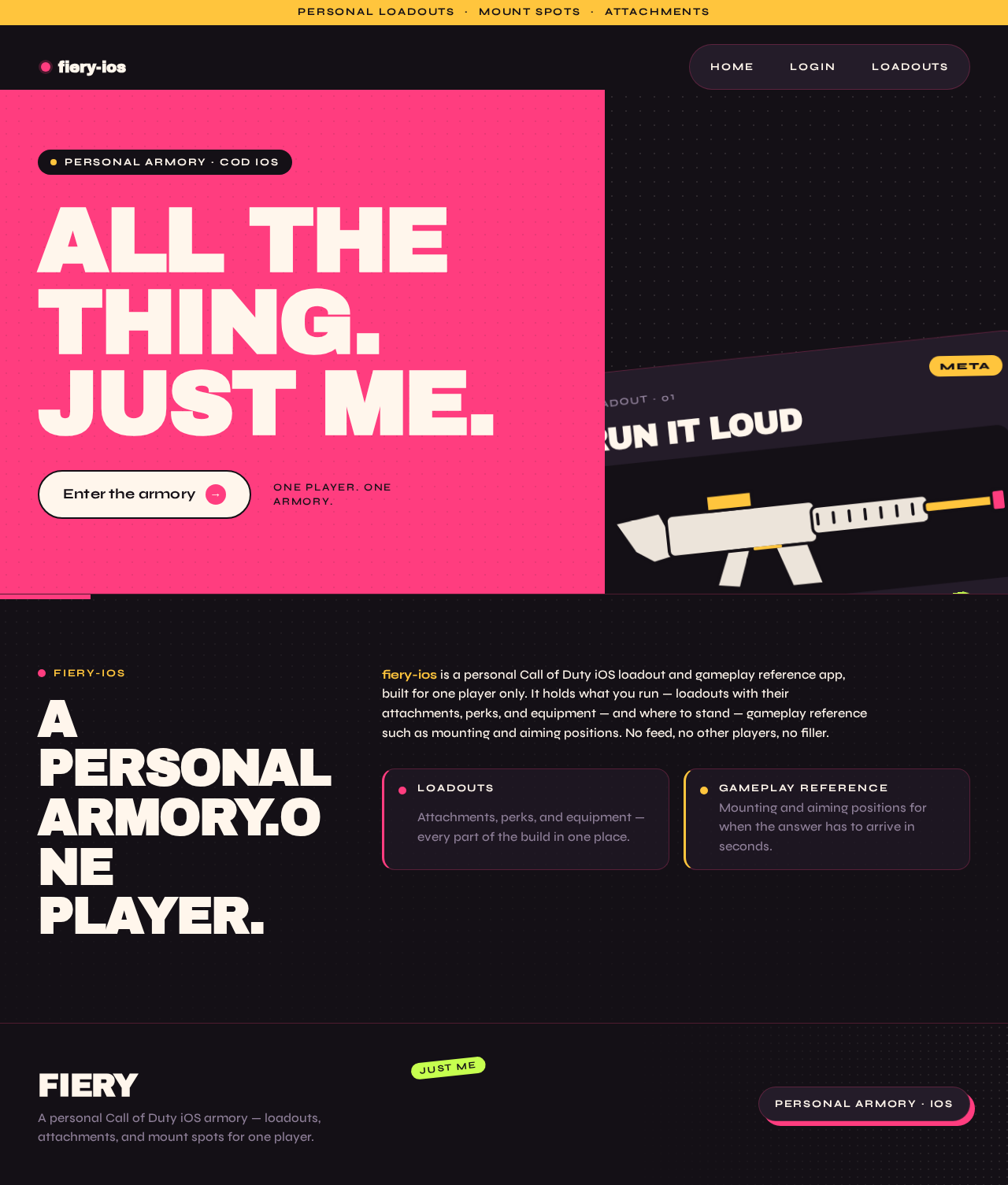
- Information/state: Anonymous public entry. Explains that fiery-ios is a personal Call of Duty iOS loadout and gameplay reference app, that it is for one player only, and what it covers — loadouts with attachments, perks, and equipment, plus gameplay reference such as mounting and aiming positions.
- Primary action: A cream capsule CTA "Enter the armory" that leads to the Login page.
- Supporting actions: A persistent top-left wordmark and a right-aligned capsule menu on desktop; a bottom capsule navigation bar on mobile. Navigation to Login is available from both.
- Domain entities: None persisted; the page presents product identity only.
- Component responsibilities: Hero colour-field composition (magenta left block, aubergine right block), oversized rotated weapon-card sticker, top ticker line, CTA capsule, navigation shell.
- States: Loading — static content, no data fetch; Empty — not applicable; Success — hero and CTA render fully at 375/768/1280; Error — not applicable (no remote data); Recovery — not applicable.
Login
- Information/state: Neutral access surface. Two modes: first-use self-service enrollment and returning verification. Anonymous access; the page does not expose protected library state.
- Primary action: Submit enrollment (first use) or submit verification (returning) to establish a session.
- Supporting actions: Switch between enrollment and returning-verification modes; return to Landing.
- Domain entities: Player identity (the single owner of the personal library).
- Component responsibilities: Mode toggle, credential fields, submit capsule, inline validation messaging.
- States: Loading — submit control shows pending state while the request is in flight; Empty — fields blank with mode-appropriate labels; Success — session established and the player is taken to Loadouts; Error — invalid or incomplete credentials show an inline message and preserve entered values so the player can correct and resubmit; Recovery — the player may retry, switch modes, or return to Landing.
Loadouts
- Information/state: Protected browse owner for the reference library of loadouts. Each entry surfaces its name and its attachments, perks, and equipment at a glance, with sticker tags such as META, MOUNT, or CQB.
- Primary action: Select a loadout to open its details.
- Supporting actions: Scan the library via the slow marquee ticker of loadout names at the top of the page; use the navigation shell to reach Gameplay Reference.
- Domain entities: Loadout (name, attachments, perks, equipment, tags).
- Component responsibilities: Marquee ticker, asymmetric poster grid of loadout cards (5/7 and 7/5 alternating spans on desktop, single column at 768px and below), rotated sticker tags, navigation shell.
- States: Loading — cards scale in with a slight overshoot on first paint; Empty — a clear message that the library has no loadouts yet, with no fabricated entries; Success — all loadouts render with readable names, tags, and stat rows; Error — a message that the library could not be loaded plus a retry control; Recovery — retry reloads the library without losing the player's place in navigation.
Loadout Details
- Information/state: Protected focused owner for one loadout. Shows the loadout name, its attachments, its perks, and its equipment, with stat rows as ruled label/value pairs using tabular numerals.
- Primary action: Read the full loadout composition.
- Supporting actions: Return to Loadouts; move to Gameplay Reference via the navigation shell.
- Domain entities: Loadout, Attachment, Perk, Equipment.
- Component responsibilities: Page title, sticker tag cluster, stat rows with magenta hairline rules, attachment/perk/equipment groupings, navigation shell.
- States: Loading — page title and groupings render as the loadout resolves; Empty — if a loadout has no recorded attachments, perks, or equipment in a grouping, that grouping states it plainly rather than showing invented entries; Success — every recorded attachment, perk, and equipment item is readable; Error — a message that the loadout could not be loaded plus a retry control and a path back to Loadouts; Recovery — retry reloads the same loadout; returning to Loadouts restores the browse context.
Gameplay Reference
- Information/state: Protected owner for related gameplay reference content, including mounting and aiming positions, presented with schematic top-down map diagrams and flat magenta and yellow mount/aim wedges.
- Primary action: Consult a reference entry for mounting or aiming guidance.
- Supporting actions: Move between reference entries; use the navigation shell to reach Loadouts.
- Domain entities: Gameplay reference entry (topic, schematic diagram, mount/aim guidance).
- Component responsibilities: Reference entry list, schematic diagram tiles, callout labels in accent yellow, navigation shell.
- States: Loading — entries render as the reference set resolves; Empty — a clear message that no reference entries exist yet, with no fabricated diagrams; Success — each entry's diagram and guidance are fully readable; Error — a message that reference content could not be loaded plus a retry control; Recovery — retry reloads the reference set.
3. Functional Requirements
FR-1 — Personal loadout and gameplay reference app (explicit) As the Solo Call of Duty Mobile Player, I should have an app for Call of Duty on iOS that helps me with weapon loadouts — attachments, perks, and equipment — and other related gameplay reference such as mounting and aiming positions, so that I have one place for the information I need.
- Trigger/input: the player opens the app.
- Observable result: loadout composition and gameplay reference content are available in one product.
- Access state: protected library content requires an established session; the Landing page is anonymous.
- Failure/recovery: if library content fails to load, the owning page shows an error with a retry control.
- Continuation: the player moves between Loadouts, Loadout Details, and Gameplay Reference via the navigation shell.
FR-2 — Personal use only (explicit) As the Solo Call of Duty Mobile Player, I should have the app serve only me, so that it stays a personal tool rather than something built for other players.
- Trigger/input: any use of the app.
- Observable result: the product presents itself as a personal armory for one player; there is no sharing, invitation of others, or audience-facing surface.
- Access state: the single enrolled identity owns the library.
- Failure/recovery: not applicable — this is a scope constraint, not a runtime state.
- Continuation: all other requirements operate within this boundary.
FR-3 — Reference library of loadouts and gameplay information (explicit) As the Solo Call of Duty Mobile Player, I should browse a reference library of loadouts and related gameplay information, so that I can find the build or guidance I need quickly.
- Trigger/input: the player opens Loadouts or Gameplay Reference.
- Observable result: loadout entries and gameplay reference entries are listed and selectable.
- Access state: requires an established session.
- Failure/recovery: an error message with a retry control on the affected page.
- Continuation: selecting a loadout opens Loadout Details; consulting a reference entry shows its diagram and guidance.
FR-4 — Self-service enrollment on first use (required_inference) As the Solo Call of Duty Mobile Player, I should be able to enroll myself on first use from the Login page, so that I can reach my personal library without waiting on anyone else.
- Trigger/input: the player submits enrollment details on the Login page.
- Observable result: a session is established and the player is taken to Loadouts.
- Access state: Login is anonymously reachable; protected library state remains unavailable until enrollment succeeds.
- Failure/recovery: invalid or incomplete details show an inline message and preserve entered values for correction.
- Continuation: the player proceeds to Loadouts.
FR-5 — Returning verification before protected access (required_inference) As the Solo Call of Duty Mobile Player, I should verify myself on return before reaching the loadout library and gameplay reference, so that my personal library stays bound to me.
- Trigger/input: the returning player submits verification details on the Login page.
- Observable result: a session is established and the player is taken to Loadouts.
- Access state: Loadouts, Loadout Details, and Gameplay Reference are unreachable without a verified session.
- Failure/recovery: invalid details show an inline message and preserve entered values; the player may retry, switch modes, or return to Landing.
- Continuation: the player proceeds to Loadouts or Gameplay Reference.
FR-6 — View an individual loadout's composition (required_inference) As the Solo Call of Duty Mobile Player, I should open a single loadout and see its attachments, perks, and equipment, so that I can read the full build without scanning the whole library.
- Trigger/input: the player selects a loadout on Loadouts.
- Observable result: Loadout Details shows that loadout's name, attachments, perks, and equipment.
- Access state: requires an established session.
- Failure/recovery: an error message with a retry control and a path back to Loadouts.
- Continuation: the player returns to Loadouts or moves to Gameplay Reference.
FR-7 — Consult mounting and aiming positions (required_inference) As the Solo Call of Duty Mobile Player, I should consult gameplay reference content such as mounting and aiming positions, so that I know where to hold during a session.
- Trigger/input: the player opens Gameplay Reference and selects an entry.
- Observable result: the entry's schematic diagram and mount/aim guidance are shown.
- Access state: requires an established session.
- Failure/recovery: an error message with a retry control.
- Continuation: the player moves to another entry or back to Loadouts.
4. User Personas
Solo Call of Duty Mobile Player
Product context. Riley Musgrave plays Call of Duty on iOS and wants a personal reference companion — a single-player armory, not a social platform. The app exists for this one person and no one else; the "personal use only" constraint is a defining part of the role, not an afterthought.
Primary goal. Find the loadout or the mount/aim guidance needed quickly, during or around a play session, without digging through Reddit or YouTube.
Distinct accepted responsibilities.
- Enrolls once on first use and verifies on return before reaching the library.
- Browses the reference library of loadouts covering attachments, perks, and equipment.
- Opens an individual loadout to read its full composition.
- Consults gameplay reference content such as mounting and aiming positions.
Relevant inputs and decisions. Which loadout to open; which reference entry to consult; whether to retry a failed load or move on. The player decides what to run and where to hold — the app supplies the reference, the player makes the call.
Interactions with other accepted participants. None. There are no other human participants in the product; the player is the sole actor, and the app's identity layer exists only to keep the personal library bound to this one player.
Observable success. The needed loadout or guidance is on screen within seconds of opening the app, with attachments, perks, equipment, and mount/aim callouts fully readable.
5. Core User Flows
Flow A — First use: enroll and reach the library
- The player opens fiery-ios and lands on the anonymous Landing page, which explains that this is a personal Call of Duty loadout and gameplay reference app for one player.
- The player activates the cream capsule CTA "Enter the armory" and arrives at Login.
- On Login, the player switches to enrollment mode and submits their enrollment details.
- If the details are invalid or incomplete, an inline message appears and the entered values are preserved; the player corrects them and resubmits.
- On success, a session is established and the player is taken to Loadouts, where the reference library of loadouts is listed.
- Next step: the player browses loadouts or moves to Gameplay Reference.
Flow B — Returning: verify and resume
- The player opens the app and navigates to Login (from Landing or the navigation shell).
- The player submits verification details in returning mode.
- If verification fails, an inline message appears with values preserved; the player retries, switches modes, or returns to Landing.
- On success, the player is taken to Loadouts with the personal library available.
- Next step: the player opens a loadout or consults gameplay reference.
Flow C — Browse the loadout library
- From Loadouts, the player scans the library; the slow marquee ticker of loadout names runs across the top, and loadout cards show names, sticker tags, and stat rows.
- If the library fails to load, an error message with a retry control appears; the player retries and the library reloads without losing their place in navigation.
- If the library is empty, a clear message states there are no loadouts yet — no fabricated entries are shown.
- The player selects a loadout.
- Next step: Flow D.
Flow D — Read an individual loadout
- Selecting a loadout on Loadouts opens Loadout Details.
- The page shows the loadout name, its attachments, its perks, and its equipment, with stat rows as ruled label/value pairs in tabular numerals.
- If the loadout fails to load, an error message with a retry control appears alongside a path back to Loadouts; the player retries or returns to the library.
- If a grouping has no recorded items, that grouping states it plainly rather than showing invented entries.
- Next step: the player returns to Loadouts or moves to Gameplay Reference.
Flow E — Consult mounting and aiming positions
- From the navigation shell, the player opens Gameplay Reference.
- The player selects a reference entry; a schematic top-down map diagram shows mount/aim cones as flat magenta and yellow wedges with accent callouts.
- If reference content fails to load, an error message with a retry control appears; the player retries.
- If no entries exist, a clear message states so — no fabricated diagrams.
- Next step: the player consults another entry or returns to Loadouts.
6. Visuals Colors and Theme
Muse and headline. After Jessica Walsh — "ALL THE THING. JUST ME." Loud, confident loadout craft: a personal armory with swagger, not a spreadsheet.
Mode. Dark mode only.
Colour tokens (exact hex, by role).
| Role | Hex | Use |
|---|---|---|
| Background | #141016 | Deep aubergine-black ground; carries ~70% of every screen |
| Surface | #241C29 | Lifted plum for cards, tiles, and panels |
| Text | #FFF6EC | Warm cream body and heading text — never pure white |
| Primary | #FF3D7F | Hot magenta: primary actions, active loadout, hairline rules, hard shadows |
| Accent | #FFC53D | Acid tangerine-yellow: stat highlights, mount callouts, hover flips, hard shadows |
| Muted | #8E7F98 | Secondary labels and de-emphasised metadata |
| Sticker accent | #C6FF4F | Lime, used rarely and only on tags |
Surface edges are 1px #FF3D7F at 25% opacity. No blue or indigo appears anywhere in the palette.
Typography.
- Headings: Archivo Black, weight 800, all-caps for section titles, tracking
-0.03em. Hero displayclamp(44px, 9vw, 128px); page H1clamp(32px, 5vw, 64px). - Body and labels: Syne at 500/600, sentence case, line-height 1.55.
- Numbers (damage, range, ADS speed): Syne 700 with tabular figures.
- Scale (1.5 display / 1.333 body ratio): 128 / 64 / 40 / 28 / 20 / 16 / 14. Card title 20px; body 16px; micro-label 13px uppercase Syne 700 with
0.14emletter-spacing.
Shape language. Sticker-and-field geometry: hard-edged full-bleed colour blocks with sharp corners for section grounds; every card, chip, and button is a fully rounded capsule or a 24px-radius tile with a hard offset shadow (6px 6px 0 in #FF3D7F or #FFC53D) instead of a blur. Overlapping rotated sticker tags at −6° to +6°. Small dot-grid and halftone dot textures as ground pattern. No gradient blobs, no glass.
Layout. Asymmetric poster grid: 12 columns, loadout cards alternating 5/7 and 7/5 spans with 24px gutters on desktop, collapsing to a single column at 768px and below. Navigation is a persistent bottom capsule bar on mobile and a top-left wordmark with a right-aligned capsule menu on desktop. Stat rows are ruled label/value pairs with a magenta hairline. All text and controls stay inside the viewport and their container at 375 / 768 / 1280 via clamp() type and wrapping capsules.
Imagery. No stock photos. Flat vector weapon silhouettes and attachment pictograms in thick 3px strokes on solid colour tiles, halftone-dot textures, and bold rotated sticker badges (META, MOUNT, CQB). Gameplay Reference uses schematic top-down map diagrams with mount/aim cones as flat magenta and yellow wedges. Everything is flat, saturated, and poster-like.
7. Signature Design Concept
The Armory Door. The Landing page is a full-bleed aubergine-black ground split into two hard-edged colour fields. The left 60% is a hot magenta (#FF3D7F) block carrying the four-line Archivo Black headline "ALL THE THING. JUST ME." at clamp(44px, 9vw, 128px), stacked flush-left. The right 40% is where an oversized rotated weapon-card sticker — a plum (#241C29) tile with a flat vector rifle silhouette, attachment chips, and a yellow (#FFC53D) hard offset shadow — bleeds off the right and bottom edges. A cream capsule CTA "Enter the armory" with a magenta hard shadow sits beneath the headline. A thin yellow ticker line runs along the very top reading "PERSONAL LOADOUTS · MOUNT SPOTS · ATTACHMENTS". No centred hero, no gradient, no floating cards.
The concept recomposes only accepted content: the product's identity as a personal loadout and gameplay reference app, and the single CTA that leads to Login. It introduces no new behavior or destination.
8. Interaction Model & Motion Direction
Interaction Model: Animated Motion Tempo: expressive Hero Dimensionality: layered_2d
Landing Hero Motion Brief
- Focal subject: the oversized rotated weapon-card sticker bleeding off the right edge of the hero, composed of a flat vector rifle silhouette, attachment chips, and a yellow hard offset shadow.
- Input → transformation → outcome thesis: on first paint, the magenta and aubergine colour fields settle into place, the weapon-card sticker scales in with a slight overshoot and holds its rotation, and the cream CTA capsule lands beneath the headline — the player reads the product's identity and the single path forward without any motion obscuring text or controls.
- Motion vocabulary: colour-block wipes (a magenta panel sweeps across in 320ms on route change), sticker cards scale-in with a slight overshoot on first paint, loadout card hover flips the accent block from plum to magenta and rotates the sticker tag 2°, and a single slow marquee ticker of loadout names runs at the top of the Loadouts page.
- Composed first frame: aubergine ground, magenta left block with the four-line headline fully legible, rotated weapon sticker mid-bleed on the right, cream CTA capsule with magenta shadow beneath the headline, thin yellow ticker line along the top.
- Reduced-motion state: all transitions become instant and the ticker wraps into static rows; every headline, label, number, and control remains fully readable and inside its container.
9. Non-Functional Requirements
- NFR-1 — Personal-use boundary (explicit): The app is intended for the single user, not for other players. No sharing, invitation, or audience-facing surface is provided.
- NFR-2 — Durable personal state (required_inference): The loadout library and gameplay reference content persist across sessions and remain bound to the single enrolled identity.
- NFR-3 — Protected library access (required_inference): Loadouts, Loadout Details, and Gameplay Reference are reachable only with an established session; Landing and Login are anonymously reachable.
- NFR-4 — Readable at every viewport (explicit, from design direction): Headlines, wordmarks, labels, numbers, card text, and controls stay entirely inside the viewport and their container at 375px, 768px, and 1280px, wrapping or scaling via
clamp(). Decoration and imagery may bleed, rotate, or overlap but never cover readable text or controls. - NFR-5 — Reduced-motion support (explicit, from design direction): With
prefers-reduced-motion, all transitions become instant and the marquee ticker wraps into static rows so every item is fully readable. - NFR-6 — Palette discipline (explicit, from design direction): No blue or indigo anywhere; no gradient blobs, glassmorphism, or frosted panels; no pure white grounds or neutral greys as the base; no Inter, Roboto, Poppins, or system-ui fonts.
10. Tech Stack
- Frontend: React (web application with custom UI), styled to the palette, typography, and shape language in Section 6.
- Backend: Python / FastAPI, extended with routes and modules for identity, loadouts, loadout details, and gameplay reference content.
- Storage: A persistent database for the player identity and the loadout and gameplay reference records, satisfying NFR-2.
- Deployment: Docker / docker-compose for the frontend and backend services.
No additional services, queues, or orchestration layers are required for the current scope.
11. Assumptions and Constraints
- A-1 (explicit constraint): The app is for the single user's own personal use only, not for other players. This is binding on all current and future scope.
- A-2 (required_inference): The single player self-enrolls on first use and verifies on return; there is no invitation, provisioning, or administrative flow, because there is no second participant.
- A-3 (required_inference): The loadout library and gameplay reference content are durable and personal, which is why an application-owned identity layer exists.
- A-4 (assumption): The reference content itself is authored and maintained by the player; the app provides the library and its presentation, not an external content feed.
- A-5 (assumption): The app is delivered as a web application with a custom UI; no native iOS packaging is specified by the source.
- A-6 (default — not specified by user): Dark mode only, per the creative direction; no light theme is provided.
12. Glossary
- Loadout: A named weapon configuration comprising attachments, perks, and equipment.
- Attachment: A weapon modification recorded on a loadout.
- Perk: A passive ability slot recorded on a loadout.
- Equipment: A carried item slot recorded on a loadout.
- Gameplay Reference: Guidance content such as mounting and aiming positions, presented with schematic top-down map diagrams.
- Mount / Aim Position: A location and orientation from which the player holds an angle, shown as a magenta or yellow wedge on a schematic diagram.
- Sticker Tag: A rotated badge (e.g. META, MOUNT, CQB) pinned to a loadout card at ±6°.
- Armory: The product's own name for the personal loadout library.
fiery-ios
A personalarmory.One player.
fiery-ios is a personal Call of Duty iOS loadout and gameplay reference app, built for one player only. It holds what you run — loadouts with their attachments, perks, and equipment — and where to stand — gameplay reference such as mounting and aiming positions. No feed, no other players, no filler.
- LoadoutsAttachments, perks, and equipment — every part of the build in one place.
- Gameplay referenceMounting and aiming positions for when the answer has to arrive in seconds.
fiery-ios
A personalarmory.One player.
fiery-ios is a personal Call of Duty iOS loadout and gameplay reference app, built for one player only. It holds what you run — loadouts with their attachments, perks, and equipment — and where to stand — gameplay reference such as mounting and aiming positions. No feed, no other players, no filler.
- LoadoutsAttachments, perks, and equipment — every part of the build in one place.
- Gameplay referenceMounting and aiming positions for when the answer has to arrive in seconds.
No comments yet. Be the first!