0
Total Complaints
All records currently tracked
 KRISH SIRSATH
# Smart Hostel Complaint & Maintenance System Build a medium-sized full-stack web application for managing hostel maintenance complaints. The goal is to allow students to report hostel problems and allow hostel administrators to manage, prioritize, assign, and resolve those complaints. Keep the project focused and do NOT add unnecessary hostel-management features such as rent payments, room allocation, visitor management, leave management, or complex staff management. ## User Roles ### Student Students can: * Register and login * View their dashboard * Submit a complaint * Upload an optional image * Select or receive an AI-suggested category * View complaint priority * View complaint status * View complaint history * Open complaint details * Add comments to their complaints * Receive notifications when complaint status changes ### Admin Admins can: * Login * View an analytics dashboard * View all complaints * Search and filter complaints * View complaint details * Change complaint status * Assign complaints * Change priority * Add admin comments * Mark complaints as resolved * View basic analytics ## Complaint Categories Support: * Electrical * Plumbing * Cleaning * Internet * Furniture * Security * Other ## Complaint Priority Support: * Low * Medium * High * Emergency ## Complaint Status Use: Submitted → Assigned → In Progress → Resolved → Closed ## AI Feature Add an AI-powered complaint analyzer. When a student writes a complaint, analyze the text and suggest: * Category * Priority * Short summary Example: Input: "The fan in room 204 is not working and there is a strange noise." Output: Category: Electrical Priority: High Summary: Fan malfunction in room 204. The student must be able to review and change the AI suggestion before submitting. Keep the AI integration configurable through an environment variable. ## Student Dashboard Show: * Total complaints * Pending complaints * In-progress complaints * Resolved complaints * Recent complaints Use clean cards and a simple complaint-status chart. ## Admin Dashboard Show: * Total complaints * Pending complaints * In-progress complaints * Resolved complaints * Emergency complaints Add charts for: * Complaints by category * Complaints by status * Complaints by priority ## Complaint Details Display: * Complaint title * Description * Category * Priority * Status * Student * Room number * Image * Assigned person * Created date * Updated date * Comments/history Provide appropriate actions based on the user's role. ## Authentication Implement: * Registration * Login * Logout * JWT authentication * Password hashing * Protected routes * Role-based authorization There are only two roles: STUDENT ADMIN Students must only be able to access their own complaints. Admins can access all complaints. ## Database Use MongoDB with Mongoose. Keep the database simple. Main models: * User * Complaint * Comment * Notification Use proper relationships and timestamps. ## Tech Stack Frontend: * React * Vite * Tailwind CSS * React Router * Recharts Backend: * Node.js * Express.js Database: * MongoDB * Mongoose Authentication: * JWT * bcrypt AI: * Configurable LLM API through environment variables File upload: * Use Cloudinary if needed; otherwise provide a simple configurable upload implementation. ## UI/UX Create a modern, clean SaaS-style interface. Requirements: * Responsive design * Sidebar dashboard * Professional cards * Tables * Status badges * Forms * Modal dialogs where useful * Toast notifications * Loading states * Empty states * Error states * Confirmation dialogs Use a consistent design system throughout the application. ## Seed Data Create demo data including: * 1 admin * 5–10 students * 15–20 complaints * Different categories * Different priorities * Different statuses * Comments * Notifications ## Project Structure Keep frontend and backend separated and maintainable. Use: Frontend: components/ pages/ services/ hooks/ context/ Backend: controllers/ routes/ models/ middleware/ services/ utils/ Do not put the entire application into a few large files. ## Important Scope Constraint This is intentionally a medium-sized project. DO NOT implement: * Rent/payment management * Room allocation * Visitor management * Leave management * Hostel property management * Complex staff management * Real payment gateway * Complex messaging system Focus on making the complaint and maintenance workflow polished and production-quality. ## Development Process Before coding, generate only: 1. Requirements 2. User flows 3. Database schema 4. API endpoints 5. Screen list 6. Implementation plan Then implement in phases. Phase 1: Authentication + database + basic project structure Phase 2: Student complaint workflow Phase 3: Admin complaint management Phase 4: AI complaint analyzer Phase 5: Dashboards + analytics + notifications After each phase, test the implemented functionality before continuing. Do not implement all phases at once.


Sign in to leave a comment
The "fiery-hostel" project is a medium-sized full-stack web application designed to manage hostel maintenance complaints. The system allows students to report issues and enables hostel administrators to manage, prioritize, assign, and resolve these complaints efficiently. The focus is on creating a streamlined complaint and maintenance workflow without incorporating additional hostel-management features.
Domain Descriptor: Complaint Management System
Project Scope:
Custom Pages:
Access: Application-owned identity with JWT authentication and role-based authorization.
Behavior Contracts:
Student Dashboard:
Complaint Submission:
Admin Dashboard:
Complaint Details:
explicitexplicitexplicitexplicitexplicitexplicitrequired_inferenceThe fiery-hostel application will feature a modern, clean SaaS-style interface with a focus on usability and clarity. The design will incorporate a sidebar navigation for easy access to different sections, professional cards for displaying complaint summaries, and a consistent color scheme to enhance the user experience. The student dashboard will prominently feature complaint status charts and summary cards, providing a clear overview of complaint progress. The admin dashboard will include analytics charts to help visualize complaint data by category, status, and priority.
explicitexplicit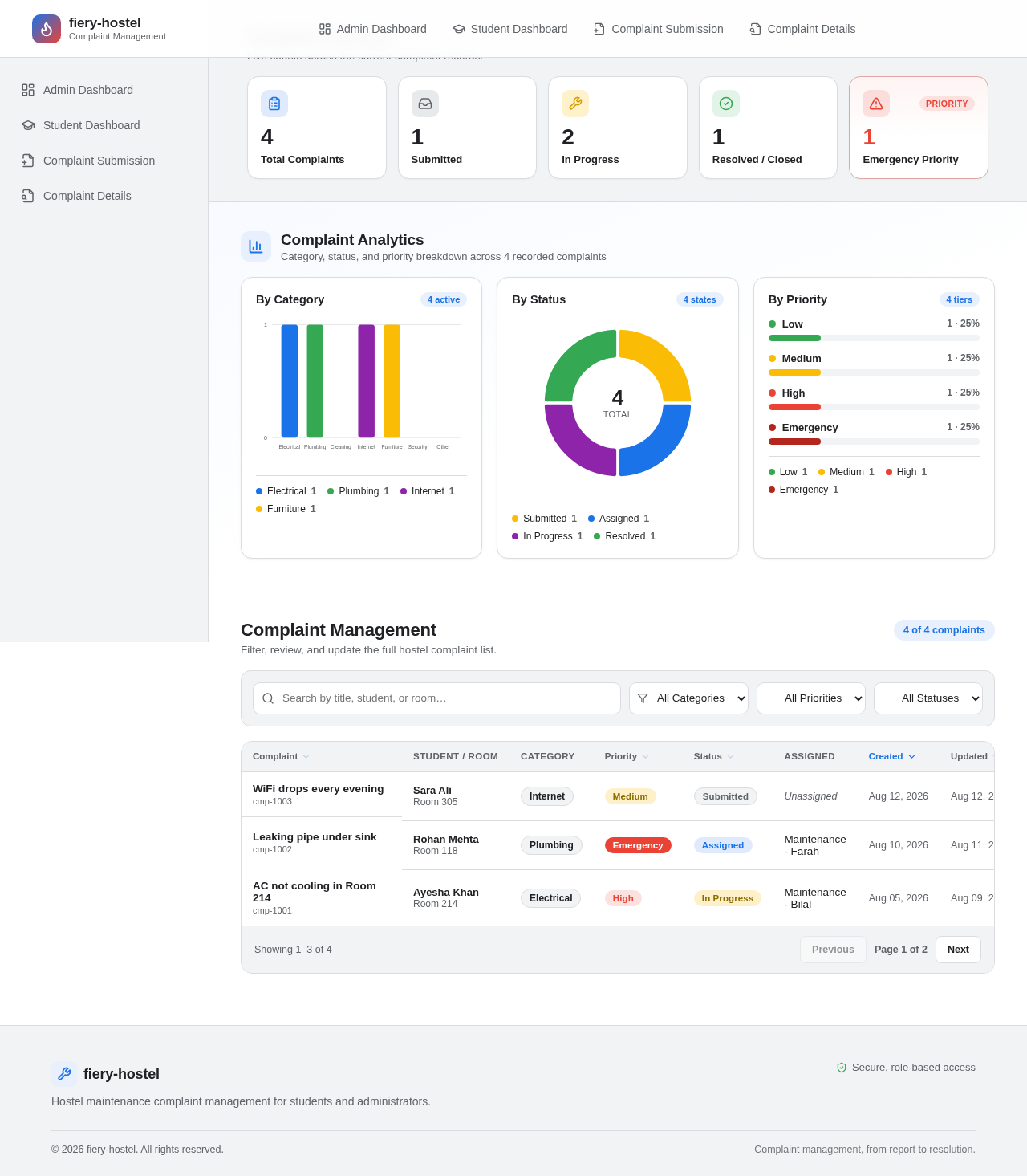
Live counts across the current complaint records.
Total Complaints
All records currently tracked
Submitted
Awaiting assignment
In Progress
Assigned or being worked on
Resolved / Closed
Completed complaints
Emergency Priority
Needs immediate attention
Category, status, and priority breakdown across 4 recorded complaints
Filter, review, and update the full hostel complaint list.
| Student / Room | Category | Assigned | Actions | |||||
|---|---|---|---|---|---|---|---|---|
| WiFi drops every eveningcmp-1003 | Sara Ali Room 305 | Internet | Medium | Submitted | Unassigned | Aug 12, 2026 | Aug 12, 2026 | |
| Leaking pipe under sinkcmp-1002 | Rohan Mehta Room 118 | Plumbing | Emergency | Assigned | Maintenance - Farah | Aug 10, 2026 | Aug 11, 2026 | |
| AC not cooling in Room 214cmp-1001 | Ayesha Khan Room 214 | Electrical | High | In Progress | Maintenance - Bilal | Aug 05, 2026 | Aug 09, 2026 |
Live counts across the current complaint records.
Total Complaints
All records currently tracked
Submitted
Awaiting assignment
In Progress
Assigned or being worked on
Resolved / Closed
Completed complaints
Emergency Priority
Needs immediate attention
Category, status, and priority breakdown across 4 recorded complaints
Filter, review, and update the full hostel complaint list.
| Student / Room | Category | Assigned | Actions | |||||
|---|---|---|---|---|---|---|---|---|
| WiFi drops every eveningcmp-1003 | Sara Ali Room 305 | Internet | Medium | Submitted | Unassigned | Aug 12, 2026 | Aug 12, 2026 | |
| Leaking pipe under sinkcmp-1002 | Rohan Mehta Room 118 | Plumbing | Emergency | Assigned | Maintenance - Farah | Aug 10, 2026 | Aug 11, 2026 | |
| AC not cooling in Room 214cmp-1001 | Ayesha Khan Room 214 | Electrical | High | In Progress | Maintenance - Bilal | Aug 05, 2026 | Aug 09, 2026 |
No comments yet. Be the first!