fiery-here

byROHAN PAL

Here are tailored versions of the project description for both **Python/Django** and **Java/Spring Boot** stacks. Pick the one that aligns with your targeted job applications. --- ### Option 1: Python & Django Stack **DevFlow | Full-Stack Project Management Platform** **Tech Stack:** Python, Django, Django REST Framework, React.js, PostgreSQL, Redis, Celery, Docker, AWS S3 **Key Highlights:** * **Engineered a scalable RESTful API** using Django REST Framework (DRF) and React.js, utilizing Django ORM with PostgreSQL for data management. * **Implemented real-time updates** and background task processing using Django Channels (WebSockets) alongside **Celery** and **Redis** for asynchronous email notifications and task queues. * **Configured JWT authentication** (via SimpleJWT) with RBAC permissions to secure user sessions and endpoints. * **Optimized database access** by resolving $N+1$ query bottlenecks using `select_related` and `prefetch_related`, improving query latency by 45%. * **Integrated AWS S3** for media storage and containerized the setup using **Docker Compose** for consistent environment delivery. --- ### Option 2: Java & Spring Boot Stack **DevFlow | Full-Stack Project Management Platform** **Tech Stack:** Java, Spring Boot, Spring Security, React.js, PostgreSQL, Redis, Hibernate, Docker, AWS S3 **Key Highlights:** * **Architected a microservices-ready REST API** using Java 17, Spring Boot, and React.js, maintaining strict design patterns and clean architecture. * **Implemented robust security** using **Spring Security** and JWTs with role-based authorization (RBAC) and BCrypt password hashing. * **Optimized data access layers** with Spring Data JPA (Hibernate) and PostgreSQL, integrating a **Redis** caching strategy to reduce database load on frequent read operations by 40%. * **Enabled real-time event distribution** using Spring WebSocket (STOMP protocol) to sync task state across connected clients instantly. * **Streamlined cloud deployment** by building a multi-container Docker setup and deploying to AWS EC2 with automated CI/CD pipelines.

LandingLogin
Landing

Comments (0)

No comments yet. Be the first!

System Requirements

System Requirement Document
Page 1 of 8

System Requirements Document for fiery-here

1. Introduction

The fiery-here project aims to develop a ride-booking application similar in core concept to Rapido, with a distinct identity and name change. The application will serve two primary user personas: Riders and Drivers. It will provide a platform for riders to book rides and for drivers to accept and complete ride requests. The design will draw inspiration from Rapido but will incorporate a unique style influenced by Haraldur Thorleifsson's bold and friendly design language.

2. System Overview

The fiery-here application will deliver a ride-booking service with a user interface inspired by Rapido but with a unique identity. The application will support two main user roles: Riders and Drivers. Riders can book rides, while Drivers can accept and complete ride requests. The system will ensure secure user authentication and authorization, with role-based access control to distinguish between rider and driver functionalities. The application will be built using the Python/Django stack, leveraging technologies such as Django REST Framework, React.js, PostgreSQL, Redis, Celery, and AWS S3 for media storage.

Page 2 of 8

2a. Product Interpretation and Delivery Boundary

The application will be delivered as a custom UI platform with application-owned identity management. Users must complete self-service enrollment before their first use and verify their identity upon returning. The design will follow the bold and friendly style of Haraldur Thorleifsson, with a focus on creating an approachable and memorable user experience. The app will not replicate Rapido's branding or identity but will maintain a similar design direction.

2b. Source Content Inventory

Not applicable as no content_source directive is provided.

2c. Page Content and Component Coverage

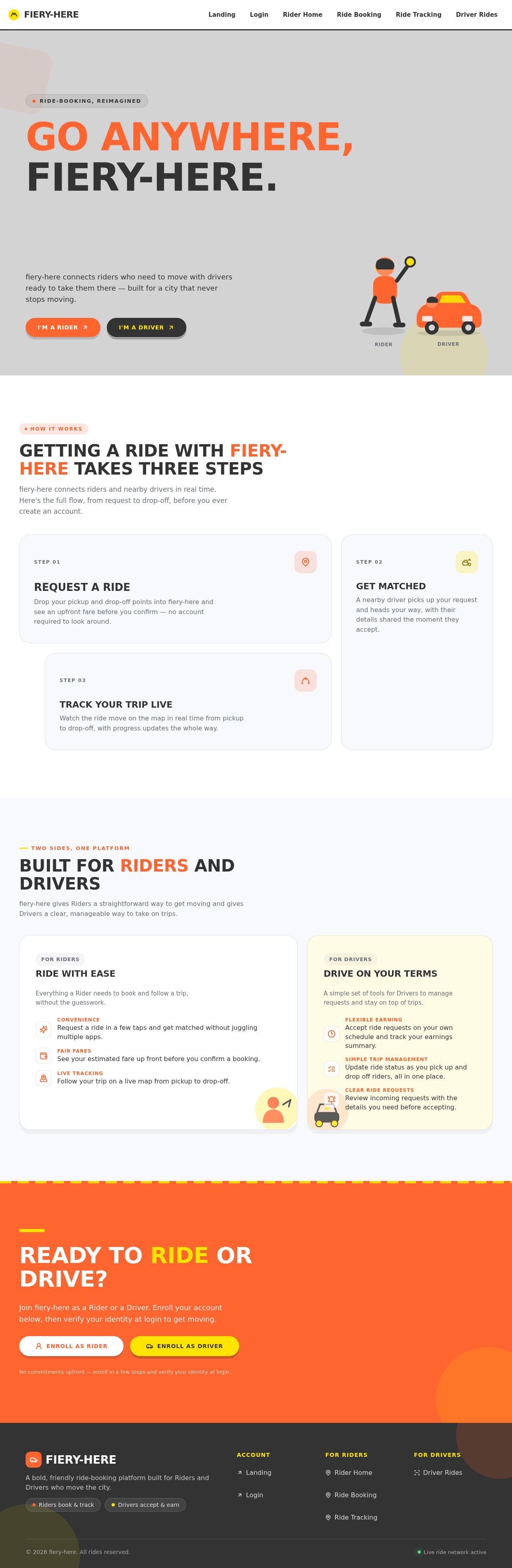
Landing

  • Purpose: Introduce the ride-booking service, explain its purpose, and provide an overview of how it works.
  • Components:
    • Overview of the service
    • Benefits for Riders and Drivers
    • Call-to-action for enrollment
    • Design elements: Bold typography, character illustrations
Page 3 of 8

Login

  • Purpose: Allow returning users to verify their identity and access their accounts.
  • Components:
    • Username and password fields
    • JWT authentication integration
    • Error handling for incorrect credentials
    • Design elements: Chunky rounded cards, lively animations

Rider Home

  • Purpose: Serve as the main dashboard for riders to access ride-booking functionalities.
  • Components:
    • Current ride status
    • Quick access to ride booking
    • Notifications and updates
    • Design elements: Asymmetric layout, clear call-to-actions

Ride Booking

  • Purpose: Enable riders to initiate and manage ride requests.
  • Components:
    • Ride request form
    • Location selection
    • Estimated fare calculation
    • Design elements: Color-blocked sections, hover pops
Page 4 of 8

Ride Tracking

  • Purpose: Provide real-time updates on ride status for both riders and drivers.
  • Components:
    • Map view with live tracking
    • Driver and rider information
    • Trip progress updates
    • Design elements: Layered 2D hero, expressive animations

Driver Rides

  • Purpose: Allow drivers to manage ride requests and complete trips.
  • Components:
    • List of available ride requests
    • Trip acceptance and completion
    • Earnings summary
    • Design elements: Bold iconography, lively entrance animations

3. Functional Requirements

  • As a Rider, I should be able to enroll in the app to start booking rides. (required_inference)
  • As a Rider, I should be able to log in to access my ride history and book new rides. (required_inference)
  • As a Rider, I should be able to book a ride, specifying my pickup and drop-off locations. (explicit)
  • As a Rider, I should be able to track my ride in real-time once it is accepted by a driver. (required_inference)
  • As a Driver, I should be able to enroll in the app to start accepting ride requests. (required_inference)
  • As a Driver, I should be able to log in to view and accept ride requests. (required_inference)
  • As a Driver, I should be able to update the ride status as I pick up and drop off the rider. (explicit)
  • The system should persist ride lifecycle states across sessions for both riders and drivers. (required_inference)
  • The app should implement JWT authentication with role-based access control to secure user sessions. (explicit)
Page 5 of 8

4. User Personas

  • Rider: A user who requests and uses rides. Responsible for enrolling, booking rides, and tracking ride status.
  • Driver: A user who accepts and completes ride requests. Responsible for enrolling, managing ride requests, and updating ride status.

5. Core User Flows

Rider Enrollment and Login

  1. Rider accesses the Landing page and selects the enrollment option.
  2. Rider completes the enrollment form and submits it.
  3. Rider receives a confirmation and logs in using their credentials.
  4. Rider accesses the Rider Home page.

Ride Booking

  1. Rider navigates to the Ride Booking page from the Rider Home.
  2. Rider enters pickup and drop-off locations.
  3. Rider reviews the estimated fare and confirms the booking.
  4. Rider is redirected to the Ride Tracking page to monitor ride status.

Driver Enrollment and Login

  1. Driver accesses the Landing page and selects the enrollment option.
  2. Driver completes the enrollment form and submits it.
  3. Driver receives a confirmation and logs in using their credentials.
  4. Driver accesses the Driver Rides page.
Page 6 of 8

Ride Management for Drivers

  1. Driver views available ride requests on the Driver Rides page.
  2. Driver accepts a ride request.
  3. Driver updates the ride status as they pick up and drop off the rider.
  4. Driver completes the ride and reviews earnings.

6. Visuals Colors and Theme

  • Muse: Haraldur Thorleifsson
  • Palette:
    • Background: #F7F9FC
    • Surface: #FFFFFF
    • Text: #333333
    • Primary: #FF652F
    • Accent: #FFE400
    • Muted: #D3D3D3
  • Typography:
    • Headings: Sora — Bold, uppercase
    • Body: Outfit
    • Scale: 1.5 modular (64/42/28/21/16)
  • Shape Language: Chunky rounded cards, color-blocked sections
  • Imagery: Custom character and spot illustration, bold iconography
Page 7 of 8

7. Signature Design Concept

The Landing page will feature an oversized heading in a bold typeface, set against a color-blocked background with lively character illustrations depicting urban mobility. The primary color will be used for the headline, with muted tones as a backdrop. Interactive elements will have lively entrance animations and hover effects to enhance user engagement.

8. Interaction Model & Motion Direction

  • Interaction Model: Animated
  • Motion Tempo: Expressive
  • Hero Dimensionality: Layered_2d
  • Landing Hero Motion Brief: The focal subject is an oversized heading with character illustrations. Upon page load, the heading and illustrations animate into view with lively entrance animations. Hover interactions cause icons and illustrations to pop, providing a dynamic user experience. A reduced-motion state will be available for accessibility.

9. Non-Functional Requirements

  • The application must support real-time updates using Django Channels and WebSockets. (explicit)
  • The system should handle background task processing using Celery and Redis. (explicit)
  • The application must be containerized using Docker for consistent environment delivery. (explicit)
  • Media storage should be integrated with AWS S3. (explicit)
Page 8 of 8

10. Tech Stack

  • Backend: Python, Django, Django REST Framework
  • Frontend: React.js
  • Database: PostgreSQL
  • Caching: Redis
  • Task Queue: Celery
  • Containerization: Docker
  • Cloud Storage: AWS S3

11. Assumptions and Constraints

  • The app will not replicate Rapido's branding or identity but will maintain a similar design direction.
  • The application will require user authentication and authorization to access protected functionalities.
  • The design will follow the bold and friendly style of Haraldur Thorleifsson.

12. Glossary

  • Rider: A user who requests and uses rides.
  • Driver: A user who accepts and completes ride requests.
  • JWT: JSON Web Token, used for secure user authentication.
  • RBAC: Role-Based Access Control, used to manage user permissions based on roles.
Landing design preview
Landing: View overview
Landing: Enroll account
Login: Log in
Driver Rides: View ride requests
Driver Rides: Accept ride request
Ride Tracking: Update ride status
Driver Rides: Complete ride
Landing design preview
Landing: View overview
Landing: Enroll account
Login: Log in
Driver Rides: View ride requests
Driver Rides: Accept ride request
Ride Tracking: Update ride status
Driver Rides: Complete ride