fiery-find
 Melzi Aja
Create a website that can find out what name a user saved with a WhatsApp number

Comments (0)
Sign in to leave a comment
System Requirements
System Requirements Document for fiery-find
1. Introduction
fiery-find is a website that answers one question: what name is saved with a given WhatsApp number? A visitor arrives with a WhatsApp phone number, submits it, and receives the saved contact name associated with that number as the product's single moment of payoff.
The product intent is deliberately narrow. There is no browsing, no directory, no contact management, and no account relationship implied by the request. The entire value of fiery-find is a single act of digital detective work: a number goes in, a name comes back. Everything in this document serves that one interaction.
The audience is a curious, mobile-first, slightly impatient visitor — someone who has a number in hand (from a message, a missed call, a business card, a screenshot) and wants to know who it belongs to. They are not administrators, and they are not managing a contact list. They want one answer, quickly, and they want the answer to feel like a reveal rather than a database row.
2. System Overview
fiery-find is delivered as a custom web application with three pages: Landing, Lookup, and Results. All three are anonymously reachable — no account, sign-in, or identity establishment is required or implied by the source requirements. The visitor's only input is a WhatsApp phone number; the only output is the saved name associated with it.
Actors. The single accepted active human persona is the Lookup User: a person who has a WhatsApp phone number and wants to learn the saved contact name associated with it. There are no other human personas. The lookup resolution itself is performed by the application's backend service, which is a system actor, not a persona.
Accepted behavior. The system accepts a WhatsApp phone number as lookup input and returns the saved name associated with that number. The Landing page explains what the site does and directs the visitor to begin. The Lookup page provides the phone-number input and submission interaction. The Results page displays the saved name found for the submitted number.
Ownership. All three pages are application-owned custom pages with no access requirement. The lookup resolution is owned by the application backend; no third-party provider surface, external destination, or headless delivery is accepted by the source.
Narrow exclusions. The source does not accept: user accounts or sign-in, saved lookup history, contact list management, bulk or batch lookup, messaging or contacting the number's owner, exporting results, or any social or sharing feature. These are not part of the current product.
2a. Product Interpretation and Delivery Boundary
fiery-find is a public, anonymous utility. A visitor lands on the site, understands in one glance that it resolves a WhatsApp number to a saved name, and proceeds to enter a number. No identity is established at any point, because nothing in the accepted behavior requires durable, actor-specific state: a lookup is a single request-and-response with no commitment, entitlement, value transfer, or resumable relationship bound to a particular person. The submitted number and its resolved name are transient — they exist to produce the reveal and are not retained as a personal record.
The delivery boundary is therefore simple and closed: three first-party pages, one backend lookup service, no authentication, no provider-owned surfaces, and no external destinations. Everything the visitor sees and does happens inside the fiery-find application.
Future ideas that were not accepted — history, accounts, batch lookup, sharing — are explicitly out of the current delivery boundary and appear only in the future section, never in current pages or acceptance criteria.
2b. Source Content Inventory
Not applicable. No reference directive with content_source authority was supplied; there is no verified factual collection to preserve.
2c. Page Content and Component Coverage
Landing
- Information and state. The public entry surface. It states, in the product's own voice, that fiery-find looks up the saved name associated with a WhatsApp number. It carries no data state of its own; it is a static scene with one call to action.
- Primary action. Begin a lookup — navigate to the Lookup page.
- Supporting actions. None required. No sign-in, no secondary navigation, no account entry.
- Domain entities. None rendered. The page references the concept of a WhatsApp number and a saved name only as explanation.
- Component responsibilities.
- Hero headline — the loudest object on the page, stacked and asymmetric, asking the product's core question.
- Instrument panel — a glass panel holding a single input field with a monospace placeholder and a cyan call-to-action that begins the lookup.
- Ring field and particle drift — the ambient instrument imagery behind the composition.
- HUD corner metadata — uppercase micro-labels pinned to the viewport corners identifying the product context.
- States.
- Loading — the ring field and particle drift initialize; the panel receives its single cyan light sweep on load.
- Empty — the input field shows its monospace placeholder; no number has been entered.
- Success — not applicable on this page; success is observed on Results.
- Error — not applicable; the page performs no lookup.
- Recovery — not applicable.
Lookup
- Information and state. The working surface for the lookup. It presents the phone-number field as the aperture of the instrument panel and holds the submitted value while the lookup runs.
- Primary action. Submit the entered WhatsApp phone number to run the lookup.
- Supporting actions. Edit or clear the entered number before submitting; return to Landing.
- Domain entities. WhatsApp phone number — the single input entity, entered as text and displayed in monospace.
- Component responsibilities.
- Number input field — accepts the WhatsApp phone number; monospace numerals; focus straightens the tilted panel.
- Submit control — labelled as the lookup action; disabled or inert while the field is empty.
- Scan instrument — concentric rings that contract and monospace digits that stream during the scan animation.
- Status readout — HUD micro-label reflecting live state, moving from idle to scanning.
- Inline validation message — appears when the entered value cannot be treated as a phone number.
- States.
- Loading — the scan animation runs: concentric rings contract, monospace digits stream, status reads as scanning.
- Empty — the field is blank and the submit control is inert.
- Success — the scan completes and the visitor is taken to Results with the resolved name.
- Error — the entered value is not a usable phone number, or the lookup cannot be completed; an inline message explains the problem and the field retains the entered value for correction.
- Recovery — the visitor corrects the number and resubmits, or clears the field and starts again.
Results
- Information and state. The reveal surface. It displays the saved name found for the submitted WhatsApp number, together with a monospace data row beneath it showing the submitted number, the detected country code, and the lookup status.
- Primary action. Run another lookup — return to Lookup with a fresh field.
- Supporting actions. Return to Landing.
- Domain entities. Saved name — the resolved answer, displayed at display scale. Submitted WhatsApp number — the input that produced the answer. Detected country code — derived from the submitted number. Lookup status — the outcome state of the resolution.
- Component responsibilities.
- Resolved name display — the name rendered at display scale inside a violet radial halo.
- Data readout row — monospace line showing the submitted number, detected country code, and lookup status.
- Status micro-label — HUD label moving from scanning to resolved.
- New lookup control — returns the visitor to the Lookup page with an empty field.
- No-result state block — shown when no saved name is found for the submitted number.
- States.
- Loading — the panel arrives in its scanning state and transitions to resolved as the answer lands.
- Empty — not applicable; the page is only reached with a submitted number.
- Success — the saved name appears at display scale with a violet glow bloom and the data readout row beneath it.
- Error — the lookup could not be completed; the page states the failure plainly and offers a retry.
- Recovery — the visitor runs another lookup from the same page, or returns to Lookup to correct the number.
3. Functional Requirements
FR-1 — Look up the saved name for a WhatsApp number (explicit) As a Lookup User, I should submit a WhatsApp phone number and receive the saved name associated with it, so that I can find out who a number belongs to.
- Trigger/input: the visitor enters a WhatsApp phone number and submits the lookup.
- Observable result: the saved name associated with that number is displayed on the Results page.
- Access state: anonymous; no account or sign-in required.
- Failure/recovery: if the lookup cannot be completed, the visitor is told plainly and can retry or correct the number.
- Continuation: the visitor can run another lookup immediately.
FR-2 — Understand the product before using it (required_inference) As a Lookup User, I should understand from the entry page that fiery-find resolves a WhatsApp number to a saved name, so that I know what to do and what to expect.
- Trigger/input: the visitor arrives at the Landing page.
- Observable result: the page states the product's purpose and presents a single clear way to begin.
- Access state: anonymous.
- Failure/recovery: not applicable; the page is static.
- Continuation: the visitor proceeds to the Lookup page.
FR-3 — Enter a WhatsApp phone number (explicit) As a Lookup User, I should enter a WhatsApp phone number into a dedicated input, so that the lookup has a value to resolve.
- Trigger/input: the visitor types or pastes a number into the number field.
- Observable result: the entered number is held in the field and displayed in monospace.
- Access state: anonymous.
- Failure/recovery: if the entered value cannot be treated as a phone number, an inline message explains the problem and the entered value is retained for correction.
- Continuation: the visitor submits the number, or edits it first.
FR-4 — Submit the lookup (explicit) As a Lookup User, I should submit the entered number to run the lookup, so that the resolution begins.
- Trigger/input: the visitor activates the submit control with a number entered.
- Observable result: the scan state begins — rings contract, digits stream, status reads as scanning — and the lookup runs.
- Access state: anonymous.
- Failure/recovery: if the lookup fails, the failure is surfaced and the visitor can retry.
- Continuation: on completion the visitor is taken to the Results page.
FR-5 — See the resolved saved name (explicit) As a Lookup User, I should see the saved name found for the submitted number, so that I have the answer I came for.
- Trigger/input: the lookup completes successfully.
- Observable result: the saved name is displayed at display scale inside a violet halo, with a monospace data row beneath it showing the submitted number, detected country code, and lookup status.
- Access state: anonymous.
- Failure/recovery: if no saved name is found, the page states that plainly rather than showing an empty or broken result.
- Continuation: the visitor can run another lookup.
FR-6 — Run another lookup (required_inference) As a Lookup User, I should be able to start a fresh lookup from the Results page, so that I can resolve another number without losing my place.
- Trigger/input: the visitor activates the new-lookup control on the Results page.
- Observable result: the Lookup page is presented with an empty number field.
- Access state: anonymous.
- Failure/recovery: not applicable.
- Continuation: the visitor enters a new number and submits.
FR-7 — Recover from a failed or empty lookup (required_inference) As a Lookup User, I should be told clearly when a lookup cannot be completed or returns no name, so that I am not left with an ambiguous or broken screen.
- Trigger/input: the lookup fails, or completes with no saved name found.
- Observable result: a plain statement of the outcome is shown, with a way to retry or correct the number.
- Access state: anonymous.
- Failure/recovery: this requirement is the recovery path; the visitor can retry from the same page or return to the Lookup page.
- Continuation: the visitor retries or corrects the number.
4. User Personas
Lookup User
Product context. The Lookup User is a curious, mobile-first visitor who has a WhatsApp phone number in hand and does not know who it belongs to. The number may have arrived from a message, a missed call, a business card, a screenshot, or a forwarded contact. They are not managing a contact list and they are not an administrator of anything — they have one question and they want it answered in one sitting.
Primary goal. To learn the saved name associated with a specific WhatsApp phone number.
Distinct accepted responsibilities. The Lookup User is the sole active human actor in fiery-find, and their work is a single continuous arc: understand what the site does, enter the number, submit it, and read the answer. They are the initiator of the lookup, the provider of its only input, and the sole recipient of its result. There is no second human participant in this product — no approver, no counterparty, no administrator — which is precisely what makes the role's work different from a typical multi-role application: every accepted responsibility in fiery-find belongs to this one person.
Relevant inputs and decisions. The only input is the WhatsApp phone number itself. The only decisions are whether the entered number is the one they meant to look up, and whether to run another lookup afterward. There is no configuration, no preference, and no permission decision.
Interactions with other accepted participants. None. The Lookup User interacts only with the application. The resolution of the number to a name is performed by the application's backend service, which is a system actor rather than a participant with its own goals.
Observable success. The saved name appears on the Results page at display scale, with the submitted number, detected country code, and lookup status shown beneath it. The visitor has their answer and can immediately run another lookup.
5. Core User Flows
Flow 1 — Resolve a WhatsApp number to a saved name
- Starting context. The Lookup User has a WhatsApp phone number and opens fiery-find in a browser. They are anonymous and have no account.
- Landing. The Landing page presents the product's question as its headline and a glass instrument panel holding a single input field with a monospace placeholder. The visitor reads what the site does and understands that a number goes in and a saved name comes back.
- Begin. The visitor activates the panel's call to action and arrives at the Lookup page.
- Enter the number. On the Lookup page, the visitor types or pastes the WhatsApp phone number into the number field. The panel straightens as the field takes focus, and the number is displayed in monospace.
- Submit. The visitor activates the submit control. The scan state begins: concentric rings contract, monospace digits stream through the panel, and the HUD status label reads as scanning.
- Resolution. The application backend resolves the submitted number to the saved name associated with it.
- Reveal. The Results page presents the saved name at display scale inside a violet radial halo, with a monospace data row beneath it showing the submitted number, the detected country code, and the lookup status. The status label moves to resolved.
- Observable result. The Lookup User has the answer they came for: the name saved against that WhatsApp number.
- Continuation. The visitor activates the new-lookup control, which returns them to the Lookup page with an empty field, and can resolve another number immediately.
Flow 2 — Recover from an unusable number or a failed lookup
- Starting context. The Lookup User is on the Lookup page with a number entered, or has just submitted one.
- Failure. Either the entered value cannot be treated as a phone number, or the lookup cannot be completed.
- Observable result. The page states the problem plainly in an inline message. The entered value is retained in the field so the visitor does not have to retype it.
- Recovery. The visitor corrects the number and resubmits, or clears the field and enters a different number.
- Continuation. On a successful resubmission, the flow continues into the reveal on the Results page as in Flow 1.
Flow 3 — Lookup completes with no saved name found
- Starting context. The Lookup User has submitted a WhatsApp phone number from the Lookup page.
- Outcome. The lookup completes, but no saved name is found for that number.
- Observable result. The Results page states plainly that no saved name was found for the submitted number, rather than showing an empty or broken result. The submitted number and lookup status remain visible in the data readout row.
- Recovery. The visitor can run another lookup from the same page, or return to the Lookup page to correct the number.
- Continuation. The visitor resolves a different number, or leaves the site with a clear answer that nothing was found.
6. Visuals, Colors and Theme
The creative direction is authoritative for this section. The muse is Gleb Kuznetsov, and the headline concept is cinematic signal intelligence — a dark void where a phone number resolves into a name. The design language is a dark room with a lit instrument in it: no white grounds, no gradient blobs, no centred headline-and-button stacking, and no blue-indigo SaaS primary.
Color tokens (dark mode)
| Role | Value | Usage |
|---|---|---|
| Background | #05070E | Deep navy-black ground; owns roughly 70% of every screen |
| Surface | #0C1220 | Glass panels |
| Panel border | rgba(34, 224, 255, 0.18) | 1px luminous stroke on glass panels |
| Text | #E8EEF9 | Body and display text; clears 15:1 on #05070E |
| Primary | #22E0FF | Electric cyan — the instrument colour: focus rings, scan lines, the result name, the primary CTA |
| Accent | #A855F7 | Violet — secondary glow only, for the resolved state and the radial halo behind the result; never a large fill |
| Muted | #6B7A99 | Micro-labels at 12px uppercase only; never used for paragraphs |
Typography
- Headings: Space Grotesk. Uppercase for micro-labels with
0.18emtracking; sentence case for the display headline at 500–600 weight with-0.02emtracking. - Body: Space Grotesk.
- Numerals: JetBrains Mono for phone numbers, timestamps, and status codes.
- Scale (1.333 modular): display
clamp(44px, 9vw, 128px)/ h2clamp(28px, 4vw, 48px)/ h324px/ body16px/ micro-label12pxuppercase0.18em.
Display sizes are large and confident — the headline is the loudest object on the page — while all interface copy stays small, technical, and precise.
Shape language
Floating glass panels with 20–28px radii and 1px luminous strokes. Thin concentric rings and radial tick marks around the scan instrument. Hard-edged HUD brackets at panel corners. Hairline connector lines running from the input field to the result card. No soft blobs and no drop shadows — depth comes from glow and layering, not from blur.
Layout
Full-bleed dark scene, content centred in a 560px instrument column at 1280px and edge-to-edge at 375px. Landing: oversized stacked headline upper-left, live scan instrument lower-right, HUD micro-labels pinned to the viewport corners. Lookup: the instrument panel takes the stage with the number field as its aperture. Results: the panel flips from scanning to resolved, with the name at display scale inside a violet halo and a data row beneath it.
Imagery
No stock photography and no people. The imagery is the instrument itself: a procedurally drawn field of concentric rings, radial ticks, and orbiting nodes rendered in CSS/SVG, with a real-time Three.js ring field as the hero subject, plus monospace data readouts. A faint particle drift of roughly 40 dots at low opacity fills the void. The result state adds a violet radial gradient halo behind the name — the only soft form on the page.
7. Signature Design Concept
The public entry is a near-black full-viewport scene composed as a dark room with a lit instrument in it.
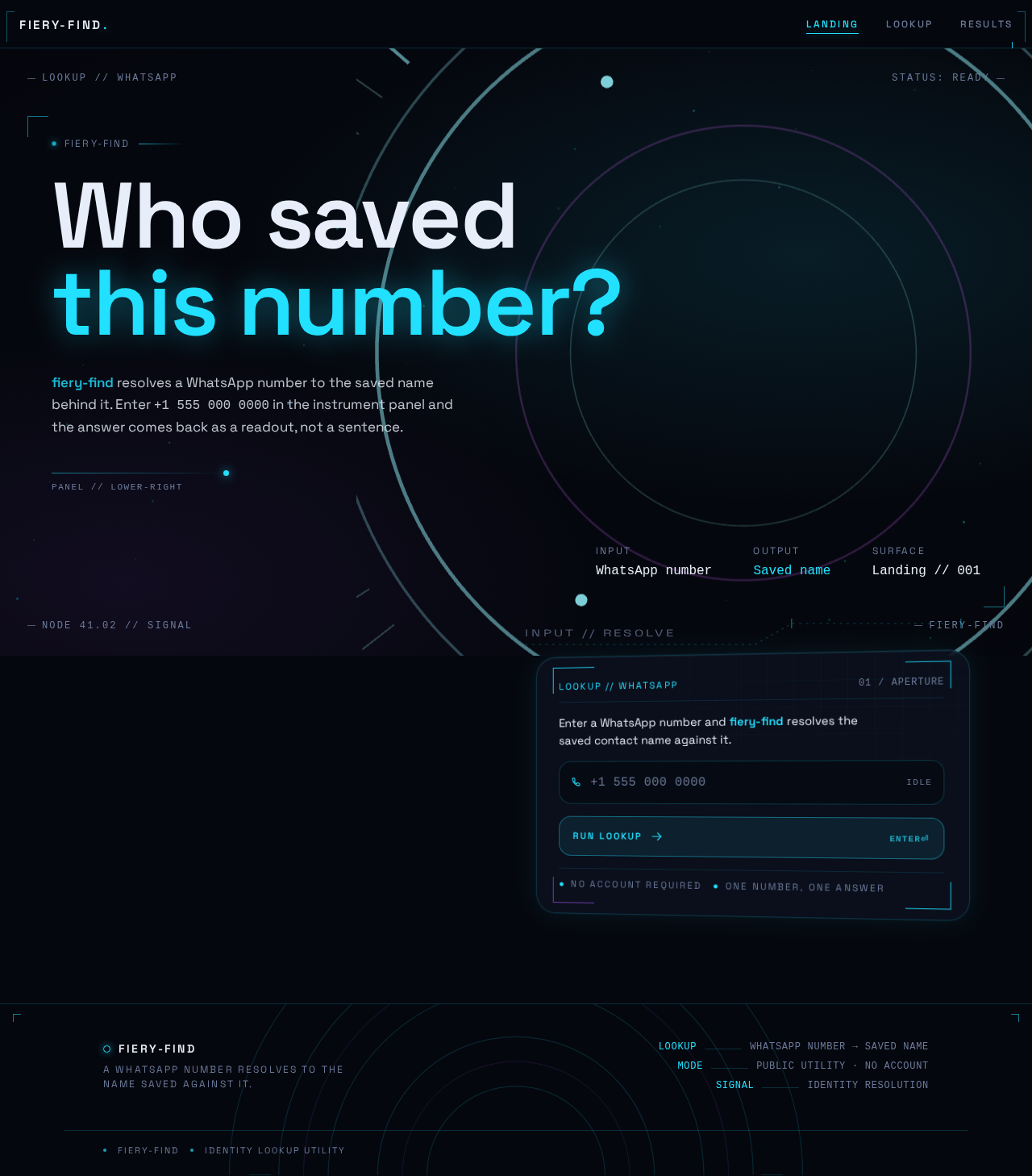
Upper-left, a stacked Space Grotesk headline at clamp(44px, 9vw, 128px) reads "WHO SAVED THIS NUMBER?" in two lines, the second line in electric cyan, occupying roughly half the viewport width. Lower-right, a glass instrument panel floats at a slight 3D tilt (perspective: 1200px; rotateY(-8deg)) holding a single input field with a monospace placeholder +1 555 000 0000 and a cyan CTA labelled RUN LOOKUP. Behind both, a slow-orbiting ring field and particle drift fill the void. HUD micro-labels pin to the four viewport corners with metadata such as LOOKUP // WHATSAPP.
Nothing is centred, nothing is symmetric, and there is no gradient blob. The composition is deliberately asymmetric: the headline anchors the upper-left, the instrument anchors the lower-right, and the ring field binds them. The panel straightens to rotateY(0deg) when the input takes focus, as if the user turned the device toward them. A single cyan light sweep crosses the panel once on load and repeats only on new submissions — one deliberate motion event rather than ambient animation.
8. Interaction Model & Motion Direction
Interaction Model: Animated Motion Tempo: cinematic Hero Dimensionality: webgl
Landing Hero Motion Brief
- Focal subject. The live scan instrument: a procedurally drawn field of concentric rings, radial ticks, and orbiting nodes rendered as a real-time WebGL ring field, with a faint particle drift of roughly 40 low-opacity dots filling the void behind it.
- Input → transformation → outcome thesis. The visitor's number enters the instrument's aperture; the ring field contracts and monospace digits stream through the panel as the lookup runs; the motion resolves into a violet glow bloom as the saved name lands at display scale. The motion is the product's single act of revelation made visible.
- Motion vocabulary. A slow continuous orbit of the ring field behind the hero; a cyan light sweep across the instrument panel on load; a 1.2s scan animation on submit with concentric rings contracting and monospace digits streaming; a 400ms resolve in which the name scales in from 0.96 with a violet glow bloom; scroll-scrubbed parallax between the headline layer and the instrument layer.
- Composed first frame. A near-black viewport. The stacked headline sits upper-left with its second line in electric cyan. The glass instrument panel floats lower-right at
rotateY(-8deg), holding the monospace placeholder and the cyan CTA. The ring field orbits slowly behind both, particles drift, and HUD micro-labels pin to the four corners. Nothing is centred. - Reduced-motion state. Under
prefers-reduced-motion, the rings hold static, the scan becomes an instant state swap, the parallax is removed, and the result appears with a simple fade. All motion is transform/opacity only.
Landing Hero 3D Scene Brief — DIRECTION-DERIVED
The hero dimensionality is webgl, so a crafted real-time scene is expected. The scene is a compact ring field: a set of thin concentric rings with radial tick marks and a small number of orbiting nodes, rendered in electric cyan on the deep navy-black ground, with a low-opacity particle drift behind it. The scene shows the product's defining state — an instrument coming online, waiting for a number, and ready to resolve. It is not decorative: the rings contract on submit and the field resolves into the violet bloom that accompanies the name reveal. The scene must remain legible and performant on mobile, and must degrade to the static reduced-motion arrangement described above.
9. Non-Functional Requirements
NFR-1 — Anonymous access (explicit) All three pages are reachable without an account, sign-in, or any identity establishment. No accepted behavior in fiery-find requires durable, actor-specific state, so no authentication is introduced.
NFR-2 — Mobile-first responsiveness (explicit) The product is designed mobile-first. Readable text and controls stay whole at every viewport: headlines, labels, numbers, and controls stay entirely inside the viewport and their container at 375px, 768px, and 1280px, wrapping or scaling to fit. No other element covers any part of them.
NFR-3 — Motion accessibility (explicit)
All motion is transform/opacity only. Under prefers-reduced-motion, the rings hold static, the scan becomes an instant state swap, the parallax is removed, and the result appears with a simple fade. A usable static arrangement is always available.
NFR-4 — Text legibility (explicit)
Body text #E8EEF9 at 16px on #05070E clears 15:1 contrast. Muted #6B7A99 is reserved for 12px uppercase micro-labels and is never used for paragraphs.
NFR-5 — Lookup responsiveness (required_inference) The lookup interaction must return a result or a clear failure state within a short, bounded time so that the scan animation and the reveal remain a single continuous moment rather than an open-ended wait. If the lookup cannot complete within that bound, the visitor is shown the failure state and offered a retry.
NFR-6 — Input handling (required_inference)
The number field accepts typed and pasted input, including numbers with spaces, dashes, parentheses, and a leading +. Values that cannot be treated as a phone number are rejected with an inline message rather than being submitted.
10. Tech Stack
- Frontend: React, with a WebGL/Three.js ring field for the hero subject as required by the creative direction.
- Backend: Python with FastAPI, providing the lookup endpoint that resolves a submitted WhatsApp number to its saved name.
- Storage: A persistent store for the number-to-name mapping the lookup resolves against. The specific engine is not specified by the source; a relational store is sufficient for the current single-entity lookup.
- Deployment: Docker with docker-compose, running the frontend and the backend as the project's services. Kubernetes is not required for the current delivery shape.
11. Assumptions and Constraints
- A-1 (assumption) The lookup resolves against a number-to-name mapping available to the application backend. The source does not specify the origin of that mapping; the current delivery assumes the application owns it.
- A-2 (assumption) The submitted number and its resolved name are transient. No lookup history, saved record, or personal account state is retained, because no accepted behavior requires it.
- A-3 (constraint) The product is anonymous. No sign-in, account creation, or identity establishment is introduced, because no accepted behavior requires durable actor-specific state.
- A-4 (constraint) The product performs lookup only. It does not message, contact, or otherwise act on the number's owner, and it does not manage, export, or share contact data.
- A-5 (constraint) The creative direction is authoritative for visuals, motion, and layout. The generic indigo/blue-on-white SaaS template is forbidden for this project.
- A-6 (constraint) The page inventory is fixed at Landing, Lookup, and Results. No additional pages are introduced.
12. Glossary
- WhatsApp number — the phone number submitted by the visitor as the lookup input.
- Saved name — the contact name associated with a WhatsApp number; the product's single output.
- Lookup — the act of submitting a WhatsApp number and receiving the saved name associated with it.
- Lookup User — the single accepted active human persona: a person who has a WhatsApp number and wants to learn the saved name associated with it.
- Scan state — the in-progress visual state of the instrument panel while a lookup runs: contracting rings, streaming monospace digits, and a scanning status label.
- Resolved state — the completed visual state in which the saved name is displayed at display scale inside a violet halo.
- Instrument panel — the glass panel that holds the number input and the submit control, and that flips from scanning to resolved.
- HUD micro-label — a 12px uppercase label with
0.18emtracking, pinned to the viewport corners, reflecting live product state.
Who savedthis number?
fiery-find resolves a WhatsApp number to the saved name behind it. Enter +1 555 000 0000 in the instrument panel and the answer comes back as a readout, not a sentence.
Enter a WhatsApp number and fiery-find resolves the saved contact name against it.
Who savedthis number?
fiery-find resolves a WhatsApp number to the saved name behind it. Enter +1 555 000 0000 in the instrument panel and the answer comes back as a readout, not a sentence.
Enter a WhatsApp number and fiery-find resolves the saved contact name against it.
No comments yet. Be the first!