fiery-complete

byTarak Patil

Build a complete full-stack certification exam prep SaaS application with the following specifications: ## PRODUCT OVERVIEW Create "ExamPrep Pro" - a micro SaaS that helps users prepare for professional certification exams (like ISA Certified Arborist, PMP, AWS, etc.). The app provides practice questions, progress tracking, study schedules, and mock exams. ## TARGET USERS - Professionals preparing for certification exams with booked exam dates - Study groups and training centers - Individual learners who need structured prep ## CORE FEATURES ### 1. User Authentication & Onboarding - Email/password signup with email verification - Google OAuth login option - Onboarding flow: select exam type, set exam date, choose daily study time - User dashboard showing progress, streak, and next study session ### 2. Exam Selection & Setup - Browse available certification exams by category (IT, Project Management, Trades, Healthcare, etc.) - Each exam has: name, description, total questions, passing score, recommended study hours, price - Users can search and filter exams - After selecting an exam, users set their exam date and daily study goal ### 3. Practice Question Bank - Multiple choice questions (4 options, 1 correct answer) - Questions organized by topic/module - Each question includes: - Question text - 4 answer options - Correct answer with detailed explanation - Difficulty level (easy/medium/hard) - Topic tag - Users answer questions one at a time - Immediate feedback: show correct/incorrect with explanation - Bookmark questions for review ### 4. Adaptive Learning System - Track user performance by topic - Identify weak areas and prioritize those questions - Show confidence score for each topic (0-100%) - Recommend which topics to study next based on exam date and current progress ### 5. Mock Exams - Full-length practice exams that simulate real exam conditions - Timer countdown matching actual exam duration - Randomized question selection from question bank - Score report at end with: - Overall percentage - Pass/fail prediction - Breakdown by topic - Time spent per question - Questions to review ### 6. Study Schedule & Reminders - Auto-generated study plan based on: - Exam date - Total questions/topics - Daily study time preference - Daily study goals with progress tracking - Email reminders for missed study sessions - Streak counter to encourage daily practice ### 7. Progress Dashboard - Visual progress bar toward exam readiness - Topics mastered vs. topics needing work - Daily/weekly study activity chart - Mock exam score history - Predicted pass probability based on current performance ### 8. Payment & Subscription - Stripe integration for payments - Pricing tiers: - Free: 50 practice questions, 1 mock exam - Pro ($29/month or $99 one-time): unlimited questions, unlimited mock exams, all features - Subscription management page - Receipts via email ### 9. Admin Dashboard - Add/edit/delete exams and questions - Bulk import questions via CSV - View user analytics (signups, active users, revenue) - Manage subscriptions and refunds ## TECHNICAL REQUIREMENTS ### Frontend - React with TypeScript - Tailwind CSS for styling - Responsive design (mobile-first) - React Router for navigation - React Query for data fetching - Recharts for progress charts and analytics ### Backend - Node.js with Express - PostgreSQL database with Prisma ORM - JWT-based authentication - RESTful API architecture - Rate limiting and input validation ### Database Schema Create these tables: - users (id, email, password_hash, name, exam_date, daily_study_minutes, created_at) - exams (id, name, category, description, total_questions, passing_score, price, created_at) - questions (id, exam_id, topic, question_text, options JSON, correct_answer, explanation, difficulty, created_at) - user_progress (id, user_id, exam_id, topic, questions_answered, correct_count, last_studied) - bookmarks (id, user_id, question_id, created_at) - mock_exams (id, user_id, exam_id, score, topic_breakdown JSON, duration_seconds, created_at) - subscriptions (id, user_id, stripe_customer_id, stripe_subscription_id, status, current_period_end) ### API Endpoints - POST /api/auth/signup, /api/auth/login, /api/auth/logout - GET /api/exams, /api/exams/:id, /api/exams/:id/questions - POST /api/questions/:id/answer - GET /api/progress, /api/progress/by-topic - POST /api/mock-exams/start, /api/mock-exams/:id/submit - GET /api/study-plan - POST /api/webhooks/stripe (payment webhooks) ### Integrations - Stripe for payments (test mode initially) - SendGrid or Resend for transactional emails - PostgreSQL database (use connection string from environment) ## UI/UX DESIGN - Clean, modern interface with focus on readability - Color scheme: blue (#3B82F6) primary, green (#10B981) for success, red (#EF4444) for errors - Card-based layout with subtle shadows - Progress bars and circular progress indicators - Mobile-responsive navigation with hamburger menu - Loading states and error handling throughout ## PAGES TO BUILD 1. Landing page (hero, features, pricing, testimonials, CTA) 2. Signup/Login pages 3. User dashboard (main study interface) 4. Exam browser/search page 5. Exam detail page 6. Practice question interface 7. Mock exam interface with timer 8. Progress/analytics page 9. Study schedule page 10. Account settings & subscription management 11. Admin dashboard (exam/question management) 12. Payment success/failure pages ## DEPLOYMENT READY - Environment variables for database URL, Stripe keys, email API key, JWT secret - Docker configuration for easy deployment - Production build optimization - Error logging and monitoring setup ## START BUILDING Generate the complete application with all features, pages, components, API routes, database schema, and authentication. Make it production-ready with proper error handling, loading states, and responsive design. Include sample data for 3 certification exams with 50+ questions each for testing.

Landing pageSignup/Login pagesMock exam interface with timer
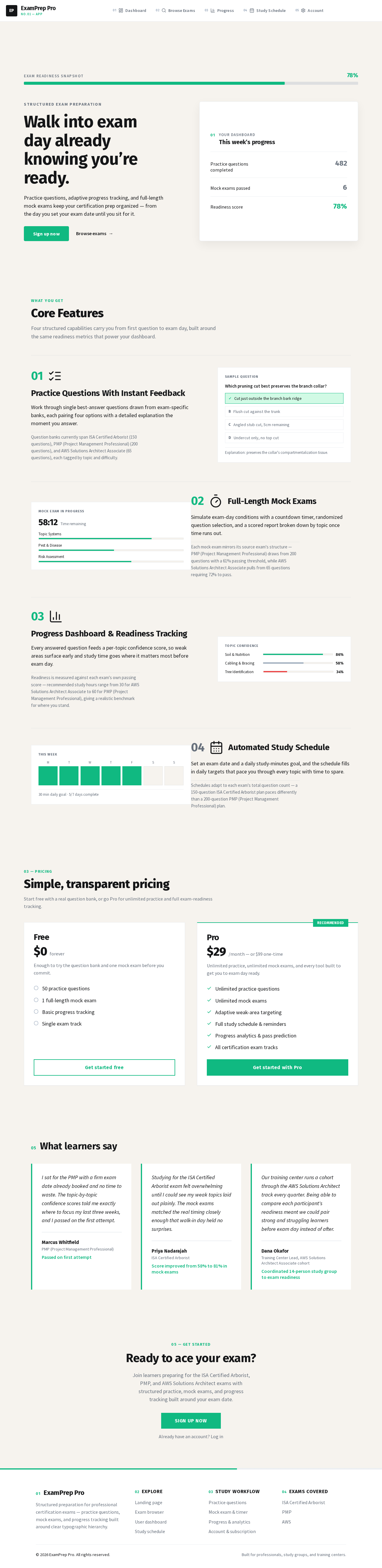
Landing page

Comments (0)

No comments yet. Be the first!

System Requirements

System Requirement Document
Page 1 of 9

System Requirements Document for fiery-complete

1. Introduction

ExamPrep Pro is a micro SaaS application designed to assist users in preparing for professional certification exams such as ISA Certified Arborist, PMP, and AWS. The application provides a comprehensive suite of tools including practice questions, progress tracking, study schedules, and mock exams. It targets professionals with booked exam dates, study groups, training centers, and individual learners who require structured preparation.

2. System Overview

ExamPrep Pro is a full-stack application that delivers a structured and user-friendly interface for exam preparation. It includes features such as user authentication, exam selection, practice question banks, adaptive learning, mock exams, study schedules, and progress dashboards. The application supports both free and paid subscription models, with payment processing handled via Stripe. An admin dashboard is available for managing exams, questions, and user analytics.

Page 2 of 9

2a. Product Interpretation and Delivery Boundary

ExamPrep Pro is delivered as a SaaS application with a responsive, mobile-first design. It uses a combination of React with TypeScript for the frontend and Node.js with Express for the backend. PostgreSQL is used for data persistence, and Stripe is integrated for payment processing. The application includes a set of predefined pages and functionalities, with user access managed through email/password and Google OAuth authentication. The system is designed to be production-ready, with error handling, monitoring, and logging capabilities.

2b. Source Content Inventory

Not applicable as no content source directive was provided.

2c. Page Content and Component Coverage

Landing page

  • Hero Section: Introduction to ExamPrep Pro, key features, and call to action.
  • Features Overview: Detailed description of core features.
  • Pricing Information: Explanation of free and pro tiers.
  • Testimonials: User testimonials and success stories.
  • Call to Action: Sign-up prompts and contact information.

Signup/Login pages

  • Signup Form: Email/password fields, Google OAuth option, email verification.
  • Login Form: Email/password fields, Google OAuth option.
  • Verification Process: Email verification workflow.
Page 3 of 9

User dashboard

  • Progress Overview: Visual progress bar, streak counter, next study session.
  • Exam Readiness: Topics mastered vs. topics needing work.
  • Upcoming Sessions: Next scheduled study session details.

Exam browser/search page

  • Exam Categories: Browse exams by category.
  • Search and Filter: Search bar and filter options.
  • Exam Listings: List of available exams with metadata.

Exam detail page

  • Exam Information: Name, description, total questions, passing score, recommended study hours, price.
  • Setup Options: Set exam date and daily study goal.

Practice question interface

  • Question Display: One question at a time with multiple-choice options.
  • Feedback Mechanism: Immediate correctness feedback with explanations.
  • Bookmarking: Option to bookmark questions for review.

Mock exam interface with timer

  • Exam Simulation: Full-length practice exam with timer.
  • Randomized Questions: Random selection from question bank.
  • Score Report: Overall percentage, pass/fail prediction, topic breakdown.
Page 4 of 9

Progress/analytics page

  • Readiness Bar: Visual representation of exam readiness.
  • Performance Breakdown: Topic performance and activity chart.
  • Mock Exam History: Historical scores and predicted pass probability.

Study schedule page

  • Study Plan: Auto-generated based on exam date and preferences.
  • Daily Goals: Track daily study goals and progress.
  • Reminders: Email reminders for missed sessions.

Account settings & subscription management

  • Subscription Details: View and manage subscription status.
  • Payment History: Access to past receipts and payment details.
  • Account Settings: Update personal information and preferences.

Admin dashboard

  • Exam Management: Add/edit/delete exams and questions.
  • Bulk Import: CSV import for questions.
  • User Analytics: View signups, active users, and revenue.
  • Subscription Management: Manage subscriptions and process refunds.

Payment success/failure pages

  • Success Page: Confirmation of successful payment.
  • Failure Page: Notification of payment failure and retry options.
Page 5 of 9

3. Functional Requirements

  • As an Individual Learner, I should be able to sign up using email/password or Google OAuth, verify my email, and access the application. (explicit)
  • As an Individual Learner, I should be able to select an exam, set my exam date, and choose my daily study time during onboarding. (explicit)
  • As an Individual Learner, I should be able to browse, search, and filter certification exams by category. (explicit)
  • As an Individual Learner, I should be able to practice questions one at a time, receive immediate feedback, and bookmark questions. (explicit)
  • As an Individual Learner, I should be able to take full-length mock exams with a timer and receive a detailed score report. (explicit)
  • As an Individual Learner, I should be able to view my progress, track my study streak, and see my next study session on the dashboard. (explicit)
  • As an Individual Learner, I should be able to manage my subscription and view payment history. (explicit)
  • As an Administrator, I should be able to manage exams and questions, view user analytics, and handle subscriptions and refunds. (explicit)
  • As a Study Group or Training Center Participant, I should be able to access shared study resources and track group progress. (explicit)

4. User Personas

  • Individual Learner: Engages with the application to select exams, practice questions, track progress, and manage subscriptions.
  • Study Group or Training Center Participant: Uses the application for shared study resources and group progress tracking.
  • Administrator: Manages the content, user analytics, and subscription processes within the application.

5. Core User Flows

Page 6 of 9

Individual Learner

  1. Signup/Login: Access the application via email/password or Google OAuth.
  2. Onboarding: Select exam type, set exam date, and choose daily study time.
  3. Exam Selection: Browse and select an exam, set up study goals.
  4. Practice Questions: Engage with practice questions, receive feedback, bookmark for review.
  5. Mock Exams: Take mock exams, receive detailed score reports.
  6. Progress Tracking: Monitor progress, streaks, and upcoming sessions on the dashboard.
  7. Subscription Management: Manage subscription status and view payment history.

Study Group or Training Center Participant

  1. Access Shared Resources: Engage with shared study materials and resources.
  2. Track Group Progress: Monitor group study progress and performance.

Administrator

  1. Manage Content: Add/edit/delete exams and questions, import questions via CSV.
  2. View Analytics: Access user signups, active users, and revenue data.
  3. Handle Subscriptions: Manage user subscriptions and process refunds.
Page 7 of 9

6. Visuals Colors and Theme

  • Muse: Erik Spiekermann
  • Palette:
    • Background: #F6F3EE
    • Surface: #FFFFFF
    • Text: #141517
    • Primary: #10B981
    • Accent: #EF4444
    • Muted: #A0AEC0
  • Typography:
    • Headings: Fira Sans
    • Body: Source Sans
    • Scale: 1.333 modular, 56/40/28/18/16
  • Shape Language: Clear columns, generous margins, numbered systems, iconography with type.
  • Layout: Structured grid system with strong typographic hierarchy.
  • Motion: Functional transitions, restrained tempo.

7. Signature Design Concept

The landing page will feature an editorial-style composition with a dominant progress dashboard graphic. The primary green will highlight key stats and headlines, guiding users through the interface with a clear typographic hierarchy and structured layout.

Page 8 of 9

8. Interaction Model & Motion Direction

  • Interaction Model: Static
  • Motion Tempo: Restrained
  • Hero Dimensionality: Flat
  • Landing Hero Motion Brief: The hero section will feature a composed editorial-style dashboard graphic, focusing on progress and readiness stats. The motion will be minimal, with subtle transitions to reinforce user actions.

9. Non-Functional Requirements

  • Responsive Design: Mobile-first approach with hamburger navigation.
  • Performance: Optimized for fast loading and smooth interactions.
  • Security: JWT-based authentication, input validation, and rate limiting.
  • Reliability: Error logging and monitoring setup for production readiness.

10. Tech Stack

  • Frontend: React with TypeScript, Tailwind CSS, React Router, React Query, Recharts.
  • Backend: Node.js with Express, PostgreSQL with Prisma ORM.
  • Authentication: JWT-based.
  • Payments: Stripe integration.
  • Emails: SendGrid or Resend for transactional emails.
  • Deployment: Docker configuration, environment variables for sensitive data.
Page 9 of 9

11. Assumptions and Constraints

  • Assumption: Users will have internet access and modern browsers.
  • Constraint: Must use specified tech stack and design guidelines.
  • Assumption: Stripe and email services will be available and configured.

12. Glossary

  • JWT: JSON Web Token, a compact, URL-safe means of representing claims to be transferred between two parties.
  • SaaS: Software as a Service, a software distribution model in which applications are hosted by a service provider and made available to customers over the internet.
  • OAuth: Open Authorization, a standard for access delegation commonly used as a way to grant websites or applications limited access to user information without exposing passwords.
Landing page design preview
Landing page: Learn about platform
Signup/Login pages: Log in as admin
Admin dashboard: Manage exams and questions
Admin dashboard: Import questions via CSV
Admin dashboard: View user analytics
Admin dashboard: Manage subscriptions and refunds
Landing page design preview
Landing page: Learn about platform
Signup/Login pages: Log in as admin
Admin dashboard: Manage exams and questions
Admin dashboard: Import questions via CSV
Admin dashboard: View user analytics
Admin dashboard: Manage subscriptions and refunds