fierce-opsdesk
 Naresh Vasikarla
Absolutely. For Opsdesk, I’d make the mobile app a read-first engineering command center: everything an engineer needs to understand the state of their projects, cloud, code, security, and work — without Docker. Build a native-quality Opsdesk mobile app for iOS and Android using the existing Opsdesk backend/APIs and React-based architecture. Goal Turn Opsdesk into a mobile engineering command center where a developer can open the app and immediately see the health, activity, security, cost, deployments, and connected services across their projects — minimizing the need to switch between tools. Important * Reuse all existing Opsdesk APIs, authentication, models, and business logic. * Do NOT add Docker/container/image functionality to the mobile app. * Do NOT duplicate backend logic in the mobile client. * Prefer existing API endpoints over creating duplicate APIs. * The mobile UI must be optimized for phone screens, touch, intermittent connectivity, and fast scanning. * Use secure OAuth/token handling. Never expose secrets or cloud credentials in the client. Mobile Architecture * React Native + TypeScript. * Reuse existing React components/design language where practical. * Shared API/types/models with the existing Opsdesk application where possible. * Central API client with authentication, retries, caching, pagination, error handling, and refresh. * Secure local credential/token storage. * Pull-to-refresh and background refresh where platform permits. * Dark/light mode. * Responsive layouts for iPhone and Android. * Deep linking into detailed resources. * Push notifications for important alerts where supported. Main Navigation Use a simple bottom navigation: 1. Home 2. Projects 3. Activity 4. Alerts 5. More Home Dashboard Create a highly useful engineering overview: * Overall system/project status * GitHub activity * Open PRs * Failed/recent GitHub Actions * Security alerts * Dependabot/code scanning alerts * AWS cost/current spend * Cost changes/trends * Recent deployments * Recent commits * Issues requiring attention * Connected application status * Recent important events * Quick actions The dashboard should prioritize things requiring attention, not simply display raw data. Example sections: Needs Attention * Failed deployment * Critical security alert * PR awaiting review * AWS cost spike * Failed workflow * Expiring credential/integration * Service/integration error Today * Commits * PRs * deployments * workflow runs * security events Infrastructure * AWS account/environment summary * Cost * major resource/service activity Projects Allow users to see all connected repositories/projects. For each project show: * Repository * Branch * Last commit * Open PRs * Open issues * GitHub Actions status * Deployment status * Security status * Recent activity * Project health summary Project detail should provide: * Commits * PRs * Issues * Actions/workflows * Releases * Security alerts * Code scanning * Dependabot * Deployment/activity history GitHub Use all relevant existing GitHub APIs. Expose: * Repositories * Organizations * Commits * Branches * Pull requests * Reviews * Issues * Releases * GitHub Actions * Workflow runs * Failed workflows * Security alerts * Dependabot alerts * Code scanning alerts * Secret scanning status/alerts where API access permits * Repository health * Recent activity Provide useful filtering by: * Repository * Organization * Status * Severity * Time range AWS Use the existing AWS integrations/APIs. Expose mobile-friendly views for: * AWS accounts * Regions * Cost Explorer * Current spend * Cost by service * Cost trends * Cost anomalies * Budget status * Major cost changes * Resource/service summaries * Recent AWS activity where APIs are available Add simple visualizations for cost trends and service breakdowns. Do not attempt to reproduce the entire AWS console. Surface the information an engineer needs most often. Security Create a unified security dashboard aggregating available security APIs. Show: * Critical/high/medium/low alerts * GitHub security alerts * Dependabot * Code scanning * Secret scanning * AWS security findings where available * Alert trends * New alerts * Resolved alerts * Repository/resource affected * Severity * Age * Recommended next action when available Allow drill-down into the original provider/resource. Activity Create a unified engineering activity stream across all connected APIs. Normalize events into: * Commit * PR * Issue * Deployment * Workflow * Release * Security event * AWS event * Cost event * Integration event Each event should contain: * Time * Source * Project/repository * Actor * Event type * Status * Link to original resource Support filtering by project, source, event type, and time. Alerts Create a single cross-platform alert center. Group alerts into: * Critical * High * Medium * Informational Support: * Read/unread * Acknowledged * Filtering * Sorting * Deep links * Alert details * Original-provider links Avoid notification spam. Aggregate related events where possible. Connected Apps Provide a Connected Apps screen showing every available integration. For each integration display: * Provider * Connection status * Account/user * Permissions/scopes * Last successful synchronization * API health * Available capabilities * Reconnect/disconnect where supported Use the existing OAuth/integration APIs. Potential integrations should include everything already supported by Opsdesk, including: * GitHub * AWS * Google * Other existing Opsdesk integrations Do not invent APIs that do not exist. Dynamically surface capabilities from the backend where possible. Search Add global search across available Opsdesk data. Search: * Projects * Repositories * PRs * Issues * Commits * Alerts * AWS resources * Integrations * Activity Results should be grouped by source/type. Notifications Support push notifications for meaningful events: * Critical security alert * Failed deployment * Failed workflow * Important PR activity * AWS cost anomaly * Integration failure Allow users to configure notification preferences. UX Principles The app should feel like a personal engineering cockpit, not a collection of API screens. Prioritize: 1. What needs my attention? 2. What changed? 3. Is everything healthy? 4. What is costing money? 5. Is there a security problem? 6. What happened in my projects? 7. Where do I need to take action? Use cards, status indicators, compact charts, badges, timelines, and drill-down screens. Every card should support: Summary → Detail → Original provider Offline / Performance * Cache recently viewed data. * Display cached data while refreshing. * Clearly show stale data. * Avoid unnecessary API calls. * Parallelize independent API requests. * Paginate large datasets. * Lazy-load expensive screens. * Persist user preferences locally. Security * Secure authentication. * Secure token storage. * No secrets in AsyncStorage/plaintext. * Respect provider OAuth scopes. * Never expose AWS credentials. * Logout must clear sensitive local credentials. * Handle expired/revoked tokens gracefully. * Backend remains the authority for authorization. Engineering Requirements Before implementation: 1. Inspect the existing Opsdesk repository. 2. Identify every existing API/integration. 3. Identify authentication flow. 4. Identify existing React components and design system. 5. Identify reusable types/models. 6. Map every existing API to a mobile capability. 7. Do not create duplicate backend functionality. Create a mobile API capability matrix: Provider → API → Existing endpoint → Mobile screen/card → Refresh strategy Then implement the mobile app incrementally. Quality Include: * TypeScript strict mode * Unit tests * API/client tests * Component tests * Navigation tests * Authentication tests * Error/loading/empty states * Accessibility * Responsive phone layouts * Dark/light themes * Offline/cache behavior Do not claim features are complete until the corresponding APIs and UI flows have actually been implemented and tested. Definition of Done A user can install Opsdesk on their phone, authenticate once, and immediately see: Projects + GitHub + deployments/workflows + security + AWS costs + alerts + activity + connected apps in one unified mobile experience, using the existing Opsdesk APIs and integrations, without needing to open separate engineering dashboards for routine visibility. This keeps the mobile app focused on visibility, triage, and navigation, rather than trying to turn a phone into a full developer workstation.

Comments (0)
Sign in to leave a comment
System Requirements
System Requirements Document for fierce-opsdesk
1. Introduction
fierce-opsdesk is the mobile engineering command center for Opsdesk: a read-first iOS and Android application that lets a developer open their phone and immediately understand the health, activity, security, cost, deployments, and connected services across their projects — minimizing the need to switch between tools.
The product intent is visibility, triage, and navigation, not a full developer workstation. The app reuses the existing Opsdesk backend, APIs, authentication, models, and business logic; it does not duplicate backend logic in the client, does not add Docker/container/image functionality, and prefers existing API endpoints over creating duplicate APIs. The audience is the Engineer: a developer or on-call engineer who scans a phone between meetings and at 3am and needs to know what needs attention, what changed, whether everything is healthy, what is costing money, whether there is a security problem, what happened in their projects, and where action is needed.
2. System Overview
fierce-opsdesk is a React Native + TypeScript mobile client for iOS and Android that consumes the existing Opsdesk backend/APIs and reuses the existing Opsdesk authentication, models, business logic, React components, and design language where practical. A central API client handles authentication, retries, caching, pagination, error handling, and refresh; credentials and tokens are stored in secure platform storage; the backend remains the authority for authorization.
The app is organized around a five-tab bottom navigation — Home, Projects, Activity, Alerts, More — with Home Dashboard, Project Details, GitHub, AWS, Security, Connected Apps, Search, and Notifications as the working surfaces behind those tabs. Every card follows Summary → Detail → Original provider. Data is cached, stale data is clearly marked, independent requests are parallelized, large datasets are paginated, expensive screens are lazy-loaded, and user preferences are persisted locally.
Current delivery covers the mobile command center only. Docker/container/image functionality is explicitly excluded from the mobile app, the entire AWS console is explicitly not reproduced, and no APIs are invented that do not exist. Provider-dependent data (secret scanning, recent AWS activity, AWS security findings, recommended next actions, reconnect/disconnect, push notifications, background refresh) is surfaced only where the corresponding API access or platform capability permits.
2a. Product Interpretation and Delivery Boundary
fierce-opsdesk is a first-party mobile client. The Engineer installs the app, establishes identity once through the existing Opsdesk authentication, and from then on sees a unified read-first view of projects, GitHub, deployments and workflows, security, AWS costs, alerts, activity, and connected apps.
Delivery ownership is split deliberately:
- First-party mobile surfaces (this app): Home entry, Login, Sign Up, Home Dashboard, Projects, Project Details, GitHub, AWS, Security, Activity, Alerts, More, Connected Apps, Search, Notifications. These own the Engineer's interaction, scanning, filtering, triage, and drill-down.
- Existing Opsdesk backend/APIs: the authority for provider data, authorization, business logic, and integration state. The mobile client never reimplements this logic and never invents endpoints.
- Provider surfaces (GitHub, AWS, Google, other existing Opsdesk integrations): own the original resources. The app links out to them for the "Original provider" step of every card; it does not reproduce them.
- Platform services: own push notification delivery and background refresh scheduling, where the platform permits.
Identity is application-owned because the Engineer must privately own and resume durable, actor-specific state (acknowledged alerts, read/unread state, notification preferences, cached views) and because provider connections and their scopes must remain bound to the correct participant. First use is anonymous: the Home entry surface is reachable without identity, and protected state remains unavailable until identity is established through Login or Sign Up. No adjacent account-management capabilities (team administration, role management, billing) are introduced.
Current scope is the mobile command center. Future scope is not committed in this document.
2b. Source Content Inventory
The authoritative reference directive identifies the existing Opsdesk repository, backend/APIs, authentication, models, business logic, React components, and design system as a content_source. The concrete inventory of that source — the enumerated API list, endpoint paths, authentication flow details, component names, and reusable type/model names — is not present in the supplied evidence and must be produced by the pre-implementation inspection defined in Section 3 (FR-40 through FR-46) and captured in the mobile API capability matrix (Provider → API → Existing endpoint → Mobile screen/card → Refresh strategy). No endpoint names, component names, or model names are invented here.
2c. Page Content and Component Coverage
Home
- Information/state: anonymous first impression and entry into the Opsdesk mobile command center; product identity, the value proposition of one unified engineering view, and the two entry paths (returning verification and self-service enrollment).
- Primary actions: proceed to Login; proceed to Sign Up.
- Supporting actions: none beyond entry.
- Domain entities: none loaded; no protected state is available here.
- Component responsibilities: entry surface presenting the product intent and the two identity paths; no provider data, no cached protected data, no alert counts.
- States: loading (minimal, static entry), empty (not applicable), success (Engineer proceeds to Login or Sign Up), error (entry remains usable; identity paths remain available), recovery (retry entry navigation).
Login
- Information/state: returning verification for the Engineer using existing Opsdesk authentication; entry fields required by that existing flow.
- Primary actions: submit credentials to the existing Opsdesk authentication; complete returning verification.
- Supporting actions: navigate to Sign Up; recover from invalid credentials.
- Domain entities: Engineer identity session; secure token/credential storage target.
- Component responsibilities: credential entry, submission, error display, secure handoff of the resulting token to secure storage.
- States: loading (submission in progress), empty (initial form), success (identity established, secure token stored, navigation to Home Dashboard), error (invalid credentials, network failure, expired/revoked token), recovery (retry, re-enter, or route to Sign Up).
Sign Up
- Information/state: self-service enrollment for the Engineer, because the source establishes no invitation, provisioning, or pre-existing-account boundary.
- Primary actions: submit enrollment details to the existing Opsdesk authentication; establish identity.
- Supporting actions: navigate to Login; recover from enrollment errors.
- Domain entities: Engineer identity; secure token/credential storage target.
- Component responsibilities: enrollment form, submission, validation and error display, secure handoff of the resulting token to secure storage.
- States: loading (submission in progress), empty (initial form), success (identity established, secure token stored, navigation to Home Dashboard), error (validation failure, duplicate identity, network failure), recovery (correct and resubmit, or route to Login).
Home Dashboard
- Information/state: overall system/project status; GitHub activity; open PRs; failed/recent GitHub Actions; security alerts; Dependabot/code scanning alerts; AWS cost/current spend; cost changes/trends; recent deployments; recent commits; issues requiring attention; connected application status; recent important events; quick actions. Priority-ordered, not raw data.
- Primary actions: scan Needs Attention; tap a Needs Attention row to open its detail; tap the severity distribution bar to filter the list beneath it; pull-to-refresh.
- Supporting actions: quick actions; navigate to Projects, Activity, Alerts, More; open a card's detail and then the original provider.
- Domain entities: project status, GitHub activity, pull requests, workflow runs, security alerts, Dependabot alerts, code scanning alerts, AWS cost and spend, cost trends, deployments, commits, issues, connected application status, events.
- Component responsibilities: full-width status strip at top with workspace name and the 48px tangerine tabular count of items needing attention; horizontal severity distribution bar (tangerine/amber/lime/grey) that doubles as a filter tap target; Needs Attention as a dense list of edge-barred rows covering failed deployment, critical security alert, PR awaiting review, AWS cost spike, failed workflow, expiring credential/integration, and service/integration error; Today as a 2x2 stat grid with big tabular numerals covering commits, PRs, deployments, workflow runs, and security events; Infrastructure with AWS account/environment summary, cost, major resource/service activity, and a compact cost sparkline; Projects as a horizontally scrolling row of repo chips.
- States: loading (hairline-bordered placeholder rows, never shimmer gradients), empty (no items needing attention — the count reads zero and the list states that nothing requires attention), success (priority-ordered panels rendered with tabular numerals), stale (cached data shown at 60% opacity with a muted "Updated 4m ago" line), error (per-panel error with retry; other panels remain usable), recovery (pull-to-refresh; retry the failed panel).
Projects
- Information/state: all connected repositories/projects, each with repository, branch, last commit, open PRs, open issues, GitHub Actions status, deployment status, security status, recent activity, and project health summary.
- Primary actions: open a project to Project Details; pull-to-refresh.
- Supporting actions: filter and sort the project list; navigate to GitHub for repository-level views.
- Domain entities: repository, branch, commit, pull request, issue, workflow/actions status, deployment status, security status, activity, project health.
- Component responsibilities: project list rows with repository identity, branch, last commit, open PR and issue counts, Actions status, deployment status, security status, recent activity, and health summary; pagination for large project sets.
- States: loading (hairline-bordered placeholder rows), empty (no connected repositories/projects — states that none are connected and points to Connected Apps), success (project rows with tabular counts), stale (cached rows at 60% opacity with timestamp), error (list-level error with retry), recovery (pull-to-refresh; retry).
Project Details
- Information/state: focused project workspace for commits, PRs, issues, actions/workflows, releases, security alerts, code scanning, Dependabot, and deployment/activity history.
- Primary actions: drill into a commit, PR, issue, workflow run, release, security alert, code scanning alert, Dependabot alert, or deployment/activity entry; open the original provider.
- Supporting actions: filter by status, severity, and time range; pull-to-refresh; lazy-load expensive sections.
- Domain entities: commit, pull request, issue, workflow/actions run, release, security alert, code scanning alert, Dependabot alert, deployment, activity event.
- Component responsibilities: ruled readout rows (label left in muted 13px, value right in Inter Tight tabular numerals one weight heavier, separated by 1px rules) for each section; section-level lazy loading; provider link per row.
- States: loading (per-section hairline placeholders), empty (per-section empty state, e.g. no releases), success (ruled readout rows), stale (cached sections at 60% opacity with timestamp), error (per-section error with retry), recovery (pull-to-refresh; retry the failed section).
GitHub
- Information/state: unified filtered view of available GitHub data — repositories, organizations, commits, branches, pull requests, reviews, issues, releases, GitHub Actions, workflow runs, failed workflows, security alerts, Dependabot alerts, code scanning alerts, secret scanning status/alerts where API access permits, repository health, and recent activity.
- Primary actions: filter by repository, organization, status, severity, and time range; drill into an item; open the original provider.
- Supporting actions: pull-to-refresh; paginate large datasets; lazy-load expensive sections.
- Domain entities: repository, organization, commit, branch, pull request, review, issue, release, workflow run, failed workflow, security alert, Dependabot alert, code scanning alert, secret scanning status/alert, repository health, activity.
- Component responsibilities: filter controls for repository, organization, status, severity, and time range; grouped result rows; provider links; pagination.
- States: loading (hairline placeholders), empty (no GitHub data available or no results for the active filters), success (grouped filtered rows), stale (cached rows at 60% opacity with timestamp), error (error with retry; secret scanning absence is shown as unavailable where API access does not permit), recovery (pull-to-refresh; adjust filters; retry).
AWS
- Information/state: mobile-friendly AWS views — AWS accounts, regions, Cost Explorer, current spend, cost by service, cost trends, cost anomalies, budget status, major cost changes, resource/service summaries, and recent AWS activity where APIs are available. The entire AWS console is explicitly not reproduced.
- Primary actions: select account and region; read cost and resource summaries; drill into a cost anomaly, budget, or resource/service summary; open the original provider.
- Supporting actions: pull-to-refresh; simple visualizations for cost trends and service breakdowns.
- Domain entities: AWS account, region, cost and current spend, cost by service, cost trend, cost anomaly, budget status, major cost change, resource/service summary, AWS activity.
- Component responsibilities: ruled readout rows for cost and resource values with tabular numerals; a single-line cost trend with a marked anomaly dot; flat tangerine/lime blocks for service breakdowns; provider links.
- States: loading (hairline placeholders), empty (no AWS accounts connected, or no data available for the selected account/region), success (ruled readouts and compact charts), stale (cached values at 60% opacity with timestamp), error (error with retry; unavailable data shown as unavailable where APIs do not provide it), recovery (pull-to-refresh; change account/region; retry).
Security
- Information/state: unified security dashboard aggregating available security APIs — critical/high/medium/low alerts, GitHub security alerts, Dependabot, code scanning, secret scanning, AWS security findings where available, alert trends, new alerts, resolved alerts, repository/resource affected, severity, age, and recommended next action when available.
- Primary actions: filter by severity and time range; drill into an alert; open the original provider/resource.
- Supporting actions: pull-to-refresh; read alert trends.
- Domain entities: security alert, Dependabot alert, code scanning alert, secret scanning alert, AWS security finding, alert trend, new alert, resolved alert, affected repository/resource, severity, age, recommended next action.
- Component responsibilities: severity distribution strip; alert rows with severity edge bar, affected repository/resource, severity, age, and recommended next action when available; provider drill-down links.
- States: loading (hairline placeholders), empty (no open security alerts — states that nothing is open), success (severity-grouped alert rows), stale (cached rows at 60% opacity with timestamp), error (error with retry; unavailable sources shown as unavailable), recovery (pull-to-refresh; adjust filters; retry).
Activity
- Information/state: unified engineering activity stream across all connected APIs, normalized into commit, PR, issue, deployment, workflow, release, security event, AWS event, cost event, and integration event. Each event contains time, source, project/repository, actor, event type, status, and link to original resource.
- Primary actions: filter by project, source, event type, and time; open an event's original resource.
- Supporting actions: pull-to-refresh; paginate the stream.
- Domain entities: normalized event with time, source, project/repository, actor, event type, status, and original-resource link.
- Component responsibilities: timeline rows with tabular timestamps; filter controls for project, source, event type, and time; provider links; pagination.
- States: loading (hairline placeholders), empty (no activity for the active filters), success (timeline rows), stale (cached rows at 60% opacity with timestamp), error (error with retry), recovery (pull-to-refresh; adjust filters; retry).
Alerts
- Information/state: single cross-platform alert center grouped into Critical, High, Medium, and Informational, with read/unread and acknowledged state, filtering, sorting, deep links, alert details, and original-provider links. Related events are aggregated where possible to avoid notification spam.
- Primary actions: read/unread an alert; acknowledge an alert; filter; sort; open alert details; open the original provider.
- Supporting actions: deep link into an alert; pull-to-refresh.
- Domain entities: alert with severity group, read/unread state, acknowledged state, details, and original-provider link; aggregated related events.
- Component responsibilities: severity-grouped list with severity edge bars and 999px severity pills; unread count badge; filter and sort controls; aggregation of related events into a single row where possible.
- States: loading (hairline placeholders), empty (no alerts — states that nothing is open), success (severity-grouped rows with read/unread and acknowledged state), stale (cached rows at 60% opacity with timestamp), error (error with retry), recovery (pull-to-refresh; retry; re-open from a deep link).
More
- Information/state: bottom-navigation destination for additional protected Opsdesk functions and settings entry points, including Connected Apps, Search, Notifications, and logout.
- Primary actions: navigate to Connected Apps, Search, and Notifications; log out.
- Supporting actions: read app and account context available from existing Opsdesk APIs.
- Domain entities: navigation entries; account context from existing Opsdesk APIs.
- Component responsibilities: grouped navigation rows; logout action that clears sensitive local credentials.
- States: loading (minimal), empty (not applicable), success (navigation rows rendered), error (navigation remains usable; unavailable entries shown as unavailable), recovery (retry).
Connected Apps
- Information/state: every available integration with provider, connection status, account/user, permissions/scopes, last successful synchronization, API health, available capabilities, and reconnect/disconnect where supported. Integrations include everything already supported by Opsdesk, including GitHub, AWS, Google, and other existing Opsdesk integrations. Capabilities are surfaced dynamically from the backend where possible.
- Primary actions: reconnect or disconnect an integration where supported; open the provider's authorization surface through the existing OAuth/integration APIs.
- Supporting actions: pull-to-refresh; inspect scopes, last synchronization, and API health.
- Domain entities: integration with provider, connection status, account/user, permissions/scopes, last successful synchronization, API health, available capabilities, reconnect/disconnect support.
- Component responsibilities: integration rows with connection status, account/user, scopes, last synchronization, API health, and capability list; reconnect/disconnect controls only where supported; provider links.
- States: loading (hairline placeholders), empty (no integrations available — states that none are connected), success (integration rows with status and capabilities), stale (cached rows at 60% opacity with timestamp), error (error with retry; unavailable capabilities shown as unavailable), recovery (pull-to-refresh; reconnect where supported; retry).
Search
- Information/state: global search across available Opsdesk data covering projects, repositories, PRs, issues, commits, alerts, AWS resources, integrations, and activity, with results grouped by source/type.
- Primary actions: enter a query; open a grouped result; open the original provider.
- Supporting actions: refine the query; paginate large result sets.
- Domain entities: project, repository, pull request, issue, commit, alert, AWS resource, integration, activity.
- Component responsibilities: query input; grouped result sections by source/type; provider links; pagination.
- States: loading (hairline placeholders), empty (no results for the query — states that nothing matched), success (grouped results), stale (cached results at 60% opacity with timestamp), error (error with retry), recovery (edit the query; retry).
Notifications
- Information/state: notification preferences for meaningful events — critical security alert, failed deployment, failed workflow, important PR activity, AWS cost anomaly, and integration failure — plus the platform push-notification permission state where supported.
- Primary actions: configure notification preferences per meaningful event type; persist preferences locally.
- Supporting actions: read the current platform permission state; adjust preferences when permission is unavailable.
- Domain entities: notification preference per event type; platform permission state.
- Component responsibilities: per-event-type preference controls; permission state display; local persistence of preferences.
- States: loading (minimal), empty (defaults shown before any preference is set), success (preferences saved and persisted locally), error (save failure with retry; unsupported platform state shown as unsupported), recovery (retry save; adjust preferences).
3. Functional Requirements
Each requirement is a distinct story point with provenance (explicit, basic_default, required_inference), lifecycle facts, and observable acceptance.
FR-01 — Mobile command center (explicit). As an Engineer, I should open the Opsdesk mobile app and immediately see the health, activity, security, cost, deployments, and connected services across my projects, so that I minimize switching between tools. Trigger: app launch. Observable result: the Home Dashboard renders priority-ordered panels. Access: protected. Failure/recovery: per-panel error with retry. Continuation: drill into any card.
FR-02 — Reuse existing backend (explicit). As an Engineer, I should see data produced by the existing Opsdesk APIs, authentication, models, and business logic, so that the mobile app stays consistent with Opsdesk. Trigger: any data request. Observable result: responses come from existing endpoints. Failure/recovery: backend errors surface with retry. Continuation: unchanged.
FR-03 — No Docker functionality (explicit). As an Engineer, I should not see Docker/container/image functionality in the mobile app. Trigger: any navigation. Observable result: no Docker/container/image surface, card, or action exists. Failure/recovery: not applicable. Continuation: unchanged.
FR-04 — No duplicated backend logic (explicit). As an Engineer, I should receive behavior computed by the backend, not reimplemented in the client. Trigger: any capability. Observable result: the client performs no business-logic duplication. Failure/recovery: not applicable. Continuation: unchanged.
FR-05 — Prefer existing endpoints (explicit). As an Engineer, I should get data through existing API endpoints rather than duplicate APIs. Trigger: any data request. Observable result: existing endpoints are used. Failure/recovery: not applicable. Continuation: unchanged.
FR-06 — Phone-optimized UI (explicit). As an Engineer, I should use a UI optimized for phone screens, touch, intermittent connectivity, and fast scanning. Trigger: any interaction. Observable result: touch targets, compact scanning layouts, and connectivity-tolerant states. Failure/recovery: cached data shown while refreshing. Continuation: unchanged.
FR-07 — Secure OAuth/token handling (explicit). As an Engineer, I should have my OAuth tokens handled securely, with no secrets or cloud credentials exposed in the client. Trigger: authentication and any provider call. Observable result: tokens stored in secure storage; no secrets in the client. Failure/recovery: expired/revoked tokens handled gracefully. Continuation: re-authenticate.
FR-08 — React Native + TypeScript (explicit). As an Engineer, I should use a React Native + TypeScript app. Trigger: app build. Observable result: the app is React Native + TypeScript. Failure/recovery: not applicable. Continuation: unchanged.
FR-09 — Reuse React components/design language (explicit). As an Engineer, I should see the existing Opsdesk design language reused where practical. Trigger: any screen. Observable result: reused components/design language where practical. Failure/recovery: not applicable. Continuation: unchanged.
FR-10 — Shared API/types/models (explicit). As an Engineer, I should benefit from shared API/types/models with the existing Opsdesk application where possible. Trigger: any data request. Observable result: shared types/models used where possible. Failure/recovery: not applicable. Continuation: unchanged.
FR-11 — Central API client (explicit). As an Engineer, I should have all API calls go through a central client with authentication, retries, caching, pagination, error handling, and refresh. Trigger: any data request. Observable result: the central client handles the request lifecycle. Failure/recovery: retries and error handling. Continuation: refresh.
FR-12 — Secure local credential/token storage (explicit). As an Engineer, I should have credentials and tokens stored in secure local storage. Trigger: identity established or refreshed. Observable result: tokens in secure storage, never in AsyncStorage/plaintext. Failure/recovery: storage failure surfaces an error. Continuation: retry.
FR-13 — Pull-to-refresh and background refresh (explicit). As an Engineer, I should pull to refresh and have background refresh where the platform permits. Trigger: pull gesture or platform background schedule. Observable result: data refreshes; the pull-to-refresh indicator resolves into a timestamp. Failure/recovery: refresh failure keeps cached data with a stale marker. Continuation: retry.
FR-14 — Dark/light mode (explicit). As an Engineer, I should use the app in dark or light mode. Trigger: system or app theme setting. Observable result: the theme switches between the graphite dark palette and the paper light palette. Failure/recovery: not applicable. Continuation: unchanged.
FR-15 — Responsive layouts (explicit). As an Engineer, I should get responsive layouts on iPhone and Android. Trigger: device and orientation. Observable result: layouts adapt. Failure/recovery: not applicable. Continuation: unchanged.
FR-16 — Deep linking (explicit). As an Engineer, I should deep link into detailed resources. Trigger: deep link. Observable result: the target detail opens. Failure/recovery: invalid or unauthorized links route to a safe surface. Continuation: navigate normally.
FR-17 — Push notifications (explicit). As an Engineer, I should receive push notifications for important alerts where supported. Trigger: meaningful event. Observable result: a push notification is delivered where the platform supports it. Failure/recovery: unsupported platforms show the state as unsupported. Continuation: open the alert.
FR-18 — Bottom navigation (explicit). As an Engineer, I should navigate with a simple bottom navigation of Home, Projects, Activity, Alerts, and More. Trigger: tab tap. Observable result: the selected tab opens. Failure/recovery: not applicable. Continuation: unchanged.
FR-19 — Home Dashboard content (explicit). As an Engineer, I should see overall system/project status, GitHub activity, open PRs, failed/recent GitHub Actions, security alerts, Dependabot/code scanning alerts, AWS cost/current spend, cost changes/trends, recent deployments, recent commits, issues requiring attention, connected application status, recent important events, and quick actions. Trigger: Home Dashboard open. Observable result: all listed panels render. Failure/recovery: per-panel retry. Continuation: drill into
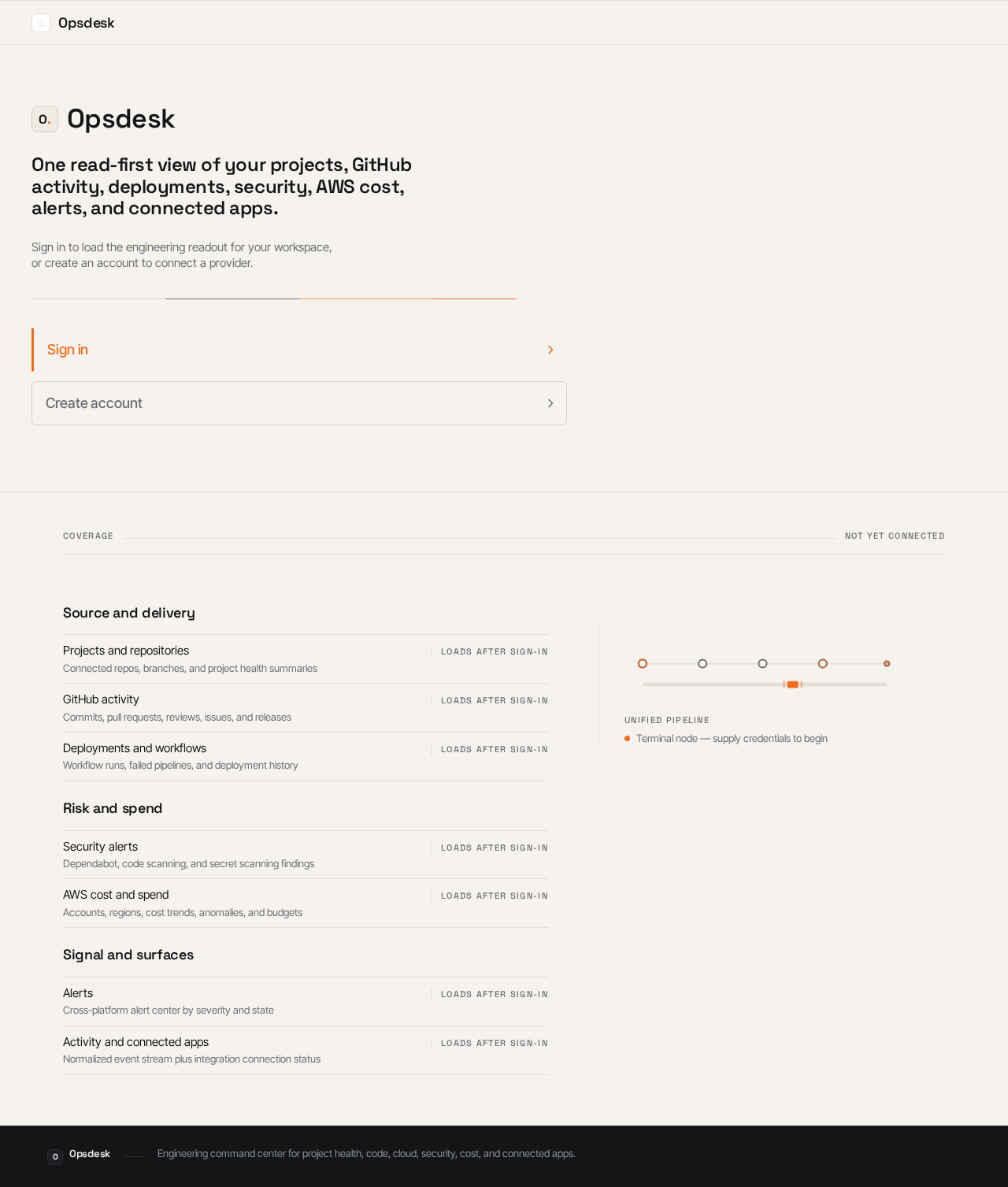
Opsdesk
One read-first view of your projects, GitHub activity, deployments, security, AWS cost, alerts, and connected apps.
Sign in to load the engineering readout for your workspace, or create an account to connect a provider.
Source and delivery
Risk and spend
Signal and surfaces
Opsdesk
One read-first view of your projects, GitHub activity, deployments, security, AWS cost, alerts, and connected apps.
Sign in to load the engineering readout for your workspace, or create an account to connect a provider.
No comments yet. Be the first!