fierce-idea
Create a simple single page design of todo.


Comments (0)
Sign in to leave a comment
System Requirements
fierce-idea System Requirements Document
Introduction
The purpose of this document is to outline the system requirements for the "fierce-idea" project. This project aims to develop a simple, single-page application for managing to-do tasks.
System Overview
The "fierce-idea" project is a single-page application designed to help users manage their to-do lists efficiently. The application will provide a clean and intuitive interface for users to add, view, and manage tasks seamlessly.
Functional Requirements
- As a User, I should be able to add a new task to my to-do list.
- As a User, I should be able to view all my tasks in a single list.
- As a User, I should be able to mark tasks as completed.
- As a User, I should be able to delete tasks from my list.
- As a User, I should be able to edit existing tasks.
User Personas
- User: The primary user of the application who wants to manage their to-do tasks efficiently.
Core User Flows
- User opens the application -> User adds a new task -> Task appears in the list.
- User views the list of tasks -> User marks a task as completed -> Task is visually updated to show completion.
- User selects a task -> User edits the task details -> Updated task is saved and displayed.
- User selects a task -> User deletes the task -> Task is removed from the list.
Visuals Colors and Theme
- primary: #4A90E2 (a calming blue for the main interface)
- primary_light: #B3D4FC (a lighter blue for hover states)
- secondary: #F5A623 (a warm orange for emphasis and links)
- accent: #50E3C2 (a vibrant teal for call-to-action buttons)
- highlight: #F8E71C (a bright yellow for notifications and active states)
- bg: #FFFFFF (a clean white background)
- surface: rgba(255, 255, 255, 0.9) (a slightly transparent white for cards/panels)
- text: #333333 (a dark grey for primary text)
- text_muted: #9B9B9B (a light grey for secondary text)
- border: rgba(74, 144, 226, 0.2) (a subtle blue for borders)
Signature Design Concept
The "fierce-idea" application will feature an interactive "Task Carousel" on the homepage. Users can swipe through their tasks in a carousel format, providing a dynamic and engaging way to interact with their to-do list. Each task card will flip to reveal options for editing, completing, or deleting tasks. This concept will be implemented using framer-motion for smooth animations and transitions, enhancing the user experience with a modern and fluid interface.
Interaction Model & Motion Direction
The landing page will utilize an "animated" interaction model. This will include scroll-triggered reveals for task details, hover transitions on task cards, and spring physics for interactive elements. The focus will be on providing a polished and responsive user experience.
Non-Functional Requirements
- The application should load quickly and perform efficiently on both desktop and mobile devices.
- The user interface should be responsive and adapt to various screen sizes.
- The application should be accessible, adhering to WCAG 2.1 guidelines.
Tech Stack
- Frontend: React for Web
- Backend: Python with FastAPI
- Database: MongoDB for storing tasks
- AI Models: Not applicable
- AI Tools: Not applicable
- Local Orchestration: Docker
- Server-side Orchestration: Kubernetes
Assumptions and Constraints
- The application will be developed as a single-page application.
- The primary user base is located in India, and the application will be optimized for this locale.
- The application will not require user authentication or complex user management features.
Glossary
- SPA: Single Page Application
- WCAG: Web Content Accessibility Guidelines
- UI: User Interface
This document outlines the requirements for the "fierce-idea" project, focusing on delivering a simple, efficient, and engaging to-do list application.
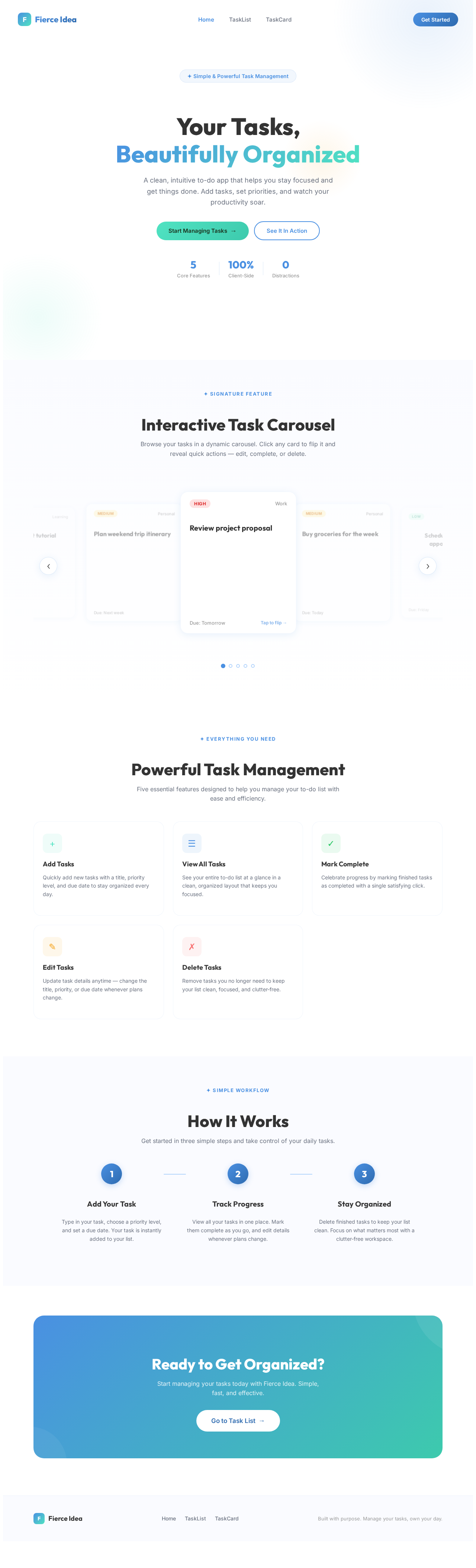
Your Tasks,
Beautifully Organized
A clean, intuitive to-do app that helps you stay focused and get things done. Add tasks, set priorities, and watch your productivity soar.
Interactive Task Carousel
Browse your tasks in a dynamic carousel. Click any card to flip it and reveal quick actions — edit, complete, or delete.
Review project proposal
Task Actions
← Tap to flip backBuy groceries for the week
Task Actions
← Tap to flip backSchedule dentist appointment
Task Actions
← Tap to flip backComplete React tutorial
Task Actions
← Tap to flip backPlan weekend trip itinerary
Task Actions
← Tap to flip backPowerful Task Management
Five essential features designed to help you manage your to-do list with ease and efficiency.
Add Tasks
Quickly add new tasks with a title, priority level, and due date to stay organized every day.
View All Tasks
See your entire to-do list at a glance in a clean, organized layout that keeps you focused.
Mark Complete
Celebrate progress by marking finished tasks as completed with a single satisfying click.
Edit Tasks
Update task details anytime — change the title, priority, or due date whenever plans change.
Delete Tasks
Remove tasks you no longer need to keep your list clean, focused, and clutter-free.
How It Works
Get started in three simple steps and take control of your daily tasks.
Add Your Task
Type in your task, choose a priority level, and set a due date. Your task is instantly added to your list.
Track Progress
View all your tasks in one place. Mark them complete as you go, and edit details whenever plans change.
Stay Organized
Delete finished tasks to keep your list clean. Focus on what matters most with a clutter-free workspace.
Ready to Get Organized?
Start managing your tasks today with Fierce Idea. Simple, fast, and effective.
Go to Task List→
No comments yet. Be the first!