fierce-calculator
 Diya Trivedi
start a project to build simple single page design of the calculator

Comments (0)
Sign in to leave a comment
System Requirements
System Requirements Document for fierce-calculator
1. Introduction
fierce-calculator is a simple, single-page calculator design. The product intent is to present a calculator as one page: a display that shows the running value and an operation keypad that lets an anonymous visitor enter numbers and operations and read the computed result. The design must be simple, and the calculator must live on exactly one page.
The audience is the everyday, anonymous calculator user who opens the page and performs arithmetic entry to get a computed result. Success is a clear, instantly legible single-page calculator interface with unambiguous operation keys — a utilitarian tool that still feels like a designed object.
2. System Overview
fierce-calculator is delivered as a single custom page, Calculator, which is the public entry surface. It both introduces the simple calculator to an anonymous visitor and hosts number and operation entry with the computed result. There is no navigation chrome beyond a single wordmark rule, and no additional pages.
The sole active human actor is the Calculator User. The page is publicly reachable with no access requirement; no account, identity, or session continuity is needed because the calculator holds no durable actor-specific state.
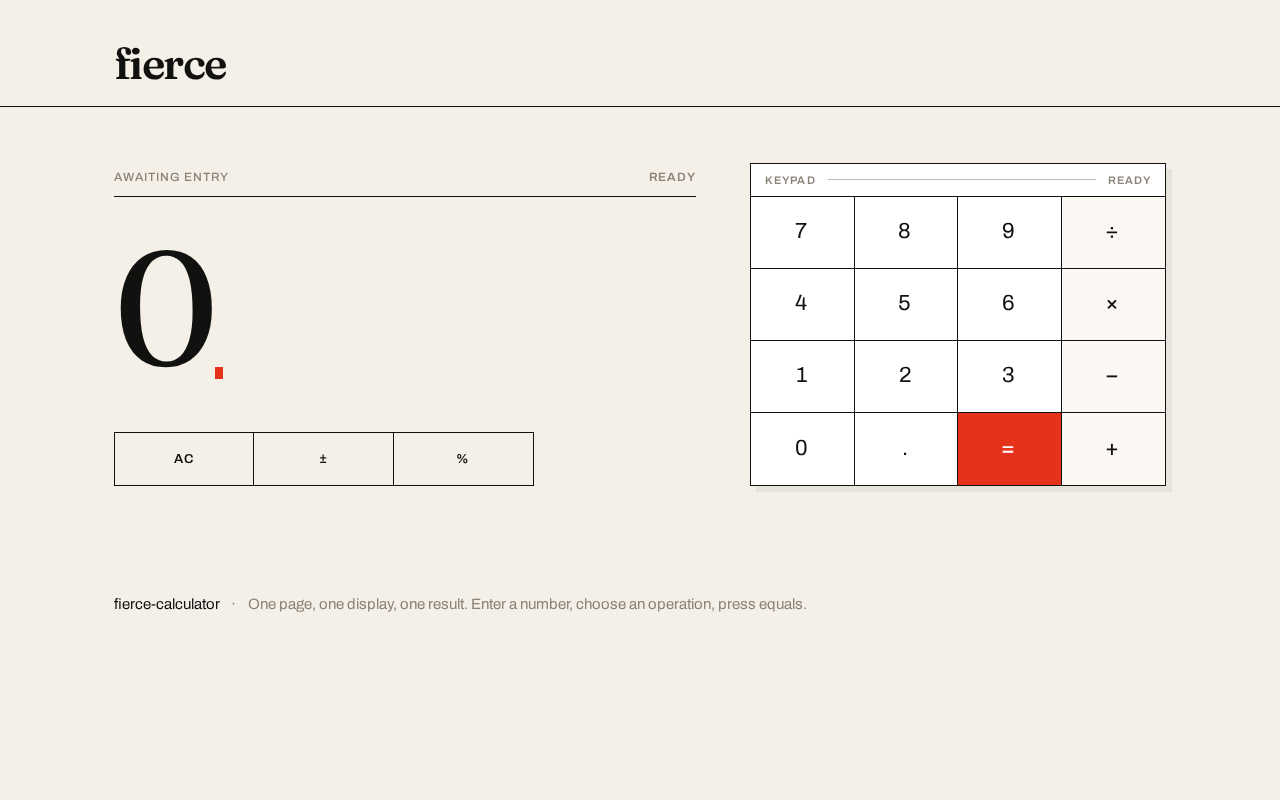
Accepted current behavior: a running-value display, an expression line, an AC / ± / % strip, and a 4×5 keypad of digits and operations with an equals key that produces the computed result. The interface itself is the imagery — an oversized display numeral on a warm off-white field, cut by a single hot red.
Narrow exclusions: no multiple pages, no navigation chrome beyond the single wordmark rule, no photography or illustration, no gradients, blobs, glass panels, rounded pill keys, or hover-lift cards, and no blue/indigo primary or accent on white.
2a. Product Interpretation and Delivery Boundary
The product is a first-party, browser-delivered single page. Access is public and anonymous: the Calculator page is reachable without sign-in, and no application-owned identity, account, or persistence is established, because the accepted behavior creates no durable relationship, obligation, or actor-specific state that must be resumed. All arithmetic entry and result display happen within the one page.
Current scope is limited to the single Calculator page and its arithmetic entry and result display. There is no future-horizon requirement stated by the user; anything beyond the single-page calculator (history, memory, scientific functions, accounts) is out of current scope and is not part of this document.
2b. Source Content Inventory
Not applicable — no reference directive declares a content_source.
2c. Page Content and Component Coverage
Calculator
The single public entry surface. It introduces the simple calculator and hosts all number and operation entry with the computed result. Access: public, anonymous, no identity required.
- Information and state
- The running value (current display numeral), rendered as the hero: an oversized Fraunces numeral, flush left, on the warm off-white paper ground with no card around it.
- The expression line: a tiny uppercase Archivo line above the display showing the pending expression/operation context.
- A small red caret after the display value.
- The active operator state, shown as a solid red fill on the corresponding operator key.
- The computed result state, shown in the display after equals.
- Primary actions
- Enter digits (0–9) and a decimal point.
- Select an operation (add, subtract, multiply, divide).
- Press equals to compute and show the result.
- Press AC to clear.
- Press ± to toggle sign.
- Press % for percent.
- Supporting actions
- The wordmark rule anchors the top; a single line of muted metadata sits at the bottom.
- Domain entities
- Running value (display numeral).
- Expression (pending operands and operator).
- Active operator.
- Computed result.
- Component responsibilities
- Wordmark rule: lowercase
fiercewordmark in Fraunces 600 with a full-bleed ink hairline beneath it; the only chrome. - Display block: expression line (tiny uppercase Archivo) above the oversized running-value numeral (Fraunces, clamp 64px–168px) with the red caret.
- AC / ± / % strip: a thin strip of control keys above/beside the keypad.
- Keypad plate: white surface with 1px ink hairlines separating flat square keys in a 4×5 grid; digits and operations in Archivo uppercase with 0.08em letterspacing; the equals key filled hot red with a white glyph; the active operator key filled hot red.
- Metadata line: a single line of muted metadata at the bottom.
- Wordmark rule: lowercase
- States
- Loading: the wordmark reveals once on load with a slow 600ms upward fade; the display shows its initial value.
- Empty/initial: display shows the starting value (e.g., 0) with no active operator and no pending expression.
- Success: each new digit crossfades the display numeral in 180ms ease-out; the active operator snaps to a solid red fill; equals shows the computed result.
- Error/recovery: if an operation cannot be computed (e.g., division by zero), the display shows an error indication and the user recovers by pressing AC to clear and re-enter.
- Continuation: after a result, the user may continue entering a new number or operation from the result.
3. Functional Requirements
FR-1 — Single-page calculator presentation (explicit) As a Calculator User, I should see the calculator presented as one page, so that I can use it without navigating anywhere.
- Trigger/input: opening the page.
- Observable result: the entire calculator (display, expression line, AC/±/% strip, keypad, wordmark rule, metadata line) is present on the single Calculator page.
- Access state: public, anonymous.
- Failure/recovery: not applicable to presentation.
- Continuation: the user proceeds to enter numbers and operations.
FR-2 — Simple design (explicit) As a Calculator User, I should experience a simple design, so that the calculator is instantly legible and effortless to use.
- Trigger/input: viewing the page.
- Observable result: a clear running value and unambiguous operation keys, with no navigation chrome beyond the single wordmark rule.
- Access state: public, anonymous.
- Failure/recovery: not applicable.
- Continuation: the user reads the display and selects keys.
FR-3 — Digit and decimal entry (required_inference) As a Calculator User, I should enter digits and a decimal point, so that I can build the number I want to calculate.
- Trigger/input: pressing digit keys (0–9) and the decimal point on the keypad.
- Observable result: the running value updates in the display, each new digit crossfading in over 180ms ease-out.
- Access state: public, anonymous.
- Failure/recovery: pressing AC clears the entry and returns the display to its initial value.
- Continuation: the user selects an operation or presses equals.
FR-4 — Operation selection (required_inference) As a Calculator User, I should select an operation (add, subtract, multiply, divide), so that I can combine numbers.
- Trigger/input: pressing an operator key.
- Observable result: the selected operator key snaps to a solid red fill, and the expression line reflects the pending operation.
- Access state: public, anonymous.
- Failure/recovery: pressing AC clears the pending operation and active-operator state.
- Continuation: the user enters the next operand and presses equals.
FR-5 — Compute result (required_inference) As a Calculator User, I should press equals to compute and see the result, so that I get the answer to my expression.
- Trigger/input: pressing the equals key (filled hot red with a white glyph).
- Observable result: the display shows the computed result as the running value.
- Access state: public, anonymous.
- Failure/recovery: if the operation cannot be computed (e.g., division by zero), the display shows an error indication; the user presses AC to clear and re-enter.
- Continuation: the user may continue from the result with a new number or operation.
FR-6 — Clear (AC) (required_inference) As a Calculator User, I should press AC to clear, so that I can reset the calculator and start a new calculation.
- Trigger/input: pressing the AC key in the AC/±/% strip.
- Observable result: the display returns to its initial value, the expression line clears, and no operator is active.
- Access state: public, anonymous.
- Failure/recovery: this is itself the recovery action from error and mis-entry states.
- Continuation: the user begins a new entry.
FR-7 — Sign toggle (±) (required_inference) As a Calculator User, I should press ± to toggle the sign of the current value, so that I can enter negative numbers.
- Trigger/input: pressing the ± key.
- Observable result: the running value's sign flips in the display.
- Access state: public, anonymous.
- Failure/recovery: pressing AC clears the value.
- Continuation: the user continues entry or selects an operation.
FR-8 — Percent (%) (required_inference) As a Calculator User, I should press % to apply percent, so that I can compute a percentage of the current value.
- Trigger/input: pressing the % key.
- Observable result: the running value reflects the percent result in the display.
- Access state: public, anonymous.
- Failure/recovery: pressing AC clears the value.
- Continuation: the user continues entry or selects an operation.
4. User Personas
Calculator User
- Product context: An anonymous everyday visitor who opens the single-page calculator to perform a quick arithmetic calculation. There is no account, no sign-in, and no saved state; the page is a self-contained tool.
- Primary goal: Enter numbers and operations and read a clear, correct computed result with minimal effort.
- Distinct accepted responsibilities: Reading the oversized running value, entering digits and a decimal point, selecting an operation, pressing equals to compute, and using AC / ± / % to correct or adjust the entry. This role is the sole active human actor; its work is defined by direct manipulation of the display and keypad rather than by any administrative, collaborative, or persistent-record responsibility.
- Relevant inputs or decisions: Which digits to enter, which operator to apply, when to press equals, and when to clear or adjust with AC / ± / %.
- Interactions with other accepted participants: None — there are no other accepted human participants; the calculator computes locally and returns the result to the same user.
- Observable success: The current value is instantly legible as an oversized numeral, the active operator is unmistakable in hot red, and pressing equals yields the computed result on the same page.
5. Core User Flows
Flow A — Perform a basic calculation
- The Calculator User opens the Calculator page (public, anonymous). The wordmark reveals once with a 600ms upward fade; the display shows its initial value with no active operator.
- The user presses digit keys to enter the first number. Each digit crossfades into the display numeral over 180ms ease-out.
- The user presses an operator key (add, subtract, multiply, or divide). The key snaps to a solid red fill, and the expression line reflects the pending operation.
- The user enters the second number; the display updates with each digit.
- The user presses the red equals key. The display shows the computed result as the running value.
- Continuation: the user may continue from the result by entering a new number or selecting another operation, or press AC to start fresh.
Flow B — Correct or adjust an entry
- The user is mid-entry on the Calculator page.
- To flip the sign, the user presses ±; the running value's sign flips in the display.
- To apply a percentage, the user presses %; the display reflects the percent result.
- To reset entirely, the user presses AC; the display returns to its initial value, the expression line clears, and no operator is active.
- Continuation: the user resumes entry or begins a new calculation.
Flow C — Recover from an invalid operation
- The user presses equals on an operation that cannot be computed (e.g., division by zero).
- The display shows an error indication instead of a result.
- Recovery: the user presses AC to clear; the display returns to its initial value and no operator is active.
- Continuation: the user re-enters the calculation.
6. Visuals Colors and Theme
Muse and headline: Editorial swagger for a calculator — one enormous numeral on a warm off-white field, cut by a single hot red. The interface is the image.
Mode: Light mode only.
Colour tokens (exact hex by role)
- Background (paper ground, ~70%):
#F4EFE7 - Surface (keypad plate only, ~25%):
#FFFFFF - Text / primary (ink black — display numerals, key labels, hairline rules):
#111110 - Accent (hot vermilion red — active operator, equals key fill, result caret only, ~5%):
#E4321B - Muted (metadata line, helper copy):
#8A8378
Red is never used for small body copy — only for large numerals and key fills with white glyphs.
Typography
- Headings / display: Fraunces, 300–400 weight, optical size cranked large, tight −0.03em tracking for the running-value display; wordmark in Fraunces 600, single lowercase line.
- Key labels and micro-labels: Archivo Medium/SemiBold, uppercase, 0.08em letterspacing.
- Body / helper copy: Archivo.
- Scale (1.333 modular): display value
clamp(64px, 14vw, 168px); wordmarkclamp(28px, 4vw, 44px); key glyphsclamp(20px, 2.4vw, 30px); micro-labels 12px uppercase; helper copy 15px/1.5.
Shape language: Sharp corners everywhere — zero border radius on keys, panels, and rules. Keys are flat rectangles separated by 1px ink hairlines rather than gaps, so the keypad reads as a printed grid. The only curves are the Fraunces display numerals themselves.
Layout: Asymmetric editorial split on desktop — left 7 columns hold the oversized running value stacked over a thin expression line and a small AC / ± / % strip; right 5 columns hold the 4×5 keypad as a hairline-ruled plate. A full-width ink rule under a tiny uppercase wordmark anchors the top; the bottom carries a single line of muted metadata. At 768px the two halves stack with the display above the keypad; at 375px the display shrinks to its clamp minimum and the keypad becomes a full-width 4-column grid with keys no smaller than 56px tall.
Spacing rhythm: Hairline-ruled grid with no gaps between keys; generous paper margins around the display block; a single full-bleed rule under the wordmark and a single metadata line at the bottom.
Imagery style: No photography and no illustration. The interface is the image — the display numeral is the hero artwork, supported by hairline rules, a tiny red caret, and the printed-grid keypad.
Readable text and controls: Headlines, wordmarks, labels, numbers, and controls stay entirely inside the viewport and their container at 375px, 768px, and 1280px, wrapping or scaling to fit; no other element covers any part of them.
7. Signature Design Concept
The first screen is dominated by one enormous Fraunces numeral — the running value — set flush left at up to 168px on desktop and 64px on mobile, sitting directly on the warm off-white paper ground with no card around it. Above it, a single lowercase fierce wordmark in Fraunces 600 and a full-bleed ink hairline. To the right (below on mobile) the keypad is a white plate with 1px ink rules and one red equals key. The composition is asymmetric and editorial, not centred — no gradient, no blob, no blue button anywhere.
Signature moves:
- The running value rendered as an oversized Fraunces display numeral (clamp 64px–168px) flush left on the paper ground, with the expression line in tiny uppercase Archivo above it — the number is the hero image.
- Keypad built as a printed grid: flat square keys separated by 1px ink hairlines with no gaps and no radius, so the plate reads like a Swiss newspaper table rather than a phone keypad.
- One hot red (
#E4321B) used exclusively for the active operator, the equals key fill, and a small caret after the display value — everything else is ink on warm off-white. - A full-bleed ink hairline running edge to edge under the lowercase
fiercewordmark, doubling as the top rule of the page and the only chrome on the screen. - Digit entry crossfades the display numeral in 180ms while the active operator snaps to a solid red fill with zero easing theatrics — motion as editorial restraint, not bounce.
8. Interaction Model & Motion Direction
Interaction Model: Animated Motion Tempo: restrained Hero Dimensionality: flat
Landing Hero Motion Brief
- Focal subject: the oversized Fraunces running-value numeral, flush left on the warm off-white paper ground, with the tiny uppercase expression line above it and the red caret after it.
- Input → transformation → outcome thesis: each digit key press transforms the display numeral — the new value crossfades in over 180ms ease-out; selecting an operator snaps that key to a solid red fill with no bounce; pressing equals replaces the display with the computed result. The motion is editorial restraint: it confirms input and state without theatrics.
- Motion vocabulary: 180ms ease-out crossfade on each new digit; instant red fill on the active operator; a one-time 600ms upward fade reveal of the wordmark on load. No parallax, no particles, no hover lift.
- Composed first frame: the lowercase
fiercewordmark and full-bleed ink hairline at top; the initial running value as a large Fraunces numeral flush left; the expression line above it; the white hairline-ruled keypad plate to the right (below on mobile) with the red equals key. - Reduced-motion state: with
prefers-reduced-motion, the wordmark appears without the upward fade, digit changes update the display without crossfade, and the active operator still shows its solid red fill; the layout remains the same usable static arrangement.
9. Non-Functional Requirements
- NFR-1 — Single page (explicit): The calculator is presented as exactly one page; no additional pages or routes are introduced.
- NFR-2 — Simplicity (explicit): The design remains simple — no navigation chrome beyond the single wordmark rule, and no decorative elements beyond the hairline rules, red caret, and printed-grid keypad.
- NFR-3 — Responsive legibility (explicit, from design direction): Readable text and controls stay whole at 375px, 768px, and 1280px; the display scales via
clamp(64px, 14vw, 168px)and keys are no smaller than 56px tall at 375px. - NFR-4 — Accessible contrast (required_inference): Body text is ink on paper at high contrast; red is never used for small body copy, only for large numerals and key fills with white glyphs.
- NFR-5 — Reduced motion (required_inference): A usable static arrangement is provided under
prefers-reduced-motion. - NFR-6 — No identity or persistence (required_inference): The page requires no account, sign-in, or durable storage; calculation state is ephemeral to the page session.
10. Tech Stack
- Frontend: React single-page application rendering the Calculator page.
- Styling: CSS with the specified Fraunces and Archivo web fonts, exact hex tokens, hairline rules, and
clamp()type scale. - Computation: Client-side arithmetic within the page; no backend service is required for the accepted behavior.
- Delivery: Static browser delivery of the single page.
11. Assumptions and Constraints
- A-1 (explicit): The calculator is a single page; the page count is exactly one.
- A-2 (explicit): The design should be simple.
- A-3 (required_inference): The calculator supports the standard operations implied by the AC / ± / % strip and a 4×5 keypad — digits 0–9, decimal point, add, subtract, multiply, divide, equals, clear, sign toggle, and percent.
- A-4 (required_inference): Calculation state is ephemeral; no history, memory, or persistence is provided.
- A-5 (required_inference): The page is publicly reachable with no identity requirement.
- A-6 (explicit, design): No blue/indigo primary or accent on white; no gradients, blobs, glass panels, rounded pill keys, hover-lift cards, photography, or illustration.
12. Glossary
- Running value: The current number shown as the oversized Fraunces display numeral.
- Expression line: The tiny uppercase Archivo line above the display showing the pending expression/operation context.
- Active operator: The currently selected arithmetic operator, shown with a solid hot-red fill.
- Keypad plate: The white, hairline-ruled 4×5 grid of flat square keys.
- AC / ± / % strip: The small control strip holding clear, sign-toggle, and percent keys.
- Wordmark rule: The lowercase
fiercewordmark with the full-bleed ink hairline beneath it — the only chrome on the page. - Caret: The small red mark after the display value.
fierce
fierce
No comments yet. Be the first!