fierce-burgerwale
 Krunal Hingu
# Burgerwale – ફાસ્ટ ફૂડ રેસ્ટોરન્ટ વેબસાઇટ **Burgerwale** નામની ફાસ્ટ ફૂડ રેસ્ટોરન્ટ માટે એક આધુનિક, આકર્ષક અને સંપૂર્ણપણે રિસ્પોન્સિવ વેબસાઇટ બનાવો. આ રેસ્ટોરન્ટમાં સ્વાદિષ્ટ બર્ગર, પિઝા, ફ્રેન્ચ ફ્રાઇઝ અને અન્ય ફાસ્ટ ફૂડ ઉપલબ્ધ છે. વેબસાઇટમાં ગ્રાહકને સંપૂર્ણ ઓનલાઇન ફૂડ ઓર્ડરિંગનો અનુભવ મળવો જોઈએ. ગ્રાહક મેનૂ જોઈ શકે, પ્રોડક્ટ પસંદ કરી શકે, કાર્ટમાં ઉમેરી શકે, ચેકઆઉટ કરી શકે, પેમેન્ટ પસંદ કરી શકે અને ઓર્ડર કન્ફર્મેશન મેળવી શકે. ## 1. બ્રાન્ડ ઓળખ (Brand Identity) - **બ્રાન્ડનું નામ:** Burgerwale - **બિઝનેસનો પ્રકાર:** ફાસ્ટ ફૂડ રેસ્ટોરન્ટ - **ટેગલાઇન:** Big Bites. Bold Flavours. Full Satisfaction. - **વિઝ્યુઅલ થીમ:** આધુનિક અર્બન સ્ટ્રીટ ફૂડ ડિઝાઇન. - **મુખ્ય રંગો:** ડાર્ક બ્લેક, આકર્ષક મસ્ટર્ડ યેલો અને સફેદ. - **ફોન્ટ:** બોલ્ડ અને આધુનિક હેડિંગ્સ સાથે સરળતાથી વાંચી શકાય તેવા ફોન્ટ. આપવામાં આવેલી રેસ્ટોરન્ટની મેનૂ ઇમેજને ડિઝાઇન માટે રેફરન્સ તરીકે ઉપયોગ કરો. ડિઝાઇનમાં નીચેની બાબતો હોવી જોઈએ: - ડાર્ક બેકગ્રાઉન્ડ સાથે યેલો હાઇલાઇટ્સ. - બર્ગર અને પિઝાની ઉચ્ચ ગુણવત્તાવાળી તસવીરો. - આકર્ષક ટાઇપોગ્રાફી અને પ્રાઇસ ડિસ્પ્લે. - આધુનિક મેનૂ કાર્ડ્સ. - સ્મૂથ એનિમેશન અને ટ્રાન્ઝિશન. - પ્રીમિયમ સ્ટ્રીટ ફૂડ જેવો અનુભવ. ## 2. નેવિગેશન બાર (Navigation Bar) એક રિસ્પોન્સિવ નેવિગેશન બાર બનાવો, જેમાં નીચેની વસ્તુઓ હોવી જોઈએ: - કસ્ટમ બર્ગર આઇકન સાથે Burgerwale લોગો. - Home - Our Menu - About Us - Offers - Contact - ડાયનેમિક આઇટમ કાઉન્ટ સાથે Shopping Cart આઇકન. - ખાસ દેખાતું Order Now બટન. સ્ક્રોલ કરતી વખતે પણ નેવિગેશન બાર સરળતાથી ઉપલબ્ધ રહેવું જોઈએ. ## 3. મુખ્ય હીરો સેક્શન (Hero Section) એક આકર્ષક હીરો સેક્શન બનાવો, જેમાં મોટા અને સ્વાદિષ્ટ ડબલ ચીઝ બર્ગરની તસવીર હોય. **હેડલાઇન:** Cravings Don't Wait. Neither Should You! **વર્ણન:** રસદાર બર્ગરથી લઈને ચીઝી પિઝા સુધી, Burgerwale સાથે માણો અદ્ભુત સ્વાદ અને યાદગાર ફૂડ અનુભવ. બટન્સ: - Explore Menu - Order Now ફ્લોટિંગ ફૂડ ઇમેજ, આકર્ષક ડેકોરેટિવ એલિમેન્ટ્સ અને સુંદર એનિમેશન ઉમેરો. ## 4. ફૂડ કેટેગરીઝ (Food Categories) નીચેની કેટેગરીઝ માટે આકર્ષક કાર્ડ્સ બનાવો: - Classic Burgers - Cheese Burgers - Spicy Burgers - Pizzas - Fries & Sides - Special Combos દરેક કેટેગરીમાં ફૂડની તસવીર અને તેના સંબંધિત મેનૂ સુધી પહોંચવા માટે ક્લિક કરી શકાય તેવી સુવિધા હોવી જોઈએ. ## 5. અમારું મેનૂ (Our Menu) આપવામાં આવેલી રેફરન્સ ઇમેજથી પ્રેરિત થઈને આકર્ષક મેનૂ ડિઝાઇન બનાવો. ### બર્ગર (Burgers) | પ્રોડક્ટનું નામ | કિંમત | |---|---:| | Aloo Tikki Burger | ₹40 | | Aloo Tikki Mayo Burger | ₹50 | | Veg Burger | ₹50 | | Veg Mayo Burger | ₹60 | | Herb Chilly Burger | ₹50 | | Spicy Schezwan Burger | ₹55 | | Mayo Schezwan Burger | ₹65 | | Tandoori Burger | ₹70 | | Paneer Burger | ₹70 | | Paneer Mayo Burger | ₹90 | | Paneer Tandoori Burger | ₹90 | | Mayo Salad Burger | ₹80 | ### પિઝા (Pizzas) | પ્રોડક્ટનું નામ | કિંમત | |---|---:| | Margherita Pizza Burger | ₹110 | | Paneer Pizza Burger | ₹125 | | Veg Pizza Burger | ₹110 | | Peri Peri Paneer Cheese Burger | ₹100 | ### સ્પેશિયલ આઇટમ્સ (Special Items) - Burgerwale Special Burger – ₹150 - Paneer Burger – ₹70 દરેક મેનૂ આઇટમમાં નીચેની વિગતો હોવી જોઈએ: - પ્રોડક્ટની તસવીર. - પ્રોડક્ટનું નામ. - ટૂંકું વર્ણન. - ભારતીય રૂપિયામાં કિંમત (₹). - વેજિટેરિયન આઇકન. - Add to Cart બટન. મેનૂમાં કેટેગરી ફિલ્ટર અને પ્રોડક્ટ સર્ચ કરવાની સુવિધા ઉમેરો. ## 6. સ્પેશિયલ બર્ગર સેક્શન (Signature Special) Burgerwale Special Burger માટે એક ખાસ પ્રમોશનલ સેક્શન બનાવો. તેમાં નીચેની વિગતો હોવી જોઈએ: - મોટા બર્ગરની આકર્ષક તસવીર. - Special બેજ. - પ્રોડક્ટનું વર્ણન. - ખાસ હાઇલાઇટ કરેલી કિંમત. - Order Now બટન. ## 7. કોમ્બો ડીલ્સ અને ઓફર્સ (Combo Deals & Offers) નીચેના કોમ્બો માટે આકર્ષક પ્રમોશનલ કાર્ડ્સ બનાવો: - Burger + Fries Combo. - Double Cheese Burger Combo. - Pizza + Cold Drink Combo. - Family Feast Combo. મૂળ કિંમત, ડિસ્કાઉન્ટ પછીની કિંમત અને આકર્ષક ઓફર લેબલ દર્શાવો. ## 8. Burgerwale વિશે (About Burgerwale) **હેડલાઇન:** Serving Happiness, One Bite at a Time. Burgerwaleની તાજી સામગ્રી, સ્વાદિષ્ટ વાનગીઓ, ગુણવત્તાયુક્ત તૈયારી અને વ્યાજબી કિંમતે ફાસ્ટ ફૂડ આપવાની પ્રતિબદ્ધતા વિશે આકર્ષક વર્ણન લખો. ## 9. ગ્રાહકોના રિવ્યુ (Customer Reviews) ગ્રાહકોના અભિપ્રાય દર્શાવતા આકર્ષક કાર્ડ્સ બનાવો. તેમાં નીચેની વિગતો હોવી જોઈએ: - ગ્રાહકનું નામ. - સ્ટાર રેટિંગ. - ટૂંકું રિવ્યુ. - આકર્ષક રિવ્યુ લેઆઉટ. ## 10. શોપિંગ કાર્ટ (Shopping Cart) સંપૂર્ણપણે કાર્યરત શોપિંગ કાર્ટ બનાવો. સુવિધાઓ: - પ્રોડક્ટને કાર્ટમાં ઉમેરવાની સુવિધા. - કાર્ટમાંથી પ્રોડક્ટ દૂર કરવાની સુવિધા. - પ્રોડક્ટની સંખ્યા વધારવા અને ઘટાડવાની સુવિધા. - સબટોટલની આપમેળે ગણતરી. - પ્રોડક્ટની તસવીર અને કિંમત દર્શાવવી. - કાર્ટમાં રહેલી કુલ વસ્તુઓની સંખ્યા દર્શાવવી. - કુલ બિલની આપમેળે ગણતરી. - Continue Shopping બટન. - Proceed to Checkout બટન. - કાર્ટ ખાલી હોય ત્યારે આકર્ષક ઇમેજ અને મેસેજ દર્શાવવો. વેબસાઇટના અલગ-અલગ સેક્શનમાં જતી વખતે પણ કાર્ટની માહિતી જળવાઈ રહેવી જોઈએ. ## 11. ચેકઆઉટ પ્રક્રિયા (Checkout Process) એક પ્રોફેશનલ અને સરળતાથી ઉપયોગ કરી શકાય તેવું ચેકઆઉટ પેજ બનાવો. ### A. ગ્રાહકની માહિતી (Customer Information) ગ્રાહક પાસેથી નીચેની માહિતી મેળવો: - પૂરું નામ. - મોબાઇલ નંબર. - ઈમેઇલ એડ્રેસ (વૈકલ્પિક). - સંપૂર્ણ ડિલિવરી એડ્રેસ. - શહેર. - રાજ્ય. - પિન કોડ. - ડિલિવરી અંગેની સૂચનાઓ (વૈકલ્પિક). બધા જરૂરી ફીલ્ડ અને મોબાઇલ નંબરની યોગ્યતા ચકાસો. ### B. ઓર્ડરની વિગતો (Order Summary) નીચેની વિગતો દર્શાવો: - પ્રોડક્ટનું નામ અને તસવીર. - પસંદ કરેલી સંખ્યા. - દરેક પ્રોડક્ટની કિંમત. - સબટોટલ. - ડિલિવરી ચાર્જ. - લાગુ પડતું ડિસ્કાઉન્ટ. - કુલ ચૂકવવાની રકમ. કાર્ટમાં રહેલી વસ્તુઓ પ્રમાણે તમામ રકમ આપમેળે અપડેટ થવી જોઈએ. ### C. પેમેન્ટ પદ્ધતિ (Payment Method) ગ્રાહકને નીચેના પેમેન્ટ વિકલ્પોમાંથી પસંદગી કરવાની સુવિધા આપો. **1. Cash on Delivery (COD)** - ગ્રાહક ઓર્ડર મળ્યા પછી પેમેન્ટ કરી શકે. - ઓર્ડર મૂક્યા પછી કન્ફર્મેશન મેસેજ દર્શાવો. **2. UPI Payment** - UPI પેમેન્ટ માટે ઇન્ટરફેસ બનાવો. - પેમેન્ટ સફળ થયું છે કે નહીં તે દર્શાવવા માટે સિમ્યુલેટેડ પેમેન્ટ કન્ફર્મેશન આપો. **3. Credit/Debit Card** - કાર્ડ નંબર, એક્સપાયરી ડેટ અને CVV માટે ફીલ્ડ બનાવો. - દાખલ કરેલી માહિતીની માન્યતા તપાસો. - સફળ અને નિષ્ફળ પેમેન્ટની સિમ્યુલેટેડ પ્રક્રિયા બનાવો. **4. Net Banking** - બેંક પસંદ કરવા માટે ઇન્ટરફેસ બનાવો. - પેમેન્ટ પ્રોસેસિંગ અને કન્ફર્મેશનની સિમ્યુલેટેડ પ્રક્રિયા બનાવો. ### D. ઓર્ડર કન્ફર્મેશન (Order Confirmation) ઓર્ડર સફળતાપૂર્વક મૂકાયા પછી: - એક યુનિક Order ID બનાવો. - ઓર્ડર કન્ફર્મેશન મેસેજ દર્શાવો. - ગ્રાહકની વિગતો દર્શાવો. - ઓર્ડર કરેલી પ્રોડક્ટ્સ અને તેમની સંખ્યા દર્શાવો. - પેમેન્ટ પદ્ધતિ અને પેમેન્ટ સ્ટેટસ દર્શાવો. - કુલ રકમ દર્શાવો. - અંદાજિત ડિલિવરી સમય દર્શાવો. Continue Shopping બટન આપો. ### E. ઓર્ડર ટ્રેકિંગ (Order Tracking) ઓર્ડર ટ્રેક કરવા માટે એક અલગ ઇન્ટરફેસ બનાવો. નીચેના સ્ટેટસ દર્શાવો: 1. Order Placed – ઓર્ડર મૂકવામાં આવ્યો. 2. Order Confirmed – ઓર્ડર કન્ફર્મ થયો. 3. Preparing – ઓર્ડર તૈયાર થઈ રહ્યો છે. 4. Out for Delivery – ઓર્ડર ડિલિવરી માટે નીકળી ગયો છે. 5. Delivered – ઓર્ડર ડિલિવર થઈ ગયો છે. વિઝ્યુઅલ પ્રોગ્રેસ ઇન્ડિકેટર અને ઓર્ડરની વિગતો દર્શાવો. ### F. પેમેન્ટ સ્ટેટસ (Payment States) નીચેની તમામ પરિસ્થિતિઓને હેન્ડલ કરો: - Payment Successful. - Payment Failed. - Payment Pending. - COD Order Placed. દરેક પરિસ્થિતિ પ્રમાણે યોગ્ય મેસેજ દર્શાવો અને નિષ્ફળ ગયેલા પેમેન્ટને ફરીથી કરવાનો વિકલ્પ આપો. **ખાસ નોંધ:** પેમેન્ટની પ્રક્રિયા સિમ્યુલેટેડ રાખો. વાસ્તવિક પેમેન્ટ ગેટવે ઇન્ટિગ્રેટ કર્યા વગર વાસ્તવિક પેમેન્ટ પ્રોસેસ થતું હોવાનો દાવો ન કરો. ## 12. સંપર્ક અને લોકેશન (Contact & Location) નીચેની વિગતો ઉમેરો: - રેસ્ટોરન્ટનું સરનામું. - સંપર્ક માટેનો ફોન નંબર. - રેસ્ટોરન્ટનો સમય. - Google Maps લોકેશન પ્લેસહોલ્ડર. - સંપર્ક ફોર્મ. - સોશિયલ મીડિયા લિંક્સ. ## 13. ફૂટર (Footer) ફૂટરમાં નીચેની વિગતો ઉમેરો: - Burgerwale લોગો. - બ્રાન્ડ વિશે ટૂંકું વર્ણન. - ક્વિક નેવિગેશન લિંક્સ. - મેનૂ કેટેગરીઝ. - સંપર્કની વિગતો. - સોશિયલ મીડિયા આઇકન્સ. - કોપીરાઇટ માહિતી. ## 14. કાર્યક્ષમ સુવિધાઓ (Functional Requirements) 1. ફ્રન્ટએન્ડ ડેવલપમેન્ટ માટે ફક્ત AngularJS નો ઉપયોગ કરો. 2. સંપૂર્ણપણે કાર્યરત શોપિંગ કાર્ટ બનાવો. 3. પ્રોડક્ટ સર્ચ અને કેટેગરી ફિલ્ટર કાર્યરત બનાવો. 4. પ્રોડક્ટની સંખ્યા વધારવા અને ઘટાડવાની સુવિધા આપો. 5. કાર્ટની કુલ રકમની આપમેળે ગણતરી કરો. 6. ગ્રાહક માટે ચેકઆઉટ ફોર્મ બનાવો. 7. COD અને સિમ્યુલેટેડ ઓનલાઇન પેમેન્ટ વિકલ્પો આપો. 8. યુનિક ઓર્ડર ID જનરેટ કરો. 9. ઓર્ડર કન્ફર્મેશન પેજ દર્શાવો. 10. ઓર્ડર ટ્રેકિંગ ઇન્ટરફેસ બનાવો. 11. બધા જરૂરી ફોર્મ ફીલ્ડની માન્યતા તપાસો. 12. રિસ્પોન્સિવ નેવિગેશન બનાવો. 13. દરેક બટન અને ઇન્ટરેક્ટિવ એલિમેન્ટ યોગ્ય રીતે કાર્ય કરે તેની ખાતરી કરો. 14. વેબસાઇટમાં નેવિગેશન કરતી વખતે કાર્ટની માહિતી જાળવી રાખો. 15. યોગ્ય સફળતા અને ભૂલના મેસેજ દર્શાવો. ## 15. એનિમેશન અને ઇન્ટરેક્શન (Animations & Interactions) - સ્મૂથ સ્ક્રોલિંગ. - મેનૂ કાર્ડ પર હોવર ઇફેક્ટ. - કાર્ટ અપડેટ થાય ત્યારે એનિમેશન. - ઇમેજ ઝૂમ ઇફેક્ટ. - સ્ક્રોલ કરતી વખતે સેક્શન એનિમેશન. - સ્મૂથ નેવિગેશન ટ્રાન્ઝિશન. - આકર્ષક બટન ઇન્ટરેક્શન. - ચેકઆઉટ સ્ટેપ્સ વચ્ચે સ્મૂથ ટ્રાન્ઝિશન. - ઓર્ડર ટ્રેકિંગ પ્રોગ્રેસ એનિમેશન. ## 16. ટેક્નિકલ જરૂરિયાતો (Technical Requirements) - ફક્ત AngularJS નો ઉપયોગ કરો. - સ્ટાન્ડર્ડ HTML5 અને CSS3 નો ઉપયોગ કરો. - React, Vue.js, Modern Angular, Bootstrap, Tailwind અથવા અન્ય કોઈ ફ્રન્ટએન્ડ ફ્રેમવર્કનો ઉપયોગ ન કરો. - કોડને મોડ્યુલર અને સરળતાથી જાળવી શકાય તેવો બનાવો. - જરૂરિયાત મુજબ ફરીથી ઉપયોગ કરી શકાય તેવા કમ્પોનન્ટ્સ બનાવો. - ડેસ્કટોપ, ટેબ્લેટ અને મોબાઇલ માટે સંપૂર્ણ રિસ્પોન્સિવ વેબસાઇટ બનાવો. - વાસ્તવિક ફૂડ ઇમેજનો ઉપયોગ કરો. - આખી વેબસાઇટમાં INR (₹) કરન્સીનો જ ઉપયોગ કરો. - મુખ્ય સુવિધાઓ માટે માત્ર દેખાવ પૂરતા અથવા કામ ન કરતા બટન્સ ન રાખો. ## અંતિમ પરિણામ (Expected Final Result) Burgerwale માટે એક સંપૂર્ણ, આકર્ષક, આધુનિક અને પ્રોફેશનલ ફાસ્ટ ફૂડ રેસ્ટોરન્ટ વેબસાઇટ બનાવો, જે વાસ્તવિક ઓનલાઇન ફૂડ ઓર્ડરિંગ પ્લેટફોર્મ જેવી લાગવી જોઈએ. ગ્રાહકની સંપૂર્ણ પ્રક્રિયા નીચે મુજબ કાર્યરત હોવી જોઈએ: **Home → Browse Menu → Select Products → Add to Cart → Checkout → Select Payment Method → Place Order → Order Confirmation → Track Order.** વેબસાઇટની ડિઝાઇન, ઉપયોગમાં સરળતા, વાસ્તવિક ફૂડ ફોટોગ્રાફી, સ્મૂથ ઇન્ટરેક્શન અને સંપૂર્ણપણે કાર્યરત સુવિધાઓને પ્રાથમિકતા આપો.

Comments (0)
Sign in to leave a comment
System Requirements
System Requirements Document for fierce-burgerwale
1. Introduction
This document specifies the complete system requirements for Burgerwale, a modern, attractive and fully responsive fast food restaurant website for the Burgerwale brand. Burgerwale serves delicious burgers, pizzas, french fries and other fast food, and the website must give customers a complete online food ordering experience: view the menu, select products, add to cart, check out, select a payment method and receive order confirmation, then track the order.
The product intent is a premium urban street-food ordering experience that feels like a real online food ordering platform. Design, ease of use, real food photography, smooth interaction and fully working features are the priorities. The audience is young Indian city customers ordering fast food online, browsing on desktop, tablet and mobile.
Brand identity carried into the product:
- Brand name: Burgerwale
- Business type: Fast food restaurant
- Tagline: Big Bites. Bold Flavours. Full Satisfaction.
- Visual theme: Modern urban street food design
- Main colors: Dark black, striking mustard yellow and white
- Fonts: Bold, modern headings with easily readable body fonts
The supplied restaurant menu image is used as a design reference for the menu design.
2. System Overview
Burgerwale is a single first-party web application delivered as a responsive website. A customer arrives anonymously, browses the home page, explores the menu, filters and searches products, adds items to a persistent cart, proceeds through checkout with customer information and a simulated payment method, places an order that receives a unique Order ID, sees an order confirmation, and tracks the order through five statuses.
Current delivery comprises:
- A frontend built only with AngularJS, standard HTML5 and CSS3, fully responsive for desktop, tablet and mobile.
- A shared backend (FastAPI) that serves the application APIs and domain modules for menu data, cart persistence, order placement, order status and simulated payment state.
- A database (MariaDB) that stores application-owned persistent data: menu catalog, orders, order line items, customer details attached to orders, payment state and order status history.
Actors:
- Customer — the single active human persona. The customer browses, selects, adds to cart, checks out, pays (simulated), places the order, receives confirmation and tracks the order.
Ownership boundaries:
- All nine pages are first-party application pages owned by the application and reachable without an account.
- Payment processing is simulated inside the application. No real payment gateway is integrated and the site must never claim that a real payment was processed.
- The Google Maps location is a placeholder, not a live embedded map integration.
Narrow exclusions:
- No real payment gateway integration.
- No real map integration (placeholder only).
- No frontend framework other than AngularJS (no React, Vue.js, Modern Angular, Bootstrap, Tailwind or any other frontend framework).
- No appearance-only or non-working buttons for main features.
Removed from scope
- Real payment gateway integration (also: live payment processing, actual UPI settlement, actual card authorization, actual net banking transaction).
- Live Google Maps embed (also: real map integration).
- React, Vue.js, Modern Angular, Bootstrap, Tailwind and any other frontend framework.
2a. Product Interpretation and Delivery Boundary
Burgerwale is delivered as a public, anonymous-access restaurant website. Every page — Home, Our Menu, About Us, Offers, Contact, Shopping Cart, Checkout, Order Confirmation and Order Tracking — is reachable without creating an account or signing in. There is no login, registration, profile or account-management surface in the current product.
Cart continuity is achieved through application-owned browser-side persistence so that cart contents survive navigation between sections of the website. Order placement creates a durable order record in the application database with a unique Order ID, the customer's delivery details, the ordered products and quantities, the selected payment method, the payment state, the total amount and the estimated delivery time. The Order Confirmation page presents that record, and the Order Tracking page presents the five-status progress for that order.
Payment is explicitly simulated. The application presents UPI, Credit/Debit Card and Net Banking interfaces and produces simulated success, failure and pending outcomes, plus a COD path where the customer pays on delivery. The interface must never state or imply that a real payment was processed through a real gateway.
The Google Maps location on the Contact page is a placeholder region reserved for a map, not a live map. Social media links, the contact form and all navigation and action buttons are functional within the scope described in this document.
Future work (not part of current acceptance) is kept out of the current pages and is listed only in Section 11.
2b. Source Content Inventory
The supplied restaurant menu image is a design reference only (visual inspiration and structure reference); it supplies no verified factual entities beyond the menu items and prices already stated in the requirement thread. The authoritative product facts are:
Burgers
| Product name | Price |
|---|---|
| Aloo Tikki Burger | ₹40 |
| Aloo Tikki Mayo Burger | ₹50 |
| Veg Burger | ₹50 |
| Veg Mayo Burger | ₹60 |
| Herb Chilly Burger | ₹50 |
| Spicy Schezwan Burger | ₹55 |
| Mayo Schezwan Burger | ₹65 |
| Tandoori Burger | ₹70 |
| Paneer Burger | ₹70 |
| Paneer Mayo Burger | ₹90 |
| Paneer Tandoori Burger | ₹90 |
| Mayo Salad Burger | ₹80 |
Pizzas
| Product name | Price |
|---|---|
| Margherita Pizza Burger | ₹110 |
| Paneer Pizza Burger | ₹125 |
| Veg Pizza Burger | ₹110 |
| Peri Peri Paneer Cheese Burger | ₹100 |
Special Items
- Burgerwale Special Burger – ₹150
- Paneer Burger – ₹70
Food categories: Classic Burgers, Cheese Burgers, Spicy Burgers, Pizzas, Fries & Sides, Special Combos.
Combo deals: Burger + Fries Combo, Double Cheese Burger Combo, Pizza + Cold Drink Combo, Family Feast Combo.
Brand copy: Tagline "Big Bites. Bold Flavours. Full Satisfaction."; hero headline "Cravings Don't Wait. Neither Should You!"; hero description (juicy burgers to cheesy pizzas, enjoy an amazing taste and memorable food experience with Burgerwale); About headline "Serving Happiness, One Bite at a Time."
2c. Page Content and Component Coverage
Home
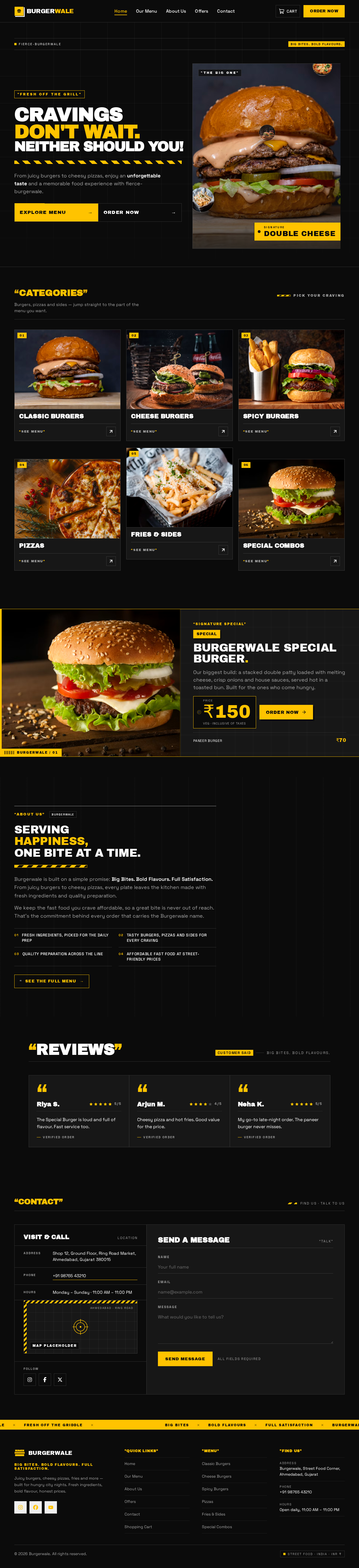
- Information/state: Hero with large double cheese burger image, headline "Cravings Don't Wait. Neither Should You!", the hero description, Explore Menu and Order Now buttons, floating food images and decorative elements. Food category cards for Classic Burgers, Cheese Burgers, Spicy Burgers, Pizzas, Fries & Sides and Special Combos, each with a food image and clickable to its related menu. Signature Special promotional section for Burgerwale Special Burger with large burger image, Special badge, product description, highlighted price and Order Now button. About Burgerwale section with headline "Serving Happiness, One Bite at a Time." and the commitment description. Customer review cards with customer name, star rating and short review. Contact and location block with address, phone number, restaurant hours, Google Maps location placeholder, contact form and social media links. Footer with Burgerwale logo, short brand description, quick navigation links, menu categories, contact details, social media icons and copyright information.
- Primary actions: Explore Menu (to Our Menu), Order Now (to Our Menu), category card click (to Our Menu filtered to that category), Signature Special Order Now (to Our Menu / add the Special Burger), contact form submit, social media link clicks, footer navigation.
- Supporting actions: Persistent responsive navigation bar with Burgerwale logo and custom burger icon, Home, Our Menu, About Us, Offers, Contact, Shopping Cart icon with dynamic item count and a prominent Order Now button; navigation stays available while scrolling.
- Domain entities: Menu item, Food category, Combo deal, Customer review, Restaurant contact details.
- Component responsibilities: Hero component, category card grid, Signature Special banner, About block, review card list, contact/location block, footer, sticky navigation bar with cart count badge.
- States: Loading (menu/category imagery), empty (no reviews configured — hide review block gracefully), success (contact form submitted confirmation), error (contact form validation errors), recovery (retry loading imagery).
Our Menu
- Information/state: Menu items grouped as Burgers, Pizzas and Special Items with the exact names and INR prices from Section 2b. Each menu item shows product image, product name, short description, price in ₹, vegetarian icon and Add to Cart button. Category filter control and product search field.
- Primary actions: Add to Cart, category filter selection, product search input, category card arrival from Home pre-applies the matching filter.
- Supporting actions: Cart count updates in the navigation bar; navigation to Shopping Cart.
- Domain entities: Menu item, Food category, Cart line.
- Component responsibilities: Menu item card (price-tag styled), filter bar, search field, category chips, empty-results message.
- States: Loading (menu fetch), empty (no items match search/filter — show message and clear-filters action), success (item added — cart count flips and a confirmation message appears), error (menu fetch failure — retry action), recovery (clear search/filter restores full list).
About Us
- Information/state: Headline "Serving Happiness, One Bite at a Time." and an attractive description of Burgerwale's commitment to fresh ingredients, tasty dishes, quality preparation and affordable fast food. Customer review cards with customer name, star rating, short review and attractive review layout.
- Primary actions: Navigate to Our Menu or Offers from within the page; read reviews.
- Supporting actions: Sticky navigation remains available.
- Domain entities: Brand story content, Customer review.
- Component responsibilities: Story block, review card grid.
- States: Loading (review content), empty (no reviews — hide review grid), success (content rendered), error (content fetch failure — retry).
Offers
- Information/state: Promotional cards for Burger + Fries Combo, Double Cheese Burger Combo, Pizza + Cold Drink Combo and Family Feast Combo, each showing original price, discounted price and an attractive offer label.
- Primary actions: Select an offer to order it (routes to Our Menu / adds the combo to cart), navigate to Our Menu.
- Supporting actions: Sticky navigation, cart count.
- Domain entities: Combo deal (original price, discounted price, offer label).
- Component responsibilities: Offer card with struck original price, discounted price and offer label tag.
- States: Loading (offers fetch), empty (no active offers — message), success (offers rendered), error (fetch failure — retry).
Contact
- Information/state: Restaurant address, contact phone number, restaurant hours, Google Maps location placeholder, contact form and social media links.
- Primary actions: Submit contact form, click phone number, click social media links.
- Supporting actions: Sticky navigation.
- Domain entities: Restaurant contact details, Contact message.
- Component responsibilities: Contact detail block, map placeholder region, contact form with validation, social link row.
- States: Loading (form submission), empty (map placeholder shown until a map is configured), success (contact form submitted confirmation message), error (validation errors on required fields), recovery (correct fields and resubmit).
Shopping Cart
- Information/state: Cart lines with product image, product name, unit price and quantity; per-line subtotal; total item count; automatically calculated subtotal and total bill; Continue Shopping button; Proceed to Checkout button; attractive empty-cart image and message when the cart is empty.
- Primary actions: Increase quantity, decrease quantity, remove product, Continue Shopping (to Our Menu), Proceed to Checkout (to Checkout).
- Supporting actions: Cart contents persist across navigation between website sections; cart count in navigation reflects total items.
- Domain entities: Cart, Cart line, Menu item.
- Component responsibilities: Cart line row with quantity stepper and remove control, totals panel, empty state, checkout CTA.
- States: Loading (cart hydration), empty (illustration and message with Continue Shopping), success (quantity/total updates animate), error (cart persistence failure — message and retry), recovery (re-add items or retry persistence).
Checkout
- Information/state: Customer information fields — full name, mobile number, email address (optional), full delivery address, city, state, pin code, delivery instructions (optional). Order summary with product name and image, selected quantity, each product price, subtotal, delivery charge, applicable discount and total payable amount, all updating automatically with cart items. Payment method selection among Cash on Delivery (COD), UPI Payment, Credit/Debit Card and Net Banking, with the method-specific interface for the selected option. Payment state messaging for Payment Successful, Payment Failed, Payment Pending and COD Order Placed, with a retry option for failed payments.
- Primary actions: Enter customer information, select payment method, complete the method-specific step (UPI interface, card number/expiry/CVV fields, bank selection), place order, retry failed payment.
- Supporting actions: Smooth transitions between checkout steps; validation of all required fields and the mobile number.
- Domain entities: Customer information, Order, Order line, Payment method, Payment state.
- Component responsibilities: Customer information form with validation, order summary panel, payment method selector, UPI panel, card panel with validation, net banking bank selector, payment state banner, place-order button.
- States: Loading (payment simulation in progress), empty (cart empty — redirect to Shopping Cart with message), success (order placed — navigate to Order Confirmation), error (field validation errors, card validation errors, simulated payment failure), recovery (retry payment, correct fields).
Order Confirmation
- Information/state: Unique Order ID, order confirmation message, customer details, ordered products and their quantities, payment method and payment status, total amount, estimated delivery time, Continue Shopping button.
- Primary actions: Continue Shopping (to Our Menu), navigate to Order Tracking for this order.
- Supporting actions: Sticky navigation.
- Domain entities: Order, Order line, Payment state, Estimated delivery time.
- Component responsibilities: Confirmation banner, Order ID display, customer detail block, ordered product list, payment summary, delivery estimate, Continue Shopping button, Track Order link.
- States: Loading (order fetch), empty (unknown Order ID — message with link to Our Menu), success (confirmation rendered), error (order fetch failure — retry), recovery (return to Our Menu).
Order Tracking
- Information/state: Visual progress indicator across the five statuses Order Placed, Order Confirmed, Preparing, Out for Delivery and Delivered, with order details. Progress animation as status advances.
- Primary actions: Look up an order by Order ID, view current status and details.
- Supporting actions: Sticky navigation.
- Domain entities: Order, Order status, Order status history.
- Component responsibilities: Order ID lookup field, five-step progress indicator, order detail panel.
- States: Loading (status fetch), empty (no order found for the entered Order ID — message), success (progress indicator and details rendered), error (status fetch failure — retry), recovery (re-enter Order ID).
3. Functional Requirements
FR-01 — Responsive restaurant website (explicit) As a Customer, I should get a modern, attractive and fully responsive website for Burgerwale, so that I can browse the restaurant on desktop, tablet and mobile.
- Trigger: opening the website.
- Observable result: layout adapts to desktop, tablet and mobile viewports; all content readable and controls usable.
- Failure/recovery: layout breakage is a defect; content must remain reachable at every viewport.
- Continuation: navigate to any page.
FR-02 — Brand identity presentation (explicit) As a Customer, I should see the Burgerwale brand identity — name, fast food restaurant type, tagline "Big Bites. Bold Flavours. Full Satisfaction.", modern urban street food visual theme, dark black / mustard yellow / white palette and bold modern headings with readable fonts — so that the site feels like a premium street food brand.
- Observable result: brand name, tagline and palette present across the site.
FR-03 — Responsive navigation bar (explicit) As a Customer, I should see a responsive navigation bar with the Burgerwale logo and custom burger icon, Home, Our Menu, About Us, Offers, Contact, a Shopping Cart icon with dynamic item count and a prominent Order Now button, so that I can move around the site.
- Observable result: each item navigates to its page; cart count reflects current total items; Order Now is visually prominent.
- Continuation: navigation bar stays easily available while scrolling.
FR-04 — Hero section (explicit) As a Customer, I should see a hero section with a large double cheese burger image, headline "Cravings Don't Wait. Neither Should You!", the hero description, Explore Menu and Order Now buttons, floating food images, decorative elements and animations.
- Observable result: Explore Menu and Order Now both lead to the menu; decorative and floating imagery animate.
FR-05 — Food category cards (explicit) As a Customer, I should see attractive cards for Classic Burgers, Cheese Burgers, Spicy Burgers, Pizzas, Fries & Sides and Special Combos, each with a food image and clickable to its related menu.
- Observable result: clicking a category card opens Our Menu filtered to that category.
FR-06 — Menu item presentation (explicit) As a Customer, I should see every menu item with product image, product name, short description, price in Indian rupees (₹), vegetarian icon and Add to Cart button.
- Observable result: all items from Section 2b render with those six elements.
FR-07 — Category filter and product search (explicit) As a Customer, I should filter the menu by category and search products, so that I can find what I want.
- Input: category selection and/or search text.
- Observable result: menu list narrows to matching items.
- Failure/recovery: no matches shows an empty-results message with a clear-filters action.
FR-08 — Signature Special section (explicit) As a Customer, I should see a promotional section for Burgerwale Special Burger with a large burger image, Special badge, product description, highlighted price and Order Now button.
- Observable result: Order Now leads to ordering the Special Burger.
FR-09 — Combo deals and offers (explicit) As a Customer, I should see promotional cards for Burger + Fries Combo, Double Cheese Burger Combo, Pizza + Cold Drink Combo and Family Feast Combo, each showing original price, discounted price and an attractive offer label.
- Observable result: each card shows all three price/label facts and can be ordered.
FR-10 — About Burgerwale (explicit) As a Customer, I should read the About section with headline "Serving Happiness, One Bite at a Time." and an attractive description of commitment to fresh ingredients, tasty dishes, quality preparation and affordable fast food.
FR-11 — Customer reviews (explicit) As a Customer, I should see attractive review cards showing customer name, star rating and short review in an attractive layout.
FR-12 — Add to cart (explicit) As a Customer, I should add products to the cart from the menu.
- Observable result: cart line created or quantity incremented; cart count updates with animation; confirmation message shown.
FR-13 — Remove from cart (explicit) As a Customer, I should remove products from the cart.
- Observable result: line removed; subtotal, total and count recalculate automatically.
FR-14 — Increase and decrease quantity (explicit) As a Customer, I should increase and decrease product quantity in the cart.
- Observable result: quantity, line subtotal, subtotal, total and count recalculate automatically.
FR-15 — Automatic subtotal and total bill (explicit) As a Customer, I should see the subtotal and total bill calculated automatically from cart contents.
- Observable result: amounts always match current cart lines.
FR-16 — Cart display details (explicit) As a Customer, I should see product image and price for each cart line and the total number of items in the cart.
FR-17 — Cart navigation buttons (explicit) As a Customer, I should use Continue Shopping and Proceed to Checkout buttons in the cart.
- Observable result: Continue Shopping returns to the menu; Proceed to Checkout opens Checkout.
FR-18 — Empty cart state (explicit) As a Customer, I should see an attractive image and message when the cart is empty.
FR-19 — Cart persistence across sections (explicit) As a Customer, I should keep my cart information when I move between different sections of the website.
- Observable result: cart lines, quantities and totals survive navigation and reload.
FR-20 — Checkout customer information (explicit) As a Customer, I should provide full name, mobile number, email address (optional), full delivery address, city, state, pin code and delivery instructions (optional) at checkout.
- Observable result: values captured and carried into the placed order.
FR-21 — Checkout validation (explicit) As a Customer, I should have all required fields and the mobile number validated before I can place the order.
- Failure/recovery: invalid or missing required fields show error messages and block placement until corrected.
FR-22 — Order summary at checkout (explicit) As a Customer, I should see product name and image, selected quantity, each product price, subtotal, delivery charge, applicable discount and total payable amount, all updating automatically with cart items.
FR-23 — Cash on Delivery (explicit) As a Customer, I should choose Cash on Delivery and pay after receiving the order, and see a confirmation message after the order is placed.
- Observable result: order placed with COD payment state "COD Order Placed".
FR-24 — UPI payment (simulated) (explicit) As a Customer, I should use a UPI payment interface and receive a simulated payment confirmation showing whether payment succeeded.
- Observable result: simulated success or failure state displayed.
FR-25 — Credit/Debit Card payment (simulated) (explicit) As a Customer, I should enter card number, expiry date and CVV, have the entered information validated, and experience simulated successful and failed payment processing.
- Failure/recovery: invalid card data shows validation errors; simulated failure offers retry.
FR-26 — Net Banking payment (simulated) (explicit) As a Customer, I should select a bank and experience simulated payment processing and confirmation.
FR-27 — Unique Order ID and order record (explicit) As a Customer, I should receive a unique Order ID when my order is successfully placed.
- Observable result: order persisted with customer details, products and quantities, payment method, payment status, total amount and estimated delivery time.
FR-28 — Order confirmation page (explicit) As a Customer, I should see an order confirmation message, my customer details, ordered products and quantities, payment method and payment status, total amount, estimated delivery time and a Continue Shopping button after a successful order.
FR-29 — Order tracking interface (explicit) As a Customer, I should track my order on a separate interface showing Order Placed, Order Confirmed, Preparing, Out for Delivery and Delivered, with a visual progress indicator and order details.
- Input: Order ID.
- Observable result: current status highlighted on the five-step indicator with order details.
- Failure/recovery: unknown Order ID shows a not-found message and allows re-entry.
FR-30 — Payment states (explicit) As a Customer, I should see an appropriate message for Payment Successful, Payment Failed, Payment Pending and COD Order Placed, and be able to retry a failed payment.
FR-31 — Simulated payment honesty (explicit) As a Customer, I should never be told that a real payment was processed when no real payment gateway is integrated.
- Observable result: all payment interfaces and messages are clearly simulated.
FR-32 — Contact and location (explicit) As a Customer, I should see the restaurant address, contact phone number, restaurant hours, a Google Maps location placeholder, a contact form and social media links.
- Observable result: contact form validates and confirms submission; social links open their destinations.
FR-33 — Footer (explicit) As a Customer, I should see a footer with Burgerwale logo, short brand description, quick navigation links, menu categories, contact details, social media icons and copyright information.
FR-34 — INR currency only (explicit) As a Customer, I should see every price and amount across the whole website in INR (₹) only.
FR-35 — Working interactive elements (explicit) As a Customer, I should find that every button and interactive element works correctly, with no appearance-only or non-working buttons for main features.
FR-36 — Success and error messages (explicit) As a Customer, I should see appropriate success and error messages for actions across the site.
FR-37 — Animations and interactions (explicit) As a Customer, I should experience smooth scrolling, menu card hover effects, cart update animation, image zoom effect, scroll section animations, smooth navigation transitions, attractive button interactions, smooth transitions between checkout steps and order tracking progress animation.
FR-38 — Complete ordering flow (explicit) As a Customer, I should complete the full flow Home → Browse Menu → Select Products → Add to Cart → Checkout → Select Payment Method → Place Order → Order Confirmation → Track Order.
FR-39 — AngularJS-only frontend (explicit) As the product owner, the frontend should be built only with AngularJS, standard HTML5 and CSS3, with no React, Vue.js, Modern Angular, Bootstrap, Tailwind or any other frontend framework, in modular, maintainable code with reusable components.
FR-40 — Real food images (explicit) As a Customer, I should see real food images throughout the site.
4. User Personas
Customer
Product context. The Customer is a young Indian city customer ordering fast food online from Burgerwale on a desktop, tablet or mobile device. They arrive anonymously — there is no account, login or profile in the product — and expect a loud, fast, premium street-food experience with real food photography, bold typography and clear INR prices.
Primary goal. Order food from Burgerwale end to end: find what they want on the menu, build a cart, check out with delivery details, choose a payment method, place the order, receive confirmation with a unique Order ID, and track the order to delivery.
Distinct accepted responsibilities.
- Browse the Home page hero, food categories, Signature Special, About and reviews.
- Filter the menu by category and search products by name.
- Add products to the cart, remove them, and increase or decrease quantities.
- Keep the cart intact while moving between website sections.
- Enter customer information at checkout and correct validation errors.
- Choose among COD, UPI, Credit/Debit Card and Net Banking, and complete the method-specific step.
- Retry a failed payment.
- Read the order confirmation with Order ID, details, payment status, total and estimated delivery time.
- Track the order through the five statuses.
- Read contact and location details and submit the contact form.
Relevant inputs or decisions. Category selection, search text, product and quantity choices, delivery details (full name, mobile number, optional email, full delivery address, city, state, pin code, optional delivery instructions), payment method choice, card number/expiry/CVV or bank selection, and the Order ID for tracking.
Interactions with other accepted participants. The Customer is the only active human persona. The restaurant's kitchen and delivery operation advance the order statuses that the Customer observes on Order Tracking; the Customer does not interact with them directly through the product.
Observable success. The Customer completes the full flow and sees a confirmation with a unique Order ID, correct totals in ₹, the chosen payment method and status, an estimated delivery time, and a tracking view that reflects the order's current status.
5. Core User Flows
Flow 1 — Discover Burgerwale on Home
- Customer opens the website and lands on Home (anonymous access, no sign-in).
- Customer sees the hero with the large double cheese burger image, headline "Cravings Don't Wait. Neither Should You!", the hero description, Explore Menu and Order Now buttons, floating food images and decorative animations.
- Customer scrolls; the navigation bar remains available and section animations play.
- Customer reviews the food category cards, the Signature Special section, the About section with "Serving Happiness, One Bite at a Time.", the customer review cards, the contact and location block and the footer.
- Customer clicks Explore Menu, Order Now, a category card, or the Signature Special Order Now.
- Result: the Customer arrives at Our Menu (with the matching category filter applied when a category card was clicked).
- Failure/recovery: if imagery or content fails to load, the page shows a retry action and the navigation remains usable.
Flow 2 — Browse, filter and search the menu
- Customer is on Our Menu.
- Customer sees Burgers, Pizzas and Special Items with the exact names and ₹ prices, each item showing image, name, short description, price, vegetarian icon and Add to Cart.
- Customer selects a category filter and/or types a product search.
- Result: the list narrows to matching items.
- Failure/recovery: no matches shows an empty-results message with a clear-filters action; clearing restores the full list.
- Continuation: Customer adds items (Flow 3) or opens the cart.
Flow 3 — Add products to the cart
- Customer is on Our Menu (or arrives from a category card or an offer).
- Customer clicks Add to Cart on a menu item.
- Result: the item is added to the cart, the navigation cart count flips with animation to the new total, and a success message confirms the addition.
- Customer repeats for other items.
- Continuation: Customer opens Shopping Cart via the navigation cart icon.
Flow 4 — Manage the cart
- Customer opens Shopping Cart.
- Customer sees each line with product image, name, unit price and quantity, the per-line subtotal, the total item count, the automatically calculated subtotal and total bill, plus Continue Shopping and Proceed to Checkout buttons.
- Customer increases or decreases quantity, or removes a product.
- Result: quantity, line subtotal, subtotal, total and item count recalculate automatically with animation.
- Customer navigates to another section and returns; the cart contents are preserved.
- Failure/recovery: if the cart is empty, an attractive image and message appear with Continue Shopping; if cart persistence fails, a message with a retry action appears.
- Continuation: Customer clicks Proceed to Checkout.
Flow 5 — Checkout with customer information
- Customer arrives at Checkout with the order summary showing product name and image, selected quantity, each product price, subtotal, delivery charge, applicable discount and total payable amount.
- Customer enters full name, mobile number, optional email address, full delivery address, city, state, pin code and optional delivery instructions.
- Customer submits or moves to payment.
- Result: all required fields and the mobile number are validated; valid input is accepted and the order summary continues to update automatically with cart items.
- Failure/recovery: missing or invalid required fields and an invalid mobile number show error messages and block progress until corrected.
- Continuation: Customer selects a payment method (Flow 6).
Flow 6 — Select a payment method and place the order
- Customer is on Checkout at the payment step, with smooth transitions between checkout steps.
- Customer selects one of:
- Cash on Delivery (COD) — the Customer will pay after receiving the order.
- UPI Payment — the Customer uses the UPI interface and receives a simulated payment confirmation showing whether payment succeeded.
- Credit/Debit Card — the Customer enters card number, expiry date and CVV; the entered information is validated; simulated successful and failed processing occurs.
- Net Banking — the Customer selects a bank and experiences simulated payment processing and confirmation.
- Customer places the order.
- Result: the application generates a unique Order ID and records the order with customer details, products and quantities, payment method, payment status, total amount and estimated delivery time.
- Payment state handling:
- Payment Successful — appropriate success message; proceed to Order Confirmation.
- Payment Failed — appropriate failure message with an option to retry the payment.
- Payment Pending — appropriate pending message.
- COD Order Placed — confirmation message after the order is placed.
- Failure/recovery: invalid card data shows validation errors; a simulated failure offers retry; the Customer can retry until success or switch method.
- Continuation: Customer lands on Order Confirmation.
Flow 7 — Receive order confirmation
- Customer arrives at Order Confirmation after a successful order.
- Customer sees the unique Order ID, the order confirmation message, their customer details, the ordered products and quantities, the payment method and payment status, the total amount and the estimated delivery time.
- Customer clicks Continue Shopping to return to the menu, or follows the link to Order Tracking.
- Failure/recovery: an unknown Order ID shows a message with a link back to Our Menu; a fetch failure shows a retry action.
Flow 8 — Track the order
- Customer opens Order Tracking (from Order Confirmation or the navigation).
- Customer enters the Order ID.
- Result: the five-step visual progress indicator shows Order Placed, Order Confirmed, Preparing, Out for Delivery and Delivered, with the current status highlighted and the order details displayed; the progress animation plays as the status advances.
- Failure/recovery: an unknown Order ID shows a not-found message and allows re-entry; a fetch failure shows a retry action.
- Continuation: Customer returns to the menu to order again.
Flow 9 — Contact Burgerwale
- Customer opens Contact.
- Customer reads the restaurant address, contact phone number, restaurant hours, the Google Maps location placeholder and social media links.
- Customer fills the contact form and submits.
- Result: a success confirmation message appears.
- Failure/recovery: missing or invalid required fields show error messages; the Customer corrects and resubmits.
6. Visuals Colors and Theme
The creative direction is authoritative for this section: Remixed street food, quoted bold, with the muse Virgil Abloh and the headline mood loud, fast and premium street. The direction fits the requested dark ground, mustard yellow and white street theme, and its label-and-tape language gives the menu a bold identity.
Mode: Dark mode.
Color tokens (exact hex by role):
| Role | Hex | Usage |
|---|---|---|
| Background | #0B0B0B | Black ground, ~60% of the surface |
| Surface | #171717 | Cards, panels, ruled boxes |
| Text | #FFFFFF | Primary readable text |
| Primary | #FFC300 | Prices, badges, Order Now button, hazard stripe |
| Accent | #FF6B00 | Offer labels only |
| Muted | #A3A3A3 | Secondary text, metadata |
Black ground holds 60 percent; mustard #FFC300 marks prices, badges and the Order Now button; safety orange #FF6B00 marks offer labels only. No blue or indigo accent anywhere.
Typography:
- Headings: Archivo Black — all caps, heavy weight, tight tracking, label-like, with quoted phrases in mustard.
- Body: Space Grotesk.
- Scale: 1.333 modular — display 56/72/96/128; body 40/28/18/16.
- Headlines use
clamp()sizing (for exampleclamp(56px, 9vw, 128px)) so they stay whole at 375px, 768px and 1280px.
Shape language: Hard edges, label tags, hazard stripes and exposed grid lines; no soft radii above 4px.
Layout: Asymmetric poster grid with wide margins; menu rows use ruled price lines and numbered labels.
Spacing rhythm: Generous wide margins around the poster grid; tight, ruled internal spacing inside price-tag cards and label boxes.
Imagery style: Real burger and pizza photos on concrete and black grounds, cropped hard at the frame edge. No stock smiling-people photos.
Avoid: No gradient blobs or glass panels; no soft rounded cards with hover lift; no blue or indigo accent; no stock smiling people photos; the generic indigo/blue-on-white SaaS template is forbidden.
7. Signature Design Concept
The public entry (Home) is a full black poster screen built from the direction's hero: a large double cheese burger photograph sits on the right, cut by the viewport edge, while the headline "Cravings Don't Wait. Neither Should You!" stacks in three lines of Archivo Black at clamp(56px, 9vw, 128px) on the left. A mustard hazard stripe runs under the headline, and both Explore Menu and Order Now sit inside a ruled box below.
Signature moves carried through the page:
- Quoted section labels — every section label is wrapped in quote marks, for example
"OUR MENU","OFFERS","ABOUT US". - Mustard hazard stripe band — crosses the hero and the Offers section as a continuous graphic gesture.
- Price-tag menu cards — menu items are styled as price tags with a punched hole and a ruled price row, with the ₹ price set in mustard.
- Cart count as a mustard label tag — the navigation cart count is a mustard label tag that flips when an item is added.
The concept only recomposes accepted content, states and controls: the hero headline, description, Explore Menu and Order Now buttons, floating food imagery, category cards, Signature Special, About, reviews, contact block and footer. Readable text and controls stay whole at every viewport; the hard crop and bleed gestures are carried by imagery and decoration only.
8. Interaction Model & Motion Direction
Interaction Model: Animated Motion Tempo: expressive Hero Dimensionality: flat
Landing Hero Motion Brief
- Focal subject: the large double cheese burger photograph on the right, cropped hard by the viewport edge, on a full black ground.
- Input → transformation → outcome thesis: on load, the headline lines rise into place in sequence while the mustard hazard stripe sweeps under them; on hover, Explore Menu and Order Now show a quoted label and a snappy 150ms state change; floating food images drift slowly. The outcome is a composed, loud first frame that invites the Customer to Explore Menu or Order Now — both accepted actions.
- Motion vocabulary: snappy 150ms transitions, ticker marquees, tag flips, scroll section animations, image zoom on hover, cart count label flip, order tracking progress animation, smooth transitions between checkout steps.
- Composed first frame: black ground; three-line Archivo Black headline on the left; mustard hazard stripe beneath; ruled box with both buttons; burger photograph bleeding off the right edge; floating food imagery and exposed grid lines as decoration.
- Reduced-motion state: with
prefers-reduced-motion, the hero renders as a static composed arrangement — headline, stripe, ruled button box and burger photograph in place, floating imagery static, marquees and scrollable rows wrapped or horizontally scrollable so every item can be brought fully into view.
9. Non-Functional Requirements
- Frontend technology constraint (explicit): frontend development uses only AngularJS with standard HTML5 and CSS3. React, Vue.js, Modern Angular, Bootstrap, Tailwind and any other frontend framework are prohibited.
- Code quality (explicit): code is modular, maintainable and uses reusable components as needed.
- Responsiveness (explicit): the website is fully responsive for desktop, tablet and mobile; readable text and controls stay entirely inside the viewport and their container at 375px, 768px and 1280px.
- Currency (explicit): only INR (₹) is used across the whole website.
- No non-working controls (explicit): no appearance-only or non-working buttons for main features; every button and interactive element works correctly.
- Payment honesty (explicit): payment processing stays simulated; the site never claims a real payment was processed without a real payment gateway integration.
- Real imagery (explicit): real food images are used throughout.
- Feedback (explicit): appropriate success and error messages are shown for actions.
- Cart durability (explicit): cart information is preserved when the customer moves between website sections.
- Order durability (required_inference): placed orders persist with a unique Order ID, customer details, line items, payment method, payment state, total and estimated delivery time so that Order Confirmation and Order Tracking can present them.
- Accessibility of motion (required_inference): a usable static arrangement is provided under
prefers-reduced-motionfor all animated and scrolling content.
10. Tech Stack
- Frontend: AngularJS only, with standard HTML5 and CSS3. No React, Vue.js, Modern Angular, Bootstrap, Tailwind or any other frontend framework. Modular, maintainable code with reusable components.
- Backend: shared FastAPI process serving the application APIs and domain modules (menu catalog, cart persistence, order placement, order status, simulated payment state).
- Database: MariaDB for application-owned persistent data (menu catalog, orders, order line items, customer details attached to orders, payment state, order status history).
- Containerization: Docker with docker-compose for the frontend, backend and database services.
- Imagery: real food photography served as static assets.
11. Assumptions and Constraints
Assumptions
- The restaurant's address, phone number, hours and social media destinations are supplied as content; the Google Maps location is a placeholder region reserved for a map, not a live embed.
- Delivery charge and applicable discount values are configuration of the order summary; the requirement fixes that they are shown and update automatically, not their specific amounts.
- The estimated delivery time shown on confirmation is a displayed estimate, not a live dispatch calculation.
- Order statuses advance through the five defined states; the product presents the status, it does not require the customer to change it.
- Customer reviews are curated content displayed on Home and About Us; the product does not accept customer-submitted reviews.
Constraints
- Frontend is AngularJS only with standard HTML5 and CSS3; React, Vue.js, Modern Angular, Bootstrap, Tailwind and any other frontend framework are prohibited.
- Payment processing is simulated; no real payment gateway is integrated and no real payment claim may be made.
- Only INR (₹) currency across the whole website.
- No appearance-only or non-working buttons for main features.
- Real food images only.
- Fully responsive for desktop, tablet and mobile.
- No account, login or registration exists; all pages are anonymously reachable.
Future (not current acceptance)
- Real payment gateway integration.
- Live Google Maps embed.
- Customer accounts and order history.
12. Glossary
- Burgerwale — the fast food restaurant brand this website represents.
- Customer — the single active human persona who browses, orders and tracks food.
- Our Menu — the page listing Burgers, Pizzas and Special Items with prices, filter and search.
- Signature Special — the promotional section for Burgerwale Special Burger (₹150).
- Combo deal — a promotional bundle (Burger + Fries, Double Cheese Burger, Pizza + Cold Drink, Family Feast) shown with original price, discounted price and offer label.
- Cart — the customer's selected products with quantities, subtotal and total bill, persisted across website sections.
- Checkout — the page collecting customer information, showing the order summary and selecting a payment method.
- COD — Cash on Delivery; the customer pays after receiving the order.
- UPI — a simulated UPI payment interface with simulated confirmation.
- Net Banking — a simulated bank-selection payment interface.
- Order ID — the unique identifier generated when an order is successfully placed.
- Payment state — one of Payment Successful, Payment Failed, Payment Pending or COD Order Placed.
- Order status — one of Order Placed, Order Confirmed, Preparing, Out for Delivery or Delivered.
- INR (₹) — Indian Rupee, the only currency used on the website.
"Fresh Off The Grill"
CravingsDon't Wait.Neither Should You!
From juicy burgers to cheesy pizzas, enjoy an unforgettable taste and a memorable food experience with fierce-burgerwale.
 "THE BIG ONE"


Categories
Pick your cravingBurgers, pizzas and sides — jump straight to the part of the menu you want.



“SIGNATURE SPECIAL”
SpecialBurgerwale Special Burger.
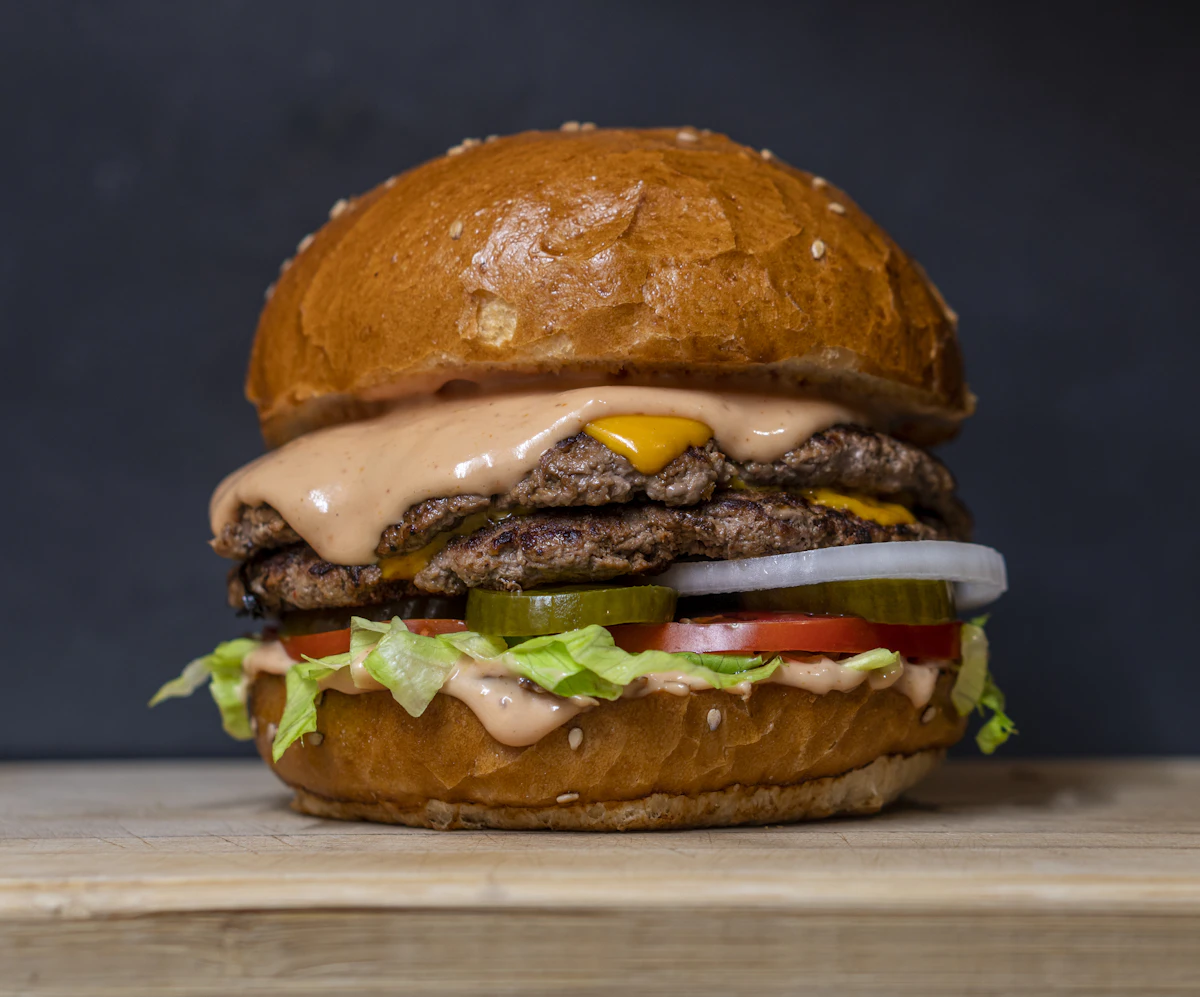
Our biggest build: a stacked double patty loaded with melting cheese, crisp onions and house sauces, served hot in a toasted bun. Built for the ones who come hungry.
Serving Happiness, One Bite at a Time.
Burgerwale is built on a simple promise: Big Bites. Bold Flavours. Full Satisfaction. From juicy burgers to cheesy pizzas, every plate leaves the kitchen made with fresh ingredients and quality preparation.
We keep the fast food you crave affordable, so a great bite is never out of reach. That’s the commitment behind every order that carries the Burgerwale name.
- Fresh ingredients, picked for the daily prep
- Tasty burgers, pizzas and sides for every craving
- Quality preparation across the line
- Affordable fast food at street-friendly prices
REVIEWS
Riya S.
The Special Burger is loud and full of flavour. Fast service too.
Verified orderArjun M.
Cheesy pizza and hot fries. Good value for the price.
Verified orderNeha K.
My go-to late-night order. The paneer burger never misses.
Verified order
“CONTACT”
Visit & Call
LocationShop 12, Ground Floor, Ring Road Market, Ahmedabad, Gujarat 380015
Monday – Sunday · 11:00 AM – 11:00 PM
Send a Message
“TALK”"Fresh Off The Grill"
CravingsDon't Wait.Neither Should You!
From juicy burgers to cheesy pizzas, enjoy an unforgettable taste and a memorable food experience with fierce-burgerwale.
"THE BIG ONE"Categories
Pick your cravingBurgers, pizzas and sides — jump straight to the part of the menu you want.
“SIGNATURE SPECIAL”
SpecialBurgerwale Special Burger.
Our biggest build: a stacked double patty loaded with melting cheese, crisp onions and house sauces, served hot in a toasted bun. Built for the ones who come hungry.
Serving Happiness, One Bite at a Time.
Burgerwale is built on a simple promise: Big Bites. Bold Flavours. Full Satisfaction. From juicy burgers to cheesy pizzas, every plate leaves the kitchen made with fresh ingredients and quality preparation.
We keep the fast food you crave affordable, so a great bite is never out of reach. That’s the commitment behind every order that carries the Burgerwale name.
- Fresh ingredients, picked for the daily prep
- Tasty burgers, pizzas and sides for every craving
- Quality preparation across the line
- Affordable fast food at street-friendly prices
REVIEWS
Riya S.
The Special Burger is loud and full of flavour. Fast service too.
Verified orderArjun M.
Cheesy pizza and hot fries. Good value for the price.
Verified orderNeha K.
My go-to late-night order. The paneer burger never misses.
Verified order
“CONTACT”
Visit & Call
LocationShop 12, Ground Floor, Ring Road Market, Ahmedabad, Gujarat 380015
Monday – Sunday · 11:00 AM – 11:00 PM
No comments yet. Be the first!