feral-ui
 Yashasvi paheriya
Act as a senior frontend architect, AI SaaS designer, and motion UI expert. Create a premium, modern web application UI for an AI Object Detection platform called "VisionX". Take inspiration from a YOLO demo website (clean layout, model showcase, detection examples), but transform it into a futuristic, interactive AI product with smooth animations and better UX. --------------------------------------------- 🎯 CORE EXPERIENCE: The website should feel like: - A real AI product (not a static page) - Smooth, interactive, and modern - Similar flow to YOLO demo, but upgraded to a SaaS dashboard experience --------------------------------------------- 🧩 PAGE STRUCTURE: 1. HERO SECTION (Like video but premium) - Fullscreen dark background - Subtle animated gradient / particles - Title: "VisionX AI Object Detection" - Subtitle: "Detect, Analyze, and Understand Objects in Real-Time" - CTA: - Upload Image - Start Live Detection - Smooth fade-in + slide-up animation --------------------------------------------- 2. "WHAT IS VISIONX" SECTION (Inspired by YOLO info block) - Left: text explanation - Right: animated AI preview (image with fake detection boxes) - On scroll: - text fades in - image animates with bounding boxes appearing --------------------------------------------- 3. MODEL / USE CASE SECTION (Inspired by video cards) Create responsive cards: - Plane Detection - Warehouse Detection - License Plate Detection Each card should have: - Image preview - Overlay detection boxes (animated) - Hover effect: - zoom image - glow border - show label + confidence --------------------------------------------- 4. DETECTION WORKSPACE (MAIN FEATURE) A full interactive section: LEFT: - Drag & drop upload box - Smooth hover animation CENTER: - Detection Canvas: - shows uploaded image - bounding boxes animate in (fade + scale) - labels appear with delay RIGHT: - Result Sidebar: - object list - confidence bars (animated) --------------------------------------------- 5. SKELETON LOADING SYSTEM (IMPORTANT) When user uploads: - Show skeleton UI - Grey shimmer effect - Fake bounding boxes loading animation - Smooth transition into real results --------------------------------------------- 6. FAQ / INFO SECTION (like video but improved) - Accordion style - Smooth expand/collapse animation --------------------------------------------- 🎨 DESIGN SYSTEM: - Dark UI (#0f0f0f) - Neon accents (blue/purple) - Glassmorphism cards - Soft shadows - Rounded corners (2xl) - Clean spacing like SaaS products --------------------------------------------- ✨ ANIMATIONS (VERY IMPORTANT): - Use Framer Motion - Page load → fade + slide - Scroll animations → reveal sections - Hover → scale + glow - Detection boxes: - appear sequentially - smooth easing NO sudden changes. Everything must feel fluid. --------------------------------------------- 🧠 UX RULES: - Instant feedback on actions - Show preview immediately after upload - Clear focus on main feature (detection) - Minimal clutter --------------------------------------------- 🛠 TECH STACK: - React (Vite) - Tailwind CSS - Framer Motion - Three.js (background) - Axios (API calls) --------------------------------------------- 📁 FOLDER STRUCTURE (STRICT): frontend/ ├── src/ │ ├── components/ │ │ Navbar.jsx │ │ Hero.jsx │ │ UploadBox.jsx │ │ DetectionCanvas.jsx │ │ ResultSidebar.jsx │ │ SkeletonLoader.jsx │ │ ModelCard.jsx │ │ FAQ.jsx │ │ │ ├── sections/ │ │ HeroSection.jsx │ │ AboutSection.jsx │ │ ModelsSection.jsx │ │ DetectionSection.jsx │ │ │ ├── services/ │ │ api.js │ │ │ ├── hooks/ │ │ useDetection.js │ │ │ ├── pages/ │ │ Home.jsx │ │ │ ├── App.jsx │ ├── main.jsx --------------------------------------------- ⚡ EXTRA PREMIUM TOUCHES: - Smooth scrolling - Glass blur navbar - Animated gradients - Subtle sound feedback (optional) - Loading progress indicator --------------------------------------------- 🎯 OUTPUT REQUIREMENT: - Clean, modular React code - Production-ready UI - Smooth animations everywhere - Premium SaaS feel (like a startup product demo) --------------------------------------------- IMPORTANT: Do NOT create a basic UI. Do NOT copy YOLO layout. Upgrade it into a modern AI product experience called VisionX. Focus on smoothness, interaction, and visual quality. Act as a senior AI product designer and frontend engineer. Create a premium, production-ready web application UI for an AI object detection system called "VisionX". The UI should replicate the EXPERIENCE of a YOLO demo video: - Image appears instantly after upload - Detection happens smoothly - Bounding boxes animate onto the screen - Labels and confidence scores fade in progressively DO NOT copy any existing UI. Instead, recreate the same smooth experience with a modern, futuristic design. -------------------------------------------------- 🎯 CORE EXPERIENCE FLOW (VERY IMPORTANT): 1. User uploads image 2. Image instantly appears on screen (no delay) 3. Skeleton loader overlays the image (AI scanning effect) 4. After 1–2 seconds: - Bounding boxes animate in one by one - Labels fade in with slight delay - Confidence scores animate (count-up effect) This flow must feel smooth, cinematic, and satisfying. -------------------------------------------------- 🎨 UI STYLE: - Dark theme (#0f0f0f) - Neon glow accents (blue / purple) - Glassmorphism panels - Minimal, clean layout - Inspired by AI tools + n8n + Tesla UI -------------------------------------------------- 🧩 MAIN COMPONENTS: 1. Upload Area: - Drag & drop box - Smooth hover glow - Instant preview after upload 2. Detection Canvas (MOST IMPORTANT): - Displays uploaded image - Overlay bounding boxes: - Animate with scale + fade - Slight delay between each box - Smooth easing (easeOut) 3. Results Sidebar: - List detected objects - Animated confidence bars - Icons + labels -------------------------------------------------- 💀 SKELETON LOADER (MANDATORY): While detecting: - Show shimmer effect over image - Fake bounding boxes pulsing - Blurred overlay with "Analyzing..." text - Smooth transition into real results -------------------------------------------------- ✨ ANIMATION DETAILS (CRITICAL): - Use Framer Motion - No sudden jumps — everything must animate Bounding box animation: - opacity: 0 → 1 - scale: 0.8 → 1 - delay: staggered (0.1–0.2s) Label animation: - slide up + fade in Confidence: - animate number from 0 → value -------------------------------------------------- 🎥 LIVE DETECTION MODE: - Webcam feed - Real-time overlay boxes - Subtle scanning line animation -------------------------------------------------- 📁 FOLDER STRUCTURE: frontend/ ├── src/ │ ├── components/ │ │ UploadBox.jsx │ │ DetectionCanvas.jsx ← handles bounding boxes │ │ ResultSidebar.jsx │ │ SkeletonLoader.jsx │ │ Navbar.jsx │ │ ├── features/ │ │ detection/ │ │ liveDetection/ │ │ analytics/ │ │ ├── hooks/ │ │ useDetection.js │ │ ├── services/ │ │ api.js │ │ ├── pages/ │ │ Home.jsx │ │ ├── App.jsx │ ├── main.jsx -------------------------------------------------- 🛠 TECH STACK: - React (Vite) - Tailwind CSS - Framer Motion - Axios -------------------------------------------------- 🎯 OUTPUT: - Clean, modular React code - Beautiful animations - Realistic detection flow (like YOLO demo) - Premium SaaS-level UI -------------------------------------------------- IMPORTANT: Focus more on EXPERIENCE than layout. The UI should feel alive, smooth, and intelligent — not static.

Comments (0)
Sign in to leave a comment
Project Tasks17
Implement Theme and Structure
As a user, I want the app to look exactly like the mock-design pages so that I experience a consistent, professional black-and-white theme with neon blue accents across all pages. This task covers: applying the VisionX color palette (#121212 background, #1e1e1e surface, #ffffff text, #4a90e2 accent, #757575 muted), setting up Tailwind CSS theme config, integrating Framer Motion globally, implementing glassmorphism card styles, rounded corners, soft shadows, and removing any pages not present in the design. All 11 designed pages (Landing v2, Login v2, Settings v1, Results v1, Demo v1, Live Detection v1, Dashboard v1, FAQ v1, Home v1, Logs v1, Detection v1) should match their JSX designs exactly.
Implement Object Detection API
As a user, I want to use a POST /detect API endpoint so that I can upload an image and receive real YOLOv8 (VisionX) inference results including bounding boxes, labels, and confidence scores. Implementation: FastAPI endpoint accepting multipart/form-data image upload, load YOLOv8 pretrained model (yolov8n.pt / yolov8s.pt via Ultralytics), preprocess image with OpenCV, run inference with confidence threshold 0.5, return JSON: { detections: [{ label, confidence, box: [x,y,w,h] }] }. Support model variant selection (yolov8n, yolov8s). Ensure inference time < 2 seconds.
Implement Dashboard Analytics API
As an admin, I want a backend API to fetch platform analytics (total detections, active users, model usage, system health) so that the Dashboard page can display real-time metrics. Implement FastAPI endpoints: GET /analytics/overview, GET /analytics/usage. Return structured JSON for the frontend to consume.
Implement Logs API
As an admin, I want a backend API to fetch system logs (detection events, errors, user activity) so that the Logs page can display them with filtering and pagination. Implement GET /logs endpoint with query params for filtering by type, date, and pagination.
Implement Settings API
As an admin, I want a backend API to GET and UPDATE platform configuration settings (confidence threshold, active model variant, etc.) so that the Settings page can persist changes. Implement GET /settings and PUT /settings endpoints.
Build Landing Page
As a user, I want to see a fullscreen dark futuristic landing page (Landing v2 design) with a galaxy map / animated gradient background, the VisionX title, subtitle, and CTA buttons (Upload Image, Start Live Detection) so that I am immediately impressed and guided into the platform. Implement smooth fade-in and slide-up animations with Framer Motion. This page links to Login and Home (Demo) per user flows.
Build Login Page
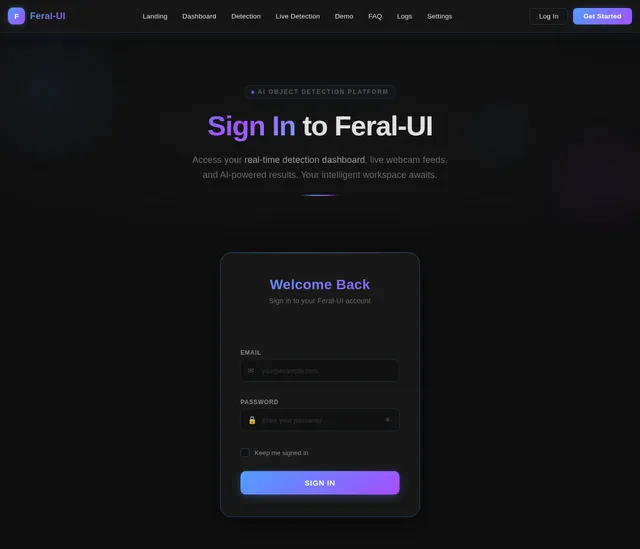
As a user, I want to sign in via a premium dark-themed login page (Login v2 design) so that I can securely access the platform. The page should feature glassmorphism card styling, smooth input animations, and connect to the auth API. Per user flows, it is reached from the Landing page and leads to the Home page (for Users) or Dashboard (for Admins).
Build Home Page
As a user, I want to browse VisionX features from the Home page (Home v1 design) after login so that I can navigate to Detection, Live Detection, or explore the platform. The page should highlight key features with animated cards, smooth scroll reveals, and a glass blur navbar. Links from this page lead to Detection, Live Detection, and FAQ per user flows.
Build Demo Page
As a guest, I want to try a sample image upload and view detection results on the Demo page (Demo v1 design) without signing in so that I can evaluate VisionX before committing. Implement sample image selection, skeleton loader shimmer, animated bounding boxes, and a results sidebar. This page is reached from the Home/Explore Demo flow and links to the Results view.
Build Detection Page
As a user, I want to upload an image via drag-and-drop or file selection on the Detection page (Detection v1 design) so that VisionX analyzes it and shows animated bounding boxes, labels, and confidence scores in real time. Implement: drag-and-drop UploadBox with neon glow on hover, instant image preview, skeleton shimmer loader with fake pulsing bounding boxes and 'Analyzing with VisionX...' text, DetectionCanvas with Framer Motion staggered bounding box animations (opacity 0→1, scale 0.8→1, 0.1s stagger), and ResultSidebar with animated confidence bars. Also support model variant switching (yolov8n / yolov8s) and annotated image download.
Build FAQ Page
As a guest or user, I want to expand and collapse FAQ items on the FAQ page (FAQ v1 design) so that I can learn about VisionX features and usage. Implement accordion-style expand/collapse with smooth Framer Motion animations. This page is linked from the Home/Explore Demo flow.
Implement Live Detection API
As a user, I want to use a real-time webcam detection API so that the Live Detection page can stream frames and receive bounding box overlays. Implement a WebSocket or streaming endpoint in FastAPI that accepts video frames, runs YOLOv8 (VisionX) inference, and returns detections in real time. Ensure low-latency response suitable for live webcam feeds.
Build Dashboard Page
As an admin, I want to view analytics and monitor platform usage on the Dashboard page (Dashboard v1 design) so that I can track user activity, detection counts, and system health metrics. Implement charts, usage stats cards, and smooth data load animations. This page is reached from Login for admin users and links to Logs and Settings.
Build Logs Page
As an admin, I want to review system logs on the Logs page (Logs v1 design) so that I can monitor detection events, errors, and user activity. Implement a filterable, paginated log table with smooth load animations. This page is reached from the Dashboard.
Build Settings Page
As an admin, I want to configure platform settings on the Settings page (Settings v1 design) so that I can manage detection thresholds, model variants, and system preferences. Implement settings form with save/reset actions, smooth toggle and input animations. This page is reached from the Dashboard.
Build Results Page
As a user, I want to inspect detected objects in detail on the Results page (Results v1 design) so that I can review all bounding boxes, labels, confidence scores, and download the annotated image. Implement animated object list, confidence bars, total object count, and download button. This page is reached from the Detection page.
Build Live Detection Page
As a user or guest, I want to start real-time webcam object detection on the Live Detection page (Live Detection v1 design) so that I can see bounding boxes and labels overlaid on my live webcam feed. Implement WebRTC webcam integration, real-time overlay boxes, a scanning line animation, and connect to the live detection API endpoint. This page is reachable from Home and the Landing page.

Detect Objects with AI Precision
Real-time AI object detection with futuristic animations. Upload images, analyze objects instantly, and explore results with cinematic visual feedback.
Explore the Galaxy
Navigate the Feral-UI constellation — hover over a star to discover each platform section
Powered by Intelligent AI
Experience the next generation of object detection with features engineered for speed, precision, and an unmatched visual experience.
Real-time Detection
Leverage cutting-edge AI models to detect and classify objects in real-time with animated bounding boxes and live overlays on webcam or uploaded media.
Instant Preview
See detection results the moment you upload. Drag-and-drop your image and watch AI-powered analysis render instantly with smooth, cinematic animations.
Confidence Scoring
Every detected object comes with a precise confidence score displayed as animated gradient bars, helping you understand the accuracy of each detection at a glance.
Upload Your Image
Drag and drop your image for instant AI-powered object detection
Maximum file size: 10 MB
Recent Uploads
Real-time Object Detection with Live Webcam
Experience AI-powered object detection in real time. Enable your webcam and watch as our model identifies objects instantly with animated bounding boxes and live confidence scoring.
AI-Powered Object Detection in Action
See how Feral-UI identifies objects with precision bounding boxes, real-time confidence scores, and millisecond processing times.
Street Scene Analysis
From Upload to Detection in Seconds
Four simple steps to harness the power of AI object detection with real-time feedback and precision scoring.
Upload Image
Drag and drop your image or select a file. Instant preview with support for all major formats.
AI Processing
Our neural network analyzes your image with skeleton-loader feedback so you always know the status.
Real-time Detection
Animated bounding boxes appear on detected objects with labels and precise coordinates.
View Results
Explore confidence scores, detected object lists, and export your results with a single click.
Frequently Asked Questions
Everything you need to know about VisionX and AI object detection.
Trusted by AI Innovators Worldwide
See how teams and researchers are using Feral-UI to supercharge their object detection workflows.
Feral-UI completely transformed our object detection workflow. The real-time bounding boxes and confidence scores are incredibly accurate, and the interface is a joy to use.
The live webcam detection feature is game-changing. We integrated it into our warehouse monitoring system and saw a 40% improvement in detection speed compared to our old tool.
As a researcher, I need quick and reliable detection results. Feral-UI delivers that with beautiful animations that actually help visualize the data better. The drag-and-drop upload is seamless.
The futuristic design and glassmorphic UI set this platform apart from everything else. Our team loves the smooth Framer Motion animations and the dark neon theme. Truly premium.
Ready to Detect?
Sign up now and explore our AI object detection platform. Experience real-time detection, instant previews, and confidence scoring — all in one place.
No credit card required · Free tier available · Setup in under 2 minutes
No comments yet. Be the first!