feral-pty
 Vikas Chavan
in the pty

Comments (0)
Sign in to leave a comment
System Requirements
System Requirements Document (SRD)
Project Name: feral-pty
1. Introduction
The feral-pty project is focused on developing a robust attendance management system using Python. This document outlines the system requirements for the project, ensuring clarity and alignment with the goals set by Vikas Chavan. The attendance management system aims to streamline attendance tracking processes for organizations, schools, and events, providing a user-friendly and efficient solution.
This SRD has been tailored to meet the needs of the project, incorporating locale-specific considerations for India (IN), such as timezone (IST), potential integration with Aadhaar-based authentication systems, and compliance with Indian data protection laws.
2. System Overview
The feral-pty Attendance Management System will be a Python-based application designed to simplify attendance tracking. It will cater to various user personas, including administrators, teachers, students, and guests. The system will offer functionalities such as attendance marking, reporting, analytics, leave management, and selective re-run of SRD regeneration triggered by the user, while ensuring data security and scalability.
Key features include:
- Real-time attendance tracking.
- Role-based access control.
- Integration with biometric devices (optional).
- Automated report generation.
- Leave management module for students and parents.
- Automated proctor call system for unplanned absences.
- User-friendly interface.
- Selective re-run of SRD regeneration triggered by the user.
The system will leverage modern technologies such as Python, FastAPI, and MySQL/MariaDB for backend operations, ensuring reliability and performance.
3. Functional Requirements
Story Points:
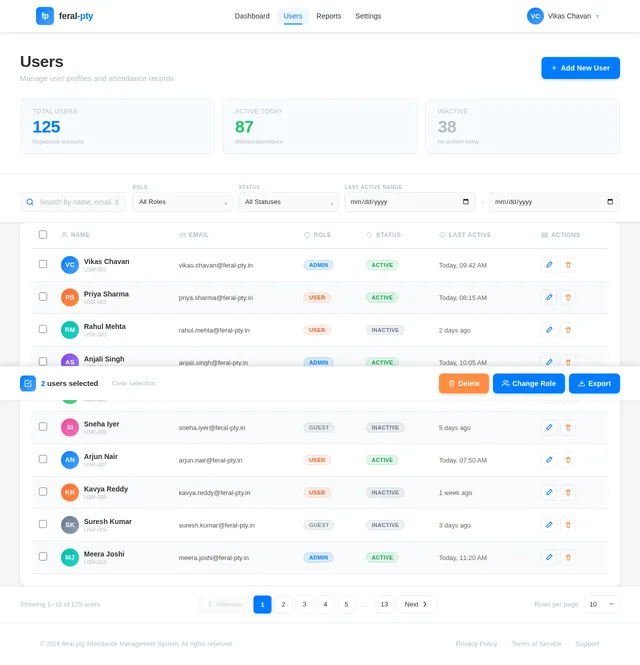
- As Admin, I should be able to add, update, and delete user profiles.
- As Admin, I should be able to view attendance reports for specific dates or users.
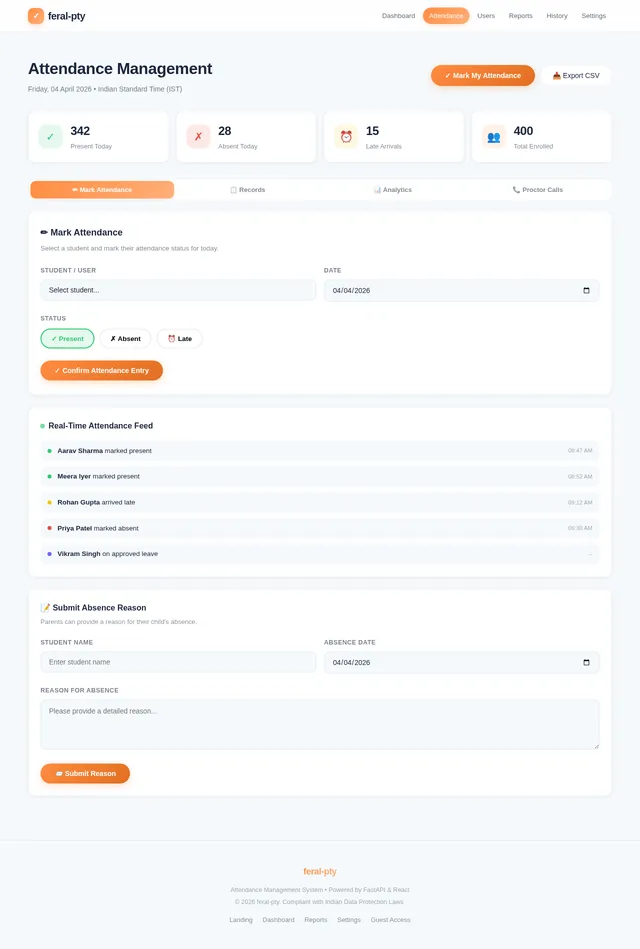
- As User, I should be able to mark my attendance using a simple interface.
- As Admin, I should be able to configure attendance rules (e.g., late penalties, working hours).
- As User, I should be able to view my attendance history.
- As Admin, I should be able to export attendance data in CSV or PDF format.
- As Admin, I should be able to integrate biometric devices for attendance tracking.
- As Guest, I should be able to mark attendance without requiring a login (optional feature).
- As Admin, I should be able to trigger selective re-run of SRD regeneration based on specific updates.
- As Teacher, I should be able to view a list of students absent without prior leave approval.
- As Teacher, I should be able to trigger an automated proctor call to parents of absent students.
- As Parent, I should be able to receive notifications about my child’s absence and provide a reason.
- As Student/Parent, I should be able to apply for leave through a leave management module.
- As Admin, I should be able to approve or reject leave requests and update attendance records accordingly.
4. User Personas
1. Admin
- Role: Manages the system, configures rules, oversees attendance data, and triggers selective SRD regeneration.
- Responsibilities: User management, report generation, system configuration, and SRD updates.
2. Teacher
- Role: Monitors student attendance and manages unplanned absences.
- Responsibilities: Reviewing absences, triggering proctor calls, and approving leave requests.
3. Student
- Role: Marks attendance and applies for leave when necessary.
- Responsibilities: Attendance marking and leave management.
4. Parent
- Role: Receives notifications about their child’s attendance and provides reasons for absences.
- Responsibilities: Responding to proctor calls and managing leave applications.
5. Guest
- Role: Temporary user who marks attendance without login credentials.
- Responsibilities: Attendance marking (optional feature).
5. Visuals Colors and Theme
Color Palette:
The feral-pty Attendance Management System will use a unique color palette to evoke professionalism and simplicity:
- Background:
#F5F9FC(Gentle Mist Blue) - Surface:
#FFFFFF(Pure White) - Text:
#1B263B(Midnight Navy) - Accent:
#FF8C42(Vivid Tangerine) - Muted Tones:
#B0C4DE(Soft Steel Blue)
This palette ensures clarity, ease of use, and a modern aesthetic while maintaining a professional tone.
6. Signature Design Concept
Concept: Interactive Attendance Dashboard
The homepage will feature an interactive attendance dashboard that combines real-time data updates with engaging design elements.
Key Features:
- Real-Time Attendance Feed: Attendance data updates dynamically as users mark their attendance.
- Absence Alerts: Teachers will see a list of absent students with an option to trigger proctor calls directly from the dashboard.
- Leave Management Panel: A dedicated section for students and parents to apply for leave and track approvals.
- Interactive Charts: Teachers and admins can view attendance trends through bar charts, pie charts, and heatmaps.
- Automated Notifications: Parents receive real-time alerts about unplanned absences with a call-to-action to provide a reason.
- Micro-Animations: Subtle animations for buttons, icons, and graphs enhance user engagement.
- Proctor Call Status: The dashboard will display the status of automated calls (e.g., "Call Sent" or "Awaiting Response").
The design will be bold, modern, and intuitive, ensuring users feel connected to the system while enjoying a seamless experience.
7. Non-Functional Requirements
- Performance: The system should handle up to 10,000 users without performance degradation.
- Scalability: The architecture should support future integrations, such as biometric devices or AI-based analytics.
- Security: Data encryption must be implemented for sensitive information like user profiles and attendance records.
- Availability: The system should maintain 99.9% uptime.
- Localization: The system should support Indian timezone (IST) and locale-specific formats (e.g., DD/MM/YYYY).
- Selective SRD Regeneration: The system should allow admins to trigger selective SRD regeneration with minimal latency.
- Automated Proctor Calls: The system should ensure reliable delivery of notifications to parents.
8. Tech Stack
Frontend:
- React for Web
Backend:
- Python
- FastAPI
Database RDBMS:
- MySQL or MariaDB (using Alembic for migrations)
AI Models (if applicable):
- GPT 5.4 for user-friendly responses
Local Orchestration:
- Docker
- docker-compose
Server-Side Orchestration:
- Kubernetes
9. Assumptions and Constraints
Assumptions:
- Users will have access to devices capable of running modern browsers.
- Biometric integration is optional and may require additional hardware.
- Attendance rules will be configurable by the admin.
- Admins will have the technical capability to trigger selective SRD regeneration.
- Parents will have access to mobile devices for receiving notifications.
Constraints:
- The system must comply with Indian data protection laws.
- The application must be optimized for low-bandwidth environments.
- Selective SRD regeneration must not impact system performance.
- Automated proctor calls must comply with telecom regulations in India.
10. Glossary
- Admin: A user with elevated privileges to manage the system and trigger SRD updates.
- Teacher: A user responsible for monitoring student attendance and managing absences.
- Student: A regular attendee who interacts with the system for attendance and leave management.
- Parent: A guardian who receives notifications about their child’s attendance and manages leave applications.
- Guest: A temporary attendee with limited access.
- Biometric Device: Hardware used to capture fingerprints or other biometric data for attendance tracking.
- IST: Indian Standard Time.
- SRD Regeneration: The process of selectively updating the System Requirements Document based on specific user inputs.
- Proctor Call: An automated voice or SMS notification sent to parents about unplanned student absences.

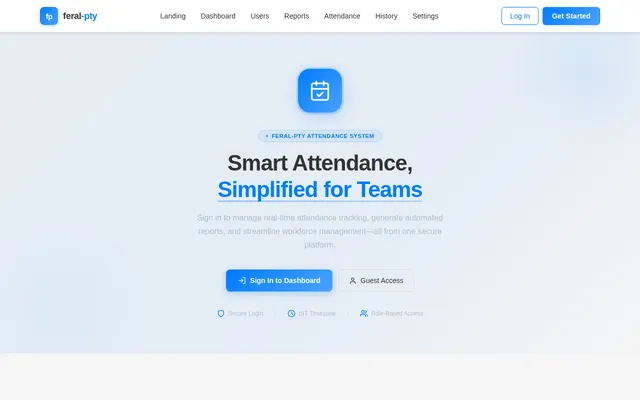
Simplify Attendance Tracking
Real-time attendance management for organizations, schools, and events. Track, analyze, and report—all in one platform.
1,247
Present Today
87.3%
Attendance Rate
23
Late Arrivals
Attendance Rate
Trusted by Teams Everywhere
Numbers that reflect our commitment to seamless attendance management
Everything You Need to Manage Attendance
Powerful features designed to streamline attendance tracking for organizations, schools, and events.
Real-Time Tracking
Monitor attendance as it happens with live updates across all connected devices and dashboards.
Role-Based Access
Configure granular permissions for admins, employees, and guests to secure sensitive attendance data.
Biometric Integration
Seamlessly connect fingerprint scanners and facial recognition devices for automated attendance marking.
Automated Reports
Generate detailed attendance reports on schedule with customizable templates and delivery options.
User History
Access complete attendance history with filtering by date, department, and attendance status.
Data Export
Export attendance records in CSV or PDF format for payroll processing and compliance audits.
Interactive Attendance Dashboard
Experience real-time attendance insights with dynamic charts, an interactive calendar, and live device monitoring — all in one unified view.
Active Users
↑ +12%Attendance Rate
↑ +3.2%Avg. Duration
↓ -0.5hBuilt for Every Role
From administrators managing thousands of users to guests checking in for a single event, feral-pty adapts to every persona.
Admin
System Administrator
- Manage user profiles and access roles
- Generate and export attendance reports
- Configure attendance rules and policies
- Integrate biometric devices
User
Employee / Student
- Mark attendance with a single tap
- View personal attendance history
- Track working hours and trends
- Receive automated notifications
Guest
Temporary Visitor
- Mark attendance without login
- Access via shared link or QR code
- Attend events with instant check-in
What Our Users Say
Trusted by organizations, schools, and event managers across India to simplify attendance management.
Built With Modern Technology
The feral-pty attendance system is powered by a production-grade stack designed for reliability, speed, and intelligent insights.
Ready to Streamline Attendance?
Join thousands of organizations managing attendance with feral-pty
Frequently Asked Questions
Everything you need to know about the feral-pty attendance management system
Our system updates attendance records instantly as users mark their presence. Whether through the web interface or integrated biometric devices, every entry is timestamped in IST and reflected on the dashboard within seconds.
Yes, feral-pty supports optional integration with fingerprint scanners and other biometric hardware. Once connected, the system displays live device status and automatically logs attendance from biometric inputs.
The system supports three user personas: Admin (full system management, report generation, and rule configuration), User (attendance marking and history viewing), and Guest (temporary attendance marking without login credentials).
Admins can export attendance data in both CSV and PDF formats. Navigate to the Reports section, apply your desired date range or user filters, and click the export button to download your report instantly.
Absolutely. All sensitive information including user profiles and attendance records is encrypted. The system complies with Indian data protection laws and maintains 99.9% uptime with enterprise-grade security protocols.
Yes, administrators can fully configure attendance rules from the Settings page. This includes defining working hours, setting late arrival thresholds and penalties, and customizing grace periods for your organization.
Yes, the Guest Access feature allows temporary attendees to mark their attendance without requiring login credentials. Guests simply enter their basic details and confirm their presence, making it ideal for events and visitor tracking.
feral-pty is built to scale, supporting up to 10,000 concurrent users without performance degradation. The architecture leverages FastAPI and MySQL/MariaDB with Docker and Kubernetes orchestration for reliable, high-performance operations.
Simplify Attendance Tracking
Real-time attendance management for organizations, schools, and events. Track, analyze, and report—all in one platform.
1,247
Present Today
87.3%
Attendance Rate
23
Late Arrivals
Attendance Rate
Trusted by Teams Everywhere
Numbers that reflect our commitment to seamless attendance management
Everything You Need to Manage Attendance
Powerful features designed to streamline attendance tracking for organizations, schools, and events.
Real-Time Tracking
Monitor attendance as it happens with live updates across all connected devices and dashboards.
Role-Based Access
Configure granular permissions for admins, employees, and guests to secure sensitive attendance data.
Biometric Integration
Seamlessly connect fingerprint scanners and facial recognition devices for automated attendance marking.
Automated Reports
Generate detailed attendance reports on schedule with customizable templates and delivery options.
User History
Access complete attendance history with filtering by date, department, and attendance status.
Data Export
Export attendance records in CSV or PDF format for payroll processing and compliance audits.
Interactive Attendance Dashboard
Experience real-time attendance insights with dynamic charts, an interactive calendar, and live device monitoring — all in one unified view.
Active Users
↑ +12%Attendance Rate
↑ +3.2%Avg. Duration
↓ -0.5hBuilt for Every Role
From administrators managing thousands of users to guests checking in for a single event, feral-pty adapts to every persona.
Admin
System Administrator
- Manage user profiles and access roles
- Generate and export attendance reports
- Configure attendance rules and policies
- Integrate biometric devices
User
Employee / Student
- Mark attendance with a single tap
- View personal attendance history
- Track working hours and trends
- Receive automated notifications
Guest
Temporary Visitor
- Mark attendance without login
- Access via shared link or QR code
- Attend events with instant check-in
What Our Users Say
Trusted by organizations, schools, and event managers across India to simplify attendance management.
Built With Modern Technology
The feral-pty attendance system is powered by a production-grade stack designed for reliability, speed, and intelligent insights.
Ready to Streamline Attendance?
Join thousands of organizations managing attendance with feral-pty
Frequently Asked Questions
Everything you need to know about the feral-pty attendance management system
Our system updates attendance records instantly as users mark their presence. Whether through the web interface or integrated biometric devices, every entry is timestamped in IST and reflected on the dashboard within seconds.
Yes, feral-pty supports optional integration with fingerprint scanners and other biometric hardware. Once connected, the system displays live device status and automatically logs attendance from biometric inputs.
The system supports three user personas: Admin (full system management, report generation, and rule configuration), User (attendance marking and history viewing), and Guest (temporary attendance marking without login credentials).
Admins can export attendance data in both CSV and PDF formats. Navigate to the Reports section, apply your desired date range or user filters, and click the export button to download your report instantly.
Absolutely. All sensitive information including user profiles and attendance records is encrypted. The system complies with Indian data protection laws and maintains 99.9% uptime with enterprise-grade security protocols.
Yes, administrators can fully configure attendance rules from the Settings page. This includes defining working hours, setting late arrival thresholds and penalties, and customizing grace periods for your organization.
Yes, the Guest Access feature allows temporary attendees to mark their attendance without requiring login credentials. Guests simply enter their basic details and confirm their presence, making it ideal for events and visitor tracking.
feral-pty is built to scale, supporting up to 10,000 concurrent users without performance degradation. The architecture leverages FastAPI and MySQL/MariaDB with Docker and Kubernetes orchestration for reliable, high-performance operations.
No comments yet. Be the first!