feral-ngo
You are a highly experienced Full Stack Developer tasked with building a complete web application using only free resources and tools. 🎯 Objective Develop a user-friendly website for an NGO to manage and showcase Self-Help Group (SHG) beneficiaries, many of whom run small businesses. This platform must: Be fully functional and scalable Be built entirely using free tools/resources Be designed so that a non-technical person can easily manage and update it without confusion ⚠️ Important Constraint (Development Environment) I cannot download or install any software on my laptop Development must be done using browser-based tools only I am currently using GitHub (web-based environment) 👉 So: Suggest only cloud-based / browser-based tools Avoid any setup that requires local installation Ensure the entire development workflow can run online 👥 Target Users Admin (Non-technical NGO staff) Should be able to: Add Edit Manage Delete Must handle everything without coding knowledge Interface must be simple and confusion-free Public Users Can browse and view beneficiary profiles 🧩 Core Features 1. Dynamic Multi-Level Categorization (Very Important) Beneficiaries should be organized in a flexible hierarchical structure Not limited to: Sector → Subcategory Must support unlimited nested levels Example: Service Sector → Tailoring → Women Entrepreneurs → Bridal Specialists → Individual Beneficiaries ✅ Requirements: Add categories at any level Expand structure without limitation Easy navigation across levels 2. Beneficiary Listing Example: Service Sector → Tailoring → “Prema Stitching Shop” Clicking opens a detailed profile page 👤 Beneficiary Profile Page Should Include Profile Photo (or placeholder) Shop/Business Name About Section Services Offered Contact Details: Mobile Number Location (map optional) Social Links: Instagram Facebook Business Card (image/upload) 🖼️ Media Handling Sections for: Profile Image Work Images Visiting/Activity Images If no image: Show default placeholder Handle cases where users don’t want to upload images ⚙️ Admin Panel (Very Important) Non-technical user should be able to: Add / Edit / Delete: Categories (any level) Beneficiaries Upload/manage images easily 👉 UX must ensure: No confusion Clear navigation Always know: Where they are What they are editing 🎨 Design Requirements Modern, clean, professional UI Proper spacing and layout Use: Good fonts Consistent color palette (I can provide codes) Smooth animations (optional) 3D icons / soft UI (if suitable) Fully mobile responsive 🧰 Technical Constraints Only free tools No paid services Must be browser-based (no installation required) Suggested stack (flexible): Frontend: React / Next.js (via browser IDE if possible) Backend: Supabase / Firebase Hosting: Vercel / Netlify Version Control: GitHub 🧠 Key Requirement This platform will be handed over to a non-technical NGO staff member. So: Must be extremely easy to use Avoid complex workflows No confusion in usage or navigation Guide me to build this website step by step in detail. I am a non-technical person, and this will be handed over to another non-technical person.
Comments (0)
Sign in to leave a comment
System Requirements
System Requirements Document (SRD)
Project Name: Feral-NGO
1. Introduction
The Feral-NGO project aims to develop a user-friendly web application for an NGO to manage and showcase Self-Help Group (SHG) beneficiaries, many of whom run small businesses. The platform will be built entirely using free, browser-based tools to accommodate the user's constraints, ensuring scalability and ease of use for non-technical NGO staff.
This document outlines the system requirements, functional specifications, and design concepts for the Feral-NGO project.
2. System Overview
The Feral-NGO platform will serve two primary user groups:
- Admin Users: Non-technical NGO staff who will manage categories, beneficiaries, and media content.
- Public Users: Visitors who can browse and view beneficiary profiles.
The system will include:
- A dynamic multi-level categorization system for organizing beneficiaries.
- Beneficiary profile pages with detailed information and media galleries.
- An intuitive admin panel for managing categories, beneficiaries, and media.
- A modern, responsive design optimized for mobile and desktop use.
The platform will be developed entirely using free, browser-based tools, ensuring accessibility and ease of deployment.
3. Functional Requirements
Admin User Stories:
- As Admin, I should be able to add, edit, delete, and manage categories at any level of hierarchy.
- As Admin, I should be able to add, edit, delete, and manage beneficiary profiles.
- As Admin, I should be able to upload and manage images for beneficiaries.
- As Admin, I should always know where I am and what I am editing in the admin panel.
Public User Stories:
- As Public User, I should be able to browse categories and subcategories to find beneficiaries.
- As Public User, I should be able to view detailed beneficiary profiles, including their services and contact details.
- As Public User, I should be able to view media galleries for beneficiaries.
4. User Personas
Admin
Description: Non-technical NGO staff responsible for managing categories, beneficiaries, and media content.
Goals:
- Manage the platform without coding knowledge.
- Ensure beneficiary information is accurate and up-to-date.
Pain Points: - Confusion in navigation or workflows.
- Difficulty in uploading and managing media content.
Public User
Description: Visitors interested in learning about SHG beneficiaries and their services.
Goals:
- Easily browse and find relevant beneficiaries.
- Access detailed profiles and contact information.
Pain Points: - Difficulty navigating categories or finding specific beneficiaries.
5. Visuals Colors and Theme
Color Palette
The Feral-NGO platform will use a unique color palette inspired by nature and community empowerment:
- Background:
#F5F9F8(soft mint green for a calming effect) - Surface:
#FFFFFF(clean white for clarity and simplicity) - Text:
#333333(dark gray for readability) - Accent:
#FF6F61(warm coral for highlights and buttons) - Muted Tones:
#A8B5C3(soft blue-gray for secondary elements)
Typography
- Primary Font: Nunito (Google Font for a modern and approachable feel)
- Secondary Font: Roboto (Google Font for clean readability)
6. Signature Design Concept
Concept: Interactive Tree Navigation
The homepage will feature an interactive tree navigation system representing the hierarchical structure of categories.
Details:
- Visuals: A dynamic tree diagram where each node represents a category or subcategory. Nodes expand and collapse smoothly with animations.
- Interaction:
- Clicking a node reveals its subcategories and beneficiaries.
- Hovering over a node displays a tooltip with a brief description.
- Transitions: Smooth fade-in/out animations for expanding and collapsing nodes.
- Color Shifts: Nodes change color based on their level in the hierarchy (e.g., parent nodes in coral, child nodes in mint green).
- Micro-Interactions: Beneficiary profiles "pop up" as cards when clicked, with subtle shadow and zoom effects.
This design will make navigation intuitive and visually engaging, leaving a memorable impression on users.
7. Non-Functional Requirements
- Scalability: The platform must support unlimited nested categories and beneficiaries.
- Performance: Pages should load within 3 seconds on average.
- Accessibility: Ensure compliance with WCAG 2.1 standards for accessibility.
- Responsiveness: Fully functional on mobile, tablet, and desktop devices.
- Security: Protect user data and media uploads using Firebase authentication and storage rules.
8. Tech Stack
Frontend
- React (via Replit or CodeSandbox for browser-based development)
Backend
- Firebase (Firestore for database, Firebase Storage for media handling)
Hosting
- Vercel (for seamless deployment and hosting)
Version Control
- GitHub (for code management and collaboration)
9. Assumptions and Constraints
Assumptions
- Admin users have basic computer literacy but no coding knowledge.
- Public users primarily access the platform via mobile devices.
Constraints
- Development must be done entirely using browser-based tools.
- No paid services or software installations are allowed.
10. Glossary
- SHG: Self-Help Group, a community-based group that supports small businesses.
- Admin Panel: The backend interface for managing categories, beneficiaries, and media.
- Beneficiary Profile: A detailed page showcasing an SHG member's business and services.
- Firebase: A cloud-based platform for database and storage management.
- Vercel: A hosting platform for deploying web applications.
Let me know when you're ready to proceed with Step 2, or if you'd prefer I build the complete website for you!
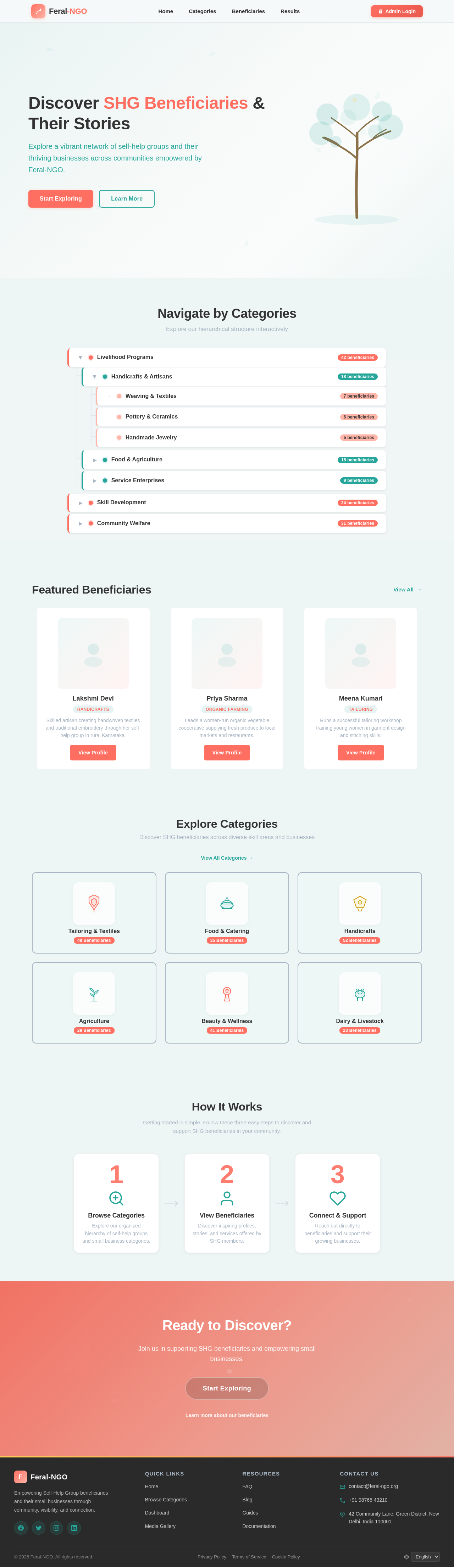
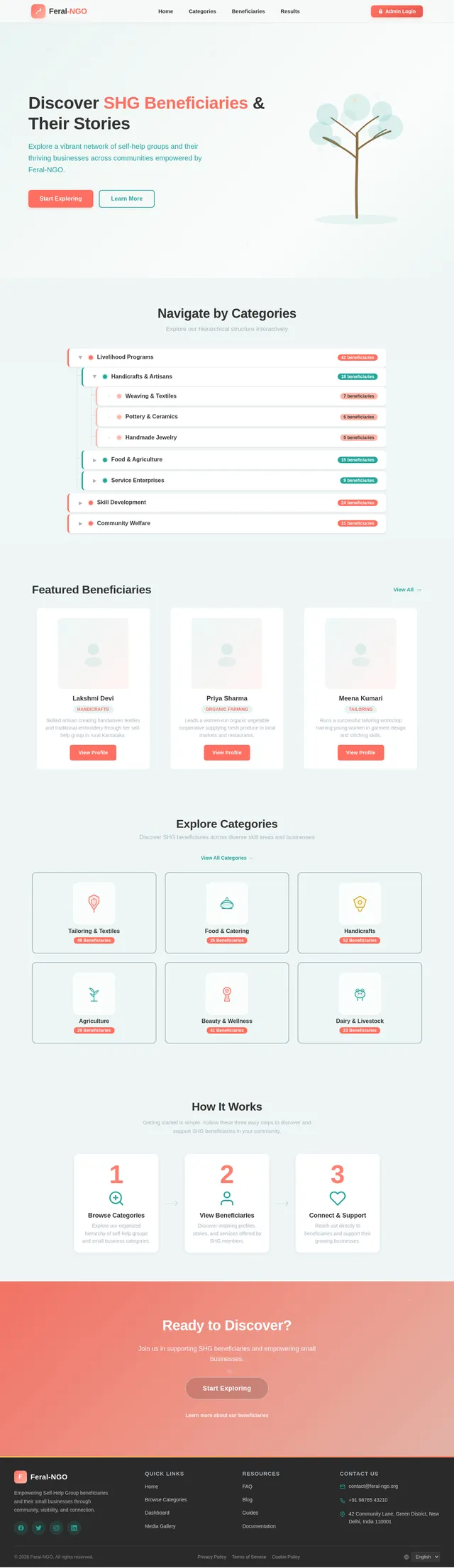
Discover SHG Beneficiaries & Their Stories
Explore a vibrant network of self-help groups and their thriving businesses across communities empowered by Feral-NGO.
Navigate by Categories
Explore our hierarchical structure interactively
Featured Beneficiaries
View All→Lakshmi Devi
HandicraftsSkilled artisan creating handwoven textiles and traditional embroidery through her self-help group in rural Karnataka.
View ProfilePriya Sharma
Organic FarmingLeads a women-run organic vegetable cooperative supplying fresh produce to local markets and restaurants.
View ProfileMeena Kumari
TailoringRuns a successful tailoring workshop training young women in garment design and stitching skills.
View ProfileExplore Categories
Discover SHG beneficiaries across diverse skill areas and businesses
View All Categories →Tailoring & Textiles
48 BeneficiariesFood & Catering
35 BeneficiariesHandicrafts
52 BeneficiariesAgriculture
29 BeneficiariesBeauty & Wellness
41 BeneficiariesDairy & Livestock
23 BeneficiariesHow It Works
Getting started is simple. Follow these three easy steps to discover and support SHG beneficiaries in your community.
Ready to Discover?
Join us in supporting SHG beneficiaries and empowering small businesses.
Start ExploringLearn more about our beneficiaries
No comments yet. Be the first!