feral-caluclayot
 Diya Trivedi
start a project to build a simple single page design of caluclayot]

Comments (0)
Sign in to leave a comment
System Requirements
System Requirements Document for feral-caluclayot
1. Introduction
feral-caluclayot is a simple calculator delivered as a single-page design. The product intent is narrow and complete: a person opens one page, enters numbers and arithmetic operations, reads the computed result, and clears the entry to begin a new calculation. There is no navigation, no secondary page, and no marketing surface — the calculator itself is the entire product.
The audience is broad and casual: anyone who needs quick arithmetic on a single page. The experience is designed to feel warm, approachable, and a little playful — pressing buttons should feel like a small, satisfying toy rather than a spreadsheet — while remaining instantly legible.
This document is the System Requirements Document for the project requested by Diya Trivedi.
2. System Overview
feral-caluclayot is a single-page web calculator. The current delivery consists of:
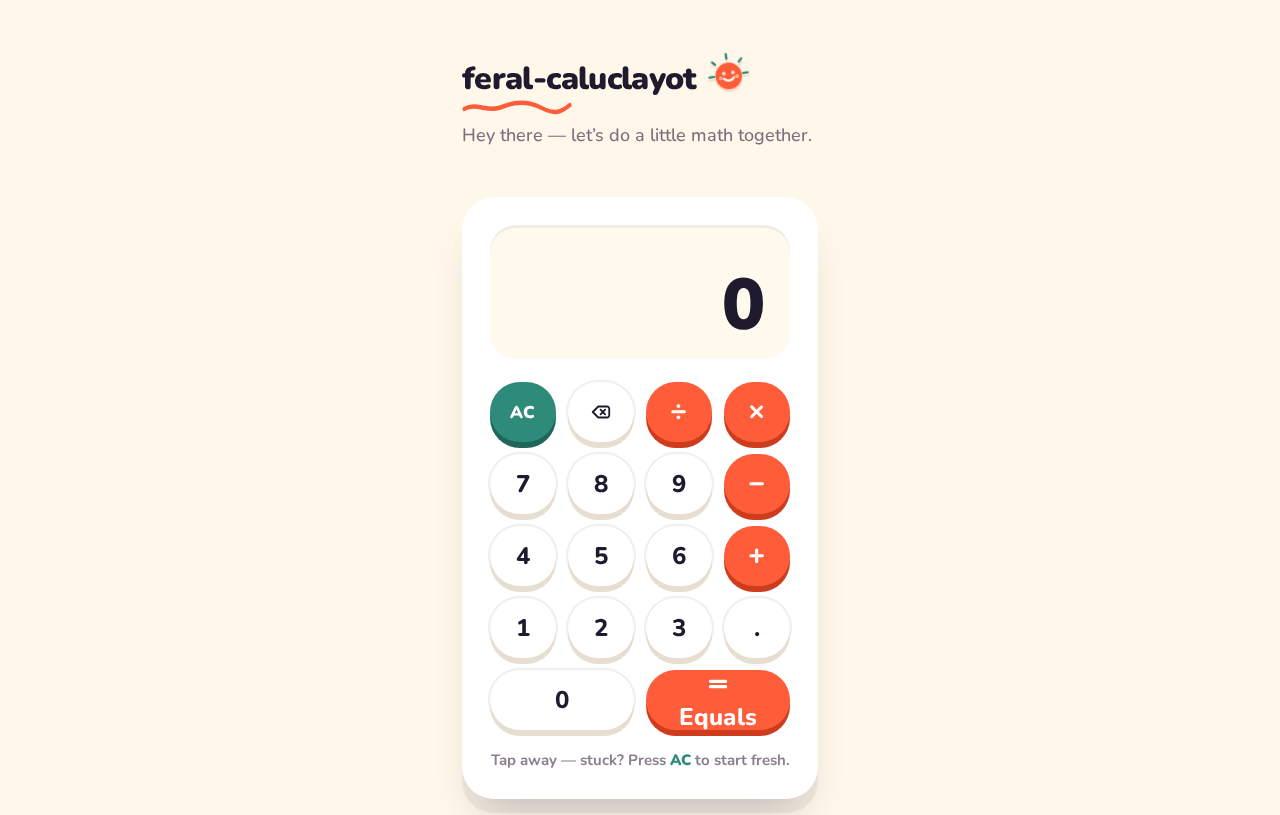
- frontend — a React application UI that renders the single Calculator page: a wordmark and one-line greeting above one oversized calculator card containing a wide digit readout and a 4-column keypad.
- backend — a shared FastAPI process for application APIs and domain modules. The calculator's arithmetic is a simple, self-contained operation; the backend is available as the shared application API process and is reused for any feature API the calculator requires rather than introducing a separate service.
- database — MariaDB, provisioned as application-owned persistent storage. The accepted calculator behavior (enter numbers and operations, read the result, clear to start again) does not require durable stored records, so no domain entities, accounts, or persistence schema are established by this document.
Actors. The only active human actor is the Calculator User, who performs arithmetic on the single page. There are no other human personas, no system-to-system product actors, and no provider-owned product surfaces.
Accepted behavior. The product is a simple calculator (explicit) delivered as a single-page design (explicit). The design must be a single page (explicit hard constraint) and must be a simple single-page design (explicit hard constraint). The page is anonymously reachable with no access requirement: no account, sign-in, or identity is needed to calculate.
Ownership. All accepted human-facing behavior is owned by the single first-party page, Calculator. No other destination exists.
Narrow exclusions. There is no secondary page, no navigation beyond the single calculator, no account or identity system, no saved calculation history, and no marketing hero separate from the calculator itself.
Removed from scope
- Secondary pages or navigation beyond the single calculator (also: multi-page design, marketing hero page).
2a. Product Interpretation and Delivery Boundary
The requester asked for a simple single-page calculator design. That request is the whole current product: one anonymously reachable page where a Calculator User enters numbers and operations, sees the computed result, and clears the entry to start a new calculation. The calculator card is the first screen — there is no separate landing or marketing surface in front of it.
Delivery is first-party: the React frontend renders the page, and the shared FastAPI backend is the application API process available for the calculator's feature API. MariaDB is provisioned infrastructure; because the accepted behavior creates no durable records, it holds no calculator domain data and implies no accounts or history.
Access is anonymous and requires no identity. Nothing in the accepted requirements calls for sign-in, saved state across visits, or differentiated permissions, so none is introduced. No future-horizon requirements were stated; anything beyond the single-page calculator is out of current scope.
2c. Page Content and Component Coverage
Calculator
The sole page and public entry surface. Anonymous access; no identity required.
Information and state
- Current entry / computed result, shown in a wide pill readout at the top of the calculator card in large rounded numerals (
clamp(44px, 9vw, 72px)). - Pending operation state (which operator was last chosen, and the operand entered before it) reflected in the readout as the user builds an expression.
- Idle/initial state: readout shows a starting value (e.g.
0) before any input. - Error state: an invalid operation (such as division by zero) is surfaced in the readout rather than silently ignored.
Primary actions
- Digit keys (0–9) and decimal point: append to the current entry; the readout updates with a small pop.
- Operator keys (+, −, ×, ÷) in coral: record the pending operation and operand.
- Equals key, a broad coral pill: evaluate the pending expression and show the result in the readout.
- Clear key in teal: reset the entry and pending operation so a new calculation can begin; the key gives a gentle wobble when pressed.
Supporting elements
- Short warm wordmark and a friendly one-line greeting above the card.
- Hand-drawn squiggle underline beneath the wordmark and a small flat vector sticker (smiling sun or star) as the only decoration, never overlapping the readout or key labels.
- Rounded pictograms on the clear and equals keys.
Domain entities
- None persisted. The calculator operates on in-page numeric entry and pending-operation state only; no records are stored in MariaDB.
Component responsibilities
- Calculator card — soft-oval white surface with a large 32px radius and soft offset shadow, capped around 420px wide on desktop, full width with comfortable padding on mobile; holds the readout and keypad and nothing competing with them.
- Readout — displays the current number or result in heavy Nunito with wide tabular-feeling spacing; scales with
clamp(44px, 9vw, 72px). - Keypad — 4-column grid of fully-rounded pill keys: digits in white with ink labels, operators in coral, clear in teal, equals as a broad coral pill; each key carries a soft offset shadow (
0 6px 0in a darker tone) so presses visibly compress. - Wordmark and greeting — short, conversational copy above the card.
States
- Loading: not applicable — the page renders its calculator immediately with no data fetch required for the accepted behavior.
- Empty/initial: readout at its starting value, keypad ready.
- Success: each key press updates the readout; equals shows the computed result.
- Error: invalid operations (e.g. division by zero) shown in the readout; the user recovers by pressing clear and starting a new calculation.
- Recovery: clear resets entry and pending operation at any time, returning the page to its initial state.
3. Functional Requirements
FR-1 — Single-page calculator delivery (explicit) As a Calculator User I should get a simple calculator on a single page so that I can do quick arithmetic without navigating anywhere.
- Trigger: the user opens the product.
- Observable result: one page renders the calculator card with readout and keypad; there is no navigation to any other page.
- Access: anonymous; no identity required.
- Failure/recovery: not applicable to delivery; the page is the only surface.
- Continuation: the user proceeds directly to entering numbers.
FR-2 — Enter numbers (explicit) As a Calculator User I should press digit keys to enter a number so that I can build the value I want to calculate with.
- Trigger/input: pressing digit keys (0–9) and the decimal point.
- Observable result: the readout shows the entered number, updating with a small pop on each change.
- Access: anonymous.
- Failure/recovery: clear resets the entry.
- Continuation: the user may continue entering digits or choose an operator.
FR-3 — Choose an operation (explicit) As a Calculator User I should press an operator key so that I can apply arithmetic to my entered number.
- Trigger/input: pressing +, −, ×, or ÷ (coral operator pills).
- Observable result: the pending operation is recorded and reflected in the readout as the user builds the expression.
- Access: anonymous.
- Failure/recovery: clear discards the pending operation.
- Continuation: the user enters the next operand.
FR-4 — Read the computed result (explicit) As a Calculator User I should press equals so that I can see the computed result of my expression.
- Trigger/input: pressing the broad coral equals key.
- Observable result: the readout displays the computed result in large rounded numerals.
- Access: anonymous.
- Failure/recovery: an invalid operation (such as division by zero) is surfaced in the readout; the user recovers by clearing and starting again.
- Continuation: the user may continue calculating from the result or clear.
FR-5 — Clear and start a new calculation (explicit) As a Calculator User I should press the clear key so that I can reset the entry and begin a new calculation.
- Trigger/input: pressing the teal clear key.
- Observable result: the readout and pending operation reset to the initial state; the clear key gives a gentle wobble when pressed.
- Access: anonymous.
- Failure/recovery: clear is itself the recovery action and is always available.
- Continuation: the user enters a fresh number.
4. User Personas
Calculator User
Product context. A casual, everyday person who needs quick arithmetic and opens feral-caluclayot on a single page. They are not an enterprise analyst and expect no setup, sign-in, or saved workspace — just a calculator that is instantly legible and pleasant to press.
Primary goal. Enter numbers and operations and read the correct computed result without navigating anywhere.
Distinct accepted responsibilities.
- Enter numbers using the digit and decimal keys.
- Choose an arithmetic operation using the operator keys.
- Read the computed result after pressing equals.
- Clear the entry to start a new calculation.
Relevant inputs and decisions. Which digits to enter, which operator to apply, when to press equals, and when to clear. The user decides when a calculation is finished and when to begin another.
Interactions with other participants. None — the Calculator User is the sole active human actor and works alone on the page. No counterparty, recipient, or approver is affected by the calculation.
Observable success. The readout shows the correct result of the entered expression, and the user can clear and repeat without leaving the page.
5. Core User Flows
Flow 1 — Perform a calculation
- The Calculator User opens feral-caluclayot. The single Calculator page renders anonymously: the wordmark and greeting above one calculator card, with the readout at its starting value and the 4-column keypad ready.
- The user presses digit keys to enter the first number. The readout updates with a small pop on each press.
- The user presses an operator key (coral pill) to choose the operation. The pending operation is recorded and reflected in the readout.
- The user presses digit keys to enter the second number; the readout continues to update.
- The user presses the broad coral equals key. The readout displays the computed result in large rounded numerals.
- Continuation: the user may continue calculating from the result or press clear to start over.
Flow 2 — Recover from an invalid operation
- While building an expression on the Calculator page, the user presses equals on an operation that cannot be evaluated (for example, division by zero).
- The readout surfaces the error instead of a silent or misleading number.
- The user presses the teal clear key; the readout and pending operation reset to the initial state (the clear key gives a gentle wobble).
- The user enters a fresh calculation as in Flow 1.
Flow 3 — Clear and start a new calculation
- On the Calculator page, after finishing or abandoning a calculation, the user presses the teal clear key.
- The readout and pending operation reset to the initial state.
- The user begins a new calculation by entering digits, as in Flow 1.
6. Visuals Colors and Theme
Muse and headline. Friendly modular arithmetic after Pablo Stanley — warm, approachable, a little playful; pressing buttons feels like a small, satisfying toy.
Mode. Light mode only.
Colour tokens (exact hex by role)
- Background (cream ground):
#FFF7E9 - Surface (calculator card):
#FFFFFF - Text (ink, digits and copy):
#1F1A2E - Primary (operator colour and equals key):
#FF5C39 - Accent (clear key and small labels):
#2E8B7A - Muted (secondary labels):
#8A7F8E
Colour is used in confident blocks, never as a neon wash. Operators are coral-orange pills, clear is teal, equals is a wide coral bar, digits are white with ink labels.
Typography
- Headings: Nunito, extra-bold for the wordmark and headings.
- Body: Nunito.
- Display readout: Nunito at heavy weight with tabular-feeling wide spacing so numbers read as a calm, chunky instrument; scales from 44px on mobile to 72px on desktop via
clamp(44px, 9vw, 72px). - Type scale: 1.25 modular — 40 / 32 / 24 / 18 / 16.
- Copy is warm and conversational.
Shape language. Big radii everywhere: fully rounded pill buttons, soft-oval calculator body with a large 32px radius, sticker-like shape accents, and soft offset shadows (0 6px 0 in a darker tone beneath keys) for a pressable, toy-like feel. No sharp corners; no hard 1px borders where a chunky outline can do the job.
Spacing rhythm. Centered single column on the cream ground; the card is capped around 420px wide on desktop and floats with generous surrounding space; on mobile it fills the width with comfortable padding. Nothing else on the page competes with the keypad.
Imagery style. No photography. Personality comes from flat vector sticker accents: a small smiling sun or star near the wordmark, a hand-drawn squiggle underline, and rounded pictograms on the clear/equals keys. Illustration is decorative and never overlaps the readout or keypad labels.
Readability constraint. Headlines, wordmarks, labels, numbers, and controls stay entirely inside the viewport and their container at 375px, 768px, and 1280px, wrapping or scaling (e.g. clamp(...) with its mobile size) to fit; no other element covers any part of them.
7. Signature Design Concept
The first screen is the calculator itself, not a marketing hero. A cream full-viewport ground (#FFF7E9) holds a single, oversized white calculator card centred with a soft offset shadow. At the top of the card, a wide pill readout shows the current number in huge rounded Nunito (clamp(44px, 9vw, 72px)). Beneath it, a 4-column grid of fully-rounded pill keys: digits in white with ink labels, operators in coral (#FF5C39), clear in teal (#2E8B7A), and equals as a broad coral bar. A short warm wordmark and a friendly one-liner sit above the card, with a hand-drawn squiggle sticker accent to the side and a small flat vector sticker (smiling sun or star) as the only decoration. The composition is dominated by the keypad's colour blocks, not by a headline-plus-button pattern. Every key carries a soft offset shadow (0 6px 0 in a darker tone) so each press visibly compresses, giving the whole card a tactile, toy-like feel.
8. Interaction Model & Motion Direction
Interaction Model: Animated Motion Tempo: expressive Hero Dimensionality: layered_2d
Landing Hero Motion Brief
- Focal subject: the single oversized calculator card — its wide pill readout and 4-column keypad of pill keys — as the first and only screen.
- Input → transformation → outcome thesis: a key press (input) compresses the key with a quick scale and shadow drop and pops the readout number (transformation), producing the updated entry or computed result in the readout (outcome). The clear key adds a gentle wobble; hover lifts keys slightly.
- Motion vocabulary: springy micro-interactions — short, playful, tactile. Keys compress on press with a quick scale and shadow drop; the readout number updates with a small pop; the clear key wobbles; hover states lift keys slightly.
- Composed first frame: cream ground, centred white card with soft offset shadow, wordmark and one-liner above with squiggle and sticker accent, readout at its starting value, keypad at rest with offset shadows visible.
- Reduced-motion state: under
prefers-reduced-motion, keys change colour instead of animating and the layout stays static; the readout updates without the pop and the clear key does not wobble.
9. Non-Functional Requirements
- Single-page constraint (explicit): the design must be a single page; there is no secondary page or navigation beyond the single calculator.
- Simplicity (explicit): the design must be a simple single-page design; nothing on the page competes with the keypad.
- Legibility (explicit, from creative direction): readable text and controls stay whole at 375px, 768px, and 1280px, wrapping or scaling to fit, with no element covering them.
- Accessibility — reduced motion (explicit, from creative direction): under
prefers-reduced-motion, provide a usable static arrangement where keys change colour instead of animating. - Anonymous access (explicit): the calculator requires no account, sign-in, or identity.
- No persistence requirement (explicit by absence): the accepted behavior creates no durable records; MariaDB is provisioned but holds no calculator domain data.
10. Tech Stack
- Frontend: React application UI rendering the single Calculator page.
- Backend: shared FastAPI process for application APIs and domain modules; reused for any calculator feature API rather than a separate service.
- Database: MariaDB, provisioned as application-owned persistent storage (no calculator domain entities established).
- Containerization: Docker / docker-compose as the runnable service inventory (backend, database, frontend).
11. Assumptions and Constraints
- Assumption (required_inference): the calculator supports the four basic arithmetic operations (+, −, ×, ÷) with digit and decimal entry, equals, and clear, as the minimal complete set implied by "simple calculator."
- Assumption (required_inference): an invalid operation such as division by zero is surfaced in the readout rather than silently ignored, and clear is always available as recovery.
- Constraint (explicit): the product is a single page; no secondary page or navigation is added.
- Constraint (explicit): the design is simple; the keypad dominates and nothing competes with it.
- Constraint (explicit): access is anonymous; no identity, account, or permission system is introduced.
- Constraint (explicit, from creative direction): the generic indigo/blue-on-white SaaS template is forbidden; the specified palette, Nunito typography, pill shapes, and cream ground are preserved.
- Constraint (explicit): no photography or 3D renders; decoration is flat vector only and never overlaps readout or key labels.
12. Glossary
- Calculator User — the sole active human persona; a casual person performing quick arithmetic on the single page.
- Calculator page — the single, anonymously reachable first-party page that is the entire product.
- Readout — the wide pill display at the top of the calculator card showing the current entry or computed result.
- Keypad — the 4-column grid of fully-rounded pill keys (digits, operators, clear, equals).
- Pending operation — the operator and prior operand recorded while the user builds an expression before pressing equals.
- Clear — the teal key that resets the entry and pending operation to the initial state.
feral-caluclayot
Hey there — let’s do a little math together.
Tap away — stuck? Press AC to start fresh.
feral-caluclayot
Hey there — let’s do a little math together.
Tap away — stuck? Press AC to start fresh.
No comments yet. Be the first!