feral-calculator
 Diya Trivedi
start a project to build simple single page design of calculator


Comments (0)
Sign in to leave a comment
System Requirements
System Requirements Document for feral-calculator
1. Introduction
feral-calculator is a simple, single-page calculator design. The product intent, taken directly from the authoritative requirement thread, is to present a working calculator — number entry, arithmetic operations, and a computed result — on exactly one page, with a design that is deliberately simple and fits within a single page.
The audience is everyday people doing quick sums: students, cooks, shoppers, and freelancers on a phone. The product is a lightweight utility, not a productivity suite. Its emotional register is playful and tactile — a glossy toy you want to poke — rather than spreadsheet-neutral or corporate.
The single hard constraint that governs the whole document is the exact one-page limit: the calculator itself lives on one page, and no additional product pages, modules, or adjacent capabilities are introduced.
2. System Overview
feral-calculator is a single-page, client-side calculator. A single active human role — the Calculator User — opens the page, enters numbers and arithmetic operations, and reads the computed result. There is no account, no sign-in, no persistence requirement, and no server-side workflow described by the source.
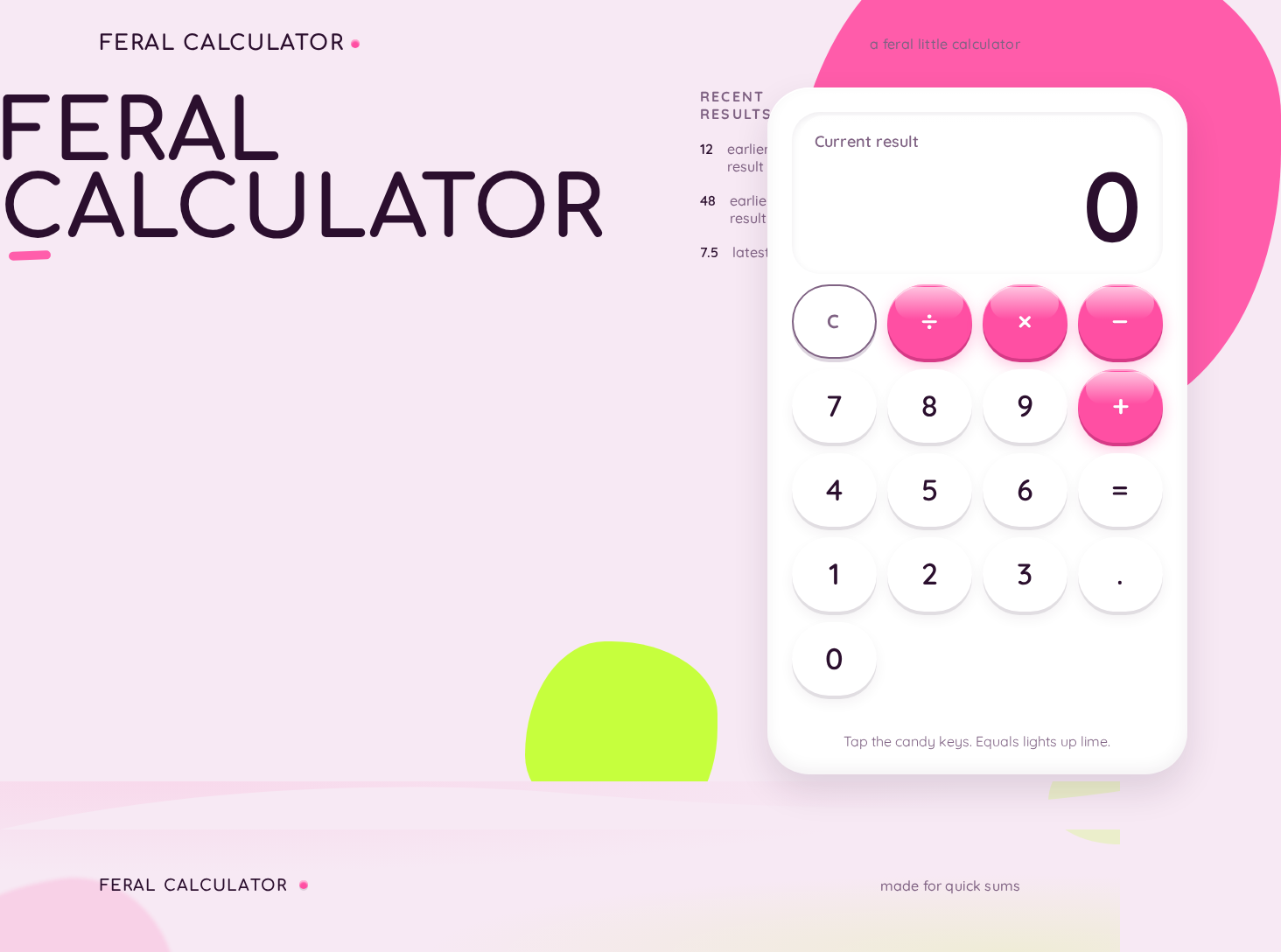
The page is the product: a glossy white calculator capsule floating on a bubblegum-pink field, with an oversized live result readout as the hero, a 4×5 keypad of pill keys, and a stacked "FERAL / CALCULATOR" wordmark. All arithmetic is performed in the browser; the result is displayed immediately in the readout.
2a. Product Interpretation and Delivery Boundary
Delivery ownership. The calculator is a first-party, application-owned, custom-UI surface. It is delivered as a single page with no authentication and no account lifecycle. Access is anonymous and public: the Calculator User reaches the calculator directly and begins using it. No identity establishment, invitation, provisioning, or session continuity is required, because the accepted behavior creates no durable actor-specific state, commitment, entitlement, or value transfer that must remain bound to a participant.
Single-page boundary. The exact one-page constraint is a hard, source-stated limit. The calculator, its readout, its keypad, and its wordmark all live on that one page. There is no separate landing page, no separate results page, no settings page, and no history page as a distinct destination. Any recent-history display is an in-page strip within the same single page, not a separate route.
Current vs. future. Current scope is exactly: a simple single-page calculator design that performs basic arithmetic in one place. Nothing in the source accepts memory functions, scientific functions, unit conversion, currency conversion, tape export, sharing, accounts, or persistence across sessions. These are not current requirements and are not represented as pages or modules.
Exclusions. No blue or indigo anywhere in the interface. No stock photography or illustration of people. No dark admin chrome or spreadsheet-neutral grey UI. No sharp corners or flat rectangular keys. No additional product pages beyond the single calculator page.
2b. Source Content Inventory
Not applicable. No reference directive in the supplied material declares a content_source; the creative direction supplies visual and tonal guidance only, not factual product content.
2c. Page Content and Component Coverage
The page contract is exact and contains one page. The calculator itself is the single page; the wordmark, readout, keypad, and any recent-history strip are components of that one page, not separate destinations.
Calculator
Purpose and information/state. The single page presents the calculator as a product on a pedestal: a glossy white calculator capsule on a bubblegum-pink ground, with the live result readout as the dominant element. The page holds the current entry state (the number being typed or the running expression), the last computed result, and an optional thin ruled strip of recent-history values beneath the wordmark at desktop widths.
Primary actions.
- Enter digits 0–9 to build the current number.
- Enter a decimal point.
- Choose an arithmetic operator (add, subtract, multiply, divide).
- Press equals to compute and display the result.
- Clear the current entry and/or reset the calculation.
Supporting actions.
- Read the live result readout as it updates.
- Read the recent-history strip (desktop) showing prior computed values.
- Observe press feedback on every key (squash to 0.94 scale, 120ms springy ease, gloss sweep) and a scale-in pop of the readout on each new equals.
Domain entities.
- Current entry — the number currently being typed.
- Pending operation — the operator awaiting its right-hand operand.
- Accumulated value — the left-hand operand held while the next number is entered.
- Result — the computed value shown in the readout.
- History entry — a prior computed result shown in the in-page strip.
Component responsibilities.
- Wordmark — stacked "FERAL / CALCULATOR" in Comfortaa 800; two centred lines at 375px, flush-left 96px block beside the calculator at 1280px.
- Display capsule — glossy white capsule with soft inner highlight; hosts the live result readout in Quicksand 600 tabular figures at
clamp(56px, 9vw, 112px). - Keypad — 4×5 grid of pill/circle keys with 12px gap; digits white with plum numerals, operators hot pink, equals acid lime.
- Recent-history strip — thin ruled strip of prior values, desktop only.
- Decorative blobs — oversized pink blob bleeding off the top-right, smaller lime blob tucked behind the keypad's bottom-left; purely decorative, never covering readable text or controls.
States.
- Loading — not applicable; the calculator is available immediately on page load with no network dependency.
- Empty / initial — readout shows
0; no pending operation; history strip empty or hidden. - Active entry — readout shows the number being typed; the chosen operator is visibly indicated on its key.
- Success — on equals, the readout shows the computed result with a scale-in pop; the result is appended to the history strip.
- Error — division by zero or an unparseable expression shows a clear error state in the readout (e.g. a short message) rather than a silent failure or a crash.
- Recovery — pressing clear resets the entry and pending operation and returns the readout to
0; the user can immediately begin a new calculation. - Reduced motion — with
prefers-reduced-motion, all press, pop, and blob-morph animation collapses to instant state changes and a static blob.
3. Functional Requirements
FR-1 — Single-page calculator presentation (explicit) As a Calculator User, I should see the calculator presented on one single page, so that I can do a quick sum in one place without navigating anywhere.
- Trigger/input: the user opens the page.
- Observable result: the calculator — wordmark, readout, and keypad — is fully present on that one page.
- Access state: anonymous, public, no sign-in.
- Failure/recovery: if the page fails to render, reloading restores the calculator; there is no partial multi-page state to recover.
- Continuation: the user proceeds directly to entering numbers.
- Acceptance: exactly one page exists; no navigation to a second product page is required or offered.
FR-2 — Simple design that fits on a single page (explicit) As a Calculator User, I should experience a simple design that fits within a single page, so that the tool stays uncluttered and immediately understandable.
- Trigger/input: page load at 375px, 768px, or 1280px.
- Observable result: the whole calculator fits the viewport at each breakpoint; readable text and controls stay whole and inside the viewport and their container.
- Access state: anonymous.
- Failure/recovery: at narrow widths the wordmark wraps to two lines and the readout shrinks via
clamprather than overflowing. - Continuation: the user can use every key without scrolling horizontally.
- Acceptance: no readable text or control is cropped, clipped, or covered at 375px, 768px, or 1280px.
FR-3 — Enter numbers (explicit) As a Calculator User, I should enter digits and a decimal point, so that I can build the number I want to calculate with.
- Trigger/input: pressing digit keys 0–9 and the decimal point.
- Observable result: the readout updates to show the number being typed.
- Access state: anonymous.
- Failure/recovery: a second decimal point in the same number is ignored rather than producing an invalid entry.
- Continuation: the user can continue typing or choose an operator.
- Acceptance: the readout reflects exactly the digits entered.
FR-4 — Choose arithmetic operations (explicit) As a Calculator User, I should choose an arithmetic operator (add, subtract, multiply, divide), so that I can tell the calculator what to do with my numbers.
- Trigger/input: pressing an operator key.
- Observable result: the chosen operator is indicated on its key and the current entry is held as the left-hand operand.
- Access state: anonymous.
- Failure/recovery: pressing a different operator before entering the second number replaces the pending operator rather than stacking an invalid expression.
- Continuation: the user enters the second number and presses equals.
- Acceptance: the pending operation matches the last operator pressed.
FR-5 — Compute and read the result (explicit) As a Calculator User, I should press equals and read the computed result, so that I get the answer to my sum.
- Trigger/input: pressing the equals key with a complete expression.
- Observable result: the readout shows the computed result with a scale-in pop; the result is appended to the recent-history strip.
- Access state: anonymous.
- Failure/recovery: division by zero or an incomplete expression shows a clear error state in the readout; pressing clear recovers to
0. - Continuation: the user can chain a new operation from the result or clear and start again.
- Acceptance: the displayed result equals the arithmetic result of the entered expression.
FR-6 — Clear and reset (explicit) As a Calculator User, I should clear the current entry and reset the calculation, so that I can start a fresh sum without reloading.
- Trigger/input: pressing the clear key.
- Observable result: the readout returns to
0and any pending operation is discarded. - Access state: anonymous.
- Failure/recovery: clear always succeeds; it is the recovery path for error states.
- Continuation: the user begins a new calculation immediately.
- Acceptance: after clear, the readout shows
0and no operator is pending.
FR-7 — Read recent history in-page (required_inference) As a Calculator User, I should see a thin strip of recent computed values beneath the wordmark at desktop widths, so that I can glance back at what I just calculated without leaving the page.
- Trigger/input: each successful equals computation.
- Observable result: the new result appears in the ruled strip; the strip is in-page, not a separate destination.
- Access state: anonymous; history is session-local and not persisted.
- Failure/recovery: if the strip is empty it is hidden or shown empty; it never blocks the calculator.
- Continuation: the user continues calculating; the strip updates on the next equals.
- Acceptance: the strip shows prior results from the current session and remains within the single page.
FR-8 — Tactile press feedback and motion (explicit, from creative direction) As a Calculator User, I should feel each key respond when I press it, so that the calculator feels like a glossy toy rather than a spreadsheet.
- Trigger/input: pressing any key; pressing equals.
- Observable result: keys squash to 0.94 scale with a 120ms springy ease and a gloss sweep; the readout pops with a scale-in on equals; the background blob slowly morphs its border-radius over 18s.
- Access state: anonymous.
- Failure/recovery: with
prefers-reduced-motion, all of this collapses to instant state changes and a static blob. - Continuation: feedback does not delay or block the computation.
- Acceptance: motion is present by default and fully suppressed under reduced-motion.
4. User Personas
Calculator User
Product context. The Calculator User is an everyday person — a student, a cook, a shopper, or a freelancer — doing a quick sum on a phone or laptop. They arrive with a number problem in mind and want an answer in seconds. They are not configuring software, managing an account, or building a workflow; they are poking a glossy toy that happens to do arithmetic.
Primary goal. Enter numbers and arithmetic operations and read the computed result, all in one place, without friction.
Distinct accepted responsibilities.
- Open the single calculator page.
- Enter digits and a decimal point to build numbers.
- Choose an arithmetic operator.
- Press equals to compute and read the result.
- Clear and reset to start a fresh sum.
- Glance at the in-page recent-history strip at desktop widths.
Relevant inputs or decisions. Which digits to type, which operator to apply, when to press equals, and when to clear. The user decides the expression; the calculator decides the arithmetic.
Interactions with other accepted participants. None. The Calculator User is the only active human role; there is no counterparty, recipient, or beneficiary whose state changes. The calculator itself is a system actor that computes and displays.
Observable success. The readout shows the correct result of the entered expression, the keypad responded tactilely to each press, and the user can immediately start another sum or clear the page.
What makes this role different. The role's work is entirely local, ephemeral, and anonymous: no identity, no persistence, no handoff. Its success is measured by the speed and satisfaction of a single sum, not by any durable record or shared state.
5. Core User Flows
Flow A — Perform a basic calculation
- The Calculator User opens the feral-calculator page. The page loads directly into the calculator: the "FERAL / CALCULATOR" wordmark, the glossy white display capsule showing
0, and the 4×5 keypad are all present on the single page. - The user presses digit keys to enter the first number. The readout updates live to show the number being typed.
- The user presses an operator key (add, subtract, multiply, or divide). The chosen operator is indicated on its key and the first number is held as the left-hand operand.
- The user presses digit keys to enter the second number. The readout shows the second number.
- The user presses equals. The readout pops with a scale-in and shows the computed result; the result is appended to the recent-history strip at desktop widths.
- Continuation: the user either chains a new operation from the result or presses clear to reset to
0and begin again.
Failure and recovery. If the user presses equals on an incomplete expression, the readout shows a clear error state rather than a silent failure. If the user divides by zero, the readout shows an error state. In either case, pressing clear returns the readout to 0 and discards the pending operation, and the user can immediately start a new sum.
Flow B — Clear and start over
- The Calculator User is mid-calculation, with a number in the readout and possibly a pending operator.
- The user presses the clear key.
- The readout returns to
0and any pending operation is discarded. - Continuation: the user begins a new calculation from step 2 of Flow A.
Flow C — Glance at recent history (desktop)
- The Calculator User has completed one or more calculations in the current session.
- At desktop widths, the thin ruled strip beneath the wordmark shows the prior computed values.
- The user reads a prior value to recall what they just calculated.
- Continuation: the user returns to the keypad and continues calculating; the strip updates on the next equals.
Flow D — Reduced-motion use
- The Calculator User has
prefers-reduced-motionenabled on their device. - The user opens the page. The calculator renders with a static background blob and no press or pop animation.
- The user performs a calculation exactly as in Flow A; state changes are instant rather than animated.
- Continuation: the user reads the result and continues as normal.
6. Visuals Colors and Theme
Muse and headline. Karim Rashid — "Sensual pop minimalism for a feral little calculator." A utilitarian object turned into a desirable one: organic capsule forms, glossy candy colour, optimism as a material.
Mode. Light mode only.
Colour tokens (exact hex by role).
| Role | Hex | Usage |
|---|---|---|
| Background | #F7E9F4 | Bubblegum-pink ground |
| Surface | #FFFFFF | Glossy white display capsule and digit keys |
| Text | #2B0F2E | Deep plum for all readable type and numerals |
| Primary | #FF4FA3 | Hot pink for operator keys and the primary CTA |
| Accent | #C6FF3D | Acid lime, reserved for the equals key and live-result flash; under 10% of surface |
| Muted | #8A6B8F | Muted mauve for secondary labels at 16px+ only |
No blue anywhere — no #2563EB, #4F46E5, #7C3AED or neighbours.
Typography.
- Headings: Comfortaa at 700–800 weight, rounded terminals, wide soft tracking on the wordmark; display sizes set large and airy with tight-ish leading.
- Body: Quicksand.
- Numerals: Quicksand 600 with tabular figures in the display.
- Scale: 1.4 modular — 96 / 68 / 48 / 34 / 24 / 18 / 16.
- Display readout:
clamp(56px, 9vw, 112px). - Keypad numerals:
clamp(22px, 4.5vw, 34px). - Forbidden: Inter, Roboto, Arial, Helvetica, Open Sans, Lato, Poppins, or system-ui for headings or body.
Shape language. Capsules and blobs everywhere: every key is a fully rounded pill or circle; the display sits in a glossy white capsule with a soft inner highlight; section edges curve gently; one oversized pink blob bleeds off the right edge of the hero as a decorative anchor. Buttons have a glossy top highlight and a soft offset shadow that reads as candy plastic. No sharp corners or flat rectangular keys.
Layout.
- Mobile (375px): single column — wordmark top-left wrapping to two lines, oversized live result readout, then a 4×5 keypad of pill keys in a 12px gap grid. Everything stays inside the viewport.
- Tablet (768px): calculator capsule centres at max 460px with the pink blob bleeding behind it.
- Desktop (1280px): asymmetric composition — calculator capsule sits right-of-centre at 480px wide while a stacked oversized "FERAL / CALCULATOR" wordmark occupies the left third, with a thin ruled strip of recent-history values beneath it.
Imagery style. No photography. The imagery is the interface itself: glossy 3D-ish CSS blobs, a pink organic shape bleeding off the hero edge, and candy-like keys with highlights. Optionally one soft lime blob peeking behind the equals key.
Readability rule. Headlines, wordmarks, labels, numbers, and controls stay entirely inside the viewport and their container at 375px, 768px, and 1280px, wrapping or scaling to fit. Decoration may bleed, crop, or overlap, but never covers readable text or controls.
7. Signature Design Concept
The calculator as a product on a pedestal.
The first screen is a single oversized glossy white calculator capsule floating on a bubblegum-pink ground. A huge organic pink blob bleeds off the top-right corner; a smaller lime blob tucks behind the keypad's bottom-left. The dominant element is the live result readout — a 112px plum numeral set inside the capsule's top third, with a soft inner highlight making the display look like polished plastic.
The wordmark "FERAL CALCULATOR" sits above the capsule in Comfortaa 800, stacked on two lines at mobile and set flush-left as a 96px block at desktop. There is no centred headline, no subtext, and no gradient blob behind a blue button — the calculator itself is the hero.
Every key is a fully rounded pill or circle with a glossy top highlight and soft offset shadow: operators hot pink, equals acid lime, digits white with plum numerals. The composition recomposes only accepted content — the wordmark, the readout, the keypad, and the decorative blobs — into a single, tactile, product-like presentation.
8. Interaction Model & Motion Direction
Interaction Model: Animated Motion Tempo: expressive Hero Dimensionality: layered_2d
Landing Hero Motion Brief.
- Focal subject: the glossy white calculator capsule and its oversized live result readout, floating on the bubblegum-pink field with the pink blob bleeding off the top-right and the lime blob behind the keypad.
- Input → transformation → outcome thesis: a key press (input) squashes the key to 0.94 scale with a 120ms springy ease and a gloss sweep, and on equals the readout pops with a scale-in (transformation), delivering the computed result as a satisfying, toy-like outcome (outcome). The background blob slowly morphs its border-radius over 18s, giving the whole composition a soft, liquid life.
- Motion vocabulary: liquid and soft — springy key squash, gloss sweep, gentle scale-in pop on the readout, slow 18s blob morph, 2px hover lift with glossy highlight drift.
- Composed first frame: the calculator capsule centred (mobile/tablet) or right-of-centre (desktop) with the wordmark above or beside it, the readout showing
0, the keypad at rest, the pink blob bleeding off the top-right, and the lime blob tucked behind the keypad's bottom-left. - Reduced-motion state: with
prefers-reduced-motion, all press, pop, and blob-morph animation collapses to instant state changes and a static blob; the layout remains fully usable and every key remains reachable.
9. Non-Functional Requirements
NFR-1 — Single-page constraint (explicit) The product must present the calculator on exactly one page. No additional product pages, routes, or destinations may be introduced. Rationale: the source states "simple single page design of calculator" as a hard constraint.
NFR-2 — Simplicity (explicit) The design must be simple: uncluttered, immediately understandable, and free of adjacent capabilities. Rationale: the source states "simple" as a hard constraint.
NFR-3 — Responsive readability (explicit, from creative direction) Readable text and controls must stay whole and inside the viewport and their container at 375px, 768px, and 1280px. Decoration may bleed or overlap but must never cover readable text or controls. Rationale: the creative direction's readability rule.
NFR-4 — Reduced motion (explicit, from creative direction)
With prefers-reduced-motion, all animation must collapse to instant state changes and a static blob, while the calculator remains fully usable. Rationale: the creative direction's motion rule.
NFR-5 — No blue or indigo (explicit, from creative direction) No blue or indigo may appear anywhere in the interface. Rationale: the creative direction's palette and avoid list.
NFR-6 — No stock photography (explicit, from creative direction) No stock photography or illustration of people. Rationale: the creative direction's imagery rule.
NFR-7 — Client-side arithmetic (required_inference) Arithmetic is performed in the browser with no network dependency, so the calculator is available immediately on page load. Rationale: the accepted behavior is a simple single-page calculator with no server-side workflow described; client-side computation is the indispensable mechanic that makes the result observable without a backend.
NFR-8 — Anonymous access (required_inference) The calculator is publicly reachable with no sign-in, account, or session continuity. Rationale: the accepted behavior creates no durable actor-specific state, commitment, entitlement, or value transfer that must remain bound to a participant.
10. Tech Stack
- Frontend: React (single-page application) with a component-based structure for the wordmark, display capsule, keypad, and history strip.
- Styling: CSS with custom properties for the colour tokens,
clamp()for responsive type, and CSS keyframes/transitions for the press, pop, and blob-morph motion, gated byprefers-reduced-motion. - Arithmetic: client-side JavaScript; no backend service is required for the accepted behavior.
- Build/deploy: static build served as a single page. No database, no authentication service, and no separate backend process are required by the current scope.
11. Assumptions and Constraints
Assumptions.
- A-1 (narrow): The calculator supports the four basic arithmetic operations (add, subtract, multiply, divide), a decimal point, equals, and clear. No scientific, memory, percentage, or unit-conversion functions are assumed, because the source does not accept them.
- A-2 (narrow): Recent history is session-local and not persisted across reloads, because the source describes no persistence requirement.
- A-3 (narrow): The calculator is used anonymously; no account lifecycle is assumed, because the accepted behavior creates no durable actor-specific state.
- A-4 (narrow): The single page is the calculator itself; the wordmark, readout, keypad, and history strip are components of that page, not separate destinations.
Constraints.
- C-1 (explicit): Exactly one page. No additional product pages.
- C-2 (explicit): Simple design that fits on a single page.
- C-3 (explicit): No blue or indigo anywhere.
- C-4 (explicit): No stock photography or illustration of people.
- C-5 (explicit): No sharp corners or flat rectangular keys.
- C-6 (explicit): No dark admin chrome or spreadsheet-neutral grey UI.
- C-7 (explicit): Readable text and controls stay whole at 375px, 768px, and 1280px.
- C-8 (explicit): Reduced-motion support is mandatory.
12. Glossary
- Calculator User — the single active human role: opens the calculator page, enters numbers and operations, and reads the computed result.
- Display capsule — the glossy white capsule at the top of the calculator that hosts the live result readout.
- Readout — the large plum numeral showing the current entry or computed result.
- Keypad — the 4×5 grid of pill/circle keys for digits, operators, equals, and clear.
- Operator key — a hot pink key for add, subtract, multiply, or divide.
- Equals key — the acid lime key that computes and displays the result.
- Clear key — the key that resets the entry and pending operation to
0. - Recent-history strip — the thin ruled strip of prior computed values beneath the wordmark at desktop widths; in-page, not a separate destination.
- Wordmark — the stacked "FERAL / CALCULATOR" text in Comfortaa 800.
- Blob — a decorative organic CSS shape (pink bleeding off the top-right, lime behind the keypad) that never covers readable text or controls.
- Reduced motion — the
prefers-reduced-motionstate in which all animation collapses to instant state changes and a static blob.
FERALCALCULATOR
Recent results
- 12earlier result
- 48earlier result
- 7.5latest
Tap the candy keys. Equals lights up lime.
FERALCALCULATOR
Recent results
- 12earlier result
- 48earlier result
- 7.5latest
Tap the candy keys. Equals lights up lime.
No comments yet. Be the first!