fantastic-chimera-fdc35a
 Taufiq abdul Aziz
https://fantastic-chimera-fdc35a.netlify.app/

Comments (0)
Sign in to leave a comment
System Requirements
System Requirements Document for fantastic-chimera-fdc35a
1. Introduction
This document specifies Buku Keuangan DKC 1202, a web application that serves as the financial ledger (buku keuangan) for DKC 1202, a regional scout/DKC unit council. The product exists so that the organisation's money — every rupiah received and every rupiah spent — is recorded once, correctly, and can be reviewed at any time by the people accountable for it.
The audience is internal to the organisation. The Bendahara DKC 1202 (treasurer) is the person who records income and expense transactions and keeps the running balance accurate and current. The Pengurus DKC 1202 (board officers) are the people who need a concise, trustworthy picture of the organisation's financial condition — total income, total expense, and balance — as the basis for organisational decisions. Both are volunteers handling money they must answer for to a board, so the product's intent is not lifestyle convenience but unimpeachable record-keeping: legible, coded, and impossible to misread.
The reference landing page supplied by the user (https://fantastic-chimera-fdc35a.netlify.app/) is treated strictly as visual inspiration — a shape-of-the-work reference (single-column stack, bold title header, icon-and-label horizontal navigation, plain labelled forms with paired Batal / Simpan buttons). It is not a specification of the Buku Keuangan DKC 1202 product, and none of its content, names, or facts are carried into this product.
2. System Overview
Buku Keuangan DKC 1202 is a first-party web application with a custom user interface and application-owned identity. It delivers:
- Anonymous public entry — a Landing page that explains what the ledger is for before any protected work begins.
- Self-service identity — Sign Up for first-use enrollment and Login for returning verification, because the source establishes no invitation, provisioning, provider, or pre-existing-account boundary for these users.
- Role-specific control — the Bendahara records and manages transactions; the Pengurus reviews financial summaries. This differentiation is required so that recording authority and review authority are not the same act.
- Recording of income and expenses — focused workspaces for entering a transaction's date, description, and amount.
- A revisitable transaction history — the recorded transactions of DKC 1202, readable like a printed account book.
- Balance and summary — total income, total expense, and the resulting balance, presented as the organisation's current financial condition.
Durable financial state is required: transactions, their amounts, and the resulting balance must persist and be resumable across sessions by the correct participant.
Actors. Two accepted human personas — Bendahara DKC 1202 and Pengurus DKC 1202 — plus the application itself as the system actor that stores records, computes totals, and enforces role-specific control.
Narrow exclusions. This document does not add budgeting, forecasting, payroll, invoicing, multi-organisation tenancy, bank or payment-provider integration, receipt OCR, or any adjacent finance capability. The reference URL supplies visual inspiration only and contributes no product content, names, or features.
2a. Product Interpretation and Delivery Boundary
The product is delivered as a first-party web application with its own custom interface and its own application-owned identity. Access is owned by the application, not by an external provider: a person establishes identity on first use through self-service enrollment, and returns through verification. The Landing page is the only anonymously reachable surface; every surface that shows or changes DKC 1202 financial state requires an established identity, and the recording surfaces additionally require the recording role.
The current delivery horizon covers the Landing entry, identity establishment and returning verification, the financial summary, the transaction history, and the recording of income and expense transactions. Nothing in this document is deferred to a future horizon; there is no accepted future-phase requirement in the authoritative thread. Where a mechanic is marked required_inference, it exists only because an accepted outcome cannot be reached without it — it is not an invitation to add adjacent capability.
2b. Source Content Inventory
Not applicable. The only supplied reference is declared visual_inspiration with inspiration_only authority and is explicitly not a specification of this product; it therefore contributes no content-source facts to inventory.
2c. Page Content and Component Coverage
The page inventory below is the final ordered page contract: Landing, Sign Up, Login, Dashboard, Transactions, Income, Expenses. Each page appears exactly once.
Landing
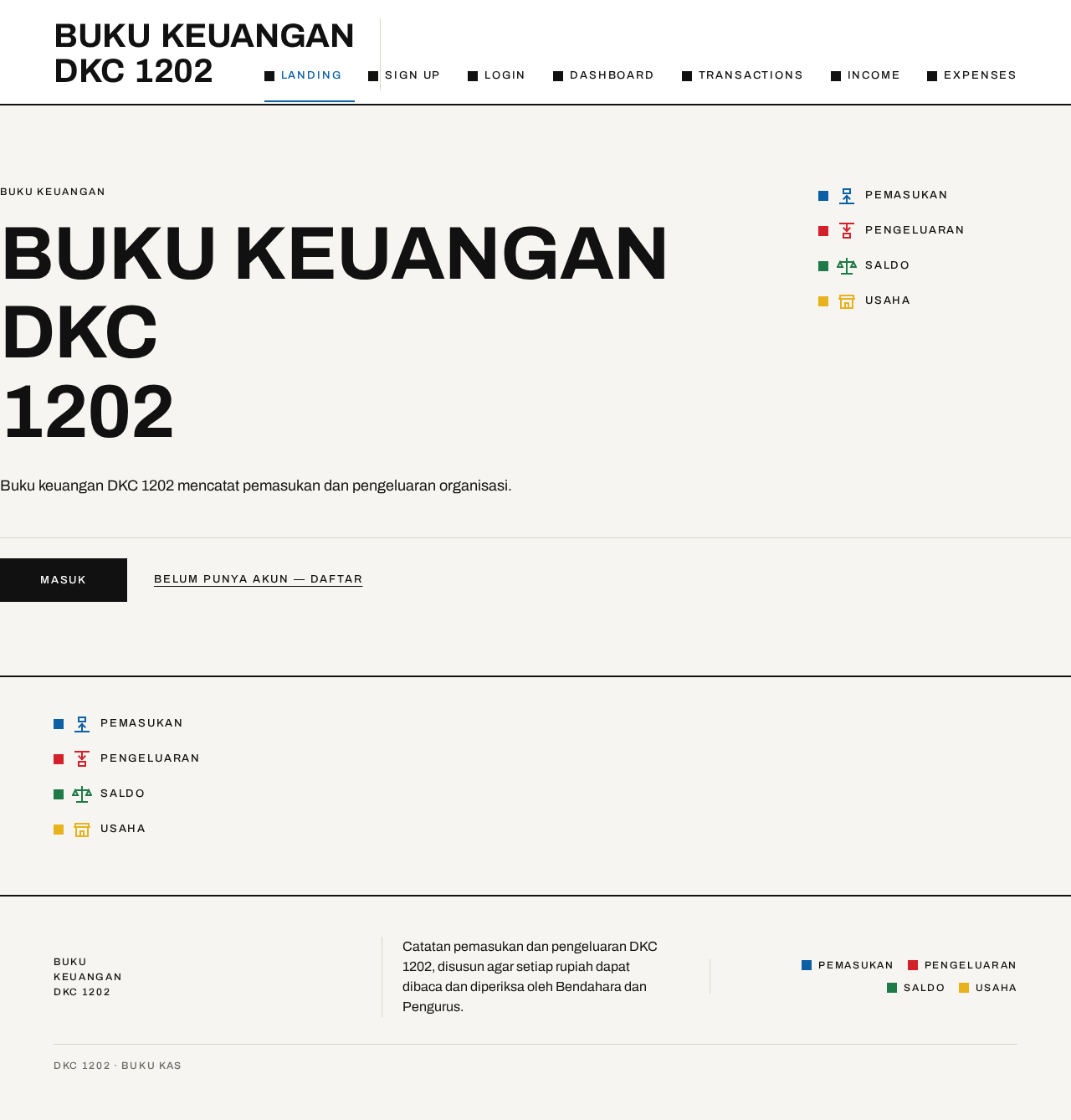
- Information and state. Anonymous, unauthenticated. States the organisation name BUKU KEUANGAN DKC 1202 as the dominant visual object, a single sentence of body copy explaining that this is the financial ledger for DKC 1202, and a four-item coded legend reading top to bottom: PEMASUKAN (blue), PENGELUARAN (red), SALDO (green), USAHA (yellow).
- Primary action. A single solid black rectangular button, Masuk, which begins the path into protected work.
- Supporting actions. A link into first-use enrollment for a person who has no identity yet.
- Domain entities. Organisation identity (DKC 1202); the four coded money categories.
- Component responsibilities. Full-bleed paper-white hero band; flush-left ragged-right headline occupying columns 1–9; vertical four-chip legend in columns 10–12; one sentence of body copy; one button; a 2px black rule closing the band edge to edge. No gradient, blob, illustration, or photograph.
- States. Loading: not applicable (static content). Empty: not applicable. Success: the page renders headline, legend, sentence, button, rule in that order. Error: not applicable. Recovery: not applicable.
Sign Up
- Information and state. Anonymous, unauthenticated. Explains that this creates the identity that will own and resume DKC 1202 financial records, and that the person must indicate whether they record transactions (Bendahara) or review summaries (Pengurus).
- Primary action. Submit enrollment to establish the identity.
- Supporting actions. Return to Landing; move to Login if an identity already exists.
- Domain entities. Person identity; role selection (Bendahara DKC 1202 / Pengurus DKC 1202).
- Component responsibilities. Form rows as label/value pairs on the grid — 12px uppercase tracked label in the left four columns, input in the right eight — closed by a 1px rule with Batal (outlined) and the submit action (solid black) right-aligned side by side.
- States. Loading: submit in progress, controls held. Empty: blank fields with labels visible. Success: identity established and the person continues into the application. Error: missing or invalid required input, or an identity already exists for the supplied credentials — the message states which, and entered values are preserved. Recovery: correct the indicated field and resubmit; or move to Login.
Login
- Information and state. Anonymous, unauthenticated. Returning verification for a person who already has an identity.
- Primary action. Verify and enter the application.
- Supporting actions. Return to Landing; move to Sign Up if no identity exists.
- Domain entities. Person identity; role carried by that identity.
- Component responsibilities. Same label/value form grid and closing rule with Batal and the submit action as Sign Up.
- States. Loading: verification in progress, controls held. Empty: blank fields with labels visible. Success: verified, and the person lands on the surface their role permits. Error: credentials do not match — the message says so without revealing which part was wrong, and entered values are preserved. Recovery: re-enter and resubmit, or move to Sign Up.
Dashboard
- Information and state. Role-restricted; reachable by Bendahara DKC 1202 and Pengurus DKC 1202. Shows the organisation's current financial condition: total PEMASUKAN, total PENGELUARAN, and SALDO, plus a balance strip.
- Primary action. Read the current condition. For the Bendahara, proceed to record a transaction.
- Supporting actions. Move to Transactions; move to Income; move to Expenses (Bendahara only).
- Domain entities. Income total; expense total; balance; the transaction records that produce them.
- Component responsibilities. A 3-up row of ruled panels (Pemasukan / Pengeluaran / Saldo) at 1280px stacking to 1-up at 375px, each headed by a coloured 12px square and an uppercase label; the balance figure carries a small strict-circle badge; a ruled balance strip — one horizontal band with a black centre line, flat blue income bars above it and flat red expense bars below it, with the net balance printed as a large tabular number at the right end; a horizontal nav row of colour-coded items, each a small square chip plus an uppercase label, with a 2px colour bar under the active item.
- States. Loading: panels and strip in a held state while totals are computed. Empty: no transactions recorded yet — totals read zero and the strip shows a flat centre line with an explicit statement that no transactions have been recorded. Success: totals and balance displayed with tabular, right-aligned numerals. Error: totals could not be retrieved — the panels state this plainly and offer retry. Recovery: retry; if it persists, the last successfully read figures are not presented as current.
Transactions
- Information and state. Role-restricted to Bendahara DKC 1202. The revisitable history of recorded DKC 1202 financial transactions, each with its date, description, amount, and whether it is income or expense.
- Primary action. Read the recorded history.
- Supporting actions. Move to Income to record income; move to Expenses to record an expense; return to Dashboard.
- Domain entities. Transaction (date, description, amount, category); running balance.
- Component responsibilities. A ruled ledger table: uppercase 12px header with 0.14em tracking; 1px #D8D4CC hairlines between rows; a vertical 1px rule separating the transaction column from the amount column; amounts right-aligned and tabular so decimal points stack vertically, printed in their code colours (blue for income, red for expense); a 2px black rule closing the table.
- States. Loading: table in a held state while records are retrieved. Empty: no transactions recorded — the table area states this explicitly and offers the recording action. Success: rows displayed in the ledger table. Error: records could not be retrieved — stated plainly with retry. Recovery: retry; a newly recorded transaction appears as an appended row with a 160ms opacity fade.
Income
- Information and state. Role-restricted to Bendahara DKC 1202. Focused workspace for recording an income transaction.
- Primary action. Simpan transaksi — commit the income record.
- Supporting actions. Batal — abandon the entry; move to Expenses; move to Transactions.
- Domain entities. Income transaction: date, description, amount.
- Component responsibilities. Form rows as label/value pairs on the grid — 12px uppercase tracked label in the left four columns, input in the right eight, collapsing to stacked label-above-input at 375px — closed by a 1px rule with Batal (outlined) and Simpan transaksi (solid black) right-aligned side by side. The income category is coded blue.
- States. Loading: commit in progress, controls held. Empty: blank fields with labels visible. Success: the income is recorded, the balance updates, and the person is told the record was saved. Error: a required field is missing or the amount is not a valid positive value — the message names the field, and entered values are preserved. Recovery: correct the named field and resubmit, or choose Batal to abandon without recording.
Expenses
- Information and state. Role-restricted to Bendahara DKC 1202. Focused workspace for recording an expense transaction.
- Primary action. Simpan transaksi — commit the expense record.
- Supporting actions. Batal — abandon the entry; move to Income; move to Transactions.
- Domain entities. Expense transaction: date, description, amount.
- Component responsibilities. Same label/value form grid and closing rule with Batal and Simpan transaksi as Income. The expense category is coded red.
- States. Loading: commit in progress, controls held. Empty: blank fields with labels visible. Success: the expense is recorded, the balance updates, and the person is told the record was saved. Error: a required field is missing or the amount is not a valid positive value — the message names the field, and entered values are preserved. Recovery: correct the named field and resubmit, or choose Batal to abandon without recording.
3. Functional Requirements
FR-01 — Anonymous entry to the ledger application [explicit]
As a visitor, I should see a Landing page that names BUKU KEUANGAN DKC 1202 and explains in one sentence that it is the financial ledger for DKC 1202, so that I understand what the application is before any protected work.
- Trigger/input: opening the application with no established identity.
- Observable result: the Landing page renders the organisation name as the dominant object, the four-item coded legend (PEMASUKAN, PENGELUARAN, SALDO, USAHA), the explanatory sentence, and the Masuk button.
- Access state: anonymous; no protected financial state is reachable from here.
- Failure/recovery: not applicable (static content).
- Continuation: the visitor proceeds to Sign Up or Login.
FR-02 — First-use enrollment [required_inference]
As a Bendahara DKC 1202 or Pengurus DKC 1202, I should establish my own identity on first use and indicate whether I record transactions or review summaries, so that the DKC 1202 records I create or read remain bound to me and resumable.
- Trigger/input: submitting the Sign Up form with the required identity details and a role selection.
- Observable result: an identity is established and the person continues into the application at the surface their role permits.
- Access state: anonymous entry; the interaction that establishes access is itself anonymously reachable.
- Failure/recovery: missing or invalid required input, or an identity already exists for the supplied credentials — the message states which, entered values are preserved, and the person corrects the field or moves to Login.
- Continuation: the person lands on Dashboard (Pengurus) or Dashboard with recording surfaces available (Bendahara).
FR-03 — Returning verification [required_inference]
As a Bendahara DKC 1202 or Pengurus DKC 1202, I should verify my identity on return, so that the durable DKC 1202 financial records are protected and I resume exactly the state my role permits.
- Trigger/input: submitting the Login form with established credentials.
- Observable result: verification succeeds and the person reaches the surface their role permits.
- Access state: anonymous entry; protected state remains unavailable until verification succeeds.
- Failure/recovery: credentials do not match — the message says so without revealing which part was wrong, entered values are preserved, and the person re-enters or moves to Sign Up.
- Continuation: Dashboard, with recording surfaces available only to the Bendahara.
FR-04 — Role-specific control over recording and review [required_inference]
As the system, I should enforce that the Bendahara DKC 1202 can record and manage transactions while the Pengurus DKC 1202 can review financial summaries, so that recording authority and review authority are not the same act.
- Trigger/input: any request to reach a recording surface (Income, Expenses, Transactions) or a summary surface (Dashboard).
- Observable result: a Bendahara reaches Dashboard, Transactions, Income, and Expenses; a Pengurus reaches Dashboard and is not offered the recording surfaces.
- Access state: identity established; role carried by that identity.
- Failure/recovery: a request for a surface the role does not permit is refused and the person is returned to the surface their role permits, with a plain statement of why.
- Continuation: the person continues on a permitted surface.
FR-05 — Record an income transaction [explicit]
As a Bendahara DKC 1202, I should record an income transaction with its date, description, and amount, so that every rupiah received by DKC 1202 is in the books.
- Trigger/input: entering date, description, and amount on Income and choosing Simpan transaksi.
- Observable result: the income is recorded, the transaction appears in the history, and the balance and income total update.
- Access state: identity established with the recording role.
- Failure/recovery: a required field is missing or the amount is not a valid positive value — the message names the field, entered values are preserved, and the person corrects it or chooses Batal to abandon without recording.
- Continuation: the person records another transaction or moves to Dashboard to see the updated condition.
FR-06 — Record an expense transaction [explicit]
As a Bendahara DKC 1202, I should record an expense transaction with its date, description, and amount, so that every rupiah spent by DKC 1202 is in the books.
- Trigger/input: entering date, description, and amount on Expenses and choosing Simpan transaksi.
- Observable result: the expense is recorded, the transaction appears in the history, and the balance and expense total update.
- Access state: identity established with the recording role.
- Failure/recovery: a required field is missing or the amount is not a valid positive value — the message names the field, entered values are preserved, and the person corrects it or chooses Batal to abandon without recording.
- Continuation: the person records another transaction or moves to Dashboard to see the updated condition.
FR-07 — Revisit the recorded transaction history [explicit]
As a Bendahara DKC 1202, I should read the recorded transactions of DKC 1202 as a revisitable history, so that I can confirm what has been entered and when.
- Trigger/input: opening Transactions.
- Observable result: the ruled ledger table lists each transaction with its date, description, and amount, with income amounts in blue and expense amounts in red, right-aligned and tabular.
- Access state: identity established with the recording role.
- Failure/recovery: records could not be retrieved — stated plainly with retry; a newly recorded transaction appears as an appended row with a 160ms opacity fade.
- Continuation: the person moves to Income or Expenses to record, or back to Dashboard.
FR-08 — See the balance and financial summary [explicit]
As a Bendahara DKC 1202 or Pengurus DKC 1202, I should see the balance and a summary of DKC 1202's financial condition — total income, total expense, and the resulting balance — so that I know where the organisation stands.
- Trigger/input: opening Dashboard.
- Observable result: the Pemasukan, Pengeluaran, and Saldo panels display their totals with tabular right-aligned numerals, and the balance strip shows income bars above and expense bars below a black centre line with the net balance printed at the right end.
- Access state: identity established; both roles permitted.
- Failure/recovery: totals could not be retrieved — the panels state this plainly and offer retry; the last successfully read figures are not presented as current.
- Continuation: the Bendahara proceeds to record; the Pengurus uses the figures for organisational decisions.
FR-09 — Review the summary as a basis for decisions [explicit]
As a Pengurus DKC 1202, I should review the income, expense, and balance figures without being able to alter the records, so that my organisational decisions rest on figures the treasurer alone maintains.
- Trigger/input: opening Dashboard after verification.
- Observable result: the summary is readable in full; no recording control is offered.
- Access state: identity established with the review role.
- Failure/recovery: totals could not be retrieved — stated plainly with retry.
- Continuation: the officer returns to the summary as needed; the figures remain the treasurer's record.
FR-10 — Durable, resumable financial state [required_inference]
As the system, I should persist every recorded transaction and the balance it produces, so that the books survive sessions and are the same for every authorised reader.
- Trigger/input: any committed income or expense record.
- Observable result: the transaction and its effect on totals persist and are present on the next visit by an authorised person.
- Access state: protected; readable only by an established identity, writable only by the recording role.
- Failure/recovery: a commit that does not persist is reported as a failure and the record is not presented as saved.
- Continuation: the person retries the entry or continues with the existing books.
4. User Personas
Bendahara DKC 1202
Product context. The treasurer is the person who keeps DKC 1202's books. They are a volunteer handling money they must answer for to a board, so their work is judged by whether the record is complete and current, not by how quickly they finish. They are the only participant who writes to the ledger.
Primary goal. Keep an accurate, current record of every rupiah received and spent by DKC 1202, so that the organisation's financial position is always knowable.
Distinct accepted responsibilities. Recording income transactions with date, description, and amount; recording expense transactions with date, description, and amount; reading and revisiting the recorded transaction history; reading the balance and summary to confirm the effect of what they entered.
Relevant inputs and decisions. The date of the transaction, a description of what it was for, and the amount; the decision of whether an entry is income or expense, which determines which workspace they use and which code colour the record carries.
Interactions with other accepted participants. The treasurer is the source of the figures the Pengurus reviews. Their recording decisions determine what the board officers see on the Dashboard, and they cannot delegate that recording authority to a reviewer.
Observable success. Every transaction they intended to record is present in the history with the correct date, description, and amount; the balance reflects those entries; and the figures the Pengurus reads match what the treasurer entered.
Pengurus DKC 1202
Product context. The board officer is a reviewer, not a recorder. They need the organisation's financial condition in a form they can act on — total income, total expense, and balance — without wading through the mechanics of bookkeeping and without the ability to change the books.
Primary goal. Obtain a concise, trustworthy picture of DKC 1202's financial condition as the basis for organisational decisions.
Distinct accepted responsibilities. Reviewing total income, total expense, and balance; using those figures to inform decisions about the organisation. They do not record, edit, or manage transactions.
Relevant inputs and decisions. The summary figures themselves; the decision the officer is making for the organisation, which the figures inform.
Interactions with other accepted participants. The officer depends entirely on the Bendahara's recording: the summary they read is the treasurer's record. Their review is the accountability check on that record, which is why their access is read-only.
Observable success. The officer can state the organisation's income, expense, and balance, and can see that those figures are current, without having altered anything.
5. Core User Flows
Flow A — A visitor understands the application and enters (Landing → Sign Up / Login)
- A person opens the application with no established identity and lands on Landing.
- They read the organisation name BUKU KEUANGAN DKC 1202, the four-item coded legend (PEMASUKAN, PENGELUARAN, SALDO, USAHA), and the single sentence explaining that this is the ledger for DKC 1202.
- They choose Masuk.
- If they have no identity, they continue to Sign Up; if they already have one, they continue to Login.
Flow B — The Bendahara enrolls on first use (Sign Up)
- The treasurer reaches Sign Up from Landing.
- They enter the required identity details and indicate that they record transactions.
- They submit.
- Observable result: their identity is established and they continue into the application with the recording surfaces available.
- Failure/recovery: if a required field is missing or invalid, or an identity already exists for the supplied credentials, the page states which and preserves what they entered; they correct the field and resubmit, or move to Login.
- Continuation: they land on Dashboard.
Flow C — The Pengurus enrolls on first use (Sign Up)
- The officer reaches Sign Up from Landing.
- They enter the required identity details and indicate that they review summaries.
- They submit.
- Observable result: their identity is established and they continue into the application with the summary surface available and no recording surfaces offered.
- Failure/recovery: as in Flow B.
- Continuation: they land on Dashboard.
Flow D — The Bendahara returns and records income (Login → Dashboard → Income → Transactions)
- The treasurer opens the application and reaches Login.
- They submit their established credentials.
- Observable result: verification succeeds and they land on Dashboard, where the Pemasukan, Pengeluaran, and Saldo panels and the balance strip show the current condition.
- They move to Income.
- They enter the date, a description, and the amount of the money received.
- They choose Simpan transaksi.
- Observable result: the income is recorded, the balance and income total update, and the person is told the record was saved.
- Failure/recovery: if a required field is missing or the amount is not a valid positive value, the message names the field and preserves what they entered; they correct it and resubmit, or choose Batal to abandon the entry without recording.
- Continuation: they move to Transactions, where the new record appears as an appended row with a 160ms opacity fade, printed in blue with a right-aligned tabular amount.
Flow E — The Bendahara returns and records an expense (Login → Dashboard → Expenses → Transactions)
- The treasurer opens the application and reaches Login.
- They submit their established credentials and land on Dashboard.
- They move to Expenses.
- They enter the date, a description, and the amount of the money spent.
- They choose Simpan transaksi.
- Observable result: the expense is recorded, the balance and expense total update, and the person is told the record was saved.
- Failure/recovery: as in Flow D step 8.
- Continuation: they move to Transactions, where the new record appears as an appended row, printed in red with a right-aligned tabular amount.
Flow F — The Bendahara revisits the history (Transactions)
- The treasurer opens Transactions.
- Observable result: the ruled ledger table lists each recorded transaction with its date, description, and amount — income in blue, expense in red, amounts right-aligned and tabular so decimal points stack vertically.
- Failure/recovery: if the records cannot be retrieved, the table area states this plainly and offers retry.
- Continuation: they move to Income or Expenses to record, or back to Dashboard.
Flow G — The Pengurus reviews the financial condition (Login → Dashboard)
- The officer opens the application and reaches Login.
- They submit their established credentials.
- Observable result: verification succeeds and they land on Dashboard, where the Pemasukan, Pengeluaran, and Saldo panels and the balance strip show the organisation's current condition with tabular right-aligned numerals.
- They read the figures and use them as the basis for the organisation's decisions.
- Observable result: no recording control is offered, and the figures they read are the treasurer's record, unaltered by their review.
- Failure/recovery: if the totals cannot be retrieved, the panels state this plainly and offer retry; the last successfully read figures are not presented as current.
- Continuation: they return to the summary whenever they need the current condition.
Flow H — A role reaches a surface it does not permit
- A person with an established identity requests a surface their role does not permit — for example, a Pengurus requesting Income, Expenses, or Transactions.
- Observable result: the request is refused and the person is returned to the surface their role permits, with a plain statement of why.
- Continuation: they continue on Dashboard, where the summary they are entitled to read remains available.
6. Visuals Colors and Theme
The creative direction is authoritative for this section. The muse is Massimo Vignelli; the headline idea is systematic clarity for a village ledger — a record that must look unimpeachable, warm enough for a village organisation, and disciplined enough that no figure can be misread.
Colour tokens (light mode).
| Role | Hex | Meaning |
|---|---|---|
| Background | #F7F5F1 | Warm paper-white ground |
| Surface | #FFFFFF | Pure white panels so ruled tables and hairlines read as printed ink |
| Text | #111111 | Black type at full strength — never greyed for softness |
| Primary | #D32029 | Codes PENGELUARAN (expense) and every destructive/confirming action |
| Accent | #0B5FA5 | Codes PEMASUKAN (income) and navigational state |
| Muted | #6B6B66 | Metadata, table captions, rule labels only — never body copy |
| Category — Usaha | #E8B21C | Business unit, as category chips and chart strokes only |
| Category — Saldo | #1E7A46 | Balance positive, as category chips and chart strokes only |
| Hairline | #D8D4CC | 1px rules between table rows |
Proportion: roughly 80% paper and white, 12% black type and rules, 8% colour — and colour only ever as code or signal.
Typography. Headings and body both use Archivo. Headings are flush-left, ragged-right, never centred and never justified: weight 700 with tight tracking (−0.01em) for section titles, weight 500 uppercase with 0.14em letterspacing for labels, table headers, and nav items. Only three sizes exist — display, section, and label — and hierarchy is carried by weight, rules, and colour rather than by a ladder of sizes. Numerals are tabular everywhere money appears.
Type scale. 1.25 modular on a 4px baseline. Display clamp(40px, 7vw, 96px); section 28px → 40px; body 16px → 18px; label/caption 12px → 13px uppercase with 0.14em tracking. Line-height 1.05 for display, 1.5 for body, 1.2 for table rows. Money columns are right-aligned and tabular so decimal points stack vertically down the page.
Shape language. Hard edges only — zero border radius on cards, inputs, buttons, and chips; every surface is a rectangle, and the rectangle is the point. Structure is drawn with 1px rules: a 2px black rule under the page header, 1px #D8D4CC hairlines between table rows, and a vertical 1px rule separating the transaction column from the amount column. Colour chips are 12px squares, not pills. Buttons are solid rectangles with a 1px black border and no shadow. The only non-rectangular element is the small circular badge on the balance figure, and it is a strict circle.
Layout. A strict 12-column grid with 24px gutters, max-width 1280px, 64px outer margins on desktop and 20px on mobile. The reference's single-column stack is preserved as the base rhythm, but each block is grid-locked: the page header is a full-bleed white band with a 2px black rule beneath it; the nav is a horizontal row of colour-coded items on the same rule line, each a small square chip plus an uppercase label. Dashboard is a 3-up row of ruled panels (Pemasukan / Pengeluaran / Saldo) at 1280px, stacking to 1-up at 375px, each panel headed by a coloured 12px square and a label. Transactions is a ruled table with an uppercase 12px header, right-aligned tabular amounts, and income/expense amounts printed in their code colours. Forms are two-column label/value rows — label left in the 4-column zone, input right in the 8-column zone — collapsing to stacked label-above-input at 375px. Batal and Simpan transaksi sit side by side, right-aligned, on a 1px rule that closes the form.
Imagery. Diagrams and pictograms, never stock photography. Every category gets a drawn 24px pictogram on a 24px grid with 2px strokes: an upward arrow into a tray for Pemasukan, a downward arrow out for Pengeluaran, a balance scale for Saldo, a shopfront for Usaha, a flag for Kegiatan. Charts are pure geometry — flat bar and line charts in the coded colours on white with black axes, no gradients, no fills under lines, no rounded caps. A single ruled balance strip runs across the dashboard: a horizontal band where income and expense bars sit on opposite sides of a centre line, drawn as flat colour rectangles.
Readability at every viewport. Headlines, wordmarks, labels, numbers, panel text, and controls stay entirely inside the viewport and their container at 375px, 768px, and 1280px, wrapping or scaling to fit, and no other element covers any part of them. Where the direction asks for a gesture that would crop or cover readable text or a control, the gesture is carried by imagery or decoration instead.
7. Signature Design Concept
The public entry is a full-bleed paper-white band, not a centred SaaS hero. The organisation name BUKU KEUANGAN DKC 1202 is set in Archivo 700 at clamp(40px, 7vw, 96px), flush-left, ragged-right, occupying columns 1–9 and wrapping to three lines on desktop and five on mobile. It is the dominant object, and it is type, not an image.
To its right, in columns 10–12, sits a single vertical stack of four coded chips — blue, red, green, yellow — each with a 12px uppercase label: PEMASUKAN, PENGELUARAN, SALDO, USAHA, reading top to bottom like a legend on a transit map. Below the headline, flush-left, one sentence of body copy at 18px explains that this is the ledger for DKC 1202. Beneath it, one solid black rectangular button, Masuk, with a 1px black border and no radius. A 2px black rule closes the hero band edge to edge.
No gradient, no blob, no illustration, no photograph — the composition is headline, legend, sentence, button, rule, in that order, all left-aligned on the grid. The concept recomposes only accepted content and controls: the organisation name, the four coded money categories, the explanatory sentence, and the entry action.
8. Interaction Model & Motion Direction
Interaction Model: Static (direction) Motion Tempo: still Hero Dimensionality: flat
Landing Hero Motion Brief. The focal subject is the organisation name itself — Archivo 700 at display size, flush-left across nine of twelve columns, with the four-chip colour legend stacked in the right three columns. The input→transformation→outcome thesis is: a visitor arrives with no context → the headline and legend establish what the ledger is and what its four coded categories mean → the visitor chooses Masuk and continues into identity establishment. Motion vocabulary is near-still, per Vignelli: motion exists only to confirm a state change. The composed first frame is the full hero band at rest — headline, legend, sentence, button, closing 2px rule — with nothing animating on load. The reduced-motion state is identical to the first frame: the hero is static by design, so prefers-reduced-motion requires no rearrangement and every element is already fully readable.
Product-wide motion. A 120ms instant colour fill on button press; a 160ms opacity fade when a new transaction row is appended to the ledger table; a number that counts to its new value over 400ms when a balance changes. No entrances, no parallax, no hover lift, no decorative loops. The one permitted ambient motion is a 2px colour bar under the active nav item that slides 140ms between items when the section changes — a wayfinding gesture, not an effect. Under prefers-reduced-motion, the appended-row fade and the balance count resolve immediately to their final values, and the active-nav bar moves without transition.
9. Non-Functional Requirements
NFR-01 — Durable financial state [required_inference]
Recorded transactions, their amounts, and the resulting totals must persist durably and be resumable across sessions by the correct participant. Rationale: the accepted outcome — a ledger that can be reviewed and relied on — is impossible if records do not survive the session.
NFR-02 — Identity-bound access to financial records [required_inference]
Protected financial state must be reachable only after identity is established, and recording surfaces only by the recording role. Rationale: the accepted role-specific control requirement cannot be enforced without binding access to identity and role.
NFR-03 — Numeric legibility [explicit]
All monetary figures must be rendered with tabular numerals, right-aligned in their columns, so decimal points stack vertically. Rationale: stated in the creative direction as a requirement of the ledger's readability.
NFR-04 — Viewport integrity [explicit]
Headlines, wordmarks, labels, numbers, panel text, and controls must remain entirely inside the viewport and their container at 375px, 768px, and 1280px, wrapping or scaling to fit, with no other element covering any part of them. Rationale: stated in the creative direction's readability rule.
NFR-05 — Reduced-motion support [explicit]
Under prefers-reduced-motion, the interface must present a usable static arrangement with all motion resolved immediately to its final state. Rationale: stated in the creative direction's motion and readability rules.
NFR-06 — Plain, unambiguous error reporting [required_inference]
Validation and retrieval failures must name the affected field or state plainly, preserve entered values, and never present unsaved or stale figures as current. Rationale: a ledger that silently loses or misreports an entry is not a usable record.
10. Tech Stack
No technology choices were specified by the user. The following are coherent defaults for the accepted scope, labelled as defaults.
- Frontend: React with a component-based custom UI implementing the Vignelli grid, ruled tables, and coded colour system.
[Default — not specified by user] - Backend: Python with FastAPI, providing the transaction, summary, and identity endpoints.
[Default — not specified by user] - Storage: a relational database for durable transaction and identity records, with monetary amounts stored in a fixed-precision numeric type.
[Default — not specified by user] - Packaging and local run: Docker with docker-compose, running the frontend and backend as services.
[Default — not specified by user] - Deployment: Kubernetes is not required by the accepted scope and is not included.
[Default — not specified by user]
11. Assumptions and Constraints
Assumptions.
- A-01
[required_inference]The two accepted personas are the only human actors; no additional organisational role participates in the current scope. - A-02
[required_inference]A person's role is declared at enrollment and carried by their identity; the source establishes no mechanism for changing it, so none is added. - A-03
[required_inference]Amounts are entered as positive values, with the income/expense distinction carried by which workspace the record is entered in, not by the sign of the number. - A-04
[required_inference]The balance is derived from the recorded transactions rather than maintained as a separately editable figure. - A-05
[required_inference]The organisation is a single entity, DKC 1202; no multi-organisation tenancy is assumed.
Constraints.
- C-01
[explicit]The reference URLhttps://fantastic-chimera-fdc35a.netlify.app/is visual inspiration only and is not a specification of this product; it contributes no product content, names, or capabilities. - C-02
[explicit]The creative direction is authoritative for palette, typography, shape language, layout, imagery, and motion, and its prohibitions are binding: no border radius, no drop shadows or blur, no gradients or decorative colour without code meaning, no centred headlines, no more than three type sizes, no photography or emoji icons, and no hover-lift, bounce, entrance, parallax, or scroll-triggered motion. - C-03
[explicit]Colour is code and must be applied consistently: blue#0B5FA5always means income, red#D32029always means expense, green#1E7A46always means balance, yellow#E8B21Calways means business unit. - C-04
[explicit]Body copy stays at full black#111111; muted#6B6B66is reserved for metadata, table captions, and rule labels. - C-05
[explicit]The current scope excludes budgeting, forecasting, payroll, invoicing, multi-organisation tenancy, bank or payment-provider integration, and receipt OCR.
12. Glossary
- DKC 1202 — the regional scout/DKC unit council whose finances this application records.
- Buku keuangan — the financial book; the ledger of income and expense records this application maintains.
- Bendahara DKC 1202 — the treasurer; the persona who records and manages DKC 1202's transactions.
- Pengurus DKC 1202 — the board officers; the persona who reviews financial summaries to inform organisational decisions.
- Pemasukan — income; money received by DKC 1202. Coded blue
#0B5FA5. - Pengeluaran — expense; money spent by DKC 1202. Coded red
#D32029. - Saldo — balance; the net position resulting from recorded income and expenses. Coded green
#1E7A46. - Usaha — business unit; a category carried by the ledger's coded colour system. Coded yellow
#E8B21C. - Transaksi — a single recorded financial entry with a date, a description, and an amount.
- Balance strip — the dashboard band with a black centre line, income bars above and expense bars below, and the net balance printed at its right end.
- Ledger table — the ruled transaction table with uppercase tracked headers, hairline row rules, and right-aligned tabular amounts.
BUKU KEUANGANDKC1202
Buku keuangan DKC 1202 mencatat pemasukan dan pengeluaran organisasi.
- PEMASUKAN
- PENGELUARAN
- SALDO
- USAHA
- PEMASUKAN
- PENGELUARAN
- SALDO
- USAHA
BUKU KEUANGANDKC1202
Buku keuangan DKC 1202 mencatat pemasukan dan pengeluaran organisasi.
- PEMASUKAN
- PENGELUARAN
- SALDO
- USAHA
- PEMASUKAN
- PENGELUARAN
- SALDO
- USAHA
No comments yet. Be the first!