exporter
 Tryo
TryoAct as an Expert Android Developer and Systems Architect. I want to build a B2B Android application for domestic trading and supply chain management in India. The primary goal of the app is to help me source products at the lowest wholesale price from specific regions (especially Maharashtra) and sell them at the highest profitable margin in target regions. Please suggest the best tech stack (e.g., Kotlin, Jetpack Compose, Firebase/Supabase) and provide the architecture, database schema, and core code implementations for the following modules: 1. Sourcing & Target Location Engine * Source Filter: Cascading dropdowns (State -> District -> City -> Village) to find where to buy. * Target Filter: Cascading dropdowns (State -> District -> City -> Village) to find profitable selling locations. * Product Mapping: Display locally abundant products based on the source location (e.g., Sugar, Rice, Wheat, Cotton, Raisins, Dry Fruits, Fresh Fruits, Electronic Items). 2. Live Market Dashboard * A dynamic dashboard displaying commodities with columns for Live Wholesale Price and Live Retail Price. * Visual UI indicators (green/red tickers) for real-time price fluctuations. * An algorithm to highlight the absolute lowest buying price locations. * Integration Strategy: How to integrate the Govt of India's e-NAM (National Agriculture Market) API for live APMC Mandi prices. 3. B2B Directory & Contacts * A searchable directory with contacts and addresses for Buyers, Wholesalers, APMC Mandis, Local Markets, Retailers, Distributors, Local Farmers, and Manufacturing Companies. 4. Trade Margin & Freight Calculator * Margin Inputs: Sourcing price, targeted selling price, and total quantity. * Logistics Inputs: Calculate truck/container tonnage limits based on commodity type (volumetric vs. dead weight) and estimate freight costs per kilometer. * Outputs: Total Profit, Total Loss, and Marginal Profit/Loss percentages. 5. Document Vault & OCR Invoice Scanner * A secure vault for compliance files like IEC (Import Export Code), DGFT certificates, and GST registrations. * An OCR (Optical Character Recognition) integration (e.g., ML Kit) to scan physical Mandi receipts and E-way bills, extracting the date, amount, and dealer name. 6. Digital Ledger (Khata) & Payment Tracker * A B2B accounting screen to track transactions (Advance Received, Pending Dues, Completed Payments) with specific buyers/sellers. 7. Multilingual Support * Implementation strategy for dynamic language switching in Jetpack Compose (supporting English, Marathi, and Hindi) for local farmers and traders. Deliverables required from you: 1. A high-level system architecture and unified database schema (SQL/NoSQL) handling locations, users, live prices, shipments, ledgers, and documents. 2. Jetpack Compose UI code for the Live Market Dashboard (with animations) and the Document Scanner screen. 3. The logic/code for the Trade Margin & Freight Calculator. 4. Recommendations for third-party OCR libraries and APIs for live Indian agricultural data.


Comments (0)
Sign in to leave a comment
System Requirements
System Requirements Document for exporter
1. Introduction
The "exporter" project is a B2B Android application designed for domestic trading and supply chain management in India. The primary goal of the application is to facilitate sourcing products at the lowest wholesale prices from specific regions, particularly Maharashtra, and selling them at the highest profitable margins in target regions. The application is intended for B2B traders and local farmers/traders, providing tools for sourcing, market analysis, contact management, trade calculations, document management, and multilingual support.
2. System Overview
The exporter application is an Android-focused solution utilizing Kotlin and Jetpack Compose for UI development. It integrates with Firebase/Supabase for backend services and supports multilingual interfaces in English, Marathi, and Hindi. The application includes modules for sourcing and target location filtering, live market dashboards, B2B directories, trade margin and freight calculators, document vaults with OCR capabilities, digital ledgers, and language settings. The app emphasizes ease of use for traders and farmers, with a focus on the Indian market.
2a. Product Interpretation and Delivery Boundary
The application is designed to support B2B traders and local farmers in India, with a particular focus on Maharashtra. It provides a comprehensive suite of tools for managing the supply chain, including live market data integration via the e-NAM API. The app requires user authentication for accessing protected workflows and data, with self-service enrollment and returning verification processes. The application is constrained to Android devices and uses Jetpack Compose for UI implementation.
2b. Source Content Inventory
Not applicable as no content source directive was provided.
2c. Page Content and Component Coverage
Landing
- Purpose: Introduce the B2B trading and supply-chain product.
- Components:
- Overview of application features and benefits.
- Call-to-action for user registration or login.
Login
- Purpose: Authenticate returning users.
- Components:
- Username and password fields.
- Login button and password recovery option.
Dashboard
- Purpose: Central hub for accessing all application features.
- Components:
- Navigation to sourcing, market, directory, calculator, document, and ledger modules.
- Overview of recent activities and alerts.
Source Locations
- Purpose: Manage source location filters.
- Components:
- Cascading dropdowns for State, District, City, Village.
- List of available products in selected locations.
Target Locations
- Purpose: Manage target location filters.
- Components:
- Cascading dropdowns for State, District, City, Village.
- List of profitable selling locations.
Product Mapping
- Purpose: Display products associated with source locations.
- Components:
- Product list with details on local abundance and pricing.
Live Market Dashboard
- Purpose: Display live market data.
- Components:
- Live Wholesale and Retail Prices.
- Price fluctuation indicators.
- Integration with e-NAM API for real-time data.
Market Opportunities
- Purpose: Highlight locations with the lowest buying prices.
- Components:
- List of locations with comparative pricing.
- Visual indicators for best opportunities.
Directory
- Purpose: Provide a searchable B2B contact directory.
- Components:
- Search functionality.
- Categorized contact lists for buyers, sellers, and other stakeholders.
Trade Calculator
- Purpose: Calculate trade margins and freight costs.
- Components:
- Input fields for sourcing price, selling price, quantity.
- Outputs for total profit, loss, and margin percentages.
Document Vault
- Purpose: Securely store compliance documents.
- Components:
- Upload and retrieval of IEC, DGFT, GST documents.
- Secure access controls.
Document Scanner screen
- Purpose: OCR scanning of documents.
- Components:
- Camera access for scanning receipts and bills.
- OCR processing to extract key data.
Ledger
- Purpose: Track financial transactions.
- Components:
- Transaction records for advances, dues, and payments.
- Summary of financial status with specific partners.
Language Settings
- Purpose: Manage application language preferences.
- Components:
- Options for English, Marathi, and Hindi.
- Immediate language switching capability.
3. Functional Requirements
-
As a B2B Trader, I should be able to filter source locations using cascading dropdowns from State to Village.
- Provenance: explicit
- Observable Acceptance: Successful filtering and display of source locations.
-
As a B2B Trader, I should be able to filter target locations using cascading dropdowns from State to Village.
- Provenance: explicit
- Observable Acceptance: Successful filtering and display of target locations.
-
As a B2B Trader, I should be able to view a live market dashboard with real-time price data and fluctuations.
- Provenance: explicit
- Observable Acceptance: Accurate display of live prices and fluctuation indicators.
-
As a B2B Trader, I should be able to access a searchable directory of B2B contacts.
- Provenance: explicit
- Observable Acceptance: Successful search and retrieval of contact information.
-
As a B2B Trader, I should be able to calculate trade margins and freight costs using the trade calculator.
- Provenance: explicit
- Observable Acceptance: Accurate calculation of profit, loss, and margin percentages.
-
As a B2B Trader, I should be able to securely store and retrieve compliance documents in the document vault.
- Provenance: explicit
- Observable Acceptance: Secure upload and retrieval of documents.
-
As a B2B Trader, I should be able to scan documents using OCR and extract key data.
- Provenance: explicit
- Observable Acceptance: Successful scanning and data extraction from documents.
-
As a B2B Trader, I should be able to track financial transactions in the digital ledger.
- Provenance: explicit
- Observable Acceptance: Accurate tracking and display of transaction records.
-
As a Local Farmer and Trader, I should be able to switch the application language dynamically.
- Provenance: explicit
- Observable Acceptance: Immediate language change across the application.
4. User Personas
-
B2B Trader
- Responsibilities: Sourcing products, selecting target markets, comparing prices, managing contacts, calculating margins and freight, tracking documents, and recording ledgers.
- Outcomes: Efficient trading operations and maximized profit margins.
-
Local Farmer and Trader
- Responsibilities: Accessing trading information and workflows, utilizing multilingual support.
- Outcomes: Enhanced market participation and informed decision-making.
5. Core User Flows
B2B Trader
-
Login and Access Dashboard
- User logs in via the Login page.
- Accesses the Dashboard for an overview of activities.
-
Filter Source and Target Locations
- Navigates to Source Locations and Target Locations pages.
- Uses cascading dropdowns to filter and select locations.
-
View Live Market Data
- Accesses the Live Market Dashboard.
- Monitors real-time price data and fluctuation indicators.
-
Manage Contacts in Directory
- Searches for contacts in the Directory.
- Views and manages contact information.
-
Calculate Trade Margins
- Inputs data into the Trade Calculator.
- Reviews calculated profit, loss, and margin outputs.
-
Store and Retrieve Documents
- Uploads documents to the Document Vault.
- Retrieves documents as needed.
-
Scan Documents with OCR
- Uses the Document Scanner screen to scan documents.
- Extracts and reviews key data from scanned documents.
-
Track Financial Transactions
- Records transactions in the Ledger.
- Monitors financial status and transaction history.
Local Farmer and Trader
-
Access Dashboard and Language Settings
- Logs in and accesses the Dashboard.
- Navigates to Language Settings to switch application language.
-
View Market Data and Opportunities
- Accesses the Live Market Dashboard.
- Reviews market opportunities for trading.
6. Visuals Colors and Theme
- Muse: Tobias van Schneider
- Palette:
- Background: #FFFFFF
- Surface: #FAFAFA
- Text: #000000
- Primary: #FF0000
- Accent: #00BFFF
- Muted: #E0E0E0
- Typography:
- Headings: Playfair Display — Bold
- Body: Söhne
- Scale: 1.5 modular, 72/48/32/24/18
- Shape Language: Sharp corners, strong editorial grid, full-bleed sections
- Layout: Asymmetric editorial grids with full-bleed imagery and oversized headlines
- Motion: Slow crossfades, type reveals, and hover image swaps
7. Signature Design Concept
The public entry page will feature a full-viewport hero with an oversized headline in Playfair Display, set against a warm off-white backdrop. A large, impactful image of a bustling market scene will be used, with red accents highlighting critical data points. This design will emphasize the bold and clear UI required for the application.
8. Interaction Model & Motion Direction
- Interaction Model: Static
- Motion Tempo: Restrained
- Hero Dimensionality: Flat
- Landing Hero Motion Brief:
- Focal Subject: Bustling market scene
- Input→Transformation→Outcome: User scrolls to reveal oversized headline and market image; red accents highlight key data points.
- Motion Vocabulary: Slow crossfades and type reveals
- Composed First Frame: Full-viewport market scene with headline
- Reduced-Motion State: Static image with headline
9. Non-Functional Requirements
- Performance: The application must load within 3 seconds on a standard 4G network.
- Security: Compliance documents must be stored securely with encryption.
- Scalability: The system must handle up to 10,000 concurrent users.
- Localization: Full support for English, Marathi, and Hindi languages.
10. Tech Stack
- Frontend: Kotlin, Jetpack Compose
- Backend: Firebase/Supabase
- Database: SQL/NoSQL (as per module requirements)
- OCR: ML Kit
- API Integration: e-NAM API for live market data
11. Assumptions and Constraints
- The application is Android-only and will not support iOS or web platforms.
- All users must authenticate to access protected features.
- The application will primarily serve the Indian market, with a focus on Maharashtra.
12. Glossary
- B2B: Business-to-Business
- e-NAM: National Agriculture Market
- APMC: Agricultural Produce Market Committee
- OCR: Optical Character Recognition
- IEC: Import Export Code
- DGFT: Directorate General of Foreign Trade
- GST: Goods and Services Tax
Source lowest.Sell highest.
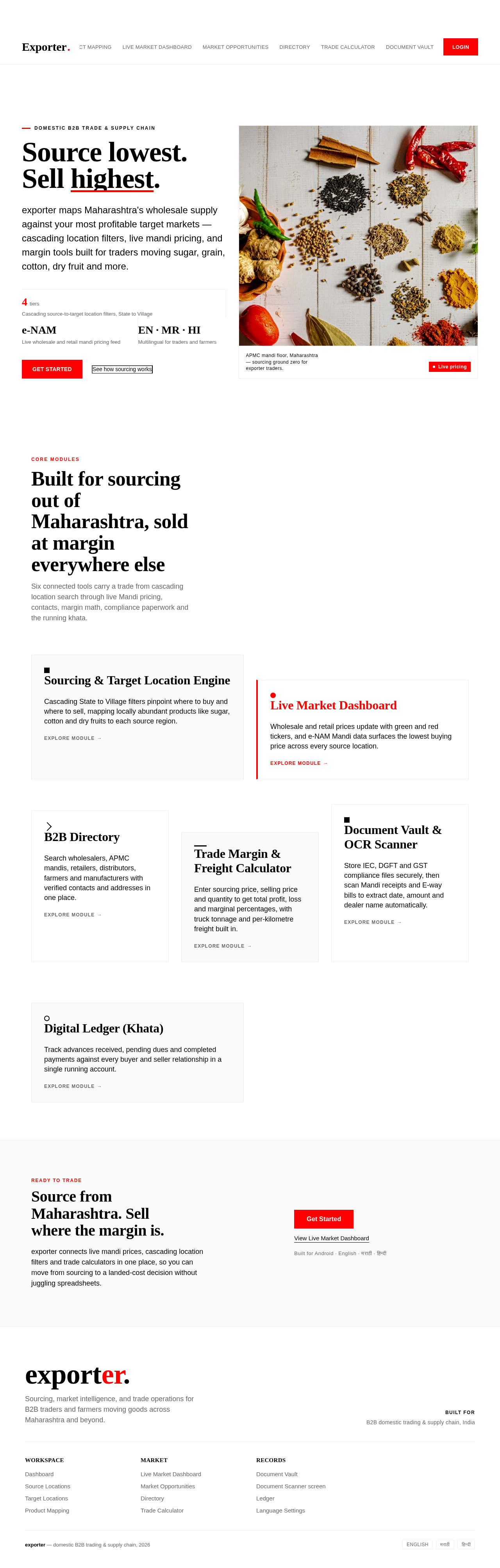
exporter maps Maharashtra's wholesale supply against your most profitable target markets — cascading location filters, live mandi pricing, and margin tools built for traders moving sugar, grain, cotton, dry fruit and more.

Core Modules
Built for sourcing out of Maharashtra, sold at margin everywhere else
Six connected tools carry a trade from cascading location search through live Mandi pricing, contacts, margin math, compliance paperwork and the running khata.
Ready to trade
Source from Maharashtra. Sell where the margin is.
exporter connects live mandi prices, cascading location filters and trade calculators in one place, so you can move from sourcing to a landed-cost decision without juggling spreadsheets.
Source lowest.Sell highest.
exporter maps Maharashtra's wholesale supply against your most profitable target markets — cascading location filters, live mandi pricing, and margin tools built for traders moving sugar, grain, cotton, dry fruit and more.
Core Modules
Built for sourcing out of Maharashtra, sold at margin everywhere else
Six connected tools carry a trade from cascading location search through live Mandi pricing, contacts, margin math, compliance paperwork and the running khata.
Ready to trade
Source from Maharashtra. Sell where the margin is.
exporter connects live mandi prices, cascading location filters and trade calculators in one place, so you can move from sourcing to a landed-cost decision without juggling spreadsheets.
No comments yet. Be the first!