expense tracker
 Chhavi Varma
Expense Tracker with Authentication is a full-stack web application that enables users to securely manage their personal finances. Users can create an account, log in securely, and track their income and expenses through a personalized dashboard. The application uses JWT-based authentication and bcrypt password hashing to ensure user accounts are protected. Each user can perform CRUD (Create, Read, Update, Delete) operations on their own transactions without accessing other users' data. The dashboard provides a real-time overview of total income, expenses, and current balance, along with transaction history. Users can categorize transactions (e.g., Food, Travel, Shopping, Salary), search and filter records, and visualize spending patterns using charts. Key Features 🔐 User Registration & Login with secure authentication 👤 Personalized user dashboard 💰 Add, edit, delete, and view income/expense transactions 📊 Balance calculation and spending analytics 🏷️ Transaction categorization 🔍 Search and filter transactions 📈 Charts for monthly and category-wise expense analysis 📄 Export transaction history (CSV/PDF) (optional enhancement)


Comments (0)
Sign in to leave a comment
System Requirements
Expense Tracker
Introduction
The "Expense Tracker" is a full-stack web application designed to help individuals securely manage their personal finances. This document outlines the system requirements for the Expense Tracker, focusing on individual use with secure authentication and personalized financial management features.
System Overview
The Expense Tracker application allows users to create an account, log in securely, and manage their income and expenses through a personalized dashboard. The application employs JWT-based authentication and bcrypt password hashing to ensure user accounts are protected. Users can perform CRUD operations on their transactions, categorize them, and visualize spending patterns. The system is designed for individual use, ensuring that each user's data is isolated and secure.
Functional Requirements
- As a user, I should be able to register and create an account with secure authentication.
- As a user, I should be able to log in securely using JWT-based authentication.
- As a user, I should be able to view a personalized dashboard displaying my total income, expenses, and current balance.
- As a user, I should be able to add, edit, delete, and view my income and expense transactions.
- As a user, I should be able to categorize my transactions (e.g., Food, Travel, Shopping, Salary).
- As a user, I should be able to search and filter my transactions.
- As a user, I should be able to visualize my spending patterns using charts for monthly and category-wise expense analysis.
- As a user, I should have the option to export my transaction history in CSV or PDF format.
User Personas
- Individual User: A person who wants to manage their personal finances securely and efficiently. They require features like secure login, transaction management, and financial analytics.
Core User Flows
- User registers an account -> logs in securely -> accesses personalized dashboard -> adds/edits/deletes transactions -> categorizes transactions -> views analytics -> exports transaction history (optional).
Visuals Colors and Theme
- primary: #2A9D8F (Teal)
- primary_light: #A8DADC (Light Teal)
- secondary: #E76F51 (Coral)
- accent: #F4A261 (Orange)
- highlight: #FFB703 (Amber)
- bg: #F1FAEE (Light Cream)
- surface: rgba(233, 233, 233, 0.8)
- text: #264653 (Dark Blue)
- text_muted: #6D6875 (Muted Gray)
- border: rgba(38, 70, 83, 0.2)
Signature Design Concept
The Expense Tracker's homepage will feature an interactive "Financial Journey Map" that visually represents the user's financial progress. Users can click on different milestones to view detailed analytics and insights. The map will use @react-three/fiber for a 3D effect, allowing users to zoom in and out, and explore their financial journey interactively. Hovering over milestones will display tooltips with quick stats, and clicking will transition to detailed views using framer-motion for smooth animations.
Interaction Model & Motion Direction
The landing page will use a "parallax" interaction model, creating a layered depth effect as users scroll through their financial journey. This will be complemented by animated transitions and hover effects for interactive elements, enhancing the storytelling aspect of the user's financial management experience.
Non-Functional Requirements
- The system must ensure secure authentication and data protection.
- The application should be responsive and accessible on various devices.
- The system should handle concurrent user sessions efficiently.
- The application should provide real-time updates on the dashboard.
Tech Stack
- Frontend: React for Web
- Backend: Python with FastAPI
- Database: MySQL or MariaDB, using Alembic for migrations
- Local Orchestration: Docker, docker-compose
- Server-side Orchestration: Kubernetes
Assumptions and Constraints
- The application is intended for individual use, not for multi-user or enterprise environments.
- User data is isolated and cannot be accessed by other users.
- The system assumes users have internet access to use the web application.
Glossary
- CRUD: Create, Read, Update, Delete operations.
- JWT: JSON Web Token, a compact, URL-safe means of representing claims to be transferred between two parties.
- Bcrypt: A password hashing function designed for secure password storage.
- Parallax: An effect where the position or direction of an object appears to differ when viewed from different positions.
- Alembic: A lightweight database migration tool for use with SQLAlchemy.
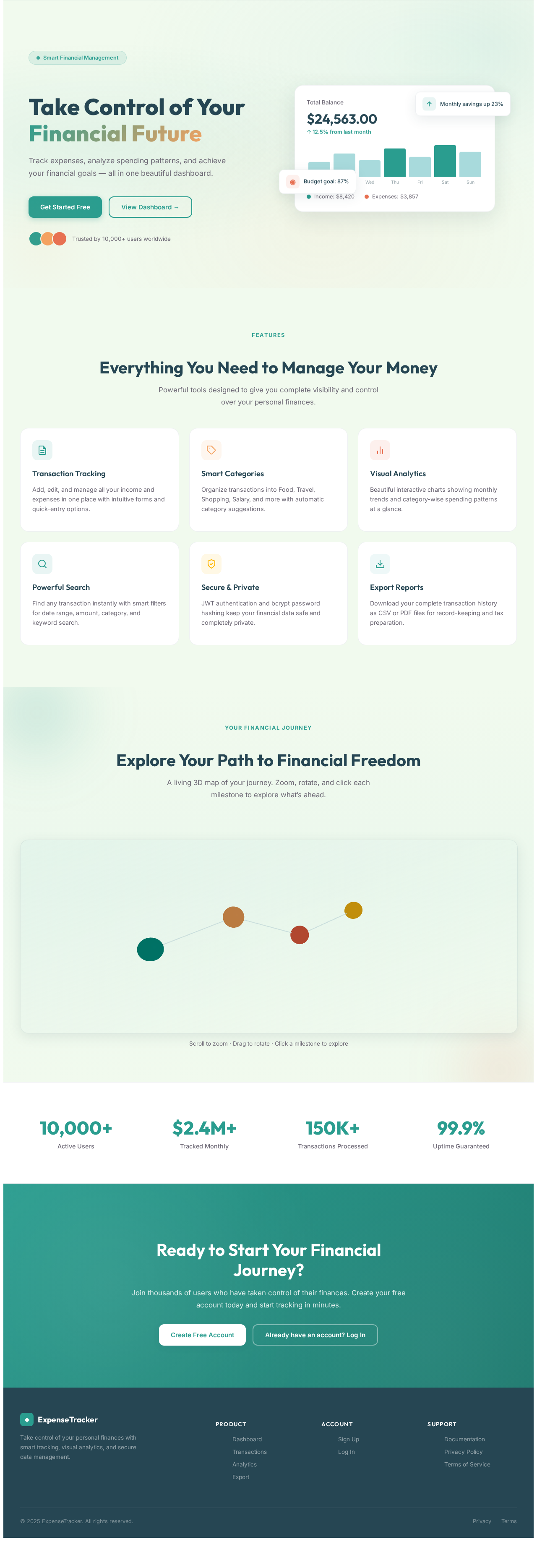
Take Control of Your Financial Future
Track expenses, analyze spending patterns, and achieve your financial goals — all in one beautiful dashboard.
Everything You Need to Manage Your Money
Powerful tools designed to give you complete visibility and control over your personal finances.
Transaction Tracking
Add, edit, and manage all your income and expenses in one place with intuitive forms and quick-entry options.
Smart Categories
Organize transactions into Food, Travel, Shopping, Salary, and more with automatic category suggestions.
Visual Analytics
Beautiful interactive charts showing monthly trends and category-wise spending patterns at a glance.
Powerful Search
Find any transaction instantly with smart filters for date range, amount, category, and keyword search.
Secure & Private
JWT authentication and bcrypt password hashing keep your financial data safe and completely private.
Export Reports
Download your complete transaction history as CSV or PDF files for record-keeping and tax preparation.
Explore Your Path to Financial Freedom
A living 3D map of your journey. Zoom, rotate, and click each milestone to explore what’s ahead.
Scroll to zoom · Drag to rotate · Click a milestone to explore
Ready to Start Your Financial Journey?
Join thousands of users who have taken control of their finances. Create your free account today and start tracking in minutes.
No comments yet. Be the first!