eternal-wall-monument
 Bachir Djoukbala
# PROMPT: Build "The Eternal Wall" WordPress Plugin (v2.0) Build a complete, production-ready WordPress plugin ZIP called "The Eternal Wall" (eternal-wall-v2.0.0.zip). ## 1. Concept & Business Rules The Eternal Wall is a pay-to-enter digital monument where visitors pay to inscribe their name permanently on a 2D interactive stone wall. - Sealed Wall: The full wall is accessible ONLY to logged-in users who have at least 1 paid, permanent inscription (and admins). Visitors see a blurred teaser wall and a live counter of carved names. - Permanent: Confirmed inscriptions can NEVER be edited, updated, or deleted by anyone (including admins). Enforced via MySQL BEFORE UPDATE/DELETE triggers + PHP model guards. - Carve Again: Carvers can purchase additional inscriptions anytime. ## 2. Server-Authoritative Pricing - Base: $1.00 USD per 10 characters, rounded up (1-10 chars = $1, 11-20 = $2 ... 91-100 = $10). Max 100 characters. - Graphemes: Emojis and composite symbols count as 1 character (grapheme_strlen with PCRE \X fallback). - Premium: Optional +$20 USD upgrade (burnished gold slab, double width, glowing border). - Currency: Store price in USD, charge customer in DZD (Algerian Dinar) using an admin-configurable rate (default: 135 DZD/USD). ## 3. Payment Gateway: Chargily Pay v2 (Algeria) Support Algerian CIB & EDAHABIA cards. Do not hardcode secret keys. - Endpoints: https://pay.chargily.net/api/v2 (live) and /test/api/v2 (test). - Flow: Frontend selects text, coords, premium -> server quotes price and creates pending record -> server calls Chargily POST /checkouts with Bearer token -> returns checkout URL. - Webhook (/wp-json/eternal-wall/v1/webhook/chargily): Verify HMAC-SHA256 in "signature" header using webhook secret. Zero-trust: fetch checkout status directly from Chargily API. If status=paid, idempotently finalize inscription and assign sequential number. - Architecture: Abstract EW_Payment_Gateway interface so other providers can be added later. ## 4. File Structure (PHP 7.4+ compatible, prefix EW_ / ew_) eternal-wall/ ├── eternal-wall.php # Plugin header, constants (EW_VERSION 2.0.0), activation/deactivation ├── uninstall.php # Safe uninstall (never drops inscriptions table) ├── readme.txt # Setup guide, shortcode instructions ├── includes/ │ ├── class-ew-plugin.php # Singleton bootstrap │ ├── class-ew-settings.php # Options: Chargily keys, test mode, DZD rate, Google OAuth │ ├── class-ew-pricing.php # Server quote & grapheme counter │ ├── class-ew-security.php # Nonces, rate limits, access checks (can_view_wall) │ ├── class-ew-database.php # dbDelta tables & immutability triggers │ ├── class-ew-inscriptions.php # Model, 2D coordinates, viewport queries │ ├── class-ew-payment-gateway.php# Gateway interface │ ├── class-ew-chargily.php # Chargily Pay v2 implementation │ ├── class-ew-payments.php # Quote verification & checkout orchestration │ ├── class-ew-webhooks.php # Replay-protected webhook receiver │ ├── class-ew-auth.php # Native WP sign-up/login + Google OAuth │ ├── class-ew-rest-api.php # Endpoints: /count, /me, /wall, /checkout, /webhook/chargily │ └── class-ew-shortcode.php # [eternal_wall] shortcode dispatcher ├── admin/ │ ├── class-ew-admin.php # Admin menu & assets │ ├── class-ew-admin-dashboard.php# Counter stats & connection tester │ ├── class-ew-admin-inscriptions.php # Read-only inscription browser (no delete action) │ └── class-ew-admin-settings.php # Settings form with masked secret keys ├── public/ │ ├── css/eternal-wall.css # Scoped (.ew-root) dark stone & gold theme │ └── js/ │ ├── eternal-wall-canvas.js # 2D zoom/pan stone canvas with viewport culling │ ├── eternal-wall-carve.js # Live stone slab preview, grapheme counter, checkout │ └── eternal-wall-search.js # Search by text/#number with auto-pan to coordinates └── templates/ ├── landing.php # Ghost teaser wall, counter, "Pay to Enter" CTA ├── auth.php # Login/register tabs + Google OAuth button ├── carve.php # Carving workshop, slab preview, spot picker ├── wall.php # Interactive 2D pannable wall └── sealed.php # "The wall is sealed" gatekeeper message ## 5. Database Schema 1) wp_eternal_wall_inscriptions: - id (BIGINT UNSIGNED AUTO_INCREMENT PK) - number (BIGINT UNSIGNED UNIQUE NULLABLE) # Sequential #1, #2... assigned only on confirmation - user_id (BIGINT UNSIGNED) - content (VARCHAR(191)) - char_count (INT UNSIGNED) - is_premium (TINYINT(1) DEFAULT 0) - status (VARCHAR(20) DEFAULT 'pending') # pending, confirmed, failed - coord_x (INT), coord_y (INT) - amount_dzd (DECIMAL(10,2)), amount_usd (DECIMAL(10,2)) - gateway (VARCHAR(50) DEFAULT 'chargily') - payment_ref (VARCHAR(191) UNIQUE) - created_at (DATETIME), confirmed_at (DATETIME NULL) 2) wp_eternal_wall_events: - id, event_id (UNIQUE), gateway, payload (LONGTEXT), processed_at (DATETIME) 3) Triggers: ew_no_delete & ew_no_update on wp_eternal_wall_inscriptions. If OLD.status = 'confirmed', SIGNAL SQLSTATE '45000' SET MESSAGE_TEXT = 'Permanent inscriptions cannot be modified or deleted.'. ## 6. Frontend & Shortcode: [eternal_wall] - Landing (Visitor): Monumental hero, live counter of inscribed souls, blurred teaser wall, "Pay to Enter" button. - Carve Room (Logged-in): Textarea (1-100 graphemes), real-time chiseled stone preview, premium toggle, 2D coordinate spot picker, live DZD/USD price, permanence agreement checkbox, "Pay & Carve Forever" button. - Wall View (Paid Carver/Admin): Full 2D canvas with drag-to-pan, pinch/scroll zoom, viewport culling (only renders visible slabs). Search box auto-pans to slab. Regular slabs = dark stone; Premium = gold double-width with glow. "Carve Again" top-bar button. ## 7. Design System - Scoped to .ew-root to avoid theme collisions. - Colors: Deep obsidian (#0B0E14, #121721), stone gray (#1E2533, #2A3447), burnished gold (#D4AF37, #F3E5AB, #996515). - Fonts: Monumental serif headings (Cinzel/Spectral), clean sans-serif body. Generate all code files following this structure, ensure syntax validity, and package into the final plugin ZIP.

Comments (0)
Sign in to leave a comment
System Requirements
System Requirements Document for eternal-wall-monument
1. Introduction
The Eternal Wall is a production-ready WordPress plugin (packaged as eternal-wall-v2.0.0.zip, plugin slug eternal-wall, version EW_VERSION 2.0.0) that powers a pay-to-enter digital monument. Visitors pay to inscribe their name permanently onto a 2D interactive stone wall. The wall is sealed: the full wall is accessible only to logged-in users who hold at least one paid, permanent inscription (and to administrators). Visitors see a blurred teaser wall and a live counter of carved names.
The product's intent is to monetize digital inscriptions on a 2D monument with server-enforced permanence, deliver a secure payment experience through Chargily Pay v2 for Algerian CIB and EDAHABIA cardholders, uphold inscription immutability at both the application and database levels, and provide a rich, interactive, access-controlled frontend wall viewing and inscription experience.
The audience is memorial-minded contributors in Algeria who wish to carve a name forever, and the administrators who run a sealed, access-controlled WordPress site. The emotional register is ceremonial, solemn, weighty, and premium — a name carved forever, not a social post.
The plugin is delivered as a WordPress plugin ZIP with PHP 7.4+ compatibility, using the EW_ / ew_ prefix throughout. It is installed into an existing WordPress site and rendered through the [eternal_wall] shortcode.
2. System Overview
The Eternal Wall is a self-contained WordPress plugin. It registers custom database tables, a REST API namespace (/wp-json/eternal-wall/v1/), an admin menu, scoped public assets, and a shortcode dispatcher. All product behavior is delivered through the plugin; the surrounding WordPress theme is not modified, and all frontend styling is scoped to .ew-root to avoid theme collisions.
Actors
- Visitor — an unauthenticated or unpaid visitor who explores the landing page, sees the blurred teaser wall and the live counter of carved names, and decides whether to pay to enter.
- Carver — a logged-in user with at least one paid permanent inscription who composes text, previews the chiseled stone slab, optionally toggles the premium gold upgrade, picks 2D coordinates, accepts the permanence agreement, and pays in DZD via Chargily. Carvers can return to carve additional inscriptions and search the wall by text or number with auto-pan.
- Administrator — a WordPress admin who configures Chargily keys, test mode, the DZD/USD rate, and Google OAuth; monitors counter stats and connection tests; and browses inscriptions read-only with no delete action. Admins can view the sealed wall but cannot edit or delete confirmed inscriptions.
Non-persona actors
- Chargily Pay v2 — the external payment provider that hosts checkout and returns payment status. It is provider-owned and out of the plugin's control.
- Google OAuth — the external identity provider used as an alternative sign-in path.
- WordPress core — the host platform providing user accounts, nonces, roles, and the admin shell.
Accepted behavior summary
- A sealed, pay-to-enter wall with a blurred teaser and live counter for visitors.
- Server-authoritative pricing in USD, charged in DZD at an admin-configurable rate (default 135 DZD/USD).
- Chargily Pay v2 checkout with a zero-trust, replay-protected webhook that idempotently finalizes inscriptions and assigns sequential numbers.
- Permanent, immutable confirmed inscriptions enforced by MySQL
BEFORE UPDATE/BEFORE DELETEtriggers plus PHP model guards. - A 2D interactive canvas wall with drag-to-pan, pinch/scroll zoom, viewport culling, and search-as-pan.
- An abstract
EW_Payment_Gatewayinterface so other providers can be added later. - Admin settings, dashboard, and a read-only inscription browser.
Narrow exclusions
- Confirmed inscriptions can never be edited, updated, or deleted by anyone, including admins.
- The admin inscription browser is read-only with no delete action.
uninstall.phpmust never drop the inscriptions table.- Secret keys must not be hardcoded.
- No blue, indigo, or violet accent anywhere in the design.
- No editing or delete affordances anywhere in the inscription UI.
2a. Product Interpretation and Delivery Boundary
The Eternal Wall is delivered as a WordPress plugin that owns its own custom pages, rendered through the [eternal_wall] shortcode and the plugin's templates. The plugin owns application identity through native WordPress sign-up/login plus Google OAuth, and it owns the sealed-wall access rule: the full wall is available only to logged-in users with at least one confirmed paid permanent inscription, and to administrators.
Payment is provider-owned. The plugin never stores card data and never hardcodes secret keys. Checkout is created server-side against Chargily Pay v2 and the customer completes payment on Chargily's hosted surface. Finalization is zero-trust: the plugin verifies the HMAC-SHA256 signature header on the webhook, then independently fetches checkout status directly from the Chargily API before idempotently finalizing the inscription and assigning its sequential number.
Current delivery covers the landing teaser, authentication, the sealed gatekeeper message, the carve room, the interactive wall, and the three admin surfaces (Dashboard, Settings, Inscriptions). Future expansion of additional payment providers is anticipated through the abstract EW_Payment_Gateway interface, but no additional provider is part of current delivery.
2b. Source Content Inventory
Not applicable. No reference directive in this project declares content_source; the Chargily Pay v2 reference is used only as feature_reference and domain_context.
2c. Page Content and Component Coverage
landing.php
- Information / state: Monumental hero with the wall itself as the hero — a tiled grid of carved stone slabs, most in
#1E2533stone-gray, a few premium slabs in burnished gold#D4AF37with a glowing bevel, all under a heavy 14px blur. Over the lower third, an oversized Cinzel counter numeral reading the live inscription count, with a thin gold rule beneath it and the labelSOULS INSCRIBED. Bottom-left: a ruled specification panel withBASE $1.00 USD / 10 CHARACTERS,PREMIUM +$20.00,CHARGED IN DZD. Bottom-right: a single gold-bordered CTAPAY TO ENTER. - Primary actions:
PAY TO ENTERCTA leading into the auth/carve flow. - Supporting actions: Cursor-following 120px blur-lens that briefly reveals sharp slabs beneath the pointer; live counter polling the REST
/countendpoint. - Domain entities: Inscription (count only), sequential number.
- Component responsibilities:
templates/landing.phprenders the teaser wall, counter, and CTA;public/js/eternal-wall-canvas.jsrenders the tiled slab grid; the counter gauge polls/count;public/css/eternal-wall.csssupplies the scoped.ew-rootdark stone and gold theme. - States: Loading (counter gauge sweeping to its first value); empty (zero inscriptions — counter reads
0, teaser wall shows the empty stone field); success (counter settles on the live number); error (counter fetch fails — the gauge holds its last known value and the CTA remains available); recovery (counter retries on the next poll interval).
auth.php
- Information / state: Login and register tabs plus a Google OAuth button. Native WordPress sign-up and login are the primary identity paths; Google OAuth is the alternative.
- Primary actions: Register a new account; log in with existing credentials; continue with Google OAuth.
- Supporting actions: Switch between login and register tabs.
- Domain entities: WordPress user account, application identity.
- Component responsibilities:
templates/auth.phprenders the tabs and OAuth button;includes/class-ew-auth.phphandles native sign-up/login and Google OAuth;includes/class-ew-security.phpsupplies nonces and rate limits. - States: Loading (submitting credentials); empty (blank form); success (identity established, redirected to the carve room or wall); error (invalid credentials, duplicate email, OAuth failure — inline message, form preserved); recovery (retry submission; OAuth retry).
sealed.php
- Information / state: "The wall is sealed" gatekeeper message explaining why the visitor cannot view the full wall and what is required to enter.
- Primary actions: Navigate to the landing page or the auth/carve flow.
- Supporting actions: None beyond navigation.
- Domain entities: Access rule (at least one confirmed paid permanent inscription, or administrator).
- Component responsibilities:
templates/sealed.phprenders the gatekeeper message;includes/class-ew-security.phpcan_view_walldetermines when this template is shown. - States: Loading (not applicable — static gatekeeper); empty (not applicable); success (not applicable); error (not applicable); recovery (navigation to landing or auth).
carve.php
- Information / state: Two-column split — chiseled slab preview on the left, ruled specification panel on the right. The right column is a table of aligned label/value pairs (
CHARACTERS 34/100,PREMIUM OFF,TOTAL 4.00 USD / 540.00 DZD) with 1px gold hairlines between rows, updating live as the textarea changes. Collapses to a single column at 768px. - Primary actions: Enter 1–100 graphemes of text; toggle the premium upgrade; pick 2D coordinates on the spot picker; accept the permanence agreement checkbox; press
Pay & Carve Forever. - Supporting actions: Real-time chiseled stone preview; live grapheme counter; live DZD/USD price; coordinate spot picker.
- Domain entities: Inscription (pending), grapheme count, premium flag, 2D coordinates, USD amount, DZD amount, permanence agreement.
- Component responsibilities:
templates/carve.phprenders the workshop;public/js/eternal-wall-carve.jshandles the live slab preview, grapheme counter, and checkout initiation;includes/class-ew-pricing.phpcomputes the server quote and grapheme count;includes/class-ew-payments.phpverifies the quote and orchestrates checkout;includes/class-ew-chargily.phpcalls ChargilyPOST /checkoutswith a Bearer token and returns the checkout URL. - States: Loading (quote request in flight; checkout creation in flight); empty (blank textarea —
CHARACTERS 0/100,TOTAL 0.00 USD / 0.00 DZD,Pay & Carve Foreverdisabled); success (checkout URL returned, customer redirected to Chargily); error (grapheme count exceeds 100, permanence agreement unchecked, quote mismatch, Chargily error — inline message, form preserved); recovery (correct the input and resubmit; retry checkout creation).
wall.php
- Information / state: Edge-to-edge 2D canvas with floating instrument HUD panels pinned to the corners. A persistent top instrument bar holds the wordmark, the gauge counter, and a search field. Regular slabs are dark stone; premium slabs are gold double-width with a glow. A
Carve Againtop-bar button is present. - Primary actions: Drag to pan; pinch/scroll to zoom; search by text or
#numberwith auto-pan to the slab's coordinates; pressCarve Again. - Supporting actions: Viewport culling (only visible slabs are rendered); slab bevel pulse on search hit.
- Domain entities: Inscription (confirmed), sequential number, 2D coordinates, premium flag, viewport.
- Component responsibilities:
templates/wall.phprenders the canvas and HUD;public/js/eternal-wall-canvas.jshandles zoom/pan and viewport culling;public/js/eternal-wall-search.jshandles search by text or#numberwith auto-pan;includes/class-ew-inscriptions.phpsupplies viewport queries;includes/class-ew-rest-api.phpexposes/wall. - States: Loading (viewport query in flight — HUD shows a sweeping gauge); empty (no inscriptions in the current viewport — the stone field renders without slabs); success (slabs render, search auto-pans and pulses the target bevel gold for 1.2s); error (viewport query fails — the canvas holds its last rendered state and the HUD shows a retry affordance); recovery (retry the viewport query; re-run the search).
Dashboard
- Information / state: Counter statistics and a Chargily connection tester.
- Primary actions: Run the Chargily connection test; review counter statistics.
- Supporting actions: Navigate to Settings or Inscriptions.
- Domain entities: Inscription count, connection test result.
- Component responsibilities:
admin/class-ew-admin-dashboard.phprenders the stats and connection tester;admin/class-ew-admin.phpsupplies the admin menu and assets. - States: Loading (connection test in flight); empty (no inscriptions yet — stats read zero); success (connection test passes); error (connection test fails — the failure reason is shown); recovery (re-run the connection test).
Settings
- Information / state: Settings form with masked secret keys. Fields cover Chargily keys, test mode, the DZD/USD rate, and Google OAuth configuration.
- Primary actions: Save Chargily keys; toggle test mode; set the DZD/USD rate; configure Google OAuth.
- Supporting actions: View masked secret keys.
- Domain entities: Chargily API keys, webhook secret, test mode flag, DZD/USD rate, Google OAuth credentials.
- Component responsibilities:
admin/class-ew-admin-settings.phprenders the form with masked secret keys;includes/class-ew-settings.phpstores the options. - States: Loading (saving); empty (unconfigured — fields blank, masked keys absent); success (settings saved, masked keys displayed); error (invalid rate, missing required key — inline message, form preserved); recovery (correct the field and resave).
Inscriptions
- Information / state: Read-only inscription browser with no delete action.
- Primary actions: Browse inscriptions; inspect an inscription's details.
- Supporting actions: Filter or page through the record list.
- Domain entities: Inscription (id, number, user_id, content, char_count, is_premium, status, coord_x, coord_y, amount_dzd, amount_usd, gateway, payment_ref, created_at, confirmed_at).
- Component responsibilities:
admin/class-ew-admin-inscriptions.phprenders the read-only browser. - States: Loading (record list in flight); empty (no inscriptions yet); success (records listed); error (query fails — inline message); recovery (retry the query).
3. Functional Requirements
Plugin Packaging and Structure
-
As a site owner, I should receive a complete, production-ready WordPress plugin ZIP named
eternal-wall-v2.0.0.zipwith plugin slugeternal-wall, PHP 7.4+ compatibility, andEW_/ew_prefixes, so that I can install and activate it on my WordPress site.- Provenance: explicit
- Lifecycle: initiator = site owner; trigger = plugin installation; observable result = plugin activates and registers its tables, REST routes, admin menu, and shortcode; failure = activation error surfaced by WordPress; continuation = configure Settings.
- Acceptance: the ZIP installs, activates, and exposes
[eternal_wall].
-
As a site owner, I should have the plugin organized into the specified file structure, so that the codebase is maintainable and matches the documented layout.
- Provenance: explicit
- Lifecycle: initiator = site owner; trigger = plugin installation; observable result = the plugin root contains
eternal-wall.php,uninstall.php,readme.txt, and theincludes/,admin/,public/, andtemplates/directories with their specified files; failure = missing file surfaced at activation; continuation = configure Settings. - Acceptance: every specified file exists at its specified path.
-
As a site owner, I should have
eternal-wall.phpcarry the plugin header, theEW_VERSION 2.0.0constant, and activation/deactivation hooks, so that WordPress recognizes and bootstraps the plugin.- Provenance: explicit
- Lifecycle: initiator = site owner; trigger = activation; observable result = plugin header is read and
EW_VERSIONis defined; failure = header parse error; continuation = configure Settings. - Acceptance:
EW_VERSIONequals2.0.0and activation/deactivation hooks run.
-
As a site owner, I should have
uninstall.phpperform a safe uninstall that never drops the inscriptions table, so that permanent inscriptions survive plugin removal.- Provenance: explicit
- Lifecycle: initiator = site owner; trigger = plugin uninstall; observable result = plugin options are removed and the inscriptions table is preserved; failure = uninstall error surfaced by WordPress; continuation = reinstall restores the plugin with inscriptions intact.
- Acceptance: after uninstall,
wp_eternal_wall_inscriptionsstill exists with its rows.
-
As a site owner, I should have
readme.txtprovide the setup guide and shortcode instructions, so that I can configure and embed the wall.- Provenance: explicit
- Lifecycle: initiator = site owner; trigger = reading the readme; observable result = setup steps and
[eternal_wall]usage are documented; failure = missing readme; continuation = follow the guide. - Acceptance:
readme.txtdocuments setup and the shortcode.
-
As a site owner, I should have
includes/class-ew-plugin.phpact as the singleton bootstrap, so that the plugin initializes once and wires its components.- Provenance: explicit
- Lifecycle: initiator = site owner; trigger = plugin load; observable result = a single plugin instance wires settings, database, REST API, shortcode, and admin; failure = bootstrap error; continuation = configure Settings.
- Acceptance: the singleton is instantiated once per request.
-
As an administrator, I should have
includes/class-ew-settings.phpstore the Chargily keys, test mode, DZD rate, and Google OAuth options, so that I can configure the plugin.- Provenance: explicit
- Lifecycle: initiator = Administrator; trigger = saving Settings; observable result = options persist and are read by pricing, payments, and auth; failure = invalid option rejected; continuation = run the connection test.
- Acceptance: saved options are read back by the consuming classes.
-
As a Carver, I should have
includes/class-ew-pricing.phpcompute the server quote and grapheme count, so that pricing is server-authoritative.- Provenance: explicit
- Lifecycle: initiator = Carver; trigger = text input; observable result = the server returns the grapheme count and USD/DZD quote; failure = invalid input rejected; continuation = checkout creation.
- Acceptance: the server quote matches the pricing rules.
-
As an administrator, I should have
includes/class-ew-security.phpprovide nonces, rate limits, and thecan_view_wallaccess check, so that key actions and payments are protected from abuse.- Provenance: explicit
- Lifecycle: initiator = Administrator; trigger = request handling; observable result = nonces are verified, rate limits are enforced, and
can_view_wallgates the full wall; failure = request rejected; continuation = retry within limits. - Acceptance: unauthorized requests are rejected and rate-limited requests are throttled.
-
As a site owner, I should have
includes/class-ew-database.phpcreate the tables viadbDeltaand install the immutability triggers, so that the schema and permanence enforcement exist.- Provenance: explicit
- Lifecycle: initiator = site owner; trigger = activation; observable result = both tables and both triggers exist; failure = schema error surfaced at activation; continuation = configure Settings.
- Acceptance:
wp_eternal_wall_inscriptions,wp_eternal_wall_events,ew_no_update, andew_no_deleteexist.
-
As a Carver, I should have
includes/class-ew-inscriptions.phpmodel inscriptions with 2D coordinates and viewport queries, so that the wall can render and search slabs.- Provenance: explicit
- Lifecycle: initiator = Carver; trigger = wall view or search; observable result = viewport queries return the visible slabs and search returns the target slab's coordinates; failure = query error; continuation = retry.
- Acceptance: viewport queries return only visible slabs and search returns the target coordinates.
-
As a site owner, I should have
includes/class-ew-payment-gateway.phpdefine the abstractEW_Payment_Gatewayinterface, so that other providers can be added later.- Provenance: explicit
- Lifecycle: initiator = site owner; trigger = plugin load; observable result = the interface is defined and implemented by
EW_Chargily; failure = interface error; continuation = add a provider later. - Acceptance:
EW_ChargilyimplementsEW_Payment_Gateway.
-
As a Carver, I should have
includes/class-ew-chargily.phpimplement Chargily Pay v2, so that checkout and status verification work against the provider.- Provenance: explicit
- Lifecycle: initiator = Carver; trigger = checkout creation or webhook verification; observable result = a checkout URL is returned or a status is fetched; failure = provider error surfaced; continuation = retry.
- Acceptance:
POST /checkoutsis called with a Bearer token and status is fetched directly from the Chargily API.
-
As a Carver, I should have
includes/class-ew-payments.phpverify the quote and orchestrate checkout, so that the pending record and checkout are created consistently.- Provenance: explicit
- Lifecycle: initiator = Carver; trigger =
Pay & Carve Forever; observable result = a pending record is created and a checkout URL is returned; failure = quote mismatch or provider error; continuation = retry. - Acceptance: the pending record matches the verified quote.
-
As a site owner, I should have
includes/class-ew-webhooks.phpreceive webhooks with replay protection, so that repeated or corrupt calls are rejected.- Provenance: explicit
- Lifecycle: initiator = Chargily Pay v2; trigger = webhook delivery; observable result = the event is recorded in
wp_eternal_wall_eventsand processed once; failure = signature mismatch or replay rejected; continuation = provider retry. - Acceptance: duplicate
event_idvalues are rejected.
-
As a Visitor, I should have
includes/class-ew-auth.phpprovide native WordPress sign-up/login plus Google OAuth, so that I can establish or resume my application identity.- Provenance: explicit
- Lifecycle: initiator = Visitor; trigger = registration, login, or OAuth; observable result = identity is established or resumed; failure = invalid credentials or OAuth failure; continuation = proceed to the carve room.
- Acceptance: native and OAuth paths both establish identity.
-
As a Carver, I should have
includes/class-ew-rest-api.phpexpose/count,/me,/wall,/checkout, and/webhook/chargily, so that the frontend and provider can interact with the plugin.- Provenance: explicit
- Lifecycle: initiator = Carver or Chargily Pay v2; trigger = REST request; observable result = the endpoint returns its response; failure = invalid request rejected; continuation = retry.
- Acceptance: all five endpoints respond under
/wp-json/eternal-wall/v1/.
-
As a Visitor, I should have
includes/class-ew-shortcode.phpdispatch the[eternal_wall]shortcode, so that the correct template renders for my state.- Provenance: explicit
- Lifecycle: initiator = Visitor; trigger = shortcode render; observable result = landing, auth, sealed, carve, or wall template renders; failure = template error; continuation = navigate.
- Acceptance: the correct template renders for each state.
-
As an administrator, I should have
admin/class-ew-admin.phpregister the admin menu and assets, so that the admin surfaces are reachable.- Provenance: explicit
- Lifecycle: initiator = Administrator; trigger = admin load; observable result = the menu and assets are registered; failure = menu error; continuation = open Dashboard.
- Acceptance: the admin menu exposes Dashboard, Settings, and Inscriptions.
-
As an administrator, I should have
admin/class-ew-admin-dashboard.phpshow counter stats and a connection tester, so that I can monitor the monument and verify Chargily connectivity.- Provenance: explicit
- Lifecycle: initiator = Administrator; trigger = opening Dashboard or running the test; observable result = stats render and the test reports pass or fail; failure = test failure surfaced; continuation = fix Settings and retest.
- Acceptance: stats render and the test reports a result.
-
As an administrator, I should have
admin/class-ew-admin-inscriptions.phpprovide a read-only inscription browser with no delete action, so that I can inspect records without violating permanence.- Provenance: explicit
- Lifecycle: initiator = Administrator; trigger = opening Inscriptions; observable result = records render read-only; failure = query error; continuation = retry.
- Acceptance: no delete action is present.
-
As an administrator, I should have
admin/class-ew-admin-settings.phprender the settings form with masked secret keys, so that I can configure the plugin without exposing secrets.- Provenance: explicit
- Lifecycle: initiator = Administrator; trigger = opening Settings; observable result = the form renders with masked keys; failure = save error; continuation = resave.
- Acceptance: secret keys are masked in the form.
-
As a Visitor, I should have
public/css/eternal-wall.cssscope the dark stone and gold theme to.ew-root, so that the theme does not collide with my site.- Provenance: explicit
- Lifecycle: initiator = Visitor; trigger = page render; observable result = styles apply only within
.ew-root; failure = style leak; continuation = navigate. - Acceptance: no styles escape
.ew-root.
-
As a Carver, I should have
public/js/eternal-wall-canvas.jsrender a 2D zoom/pan stone canvas with viewport culling, so that the wall stays performant.- Provenance: explicit
- Lifecycle: initiator = Carver; trigger = pan or zoom; observable result = only visible slabs render; failure = render error; continuation = retry.
- Acceptance: off-viewport slabs are not rendered.
-
As a Carver, I should have
public/js/eternal-wall-carve.jsprovide the live stone slab preview, grapheme counter, and checkout, so that I can compose and pay.- Provenance: explicit
- Lifecycle: initiator = Carver; trigger = text input or
Pay & Carve Forever; observable result = the preview and counter update live and checkout initiates; failure = checkout error; continuation = retry. - Acceptance: the preview and counter update as text changes.
-
As a Carver, I should have
public/js/eternal-wall-search.jssearch by text or#numberwith auto-pan to coordinates, so that I can find a slab.- Provenance: explicit
- Lifecycle: initiator = Carver; trigger = search input; observable result = the canvas auto-pans to the slab and pulses its bevel gold for 1.2s; failure = no match; continuation = refine the query.
- Acceptance: a match auto-pans and pulses.
-
As a Visitor, I should have
templates/landing.phprender the ghost teaser wall, counter, andPay to EnterCTA, so that I can see the monument and decide to enter.- Provenance: explicit
- Lifecycle: initiator = Visitor; trigger = landing render; observable result = the teaser wall, counter, and CTA render; failure = render error; continuation = press
Pay to Enter. - Acceptance: the teaser wall, counter, and CTA render.
-
As a Visitor, I should have
templates/auth.phprender login/register tabs plus a Google OAuth button, so that I can establish identity.- Provenance: explicit
- Lifecycle: initiator = Visitor; trigger = auth render; observable result = tabs and the OAuth button render; failure = render error; continuation = submit credentials.
- Acceptance: tabs and the OAuth button render.
-
As a Carver, I should have
templates/carve.phprender the carving workshop, slab preview, and spot picker, so that I can compose my inscription.- Provenance: explicit
- Lifecycle: initiator = Carver; trigger = carve render; observable result = the workshop, preview, and spot picker render; failure = render error; continuation = compose text.
- Acceptance: the workshop, preview, and spot picker render.
-
As a Carver, I should have
templates/wall.phprender the interactive 2D pannable wall, so that I can browse the monument.- Provenance: explicit
- Lifecycle: initiator = Carver; trigger = wall render; observable result = the canvas and HUD render; failure = render error; continuation = pan, zoom, or search.
- Acceptance: the canvas and HUD render.
- As a Visitor, I should have
templates/sealed.phprender the "The wall is sealed" gatekeeper message, so that I understand why the full wall is unavailable.- Provenance: explicit
- Lifecycle: initiator = Visitor; trigger = unauthorized wall access; observable result = the gatekeeper message renders; failure = render error; continuation = navigate to landing or auth.
- Acceptance: the gatekeeper message renders.
Business Rules
-
As a Visitor, I should see a blurred teaser wall and a live counter of carved names, so that I can see the monument without accessing the full wall.
- Provenance: explicit
- Lifecycle: initiator = Visitor; trigger = landing render; observable result = the teaser wall renders blurred and the counter shows the live inscription count; failure = counter fetch fails; continuation = press
Pay to Enter. - Acceptance: the teaser wall is blurred and the counter is live.
-
As a Carver, I should have the full wall accessible only when I am logged in with at least one paid, permanent inscription, so that the wall stays sealed.
- Provenance: explicit
- Lifecycle: initiator = Carver; trigger = wall access; observable result = the full wall renders; failure = access denied and the sealed gatekeeper renders; continuation = carve an inscription.
- Acceptance:
can_view_wallreturns true only for eligible users.
-
As an Administrator, I should have the full wall accessible to me, so that I can view the monument.
- Provenance: explicit
- Lifecycle: initiator = Administrator; trigger = wall access; observable result = the full wall renders; failure = access denied; continuation = browse or search.
- Acceptance:
can_view_wallreturns true for administrators.
-
As a site owner, I should have confirmed inscriptions that can never be edited, updated, or deleted by anyone, including admins, so that permanence is absolute.
- Provenance: explicit
- Lifecycle: initiator = any actor; trigger = update or delete attempt on a confirmed inscription; observable result = the attempt is blocked by the MySQL trigger and the PHP model guard; failure = the attempt is rejected with
Permanent inscriptions cannot be modified or deleted.; continuation = none — the inscription remains unchanged. - Acceptance:
ew_no_updateandew_no_deleteraiseSQLSTATE '45000'whenOLD.status = 'confirmed', and PHP model guards reject the same attempts.
-
As a Carver, I should be able to purchase additional inscriptions anytime, so that I can carve again.
- Provenance: explicit
- Lifecycle: initiator = Carver; trigger =
Carve Again; observable result = the carve room opens and a new pending inscription can be created; failure = checkout error; continuation = retry. - Acceptance: a Carver with a confirmed inscription can create another pending inscription.
Server-Authoritative Pricing
-
As a Carver, I should be charged $1.00 USD per 10 characters rounded up (1–10 chars = $1, 11–20 = $2 … 91–100 = $10), so that pricing is predictable.
- Provenance: explicit
- Lifecycle: initiator = Carver; trigger = text input; observable result = the server quote reflects the rounded-up tier; failure = invalid input rejected; continuation = checkout.
- Acceptance: the quote matches the tier for the grapheme count.
-
As a Carver, I should have a maximum of 100 characters per inscription, so that slabs stay bounded.
- Provenance: explicit
- Lifecycle: initiator = Carver; trigger = text input exceeding 100 graphemes; observable result = the input is rejected and the counter shows the limit; failure = over-limit input rejected; continuation = shorten the text.
- Acceptance: inputs above 100 graphemes are rejected.
-
As a Carver, I should have emojis and composite symbols count as 1 character, so that grapheme counting is fair.
- Provenance: explicit
- Lifecycle: initiator = Carver; trigger = text input containing emojis or composites; observable result =
grapheme_strlencounts them as 1, with a PCRE\Xfallback; failure = fallback used whengrapheme_strlenis unavailable; continuation = checkout. - Acceptance: an emoji counts as 1 grapheme.
-
As a Carver, I should have an optional +$20 USD premium upgrade (burnished gold slab, double width, glowing border), so that I can distinguish my inscription.
- Provenance: explicit
- Lifecycle: initiator = Carver; trigger = premium toggle; observable result = the quote increases by $20 USD and the slab renders gold, double-width, with a glowing border; failure = toggle error; continuation = checkout.
- Acceptance: the premium quote adds $20 USD and the slab renders premium.
-
As a Carver, I should have the price stored in USD and charged in DZD using an admin-configurable rate (default 135 DZD/USD), so that I pay in Algerian Dinar.
- Provenance: explicit
- Lifecycle: initiator = Carver; trigger = quote; observable result = the USD amount is stored and the DZD amount is charged at the configured rate; failure = invalid rate; continuation = checkout.
- Acceptance: the DZD amount equals the USD amount multiplied by the configured rate.
Payment Gateway
-
As a Carver, I should pay via Chargily Pay v2 supporting Algerian CIB and EDAHABIA cards, so that I can pay with my local card.
- Provenance: explicit
- Lifecycle: initiator = Carver; trigger =
Pay & Carve Forever; observable result = the Chargily checkout page opens and accepts CIB or EDAHABIA; failure = provider error; continuation = retry. - Acceptance: checkout is created against Chargily Pay v2.
-
As a site owner, I should have secret keys never hardcoded, so that credentials stay secure.
- Provenance: explicit
- Lifecycle: initiator = site owner; trigger = code inspection; observable result = no secret key literal exists in the codebase; failure = hardcoded key detected; continuation = move the key to Settings.
- Acceptance: no secret key literal exists in the plugin.
-
As a site owner, I should have the Chargily endpoints
https://pay.chargily.net/api/v2(live) and/test/api/v2(test), so that I can switch between live and test modes.- Provenance: explicit
- Lifecycle: initiator = Administrator; trigger = test mode toggle; observable result = requests target the live or test endpoint accordingly; failure = endpoint error; continuation = retry.
- Acceptance: the endpoint matches the test mode setting.
-
As a Carver, I should have the frontend select text, coordinates, and premium, then the server quote the price and create a pending record, then the server call Chargily
POST /checkoutswith a Bearer token and return the checkout URL, so that checkout is server-authoritative.- Provenance: explicit
- Lifecycle: initiator = Carver; trigger =
Pay & Carve Forever; observable result = a pending record is created and the checkout URL is returned; failure = quote mismatch or provider error; continuation = complete payment on Chargily. - Acceptance: the pending record is created before the checkout call and the checkout URL is returned.
-
As a site owner, I should have the webhook at
/wp-json/eternal-wall/v1/webhook/chargilyverify the HMAC-SHA256signatureheader using the webhook secret, so that only authentic webhooks are processed.- Provenance: explicit
- Lifecycle: initiator = Chargily Pay v2; trigger = webhook delivery; observable result = the signature is verified before processing; failure = signature mismatch rejected; continuation = provider retry.
- Acceptance: an invalid signature is rejected.
-
As a site owner, I should have the webhook zero-trust fetch the checkout status directly from the Chargily API, so that no silent success occurs.
- Provenance: explicit
- Lifecycle: initiator = Chargily Pay v2; trigger = webhook delivery; observable result = the checkout status is fetched directly from the Chargily API; failure = fetch error; continuation = provider retry.
- Acceptance: the status is fetched directly from the Chargily API.
-
As a Carver, I should have my inscription idempotently finalized and assigned a sequential number when
status=paid, so that my inscription is confirmed exactly once.- Provenance: explicit
- Lifecycle: initiator = Chargily Pay v2; trigger =
status=paid; observable result = the inscription is finalized and assigned the next sequential number; failure = duplicate event rejected; continuation = view the wall. - Acceptance: repeated webhooks do not create duplicate confirmations or numbers.
-
As a site owner, I should have the abstract
EW_Payment_Gatewayinterface so that other providers can be added later, so that the payment layer is extensible.- Provenance: explicit
- Lifecycle: initiator = site owner; trigger = plugin load; observable result = the interface is defined and implemented by
EW_Chargily; failure = interface error; continuation = add a provider later. - Acceptance:
EW_ChargilyimplementsEW_Payment_Gateway.
Database Schema
-
As a site owner, I should have the
wp_eternal_wall_inscriptionstable with the specified columns, so that inscriptions are stored correctly.- Provenance: explicit
- Lifecycle: initiator = site owner; trigger = activation; observable result = the table exists with
id(BIGINT UNSIGNED AUTO_INCREMENT PK),number(BIGINT UNSIGNED UNIQUE NULLABLE),user_id(BIGINT UNSIGNED),content(VARCHAR(191)),char_count(INT UNSIGNED),is_premium(TINYINT(1) DEFAULT 0),status(VARCHAR(20) DEFAULT 'pending'),coord_x(INT),coord_y(INT),amount_dzd(DECIMAL(10,2)),amount_usd(DECIMAL(10,2)),gateway(VARCHAR(50) DEFAULT 'chargily'),payment_ref(VARCHAR(191) UNIQUE),created_at(DATETIME),confirmed_at(DATETIME NULL); failure = schema error; continuation = configure Settings. - Acceptance: the table matches the specified columns.
-
As a site owner, I should have the
wp_eternal_wall_eventstable with the specified columns, so that webhook events are deduplicated.- Provenance: explicit
- Lifecycle: initiator = site owner; trigger = activation; observable result = the table exists with
id,event_id(UNIQUE),gateway,payload(LONGTEXT),processed_at(DATETIME); failure = schema error; continuation = configure Settings. - Acceptance: the table matches the specified columns.
-
As a site owner, I should have the
ew_no_deleteandew_no_updatetriggers onwp_eternal_wall_inscriptionsthat raiseSIGNAL SQLSTATE '45000' SET MESSAGE_TEXT = 'Permanent inscriptions cannot be modified or deleted.'whenOLD.status = 'confirmed', so that permanence is enforced at the database level.- Provenance: explicit
- Lifecycle: initiator = any actor; trigger = update or delete on a confirmed inscription; observable result = the statement is rejected with the specified message; failure = the attempt is rejected; continuation = none.
- Acceptance: the triggers exist and raise the specified signal.
-
As a Carver, I should have my sequential number assigned only on confirmation, so that numbers reflect confirmed inscriptions.
- Provenance: explicit
- Lifecycle: initiator = Chargily Pay v2; trigger =
status=paid; observable result =numberis assigned at confirmation; failure = duplicate event rejected; continuation = view the wall. - Acceptance:
numberis NULL until confirmation.
Frontend and Shortcode
-
As a Visitor, I should see a monumental hero, a live counter of inscribed souls, a blurred teaser wall, and a
Pay to Enterbutton on the landing page, so that I can see the monument and decide to enter.- Provenance: explicit
- Lifecycle: initiator = Visitor; trigger = landing render; observable result = the hero, counter, teaser wall, and CTA render; failure = counter fetch fails; continuation = press
Pay to Enter. - Acceptance: the hero, counter, teaser wall, and CTA render.
-
As a Carver, I should have a textarea (1–100 graphemes), a real-time chiseled stone preview, a premium toggle, a 2D coordinate spot picker, a live DZD/USD price, a permanence agreement checkbox, and a
Pay & Carve Foreverbutton in the carve room, so that I can compose and pay.- Provenance: explicit
- Lifecycle: initiator = Carver; trigger = carve room render; observable result = all controls render and update live; failure = validation error; continuation = press
Pay & Carve Forever. - Acceptance: all controls render and the price updates live.
-
As a Carver, I should have a full 2D canvas with drag-to-pan, pinch/scroll zoom, viewport culling, a search box that auto-pans to a slab, regular slabs as dark stone, premium slabs as gold double-width with glow, and a
Carve Againtop-bar button, so that I can browse and carve again.- Provenance: explicit
- Lifecycle: initiator = Carver; trigger = wall render; observable result = the canvas renders with the specified interactions and slab styles; failure = render error; continuation = pan, zoom, search, or carve again.
- Acceptance: the canvas supports pan, zoom, culling, search auto-pan, and the specified slab styles.
Design System
- As a Visitor, I should have the design system scoped to
.ew-rootwith the specified colors and fonts, so that the monument's look is consistent and isolated.- Provenance: explicit
- Lifecycle: initiator = Visitor; trigger = page render; observable result = the scoped theme applies with deep obsidian (
#0B0E14,#121721), stone gray (#1E2533,#2A3447), burnished gold (#D4AF37,#F3E5AB,#996515), monumental serif headings (Cinzel/Spectral), and a clean sans-serif body; failure = style leak; continuation = navigate. - Acceptance: the scoped theme applies and no styles escape
.ew-root.
Delivery
- As a site owner, I should have all code files generated following the specified structure with syntax validity and packaged into the final plugin ZIP, so that I can install the plugin.
- Provenance: explicit
- Lifecycle: initiator = site owner; trigger = installation; observable result = the ZIP installs and activates without syntax errors; failure = syntax error surfaced at activation; continuation = configure Settings.
- Acceptance: the ZIP installs and activates without syntax errors.
4. User Personas
Visitor
The Visitor is an unauthenticated or unpaid person who arrives at the monument. Their product context is the landing page: a monumental hero where the wall itself is the hero, a tiled grid of carved stone slabs under a heavy blur, with a live counter of inscribed souls and a ruled specification panel stating BASE $1.00 USD / 10 CHARACTERS, PREMIUM +$20.00, and CHARGED IN DZD.
Their primary goal is to see the monument, understand what it costs to enter, and decide whether to pay to carve a name. Their distinct accepted responsibilities are: viewing the blurred teaser wall, reading the live counter of carved names, and pressing Pay to Enter to begin the entry flow. Their relevant inputs are the cursor position (which drives the 120px blur-lens that briefly reveals sharp slabs) and the decision to enter. Their interactions with other accepted participants are indirect: pressing Pay to Enter leads them into the auth flow, where they become a Carver once identity is established and an inscription is confirmed. Their observable success is reaching the auth/carve flow to purchase an inscription.
What makes the Visitor's work different is that they never see the full wall and never compose an inscription; their entire experience is the teaser, the counter, and the decision to enter. They are the only persona who interacts with the monument without an established identity.
Carver
The Carver is a logged-in user with at least one paid permanent inscription. Their product context is the carve room and the wall: a two-column split with a chiseled slab preview on the left and a ruled specification panel on the right, and an edge-to-edge 2D canvas with floating instrument HUD panels.
Their primary goal is to compose 1–100 graphemes of text, preview the chiseled stone slab, optionally toggle the premium gold upgrade, pick 2D coordinates, accept the permanence agreement, and pay in DZD via Chargily. Their distinct accepted responsibilities are: composing text within the 1–100 grapheme limit, previewing the slab, toggling premium, picking coordinates, accepting the permanence agreement, pressing Pay & Carve Forever, returning to carve additional inscriptions, and searching the wall by text or #number with auto-pan. Their relevant inputs are the text, the premium toggle, the coordinates, and the permanence agreement. Their interactions with other accepted participants are: they establish identity through the auth flow (as a Visitor), they pay through Chargily Pay v2 (a provider), and their confirmed inscription becomes visible to other Carvers and Administrators on the wall. Their observable success is a confirmed inscription with a sequential number, rendered as a slab on the wall.
What makes the Carver's work different is that they are the only persona who composes and pays for inscriptions, and the only persona whose actions create permanent, immutable records. Their experience is defined by the permanence agreement and the one-way nature of confirmation.
Administrator
The Administrator is a WordPress admin. Their product context is the WordPress admin shell with three plugin surfaces: Dashboard, Settings, and Inscriptions.
Their primary goal is to configure the plugin, monitor the monument, and inspect records without violating permanence. Their distinct accepted responsibilities are: configuring Chargily keys, test mode, the DZD/USD rate, and Google OAuth; monitoring counter stats and running the Chargily connection test; and browsing inscriptions read-only with no delete action. Their relevant inputs are the Chargily keys, the webhook secret, the test mode flag, the DZD/USD rate, and the Google OAuth credentials. Their interactions with other accepted participants are: they configure the payment and identity paths that Carvers and Visitors depend on, and they can view the sealed wall alongside Carvers. Their observable success is a configured plugin with a passing connection test and a readable inscription record.
What makes the Administrator's work different is that they hold configuration authority but not content authority: they can view the sealed wall and browse inscriptions, but they cannot edit or delete confirmed inscriptions. Their experience is defined by the tension between administrative control and enforced permanence.
5. Core User Flows
Flow 1: Visitor explores the monument and decides to enter
- The Visitor navigates to the page containing the
[eternal_wall]shortcode. - The plugin renders
templates/landing.phpbecause the Visitor is not logged in and holds no confirmed inscription. - The Visitor sees the monumental hero: a tiled grid of carved stone slabs, most in
#1E2533stone-gray, a few premium slabs in burnished gold#D4AF37with a glowing bevel, all under a heavy 14px blur. - The Visitor moves the cursor across the wall; a 120px circular lens follows the pointer and briefly reveals sharp slabs beneath it, so the Visitor can glimpse names without reading the full wall.
- The Visitor reads the live counter of inscribed souls — an oversized Cinzel numeral with a thin gold rule beneath it and the label
SOULS INSCRIBED— and the ruled specification panel statingBASE $1.00 USD / 10 CHARACTERS,PREMIUM +$20.00, andCHARGED IN DZD. - The Visitor presses
PAY TO ENTER. - The plugin routes the Visitor into the auth flow (
templates/auth.php). - Failure/recovery: if the counter fetch fails, the gauge holds its last known value and the CTA remains available; the counter retries on the next poll interval.
- Continuation: the Visitor proceeds to Flow 2.
Flow 2: Visitor establishes identity
- The Visitor arrives at
templates/auth.phpfrom the landing CTA. - The Visitor chooses between the login tab, the register tab, and the Google OAuth button.
- Native path: the Visitor submits credentials;
includes/class-ew-auth.phphandles native WordPress sign-up or login, with nonces and rate limits supplied byincludes/class-ew-security.php. - OAuth path: the Visitor presses the Google OAuth button;
includes/class-ew-auth.phpcompletes the OAuth exchange and establishes the application identity. - Observable result: the Visitor's identity is established or resumed, and the plugin routes them to the carve room.
- Failure/recovery: invalid credentials, a duplicate email, or an OAuth failure produce an inline message and the form is preserved; the Visitor retries.
- Continuation: the Visitor proceeds to Flow 3 as a Carver.
Flow 3: Carver composes an inscription and pays
- The Carver arrives at
templates/carve.phpwith an established identity. - The Carver types text into the textarea;
public/js/eternal-wall-carve.jsupdates the real-time chiseled stone preview and the live grapheme counter. - The Carver observes the ruled specification panel on the right:
CHARACTERS 34/100,PREMIUM OFF,TOTAL 4.00 USD / 540.00 DZD, with 1px gold hairlines between rows, updating live as the textarea changes. - The Carver optionally toggles the premium upgrade; the quote increases by $20 USD and the preview renders a burnished gold slab, double width, with a glowing border.
- The Carver picks 2D coordinates on the spot picker.
- The Carver checks the permanence agreement checkbox.
- The Carver presses
Pay & Carve Forever. - The server quotes the price and creates a pending record in
wp_eternal_wall_inscriptionswithstatus = 'pending'. - The server calls Chargily
POST /checkoutswith a Bearer token and returns the checkout URL. - The Carver is redirected to the Chargily checkout page and pays with a CIB or EDAHABIA card.
- Observable result: the Carver completes payment on Chargily's hosted surface.
- Failure/recovery: if the grapheme count exceeds 100, the permanence agreement is unchecked, the quote mismatches, or Chargily returns an error, an inline message appears and the form is preserved; the Carver corrects the input and resubmits.
- Continuation: the Carver proceeds to Flow 4.
Flow 4: Chargily confirms payment and the inscription is finalized
- Chargily Pay v2 delivers a webhook to
/wp-json/eternal-wall/v1/webhook/chargily. includes/class-ew-webhooks.phpverifies the HMAC-SHA256signatureheader using the webhook secret.- The plugin records the event in
wp_eternal_wall_eventswith itsevent_id,gateway,payload, andprocessed_at, rejecting duplicateevent_idvalues for replay protection. - The plugin zero-trust fetches the checkout status directly from the Chargily API.
- If
status=paid, the plugin idempotently finalizes the inscription:statusbecomesconfirmed,confirmed_atis set, and the next sequentialnumberis assigned. - Observable result: the Carver's inscription is confirmed with a sequential number and becomes visible on the wall.
- Failure/recovery: an invalid signature is rejected; a duplicate event is rejected; a fetch error leaves the inscription pending and the provider retries.
- Continuation: the Carver proceeds to Flow 5.
Flow 5: Carver views the wall and searches
- The Carver navigates to the wall;
includes/class-ew-security.phpcan_view_wallconfirms the Carver holds at least one confirmed paid permanent inscription. templates/wall.phprenders the edge-to-edge 2D canvas with floating instrument HUD panels pinned to the corners and a persistent top instrument bar holding the wordmark, the gauge counter, and a search field.- The Carver drags to pan and pinch/scrolls to zoom;
public/js/eternal-wall-canvas.jsrenders only visible slabs through viewport culling. - The Carver sees regular slabs as dark stone and premium slabs as gold double-width with a glow.
- The Carver types a name or
#numberinto the search field;public/js/eternal-wall-search.jsauto-pans the canvas to that slab and pulses its bevel gold for 1.2s. - Observable result: the target slab is centered and its bevel pulses gold.
- Failure/recovery: if the viewport query fails, the canvas holds its last rendered state and the HUD shows a retry affordance; if the search finds no match, the Carver refines the query.
- Continuation: the Carver presses
Carve Againto return to Flow 3, or continues browsing.
Flow 6: Carver carves again
- The Carver presses
Carve Againin the wall's top instrument bar. - The plugin routes the Carver to
templates/carve.php. - The Carver composes a new inscription following Flow 3.
- Observable result: a new pending record is created and a new checkout URL is returned.
- Failure/recovery: the same failure and recovery paths as Flow 3 apply.
- Continuation: the Carver completes payment and the new inscription is finalized following Flow 4.
Flow 7: Visitor is blocked by the sealed gatekeeper
- A Visitor attempts to access the full wall without a confirmed paid permanent inscription.
includes/class-ew-security.phpcan_view_wallreturns false.templates/sealed.phprenders the "The wall is sealed" gatekeeper message explaining why the full wall is unavailable and what is required to enter.- Observable result: the Visitor sees the gatekeeper message instead of the full wall.
- Continuation: the Visitor navigates to the landing page or the auth/carve flow.
Flow 8: Administrator configures the plugin
- The Administrator opens the plugin's Settings surface in the WordPress admin.
admin/class-ew-admin-settings.phprenders the settings form with masked secret keys.- The Administrator enters the Chargily keys, toggles test mode, sets the DZD/USD rate (default 135 DZD/USD), and configures Google OAuth.
- The Administrator saves;
includes/class-ew-settings.phppersists the options. - Observable result: the settings are saved and the masked keys are displayed.
- Failure/recovery: an invalid rate or a missing required key produces an inline message and the form is preserved; the Administrator corrects the field and resaves.
- Continuation: the Administrator proceeds to Flow 9.
Flow 9: Administrator monitors the monument and tests the connection
- The Administrator opens the Dashboard.
admin/class-ew-admin-dashboard.phprenders the counter statistics.- The Administrator runs the Chargily connection test.
- Observable result: the test reports pass or fail.
- Failure/recovery: a failed test shows the failure reason; the Administrator returns to Settings, corrects the configuration, and re-runs the test.
- Continuation: the Administrator proceeds to Flow 10.
Flow 10: Administrator browses inscriptions read-only
- The Administrator opens the Inscriptions surface.
admin/class-ew-admin-inscriptions.phprenders the read-only inscription browser with no delete action.- The Administrator browses and inspects inscription records.
- Observable result: the records render read-only.
- Failure/recovery: a query failure shows an inline message; the Administrator retries.
- Continuation: the Administrator returns to the Dashboard or Settings.
Flow 11: Administrator views the sealed wall
- The Administrator navigates to the wall.
includes/class-ew-security.phpcan_view_wallreturns true for administrators.templates/wall.phprenders the full 2D canvas.- The Administrator pans, zooms, and searches following Flow 5.
- Observable result: the Administrator views the full wall.
- Constraint: the Administrator cannot edit or delete confirmed inscriptions; any attempt is blocked by the MySQL triggers and PHP model guards with
Permanent inscriptions cannot be modified or deleted.
6. Visuals Colors and Theme
The creative direction is Precision instrument gravitas for a digital monument, with the muse MARQ by Garmin (luxury instrument aesthetic). The headline read: a WordPress plugin powering a pay-to-carve digital monument — a stone-and-gold wall where Algerian users pay in DZD via Chargily Pay to inscribe their name permanently. The emotional register is ceremonial, solemn, weighty, and premium.
Color Tokens (dark mode)
| Role | Hex | Usage |
|---|---|---|
| Background | #0B0E14 | Deep obsidian — the void behind the wall |
| Surface | #121721 | Raised slab surface and panel ground |
| Text | #F3E5AB | Parchment gold — readable text on obsidian (contrast > 12:1) |
| Primary | #D4AF37 | Burnished gold — reserved for premium slabs, sequential inscription numbers, the live counter, and the single primary CTA; never for body text |
| Accent | #996515 | Pressed/engraved shadow tone for chiseled edges |
| Muted | #2A3447 | Stone-gray slab fills and hairline rules |
| Stone gray (fill) | #1E2533 | Regular slab fill |
| Stone gray (rule) | #2A3447 | Hairline rules |
No blue, indigo, or violet anywhere.
Typography
- Headings: Cinzel — all-caps with wide
0.08emtracking for monumental headings and the inscription counter; weight 600–700 at very large scale. - Sequential numbers: Barlow Condensed 600 with tabular figures, like instrument readouts (
#1,#2,#1,284). - Body: Spectral 400 at 17–18px with 1.7 line-height for a carved, literary calm.
- Micro-labels: Barlow Condensed uppercase with
0.14emtracking (STATUS,PREMIUM,DZD/USD).
Type Scale (1.333 modular)
| Step | Size |
|---|---|
| Micro-label | 14px |
| Body | 18px |
| Lead | 24px |
| Subhead | 32px |
| Section | 44px |
| Monument display | clamp(56px, 9vw, 128px) |
| Counter numeral | clamp(72px, 14vw, 180px) |
Shape Language
Instrument-grade geometry: hard-edged rectangular stone slabs with 2px chisel bevels, circular gauge bezels for the live counter, ruled data rows with 1px gold hairlines, and concentric ring motifs echoing a watch dial. No soft pill radii on primary surfaces — corners are cut, not rounded; only controls receive a 3px radius.
Spacing Rhythm
Strict modular grid with a persistent top instrument bar (wordmark left, live counter centre as a gauge, Carve Again + account right). Landing stacks a full-bleed teaser wall behind a ruled overlay panel. The carve room is a two-column split — chiseled slab preview on the left, ruled specification panel on the right — collapsing to a single column at 768px. Wall view is edge-to-edge canvas with floating instrument HUD panels pinned to the corners.
Imagery Style
Macro stone and metal textures: basalt grain, chisel marks, brushed gold leaf edges, and topographic contour lines as background engraving. Slabs are rendered as dimensional CSS plates with bevel highlights, not flat rectangles. No stock photography of people, no clip art, no gradient blobs.
7. Signature Design Concept
The public entry is a full-viewport dark obsidian field where the wall itself is the hero. A tiled grid of carved stone slabs fills the viewport — most in #1E2533 stone-gray, a few premium slabs in burnished gold #D4AF37 with a glowing bevel — all under a heavy 14px blur. The visitor's cursor carries a 120px circular lens that briefly unblurs the slabs beneath it, so visitors can glimpse names without ever reading the full wall.
Over the lower third, an oversized Cinzel counter numeral — clamp(72px, 14vw, 180px) — reads the live inscription count, with a thin gold rule beneath it and the label SOULS INSCRIBED. The counter is rendered as a circular instrument gauge: the inscription number sits inside concentric gold bezel rings, with a needle that sweeps and settles each time a new name is confirmed via the REST /count endpoint.
Bottom-left, a ruled specification panel states BASE $1.00 USD / 10 CHARACTERS, PREMIUM +$20.00, and CHARGED IN DZD. Bottom-right, a single gold-bordered CTA reads PAY TO ENTER. The composition is asymmetric, weighted to the counter, and could not be mistaken for a SaaS hero.
The concept recomposes only accepted content, states, and controls: the teaser wall, the live counter, the specification panel, and the Pay to Enter CTA. It introduces no new behavior, page, or destination.
8. Interaction Model & Motion Direction
Interaction Model: Animated Motion Tempo: cinematic Hero Dimensionality: dimensional_css
Landing Hero Motion Brief
- Focal subject: the wall itself — a tiled grid of carved stone slabs under a heavy 14px blur, with a few premium slabs in burnished gold glowing through the blur.
- Input → transformation → outcome thesis: the visitor's cursor position drives a 120px circular lens; the lens briefly unblurs the slabs beneath it, transforming the sealed wall into a readable glimpse; the outcome is that the visitor sees names without ever reading the full wall, and the live counter gauge sweeps and settles as new names are confirmed via the REST
/countendpoint. - Motion vocabulary: needle-sweep counter animation when the inscription number ticks up; slow 400ms ease-out reveals of ruled panels; gold hairline draw-in on scroll; a subtle parallax between the teaser wall layer and its blurred overlay. No bounce, no particles, no playful easing — every motion reads as a mechanical instrument responding.
- Composed first frame: the full-viewport obsidian field with the blurred slab grid, the counter gauge at rest with its needle settled, the ruled specification panel bottom-left, and the gold-bordered
PAY TO ENTERCTA bottom-right. - Reduced-motion state: with
prefers-reduced-motion, the blur-lens is disabled and the teaser wall renders at its full 14px blur; the counter gauge renders at its settled value without the needle sweep; the ruled panels render fully revealed without the 400ms ease-out; the gold hairlines render fully drawn without the scroll draw-in; the parallax between the teaser wall layer and its overlay is removed. All readable text and controls remain whole and inside the viewport at 375px, 768px, and 1280px.
9. Non-Functional Requirements
-
PHP 7.4+ compatibility — the plugin must run on PHP 7.4 and above, using the
EW_/ew_prefix throughout. Provenance: explicit. Rationale: the source specifies PHP 7.4+ compatibility and the prefix convention. -
Server-authoritative pricing — the server quotes the price and creates the pending record; the client never determines the charge. Provenance: explicit. Rationale: the source specifies server-authoritative pricing.
-
Zero-trust payment verification — the webhook verifies the HMAC-SHA256
signatureheader with the webhook secret and fetches checkout status directly from the Chargily API before finalizing. Provenance: explicit. Rationale: the source specifies zero-trust verification. -
Idempotent finalization — repeated webhooks must not create duplicate confirmations or sequential numbers. Provenance: explicit. Rationale: the source specifies idempotent finalization.
-
Replay protection — repeated or corrupt webhook calls are rejected via the
event_iduniqueness inwp_eternal_wall_events. Provenance: explicit. Rationale: the source specifies replay protection. -
Immutability enforcement — confirmed inscriptions are protected by MySQL
BEFORE UPDATE/BEFORE DELETEtriggers plus PHP model guards. Provenance: explicit. Rationale: the source specifies dual-layer permanence enforcement. -
Safe uninstall —
uninstall.phpmust never drop the inscriptions table. Provenance: explicit. Rationale: the source specifies safe uninstall. -
Secret key handling — secret keys must not be hardcoded and must be masked in the admin settings form. Provenance: explicit. Rationale: the source specifies no hardcoded secret keys and masked secret keys.
-
Nonces and rate limits — key actions and payments are protected from abuse. Provenance: explicit. Rationale: the source specifies nonces and rate limits.
-
Access control — the full wall is accessible only to logged-in users with at least one paid, permanent inscription, and to admins. Provenance: explicit. Rationale: the source specifies the sealed wall rule.
-
Read-only admin inscription browser — no delete action is present. Provenance: explicit. Rationale: the source specifies a read-only browser with no delete action.
-
Scoped styling — all styles are scoped to
.ew-rootto avoid theme collisions. Provenance: explicit. Rationale: the source specifies scoped styling. -
Accessibility — all visitor-facing components meet contrast and readability standards; readable text and controls stay whole at every viewport (375px, 768px, 1280px), wrapping or scaling to fit, and no other element covers any part of them. Provenance: explicit (reference directive) and creative direction. Rationale: the source specifies accessibility and the creative direction specifies readable text and controls stay whole.
-
Viewport culling — only visible slabs are rendered on the 2D canvas. Provenance: explicit. Rationale: the source specifies viewport culling for performance.
-
Grapheme counting —
grapheme_strlenwith a PCRE\Xfallback counts emojis and composite symbols as 1 character. Provenance: explicit. Rationale: the source specifies grapheme-aware counting.
10. Tech Stack
- Platform: WordPress plugin, PHP 7.4+ compatible, using the
EW_/ew_prefix. - Database: MySQL —
wp_eternal_wall_inscriptionsandwp_eternal_wall_eventscreated viadbDelta, plus theew_no_updateandew_no_deletetriggers. - Backend: PHP classes under
includes/—EW_Plugin,EW_Settings,EW_Pricing,EW_Security,EW_Database,EW_Inscriptions,EW_Payment_Gateway,EW_Chargily,EW_Payments,EW_Webhooks,EW_Auth,EW_REST_API,EW_Shortcode. - Admin: PHP classes under
admin/—EW_Admin,EW_Admin_Dashboard,EW_Admin_Inscriptions,EW_Admin_Settings. - Frontend: Vanilla JavaScript under
public/js/—eternal-wall-canvas.js,eternal-wall-carve.js,eternal-wall-search.js— plus scoped CSS atpublic/css/eternal-wall.css. - Templates: PHP templates under
templates/—landing.php,auth.php,carve.php,wall.php,sealed.php. - Payment provider: Chargily Pay v2 — live endpoint
https://pay.chargily.net/api/v2, test endpoint/test/api/v2,POST /checkoutswith a Bearer token, HMAC-SHA256signatureheader verification on webhooks. - Identity: native WordPress sign-up/login plus Google OAuth.
- REST API:
/wp-json/eternal-wall/v1/with/count,/me,/wall,/checkout, and/webhook/chargily. - Fonts: Cinzel (headings), Spectral (body), Barlow Condensed (micro-labels and sequential numbers).
11. Assumptions and Constraints
Assumptions
- The plugin is installed into an existing WordPress site with a MySQL database that supports
dbDeltaand triggers.[Assumption — not specified by user] - The site owner has the ability to configure Chargily credentials and a webhook secret before checkout and webhook finalization can operate.
[Assumption — required_inference] - Google OAuth credentials are configured by the Administrator before the Google OAuth path is usable.
[Assumption — required_inference] - The DZD/USD rate defaults to 135 DZD/USD and is admin-configurable.
[Assumption — explicit default] - The plugin's frontend is rendered through the
[eternal_wall]shortcode embedded in a WordPress page.[Assumption — explicit]
Constraints
- Confirmed inscriptions can never be edited, updated, or deleted by anyone, including admins; enforced via MySQL
BEFORE UPDATE/BEFORE DELETEtriggers plus PHP model guards. Provenance: explicit. - The full wall is accessible only to logged-in users who have at least 1 paid, permanent inscription (and admins). Provenance: explicit.
- Do not hardcode secret keys. Provenance: explicit.
uninstall.phpmust never drop the inscriptions table. Provenance: explicit.- Max 100 characters per inscription. Provenance: explicit.
- Admin inscription browser is read-only with no delete action. Provenance: explicit.
- Pricing is server-authoritative; the server quotes price and creates the pending record. Provenance: explicit.
- Webhook handling is zero-trust: verify the HMAC-SHA256
signatureheader with the webhook secret and fetch checkout status directly from the Chargily API. Provenance: explicit. - Inscription finalization must be idempotent. Provenance: explicit.
- Sequential number is assigned only on confirmation. Provenance: explicit.
- PHP 7.4+ compatible; prefix
EW_/ew_. Provenance: explicit. - Design system scoped to
.ew-rootto avoid theme collisions. Provenance: explicit. - No blue, indigo, or violet accent anywhere. Provenance: creative direction.
- No editing or delete affordances anywhere in the inscription UI. Provenance: creative direction.
12. Glossary
- The Eternal Wall — the pay-to-enter digital monument delivered as a WordPress plugin.
- Inscription — a user-submitted, paid slab with custom text, optional premium status, and 2D coordinates.
- Slab — the rendered representation of an inscription on the 2D wall; regular slabs are dark stone, premium slabs are gold double-width with a glow.
- Sealed Wall — the access rule: the full wall is accessible only to logged-in users with at least one paid, permanent inscription, and to admins.
- Teaser Wall — the blurred wall shown to visitors, with a cursor-following 120px lens that briefly reveals sharp slabs.
- Grapheme — a single visible character, counted with
grapheme_strlenand a PCRE\Xfallback; emojis and composite symbols count as 1. - Premium — the optional +$20 USD upgrade producing a burnished gold slab, double width, with a glowing border.
- Sequential number — the unique
numberassigned to an inscription only on confirmation (#1,#2, …). - Pending record — an inscription row with
status = 'pending', created before checkout. - Confirmed inscription — an inscription row with
status = 'confirmed', immutable and numbered. - Failed inscription — an inscription row with
status = 'failed'. - Zero-trust — the webhook verification posture: verify the signature and independently fetch checkout status from the Chargily API before finalizing.
- Idempotent finalization — repeated webhooks do not create duplicate confirmations or sequential numbers.
- Replay protection — rejection of repeated or corrupt webhook calls via
event_iduniqueness. EW_Payment_Gateway— the abstract PHP interface implemented byEW_Chargily, allowing other providers to be added later.- Chargily Pay v2 — the Algerian payment provider supporting CIB and EDAHABIA cards.
- DZD — Algerian Dinar, the charge currency.
- USD — United States Dollar, the storage currency.
can_view_wall— the access check inEW_Securitythat gates the full wall.ew_no_update/ew_no_delete— the MySQL triggers that block updates and deletes on confirmed inscriptions.[eternal_wall]— the shortcode that dispatches the plugin's templates.
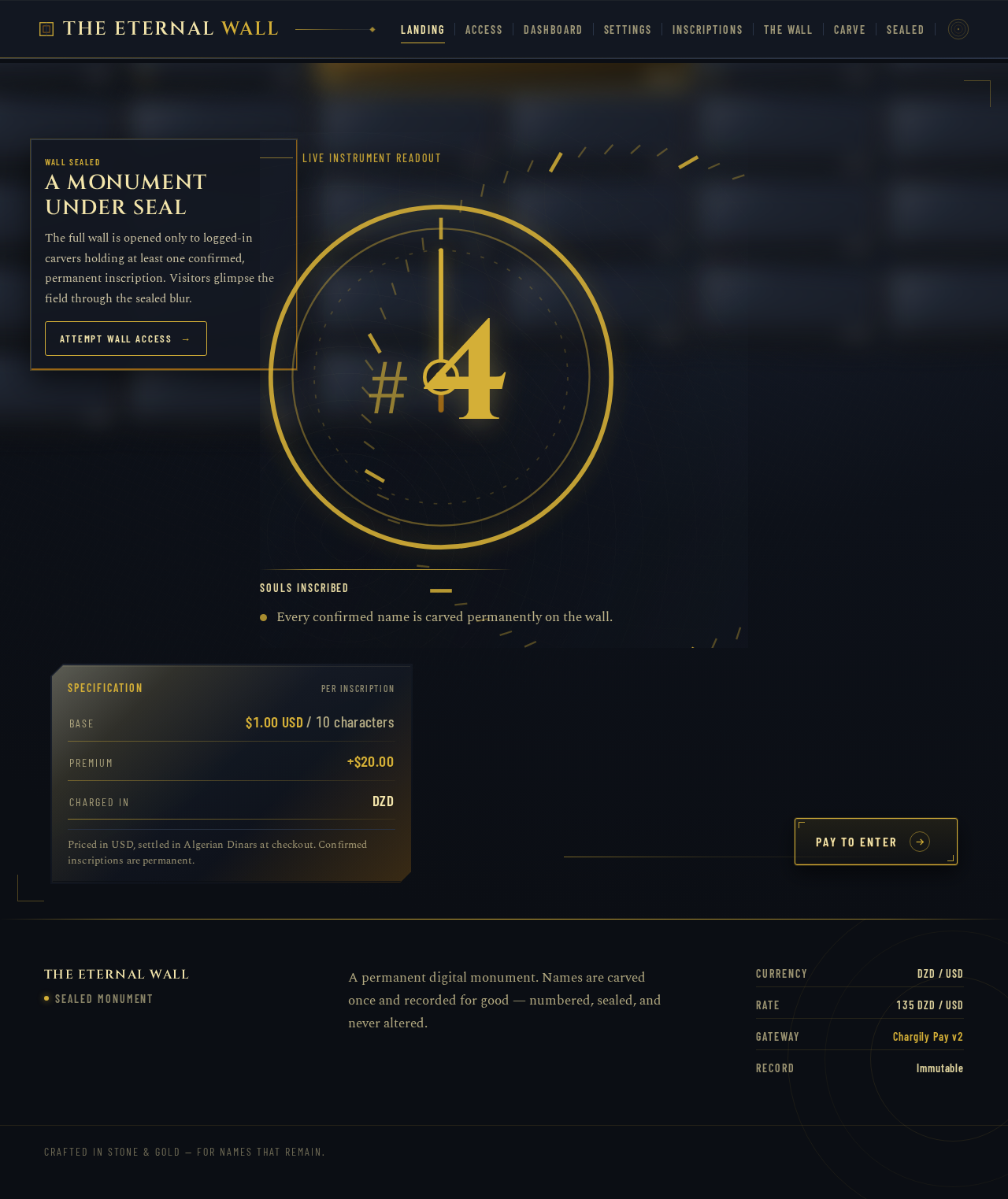
Live instrument readout
Inscriptions on the Eternal Wall
Souls Inscribed
- Base
- $1.00 USD / 10 characters
- Premium
- +$20.00
- Charged in
- DZD
Priced in USD, settled in Algerian Dinars at checkout. Confirmed inscriptions are permanent.
Live instrument readout
Inscriptions on the Eternal Wall
Souls Inscribed
- Base
- $1.00 USD / 10 characters
- Premium
- +$20.00
- Charged in
- DZD
Priced in USD, settled in Algerian Dinars at checkout. Confirmed inscriptions are permanent.
No comments yet. Be the first!