epic-page
build a to-do with single page design and minimalist design

Comments (0)
Sign in to leave a comment
Project Tasks14
Implement Navbar for Home
As a frontend developer, implement the Navbar section for the Home page. Build the `Navbar` component using `useState` for `mobileOpen`, `profileOpen`, `isDark`, and `scrolled` states. Integrate `useScroll` and `useTransform` from framer-motion to drive a `pathLength` animation on three animated SVG elements (a `motion.circle`, a `motion.path` bolt icon, and an accent arc `motion.path`) that draw in as the user scrolls. Implement a scroll listener via `useEffect` that toggles the `nb-scrolled` CSS class at 10px scroll depth. Add click-outside detection via `useRef`/`useEffect` for the profile dropdown (profileRef). Render desktop nav links from the `navLinks` array, a theme toggle button with `Sun`/`Moon` icons from lucide-react, and a profile dropdown with `ChevronDown`, `User`, `Settings`, `LogOut` icons. Implement mobile hamburger menu toggle. Apply `Navbar.css` styles. This component is shared across pages and may already exist from another page — reuse if available.
Build Tasks CRUD API
As a Backend Developer, implement the RESTful API endpoints for task management. Create the following endpoints: GET /api/tasks (list all tasks with filter support for status: all/completed/pending, pagination with page and limit params), POST /api/tasks (create a new task with title, priority, category, date fields), PUT /api/tasks/:id (update task fields including title, status, priority), PATCH /api/tasks/:id/complete (toggle task completion status), DELETE /api/tasks/:id (delete a task). Return standardized JSON responses with task objects containing id, title, status, priority, date, category fields. Include proper error handling and HTTP status codes.
Define Task Database Model
As a Backend Developer, define the Task database model and migration. Create a tasks table with the following fields: id (UUID primary key), title (varchar, required), status (enum: 'pending'/'completed', default 'pending'), priority (enum: 'low'/'medium'/'high', default 'medium'), category (varchar, nullable), due_date (date, nullable), created_at (timestamp), updated_at (timestamp). Write and run the database migration. Create seed data with at least 8 sample tasks matching the pre-seeded items used in the frontend TaskListContainer and TaskActions components.
Setup Global Task State
As a Frontend Developer, set up global state management for the task list. Implement a React Context (or Zustand store) to share task data across components: TaskListContainer, TaskActions, AddTaskSection, and EmptyState. The store should hold: tasks array, filter state ('all'/'completed'/'pending'), currentPage, loading/error states, and async action dispatchers for fetchTasks, addTask, updateTask, toggleComplete, and deleteTask. Wire up API calls to the backend endpoints (GET/POST/PUT/PATCH/DELETE /api/tasks). This global state removes the need for prop drilling and enables the EmptyState to reactively render when the task list is empty. Note: depends on backend task temp_id 'temp_backend_tasks_api'.
Implement HomeHero for Home
As a frontend developer, implement the HomeHero section for the Home page. Build the `HomeHero` component using `@react-three/fiber` Canvas with `OrbitControls` from `@react-three/drei`. Implement the `TaskSphere` sub-component with `useRef`, `useState` for `hovered`, and a `useFrame` animation loop that oscillates sphere Y position using `Math.sin` and lerps scale via `THREE.Vector3`. Each sphere maps to a `TASK_CATEGORIES` entry (12 categories with name, count, color). Implement `meshStandardMaterial` with emissive glow and hover opacity changes, plus cursor pointer toggling. Implement `ConnectionLines` sub-component using `useMemo` to build line geometry connecting nearby spheres with a distance threshold. Wire `useScroll`/`useTransform` from framer-motion for parallax effects on the overlay text. Handle sphere click with `useCallback` that projects 3D point to screen coordinates for tooltip positioning. Integrate `AnimatePresence` for tooltip/modal overlay on sphere click. Apply `HomeHero.css` styles.
Implement ValueProposition for Home
As a frontend developer, implement the ValueProposition section for the Home page. Build the `ValueProposition` component rendering three `MagneticCard` sub-components sourced from the `features` array (Quick Task Creation with `Zap`, Smart Organization with `FolderKanban`, Real-Time Sync with `RefreshCw`). Implement `MagneticCard` with `useMotionValue` for `cardX`, `cardY`, `rotateX`, `rotateY`, and a `handleFrameUpdate` callback that computes magnetic displacement based on mouse distance from card center using a `MAGNETIC_STRENGTH` of 8 and `maxDist` of 500px with eased falloff. Track `expandedId` state in the parent for accordion-style expand/collapse toggling. Render expandable detail panels with `AnimatePresence` showing `detailTitle`, `detailText`, and tag pills. Apply `colorClass` variants (`vp-icon-wrap--create`, `vp-icon-wrap--organize`, `vp-icon-wrap--sync`) per card. Wire global mouse tracking via `useMotionValue` passed down to cards. Apply `ValueProposition.css` styles.
Implement TaskListContainer for Home
As a frontend developer, implement the TaskListContainer section for the Home page. Build the `TaskListContainer` component with `useState` for `tasks` (8 pre-seeded items with id, title, status, priority, date, category), `filter` ('all'/'completed'/'pending'), `editingId`, `editValue`, and `currentPage`. Implement `useInView` from framer-motion on `listRef` with `once: true` and `-60px` margin to trigger staggered list entrance. Implement `containerVariants` with `staggerChildren: 0.08` and `itemVariants` with spring animation (`stiffness: 260`, `damping: 24`, x: -24 → 0). Build `toggleComplete` handler that flips task status between 'completed' and 'pending'. Build `startEdit`/`saveEdit`/`cancelEdit` handlers for inline title editing with a controlled input. Implement client-side pagination with `ITEMS_PER_PAGE = 5` and `ChevronLeft`/`ChevronRight` controls. Render filter tabs using `Check`, `Calendar`, `Tag` icons from lucide-react. Apply `AnimatePresence` for task item enter/exit. Apply `TaskListContainer.css` styles.
Implement AddTaskSection for Home
As a frontend developer, implement the AddTaskSection section for the Home page. Build the `AddTaskSection` component with `useState` for `taskValue`, `isFocused`, `particles`, `submitted`, and `focusOrigin`. Implement `generateParticles()` utility that produces 8 particles distributed at angles around a circle (radius 30–50px) with colors from `['#6366f1','#818cf8','#ec4899','#f59e0b','#a78bfa']`. On input focus (`handleFocus`), increment `particleKeyRef` and generate a fresh particle batch; animate particles outward using `AnimatePresence`. On form submit (`handleSubmit`), set `submitted: true`, show a success state for 1200ms via `setTimeout`, then reset. Render three helper chips (`Zap` Quick capture, `Clock` Auto-scheduled, `Tag` Smart tagging). Render two parallax decorative layers (`ats-deco-bg` at -0.25x scroll, `ats-deco-mid` at -0.45x scroll) with blob and ring divs. Apply `AddTaskSection.css` styles.
Implement TaskActions for Home
As a frontend developer, implement the TaskActions section for the Home page. Build the `TaskActions` component rendering 5 pre-seeded task cards (with id, title, tag, due, priority, completed fields). Implement `RadialMenu` sub-component that renders 3 action buttons (`CheckCircle` complete, `Pencil` edit, `Trash2` delete) positioned radially at angles `[-60, 0, 60]` degrees with `RADIAL_RADIUS = 56px` using `getRadialPosition()` trig helper. Each radial button animates from `scale: 0.3, rotate: -180` to full with spring (`stiffness: 380, damping: 22`) and staggered `delay: i * 0.07`. Implement `hoveredBtn` state within `RadialMenu` to show tooltip labels via `AnimatePresence`. In the parent, track `openMenuId` to show/hide the radial menu per card, and handle `onAction` dispatching for complete/edit/delete operations. Wire `MoreHorizontal` trigger button and `X` close button per card. Apply priority badge color variants and `AlertTriangle` icon. Apply `TaskActions.css` styles.
Implement EmptyState for Home
As a frontend developer, implement the EmptyState section for the Home page. Build the `EmptyState` component with `useState` for `ripples` array. Implement `handleCtaClick` with `useCallback` that captures click coordinates relative to the button, pushes a new ripple object `{ id: Date.now(), x, y }` into state, and removes it after 700ms via `setTimeout`. Render an orbit animation container with a `motion.div` (`es-orbit-ring`) animating `rotate: 360` on infinite linear 12s loop, containing four `es-orbit-dot` divs at cardinal positions. Render a central `motion.div` (`es-center-icon`) pulsing `scale: [1, 1.1, 1]` every 2s with `easeInOut`. Render two parallax decorative layers (`es-deco-bg` at -0.3x scroll, `es-deco-mid` at -0.5x scroll) with blob and ring divs. Render the `ClipboardList` icon (size 48, strokeWidth 1.5), headline 'No tasks yet', subtext, and a CTA button with `AnimatePresence`-driven ripple spans. Apply `EmptyState.css` styles.
Implement QuickFeatures for Home
As a frontend developer, implement the QuickFeatures section for the Home page. Build the `QuickFeatures` component using `useRef` for `carouselRef` and `wrapRef`. Implement `checkScroll` with `useCallback` that reads `scrollLeft`, `scrollWidth`, and `clientWidth` to set `canScrollLeft`/`canScrollRight` boolean states. Wire scroll and resize event listeners in `useEffect`. Implement `scrollBy` handler that reads the first `.qf-card` element's `offsetWidth` plus 24px gap to compute scroll distance, then calls `el.scrollBy()` with smooth behavior for left/right chevron buttons (`ChevronLeft`, `ChevronRight`). Integrate `useScroll` with `container: carouselRef` and `useTransform` mapping `scrollXProgress [0,1]` to `scaleX [0,1]` for a horizontal progress bar indicator. Render 4 feature cards from the `features` array (`Calendar` Due Dates, `Flag` Priority Levels, `Tag` Custom Tags, `Bell` Smart Reminders) each with `iconClass` and `dotClass` color variants. Apply `QuickFeatures.css` styles.
Implement GetStartedCTA for Home
As a frontend developer, implement the GetStartedCTA section for the Home page. Build the `GetStartedCTA` component with `useState` for `primaryHovered`, `secondaryHovered`, and `isVisible`. Use `useRef` on `sectionRef` and `useAnimation` for `gradientControls`. In `useEffect`, create an `IntersectionObserver` with `threshold: 0.2` that sets `isVisible: true` on entry. In a second `useEffect`, call `gradientControls.start()` with `backgroundPosition` keyframes `['0% 50%', '100% 50%', '0% 50%']` on a 4s linear infinite loop to animate the headline gradient. Render an animated gradient `motion.h2` with inline `background: linear-gradient(90deg, #818cf8, #ec4899, #f59e0b, ...)`, `backgroundSize: '200% 100%'`, and `WebkitBackgroundClip: text`. When `isVisible`, wrap headline text in a `motion.span` with `opacity: 0→1, y: 20→0` entrance. Render three parallax decorative layers with orbs, lines, and diamond divs. Render primary and secondary CTA buttons with hover state tracking. Apply `GetStartedCTA.css` styles.
Implement Footer for Home
As a frontend developer, implement the Footer section for the Home page. Build the `Footer` component rendering a `SocialIcon` sub-component for each of 4 social links (`FaGithub`, `FaTwitter`, `FaDiscord`, `FaLinkedin` from react-icons/fa). Implement `SocialIcon` with `useState` for `trails` array and a `handleMouseMove` callback that appends trail particles using a module-level `trailIdCounter`, trims the array to the last 4 entries, and removes each trail after 600ms via `setTimeout`. Render trail particles as `motion.span` elements with `AnimatePresence`, animating from `opacity: 0.9, y: 0, scale: 1` to `opacity: 0, y: 10, scale: 0.3`. Apply `whileHover={{ scale: 1.2, color }}` and `whileTap={{ scale: 0.9 }}` on the anchor with spring `stiffness: 400, damping: 17`. Render `docLinks` (API Reference, Getting Started, Authentication, User Management) and `resourceLinks` (Health Checks, Integration Guide, Deployment, Security) nav columns. Render a slow parallax deco layer at -0.15x scroll. Apply `Footer.css` styles. This component is shared and may already exist from another page — reuse if available.
Integrate Task Management Flow
As a Tech Lead, verify the end-to-end integration between the task management frontend implementation and the Tasks CRUD backend API. Ensure data flows correctly from AddTaskSection (POST), TaskListContainer (GET with pagination and filter), TaskActions (PATCH complete, DELETE), and EmptyState (reactive on empty list). Confirm API responses are handled properly in the UI, loading/error states display correctly, and all CRUD interactions work as expected end-to-end. Note: this task depends on the backend Tasks CRUD API (temp_backend_tasks_api), the global task state setup (temp_global_state), and the existing frontend section tasks for AddTaskSection (38112679), TaskListContainer (560fd7e4), TaskActions (ac527026), and EmptyState (00110879).
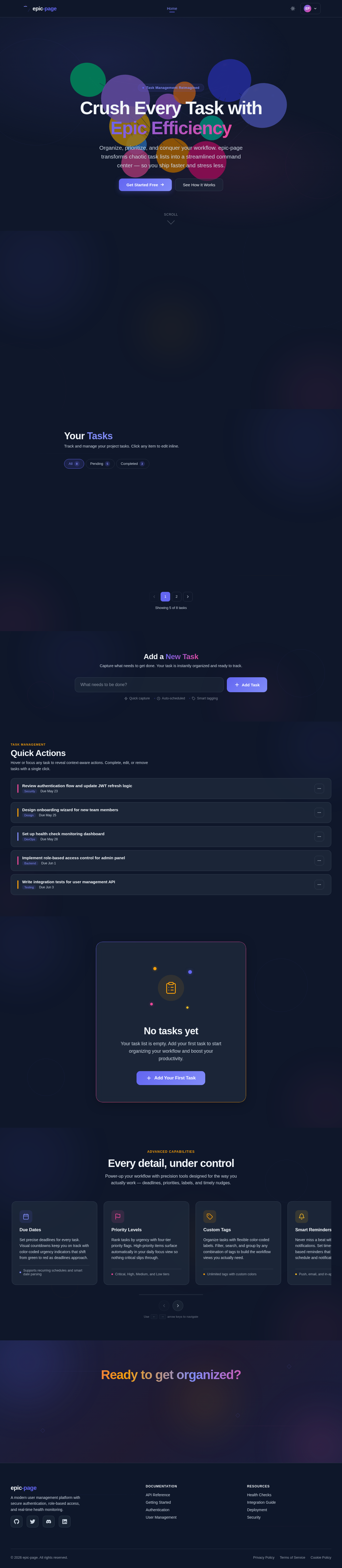
Crush Every Task with Epic Efficiency
Organize, prioritize, and conquer your workflow. epic-page transforms chaotic task lists into a streamlined command center — so you ship faster and stress less.
Everything you need to stay on track
Three core pillars power your productivity — from capturing ideas in an instant to keeping your entire team perfectly synchronized.
Quick Task Creation
Capture ideas instantly with one-click task entry. Keyboard shortcuts and smart defaults mean zero friction between thought and action.
Smart Organization
AI-powered categorization groups related tasks automatically. Drag, nest, and filter your way to a perfectly structured workspace.
Real-Time Sync
Changes propagate instantly across all devices. Collaborate with your team knowing everyone sees the same live state, always.
Your Tasks
Track and manage your project tasks. Click any item to edit inline.
- Set up user authentication flowcompletedHigh
- Design dashboard analytics widgetspendingHigh
- Implement role-based access controlpendingHigh
- Write integration tests for API endpointscompleted
- Configure deployment pipelinepending
Showing 5 of 8 tasks
Add a New Task
Capture what needs to get done. Your task is instantly organized and ready to track.
Quick Actions
Hover or focus any task to reveal context-aware actions. Complete, edit, or remove tasks with a single click.
No tasks yet
Your task list is empty. Add your first task to start organizing your workflow and boost your productivity.
Every detail, under control
Power-up your workflow with precision tools designed for the way you actually work — deadlines, priorities, labels, and timely nudges.
Due Dates
Set precise deadlines for every task. Visual countdowns keep you on track with color-coded urgency indicators that shift from green to red as deadlines approach.
Priority Levels
Rank tasks by urgency with four-tier priority flags. High-priority items surface automatically in your daily focus view so nothing critical slips through.
Custom Tags
Organize tasks with flexible color-coded labels. Filter, search, and group by any combination of tags to build the workflow views you actually need.
Smart Reminders
Never miss a beat with intelligent notifications. Set time-based or location-based reminders that adapt to your schedule and notification preferences.
Ready to get organized?
Join thousands of users who have transformed their workflow with epic-page. Start managing tasks smarter, faster, and with zero friction.
No comments yet. Be the first!