Page 1 of 25
System Requirements Document for epic-complete
1. Introduction
Kingdoms of Valor is a complete, high-quality 3D real-time strategy game combining base building, resource economy, army training, hero development, real-time battles, and online multiplayer competition. Players begin with a small village and grow it into a powerful kingdom, then take that kingdom into battle against smart AI enemies, NPC kingdoms, and other players worldwide.
The product intent is a professional fantasy strategy experience comparable to modern AAA mobile strategy titles: a beautiful fantasy world, a deep economy, massive battles, a multiplayer experience, high-quality graphics, and smooth gameplay across Android, iOS, and Windows.
The audience is strategy players on mobile and PC who expect monumental 3D presentation, dense but readable command interfaces, and competitive online progression. The game is delivered as a first-party application with application-owned player identity, a real-time multiplayer backend, a player database, and cloud save continuity.
Page 2 of 25
2. System Overview
Kingdoms of Valor is a 3D real-time strategy / base building / multiplayer battle game built in Unreal Engine 5 or Unity 6 and shipped on Android, iOS, and Windows. The current delivery includes:
- Kingdom building — a starting village that expands into a powerful kingdom through construction and upgrading of the Town Hall, Gold Mines, Crystal Mines, Resource Storage, Barracks, Defensive Towers, Walls, Magic Buildings, Training Centers, and Research Laboratory, each with 3D models, upgrade animations, construction effects, and distinct levels and appearances.
- Resource economy — Gold, Elixir, Crystal, Energy, and Gems with production, storage management, collection animations, economy balancing, and upgrade costs.
- Army system — Warriors, Archers, Knights, Wizards, Dragons, Giant creatures, Flying units, and Siege machines, each with a 3D model, animation, health, damage, speed, upgrade levels, and special abilities.
- Battle system — real-time 3D battles with troop deployment anywhere, smart AI enemies, pathfinding, defensive weapons, destruction physics, explosive effects, and a victory/defeat system, viewed through an isometric camera with free rotation, zoom, and cinematic effects.
- Defense system — Cannon towers, Archer towers, Magic towers, Fire traps, Air defense, and Walls with defense upgrades, defensive range indicators, attack animations, and damage effects.
- Multiplayer — player accounts, global matchmaking, PvP battles, leaderboards, clans/guilds, clan chat, clan wars, and a friends system, backed by a real-time server, player database, secure authentication, and cloud save.
- Heroes — the Warrior King, Magic Queen, and Dragon Rider with unique skills, an equipment system, level progression, custom skins, and special abilities.
- World map — a large 3D fantasy world with different kingdoms, resource areas, enemy bases, special events, hidden treasures, and boss battles across mountains, forests, rivers, castles, and ancient ruins.
- Progression — player levels, achievements, daily rewards, missions, seasons, battle pass, and unlockable content.
- Presentation — high-quality 3D fantasy visuals with realistic lighting, Unreal Engine 5 Nanite/Lumen support, detailed environments, dynamic shadows, particle effects, and a weather system; fire, smoke, magic, explosion, and destruction effects; and an epic fantasy soundtrack with battle sounds, building sounds, unit voices, and UI effects.
- Artificial intelligence — smart enemy AI, troop decision making, defensive AI, NPC kingdoms, and pathfinding navigation.
Actors. The active human personas are the Kingdom Builder, Army Commander, Base Defender, Hero Handler, World Explorer, Clan Leader, and Competitive Player. Non-persona actors are the real-time multiplayer server, the player database, the matchmaking service, and the AI/NPC systems that operate without human interaction.
Exclusions. No platforms beyond Android, iOS, and Windows are in scope. No game engine other than Unreal Engine 5 or Unity 6 is in scope. No cartoon or chibi unit art, warm village-cute palettes, or generic blue/indigo-on-white interface styling is in scope.
Page 3 of 25
2a. Product Interpretation and Delivery Boundary
Kingdoms of Valor is delivered as a first-party game client on Android, iOS, and Windows, with a first-party real-time backend that owns player accounts, matchmaking, PvP battle state, clans, chat, wars, friends, leaderboards, the player database, and cloud save. Player identity is application-owned: players enroll themselves through Sign Up and return through the Login screen, and secure authentication gates all protected gameplay and durable state. The anonymous Landing page is the public entry that explains the game before access.
The current horizon covers everything listed in the System Overview. Nothing in the authoritative requirements is deferred: kingdom building, resources, army, battles, defense, multiplayer, heroes, world map, UI, graphics, audio, AI, progression, and the full development architecture are all current commitments. The only boundaries are the explicit platform limit (Android, iOS, Windows), the engine choice (Unreal Engine 5 or Unity 6), and the visual exclusions named above.
2b. Source Content Inventory
Not applicable — no reference directive declares content_source.
2c. Page Content and Component Coverage
Page 4 of 25
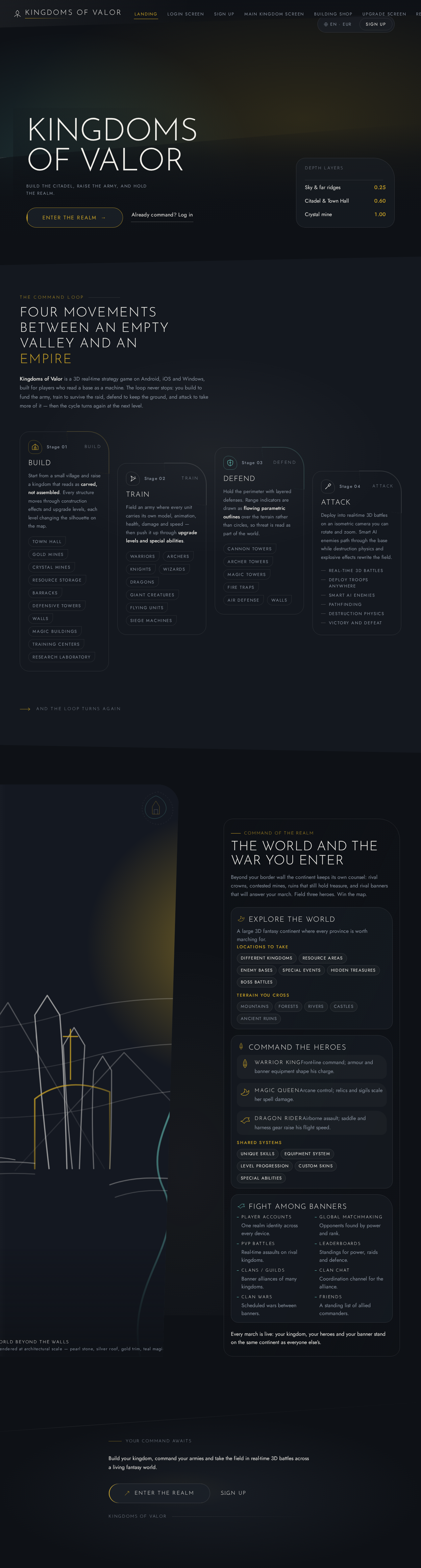
Landing
- Information/state: Anonymous first impression of Kingdoms of Valor — the fantasy strategy premise, the build/train/defend/attack loop, and the intended players. No player state is loaded.
- Primary actions: Enter the realm (proceeds to Login screen); open Sign Up.
- Supporting actions: Language/account cluster in the top-right; secondary pearl text link to Login.
- Domain entities: Game title, tagline, hero citadel imagery, primary call to action.
- Component responsibilities: Full-bleed 3D citadel hero cropped off the right edge; wordmark flush-left on an 8-degree diagonal charcoal scrim; gold-edged capsule CTA; pearl text link; language/account cluster.
- States: Loading (hero scene streaming), empty (not applicable — static entry), success (CTA proceeds to Login), error (hero scene fails to load — static layered fallback with wordmark and CTA still usable), recovery (retry scene load without blocking entry).
Login screen
- Information/state: Returning-player credential entry; secure authentication status; error messaging for invalid credentials.
- Primary actions: Submit credentials to authenticate; proceed to the Main kingdom screen on success.
- Supporting actions: Navigate to Sign Up; recover from failed authentication.
- Domain entities: Player account, credentials, session.
- Component responsibilities: Credential fields, submit control, error region, link to Sign Up.
- States: Loading (authenticating), empty (fields blank), success (session established, route to Main kingdom screen), error (invalid credentials — inline message, fields preserved), recovery (retry submission; option to go to Sign Up).
Sign Up
- Information/state: New-player self-service enrollment; validation of submitted details; account creation status.
- Primary actions: Create a player account; proceed into the game on success.
- Supporting actions: Navigate back to Login screen.
- Domain entities: Player account, credentials, initial village state.
- Component responsibilities: Enrollment fields, validation messages, submit control, link to Login screen.
- States: Loading (creating account), empty (fields blank), success (account created, session established, route to Main kingdom screen with starting village), error (validation or creation failure — inline message, fields preserved), recovery (correct and resubmit; fall back to Login screen).
Page 5 of 25
Main kingdom screen
- Information/state: The player's kingdom — starting village through expanded kingdom — with placed buildings, their levels and appearances, current resource totals, and construction/upgrade activity.
- Primary actions: Select a building to build or upgrade; open the Building shop; open the Upgrade screen; collect produced resources; open the Resource Management, Defense, Army management, Heroes, World Map, Battle preparation, Multiplayer, Progression, and Settings destinations.
- Supporting actions: Pan, rotate, and zoom the kingdom view; inspect building details.
- Domain entities: Kingdom, buildings (Town Hall, Gold Mines, Crystal Mines, Resource Storage, Barracks, Defensive Towers, Walls, Magic Buildings, Training Centers, Research Laboratory), building levels, resource totals.
- Component responsibilities: Full-bleed 3D kingdom scene; curved capsule resource ribbon across the top with five pearl glyphs (Gold, Elixir, Crystal, Energy, Gems) that count up on collection; left vertical icon rail curving into the bottom build/train dock as one continuous C-shaped command surface; building selection and placement controls; upgrade animations and construction effects.
- States: Loading (kingdom scene streaming), empty (new village with only the starting structures), success (building placed or upgraded with animation and effect), error (insufficient resources or invalid placement — inline message, no state change), recovery (adjust placement or gather resources and retry).
Building shop
- Information/state: Catalog of constructible kingdom buildings with costs, requirements, and current affordability.
- Primary actions: Purchase and place a building into the kingdom.
- Supporting actions: Filter/browse the catalog; inspect building details and level appearances.
- Domain entities: Building types, upgrade costs, resource requirements, building levels.
- Component responsibilities: Building catalog cards with asymmetric swoop corner and pearl hairline; cost display in tabular figures; placement confirmation.
- States: Loading (catalog fetch), empty (no buildings currently affordable — costs still shown), success (building purchased and placed with construction effect), error (insufficient resources or unmet requirement — inline message), recovery (earn resources or meet the requirement and retry).
Upgrade screen
- Information/state: Upgrade paths for buildings, units, defenses, and progression items with current level, next level, cost, and effect.
- Primary actions: Apply an upgrade.
- Supporting actions: Compare current and next level; inspect upgrade effects.
- Domain entities: Buildings, units, defenses, upgrade levels, upgrade costs, resource totals.
- Component responsibilities: Upgrade list with level indicators; cost and effect display; apply control; upgrade animation trigger.
- States: Loading (upgrade data fetch), empty (nothing currently upgradeable), success (upgrade applied with animation and updated appearance), error (insufficient resources or prerequisite unmet — inline message), recovery (meet the prerequisite or gather resources and retry).
Page 6 of 25
Resource Management
- Information/state: Production rates, storage capacity, current amounts, and collection status for Gold, Elixir, Crystal, Energy, and Gems.
- Primary actions: Collect produced resources; manage storage.
- Supporting actions: Inspect production and storage per resource; review economy balance and upgrade costs.
- Domain entities: Gold, Elixir, Crystal, Energy, Gems, production buildings, storage buildings, storage capacity.
- Component responsibilities: Per-resource production and storage panels; collection controls with collection animations; capacity indicators.
- States: Loading (resource state fetch), empty (no production accumulated yet), success (resources collected with count-up animation), error (storage full or collection unavailable — inline message), recovery (expand storage or wait for capacity and retry).
Defense
- Information/state: Defensive layout — Cannon towers, Archer towers, Magic towers, Fire traps, Air defense, and Walls — with levels, coverage, and defensive AI configuration.
- Primary actions: Place and upgrade defensive structures; configure defensive AI and defensive weapons.
- Supporting actions: View defensive range indicators; inspect attack animations and damage effects.
- Domain entities: Cannon towers, Archer towers, Magic towers, Fire traps, Air defense, Walls, defensive range, defensive AI settings.
- Component responsibilities: Defensive structure placement and upgrade controls; flowing parametric range outlines with a slow teal light sweep when a tower is selected; defensive AI configuration panel.
- States: Loading (defense layout fetch), empty (no defenses placed), success (defense placed or upgraded with animation), error (insufficient resources or invalid placement — inline message), recovery (adjust placement or gather resources and retry).
Army management
- Information/state: The full army roster — Warriors, Archers, Knights, Wizards, Dragons, Giant creatures, Flying units, and Siege machines — with health, damage, speed, upgrade levels, and special abilities.
- Primary actions: Train units; upgrade units.
- Supporting actions: Inspect unit stats and special abilities; review 3D models and animations.
- Domain entities: Unit types, health, damage, speed, upgrade levels, special abilities, training queues.
- Component responsibilities: Unit roster with stat display in tabular figures; training controls; upgrade controls; unit model and animation preview.
- States: Loading (roster fetch), empty (no units trained yet), success (unit trained or upgraded with animation), error (insufficient resources or training capacity reached — inline message), recovery (gather resources or free capacity and retry).
Page 7 of 25
Heroes
- Information/state: Recruited heroes — Warrior King, Magic Queen, Dragon Rider — with unique skills, equipment, level progression, custom skins, and special abilities.
- Primary actions: Recruit a hero; equip gear; level up a hero; apply a custom skin; deploy a hero.
- Supporting actions: Inspect hero skills and abilities; preview skins.
- Domain entities: Heroes, unique skills, equipment, hero levels, custom skins, special abilities.
- Component responsibilities: Hero roster with crest display; equipment slots; level progression controls; skin selection; deployment control.
- States: Loading (hero data fetch), empty (no heroes recruited), success (hero recruited, equipped, leveled, or skinned with updated appearance), error (insufficient resources or prerequisite unmet — inline message), recovery (meet the prerequisite and retry).
World Map
- Information/state: The large 3D fantasy world with different kingdoms, resource areas, enemy bases, special events, hidden treasures, and boss battles across mountains, forests, rivers, castles, and ancient ruins.
- Primary actions: Select a world location to engage — resource area, enemy base, special event, hidden treasure, or boss battle.
- Supporting actions: Explore the map; inspect location details and rewards.
- Domain entities: Kingdoms, resource areas, enemy bases, special events, hidden treasures, boss battles, NPC kingdoms, terrain features.
- Component responsibilities: Full-bleed 3D world map with slow continuous orbital drift and three-layer terrain parallax; location markers; location detail panel.
- States: Loading (world map streaming), empty (no locations currently available), success (location selected and engagement started), error (location unavailable or requirement unmet — inline message), recovery (select another location or meet the requirement and retry).
Battle preparation
- Information/state: Pre-battle configuration — selected troops, hero selection, target information, and deployment plan.
- Primary actions: Select troops and heroes; confirm and enter the Battlefield.
- Supporting actions: Inspect target defenses; adjust the deployment plan.
- Domain entities: Troop selection, hero selection, target base, deployment plan.
- Component responsibilities: Troop and hero selection controls; target summary; confirm control.
- States: Loading (target and roster fetch), empty (no troops available to deploy), success (configuration confirmed, route to Battlefield), error (invalid configuration — inline message), recovery (adjust selection and retry).
Page 8 of 25
Battlefield
- Information/state: Real-time 3D battle state — deployed troops, enemy defenses, health and damage resolution, and victory/defeat status.
- Primary actions: Deploy troops anywhere on the battlefield; command troops; pursue victory.
- Supporting actions: Control the isometric camera with free rotation and zoom; observe cinematic effects, destruction physics, and explosive effects.
- Domain entities: Deployed troops, enemy defenses, defensive weapons, health, damage, battle outcome.
- Component responsibilities: Real-time 3D battle scene; troop deployment controls; isometric camera with free rotation and zoom; cinematic effect triggers; victory/defeat presentation.
- States: Loading (battle scene and opponent state), empty (no troops deployed yet), success (victory — rewards and return), error (defeat — outcome presentation), recovery (return to Battle preparation or Main kingdom screen to rebuild and retry).
Multiplayer
- Information/state: Online state — matchmaking status, PvP opponents, leaderboards, clan membership, clan chat, clan wars, and friends.
- Primary actions: Enter global matchmaking; start a PvP battle; create or join a clan; send clan chat messages; organize and participate in clan wars; add and manage friends.
- Supporting actions: Browse leaderboards; inspect clan standing; review match history.
- Domain entities: Player accounts, matchmaking queue, PvP matches, leaderboards, clans/guilds, clan chat messages, clan wars, friends.
- Component responsibilities: Matchmaking control; leaderboard display; clan management panel; chat panel; clan war coordination panel; friends list.
- States: Loading (matchmaking or clan data fetch), empty (no clan joined, no friends added, no matches yet), success (match found, clan joined, message sent, war organized), error (matchmaking failure or clan action rejected — inline message), recovery (retry matchmaking or correct the clan action).
Progression
- Information/state: Player level, achievements, daily reward availability, missions, current season, battle pass tier, and unlockable content.
- Primary actions: Claim daily rewards; complete and claim missions; advance the battle pass; unlock content.
- Supporting actions: Review achievements; inspect season status and battle pass tiers.
- Domain entities: Player levels, achievements, daily rewards, missions, seasons, battle pass, unlockable content.
- Component responsibilities: Level and progress display; achievement list; daily reward claim control; mission list; season and battle pass panel; unlock display.
- States: Loading (progression data fetch), empty (no missions or rewards currently available), success (reward claimed or tier advanced with count-up animation), error (claim unavailable — inline message), recovery (meet the condition and retry).
Page 9 of 25
Settings
- Information/state: Game options — audio, graphics, controls, and account preferences.
- Primary actions: Change and save settings.
- Supporting actions: Reset to defaults; review account information.
- Domain entities: Audio settings, graphics settings, control settings, account preferences.
- Component responsibilities: Settings groups; toggle and slider controls; save control.
- States: Loading (settings fetch), empty (not applicable — defaults shown), success (settings saved), error (save failure — inline message), recovery (retry save).
Page 10 of 25
3. Functional Requirements
FR-1 — Kingdom building and expansion (explicit)
As a Kingdom Builder, I should start with a small village and expand it into a powerful kingdom by constructing and upgrading the Town Hall, Gold Mines, Crystal Mines, Resource Storage, Barracks, Defensive Towers, Walls, Magic Buildings, Training Centers, and Research Laboratory, so that my kingdom grows in capability and appearance.
- Trigger/input: Player selects a building to construct or upgrade from the Main kingdom screen, Building shop, or Upgrade screen.
- Observable result: The building is placed or upgraded, with its 3D model, upgrade animation, construction effects, and new level appearance applied.
- Access state: Requires an authenticated session.
- Failure/recovery: Insufficient resources or an unmet prerequisite shows an inline message with no state change; the player gathers resources or meets the prerequisite and retries.
- Continuation: The player continues building, collecting resources, or preparing for battle.
FR-2 — Resource production and management (explicit)
As a Kingdom Builder, I should produce, store, and collect Gold, Elixir, Crystal, Energy, and Gems, so that I can fund construction, upgrades, and army development.
- Trigger/input: Player opens Resource Management or collects from production buildings on the Main kingdom screen.
- Observable result: Resource totals increase with collection animations; storage capacity and production rates are visible; economy balance and upgrade costs are reflected.
- Access state: Requires an authenticated session.
- Failure/recovery: Storage full or collection unavailable shows an inline message; the player expands storage or waits for capacity and retries.
- Continuation: The player spends resources on upgrades, training, or construction.
FR-3 — Army training and upgrading (explicit)
As an Army Commander, I should train and upgrade Warriors, Archers, Knights, Wizards, Dragons, Giant creatures, Flying units, and Siege machines, so that I can field a stronger force.
- Trigger/input: Player selects a unit in Army management and issues a train or upgrade command.
- Observable result: The unit is trained or upgraded, with its 3D model, animation, health, damage, speed, upgrade level, and special abilities reflected.
- Access state: Requires an authenticated session.
- Failure/recovery: Insufficient resources or training capacity reached shows an inline message; the player gathers resources or frees capacity and retries.
- Continuation: The player prepares a battle with the updated roster.
FR-4 — Real-time 3D battle (explicit)
As an Army Commander, I should fight real-time 3D battles where I deploy troops anywhere, face smart AI enemies and defensive weapons, and rely on pathfinding, destruction physics, and explosive effects to reach victory or defeat.
- Trigger/input: Player confirms a battle from Battle preparation and enters the Battlefield.
- Observable result: Troops deploy anywhere on the battlefield, engage enemy defenses and AI enemies with pathfinding and destruction physics, and the battle resolves into a victory or defeat outcome.
- Access state: Requires an authenticated session.
- Failure/recovery: A defeat presents the outcome and returns the player to Battle preparation or the Main kingdom screen to rebuild and retry.
- Continuation: The player returns to kingdom management, army training, or matchmaking.
FR-5 — Battle camera control (explicit)
As an Army Commander, I should control the battle camera with an isometric view, free rotation, zoom in/out, and cinematic effects, so that I can read and direct the battle.
- Trigger/input: Player uses camera controls during a battle on the Battlefield.
- Observable result: The camera rotates freely, zooms in and out, and presents cinematic effects.
- Access state: Requires an authenticated session.
- Failure/recovery: Camera input is always available during battle; no failure state applies.
- Continuation: The player continues commanding troops.
FR-6 — Defense construction and configuration (explicit)
As a Base Defender, I should build and upgrade Cannon towers, Archer towers, Magic towers, Fire traps, Air defense, and Walls, and configure defensive AI and defensive weapons, so that my base repels enemy attacks.
- Trigger/input: Player places or upgrades a defensive structure and configures defensive AI on the Defense page.
- Observable result: The defense is placed or upgraded with attack animations and damage effects; defensive range indicators show coverage; defensive AI settings are applied.
- Access state: Requires an authenticated session.
- Failure/recovery: Insufficient resources or invalid placement shows an inline message; the player adjusts placement or gathers resources and retries.
- Continuation: The player returns to kingdom management or awaits an incoming attack.
FR-7 — Player accounts and secure authentication (explicit)
As a Competitive Player, I should have a player account with secure authentication, so that my progress and identity are protected.
- Trigger/input: Player enrolls through Sign Up or returns through the Login screen.
- Observable result: A secure session is established and the player reaches the Main kingdom screen.
- Access state: Anonymous entry on Landing, Login screen, and Sign Up; all protected gameplay requires the established session.
- Failure/recovery: Invalid credentials or enrollment failure shows an inline message with fields preserved; the player corrects and resubmits or switches between Login screen and Sign Up.
- Continuation: The player proceeds into the game.
FR-8 — Cloud save and player database continuity (required_inference)
As a Competitive Player, I should have my progress stored in the player database and restored through cloud save, so that I can resume my kingdom on any supported device.
- Trigger/input: Player authenticates on a supported platform.
- Observable result: The player's kingdom, resources, army, heroes, and progression are restored to their saved state.
- Access state: Requires an authenticated session.
- Failure/recovery: A restore failure shows an inline message; the player retries authentication.
- Continuation: The player resumes kingdom management.
FR-9 — Global matchmaking and PvP battles (explicit)
As a Competitive Player, I should use global matchmaking to find opponents and fight PvP battles, so that I can compete against other players.
- Trigger/input: Player enters matchmaking from the Multiplayer page.
- Observable result: A match is found and a PvP battle begins; the result is recorded.
- Access state: Requires an authenticated session.
- Failure/recovery: A matchmaking failure shows an inline message; the player retries matchmaking.
- Continuation: The player reviews the result and continues competing or returns to kingdom management.
FR-10 — Leaderboards (explicit)
As a Competitive Player, I should track my standing on leaderboards, so that I can measure my competitive progress.
- Trigger/input: Player opens leaderboards from the Multiplayer page.
- Observable result: Rankings are displayed with the player's position.
- Access state: Requires an authenticated session.
- Failure/recovery: A leaderboard fetch failure shows an inline message; the player retries.
- Continuation: The player continues competing or returns to other destinations.
FR-11 — Clans, clan chat, and clan wars (explicit)
As a Clan Leader, I should create and manage a clan or guild, coordinate clan chat, and organize clan wars, so that my clan competes effectively.
- Trigger/input: Player creates or joins a clan and uses clan management, chat, and war coordination controls on the Multiplayer page.
- Observable result: The clan is created or joined, chat messages are exchanged, and clan wars are organized and tracked.
- Access state: Requires an authenticated session.
- Failure/recovery: A rejected clan action shows an inline message; the player corrects the action and retries.
- Continuation: The clan leader tracks clan standing on leaderboards and continues coordinating.
FR-12 — Friends system (explicit)
As a Clan Leader, I should add and manage friends, so that I can coordinate with other players.
- Trigger/input: Player adds or manages a friend from the Multiplayer page.
- Observable result: The friend appears in the friends list and can be interacted with.
- Access state: Requires an authenticated session.
- Failure/recovery: A friend action failure shows an inline message; the player retries.
- Continuation: The player coordinates with friends in clan or competitive activity.
FR-13 — Hero recruitment and development (explicit)
As a Hero Handler, I should recruit and develop heroes such as the Warrior King, Magic Queen, and Dragon Rider, managing unique skills, equipment, level progression, custom skins, and special abilities, so that my heroes give me an advantage.
- Trigger/input: Player recruits, equips, levels, or applies a skin to a hero on the Heroes page.
- Observable result: The hero is recruited, equipped, leveled, or skinned with updated appearance and abilities.
- Access state: Requires an authenticated session.
- Failure/recovery: Insufficient resources or an unmet prerequisite shows an inline message; the player meets the prerequisite and retries.
- Continuation: The player deploys the hero in battle or on the world map.
FR-14 — Hero deployment (explicit)
As a Hero Handler, I should deploy heroes in battles and on the world map, so that they contribute to my success.
- Trigger/input: Player selects a hero during Battle preparation or a world map engagement.
- Observable result: The hero participates with its unique skills and special abilities.
- Access state: Requires an authenticated session.
- Failure/recovery: An invalid hero selection shows an inline message; the player adjusts the selection and retries.
- Continuation: The player continues the battle or world map engagement.
FR-15 — World map exploration (explicit)
As a World Explorer, I should explore a large 3D fantasy world containing different kingdoms, resource areas, enemy bases, special events, hidden treasures, and boss battles across mountains, forests, rivers, castles, and ancient ruins, so that I can gather resources and rewards.
- Trigger/input: Player selects a world location on the World Map.
- Observable result: The location is engaged and its rewards are claimed.
- Access state: Requires an authenticated session.
- Failure/recovery: An unavailable location or unmet requirement shows an inline message; the player selects another location or meets the requirement and retries.
- Continuation: The player continues exploring or returns to kingdom management.
FR-16 — NPC kingdom engagement (explicit)
As a World Explorer, I should engage NPC kingdoms and enemy bases, so that I can gather resources and rewards.
- Trigger/input: Player selects an NPC kingdom or enemy base on the World Map.
- Observable result: The engagement resolves and rewards are granted.
- Access state: Requires an authenticated session.
- Failure/recovery: A failed engagement shows the outcome; the player rebuilds and retries.
- Continuation: The player continues exploring or returns to kingdom management.
FR-17 — Player progression (explicit)
As a Competitive Player, I should progress through player levels, achievements, daily rewards, missions, seasons, battle pass, and unlockable content, so that I have long-term goals.
- Trigger/input: Player claims rewards, completes missions, or advances the battle pass on the Progression page.
- Observable result: Player level, achievements, rewards, missions, season status, battle pass tier, and unlocks update.
- Access state: Requires an authenticated session.
- Failure/recovery: An unavailable claim shows an inline message; the player meets the condition and retries.
- Continuation: The player continues progressing or returns to other destinations.
FR-18 — Smart AI and pathfinding (explicit)
As an Army Commander, I should face smart enemy AI with troop decision making, defensive AI, NPC kingdoms, and pathfinding navigation, so that battles and world engagements are challenging.
- Trigger/input: A battle or world engagement begins.
- Observable result: Enemy AI makes troop decisions, defenses act with defensive AI, NPC kingdoms behave autonomously, and units navigate with pathfinding.
- Access state: Requires an authenticated session.
- Failure/recovery: AI and pathfinding operate continuously during engagements; no player-facing failure state applies.
- Continuation: The engagement resolves into victory or defeat.
FR-19 — Fantasy medieval UI (explicit)
As a player, I should use a professional modern UI with a fantasy medieval theme, high-quality icons, smooth animations, and mobile-friendly controls across the Login screen, Main kingdom screen, Army management, Building shop, Upgrade screen, Battle preparation, Clan interface, and Settings, so that the game is readable and controllable on my device.
- Trigger/input: Player navigates any destination.
- Observable result: Screens present the fantasy medieval theme with high-quality icons, smooth animations, and mobile-friendly controls.
- Access state: Anonymous destinations are reachable without a session; protected destinations require one.
- Failure/recovery: A rendering or navigation failure shows an inline message; the player retries.
- Continuation: The player continues navigating.
FR-20 — High-quality 3D graphics (explicit)
As a player, I should see high-quality 3D fantasy visuals with realistic lighting, Unreal Engine 5 Nanite/Lumen support, detailed environments, dynamic shadows, particle effects, and a weather system, so that the world feels monumental.
- Trigger/input: Player views any 3D scene.
- Observable result: Scenes render with the specified visual quality and effects.
- Access state: Requires an authenticated session for gameplay scenes; the Landing hero is anonymous.
- Failure/recovery: A scene load failure falls back to a static layered arrangement; the player retries.
- Continuation: The player continues playing.
FR-21 — Visual effects (explicit)
As a player, I should see fire, smoke, magic effects, explosions, and destruction, so that battles and construction feel impactful.
- Trigger/input: A battle, construction, or magic event occurs.
- Observable result: The corresponding effects play.
- Access state: Requires an authenticated session.
- Failure/recovery: Effect failures degrade gracefully without blocking gameplay.
- Continuation: The player continues playing.
FR-22 — Audio (explicit)
As a player, I should hear an epic fantasy soundtrack, battle sounds, building sounds, unit voices, and UI effects, so that the game feels complete.
- Trigger/input: The player enters the game, battles, builds, or interacts with the UI.
- Observable result: The corresponding audio plays.
- Access state: Requires an authenticated session for gameplay audio; the Landing page may play ambient audio.
- Failure/recovery: Audio failures degrade gracefully; the player can adjust audio in Settings.
- Continuation: The player continues playing.
FR-23 — Settings configuration (explicit)
As a player, I should configure game options in Settings, so that the game matches my preferences.
- Trigger/input: Player changes a setting on the Settings page.
- Observable result: The setting is saved and applied.
- Access state: Requires an authenticated session.
- Failure/recovery: A save failure shows an inline message; the player retries.
- Continuation: The player returns to gameplay.
FR-24 — Self-service enrollment (required_inference)
As a new player, I should create my own account through Sign Up, so that I can begin playing without an invitation.
- Trigger/input: Player opens Sign Up from Landing or the Login screen and submits enrollment details.
- Observable result: A player account is created and a session is established.
- Access state: Anonymous.
- Failure/recovery: Validation or creation failure shows an inline message with fields preserved; the player corrects and resubmits.
- Continuation: The player enters the Main kingdom screen with a starting village.
FR-25 — Returning authentication (required_inference)
As a returning player, I should authenticate through the Login screen, so that I can resume my kingdom.
- Trigger/input: Player submits credentials on the Login screen.
- Observable result: A secure session is established and saved state is restored.
- Access state: Anonymous.
- Failure/recovery: Invalid credentials show an inline message with fields preserved; the player retries or goes to Sign Up.
- Continuation: The player resumes kingdom management.
FR-26 — Backend multiplayer services (required_inference)
As a Competitive Player, I should rely on backend services for matchmaking, PvP, clans, chat, wars, friends, leaderboards, and shared battle state, so that online play is consistent.
- Trigger/input: The player enters matchmaking, clan, chat, war, friend, or leaderboard activity.
- Observable result: The real-time server and player database maintain consistent shared state.
- Access state: Requires an authenticated session.
- Failure/recovery: A service failure shows an inline message; the player retries.
- Continuation: The player continues online activity.
Page 11 of 25
4. User Personas
Kingdom Builder
The Kingdom Builder owns the growth of the kingdom itself. Starting from a small village, this player constructs and upgrades the Town Hall, Gold Mines, Crystal Mines, Resource Storage, Barracks, Defensive Towers, Walls, Magic Buildings, Training Centers, and Research Laboratory, and watches each structure gain levels and new appearances with upgrade animations and construction effects. Their distinct work is economic and spatial: they decide what to build next, where to place it, and how to balance Gold, Elixir, Crystal, Energy, and Gems across production, storage, collection, and upgrade costs. They interact with the Army Commander and Base Defender by providing the Barracks, Training Centers, and Defensive Towers those roles depend on. Success is a developed, defended kingdom whose economy sustains further expansion.
Army Commander
The Army Commander owns the fighting force. This player trains and upgrades Warriors, Archers, Knights, Wizards, Dragons, Giant creatures, Flying units, and Siege machines, tracking each unit's health, damage, speed, upgrade levels, and special abilities. Their distinct work is force composition and real-time command: they select troops in Battle preparation, deploy them anywhere on the Battlefield, and use the isometric camera with free rotation and zoom to read the fight while pathfinding, destruction physics, and explosive effects play out. They interact with the Hero Handler to bring heroes into battle and with the Base Defender whose structures they must overcome or protect. Success is victory over enemy kingdoms.
Page 12 of 25
Base Defender
The Base Defender owns protection of the kingdom. This player builds and upgrades Cannon towers, Archer towers, Magic towers, Fire traps, Air defense, and Walls, configures defensive AI and defensive weapons, and reads defensive range indicators to shape coverage. Their distinct work is defensive layout and configuration: they decide which structures guard which approaches, how defenses upgrade, and how defensive AI responds. They interact with the Kingdom Builder for placement space and resources and with the Army Commander whose troops may attack similar layouts. Success is a kingdom that survives incoming attacks.
Hero Handler
The Hero Handler owns hero power. This player recruits and develops the Warrior King, Magic Queen, and Dragon Rider, managing unique skills, equipment, level progression, custom skins, and special abilities. Their distinct work is investment in a small number of high-impact characters: choosing which hero to develop, what equipment to apply, and which skin to display, then deploying heroes in battles and on the world map. They interact with the Army Commander during Battle preparation and with the World Explorer during world engagements. Success is heroes at higher progression, equipped and effective in combat.
Page 13 of 25
World Explorer
The World Explorer owns engagement with the world beyond the kingdom. This player explores the large 3D fantasy world map, finding different kingdoms, resource areas, enemy bases, special events, hidden treasures, and boss battles across mountains, forests, rivers, castles, and ancient ruins. Their distinct work is discovery and risk selection: choosing which location to engage, when to attempt a boss battle, and how to claim treasures and event rewards. They interact with the Army Commander and Hero Handler to bring forces into world engagements and with NPC kingdoms as opponents. Success is cleared world content and claimed rewards.
Clan Leader
The Clan Leader owns collective play. This player creates and manages a clan or guild, coordinates clan chat, organizes clan wars, and maintains a friends system with other players. Their distinct work is social organization: recruiting members, directing war participation, and tracking clan standing on leaderboards. They interact with the Competitive Player as clan members and opponents and with the backend services that carry chat and war state. Success is a clan that competes effectively in clan wars and rises on the leaderboards.
Competitive Player
The Competitive Player owns ranked ambition. This player uses player accounts, global matchmaking, and PvP battles to compete against other players, tracking results on leaderboards and progressing through player levels, achievements, daily rewards, missions, seasons, battle pass, and unlockable content. Their distinct work is competitive optimization: choosing when to queue, how to prepare for a match, and how to advance seasonal progression. They interact with the Clan Leader through clan membership and with the Army Commander and Hero Handler for battle readiness. Success is climbing the leaderboards and completing seasonal progression.
Page 14 of 25
5. Core User Flows
Flow 1 — New player enrollment and first kingdom (Kingdom Builder)
- The player opens the Landing page anonymously and reads the Kingdoms of Valor premise, with the citadel hero and wordmark presented on the diagonal scrim.
- The player selects the gold-edged "Enter the Realm" capsule and arrives at the Login screen.
- The player chooses Sign Up and submits enrollment details.
- The system creates the player account, establishes a secure session, and routes the player to the Main kingdom screen with a starting village.
- The player sees the starting village with the curved resource ribbon across the top and the C-shaped command surface at the left and bottom.
- The player opens the Building shop, selects a building, and places it; the building appears with its construction effect.
- The player opens Resource Management, collects produced Gold, Elixir, Crystal, Energy, and Gems with count-up animations, and returns to the Main kingdom screen.
- Failure/recovery: If enrollment validation fails, an inline message appears with fields preserved; the player corrects the details and resubmits, or returns to the Login screen.
- Continuation: The player continues building and collecting, or opens the Upgrade screen to raise a building's level.
Flow 2 — Returning player resume (Competitive Player)
- The player opens the Landing page and selects the pearl text link to the Login screen.
- The player submits credentials.
- The system authenticates the player and restores saved state from the player database through cloud save.
- The player arrives at the Main kingdom screen with their kingdom, resources, army, heroes, and progression restored.
- Failure/recovery: If credentials are invalid, an inline message appears with fields preserved; the player retries or goes to Sign Up.
- Continuation: The player resumes kingdom management or opens another destination.
Page 15 of 25
Flow 3 — Kingdom expansion and economy (Kingdom Builder)
- From the Main kingdom screen, the player opens the Building shop and reviews building costs and requirements.
- The player purchases a building and places it in the kingdom; the construction effect plays.
- The player opens the Upgrade screen, selects a building, and applies an upgrade; the upgrade animation plays and the building's level and appearance change.
- The player opens Resource Management and reviews production rates, storage capacity, and current amounts for Gold, Elixir, Crystal, Energy, and Gems.
- The player collects produced resources with collection animations and manages storage.
- Failure/recovery: If resources are insufficient or a prerequisite is unmet, an inline message appears with no state change; the player gathers resources or meets the prerequisite and retries.
- Continuation: The player continues expanding the kingdom or moves to army, defense, or hero development.
Flow 4 — Army training (Army Commander)
- The player opens Army management from the Main kingdom screen.
- The player reviews the roster — Warriors, Archers, Knights, Wizards, Dragons, Giant creatures, Flying units, and Siege machines — with health, damage, speed, upgrade levels, and special abilities.
- The player trains a unit; the unit is added to the roster with its 3D model and animation.
- The player upgrades a unit; its upgrade level and stats increase.
- Failure/recovery: If resources are insufficient or training capacity is reached, an inline message appears; the player gathers resources or frees capacity and retries.
- Continuation: The player opens Battle preparation to deploy the updated roster.
Flow 5 — Defense setup (Base Defender)
- The player opens Defense from the Main kingdom screen.
- The player places Cannon towers, Archer towers, Magic towers, Fire traps, Air defense, and Walls, and upgrades existing defenses.
- The player selects a tower and sees its defensive range indicator drawn as a flowing parametric outline with a slow teal light sweep.
- The player configures defensive AI and defensive weapons.
- Failure/recovery: If resources are insufficient or placement is invalid, an inline message appears; the player adjusts placement or gathers resources and retries.
- Continuation: The player returns to the Main kingdom screen; when an enemy attack arrives, the configured defenses act with attack animations and damage effects.
Page 16 of 25
Flow 6 — Hero development (Hero Handler)
- The player opens Heroes from the Main kingdom screen.
- The player recruits a hero — Warrior King, Magic Queen, or Dragon Rider — and reviews its unique skills and special abilities.
- The player equips gear, levels the hero, and applies a custom skin; the hero's appearance and abilities update.
- Failure/recovery: If resources are insufficient or a prerequisite is unmet, an inline message appears; the player meets the prerequisite and retries.
- Continuation: The player deploys the hero in Battle preparation or on the World Map.
Flow 7 — World map exploration (World Explorer)
- The player opens the World Map and sees the large 3D fantasy world with its slow orbital drift and three-layer terrain parallax across mountains, forests, rivers, castles, and ancient ruins.
- The player selects a location — a different kingdom, resource area, enemy base, special event, hidden treasure, or boss battle.
- The player engages the location, bringing troops and heroes; NPC kingdoms and enemy bases respond with their own AI behavior.
- The engagement resolves and rewards are granted.
- Failure/recovery: If the location is unavailable or a requirement is unmet, an inline message appears; the player selects another location or meets the requirement and retries. If the engagement fails, the player rebuilds and retries.
- Continuation: The player continues exploring or returns to the Main kingdom screen.
Flow 8 — Battle preparation and real-time battle (Army Commander)
- The player opens Battle preparation and selects troops and heroes for the engagement.
- The player reviews the target's defenses and confirms the deployment plan.
- The player enters the Battlefield and deploys troops anywhere on the terrain.
- The player commands troops in real time while smart AI enemies, defensive weapons, pathfinding, destruction physics, and explosive effects play out.
- The player controls the isometric camera with free rotation and zoom and observes cinematic effects.
- The battle resolves into victory or defeat.
- Failure/recovery: On defeat, the outcome is presented and the player returns to Battle preparation or the Main kingdom screen to rebuild and retry.
- Continuation: On victory, the player returns to kingdom management, army training, or matchmaking.
Page 17 of 25
Flow 9 — Global matchmaking and PvP (Competitive Player)
- The player opens Multiplayer and enters global matchmaking.
- The system finds an opponent through the real-time server and player database.
- The player proceeds through Battle preparation into a PvP battle on the Battlefield.
- The battle resolves and the result is recorded.
- The player checks leaderboards to see their updated standing.
- Failure/recovery: If matchmaking fails, an inline message appears; the player retries matchmaking.
- Continuation: The player queues again or returns to other destinations.
Flow 10 — Clan creation, chat, and clan wars (Clan Leader)
- The player opens Multiplayer and creates a clan or guild.
- The player manages membership and coordinates through clan chat.
- The player organizes members for a clan war and tracks clan standing on leaderboards.
- The player adds and manages friends through the friends system.
- Failure/recovery: If a clan action is rejected, an inline message appears; the player corrects the action and retries.
- Continuation: The clan leader continues coordinating wars and tracking standing.
Flow 11 — Progression and seasonal advancement (Competitive Player)
- The player opens Progression and reviews player level, achievements, daily rewards, missions, the current season, battle pass tier, and unlockable content.
- The player claims daily rewards and completes missions.
- The player advances the battle pass and unlocks content.
- Failure/recovery: If a claim is unavailable, an inline message appears; the player meets the condition and retries.
- Continuation: The player returns to competitive play or kingdom management.
Page 18 of 25
Flow 12 — Settings adjustment (any player)
- The player opens Settings from the Main kingdom screen.
- The player changes audio, graphics, control, or account preferences.
- The system saves and applies the settings.
- Failure/recovery: If saving fails, an inline message appears; the player retries.
- Continuation: The player returns to gameplay.
Page 19 of 25
6. Visuals Colors and Theme
Muse and headline. The visual language is Fluid parametric grandeur for a fantasy war engine, drawn from Zaha Hadid: motion frozen in form, sweeping continuous surfaces, diagonal flow lines, and pearl/silver/gold luminosity. The register is command, scale, and inevitability — a kingdom carved by forces bigger than the player — while the chrome stays dense, thumb-reachable, and readable at 375px.
Color tokens (dark mode):
| Role | Hex | Use |
|---|
| Background | #0E1116 | World ground and page ground; battlefield and UI share one darkness |
| Surface | #1A1F27 | Panel and plate color |
| Text | #F2F0EB | All readable type (pearl) |
| Primary | #C9A227 | Single hot accent: resources, primary CTA, Town Hall rank, hero crest (~5% of any screen) |
| Accent | #6FD3C7 | Magic/energy systems and opposing-side indicator (teal) |
| Muted | #8A93A0 | Secondary labels, timers, disabled states |
Ratio approximately 70% charcoal, 20% surface, 7% pearl, 3% gold and teal combined. No gradients except a single pearl-to-transparent scrim behind hero text for contrast. Separation comes from a 1px pearl hairline (#F2F0EB at 12% opacity) instead of a border, and one soft radial glow at 4% opacity beneath floating elements instead of drop shadows.
Typography. Headings: Josefin Sans, weights 200–300, uppercase, wide tracking (0.14em) for labels and rank names; true display moments use 300 weight at enormous size with tight tracking (-0.02em). Never bold — weight comes from scale and color. Numbers (resources, power score, timers) use Jost 500 with tabular figures. Body: Jost. Scale is a 1.333 modular progression: 72 / 54 / 40 / 30 / 22 / 16 / 13. Display uses clamp(40px, 9vw, 96px) for the login and world-map titles; section headings clamp(24px, 4.5vw, 40px); panel titles 22px; body 16px; HUD micro-labels 13px uppercase with 0.14em tracking. Mobile minimum readable body is 16px, never smaller.
Shape language. Sweeping continuous curves with no visible corner: panels use border-radius: 28px with a single asymmetric swoop corner (border-top-right-radius: 64px). Section boundaries are diagonal bands (clip-path polygons with 6–10 degree slopes) rather than horizontal rules. Buttons are full capsules; the primary CTA is an elongated capsule with a gold edge-light on the leading side only. Range indicators, wall segments, and building footprints are drawn as flowing parametric outlines, never rectangles. No hard 90-degree corners, no visible rectangular cards with drop shadows, no horizontal divider rules.
Layout. Asymmetric diagonal composition on a 12-column grid that is visibly skewed: content columns offset vertically by 48–96px so no two adjacent panels share a baseline. The Main kingdom screen is a full-bleed 3D scene with the HUD pushed to the edges — resource bar as a curved capsule ribbon across the top, build/train dock as a single bottom capsule, and a vertical icon rail on the left that curves inward at the bottom. Sections alternate between full-bleed world imagery and narrow, generously-margined editorial text columns (max 62ch). At 375px the layout collapses to one column with a single thumb-zone bottom dock and 16px side margins; 768px introduces the two-column offset; 1280px unlocks the full asymmetric 12-column arrangement with a persistent right-hand hero/clan rail.
Imagery. Architectural-scale 3D fantasy renders: fortresses whose curtain walls flow like poured stone, towers that lean and taper, bridges that spiral across ravines. Terrain is real-time (Unreal 5 Lumen/Nanite) — mountains, forests, rivers, ancient ruins — shot with long lens compression so structures feel monumental. Render palette is the UI palette: pearl stone, silver roofs, charcoal shadow, gold trim, teal magic. No cartoon characters, no clip art, no stock photography. UI iconography is thin pearl line-work on charcoal, drawn as continuous single-stroke glyphs (a sword, a dragon wing, a crystal).
Explicitly avoided. Blue or indigo primary buttons on white or near-white grounds; Inter, Roboto, Arial, Helvetica, Open Sans, Lato, Poppins, or system-ui in headings or body; centred headline + subtext + gradient blob heroes; grids of identical hover-lift cards; cartoon or chibi unit art, sticker shapes, and warm village-cute palettes; hard 90-degree corners, visible rectangular cards with drop shadows, and horizontal divider rules; glassmorphism, frosted blur panels, and multicolour violet→pink gradients; text or tap targets smaller than 16px body / 13px tracked labels; any readable label cropped by the diagonal scrim or the swoop corner; HUD decoration heavy enough to make the battlefield or deploy dock unreadable at 375px.
Page 20 of 25
7. Signature Design Concept
The public entry is an architectural poster, not a splash screen. A full-bleed 3D night-time kingdom is seen from a low drone angle: a curved pearl-stone citadel with a gold-lit Town Hall at the vanishing point, teal magic light bleeding from a crystal mine on the left third. The citadel occupies roughly 70% of viewport height and bleeds off the right edge, cropped by the frame rather than centred. The wordmark KINGDOMS OF VALOR is set in Josefin Sans 300, uppercase, clamp(40px, 9vw, 96px), flush-left in the lower-left quadrant, sitting on a diagonal charcoal scrim that slopes at 8 degrees across the bottom 40% of the screen. A 13px tracked uppercase tagline sits one line beneath it. The primary CTA is a single gold-edged capsule ("ENTER THE REALM") pinned at the scrim's left edge, vertically below the wordmark, with the Login screen as a pearl text link beside it. A small pearl-on-charcoal language/account cluster sits top-right. There is no centred stack, no gradient blob, and no blue button — the composition is a poster with the world as the image and the type as architecture. Every readable label and control stays whole inside the viewport and its container at 375px, 768px, and 1280px; the gesture is carried by the scrim and the citadel crop, never by the words.
Page 21 of 25
8. Interaction Model & Motion Direction
Interaction Model: Animated
Motion Tempo: cinematic
Hero Dimensionality: webgl
Landing Hero Motion Brief. The focal subject is the full-bleed 3D citadel at night, cropped off the right edge, with the gold-lit Town Hall at the vanishing point and teal crystal-mine light on the left third. The input→transformation→outcome thesis: as the player scrolls or the page settles, the camera performs a slow scrubbed push into the kingdom while the terrain parallaxes in three depth layers, transforming the poster into an approach and delivering the player at the gold-edged "Enter the Realm" capsule. The motion vocabulary is cinematic and camera-like: a slow continuous orbital drift (60s loop), scroll-driven camera push rather than a fade, panels entering with a 400ms ease-out "unfold" where the asymmetric corner expands from a pearl hairline into the full plate, a light sweep along the capsule's gold edge on hover/press, and numbers counting up on resource change. The composed first frame is the citadel at rest with the wordmark flush-left on the 8-degree scrim and the CTA pinned below it. The reduced-motion state collapses to a static layered arrangement: the citadel, scrim, wordmark, tagline, CTA, and language cluster laid out plainly, with the resource ribbon and dock as a plain wrapped row — nothing that carries information depends on motion.
Landing Hero 3D Scene Brief — DIRECTION-DERIVED. A single crafted real-time WebGL scene shows the product's defining state: a curved pearl-stone citadel with a gold-lit Town Hall at the vanishing point, a teal-lit crystal mine on the left third, and a slow orbital camera drift over three parallax terrain layers. The scene is the kingdom at the moment of command — monumental, carved, and lit — and it recomposes only accepted content: the kingdom, its buildings, and its resources.
Page 22 of 25
9. Non-Functional Requirements
NFR-1 — Platform support (explicit)
The game must run on Android, iOS, and Windows. No other platform is in scope.
NFR-2 — Engine (explicit)
The game must be built in Unreal Engine 5 or Unity 6. No other engine is in scope.
NFR-3 — Graphics quality (explicit)
Visuals must be high-quality 3D fantasy with realistic lighting, Unreal Engine 5 Nanite/Lumen support, detailed environments, dynamic shadows, particle effects, and a weather system.
NFR-4 — UI style (explicit)
The UI must use a fantasy medieval theme with high-quality icons, smooth animations, and mobile-friendly controls.
NFR-5 — Optimization (explicit)
The game must be optimized for both mobile and PC.
NFR-6 — Backend and security (explicit)
The backend must provide a real-time server, a player database, secure authentication, and a cloud save system.
NFR-7 — Readability and touch targets (explicit)
Readable body text must be at least 16px and tracked labels at least 13px; headlines, wordmarks, labels, numbers, card text, and controls must stay entirely inside the viewport and their container at 375px, 768px, and 1280px, wrapping or scaling to fit, with no other element covering them.
NFR-8 — Reduced motion (explicit)
Under prefers-reduced-motion, the interface must provide a usable static arrangement with the resource ribbon and dock laid out as a plain wrapped row; nothing that carries information may depend on motion.
NFR-9 — Development architecture (explicit)
The project must include complete game architecture, clean source code, modular systems, a database structure, a multiplayer architecture, a 3D asset pipeline, an animation system, a UI system, and optimization for mobile and PC.
Page 23 of 25
10. Tech Stack
- Game engine: Unreal Engine 5 or Unity 6 (explicit — the source permits either; no other engine is in scope).
- Platforms: Android, iOS, Windows (explicit).
- Rendering: Unreal Engine 5 Nanite/Lumen support for high-quality 3D fantasy visuals, realistic lighting, detailed environments, dynamic shadows, particle effects, and a weather system (explicit).
- Real-time backend: Real-time server for matchmaking, PvP, clans, chat, wars, friends, leaderboards, and shared battle state (explicit).
- Player database: Persistent storage for player accounts, kingdom state, resources, army, heroes, and progression (explicit).
- Authentication: Secure authentication for player accounts (explicit).
- Cloud save: Cloud save system for restoring player progress across supported devices (explicit).
- UI layer: Fantasy medieval themed interface with high-quality icons, smooth animations, and mobile-friendly controls (explicit).
- 3D asset pipeline and animation system: Pipeline and animation system for buildings, units, heroes, and environments (explicit).
- Audio: Epic fantasy soundtrack, battle sounds, building sounds, unit voices, and UI effects (explicit).
Page 24 of 25
11. Assumptions and Constraints
Assumptions
- A-1 (required_inference): Player identity is application-owned; players enroll through Sign Up and return through the Login screen, and secure authentication gates all protected gameplay and durable state.
- A-2 (required_inference): Cloud save and the player database restore a player's kingdom, resources, army, heroes, and progression on any supported platform.
- A-3 (required_inference): The real-time server and player database maintain consistent shared state for matchmaking, PvP, clans, chat, wars, friends, and leaderboards.
- A-4 (required_inference): The Landing page is the anonymous public entry that explains the game before access; the Login screen and Sign Up are anonymously reachable access boundaries.
- A-5 (required_inference): The Battlefield is a distinct destination because real-time battle has its own working context, state, camera control, and completion outcome separate from Battle preparation.
- A-6 (required_inference): Resource Management, Defense, Heroes, World Map, Multiplayer, and Progression are distinct destinations because each owns a materially independent lifecycle, state, and return point.
Constraints
- C-1 (explicit): Platforms are limited to Android, iOS, and Windows.
- C-2 (explicit): The game engine must be Unreal Engine 5 or Unity 6.
- C-3 (explicit): The UI must use a fantasy medieval theme with high-quality icons, smooth animations, and mobile-friendly controls.
- C-4 (explicit): Graphics must support Unreal Engine 5 Nanite/Lumen.
- C-5 (explicit): Optimization is required for mobile and PC.
- C-6 (explicit): The visual language must avoid blue or indigo primary buttons on white or near-white grounds, Inter/Roboto/Arial/Helvetica/Open Sans/Lato/Poppins/system-ui in headings or body, centred headline + subtext + gradient blob heroes, grids of identical hover-lift cards, cartoon or chibi unit art, sticker shapes, warm village-cute palettes, hard 90-degree corners, visible rectangular cards with drop shadows, horizontal divider rules, glassmorphism, frosted blur panels, and multicolour violet→pink gradients.
- C-7 (explicit): Readable text and controls must stay whole at every viewport; imagery, decoration, and motion may be cropped or bled off edges as the creative direction asks, as long as they cover no readable text or control.
Page 25 of 25
12. Glossary
- Kingdom — The player's base, starting as a small village and expanding into a powerful kingdom.
- Town Hall — The central kingdom building whose rank is marked in gold.
- Gold, Elixir, Crystal, Energy, Gems — The five resources produced, stored, collected, and spent on upgrade costs.
- Barracks / Training Centers — Buildings that support army training.
- Research Laboratory — A building supporting research and progression.
- Magic Buildings — Kingdom structures tied to magic systems and the teal accent.
- Defensive Towers / Walls — Kingdom structures that protect the base.
- Cannon towers, Archer towers, Magic towers, Fire traps, Air defense — The defensive structures available to the Base Defender.
- Warriors, Archers, Knights, Wizards, Dragons, Giant creatures, Flying units, Siege machines — The army unit roster.
- Warrior King, Magic Queen, Dragon Rider — Example heroes with unique skills, equipment, level progression, custom skins, and special abilities.
- Battlefield — The real-time 3D battle destination with troop deployment, combat, camera control, and outcomes.
- Isometric view — The battle camera perspective, with free rotation and zoom.
- Defensive range indicator — A flowing parametric outline showing a defensive structure's coverage, with a slow teal light sweep when selected.
- NPC kingdoms — AI-controlled kingdoms on the world map.
- Clan / Guild — A player organization supporting clan chat and clan wars.
- Clan wars — Organized clan-versus-clan competition tracked on leaderboards.
- Battle pass — A seasonal progression track with unlockable content.
- Cloud save — The system that stores and restores player progress through the player database.
- Nanite / Lumen — Unreal Engine 5 rendering features for geometry detail and realistic lighting.



No comments yet. Be the first!