enterprise-ai-platform
 Meghna Rajawat
Help me build enterprise ai platform design and build a secure, private, enterprise-grade AI platform powered by OpenAI’s API and integrated with our existing Microsoft 365 infrastructure. The platform will provide a ChatGPT-style experience for internal employees, with advanced document analysis, departmental workspaces, strict data confidentiality, and AI usage cost tracking. This is not a basic chatbot project. We need a scalable, production-ready solution that can evolve with the latest AI models. Key Responsibilities * Develop a private, ChatGPT-style AI application using OpenAI’s API. * Deploy and integrate the platform with Microsoft Azure and Entra ID (SSO). * Implement Zero Data Retention (ZDR), subject to provider approval and technical availability. * Enable secure document uploads, analysis, summarization, and drafting. * Create separate departmental workspaces with role-based access controls. * Develop AI spending dashboards with cost tracking by department, user, and project. * Support multiple AI models and seamless upgrades as newer models become available. * Implement administrative controls, security logging, and configurable retention policies. * Design the platform for future integrations with third-party applications.


Comments (0)
Sign in to leave a comment
System Requirements
System Requirements Document for enterprise-ai-platform
1. Introduction
enterprise-ai-platform is a secure, private, enterprise-grade AI platform for internal employees of a Microsoft 365 organisation. It is powered by OpenAI's API, deployed and integrated with Microsoft Azure and Microsoft Entra ID single sign-on (SSO), and delivered as a private, ChatGPT-style application rather than a basic chatbot. The platform provides advanced document analysis, summarization and drafting, separate departmental workspaces governed by role-based access controls, strict data confidentiality including Zero Data Retention (ZDR) subject to provider approval and technical availability, and AI usage cost tracking by department, user and project. It must be scalable, production-ready, and able to evolve with the latest AI models, and it must be designed for future integrations with third-party applications.
The audience is the organisation's internal workforce: everyday employees who need private AI assistance on their own work, department administrators / workspace owners who keep departmental content correctly scoped, and platform administrators who keep the platform secure, auditable, cost-visible and current with newer models.
2. System Overview
The platform is a first-party web application with a shared backend that brokers all AI work through OpenAI's API. Access is gated by Microsoft Entra ID SSO: anonymous visitors see a public Landing page and a Login page, and every protected surface (Chat, Documents, Workspaces, Workspace Members, Admin Settings, Security Logs, AI Spending) requires an authenticated Entra ID identity. Departmental separation is enforced through workspace membership and role assignment; platform administration is a distinct role that unlocks administrative controls, security logs and spending dashboards.
Current accepted behaviour:
- A private, ChatGPT-style conversation experience for internal employees, with durable conversation history and model selection.
- Secure document upload, analysis, summarization and drafting grounded in uploaded documents.
- Separate departmental workspaces with role-based access controls, and departmental membership/role management by the workspace owner.
- Zero Data Retention, implemented subject to provider approval and technical availability.
- AI spending dashboards with cost tracking by department, user and project.
- Support for multiple AI models and seamless upgrades as newer models become available.
- Administrative controls, security logging, and configurable retention policies.
- A design posture for future third-party application integrations (not built now).
Removed from scope
- None. No concept from the authoritative requirement thread was removed or replaced.
2a. Product Interpretation and Delivery Boundary
The product is a private, internal-employee-facing application. It is not a public chatbot and not a consumer AI product. All AI capability is delivered through the platform's own interface and its backend, which calls OpenAI's API; the platform owns the employee experience, the departmental boundaries, the retention configuration and the cost accounting.
Identity is owned by Microsoft Entra ID. The platform does not maintain its own passwords or account-creation flow: anonymous visitors reach Landing and Login, and Entra ID SSO establishes the employee's identity and returns them to the platform. Returning employees are verified by the corporate identity provider. Departmental access is then governed by workspace membership and role assignment, and platform administration by the platform administrator role.
Zero Data Retention is a current commitment but is explicitly conditional on provider approval and technical availability. The platform must therefore represent ZDR truthfully — as an active retention state where approved and available, and as a clearly labelled non-ZDR state where it is not — rather than claiming ZDR unconditionally.
Future third-party application integrations are a design horizon only. No third-party integration surface, connector, or marketplace is built in the current scope; the platform is merely structured so such integrations can be added later.
2c. Page Content and Component Coverage
Landing
- Information/state: Anonymous public entry. Explains that this is a private, internal enterprise AI platform, who it serves (internal employees, department administrators, platform administrators), and what it does (private ChatGPT-style assistance, document analysis, departmental workspaces, cost visibility). States that Entra ID sign-in is required.
- Primary action: Sign in (routes to Login).
- Supporting actions: Navigate to numbered sections (01 Platform, 02 Confidentiality, 03 Departments, 04 Cost) via the transit-line navigation; read the system map schematic.
- Domain entities: None persisted; presents platform capability and access posture.
- Component responsibilities: Editorial hero with small-caps kicker, stacked headline, ruled system-map panel (Entra ID SSO → departmental workspace → model gateway → ZDR boundary), a row of three aligned label/value facts (Data retention, Access, Models), and the sign-in action. Numbered section openers with 2px rules.
- States: Loading (static content, no data fetch); empty (n/a); success (rendered); error (n/a); recovery (sign-in action always available).
Login
- Information/state: Anonymous identity-access surface. Explains that sign-in uses the corporate Microsoft Entra ID account.
- Primary action: Continue with Microsoft Entra ID (initiates SSO).
- Supporting actions: Return to Landing.
- Domain entities: Entra ID identity assertion; resulting platform session.
- Component responsibilities: Sign-in card with a single offset border, SSO action, and a clear statement of the identity provider in use.
- States: Loading (SSO redirect in progress); empty (n/a); success (redirect to Chat); error (SSO failure or access denied — message with retry); recovery (retry SSO or return to Landing).
Chat
- Information/state: Authenticated employee's private conversation workspace. Shows conversation list (durable history), active conversation, selected model, and the retention state indicator.
- Primary actions: Start a new conversation; send a message; select an AI model from the available model list.
- Supporting actions: Reopen a prior conversation; rename or remove a conversation from own history.
- Domain entities: Conversation, Message, Model selection, Retention state.
- Component responsibilities: Conversation list, message thread, composer, model selector, retention-state badge.
- States: Loading (history and model list); empty (no conversations yet — prompt to start one); success (streamed/returned response appended); error (model call failure — inline error with retry, message preserved); recovery (retry send, switch model, or continue in a new conversation).
Documents
- Information/state: Authenticated employee's secure document area. Lists uploaded documents with status (uploaded, processing, analysed, failed) and retention state.
- Primary actions: Upload a document; request analysis; request a summary; request a draft grounded in the document.
- Supporting actions: Open a document's analysis result; remove a document from own area.
- Domain entities: Document, Analysis result, Summary, Draft, Retention state.
- Component responsibilities: Upload control, document list with status, analysis/summary/draft request controls, result panel.
- States: Loading (document list); empty (no documents — prompt to upload); success (analysis/summary/draft displayed); error (unsupported file, upload failure, or analysis failure — message with retry); recovery (re-upload, retry analysis, or remove the failed document).
Workspaces
- Information/state: Authenticated employee's departmental workspace view. Shows the departments the employee belongs to, the workspace's scoped content, and the employee's role within it. Department colour code and line segment identify the workspace.
- Primary actions: Open a departmental workspace; work with the workspace's scoped content (conversations and documents belonging to that department).
- Supporting actions: Switch between workspaces the employee belongs to; for a workspace owner, navigate to Workspace Members.
- Domain entities: Workspace, Department, Membership, Role, Workspace-scoped content.
- Component responsibilities: Workspace selector with department code chips, scoped content list, role indicator, owner-only link to membership management.
- States: Loading (workspace list and content); empty (no workspace membership — explanatory message); success (scoped content shown); error (workspace load failure — retry); recovery (retry or switch workspace).
Workspace Members
- Information/state: Department administrator / workspace owner's membership management surface for their departmental workspace. Lists current members with their roles.
- Primary actions: Add a member to the workspace; assign or change a member's role; remove a member.
- Supporting actions: Review current membership and role assignments.
- Domain entities: Workspace, Member, Role assignment.
- Component responsibilities: Member table with role column, add-member control, role selector, remove action.
- States: Loading (member list); empty (no members beyond the owner — prompt to add); success (membership change confirmed); error (change rejected — message with retry); recovery (retry the change or revert the row).
Admin Settings
- Information/state: Platform administrator's configuration surface. Shows administrative controls, configurable retention policies, and the available AI model list with version information.
- Primary actions: Configure administrative controls; set retention policy; manage the available AI models (enable/disable, set the current model version).
- Supporting actions: Review current configuration before saving.
- Domain entities: Administrative control setting, Retention policy, Model registry entry, Model version.
- Component responsibilities: Ruled configuration sections, retention policy editor, model registry table with version column and enable/disable controls, save/confirm actions.
- States: Loading (current configuration); empty (n/a — defaults shown); success (configuration saved and confirmed); error (validation or save failure — message with retry); recovery (retry save or discard changes).
Security Logs
- Information/state: Platform administrator's audit view of platform activity. Ruled table of security events with timestamp, actor, action, and outcome.
- Primary actions: Review security log entries; filter the log view.
- Supporting actions: Inspect an individual entry.
- Domain entities: Security log entry (timestamp, actor, action, outcome).
- Component responsibilities: Ruled log table with tabular numerals, filter controls, entry detail.
- States: Loading (log query); empty (no entries for the current filter — explanatory message); success (entries listed); error (query failure — retry); recovery (retry or widen the filter).
AI Spending
- Information/state: Platform administrator's cost dashboard. Shows AI spending broken down by department, by user, and by project, with tabular numerals and thin yellow horizontal bars.
- Primary actions: View spending by department; view spending by user; view spending by project.
- Supporting actions: Switch the breakdown dimension; read aligned label/value rows.
- Domain entities: Cost record (department, user, project, amount, period).
- Component responsibilities: Dimension switcher, ruled label/value rows with tabular numerals and yellow bars, period context.
- States: Loading (cost query); empty (no spend recorded for the period — explanatory message); success (breakdown rendered); error (query failure — retry); recovery (retry or change period/dimension).
3. Functional Requirements
FR-1 — Private ChatGPT-style AI application (explicit) As an Employee (internal AI user), I should hold a private, ChatGPT-style conversation with AI powered by OpenAI's API, so that I get useful assistance on my own work inside the company's private platform.
- Trigger/input: employee sends a message in Chat and selects an available model.
- Observable result: the AI response appears in the conversation and the conversation is retained in the employee's durable history.
- Access state: authenticated via Entra ID SSO.
- Failure/recovery: if the model call fails, an inline error appears, the message is preserved, and the employee can retry or switch model.
- Continuation: the employee can reopen the conversation later from their history.
FR-2 — Durable conversation history and model selection (required_inference) As an Employee (internal AI user), I should see my prior conversations and choose among the available AI models, so that I can resume work and use the model appropriate to my task.
- Trigger/input: employee opens Chat.
- Observable result: conversation list and model list are shown; the selected model is applied to the next message.
- Access state: authenticated; history is scoped to the employee.
- Failure/recovery: if history or model list fails to load, an error with retry is shown.
- Continuation: employee reopens a conversation or starts a new one.
FR-3 — Microsoft Entra ID SSO (explicit) As an Employee (internal AI user), I should sign in with my corporate Microsoft Entra ID account, so that access to the platform is controlled by the organisation's identity provider.
- Trigger/input: employee selects "Continue with Microsoft Entra ID" on Login.
- Observable result: Entra ID verifies the identity and the employee is returned to the platform authenticated.
- Access state: anonymous on Landing and Login; authenticated thereafter.
- Failure/recovery: SSO failure or access denial shows a message with retry and a route back to Landing.
- Continuation: authenticated employee proceeds to Chat.
FR-4 — Microsoft Azure deployment and integration (explicit) As a Platform administrator, I should have the platform deployed and integrated with Microsoft Azure and Entra ID, so that the platform runs inside the organisation's cloud and identity boundary.
- Trigger/input: deployment and configuration of the platform in Azure with Entra ID as the identity provider.
- Observable result: the platform is reachable in Azure and authenticates employees through Entra ID.
- Access state: platform-level; no employee-facing control.
- Failure/recovery: misconfiguration surfaces as SSO failure on Login, recoverable by correcting the Entra ID configuration.
- Continuation: employees sign in normally once configuration is correct.
FR-5 — Zero Data Retention, subject to provider approval and technical availability (explicit) As a Platform administrator, I should have Zero Data Retention implemented subject to provider approval and technical availability, so that AI requests are not retained by the provider where that is approved and technically available.
- Trigger/input: ZDR configuration in Admin Settings and the provider's approval/availability status.
- Observable result: the platform's retention state reflects ZDR as active only where approved and available; otherwise the non-ZDR state is shown truthfully.
- Access state: platform administrator configures; employees see the resulting retention state on Chat and Documents.
- Failure/recovery: if provider approval or technical availability is absent, the platform does not claim ZDR and shows the actual state.
- Continuation: the administrator re-checks and enables ZDR when approval and availability are confirmed.
FR-6 — Secure document upload (explicit) As an Employee (internal AI user), I should upload documents securely, so that I can work with my own material inside the platform.
- Trigger/input: employee selects a document on Documents.
- Observable result: the document appears in the employee's document list with a status.
- Access state: authenticated; document scoped to the employee.
- Failure/recovery: unsupported file or upload failure shows a message with retry.
- Continuation: the uploaded document is available for analysis, summarization and drafting.
FR-7 — Document analysis (explicit) As an Employee (internal AI user), I should request AI analysis of an uploaded document, so that I understand its content.
- Trigger/input: employee requests analysis on an uploaded document.
- Observable result: the analysis result is displayed and the document status reflects completion.
- Access state: authenticated; document scoped to the employee.
- Failure/recovery: analysis failure shows a message with retry; the document remains available.
- Continuation: the employee can request a summary or draft from the same document.
FR-8 — Document summarization (explicit) As an Employee (internal AI user), I should request an AI summary of an uploaded document, so that I can grasp it quickly.
- Trigger/input: employee requests a summary on an uploaded document.
- Observable result: the summary is displayed.
- Access state: authenticated; document scoped to the employee.
- Failure/recovery: summarization failure shows a message with retry.
- Continuation: the employee can request a draft or return to analysis.
FR-9 — Document drafting (explicit) As an Employee (internal AI user), I should request an AI draft grounded in an uploaded document, so that I can produce new content from it.
- Trigger/input: employee requests a draft on an uploaded document.
- Observable result: the draft is displayed.
- Access state: authenticated; document scoped to the employee.
- Failure/recovery: drafting failure shows a message with retry.
- Continuation: the employee can request further analysis, summary or draft.
FR-10 — Separate departmental workspaces (explicit) As an Employee (internal AI user), I should work inside my department's workspace, so that my departmental content stays separate from other departments.
- Trigger/input: employee opens Workspaces and selects a workspace they belong to.
- Observable result: only that workspace's scoped content is shown, identified by its department code.
- Access state: authenticated and a member of the workspace.
- Failure/recovery: workspace load failure shows a message with retry; a non-member sees an explanatory message rather than content.
- Continuation: the employee switches between workspaces they belong to.
FR-11 — Role-based access controls (explicit) As a Department administrator / workspace owner, I should have role-based access controls govern my departmental workspace, so that only authorized colleagues reach the workspace's material.
- Trigger/input: role assignments made in Workspace Members.
- Observable result: access to workspace content follows the assigned role; unauthorized employees cannot reach the content.
- Access state: authenticated; role-restricted.
- Failure/recovery: a rejected change shows a message with retry and the row reverts.
- Continuation: the owner adjusts roles as departmental needs change.
FR-12 — Departmental membership and role management (required_inference) As a Department administrator / workspace owner, I should add members to my workspace and assign or change their roles, so that departmental content is correctly scoped to the right colleagues.
- Trigger/input: owner adds a member or changes a role on Workspace Members.
- Observable result: the member list reflects the new membership and role.
- Access state: authenticated; owner of that workspace.
- Failure/recovery: a rejected change shows a message with retry.
- Continuation: the owner removes or re-roles members as needed.
FR-13 — AI spending dashboards by department, user and project (explicit) As a Platform administrator, I should see AI spending broken down by department, by user and by project, so that I can track and govern AI cost.
- Trigger/input: administrator opens AI Spending and selects a breakdown dimension.
- Observable result: ruled label/value rows with tabular numerals and yellow bars show cost for the selected dimension.
- Access state: authenticated; platform administrator role.
- Failure/recovery: query failure shows a message with retry.
- Continuation: the administrator switches dimension or period.
FR-14 — Multiple AI models and seamless upgrades (explicit) As a Platform administrator, I should manage the available AI models and their versions, so that the platform can adopt newer models as they become available.
- Trigger/input: administrator enables/disables models and sets the current model version in Admin Settings.
- Observable result: the model list available to employees in Chat reflects the administrator's configuration.
- Access state: authenticated; platform administrator role.
- Failure/recovery: validation or save failure shows a message with retry.
- Continuation: employees see the updated model list on their next Chat load.
FR-15 — Administrative controls (explicit) As a Platform administrator, I should configure administrative controls, so that the platform's operation is governed centrally.
- Trigger/input: administrator edits controls in Admin Settings and saves.
- Observable result: the configuration is saved and confirmed.
- Access state: authenticated; platform administrator role.
- Failure/recovery: validation or save failure shows a message with retry.
- Continuation: the administrator reviews the saved configuration.
FR-16 — Security logging (explicit) As a Platform administrator, I should review security logs of platform activity, so that the platform stays auditable.
- Trigger/input: administrator opens Security Logs and optionally filters.
- Observable result: a ruled table of security events with timestamp, actor, action and outcome is shown.
- Access state: authenticated; platform administrator role.
- Failure/recovery: query failure shows a message with retry.
- Continuation: the administrator inspects an entry or adjusts the filter.
FR-17 — Configurable retention policies (explicit) As a Platform administrator, I should configure retention policies, so that data retention matches the organisation's requirements.
- Trigger/input: administrator sets the retention policy in Admin Settings and saves.
- Observable result: the retention policy is saved and the resulting retention state is reflected on Chat and Documents.
- Access state: authenticated; platform administrator role.
- Failure/recovery: validation or save failure shows a message with retry.
- Continuation: the administrator reviews the saved policy.
FR-18 — Platform administrator role gate (required_inference) As a Platform administrator, I should have administrative controls, security logs and spending dashboards gated to my role, so that only authorized administrators reach them.
- Trigger/input: an authenticated employee attempts to reach an administrative surface.
- Observable result: only platform administrators reach Admin Settings, Security Logs and AI Spending.
- Access state: authenticated; platform administrator role.
- Failure/recovery: a non-administrator is denied with a clear message.
- Continuation: the administrator proceeds with configuration, review or cost analysis.
FR-19 — Future third-party integrations (design only) (explicit) As a Platform administrator, I should have the platform designed for future integrations with third-party applications, so that integrations can be added later without re-architecting.
- Trigger/input: none in the current scope.
- Observable result: the platform's structure accommodates future integrations; no integration surface is built now.
- Access state: n/a in current scope.
- Failure/recovery: n/a in current scope.
- Continuation: future work.
FR-20 — Enterprise-grade, scalable, production-ready posture (explicit) As a Platform administrator, I should operate an enterprise-grade, scalable, production-ready platform that evolves with the latest AI models, so that it is not a basic chatbot and can grow with the organisation.
- Trigger/input: ongoing operation and model adoption.
- Observable result: the platform serves internal employees reliably and adopts newer models through Admin Settings.
- Access state: platform-level.
- Failure/recovery: operational failures are visible in Security Logs.
- Continuation: continuous operation.
4. User Personas
Employee (internal AI user)
- Product context: An internal employee of the Microsoft 365 organisation who needs private AI assistance on their own work. They reach the platform through Entra ID SSO and work inside their department's workspace.
- Primary goal: Get useful AI assistance on their own work — conversation, document analysis, summarization and drafting — while confidential data stays protected and access is limited to what their role permits.
- Distinct accepted responsibilities: Holds private conversations with AI and selects among available models; uploads documents and requests analysis, summarization and drafting; works within their department's workspace and switches between workspaces they belong to.
- Relevant inputs or decisions: The message they send, the model they select, the document they upload, the analysis/summary/draft they request, and the workspace they open.
- Interactions with other accepted participants: Their workspace access is granted and shaped by the Department administrator / workspace owner; the models they can choose and the retention state they see are set by the Platform administrator.
- Observable success: They receive useful AI responses and document results, their conversation history is durable, and they only ever see content from workspaces they belong to.
Department administrator / workspace owner
- Product context: Owns a departmental workspace and is accountable for who within the department can reach its material. Works inside the same platform as employees but with membership authority over their workspace.
- Primary goal: Keep departmental content and members correctly scoped so that only authorized colleagues can reach the workspace's material.
- Distinct accepted responsibilities: Manages departmental membership and role assignments through role-based access controls; reviews current membership and roles; removes or re-roles members as departmental needs change.
- Relevant inputs or decisions: Which colleague to add, which role to assign, and which membership to remove or change.
- Interactions with other accepted participants: Grants and shapes Employee access to the departmental workspace; operates within administrative controls and retention policies set by the Platform administrator.
- Observable success: The member list accurately reflects the department, unauthorized colleagues cannot reach the workspace's material, and departmental content stays separate from other departments.
Platform administrator
- Product context: Configures and governs the platform across all departments. Reaches administrative surfaces through Entra ID SSO with the platform administrator role.
- Primary goal: Keep the platform secure, auditable, within cost visibility, and current with newer models.
- Distinct accepted responsibilities: Configures administrative controls, retention policies and available AI models with their versions; implements and monitors Zero Data Retention subject to provider approval and technical availability; reviews security logs; monitors AI spending by department, user and project.
- Relevant inputs or decisions: Retention policy settings, ZDR approval/availability status, model enablement and version, and the spending breakdown dimension.
- Interactions with other accepted participants: Sets the models and retention state that Employees experience; sets the administrative controls within which Department administrators operate.
- Observable success: The platform's configuration is saved and confirmed, security events are reviewable, spending is visible by department, user and project, and newer models can be adopted without disruption.
5. Core User Flows
Flow A — Employee signs in and holds a private AI conversation
- Employee opens the platform anonymously and lands on Landing, which explains the private, internal platform and states that Entra ID sign-in is required.
- Employee selects the sign-in action and arrives at Login.
- Employee selects "Continue with Microsoft Entra ID"; Entra ID verifies the corporate identity and returns the employee authenticated. If SSO fails or access is denied, Login shows a message with retry and a route back to Landing.
- Employee arrives at Chat, which loads their durable conversation history and the available model list. If either fails to load, an error with retry is shown.
- Employee starts a new conversation, selects a model, and sends a message.
- The AI response appears in the conversation and the conversation is retained in the employee's history. If the model call fails, an inline error appears, the message is preserved, and the employee can retry or switch model.
- Employee later reopens the conversation from their history to continue.
Flow B — Employee analyses, summarizes and drafts from a document
- Authenticated Employee opens Documents.
- Employee uploads a document; it appears in their document list with a status. If the file is unsupported or the upload fails, a message with retry is shown.
- Employee requests analysis; the analysis result is displayed and the document status reflects completion. On failure, a message with retry is shown and the document remains available.
- Employee requests a summary; the summary is displayed. On failure, a message with retry is shown.
- Employee requests a draft grounded in the document; the draft is displayed. On failure, a message with retry is shown.
- Employee can continue requesting analysis, summary or draft, or remove the document from their area.
Flow C — Employee works inside their departmental workspace
- Authenticated Employee opens Workspaces, which loads the departments they belong to with department code chips.
- Employee selects a workspace; only that workspace's scoped content is shown. If the workspace fails to load, a message with retry is shown; if the employee is not a member, an explanatory message is shown instead of content.
- Employee works with the workspace's scoped content.
- Employee switches to another workspace they belong to, or, if they are the workspace owner, navigates to Workspace Members.
Flow D — Department administrator manages workspace membership and roles
- Department administrator / workspace owner signs in via Entra ID and opens Workspaces, then navigates to Workspace Members for their departmental workspace.
- The current member list with roles is displayed. If the list fails to load, a message with retry is shown.
- Owner adds a colleague to the workspace and assigns a role. If the change is rejected, a message with retry is shown and the row reverts.
- The member list reflects the new membership and role; the colleague can now reach the workspace's material under that role.
- Owner changes a role or removes a member as departmental needs change, with the same rejection/recovery behaviour.
Flow E — Platform administrator configures controls, retention and models
- Platform administrator signs in via Entra ID and opens Admin Settings.
- Current configuration loads. If it fails to load, an error with retry is shown.
- Administrator edits administrative controls and saves; the configuration is saved and confirmed. On validation or save failure, a message with retry is shown and changes can be discarded.
- Administrator sets the retention policy and saves; the resulting retention state is reflected on Chat and Documents.
- Administrator reviews the Zero Data Retention status. Where provider approval and technical availability are confirmed, ZDR is enabled and shown as active; where they are not, the platform shows the actual non-ZDR state rather than claiming ZDR.
- Administrator enables/disables AI models and sets the current model version; the model list available to employees in Chat reflects the configuration on their next load.
Flow F — Platform administrator reviews security logs
- Platform administrator opens Security Logs.
- The ruled log table loads with timestamp, actor, action and outcome. If the query fails, a message with retry is shown.
- Administrator filters the log view; if no entries match, an explanatory message is shown.
- Administrator inspects an individual entry, then adjusts the filter or leaves the view.
Flow G — Platform administrator reviews AI spending
- Platform administrator opens AI Spending.
- The cost dashboard loads. If the query fails, a message with retry is shown.
- Administrator selects the department breakdown and reads ruled label/value rows with tabular numerals and yellow bars.
- Administrator switches to the user breakdown, then the project breakdown, reading each in turn. If no spend is recorded for the period, an explanatory message is shown.
- Administrator uses the breakdowns to govern AI cost.
6. Visuals Colors and Theme
Muse: Erik Spiekermann — typography as public infrastructure: wayfinding clarity, signal colours used like transit lines, warm neutrals inside strict columns. The register is trust, containment and legible order: a system you can see the seams of, not a friendly chatbot or a sci-fi console.
Headline: "Private AI, on the record."
Colour tokens (light mode):
| Role | Hex | Usage |
|---|---|---|
| Background | #F4F1EA | Warm paper ground, ~70% of surface |
| Surface | #FFFFFF | Cards and panels, ~20% |
| Text (ink) | #1C1B18 | All body and headings |
| Primary (signal red) | #C8362B | Active line, sign-in action, one rule per section — never a flood |
| Accent (signal yellow) | #E8B21C | Data and status: cost bars, model tags, retention states |
| Muted | #6F6A60 | Secondary labels and metadata |
| Transit green | #2E6B4F | Department/workspace line code, small size only |
| Transit blue | #2B5C8A | Department/workspace line code, small size only |
Typography: One family throughout — Fira Sans. Headings 600–700, reading copy 400. Flush-left, ragged-right, tight -0.01em tracking. Sentence case for headlines; small-caps (letter-spacing: 0.08em) for section labels and data column headers. Tabular numerals. Hierarchy carried by weight, size and rules rather than a second typeface.
Type scale (1.333 modular): 72 / 54 / 40 / 30 / 22 / 17 / 15 / 13. Display 40px mobile → 72px desktop via clamp(); section heads 30 → 40; body 17px with 1.55 line-height; labels 13px small caps.
Shape language: Functional rectangles — 4px radii on controls, 2px on cards. 1px hairline rules everywhere; 2px rules open major sections. Numbered section markers; pictogram-adjacent icon set in 1.5px stroke. No blobs, no soft shadows — depth comes from ruled panels and a single offset border on the sign-in card.
Layout: 12-column grid with a visible 1px column guide on the landing hero only. Outer margins 64–96px desktop, 20px mobile. Numbered sections (01 Platform, 02 Confidentiality, 03 Departments, 04 Cost). Data arranged as aligned label/value rows and ruled tables, never as a grid of identical cards. Navigation is a horizontal transit line: a thin rule across the top with station dots for each section, current position filled in signal red.
Imagery: Diagrammatic, not photographic — schematic line drawings of the request path (Entra ID → gateway → model → zero-retention boundary), pictogram sets for documents, workspaces and cost, and a ruled "system map" panel. Department colour codes used as line segments. No stock people, no 3D renders, no gradient artwork.
Accessibility: Readable text and controls stay whole at 375px, 768px and 1280px, wrapping or scaling to fit; imagery and decoration may bleed off edges but never cover readable text or controls.
7. Signature Design Concept
The public entry is a left-weighted editorial hero on the warm paper ground. A small-caps kicker reads INTERNAL PLATFORM · ENTRA ID REQUIRED above a 9-column stacked Fira Sans headline at 72px desktop / 40px mobile — "Private AI, on the record." — flush-left. To the right, a ruled white "system map" panel occupies the right five columns and bleeds off the right edge: a vertical schematic of Entra ID SSO → departmental workspace → model gateway → ZDR boundary, drawn in 1.5px ink strokes with signal-red connectors and one yellow status dot. Beneath the headline, a single row of three aligned label/value facts separated by vertical hairlines — Data retention: zero · Access: role-based · Models: versioned — and one signal-red sign-in button. No centred stack, no gradient, no floating cards.
The signature moves carry through the product: transit-line navigation with station dots that fill signal red as the active section; numbered section openers (01–04) in small-caps with a 2px full-bleed rule above; the ruled system-map schematic as the platform's visual signature; cost dashboards rendered as ruled label/value rows with tabular numerals and thin yellow horizontal bars; and department colour coding as a wayfinding device — each workspace carries a small coloured line segment and code (FIN, LEG, ENG) used consistently in chips, tables and logs.
8. Interaction Model & Motion Direction
Interaction Model: Animated Motion Tempo: restrained Hero Dimensionality: flat
Landing Hero Motion Brief
- Focal subject: The ruled "system map" schematic — Entra ID SSO → departmental workspace → model gateway → ZDR boundary — drawn in 1.5px ink strokes with signal-red connectors and a single yellow status dot.
- Input → transformation → outcome thesis: As the visitor scrolls the Landing page, the transit-line station dot slides along the top rule to the active section (01 Platform, 02 Confidentiality, 03 Departments, 04 Cost), and the system map's yellow status dot settles on the active stage of the request path — showing, without new behaviour, that every request is labelled and every boundary is visible. The sign-in action remains the single commitment.
- Motion vocabulary: Functional only — 120–180ms ease-out on state changes; the transit-line station dot sliding between sections on scroll; cost numerals counting up once when the dashboard enters view. No parallax, no entrances that delay reading.
- Composed first frame: Warm paper ground; small-caps kicker; 9-column stacked headline flush-left; ruled white system-map panel bleeding off the right edge with the yellow status dot at the Entra ID stage; the three label/value facts row; the signal-red sign-in button.
- Reduced-motion state: The station dot is pinned to the active section and cost numerals show final values instantly; the system map renders as a static diagram.
9. Non-Functional Requirements
- Privacy and confidentiality (explicit): The platform is private and internal-employee facing, with strict data confidentiality. Access is gated by Entra ID SSO and departmental content is separated by workspace membership and role.
- Zero Data Retention (explicit): ZDR is implemented subject to provider approval and technical availability. The platform must represent ZDR truthfully and must not claim ZDR where approval or availability is absent.
- Departmental separation and RBAC (explicit): Departmental workspaces are separate and governed by role-based access controls; only authorized colleagues reach a workspace's material.
- Enterprise-grade, scalable, production-ready (explicit): The platform must be scalable, production-ready and able to evolve with the latest AI models; it is not a basic chatbot.
- Auditability (explicit): Security logging records platform activity and is reviewable by the platform administrator.
- Configurable retention (explicit): Retention policies are configurable by the platform administrator and reflected in the retention state shown to employees.
- Cost visibility (explicit): AI spending is trackable by department, user and project.
- Future integration readiness (explicit): The platform is designed for future third-party integrations; no integration is built in the current scope.
- Accessibility and legibility (basic_default): Readable text and controls remain whole at 375px, 768px and 1280px; reduced-motion users receive a usable static arrangement.
10. Tech Stack
- Frontend: React web application (custom UI), Fira Sans typography, warm-paper palette as specified.
- Backend: Python / FastAPI shared backend brokering all AI work, document handling, workspace and membership logic, retention configuration, security logging and cost accounting.
- AI provider: OpenAI API, with multiple models and versioned model registry.
- Identity: Microsoft Entra ID SSO.
- Cloud: Microsoft Azure deployment.
- Storage: Durable storage for conversations, documents, workspace membership, retention policy, security logs and cost records.
- Packaging/deployment: Docker / docker-compose for the application services; Azure hosting for production.
11. Assumptions and Constraints
- Assumption: Employees have corporate Microsoft Entra ID accounts; the platform does not maintain its own passwords or account-creation flow.
- Assumption: Departmental membership and role assignment are managed by the department administrator / workspace owner; platform administration is a distinct role.
- Constraint: Zero Data Retention is subject to provider approval and technical availability and must not be claimed where either is absent.
- Constraint: The platform is private and internal-employee facing with strict data confidentiality.
- Constraint: Departmental workspaces are separate and governed by role-based access controls.
- Constraint: The platform must be enterprise-grade, scalable and production-ready, not a basic chatbot.
- Constraint: Third-party application integrations are a future design horizon only and are not built in the current scope.
- Default — not specified by user: Exact Azure service selection, storage engine, and deployment topology beyond Docker/docker-compose and Azure hosting.
12. Glossary
- ZDR (Zero Data Retention): A retention posture in which AI requests are not retained by the provider, subject to provider approval and technical availability.
- Entra ID SSO: Microsoft Entra ID single sign-on, the corporate identity provider used to authenticate employees.
- Departmental workspace: A separate workspace scoped to a department, governed by role-based access controls.
- Workspace owner / Department administrator: The role that manages departmental membership and roles.
- Platform administrator: The role that configures administrative controls, retention policies and AI models, reviews security logs, and monitors AI spending.
- Model registry: The platform's list of available AI models and their versions, managed by the platform administrator.
- Retention state: The retention posture shown to employees on Chat and Documents, reflecting the configured retention policy and ZDR status.
- AI spending dashboard: The cost view broken down by department, user and project.
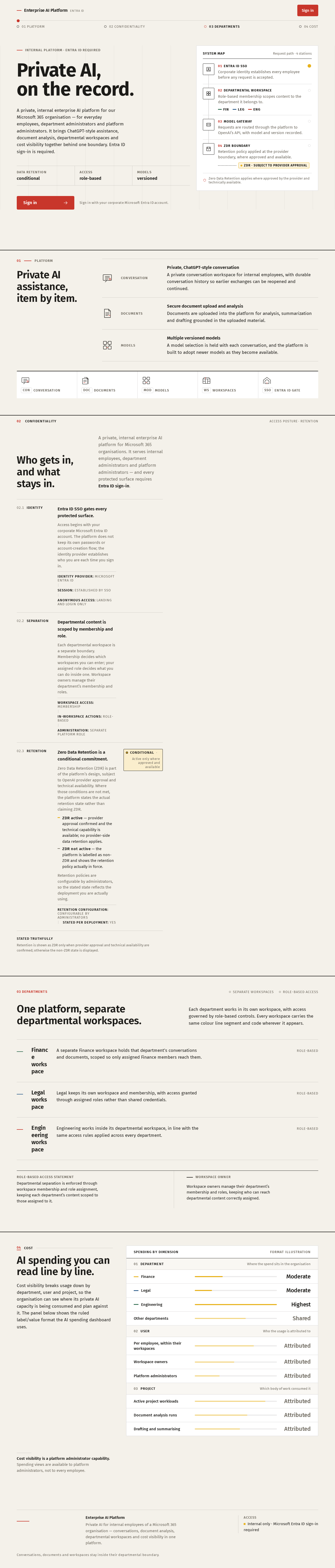
INTERNAL PLATFORM · ENTRA ID REQUIRED
Private AI,
on the record.
A private, internal enterprise AI platform for our Microsoft 365 organisation — for everyday employees, department administrators and platform administrators. It brings ChatGPT-style assistance, document analysis, departmental workspaces and cost visibility together behind one boundary. Entra ID sign-in is required.
- 01Entra ID SSO
Corporate identity establishes every employee before any request is accepted.
- 02Departmental workspace
Role-based membership scopes content to the department it belongs to.
FINLEGENG - 03Model gateway
Requests are routed through the platform to OpenAI’s API, with model and version recorded.
- 04ZDR boundary
Retention policy applied at the provider boundary, where approved and available.
ZDR · subject to provider approval
01Platform
Private AI assistance, item by item.
- Conversation
Private, ChatGPT-style conversationA private conversation workspace for internal employees, with durable conversation history so earlier exchanges can be reopened and continued.
- Documents
Secure document upload and analysisDocuments are uploaded into the platform for analysis, summarization and drafting grounded in the uploaded material.
- Models
Multiple versioned modelsA model selection is held with each conversation, and the platform is built to adopt newer models as they become available.
Who gets in, and what stays in.
A private, internal enterprise AI platform for Microsoft 365 organisations. It serves internal employees, department administrators and platform administrators — and every protected surface requires Entra ID sign-in.
- 02.1Identity
Entra ID SSO gates every protected surface.
Access begins with your corporate Microsoft Entra ID account. The platform does not keep its own passwords or account-creation flow; the identity provider establishes who you are each time you sign in.
Identity provider: Microsoft Entra IDSession: Established by SSOAnonymous access: Landing and Login only - 02.2Separation
Departmental content is scoped by membership and role.
Each departmental workspace is a separate boundary. Membership decides which workspaces you can enter; your assigned role decides what you can do inside one. Workspace owners manage their department’s membership and roles.
Workspace access: MembershipIn-workspace actions: Role-basedAdministration: Separate platform role - 02.3Retention
Zero Data Retention is a conditional commitment.
Zero Data Retention (ZDR) is part of the platform’s design, subject to OpenAI provider approval and technical availability. Where those conditions are not met, the platform states the actual retention state rather than claiming ZDR.
- ZDR active — provider approval confirmed and the technical capability is available; no provider-side data retention applies.
- ZDR not active — the platform is labelled as non-ZDR and shows the retention policy actually in force.
Retention policies are configurable by administrators, so the stated state reflects the deployment you are actually using.
Retention configuration: Configurable by administratorsStated per deployment: YesConditionalActive only where approved and available
03 Departments
One platform, separate departmental workspaces.
Each department works in its own workspace, with access governed by role-based controls. Every workspace carries the same colour line segment and code wherever it appears.
FIN Finance workspace
A separate Finance workspace holds that department’s conversations and documents, scoped so only assigned Finance members reach them.
Role-based
LEG Legal workspace
Legal keeps its own workspace and membership, with access granted through assigned roles rather than shared credentials.
Role-based
ENG Engineering workspace
Engineering works inside its departmental workspace, in line with the same access rules applied across every department.
Role-based
- Role-based access statement
- Departmental separation is enforced through workspace membership and role assignment, keeping each department’s content scoped to those assigned to it.
- Workspace owner
- Workspace owners manage their department’s membership and roles, keeping who can reach departmental content correctly assigned.
04Cost
AI spending you can read line by line.
Cost visibility breaks usage down by department, user and project, so the organisation can see where its private AI capacity is being consumed and plan against it. The panel below shows the ruled label/value format the AI spending dashboard uses.
- FinanceModerate
- LegalModerate
- EngineeringHighest
- Other departmentsShared
- Per employee, within their workspacesAttributed
- Workspace ownersAttributed
- Platform administratorsAttributed
- Active project workloadsAttributed
- Document analysis runsAttributed
- Drafting and summarisingAttributed
Cost visibility is a platform administrator capability. Spending views are available to platform administrators, not to every employee.
INTERNAL PLATFORM · ENTRA ID REQUIRED
Private AI,
on the record.
A private, internal enterprise AI platform for our Microsoft 365 organisation — for everyday employees, department administrators and platform administrators. It brings ChatGPT-style assistance, document analysis, departmental workspaces and cost visibility together behind one boundary. Entra ID sign-in is required.
- 01Entra ID SSO
Corporate identity establishes every employee before any request is accepted.
- 02Departmental workspace
Role-based membership scopes content to the department it belongs to.
FINLEGENG - 03Model gateway
Requests are routed through the platform to OpenAI’s API, with model and version recorded.
- 04ZDR boundary
Retention policy applied at the provider boundary, where approved and available.
ZDR · subject to provider approval
01Platform
Private AI assistance, item by item.
- Conversation
Private, ChatGPT-style conversationA private conversation workspace for internal employees, with durable conversation history so earlier exchanges can be reopened and continued.
- Documents
Secure document upload and analysisDocuments are uploaded into the platform for analysis, summarization and drafting grounded in the uploaded material.
- Models
Multiple versioned modelsA model selection is held with each conversation, and the platform is built to adopt newer models as they become available.
Who gets in, and what stays in.
A private, internal enterprise AI platform for Microsoft 365 organisations. It serves internal employees, department administrators and platform administrators — and every protected surface requires Entra ID sign-in.
- 02.1Identity
Entra ID SSO gates every protected surface.
Access begins with your corporate Microsoft Entra ID account. The platform does not keep its own passwords or account-creation flow; the identity provider establishes who you are each time you sign in.
Identity provider: Microsoft Entra IDSession: Established by SSOAnonymous access: Landing and Login only - 02.2Separation
Departmental content is scoped by membership and role.
Each departmental workspace is a separate boundary. Membership decides which workspaces you can enter; your assigned role decides what you can do inside one. Workspace owners manage their department’s membership and roles.
Workspace access: MembershipIn-workspace actions: Role-basedAdministration: Separate platform role - 02.3Retention
Zero Data Retention is a conditional commitment.
Zero Data Retention (ZDR) is part of the platform’s design, subject to OpenAI provider approval and technical availability. Where those conditions are not met, the platform states the actual retention state rather than claiming ZDR.
- ZDR active — provider approval confirmed and the technical capability is available; no provider-side data retention applies.
- ZDR not active — the platform is labelled as non-ZDR and shows the retention policy actually in force.
Retention policies are configurable by administrators, so the stated state reflects the deployment you are actually using.
Retention configuration: Configurable by administratorsStated per deployment: YesConditionalActive only where approved and available
03 Departments
One platform, separate departmental workspaces.
Each department works in its own workspace, with access governed by role-based controls. Every workspace carries the same colour line segment and code wherever it appears.
FIN Finance workspace
A separate Finance workspace holds that department’s conversations and documents, scoped so only assigned Finance members reach them.
Role-based
LEG Legal workspace
Legal keeps its own workspace and membership, with access granted through assigned roles rather than shared credentials.
Role-based
ENG Engineering workspace
Engineering works inside its departmental workspace, in line with the same access rules applied across every department.
Role-based
- Role-based access statement
- Departmental separation is enforced through workspace membership and role assignment, keeping each department’s content scoped to those assigned to it.
- Workspace owner
- Workspace owners manage their department’s membership and roles, keeping who can reach departmental content correctly assigned.
04Cost
AI spending you can read line by line.
Cost visibility breaks usage down by department, user and project, so the organisation can see where its private AI capacity is being consumed and plan against it. The panel below shows the ruled label/value format the AI spending dashboard uses.
- FinanceModerate
- LegalModerate
- EngineeringHighest
- Other departmentsShared
- Per employee, within their workspacesAttributed
- Workspace ownersAttributed
- Platform administratorsAttributed
- Active project workloadsAttributed
- Document analysis runsAttributed
- Drafting and summarisingAttributed
Cost visibility is a platform administrator capability. Spending views are available to platform administrators, not to every employee.
No comments yet. Be the first!