enterprise-ai-platform
 Meghna Rajawat
Help me build enterprise ai platform design and build a secure, private, enterprise-grade AI platform powered by OpenAI’s API and integrated with our existing Microsoft 365 infrastructure. The platform will provide a ChatGPT-style experience for internal employees, with advanced document analysis, departmental workspaces, strict data confidentiality, and AI usage cost tracking. This is not a basic chatbot project. We need a scalable, production-ready solution that can evolve with the latest AI models. Key Responsibilities * Develop a private, ChatGPT-style AI application using OpenAI’s API. * Deploy and integrate the platform with Microsoft Azure and Entra ID (SSO). * Implement Zero Data Retention (ZDR), subject to provider approval and technical availability. * Enable secure document uploads, analysis, summarization, and drafting. * Create separate departmental workspaces with role-based access controls. * Develop AI spending dashboards with cost tracking by department, user, and project. * Support multiple AI models and seamless upgrades as newer models become available. * Implement administrative controls, security logging, and configurable retention policies. * Design the platform for future integrations with third-party applications.


Comments (0)
Sign in to leave a comment
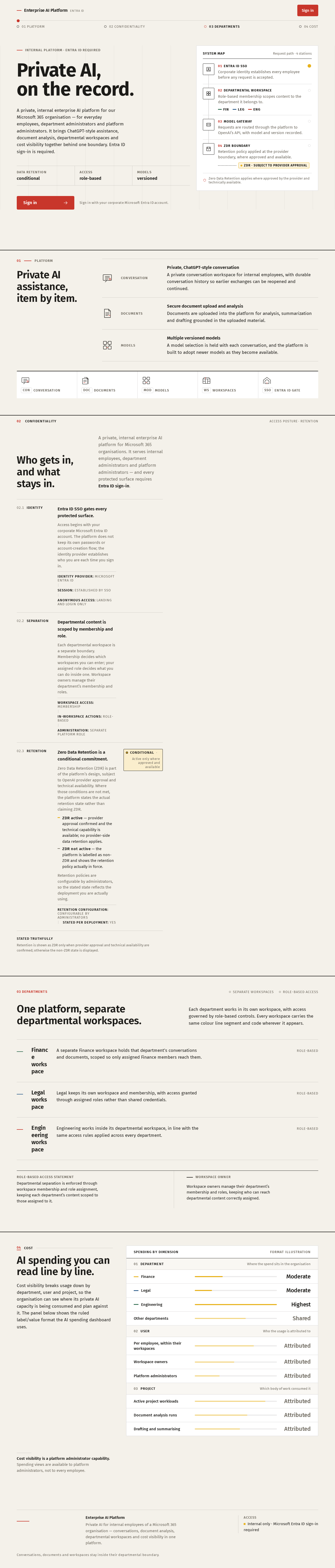
INTERNAL PLATFORM · ENTRA ID REQUIRED
Private AI,
on the record.
A private, internal enterprise AI platform for our Microsoft 365 organisation — for everyday employees, department administrators and platform administrators. It brings ChatGPT-style assistance, document analysis, departmental workspaces and cost visibility together behind one boundary. Entra ID sign-in is required.
- 01Entra ID SSO
Corporate identity establishes every employee before any request is accepted.
- 02Departmental workspace
Role-based membership scopes content to the department it belongs to.
FINLEGENG - 03Model gateway
Requests are routed through the platform to OpenAI’s API, with model and version recorded.
- 04ZDR boundary
Retention policy applied at the provider boundary, where approved and available.
ZDR · subject to provider approval
01Platform
Private AI assistance, item by item.
- Conversation
Private, ChatGPT-style conversationA private conversation workspace for internal employees, with durable conversation history so earlier exchanges can be reopened and continued.
- Documents
Secure document upload and analysisDocuments are uploaded into the platform for analysis, summarization and drafting grounded in the uploaded material.
- Models
Multiple versioned modelsA model selection is held with each conversation, and the platform is built to adopt newer models as they become available.
Who gets in, and what stays in.
A private, internal enterprise AI platform for Microsoft 365 organisations. It serves internal employees, department administrators and platform administrators — and every protected surface requires Entra ID sign-in.
- 02.1Identity
Entra ID SSO gates every protected surface.
Access begins with your corporate Microsoft Entra ID account. The platform does not keep its own passwords or account-creation flow; the identity provider establishes who you are each time you sign in.
Identity provider: Microsoft Entra IDSession: Established by SSOAnonymous access: Landing and Login only - 02.2Separation
Departmental content is scoped by membership and role.
Each departmental workspace is a separate boundary. Membership decides which workspaces you can enter; your assigned role decides what you can do inside one. Workspace owners manage their department’s membership and roles.
Workspace access: MembershipIn-workspace actions: Role-basedAdministration: Separate platform role - 02.3Retention
Zero Data Retention is a conditional commitment.
Zero Data Retention (ZDR) is part of the platform’s design, subject to OpenAI provider approval and technical availability. Where those conditions are not met, the platform states the actual retention state rather than claiming ZDR.
- ZDR active — provider approval confirmed and the technical capability is available; no provider-side data retention applies.
- ZDR not active — the platform is labelled as non-ZDR and shows the retention policy actually in force.
Retention policies are configurable by administrators, so the stated state reflects the deployment you are actually using.
Retention configuration: Configurable by administratorsStated per deployment: YesConditionalActive only where approved and available
03 Departments
One platform, separate departmental workspaces.
Each department works in its own workspace, with access governed by role-based controls. Every workspace carries the same colour line segment and code wherever it appears.
FIN Finance workspace
A separate Finance workspace holds that department’s conversations and documents, scoped so only assigned Finance members reach them.
Role-based
LEG Legal workspace
Legal keeps its own workspace and membership, with access granted through assigned roles rather than shared credentials.
Role-based
ENG Engineering workspace
Engineering works inside its departmental workspace, in line with the same access rules applied across every department.
Role-based
- Role-based access statement
- Departmental separation is enforced through workspace membership and role assignment, keeping each department’s content scoped to those assigned to it.
- Workspace owner
- Workspace owners manage their department’s membership and roles, keeping who can reach departmental content correctly assigned.
04Cost
AI spending you can read line by line.
Cost visibility breaks usage down by department, user and project, so the organisation can see where its private AI capacity is being consumed and plan against it. The panel below shows the ruled label/value format the AI spending dashboard uses.
- FinanceModerate
- LegalModerate
- EngineeringHighest
- Other departmentsShared
- Per employee, within their workspacesAttributed
- Workspace ownersAttributed
- Platform administratorsAttributed
- Active project workloadsAttributed
- Document analysis runsAttributed
- Drafting and summarisingAttributed
Cost visibility is a platform administrator capability. Spending views are available to platform administrators, not to every employee.
No comments yet. Be the first!