english-speaking-course

byNiranjan Singh

Ai english speaking course app for andriod

Landing
Landing

Comments (0)

No comments yet. Be the first!

System Requirements

Page 1 of 13

System Requirements Document for english-speaking-course

1. Introduction

english-speaking-course is an AI-powered English speaking course application for Android, built for learners who want to learn to speak English. The product's intent is to give a self-conscious adult learner a friendly coach in their pocket: a place to browse structured speaking lessons and to practice speaking English out loud, alone, often on a phone, often at night, without the fear of sounding foolish.

The audience is the English Learner — an adult who wants to build spoken English ability through lessons and speaking practice, and whose successful outcome is being able to speak English more confidently. The app is delivered as a native Android experience with a warm, illustrated, encouragement-first interface rather than a pronunciation examiner's grading tool.

Page 2 of 13

2. System Overview

The current product is a single Android application with three first-party destinations:

  • Landing — the anonymous public entry surface that explains the Android English speaking course app and directs learners to lessons and speaking practice.
  • Lessons — where learners browse and take English speaking course lessons.
  • Speaking Practice — where learners practice speaking English within the app.

The sole active human actor is the English Learner. The AI course capability is the product's core mechanism: it introduces lessons, models phrases, and responds to the learner's spoken attempts. All three destinations are owned by the application and are reachable without an account (access_requirement: none), so no identity, sign-in, or account-management capability is part of the current product.

Page 3 of 13

2a. Product Interpretation and Delivery Boundary

The app is delivered as an Android application. Its three surfaces are first-party custom UI owned by the application itself; there is no provider-owned or external destination in the current scope, and no headless delivery mode.

Access is open. The Landing surface is an anonymous first impression, and both Lessons and Speaking Practice are reachable without establishing an identity. Because no accepted journey requires a learner to privately own or resume durable actor-specific state, and because no commitment, decision, entitlement, or value transfer must remain bound to a particular participant, the current product does not establish application-owned identity. Progress and practice state are session-local to the device and the app.

The current horizon covers the Android app, its three destinations, the lesson catalog, and speaking practice with AI feedback. Nothing beyond that — no web client, no social or community features, no teacher or classroom tooling, no certification — is part of the current product.

2c. Page Content and Component Coverage

Page 4 of 13

Landing

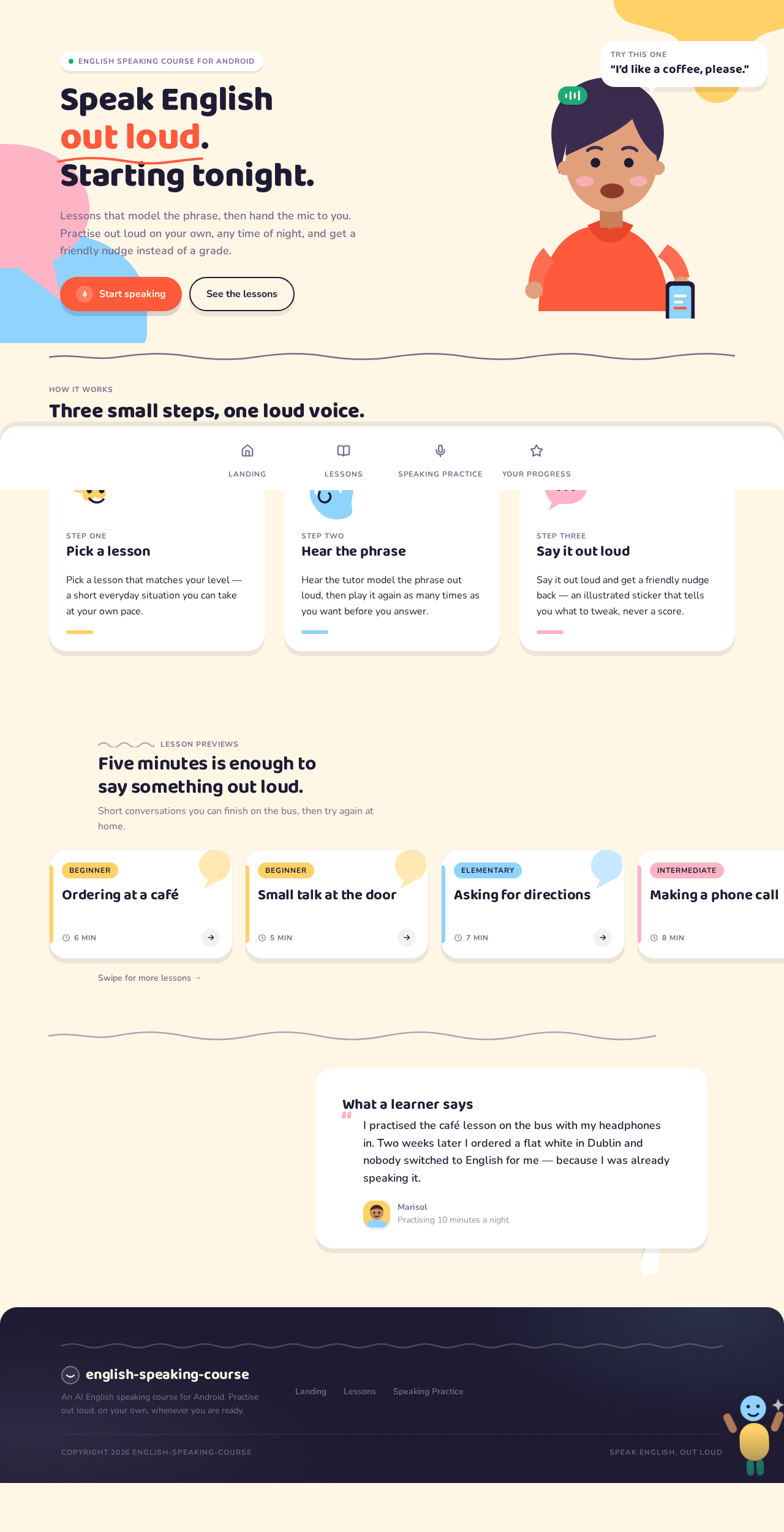
  • Information and state: The anonymous public entry surface. Presents the app's promise — speaking English out loud, starting tonight — and explains how the course works. No learner-specific state is required to view it.
  • Primary actions: Start speaking (routes the learner into Speaking Practice); See the lessons (routes the learner into Lessons).
  • Supporting actions: Scroll through the how-it-works strip, the lesson-preview carousel, and the testimonial block; tap a previewed lesson card to open that lesson in Lessons.
  • Domain entities: Course promise, how-it-works steps, lesson previews (title, level badge, duration), learner testimonial.
  • Component responsibilities:
    • Hero stage: large headline with the phrase "out loud" emphasized, an illustrated tutor character mid-sentence holding a phone, a speech bubble containing a real practice line, and a small green waveform chip.
    • Primary coral pill CTA with a round microphone icon; secondary ghost pill CTA.
    • How-it-works strip: three chunky cards in a horizontal sequence.
    • Lesson-preview carousel: cards peeking off the right edge, each showing a rounded level badge, lesson title, and duration chip.
    • Testimonial block built as a speech bubble.
    • Decorative oversized pastel sticker shapes cropped by the viewport edges.
  • States:
    • Loading: Skeleton pill and card placeholders on the cream ground while lesson previews resolve.
    • Empty: If no lesson previews are available, the carousel area is replaced by an illustrated sticker and a short encouraging line, with the See the lessons CTA still available.
    • Success: Full sticker-sheet composition with hero, strip, carousel, and testimonial.
    • Error: If lesson previews fail to load, the carousel is omitted and the hero and CTAs remain fully usable.
    • Recovery: A retry affordance on the carousel region re-requests previews; the learner can always proceed via See the lessons.
Page 5 of 13

Lessons

  • Information and state: A vertical list of pill-shaped lesson rows grouped by level. Each row shows a rounded level badge, the lesson title, a duration chip, and a progress ring reflecting how far the learner has taken that lesson.
  • Primary actions: Open a lesson to take it; play the lesson's modelled phrase; move through the lesson's steps; complete the lesson.
  • Supporting actions: Scroll the grouped list; read the level grouping headers; return to a partially completed lesson.
  • Domain entities: Level group, lesson (title, level badge, duration, progress), lesson step, modelled phrase, tutor character introduction.
  • Component responsibilities:
    • Level group headers with hand-drawn wavy dividers.
    • Lesson rows as fat pill capsules with an offset hard shadow, a rounded level badge, the lesson title, a duration chip, and a progress ring.
    • Lesson detail view: the oversized illustrated tutor character introduces the lesson and models the phrase in a speech bubble.
    • Step controls to advance through the lesson's content.
    • Completion state with an illustrated sticker reward.
  • States:
    • Loading: Pill-shaped row placeholders grouped under level headers.
    • Empty: If no lessons are available, an illustrated sticker with a short encouraging line and a route into Speaking Practice.
    • Success: Grouped lesson rows with accurate progress rings; a completed lesson shows a filled progress ring and its sticker reward.
    • Error: If the lesson list fails to load, an illustrated sticker message with a retry control replaces the list.
    • Recovery: Retry reloads the list; a lesson that fails mid-way keeps the learner's position in that lesson so they can resume it from its row.
Page 6 of 13

Speaking Practice

  • Information and state: A stage with one large character illustration centred, the current practice prompt in a speech bubble above it, and the record control anchored at the bottom. Shows whether the app is idle, playing a prompt, listening, or giving feedback.
  • Primary actions: Start recording a spoken attempt; stop recording; hear the AI feedback; try the phrase again; advance to the next prompt.
  • Supporting actions: Replay the modelled prompt; read the feedback sticker; move between prompts in the current practice set.
  • Domain entities: Practice prompt, modelled phrase, recorded attempt, AI feedback (correct or try-again with a specific tip), practice set.
  • Component responsibilities:
    • Centred character illustration that blinks and opens its mouth on a loop while a prompt is playing, and stops when the learner records.
    • Speech bubble carrying the current prompt.
    • 96px circular coral record button in a coral pill dock, with a live waveform ring that grows as the learner talks.
    • Waveform bars that react to input.
    • Feedback stickers: a green "Nice!" burst for a landed phrase, a butter "Almost — try the th sound" bubble for a near miss.
    • Next-prompt control.
  • States:
    • Loading: The stage renders with the character illustration and a placeholder speech bubble while the first prompt resolves.
    • Empty: If no prompts are available, an illustrated sticker with a short encouraging line and a route back to Lessons.
    • Success: The phrase lands — a green sticker pops in with an overshoot and a tiny three-shape confetti, and the next-prompt control appears.
    • Error: If the microphone is unavailable or permission is not granted, an illustrated sticker explains the situation in plain, non-blaming language and offers a retry; if the AI feedback cannot be produced, the learner is told the attempt was heard and is invited to try again rather than shown a failure grade.
    • Recovery: Retry re-requests the microphone or re-runs feedback for the same prompt; the learner can always replay the modelled prompt and record again.
Page 7 of 13

3. Functional Requirements

FR-1 — Android delivery As an English Learner, I should be able to use the English speaking course app on Android, so that I can learn to speak English on the phone I already carry.

  • Provenance: explicit
  • Lifecycle: The learner installs and opens the app on an Android device. Observable result: the app launches to the Landing surface. Continuation: the learner proceeds to lessons or speaking practice.
  • Acceptance: The app runs on Android and presents the Landing surface on launch.

FR-2 — Understand the course from the public entry As an English Learner, I should be able to understand what the app is and how it works before committing to anything, so that I can decide to start speaking.

  • Provenance: required_inference
  • Lifecycle: Trigger — the learner opens the app for the first time. Input — none required. Observable result: the Landing surface presents the app's promise, a how-it-works sequence, lesson previews, and a learner testimonial. Access state — anonymous, no account. Failure/recovery — if lesson previews fail to load, the hero and both CTAs remain usable and a retry is offered. Continuation — the learner chooses Start speaking or See the lessons.
  • Acceptance: The Landing surface explains the course and offers both a route into Speaking Practice and a route into Lessons without requiring any account.

FR-3 — Browse lessons by level As an English Learner, I should be able to browse English speaking course lessons grouped by level, so that I can find material that matches where I am.

  • Provenance: required_inference
  • Lifecycle: Trigger — the learner opens Lessons. Input — scrolling and level grouping. Observable result: a vertical list of pill-shaped lesson rows grouped by level, each showing a rounded level badge, the lesson title, a duration chip, and a progress ring. Access state — no account required. Failure/recovery — if the list fails to load, an illustrated message with a retry replaces it. Continuation — the learner opens a lesson.
  • Acceptance: Lessons are grouped by level and each row shows a level badge, title, duration chip, and progress ring.

FR-4 — Take a lesson As an English Learner, I should be able to take a lesson, so that I can learn the phrases and speaking patterns it teaches.

  • Provenance: required_inference
  • Lifecycle: Trigger — the learner opens a lesson row. Input — the learner's attention and step-by-step progression. Observable result: the oversized illustrated tutor character introduces the lesson and models the phrase in a speech bubble; the learner moves through the lesson's steps. Access state — no account required. Failure/recovery — if a lesson fails mid-way, the learner's position in that lesson is kept and the lesson can be resumed from its row. Continuation — the learner completes the lesson and receives an illustrated sticker reward, or moves into Speaking Practice to try the phrase aloud.
  • Acceptance: A lesson presents a tutor introduction and a modelled phrase, advances through its steps, and records completion on its row's progress ring.

FR-5 — Practice speaking English out loud As an English Learner, I should be able to practice speaking English out loud in the app, so that I can build real spoken ability rather than only reading.

  • Provenance: required_inference
  • Lifecycle: Trigger — the learner opens Speaking Practice or arrives from a lesson. Input — the learner's spoken attempt, captured through the microphone. Observable result: the current prompt is shown in a speech bubble above the centred character illustration; the learner records with the 96px circular coral record button, whose live waveform ring grows as they talk. Access state — no account required. Failure/recovery — if the microphone is unavailable or permission is not granted, an illustrated sticker explains this in plain, non-blaming language and offers a retry. Continuation — the learner receives feedback and either tries again or advances to the next prompt.
  • Acceptance: The learner can start and stop a recording of a spoken attempt against a displayed prompt, with visible live input feedback.

FR-6 — Hear the modelled phrase before speaking As an English Learner, I should be able to hear the phrase modelled before I attempt it, so that I know what I am aiming for.

  • Provenance: required_inference
  • Lifecycle: Trigger — a prompt is presented. Observable result: the character illustration blinks and its mouth opens on a loop while the prompt is playing, and stops when the learner records. Continuation — the learner records their own attempt.
  • Acceptance: Playing a prompt animates the character's mouth and blink loop, and that animation stops when recording begins.

FR-7 — Receive AI feedback on a spoken attempt As an English Learner, I should be able to receive AI feedback on what I said, so that I know whether the phrase landed and what to adjust.

  • Provenance: required_inference
  • Lifecycle: Trigger — the learner finishes recording. Input — the recorded attempt. Observable result: feedback arrives as an illustrated sticker — a green "Nice!" burst when the phrase lands, or a butter "Almost — try the th sound" bubble with a specific tip when it does not. Failure/recovery — if feedback cannot be produced, the learner is told the attempt was heard and is invited to try again, never shown a failure grade. Continuation — the learner tries the phrase again or advances to the next prompt.
  • Acceptance: A completed recording produces either a green success sticker or a butter try-again sticker carrying a specific, actionable tip, and never a red error state or a score percentage.

FR-8 — Try the phrase again As an English Learner, I should be able to try the same phrase again after feedback, so that I can improve without being moved on or judged.

  • Provenance: required_inference
  • Lifecycle: Trigger — feedback is shown. Input — a new spoken attempt. Observable result: the same prompt remains available and a new attempt can be recorded. Continuation — the learner receives fresh feedback or advances.
  • Acceptance: After any feedback sticker, the learner can record the same prompt again.

FR-9 — Advance through a practice set As an English Learner, I should be able to move to the next prompt after a landed phrase, so that I keep making progress.

  • Provenance: required_inference
  • Lifecycle: Trigger — the phrase lands and the green sticker appears. Observable result: a next-prompt control becomes available and moves the learner to the following prompt. Continuation — the learner continues practicing or returns to Lessons.
  • Acceptance: After a successful attempt, the learner can advance to the next prompt.

FR-10 — Move between lessons and speaking practice As an English Learner, I should be able to move between lessons and speaking practice, so that I can read about a phrase and then immediately say it.

  • Provenance: required_inference
  • Lifecycle: Trigger — the learner is in either destination. Observable result: the bottom tab bar of four rounded icon tiles, with the active tile filled coral and lifted, moves the learner between Landing, Lessons, and Speaking Practice. Continuation — the learner resumes whichever activity they left.
  • Acceptance: The learner can reach Lessons and Speaking Practice from the tab bar at any time without an account.
Page 8 of 13

4. User Personas

Page 9 of 13

English Learner

Product context. The English Learner is an adult who wants to learn to speak English and needs an Android app to do it. They practice speaking aloud alone, often on a phone, often at night, and often feel self-conscious about how they sound. They are not looking for a pronunciation examiner or a graded test; they are looking for a warm, slightly funny coach that encourages them to open their mouth.

Primary goal. To build spoken English ability through lessons and speaking practice, and to end up able to speak English more confidently.

Distinct accepted responsibilities. The English Learner is the sole active human role in the product. They browse the lesson catalog grouped by level, take lessons in which the tutor character introduces the material and models a phrase, and then practice speaking that phrase out loud. They decide when to attempt a phrase, when to try it again after feedback, and when to move on. They are the only participant who initiates, controls, and completes any accepted capability.

Relevant inputs and decisions. The learner's inputs are their choice of lesson, their spoken attempts captured through the microphone, and their decisions to retry, advance, or move between destinations. Their key decision is whether to keep speaking after a near miss — which is exactly the moment the product's encouragement-over-evaluation stance exists to support.

Interactions with other accepted participants. There are no other accepted human participants. The AI course capability is the product's mechanism, not a persona: it introduces lessons, models phrases, and produces feedback. The illustrated tutor character is the visible face of that mechanism, not a separate actor.

Observable success. The learner completes lessons and sees their progress rings fill; their spoken attempts land and produce green success stickers; near misses produce a specific, actionable tip rather than a grade; and they can move fluidly between reading a lesson and saying the phrase out loud.

Page 10 of 13

5. Core User Flows

Flow 1 — First contact and choosing a starting point

  1. The English Learner installs and opens the app on their Android phone. The app launches to Landing with no account required.
  2. On Landing, the learner reads the headline "Speak English out loud. Starting tonight." with "out loud" emphasized in coral, and sees the illustrated tutor character mid-sentence with a speech bubble containing a real practice line and a small green waveform chip below it.
  3. The learner scrolls the sticker-sheet sequence: the how-it-works strip of three chunky cards, the lesson-preview carousel with cards peeking off the right edge, and the testimonial block built as a speech bubble.
  4. The learner makes a decision: tap the coral pill Start speaking to go straight into speaking, or tap the ghost pill See the lessons to browse first.
  5. Observable result: the learner arrives at Speaking Practice or Lessons respectively, with no sign-in step in between.
  6. Continuation: the learner can move between the two at any time from the bottom tab bar.

Failure and recovery: If lesson previews fail to load on Landing, the carousel is omitted, the hero and both CTAs remain fully usable, and a retry is offered on the carousel region.

Flow 2 — Browsing and taking a lesson

  1. The English Learner opens Lessons from the tab bar or from the Landing CTA.
  2. The learner sees a vertical list of pill-shaped lesson rows grouped by level, each row showing a rounded level badge, the lesson title, a duration chip, and a progress ring.
  3. The learner scrolls the grouped list and picks a lesson that matches their level.
  4. The learner opens the lesson. The oversized illustrated tutor character introduces it and models the phrase in a speech bubble.
  5. The learner moves through the lesson's steps, hearing the modelled phrase and following the tutor's introduction.
  6. Observable result: on completion, the lesson's progress ring on its row fills and an illustrated sticker reward appears.
  7. Continuation: the learner either opens another lesson or moves to Speaking Practice to say the phrase out loud.

Failure and recovery: If the lesson list fails to load, an illustrated sticker message with a retry control replaces the list. If a lesson fails mid-way, the learner's position in that lesson is kept and the lesson can be resumed from its row.

Page 11 of 13

Flow 3 — Practicing a phrase out loud

  1. The English Learner opens Speaking Practice from the tab bar, from the Landing CTA, or after finishing a lesson.
  2. The stage shows one large character illustration centred, with the current prompt in a speech bubble above it.
  3. The learner plays the modelled prompt. The character blinks and its mouth opens on a 4-second loop while the prompt plays.
  4. The learner taps the 96px circular coral record button in the coral pill dock. The character animation stops, and the record button grows a live waveform ring as the learner talks; the waveform bars react to their input.
  5. The learner stops recording.
  6. Observable result — the phrase lands: a green "Nice!" sticker pops in with an overshoot and a tiny three-shape confetti, and a next-prompt control appears.
  7. Continuation: the learner taps next and moves to the following prompt in the practice set.

Failure and recovery: If the microphone is unavailable or permission is not granted, an illustrated sticker explains the situation in plain, non-blaming language and offers a retry. If AI feedback cannot be produced, the learner is told their attempt was heard and is invited to try again — never shown a failure grade.

Flow 4 — Recovering from a near miss

  1. The English Learner records a phrase in Speaking Practice and the attempt does not land.
  2. Observable result: a butter "Almost — try the th sound" bubble overshoots into place, carrying a specific, actionable tip rather than a score or a red error.
  3. The learner replays the modelled prompt to hear the target again.
  4. The learner records the same phrase again.
  5. Observable result: fresh feedback arrives for the new attempt — either the green success sticker or another specific tip.
  6. Continuation: the learner keeps trying, or advances to the next prompt, or returns to Lessons to revisit the phrase.
Page 12 of 13

6. Visuals Colors and Theme

Muse and headline. The visual direction follows Pablo Stanley: rounded modular characters, sunny colour, sticker-like shapes, and copy that talks back. The headline idea is a warm illustrated poster, not a tech landing page — a friendly coach in the pocket, never a pronunciation examiner.

Colour tokens (light mode).

RoleHexUsage
Background#FFF6E6Warm cream ground everywhere
Surface#FFFFFFWhite cards floating on the cream ground with soft offset shadows
Text#1E1B33Deep aubergine-ink for all type; replaces black so nothing feels harsh
Primary#FF5A3CCoral action colour — exactly one element per screen: the record button, the primary CTA, or the active tab
Accent#1FA97AGreen "you said it right" reward colour, used sparingly on feedback chips and progress fills
Muted#7A6F8FSecondary text, wavy dividers, inactive tab tiles
Butter#FFD166Pastel support — illustrations and level badges only, never UI chrome
Sky#8FD3FFPastel support — illustrations and level badges only, never UI chrome
Blush#FFB4C6Pastel support — illustrations and level badges only, never UI chrome

Colour balance. Roughly 60% cream, 25% white surfaces, 10% illustration colour, 5% coral.

Typography.

  • Headings: Baloo 2 at 700–800, tight -0.01em tracking, sentence case (never all-caps), soft rounded terminals that match the pill shapes. Headlines run large and confident — 44–56px on the landing hero, 28–32px on lesson titles — and are allowed to break awkwardly across two lines because the roundness makes it read as speech rather than a document.
  • Body: Nunito at 400/600, 16–18px, 1.6 line-height, never lighter than 400.
  • Type scale (1.333 modular): 56 / 42 / 32 / 24 / 18 / 16 / 14, with a 12px micro-label size for level tags set in Nunito 700 uppercase with 0.08em tracking.

Shape language. Everything is a capsule or a soft blob. Buttons are full pills with 999px radii; cards use 28px radii; the record button is a perfect 96px circle with a visible 3px coral ring. Sticker shapes — speech bubbles with a tail, rounded stars, wobbly circles — sit as decorative accents behind headings and as level badges. Cards carry a soft offset shadow (0 8px 0 rgba(30,27,51,0.08)) rather than a blur, so they read as physical objects you could pick up. Section dividers are hand-drawn wavy lines in muted colour, not rules.

Layout. Mobile-first single column at 390px with 20px gutters, expanding on tablet to a two-column split: illustration-left, content-right. The landing page is a sticker-sheet sequence — hero, then a horizontal how-it-works strip of three chunky cards, then a lesson-preview carousel with the cards peeking off the right edge, then a testimonial block built as a speech bubble. Lessons is a vertical list of pill-shaped lesson rows grouped by level, each row showing a rounded level badge, the lesson title, a duration chip, and a progress ring. Speaking Practice is a stage: one large character illustration centred, the current prompt in a speech bubble above it, the record button anchored at the bottom in a coral pill dock with waveform bars that react to input. Navigation is a bottom tab bar with four rounded icon tiles, the active one filled coral with a slight lift.

Imagery. Modular vector characters in Pablo Stanley's Humaaans/Open Peeps lineage: simple rounded bodies, no facial detail beyond dots and a mouth, diverse skin tones and hair, drawn in flat colour with no outlines. The characters are the cast of the course — a tutor character who introduces each lesson, paired dialogue characters for conversation practice, and a small cheering character for streaks. Mouth-shape diagrams are drawn in the same rounded style as simple side-profile pictograms. No photography, no stock people, no 3D renders, no gradient blobs.

Avoid. Any blue-indigo primary or bootstrap-blue CTA on white — the action colour is coral #FF5A3C only. Centred headline + subtext + button SaaS hero with a gradient blob behind it. Red error states, score percentages, or grading language that makes a nervous learner feel tested. Stock photography of people in headsets, corporate classrooms, or flags-as-language clichés. Inter, Roboto, Poppins, Lato, or system-ui for any text. A uniform grid of identical hover-lift feature cards. Sharp 4px corners, hairline grey dividers, or flat grey surfaces with no offset shadow. Dark mode as the default — this app is used at night but should feel like a lit room, not a terminal. The generic indigo/blue-on-white SaaS template is forbidden for this project.

Page 13 of 13

7. Signature Design Concept

The lit room with a coach in it.

The public entry is a cream full-bleed stage, not a centred SaaS stack. On the left two-thirds, a 56px Baloo 2 headline in deep aubergine reads "Speak English out loud. Starting tonight." with the words out loud set in coral and slightly larger, sitting on a wobbly coral underline. Beside and slightly behind it, a large flat-illustration character — three-quarter body, phone in hand, mid-sentence — carries a speech bubble containing a real practice line: "I'd like a coffee, please." A small green waveform chip sits below it.

There is no blue button. The CTA is a coral pill reading Start speaking with a small round microphone icon, and a secondary ghost pill See the lessons underneath. Behind everything, three oversized pastel sticker shapes — a butter star,
Landing design preview
Landing: Open app anonymously
Landing: Read promise and how it works
Landing: 1. Scroll lesson preview carousel
Landing: 2. Retry loading lesson previews
Speaking Practice: Open via Start speaking
Lessons: Open via See the lessons
Lessons: 1. Browse lessons grouped by level
Lessons: 2. Retry loading lesson list
Lessons: 3. Open a lesson
Lessons: 4. Hear tutor model phrase
Lessons: 5. Advance through lesson steps
Lessons: 6. Complete lesson for sticker
Lessons: 7. Resume lesson from its row
Speaking Practice: 8. Replay modelled prompt
Speaking Practice: 9. Record spoken attempt
Speaking Practice: 10. Stop recording
Speaking Practice: 11. Retry microphone access
Speaking Practice: 12. Hear green Nice sticker
Speaking Practice: 13. Read Almost tip sticker
Speaking Practice: 14. Try phrase again
Speaking Practice: 15. Advance to next prompt
Speaking Practice: 16. Return to Lessons
Landing design preview
Landing: Open app anonymously
Landing: Read promise and how it works
Landing: 1. Scroll lesson preview carousel
Landing: 2. Retry loading lesson previews
Speaking Practice: Open via Start speaking
Lessons: Open via See the lessons
Lessons: 1. Browse lessons grouped by level
Lessons: 2. Retry loading lesson list
Lessons: 3. Open a lesson
Lessons: 4. Hear tutor model phrase
Lessons: 5. Advance through lesson steps
Lessons: 6. Complete lesson for sticker
Lessons: 7. Resume lesson from its row
Speaking Practice: 8. Replay modelled prompt
Speaking Practice: 9. Record spoken attempt
Speaking Practice: 10. Stop recording
Speaking Practice: 11. Retry microphone access
Speaking Practice: 12. Hear green Nice sticker
Speaking Practice: 13. Read Almost tip sticker
Speaking Practice: 14. Try phrase again
Speaking Practice: 15. Advance to next prompt
Speaking Practice: 16. Return to Lessons