emerald-library

byJohn Raz

build me a library management system

LandingLogin
Landing

Comments (0)

No comments yet. Be the first!

System Requirements

System Requirements Document for emerald-library

1. Introduction

The emerald-library project is a library management system designed to support librarians and library members. The system aims to facilitate the management of library items and circulation, as well as to provide library members with the ability to find items and manage their borrowing activities. The design is inspired by Frank Chimero's warm editorial style, ensuring an accessible and welcoming interface.

2. System Overview

The emerald-library system provides a comprehensive solution for managing library operations. It includes functionalities for both librarians and library members, with distinct roles and access controls. The system supports item cataloging, loan management, and member self-service features. The design emphasizes accessibility and user-friendliness, with a warm and inviting interface.

2a. Product Interpretation and Delivery Boundary

The system is delivered as a custom UI application with app-owned identity management. It includes specific pages for different user roles, ensuring that librarians and library members have access to the functionalities they need. The system supports anonymous access to the landing page, with identity establishment required for accessing protected features. The system does not include adjacent capabilities such as external integrations or advanced analytics.

Page 1 of 8

2b. Source Content Inventory

Not applicable as no explicit content source directive is provided.

2c. Page Content and Component Coverage

Landing

  • Purpose: Public entry surface for anonymous visitors.
  • Components:
    • Overview of the library management system.
    • Explanation of staff and member roles.
    • Introduction to catalog and borrowing workflows.
    • Call-to-action for login or enrollment.

Login

  • Purpose: Identity access surface for returning verification.
  • Components:
    • Login form for librarians and library members.
    • Password recovery option.
    • Link to self-service enrollment for new members.

Library

  • Purpose: Member-facing destination for item discovery.
  • Components:
    • Search bar for finding library items.
    • Browse categories and filters.
    • Item details view with availability status.
Page 2 of 8

Catalog

  • Purpose: Librarian workspace for item management.
  • Components:
    • Add, edit, and delete library item records.
    • Search and filter tools for catalog management.
    • Item status and metadata management.

Loans

  • Purpose: Librarian workspace for managing circulation.
  • Components:
    • Record new loans and returns.
    • View and update item circulation status.
    • Overdue item alerts and notifications.

My Loans

  • Purpose: Member destination for managing borrowing activity.
  • Components:
    • List of currently borrowed items.
    • Due dates and renewal options.
    • Borrowing history and status updates.
Page 3 of 8

3. Functional Requirements

  • As a Librarian, I should be able to manage the library catalog to ensure accurate and up-to-date item records. (Provenance: explicit)
  • As a Librarian, I should be able to manage loans and returns to maintain accurate circulation records. (Provenance: explicit)
  • As a Library Member, I should be able to search for and find library items to facilitate borrowing. (Provenance: explicit)
  • As a Library Member, I should be able to manage my borrowing activity to keep track of due dates and renew items. (Provenance: explicit)
  • As an anonymous visitor, I should be able to access the landing page to learn about the library system before establishing identity. (Provenance: required_inference)
  • As a Library Member, I need self-service enrollment to access protected features like item discovery and borrowing history. (Provenance: required_inference)
  • As a Librarian or Library Member, I need to verify my identity through login to access protected workflows. (Provenance: required_inference)
  • As a Librarian, I need role-based access control to protect staff-only operations from members. (Provenance: required_inference)

4. User Personas

  • Librarian: Manages the library catalog and circulation, including lending and returning items.
  • Library Member: Searches for library items and manages personal borrowing activity.

5. Core User Flows

Page 4 of 8

Librarian Flow

  1. Login: Access the system through the login page.
  2. Catalog Management: Navigate to the Catalog page to add, edit, or delete item records.
  3. Loan Management: Use the Loans page to record new loans and returns.
  4. Logout: Securely exit the system.

Library Member Flow

  1. Landing Access: Visit the landing page to learn about the system.
  2. Enrollment: Complete self-service enrollment if not already a member.
  3. Login: Access the system through the login page.
  4. Item Discovery: Use the Library page to search for and browse items.
  5. Manage Loans: Visit the My Loans page to view current loans and renew items.
  6. Logout: Securely exit the system.
Page 5 of 8

6. Visuals Colors and Theme

  • Muse: Frank Chimero
  • Palette:
    • Background: #FFF8E1
    • Surface: #FFFFFF
    • Text: #333333
    • Primary: #FF7043
    • Accent: #FFB300
    • Muted: #E0E0E0
  • Typography:
    • Headings: Literata, medium weight
    • Body: Source Serif Pro
    • Scale: 1.5 modular
  • Shape Language: Soft rounded shapes, generous margins
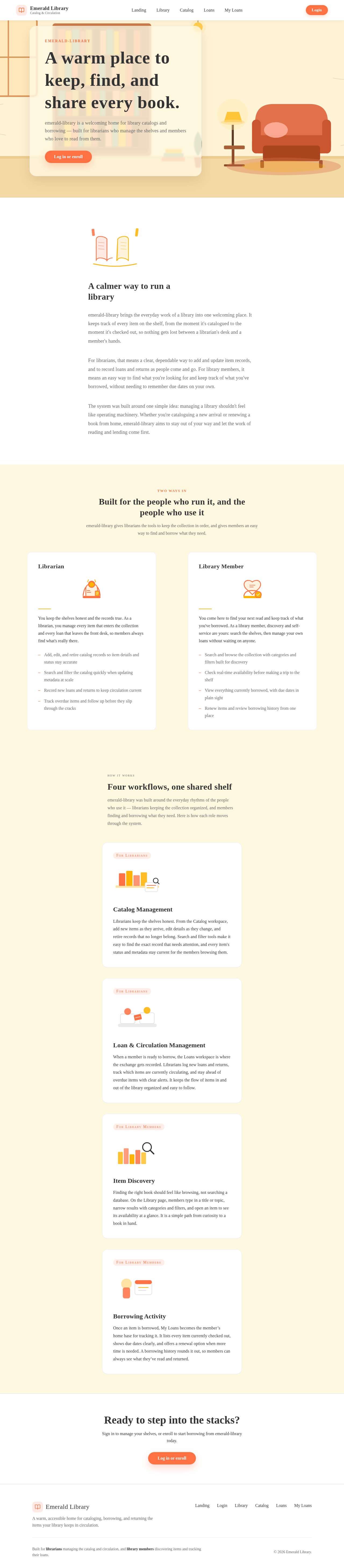
  • Layout: Single-column with illustrated section openers
  • Imagery: Warm flat illustrations, hand-drawn diagrams

7. Signature Design Concept

The landing page features a full-width illustration of a library scene in warm tones. Overlay text in a large serif font introduces the system, with a call-to-action button in primary orange inviting users to log in or enroll.

Page 6 of 8

8. Interaction Model & Motion Direction

  • Interaction Model: Static
  • Motion Tempo: Restrained
  • Hero Dimensionality: Flat
  • Landing Hero Motion Brief: A composed illustration of a library scene with overlay text and a call-to-action button. The scene remains static to maintain focus on the content.

9. Non-Functional Requirements

  • Accessibility: The system must be accessible to users with disabilities, following WCAG 2.1 guidelines.
  • Performance: The system should load pages within 2 seconds under normal network conditions.
  • Security: User data must be protected using industry-standard encryption and authentication mechanisms.

10. Tech Stack

  • Frontend: React
  • Backend: Python/FastAPI
  • Database: PostgreSQL
  • Containerization: Docker
  • Deployment: Kubernetes
Page 7 of 8

11. Assumptions and Constraints

  • Assumption: Users have internet access to use the system.
  • Constraint: The system must comply with data protection regulations applicable to library operations.

12. Glossary

  • Library Management System: A software application for managing library operations, including cataloging, circulation, and member services.
  • Catalog: A collection of library item records.
  • Circulation: The process of lending and returning library items.
  • Enrollment: The process of registering as a library member to access system features.
Page 8 of 8
Landing design preview
Landing: View overview
Login: Sign in
Catalog: Add item record
Catalog: Edit item metadata
Loans: Record new loan
Loans: Process item return
Landing design preview
Landing: View overview
Login: Sign in
Catalog: Add item record
Catalog: Edit item metadata
Loans: Record new loan
Loans: Process item return