earthy-movie
 Johnpaul Mmadubuko
Build a complete movie and TV streaming app called VYRO FLIX. VYRO FLIX should have a premium, modern, cinematic dark design with a futuristic look. Make it responsive for Android phones, tablets, and desktop. HOME Create a home page with: - VYRO FLIX logo - Search bar - Featured movie banner - Trending Movies - Popular Movies - Recently Added - Recommended - Action - Comedy - Horror - Romance - Thriller - Sci-Fi - Anime - Animation - Drama - Nigerian Movies - African Movies Movie cards should show poster, title, year, genre, and rating. SEARCH Create a working search bar that searches movies and series by title, actor, genre, or category. Examples: Action, Anime, Comedy, Horror, Marvel, Tom Cruise. Show matching results in a movie grid. MOVIE DETAILS When a movie is selected, show: - Poster - Backdrop - Title - Description - Genre - Release year - Duration - Rating - Cast - Director - Trailer - Watch Now - Download - Add to Watchlist IMPORTANT: REAL VIDEO PLAYBACK This must be a functional application, not just a visual design. Create a database field called: "video_url" This field must contain the authorized video streaming URL for each movie. When the user clicks Watch Now, retrieve that movie's "video_url" from the database and load it into a real HTML5/video streaming player. The video player must support: - Play/Pause - Volume - Full screen - Seek/progress bar - Skip forward/backward - Playback speed - Subtitles where available - Quality selection - Resume playback Support common authorized formats such as MP4 and HLS/M3U8. If there is no video URL, show "Video currently unavailable" instead of crashing. VIDEO QUALITY Add these quality fields to every movie: "video_url_144p" "video_url_240p" "video_url_360p" "video_url_480p" "video_url_720p" "video_url_1080p" Only show qualities that actually exist. Allow the user to select the available quality before watching or downloading. DOWNLOADS Create a Downloads page. Users should be able to select an available quality and download authorized movies for offline viewing where supported. Use the correct quality video URL for downloads. ADMIN DASHBOARD Create an admin dashboard where authorized administrators can add and edit movies. The Add Movie form must include: - Title - Poster URL - Backdrop URL - Description - Genre - Release year - Duration - Rating - Cast - Director - Trailer URL - Video URL - 144p video URL - 240p video URL - 360p video URL - 480p video URL - 720p video URL - 1080p video URL - Subtitle URL If the platform supports file storage, also allow administrators to upload authorized video files. Store the resulting video URL in the database. WATCHLIST Allow users to add and remove movies from a personal Watchlist. CONTINUE WATCHING Save the user's playback position and allow them to resume the movie from where they stopped. USER ACCOUNTS Allow users to create accounts, log in, edit profiles, view watch history, manage their Watchlist, and manage downloads. NAVIGATION Mobile navigation: Home | Search | Categories | Downloads | Profile DESIGN Use: - Dark cinematic background - White text - Modern typography - VYRO accent color - Large movie artwork - Rounded movie cards - Smooth animations - Professional icons TEST MOVIE Create one sample movie using a legal/public-domain or developer-authorized test video. The sample must contain a working "video_url". Test the complete flow: Movie → Watch Now → Video Player → Play Video Do not create fake buttons or a fake video player. All buttons must perform their actual functions. Only use movies and videos that VYRO FLIX is legally authorized to stream or download. App name: VYRO FLIX Tagline: "Your Movies. Your World."


Comments (0)
Sign in to leave a comment
System Requirements
System Requirements Document for earthy-movie
1. Introduction
VYRO FLIX is a movie and TV streaming application designed to provide users with a premium, modern, and cinematic experience. The app features a dark, futuristic design and is responsive across Android phones, tablets, and desktops. It allows users to browse, search, and watch movies and TV series, manage watchlists, and download content for offline viewing. Administrators can manage the content through a dedicated dashboard.
2. System Overview
VYRO FLIX is a fully functional streaming platform that supports real video playback with multiple quality options. It includes user account management, a watchlist feature, and an admin dashboard for content management. The app is designed with a cinematic dark theme, featuring smooth animations and professional icons. It is legally compliant, streaming only authorized content.
2a. Product Interpretation and Delivery Boundary
The application is designed to be responsive and accessible across multiple devices, including Android phones, tablets, and desktops. It supports user account creation and management, allowing users to maintain a personalized experience. The admin dashboard is restricted to authorized administrators for content management. All media content must be legally authorized for streaming or download.
2b. Source Content Inventory
Not applicable as no content_source directive was provided.
2c. Page Content and Component Coverage
Landing
- Information/State: Introduction to VYRO FLIX, its features, and catalog.
- Primary Actions: Explore catalog, learn about features.
- Components: Introductory text, feature highlights, call-to-action buttons.
Login
- Information/State: User authentication.
- Primary Actions: Log in, password recovery.
- Components: Username and password fields, login button, forgot password link.
HOME
- Information/State: Featured and categorized movie content.
- Primary Actions: Browse categories, select movies.
- Components: VYRO FLIX logo, search bar, featured movie banner, category sections (Trending, Popular, etc.).
SEARCH
- Information/State: Search results based on user queries.
- Primary Actions: Search by title, actor, genre, or category.
- Components: Search bar, results grid.
MOVIE DETAILS
- Information/State: Detailed movie information.
- Primary Actions: Watch Now, Download, Add to Watchlist.
- Components: Poster, backdrop, title, description, genre, release year, duration, rating, cast, director, trailer, video player.
Video Player
- Information/State: Video playback interface.
- Primary Actions: Play/Pause, adjust volume, full screen, seek, skip, change quality, subtitles.
- Components: Video player controls, quality selection, subtitle options.
Downloads
- Information/State: Downloadable content.
- Primary Actions: Select quality, download.
- Components: Download list, quality selection.
Watchlist
- Information/State: User's saved movies.
- Primary Actions: Add/remove movies.
- Components: Watchlist grid, add/remove buttons.
Continue Watching
- Information/State: Movies with saved playback positions.
- Primary Actions: Resume playback.
- Components: Continue watching list, resume button.
Profile
- Information/State: User account details.
- Primary Actions: Edit profile, view history, manage watchlist.
- Components: Profile information, edit options, history list.
admin dashboard
- Information/State: Movie management interface.
- Primary Actions: Add/edit movies, upload media.
- Components: Movie form fields, upload options.
3. Functional Requirements
- As a Viewer, I should be able to browse and search for movies and series by title, actor, genre, or category. (explicit)
- As a Viewer, I should be able to view detailed information about a selected movie. (explicit)
- As a Viewer, I should be able to watch movies using a real HTML5/video streaming player with full controls. (explicit)
- As a Viewer, I should be able to download movies for offline viewing where supported. (explicit)
- As a Viewer, I should be able to add and remove movies from my Watchlist. (explicit)
- As a Viewer, I should be able to resume watching movies from where I left off. (explicit)
- As a Viewer, I should be able to create an account, log in, and manage my profile and watch history. (explicit)
- As an Administrator, I should be able to add and edit movie metadata and media files. (explicit)
4. User Personas
- Viewer: Users who browse, search, watch, download, maintain watchlists, resume playback, and manage their profiles and history.
- Administrator: Authorized personnel who add and edit movie metadata, media URLs, subtitles, and authorized uploaded video files.
5. Core User Flows
Viewer Flow
- Browse Movies: Access the HOME page, browse categories, and select a movie.
- Search Movies: Use the SEARCH page to find movies by title, actor, genre, or category.
- View Movie Details: Select a movie to view detailed information on the MOVIE DETAILS page.
- Watch Movie: Click "Watch Now" to open the Video Player and start playback.
- Download Movie: Navigate to the Downloads page, select quality, and download the movie.
- Manage Watchlist: Add or remove movies from the Watchlist page.
- Resume Watching: Access the Continue Watching page to resume playback of previously watched movies.
- Manage Account: Log in via the Login page, edit profile, and view watch history on the Profile page.
Administrator Flow
- Log In: Access the Login page and authenticate as an administrator.
- Manage Movies: Use the admin dashboard to add or edit movie metadata and upload media files.
6. Visuals Colors and Theme
- Muse: Gleb Kuznetsov
- Palette:
- Background: #0A0A0A
- Surface: #121212
- Text: #FFFFFF
- Primary: #1F1F1F
- Accent: #FF00FF
- Muted: #757575
- Typography:
- Headings: Orbitron — Bold, large scale, uppercase, tight tracking
- Body: Space Grotesk
- Scale: 64/42/28/18/16
- Shape Language: Floating glass panels, thin luminous strokes, radial layouts
- Layout: Full-bleed 3D scene with floating content panels, minimal chrome, and radial UI elements
- Imagery: Abstract 3D objects, particle fields, and product holograms
7. Signature Design Concept
The public entry page features a full-viewport 3D scene with interactive orbiting elements. Thin, glowing borders around movie cards light up on hover, and a radially-aligned navigation menu expands with hover effects. Cinematic slow-motion data streams animate behind movie banners, and floating glass panels reveal movie details on scroll.
8. Interaction Model & Motion Direction
- Interaction Model: Animated
- Motion Tempo: Cinematic
- Hero Dimensionality: WebGL
- Landing Hero Motion Brief: A full-bleed 3D scene with floating glass panels and glowing accents. The dominant element is a volumetric form floating at large scale against a deep black ground. Interactive orbiting elements and cinematic slow-motion data streams create an immersive experience.
9. Non-Functional Requirements
- Performance: The app must load quickly and provide smooth interactions across all supported devices.
- Security: Ensure secure user authentication and data protection.
- Compliance: Only stream or download legally authorized content.
- Accessibility: Ensure the app is accessible to users with disabilities.
10. Tech Stack
- Frontend: React, HTML5, CSS3
- Backend: Python/FastAPI
- Database: PostgreSQL
- Video Streaming: HTML5 player supporting MP4 and HLS/M3U8 formats
- Deployment: Docker, Kubernetes (if required)
11. Assumptions and Constraints
- Assumptions:
- Users have internet access for streaming and downloading content.
- Administrators have the necessary permissions to manage content.
- Constraints:
- Only legally authorized movies and videos may be streamed or downloaded.
- The primary database field must be named exactly "video_url".
- Quality fields must be named exactly as specified.
12. Glossary
- VYRO FLIX: The name of the movie and TV streaming application.
- Viewer: A user who consumes content on VYRO FLIX.
- Administrator: A user with permissions to manage content on VYRO FLIX.
- Video URL: The authorized streaming URL for a movie.
- Watchlist: A personalized list of movies saved by the user for future viewing.
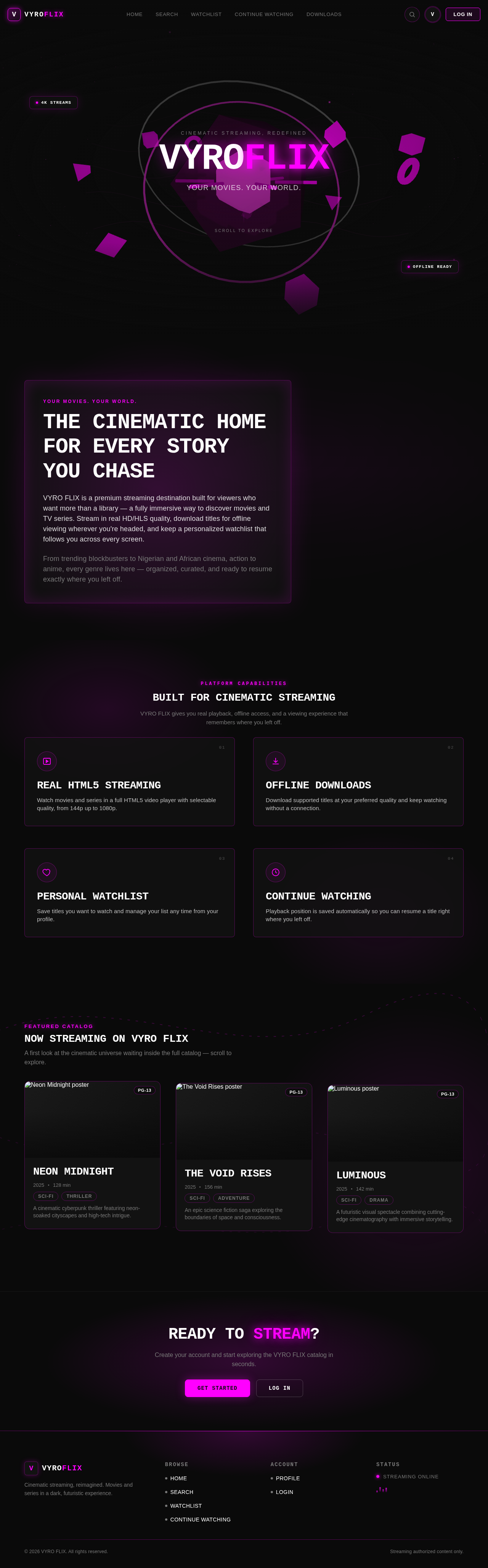
CINEMATIC STREAMING, REDEFINED
VYROFLIX
Your Movies. Your World.
YOUR MOVIES. YOUR WORLD.
The Cinematic Home For Every Story You Chase
VYRO FLIX is a premium streaming destination built for viewers who want more than a library — a fully immersive way to discover movies and TV series. Stream in real HD/HLS quality, download titles for offline viewing wherever you're headed, and keep a personalized watchlist that follows you across every screen.
From trending blockbusters to Nigerian and African cinema, action to anime, every genre lives here — organized, curated, and ready to resume exactly where you left off.
Built for Cinematic Streaming
VYRO FLIX gives you real playback, offline access, and a viewing experience that remembers where you left off.
Real HTML5 Streaming
Watch movies and series in a full HTML5 video player with selectable quality, from 144p up to 1080p.
Offline Downloads
Download supported titles at your preferred quality and keep watching without a connection.
Personal Watchlist
Save titles you want to watch and manage your list any time from your profile.
Continue Watching
Playback position is saved automatically so you can resume a title right where you left off.
Now Streaming on VYRO FLIX
A first look at the cinematic universe waiting inside the full catalog — scroll to explore.

Neon Midnight
A cinematic cyberpunk thriller featuring neon-soaked cityscapes and high-tech intrigue.

The Void Rises
An epic science fiction saga exploring the boundaries of space and consciousness.

Luminous
A futuristic visual spectacle combining cutting-edge cinematography with immersive storytelling.
READY TO STREAM?
Create your account and start exploring the VYRO FLIX catalog in seconds.
CINEMATIC STREAMING, REDEFINED
VYROFLIX
Your Movies. Your World.
YOUR MOVIES. YOUR WORLD.
The Cinematic Home For Every Story You Chase
VYRO FLIX is a premium streaming destination built for viewers who want more than a library — a fully immersive way to discover movies and TV series. Stream in real HD/HLS quality, download titles for offline viewing wherever you're headed, and keep a personalized watchlist that follows you across every screen.
From trending blockbusters to Nigerian and African cinema, action to anime, every genre lives here — organized, curated, and ready to resume exactly where you left off.
Built for Cinematic Streaming
VYRO FLIX gives you real playback, offline access, and a viewing experience that remembers where you left off.
Real HTML5 Streaming
Watch movies and series in a full HTML5 video player with selectable quality, from 144p up to 1080p.
Offline Downloads
Download supported titles at your preferred quality and keep watching without a connection.
Personal Watchlist
Save titles you want to watch and manage your list any time from your profile.
Continue Watching
Playback position is saved automatically so you can resume a title right where you left off.
Now Streaming on VYRO FLIX
A first look at the cinematic universe waiting inside the full catalog — scroll to explore.
Neon Midnight
A cinematic cyberpunk thriller featuring neon-soaked cityscapes and high-tech intrigue.
The Void Rises
An epic science fiction saga exploring the boundaries of space and consciousness.
Luminous
A futuristic visual spectacle combining cutting-edge cinematography with immersive storytelling.
READY TO STREAM?
Create your account and start exploring the VYRO FLIX catalog in seconds.
No comments yet. Be the first!