earthy-moon
 AmirAli
سلام ببین میخوام برام یک اسکریپت دلتا بسازی که یک منو باشه ولی ازت میخوام که خودت ۱۰ تا پیشنهاد بدی و اون ۱۰ تا رو بزاری داخل منو فقط حواست باشه که باگی اتفاق نیوفته منظورم از باگ مثلا فقط واحد عوض شه و به سرور دستوری وارد نشه


Comments (0)
Sign in to leave a comment
System Requirements
System Requirements Document for اسکریپت دلتا
1. Introduction
اسکریپت دلتا is a small web application that presents a single menu for a Delta game script. The product's intent is narrow and safety-first: the Delta script user opens one menu, sees ten ready-made suggestions written by the builder, and picks one. Every pick is validated before anything is sent, and each pick sends exactly one command — so a selection can never change only the unit or push a wrong command into the server.
The audience is the Delta script user: someone who runs a Delta game script and wants a plain, trustworthy menu of safe, pre-written picks rather than free-form command entry. The product is a web app only; it does not build a menu or script inside the Delta game server.
2. System Overview
2a. Product Interpretation and Delivery Boundary
The product is delivered as a first-party web application with two pages. Landing is the public entry surface that explains the Delta script menu and hands the user into the menu. Menu is the working surface: it lists the ten builder-written suggestions and validates each pick before sending exactly one command.
Both pages are openly reachable with no account, sign-in, or identity establishment — the accepted journeys require no durable per-user state, no private ownership, and no commitment bound to a specific participant, so no application identity is introduced. The application owns the menu, the ten suggestions, the validation step, and the single-command send. The Delta game server is an external system that receives the one validated command; the product does not host, modify, or embed anything inside that server.
Current scope is exactly these two pages and the pick-validate-send lifecycle. Nothing beyond a single menu is in scope.
2c. Page Content and Component Coverage
Landing
- Information and state: Product name اسکریپت دلتا; the hero headline "یک انتخاب. یک دستور. بدون خطا."; the subline "ده پیشنهاد آماده است. هر انتخاب پیش از ارسال بررسی می\xe2\x80\x8cشود."; a short plain-spoken statement that the menu holds ten suggestions and that each pick is checked before one command is sent. No user-specific state; the page is static apart from its entry motion.
- Primary action: The call to action "باز کردن منو" — a hard-cornered safety-orange block under the headline that navigates to Menu.
- Supporting actions: None beyond the single CTA; no secondary links, forms, or account entry.
- Domain entities: None owned here; it references the ten suggestions and the one-command-per-pick rule as explanatory copy only.
- Component responsibilities:
- Full-width safety-orange header band carrying the stacked Alfa Slab One headline in ink, left-aligned, with a stamped badge at the right edge.
- Kraft-paper halftone texture applied to the header band only.
- Subline block in Oswald beneath the headline.
- CTA block with thick 3px border, hard corners, safety-orange fill, ink label.
- A ruled panel summarizing the safety promise (one pick, one validated command).
- States:
- Loading: none required (static content).
- Empty: not applicable.
- Success: page renders fully; CTA navigates to Menu.
- Error: not applicable; if navigation fails the user remains on Landing and can press the CTA again.
- Recovery: re-press the CTA.
Menu
- Information and state: The list of ten suggestions, each shown as a ruled row with a thick-line vector icon, a number stamp (۱–۱۰), and a value label. Each row carries its own selection state (unselected / selected with mustard stamp). A per-pick validation state (idle / checking / valid / rejected) and a send state (idle / sending / sent / failed) are shown for the active pick. The page also shows which single command was sent for the last successful pick.
- Primary action: Select one of the ten suggestion rows, then confirm the pick so it is validated and exactly one command is sent.
- Supporting actions: Change the selection before confirming; retry after a rejected validation or a failed send; return to Landing.
- Domain entities:
- Suggestion — one of ten builder-written entries; fields: number (۱–۱۰), label, icon, and the single command it maps to.
- Pick — the user's current selection: the chosen suggestion plus its validation outcome.
- Send result — the outcome of dispatching the one validated command: sent or failed, with the command that was sent.
- Component responsibilities:
- Two-column ruled grid of ten suggestion rows at 1280px; one column at 768px and 375px.
- Each row: thick 3px border, hard corners, thick-line icon, number stamp, value label; selected rows receive a mustard stamp overlay with a hard offset shadow and no animation curve.
- Confirm control: hard-cornered safety-orange block, disabled until exactly one row is selected.
- Validation feedback area: states that the pick was checked and that one command will be sent, or that the pick was rejected and nothing was sent.
- Send result area: confirms the single command sent, or reports failure with a retry path.
- States:
- Loading: rows render immediately from the fixed ten suggestions; a brief placeholder is acceptable while the list is prepared.
- Empty: not applicable — the menu always holds exactly ten suggestions; if the list cannot be prepared, an error state explains that the menu is unavailable and offers retry.
- Success: one row selected, validation passes, exactly one command sent, and the sent command is shown.
- Error: validation rejects the pick (nothing is sent, the user is told why and may choose again); send fails (the user is told the command was not accepted and may retry the same validated pick).
- Recovery: reselect a different row, or retry the same validated pick; the confirm control re-enables only when a single valid pick is present.
3. Functional Requirements
FR-1 — Open the Delta script menu from the public entry. As a Delta script user, I should land on a public page that explains the Delta script menu and open the menu from it, so that I reach the ten suggestions with one clear action.
- Provenance: explicit (menu for a Delta script) + required_inference (Landing entry surface).
- Trigger/input: The user visits the app root.
- Observable result: Landing renders with the product name, headline, subline, and the "باز کردن منو" CTA; pressing the CTA navigates to Menu.
- Access state: Public, no account.
- Failure/recovery: If navigation does not complete, the user stays on Landing and presses the CTA again.
- Continuation: The user arrives on Menu with all ten suggestions visible.
FR-2 — See exactly ten builder-written suggestions in one menu. As a Delta script user, I should see a single menu containing exactly ten suggestions written by the builder, so that I choose from a fixed, known set rather than composing commands myself.
- Provenance: explicit.
- Trigger/input: The user opens Menu.
- Observable result: Ten ruled rows render, each with a number stamp (۱–۱۰), a thick-line icon, and a value label; no eleventh row and no free-form command field exists.
- Access state: Public, no account.
- Failure/recovery: If the list cannot be prepared, an error state says the menu is unavailable and offers retry; no partial or invented suggestions are shown.
- Continuation: The user inspects the rows and selects one.
FR-3 — Select exactly one suggestion. As a Delta script user, I should select one suggestion at a time, so that the menu never holds an ambiguous or doubled pick.
- Provenance: explicit (one command per pick) + required_inference (single-selection mechanic).
- Trigger/input: The user activates a suggestion row.
- Observable result: That row shows the mustard stamp selected state; any previously selected row returns to unselected; the confirm control becomes enabled for exactly one pick.
- Access state: Public, no account.
- Failure/recovery: The user may change the selection freely before confirming; selecting another row replaces the pick rather than adding to it.
- Continuation: The user confirms the single pick.
FR-4 — Validate each pick before any command is sent. As a Delta script user, I should have my pick validated before anything is sent, so that a bad pick is caught before it reaches the server.
- Provenance: explicit.
- Trigger/input: The user confirms the selected suggestion.
- Observable result: The pick enters a checking state; on success the page states the pick was checked and that one command will be sent; on rejection the page states the pick was rejected and that nothing was sent.
- Access state: Public, no account.
- Failure/recovery: A rejected pick sends nothing; the user is told why and may choose a different row.
- Continuation: A valid pick proceeds to the single send; a rejected pick returns the user to selection.
FR-5 — Send exactly one command per pick. As a Delta script user, I should have exactly one command sent for my pick, so that no unit or value changes by mistake and no wrong command reaches the server.
- Provenance: explicit.
- Trigger/input: A pick that passed validation.
- Observable result: Exactly one command is dispatched to the Delta game server for that pick; the page shows the sent command and a sent state; no second command is dispatched for the same confirmation.
- Access state: Public, no account.
- Failure/recovery: If the send fails, the page reports that the command was not accepted and offers retry of the same validated pick; a retry re-validates before sending again so the one-command rule holds.
- Continuation: After a successful send the user may pick another suggestion and repeat.
FR-6 — Keep the menu free of unit-only or wrong-command outcomes. As a Delta script user, I should never see a pick that changes only the unit or pushes a wrong command, so that I can trust every selection.
- Provenance: explicit (hard constraint).
- Trigger/input: Any confirmation of any of the ten suggestions.
- Observable result: Each suggestion maps to one complete command; validation rejects any pick whose command is incomplete or mismatched, and the page never dispatches a partial command.
- Access state: Public, no account.
- Failure/recovery: A rejected pick sends nothing and the user is told the pick was not sent.
- Continuation: The user selects a valid suggestion.
FR-7 — Return to the entry page. As a Delta script user, I should be able to go back to the entry page from the menu, so that I can re-read what the menu does.
- Provenance: required_inference (navigation continuity between the two accepted pages).
- Trigger/input: The user activates the return control on Menu.
- Observable result: Landing renders again.
- Access state: Public, no account.
- Failure/recovery: If navigation does not complete, the user remains on Menu and may retry.
- Continuation: The user re-enters Menu via the CTA.
4. User Personas
Delta script user
- Product context: Runs a Delta game script and needs a safe, pre-written way to issue a command. The user does not want to compose commands by hand and does not want to risk a pick that changes only the unit or sends something wrong to the server.
- Primary goal: Pick one of ten ready-made suggestions and have exactly one validated command sent.
- Distinct accepted responsibilities:
- Opens the public entry page and reads what the menu does.
- Enters the single menu and reviews the ten suggestions.
- Selects exactly one suggestion.
- Confirms the pick so it is validated before sending.
- Reads the validation outcome and the send result, and recovers by reselecting or retrying when a pick is rejected or a send fails.
- Relevant inputs or decisions: Which of the ten suggestions to pick; whether to confirm, change the selection, or retry after a rejection or failure.
- Interactions with other accepted participants: The only other actor is the external Delta game server, which receives the one validated command. There is no second human participant in the accepted journeys.
- Observable success: The page shows the pick was validated and that exactly one command was sent, with the sent command visible; no unit-only change and no wrong command occurred.
- What makes this role distinct: The user's work is a single safe pick from a fixed set under a one-command guarantee — not free-form entry, not multi-step configuration, and not account-bound work.
5. Core User Flows
Flow A — Open the menu from the public entry
- The Delta script user opens the app root and lands on Landing.
- Landing shows the product name, the headline "یک انتخاب. یک دستور. بدون خطا.", the subline "ده پیشنهاد آماده است. هر انتخاب پیش از ارسال بررسی می\xe2\x80\x8cشود.", and the safety panel explaining one pick and one validated command.
- The user presses the "باز کردن منو" CTA.
- Menu opens with all ten suggestions visible.
- Failure/recovery: If navigation does not complete, the user stays on Landing and presses the CTA again.
Flow B — Pick one suggestion and send exactly one validated command
- On Menu, the user reviews the ten ruled rows, each with a number stamp (۱–۱۰), a thick-line icon, and a value label.
- The user activates one row. That row receives the mustard stamp selected state; any prior selection clears; the confirm control enables for exactly one pick.
- The user presses confirm. The pick enters a checking state.
- Validation outcome:
- Valid: the page states the pick was checked and that one command will be sent.
- Rejected: the page states the pick was rejected and that nothing was sent; the user is told why and returns to step 2 to choose another row.
- On a valid pick, exactly one command is dispatched to the Delta game server. The page shows the sent command and a sent state; no second command is dispatched for that confirmation.
- Send failure: the page reports that the command was not accepted and offers retry. A retry re-validates the same pick before sending again, preserving the one-command rule.
- Continuation: after a successful send the user may select another suggestion and repeat from step 2, or return to Landing.
Flow C — Return to the entry page
- From Menu, the user activates the return control.
- Landing renders again with the product explanation and CTA.
- Failure/recovery: If navigation does not complete, the user remains on Menu and may retry.
- The user may re-enter Menu via the CTA.
6. Visuals Colors and Theme
Muse and headline: Aaron Draplin — bold, honest, hand-built. The theme reads as sturdy workwear: kraft ground, ink text, safety orange for the primary action, mustard for selection, thick strokes and badge logic.
Mode: Light mode only.
Colour tokens (exact hex by role):
- Background (kraft ground):
#F2E8D5 - Surface (ruled panels, rows):
#E7D9BE - Text (ink):
#1E1B16 - Primary (safety orange — primary action, active badge, header band):
#D9541E - Accent (mustard — selected state, stamp overlay):
#F0A81E - Muted (secondary labels, rules):
#6B5D45
Typography:
- Headings: Alfa Slab One, heavy slab, all caps, tight tracking; sizes 40px–96px (96px desktop hero, 40px mobile hero).
- Body: Oswald.
- Scale: 1.333 modular — 96 / 64 / 40 / 24 / 18 / 16.
Shape language: Thick 3px borders, hard corners, badge and stamp motifs, ruled panels. No rounded pills, no soft shadows.
Spacing rhythm: Poster-like stack; generous ruled gutters between rows; full-width bands for the header and CTA.
Imagery style: Thick-line vector icons for each suggestion; kraft-paper halftone texture on the header band only; no photography.
Layout: Full-width badge header above a two-column ruled grid of ten suggestion rows at 1280px; rows stack to one column at 768px and 375px.
Avoid: No blue or indigo accents anywhere; no rounded pill buttons or soft shadows; no gradient blobs or glass panels; no centred hero with subtext and a blue button; the generic indigo/blue-on-white SaaS template is forbidden.
Readability rule: Headlines, wordmarks, labels, numbers, and controls stay entirely inside the viewport and their container at 375px, 768px, and 1280px, wrapping or scaling (for example font-size: clamp(...) with its mobile size) to fit; no other element covers any part of them.
7. Signature Design Concept
The public entry is a kraft-paper poster. A full-width safety-orange band (#D9541E) fills the first screen and carries the oversized Alfa Slab One headline "یک انتخاب. یک دستور. بدون خطا." in ink (#1E1B16), stacked left at 96px on desktop and 40px on mobile. A stamped badge sits at the right edge of the band, and a kraft-paper halftone texture sits on the header band only. Beneath the headline, the Oswald subline "ده پیشنهاد آماده است. هر انتخاب پیش از ارسال بررسی می\xe2\x80\x8cشود." sits on the kraft ground (#F2E8D5). The CTA "باز کردن منو" is a hard-cornered safety-orange block with a thick 3px ink border directly under the headline. A ruled panel below restates the safety promise — one pick, one validated command — in plain talk. The gesture is carried by the band, the halftone, and the badge; all readable text and the CTA stay whole at every viewport.
8. Interaction Model & Motion Direction
Interaction Model: Animated Motion Tempo: restrained Hero Dimensionality: flat
Landing Hero Motion Brief
- Focal subject: The full-width safety-orange header band with the stacked Alfa Slab One headline and the stamped badge at the right edge.
- Input → transformation → outcome thesis: On load, the header band snaps into place with no easing curve; the headline and badge snap in with it; the CTA block snaps in beneath; the outcome is a fully composed poster with the CTA ready to open the menu. No accepted behaviour is added — the motion only reveals the existing entry content.
- Motion vocabulary: Snap-in reveals with no easing curve; selected rows get a stamp effect; no bounce.
- Composed first frame: Kraft ground filling the screen, safety-orange band across the top with the ink headline stacked left and the stamped badge at the right edge, halftone texture on the band, CTA block beneath the headline.
- Reduced-motion state: All elements render in their final positions immediately with no snap-in; the layout is fully usable and the CTA remains pressable.
9. Non-Functional Requirements
- One-command guarantee (explicit): Each confirmed pick dispatches exactly one command; the application must not dispatch a second command for the same confirmation, and a retry must re-validate before sending again. Rationale: the user's hard constraint that no unit or value changes by mistake.
- No partial commands (explicit): Validation must reject any pick whose command is incomplete or mismatched; the application must never send a unit-only change or a wrong command. Rationale: explicit hard constraint.
- Web-app-only boundary (explicit): The product is a web app only; it must not build a menu or script inside the Delta game server. Rationale: explicit hard constraint.
- Public access (required_inference): Both pages are reachable without an account; no identity, session, or permission model is introduced because no accepted journey requires durable per-user state. Rationale: actor-continuity analysis.
- Readable text and controls (explicit design constraint): Headlines, labels, numbers, and controls stay entirely inside the viewport and their container at 375px, 768px, and 1280px. Rationale: creative direction readability rule.
- Reduced motion (explicit design constraint): With
prefers-reduced-motion, provide a usable static arrangement with all content in final position. Rationale: creative direction motion rule. - Fixed suggestion set (explicit): The menu holds exactly ten builder-written suggestions; no free-form command entry exists. Rationale: explicit requirement.
10. Tech Stack
- Frontend: React application UI (Landing and Menu pages).
- Backend: Shared FastAPI process for application APIs and domain modules — hosts the suggestion list, the validation step, and the single-command dispatch to the Delta game server.
- Database: MariaDB for application-owned persistent data (the ten suggestion definitions and their command mappings).
- Deployment: Docker / docker-compose with the provisioned services:
frontend,backend,database.
11. Assumptions and Constraints
- Assumption [required_inference]: The Delta game server exposes an endpoint the backend can call to receive one command per pick; the product does not host or modify that server.
- Assumption [required_inference]: The ten suggestions are fixed, builder-written entries stored in the application database; the user does not add, edit, or remove them.
- Constraint (explicit): The product is a web app only; no menu or script is built inside the Delta game server.
- Constraint (explicit): A pick must not change only the unit or send a wrong command to the server.
- Constraint (explicit): Only one menu exists for the Delta script.
- Constraint (explicit design): No blue or indigo accents; no rounded pills or soft shadows; no gradient blobs or glass panels; no centred hero with a blue button.
- Constraint (explicit design): Readable text and controls stay whole at 375px, 768px, and 1280px.
12. Glossary
- Delta script: The game script the user runs; the product provides its menu.
- Suggestion: One of the ten builder-written entries in the menu, each with a number stamp, icon, value label, and a single mapped command.
- Pick: The user's current single selection from the ten suggestions.
- Validation: The check performed on a pick before any command is sent; a rejected pick sends nothing.
- One-command rule: Exactly one command is dispatched per confirmed pick; no unit-only change and no wrong command.
- Delta game server: The external system that receives the one validated command; outside the product's ownership.
- Landing: The public entry page that explains the menu and opens it.
- Menu: The single page listing the ten suggestions and handling pick, validation, and send.
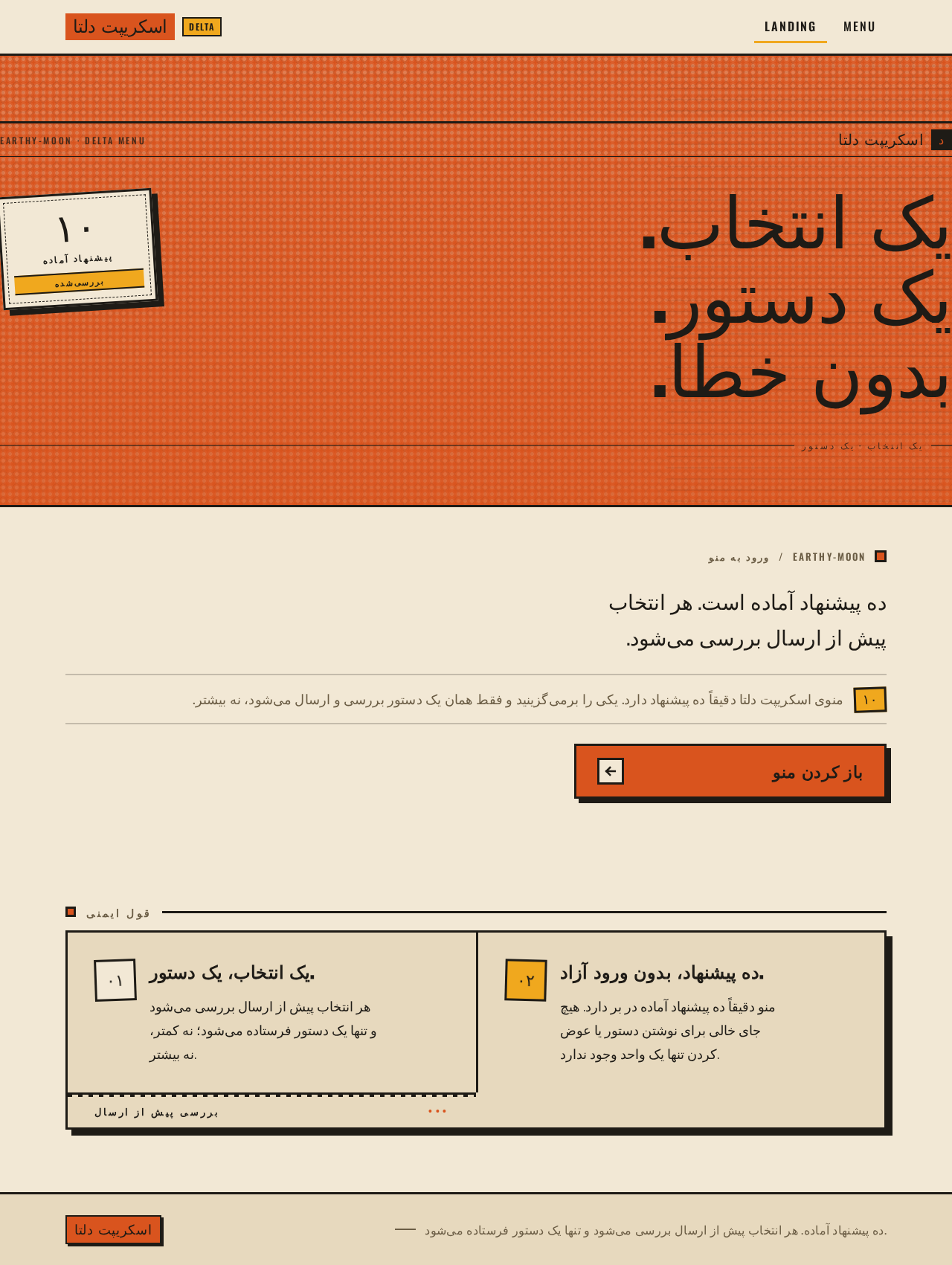
یک انتخاب.یک دستور.بدون خطا.
یک انتخاب · یک دستور
earthy-moonورود به منو
ده پیشنهاد آماده است. هر انتخاب پیش از ارسال بررسی میشود.
منوی اسکریپت دلتا دقیقاً ده پیشنهاد دارد. یکی را برمیگزینید و فقط همان یک دستور بررسی و ارسال میشود، نه بیشتر.
قول ایمنی
یک انتخاب، یک دستور.
هر انتخاب پیش از ارسال بررسی میشود و تنها یک دستور فرستاده میشود؛ نه کمتر، نه بیشتر.
ده پیشنهاد، بدون ورود آزاد.
منو دقیقاً ده پیشنهاد آماده در بر دارد. هیچ جای خالی برای نوشتن دستور یا عوض کردن تنها یک واحد وجود ندارد.
No comments yet. Be the first!