earthy-military
 Kanwarveer singh Singh
Create a complete, fully functional, single-file HTML/CSS/JS e-commerce website for a military equipment store named “TacticalGrid”. Core requirements: · The site must work entirely in a browser with no external backend – use JavaScript (localStorage) for the shopping cart. · All product data (name, price, category, image, description) must be stored in a JavaScript array of objects so that the site is fully self‑contained. · Include realistic placeholder images (using https://picsum.photos/... or similar) but with descriptive alt text (e.g., “M4 assault rifle product image”). Mandatory product categories (with at least 3 products per category): 1. Firearms (all types) – assault rifles, sniper rifles, pistols, shotguns, submachine guns. 2. Missiles & Launchers – anti‑tank missiles, shoulder‑fired rockets, surface‑to‑air missiles. 3. Communication Devices – tactical radios, encrypted handhelds, satellite phones, headsets. 4. Tactical Apparel – uniforms, boots, plate carriers. 5. Ballistic Protection – helmets, ballistic vests, shields. 6. Optics & Sights – scopes, red dots, night vision. 7. Firearm Accessories – grips, suppressors, magazines. 8. Survival & Field Gear – knives, first aid, NVG pouches. AI Chatbot (mandatory): · Add a floating chat icon (bottom right) that opens a chat widget when clicked. · The chatbot must simulate AI‑powered responses – it should answer basic customer questions such as: · “What firearms do you sell?” · “Do you have night vision?” · “How can I track my order?” · “Tell me about your missile systems.” · “What communication devices are in stock?” · Use a rule‑based or keyword‑matching approach (no external API required) – the bot should respond intelligently based on user input. · The chat window must include a message history, a text input, a send button, and a close button. · Style the chat to match the military theme (dark green, black, subtle glow). Pages / Sections (all must be present and linked): · Home page – hero section, featured products (mix of gun, missile, comms), call‑to‑action buttons. · All categories – show products grouped by category (filterable or separate sections). · Product detail view – click any product to see a modal or detail page with larger image, full description, price, stock, quantity selector. · Shopping cart – sidebar or separate page; add/remove items, update quantities, show subtotal, tax, total; persist cart using localStorage. · About Us – mission statement, team background (fictional). · Contact Us – form (name, email, message) with an alert on submit (no actual backend). · Services – custom fitting, maintenance, integration, training. SEO & structure: · Meta description and keywords. · Semantic HTML5 (header, nav, main, section, footer). · All images have alt attributes. · Responsive design (mobile, tablet, desktop) with CSS Grid/Flexbox and media queries. · Dark/olive green & black color scheme (military style). Legal disclaimer: · Add a small footer disclaimer: “All product images and descriptions are for demonstrative purposes only. Compliance with local laws is buyer’s responsibility.” Extra polish: · Header with logo, navigation dropdown for categories, cart icon with item count. · Footer with quick links, social icons, copyright. · Newsletter signup (alert on submit). · Back‑to‑top button. Output: Produce a single HTML file that includes <style> and <script> blocks – no external files required. The page must be fully interactive and functional immediately after opening in a browser. The AI chatbot must be fully operational, not just a visual placeholder. --- This prompt now explicitly demands a working AI chatbot alongside the full military e‑commerce site. Paste it into any modern AI coding tool (ChatGPT, Claude, Gemini, etc.) to generate the complete website.

Comments (0)
Sign in to leave a comment
Architecture
No Services Diagrams Yet
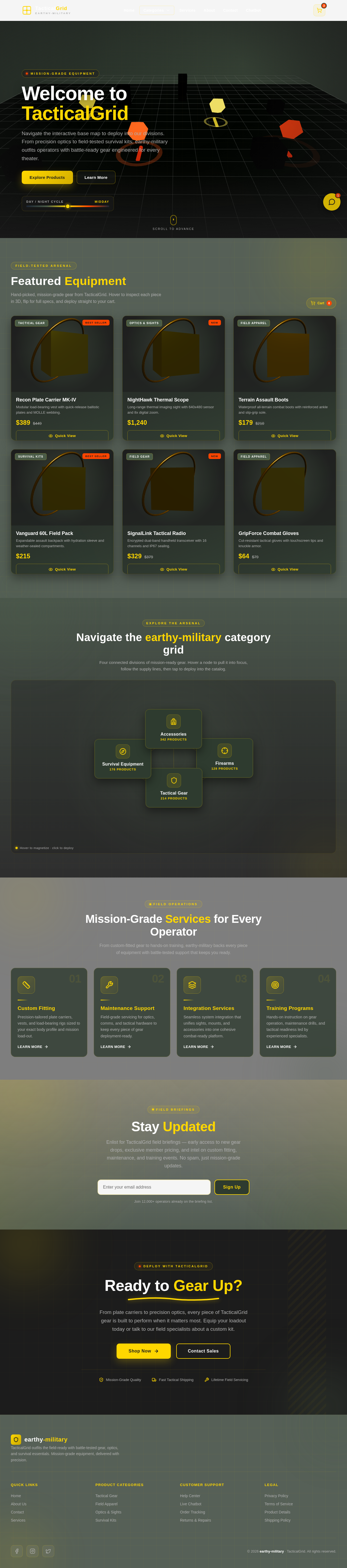
Welcome to TacticalGrid
Navigate the interactive base map to deploy into our divisions. From precision optics to field-tested survival kits, earthy-military outfits operators with battle-ready gear engineered for every theater.
Featured Equipment
Hand-picked, mission-grade gear from TacticalGrid. Hover to inspect each piece in 3D, flip for full specs, and deploy straight to your cart.
Recon Plate Carrier MK-IV
Modular load-bearing vest with quick-release ballistic plates and MOLLE webbing.
Recon Plate Carrier MK-IV
Tactical Gear
- MaterialCordura 500D
- Weight1.4 kg
- ProtectionNIJ IIIA
NightHawk Thermal Scope
Long-range thermal imaging sight with 640x480 sensor and 8x digital zoom.
NightHawk Thermal Scope
Optics & Sights
- Sensor640x480
- Range1800 m
- Battery9 hrs
Terrain Assault Boots
Waterproof all-terrain combat boots with reinforced ankle and slip-grip sole.
Terrain Assault Boots
Field Apparel
- UpperFull-grain leather
- SoleVibram XT
- RatingIPX7
Vanguard 60L Field Pack
Expandable assault backpack with hydration sleeve and weather-sealed compartments.
Vanguard 60L Field Pack
Survival Kits
- Capacity60 L
- FrameAlloy stay
- FabricRipstop nylon
SignalLink Tactical Radio
Encrypted dual-band handheld transceiver with 16 channels and IP67 sealing.
SignalLink Tactical Radio
Field Gear
- BandsVHF / UHF
- Range12 km
- Battery18 hrs
GripForce Combat Gloves
Cut-resistant tactical gloves with touchscreen tips and knuckle armor.
GripForce Combat Gloves
Field Apparel
- PalmSynthetic suede
- Cut levelEN-5
- SizesS - XXL
Navigate the earthy-military category grid
Four connected divisions of mission-ready gear. Hover a node to pull it into focus, follow the supply lines, then tap to deploy into the catalog.
Mission-Grade Services for Every Operator
From custom-fitted gear to hands-on training, earthy-military backs every piece of equipment with battle-tested support that keeps you ready.
Custom Fitting
Precision-tailored plate carriers, vests, and load-bearing rigs sized to your exact body profile and mission load-out.
Learn MoreMaintenance Support
Field-grade servicing for optics, comms, and tactical hardware to keep every piece of gear deployment-ready.
Learn MoreIntegration Services
Seamless system integration that unifies sights, mounts, and accessories into one cohesive combat-ready platform.
Learn MoreTraining Programs
Hands-on instruction on gear operation, maintenance drills, and tactical readiness led by experienced specialists.
Learn MoreReady to Gear Up?
From plate carriers to precision optics, every piece of TacticalGrid gear is built to perform when it matters most. Equip your loadout today or talk to our field specialists about a custom kit.
No comments yet. Be the first!