earthy-entire

byPriyanshu Soni

Build this entire micro sass

LandingLogin
Landing

Comments (0)

No comments yet. Be the first!

System Requirements

System Requirement Document
Page 1 of 10

System Requirements Document for earthy-entire

Introduction

This document outlines the system requirements for a Trade-Specific Quote Generator, a micro SaaS designed to assist service businesses in creating accurate and professional estimates on-site. The system facilitates the entire workflow from quote creation to approval, payment collection, and conversion into jobs or invoices, with a focus on mobile-first and WhatsApp integration.

System Overview

The Trade-Specific Quote Generator is a mobile-first SaaS platform that transforms informal pricing conversations into structured workflows. It supports various trade-specific logic and templates, enabling businesses to generate quotes, obtain digital approvals, and manage payments efficiently. The system integrates with WhatsApp for communication and follow-up, and supports payment processing through Razorpay and Stripe.

Product Interpretation and Delivery Boundary

The system is designed for small to medium-sized service businesses, emphasizing functionality and trust. It includes provider-managed SaaS workflows, secure hosted client quote pages, generated branded PDFs, and external communications via WhatsApp and email. The system excludes advanced AI estimation and full mobile app development in its MVP phase.

Page Content and Component Coverage

Page 2 of 10

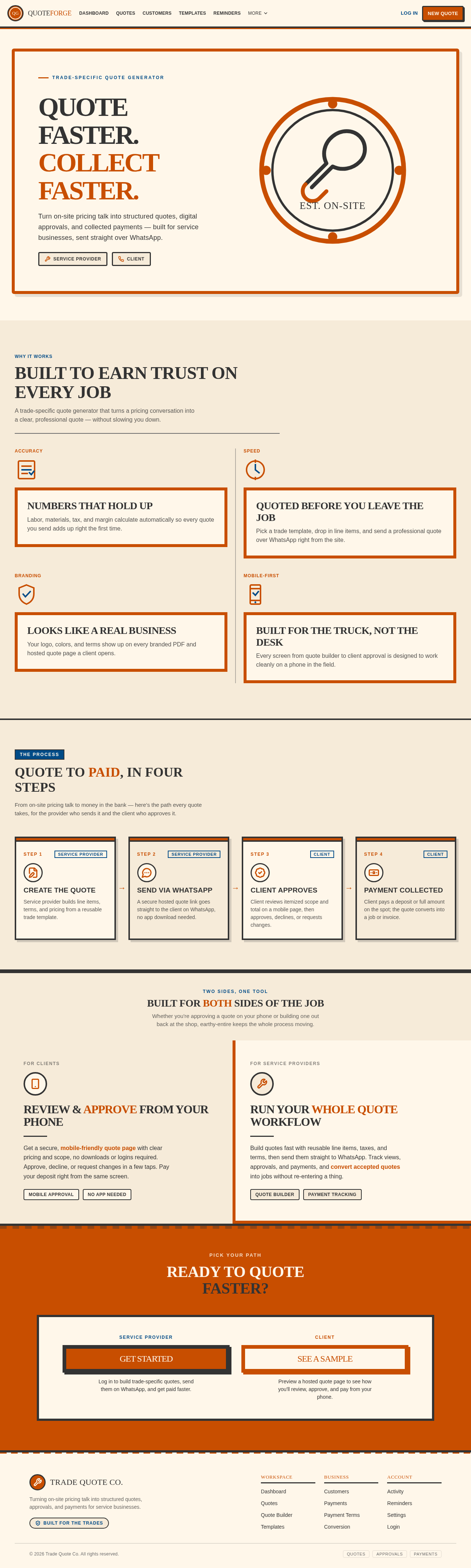
Landing

  • Information: Overview of the quote generator, benefits for service businesses, and workflow explanation.
  • Primary Actions: Explore features, contact for more information.
  • Components: Hero section with badge-style design, introductory text, feature highlights.

Login

  • Information: Access for returning Service Providers.
  • Primary Actions: Login with credentials.
  • Components: Login form, password recovery.

Dashboard

  • Information: Summary of quote activity and business workflows.
  • Primary Actions: Navigate to quotes, templates, settings.
  • Components: Activity summary, quick links, notifications.

Settings

  • Information: Manage company profile, branding, tax settings, and roles.
  • Primary Actions: Update profile, manage roles.
  • Components: Profile form, branding options, role management.

Customers

  • Information: Manage customer and contact database.
  • Primary Actions: Add, edit, delete customer information.
  • Components: Customer list, contact details form.
Page 3 of 10

Templates

  • Information: Browse and select industry-specific templates.
  • Primary Actions: Select, customize templates.
  • Components: Template library, customization options.

Quotes

  • Information: Manage quotes across various states.
  • Primary Actions: Create, send, filter, manage quotes.
  • Components: Quote list, status filters, action buttons.

Quote Builder

  • Information: Workspace for creating and editing quotes.
  • Primary Actions: Add line items, set terms.
  • Components: Line item editor, terms and conditions form.

Quote Preview

  • Information: Prepare branded PDF and hosted quote page.
  • Primary Actions: Preview, finalize quote.
  • Components: PDF preview, hosted page setup.

Reminders

  • Information: Configure automated follow-ups.
  • Primary Actions: Set reminders, manage notifications.
  • Components: Reminder settings, notification list.
Page 4 of 10

Activity

  • Information: Review quote interactions and client responses.
  • Primary Actions: View activity, respond to client actions.
  • Components: Activity log, response options.

Payment Terms

  • Information: Configure payment terms for quotes.
  • Primary Actions: Set fixed, percentage, or milestone payments.
  • Components: Payment term options, configuration form.

Payments

  • Information: Manage payment integrations and outcomes.
  • Primary Actions: Review payments, configure integrations.
  • Components: Payment list, integration settings.

Conversion

  • Information: Convert accepted quotes into invoices or jobs.
  • Primary Actions: Convert quote, manage conversions.
  • Components: Conversion options, status updates.

Hosted Quote

  • Information: Secure client destination for quote review and acceptance.
  • Primary Actions: Approve, decline, request changes.
  • Components: Quote details, approval actions, payment entry.
Page 5 of 10

Functional Requirements

Quote Creation and Management

  • As a service provider, I want to create quotes using a reusable service catalogue and line items, so that I can standardize pricing across different jobs.
  • As a service provider, I want to include labor, materials, equipment, travel, overhead, discounts, tax, and margin in my quotes, so that I can provide comprehensive pricing.
  • As a service provider, I want to define optional vs mandatory line items, so that clients can customize their quotes.
  • As a service provider, I want to set quote validity dates, so that clients are aware of the time frame for acceptance.
  • As a service provider, I want to include terms, exclusions, cancellation policy, and warranty fields in my quotes, so that all conditions are clear to the client.
  • As a service provider, I want to generate quotes in multiple currencies and tax configurations, so that I can cater to international clients.
  • As a service provider, I want to automate the calculation of totals, so that I can ensure accuracy in pricing.
  • As a service provider, I want to include job address and contact information in my quotes, so that all necessary details are captured.
  • As a service provider, I want to include unit price and quantity in my quotes, so that I can provide detailed pricing information.

Industry Template Packs

  • As a digital agency, I want to use pre-defined templates for website development, SEO retainers, and ads-management proposals, so that I can quickly generate quotes for common services.
  • As an event planner, I want to use templates for wedding packages, corporate events, and catering by guest count, so that I can efficiently create quotes for different event types.
  • As a renovation contractor, I want to use templates for demolition, tiles, paint, electrical, and labor, so that I can provide detailed quotes for renovation projects.
  • As a signage/fabrication business, I want to use templates for materials, size, quantity, and installation, so that I can provide accurate quotes for signage projects.
  • As a solar installer, I want to use templates for panels, inverter, mounting, and installation, so that I can provide comprehensive quotes for solar projects.
  • As a cleaning company, I want to use templates for service type, property size, and frequency, so that I can provide tailored quotes for cleaning services.

Client-Facing Approval Page

  • As a client, I want to receive a secure, mobile-friendly hosted quote page, so that I can easily review and approve quotes from my mobile device.
  • As a client, I want to see business branding, itemized scope, and total on the quote page, so that I have a clear understanding of the quote details.
  • As a client, I want to approve, decline, or request changes to a quote, so that I can communicate my decision effectively.
  • As a client, I want to digitally sign or accept a quote, so that I can finalize the agreement without paper signatures.
  • As a client, I want to make advance payments directly from the approval page, so that I can secure the service quickly.
Page 6 of 10

WhatsApp Automation

  • As a service provider, I want to send quote links via WhatsApp, so that clients can easily access and approve quotes.
  • As a service provider, I want to automate reminders for unopened or unapproved quotes, so that I can ensure timely follow-up.
  • As a service provider, I want to receive internal alerts when a quote is viewed, accepted, declined, or paid, so that I can track client interactions.

Payments and Conversion

  • As a service provider, I want to integrate Razorpay/Stripe for advance or full payments, so that clients can pay securely online.
  • As a service provider, I want to offer fixed deposit, percentage deposit, or milestone-based payment options, so that clients have flexible payment terms.
  • As a service provider, I want to convert accepted quotes into invoices or jobs with one click, so that I can streamline the workflow.
  • As a service provider, I want to receive a receipt/confirmation message after payment, so that I can confirm the transaction with the client.

Analytics and Reporting

  • As a service provider, I want to view analytics on total quoted, won, lost, pending, and conversion rates, so that I can assess business performance.

Must-have MVP Features

  • As a user, I want to create a user account with company profile, logo, tax settings, and basic roles, so that I can manage my business information.
  • As a user, I want to maintain a customer/contact database, so that I can store and manage client information.
  • As a user, I want to use a quote builder with tax, discount, validity, and terms, so that I can create detailed and accurate quotes.
  • As a user, I want to generate branded PDFs and secure mobile quote pages, so that I can present professional quotes to clients.
  • As a user, I want to track quote status as draft, sent, viewed, approved, rejected, or expired, so that I can manage the quote lifecycle.
  • As a user, I want to send quotes via WhatsApp and email, so that I can reach clients through their preferred communication channels.
  • As a user, I want to set follow-up reminders, so that I can ensure timely client responses.
  • As a user, I want to integrate Razorpay payment links, so that clients can make payments directly from the quote.
Page 7 of 10

User Personas

  • Service Provider: A business owner or technician who creates and manages quotes, communicates with clients, tracks quote outcomes, processes payments, and converts accepted quotes into invoices or jobs.
  • Client: A customer who receives hosted quotes, reviews itemized details, approves, declines, requests changes, signs or accepts, and makes payments.

Core User Flows

Quote Creation and Approval

  1. Service provider selects a template and enters client details.
  2. Service provider adds line items and sets terms and conditions.
  3. Service provider sends the quote link via WhatsApp.
  4. Client reviews the quote on a mobile-friendly page.
  5. Client approves the quote and makes an advance payment.
  6. System converts the quote into an invoice or job.

WhatsApp Automation

  1. Service provider sends a quote link via WhatsApp.
  2. System sends automated reminders for unopened or unapproved quotes.
  3. Client replies with "approve," "change," or "call me."
  4. System routes the reply to the appropriate team member.
Page 8 of 10

Visuals Colors and Theme

  • Muse: Aaron Draplin
  • Headline: Bold, honest Americana for service businesses
  • Palette:
    • Background: #F6EBD9
    • Surface: #FFF7EA
    • Text: #333333
    • Primary: #C84E00
    • Accent: #004B87
    • Muted: #B5B5B5
  • Typography:
    • Headings: Alfa Slab One — Bold, uppercase, tight tracking
    • Body: Oswald
    • Scale: 1.5 modular, 48/32/24/16/12
  • Shape Language: Badges and stamps, chunky borders, ruled panels
  • Layout: Poster-like sections, ruled panels for content, clean and direct
  • Motion: Snap-in transitions, minimal and sturdy
  • Imagery: Thick-line vector icons, halftone photos, maps and gear
  • Hero Direction: A badge-style hero with an oversized headline in Alfa Slab One, set against a warm off-white (#FFF7EA) background, with the primary color (#C84E00) used for emphasis. A large vector icon of a tool or badge is the central visual element.
  • Signature Moves: Oversized badge-style headline in Alfa Slab One; Warm off-white background with ruled panels; Thick-line vector icons as primary imagery; Snap-in transitions for interactive elements; Chunky borders around primary call-to-actions
  • Avoid: Minimalistic tech aesthetics; Heavy photo reliance; Complex animations; Neutral, corporate color schemes; Playful illustration styles

Signature Design Concept

  • A minimalist design that emphasizes clarity and ease of use, with intuitive navigation for both service providers and clients. The design features oversized badge-style headlines, warm off-white backgrounds with ruled panels, and thick-line vector icons as primary imagery.
Page 9 of 10

Interaction Model & Motion Direction

  • Interaction Model: Static
  • Motion Tempo: Restrained
  • Hero Dimensionality: Flat
  • Landing Hero Motion Brief: The focal subject is a large vector icon of a tool or badge. The transformation involves snap-in transitions for interactive elements, providing immediate feedback to user actions. The first frame is composed with an oversized badge-style headline in Alfa Slab One, set against a warm off-white background. In reduced-motion settings, transitions are minimized to ensure accessibility.

Non-Functional Requirements

  • The system must be highly responsive and optimized for mobile use.
  • It should ensure data security and privacy, particularly for financial transactions and client information.

Tech Stack

  • Frontend: React/Next.js for a responsive user interface.
  • Backend: Laravel/PHP or Node.js for server-side processing.
  • Database: MySQL/PostgreSQL for data storage.
  • PDF Generation: Headless browser-based renderer or server-side PDF tool.
  • Payments: Razorpay for India, Stripe for international transactions.
  • Messaging: Meta WhatsApp Cloud API or MSG91 for communication.
  • File Storage: S3-compatible object storage for media and documents.
  • Automation: Webhooks, n8n/Zapier for integrations.
  • Auth/Security: Role-based permissions, audit logs, and secure URLs.
Page 10 of 10

Assumptions and Constraints

  • The system will initially target small to medium-sized service businesses.
  • It will focus on WhatsApp integration for communication and follow-up.
  • The MVP will not include advanced features like AI estimation or full mobile app development.
  • Provider branding is customizable while maintaining a clean, professional, business-friendly presentation.
  • Use of Meta WhatsApp Cloud API or MSG91, Razorpay for India, and Stripe for international transactions is specified.

Glossary

  • Quote: A formal statement of the estimated cost for a service.
  • WhatsApp Automation: The use of WhatsApp API to send and manage quote communications.
  • Razorpay/Stripe: Payment gateways for processing online transactions.
  • CRM: Customer Relationship Management system for managing client interactions.
Landing design preview
Landing: View overview
Hosted Quote: Review itemized quote
Hosted Quote: Approve quote
Hosted Quote: Make advance payment
Landing design preview
Landing: View overview
Hosted Quote: Review itemized quote
Hosted Quote: Approve quote
Hosted Quote: Make advance payment