eagle-start
 Diya Trivedi
start a project to build a simple single page design of calcilator

Comments (0)
Sign in to leave a comment
System Requirements
System Requirements Document for eagle-start
1. Introduction
eagle-start is a simple calculator delivered as a single page. The product intent is narrow and explicit: a visitor opens one page, enters numbers and arithmetic operators, sees the computed result on that page, and can clear the current calculation to start over. There is no account, no navigation, and no second screen — the design must be a single page.
The audience is the everyday visitor who needs a fast, accurate arithmetic result without leaving the page. The visual and interaction character is set by the project's creative direction: a calculator treated as a well-made Braun-style desk instrument — calm, honest, function-first, with a strict modular grid and exactly one saturated signal colour.
This document is the System Requirements Document for eagle-start. It specifies the product's features and workflows in full, together with the personas, page coverage, flows, visual direction, and technical delivery that make the single-page calculator usable.
2. System Overview
eagle-start is a single-page web calculator. The current delivery consists of:
- Frontend (React application UI): the single Calculator page — the wordmark/spec column and the calculator instrument panel, including the display, the 4×5 keypad, and the footer operator-diagram band.
- Backend (shared FastAPI process): the application API and domain module for arithmetic evaluation, reused as the single backend for the product.
- Database (MariaDB): provisioned application-owned storage. No persistent domain entity is required by the accepted requirements; the calculator's working state (current entry, pending operator, result) lives in the page session, not in durable storage.
Actors. The only active human actor is the Calculator User, who enters numbers and operators, reads the result, and clears the calculation. There are no other human personas, no administrators, and no external provider surfaces in the accepted scope.
Accepted behavior. The product supports entering numbers and arithmetic operators, computing and displaying a result on the page, and clearing the current calculation to start over — all within one page.
Access. The Calculator page is the anonymous public entry and working surface. No identity, sign-in, or account is required or established.
Narrow exclusions. The product is a simple four-function calculator on one page. It does not include accounts, saved history, sharing, multi-page navigation, or any adjacent productivity capability.
Removed from scope
- None. No concept was removed by the authoritative requirement thread.
2a. Product Interpretation and Delivery Boundary
eagle-start is delivered as a first-party, single-page web application. The page is publicly reachable with no identity step: a visitor lands directly on the calculator and can begin entering numbers immediately. Because the accepted behavior is ephemeral arithmetic within one session, no application-owned identity, sign-in, or durable per-user state is introduced.
The React frontend owns all human interaction — key presses, the display, the active-operator indication, and the clear action. The shared FastAPI backend owns arithmetic evaluation as a domain module behind the application API, so the computation logic is server-owned and reusable while the page remains the single working surface. MariaDB is provisioned infrastructure and is not used to persist calculator sessions or results, since no accepted requirement calls for saved state.
Everything the product does today is current. No future-horizon features are accepted; the boundary of the product is the one page and the four-function arithmetic it performs.
2c. Page Content and Component Coverage
Calculator
The single page of the product, and its anonymous public entry and working surface. It presents the calculator as a Braun-style desk instrument: on desktop a two-column split at 1280px (left: wordmark, one-line description, model-style spec label; right: the calculator slab), collapsing on mobile to a single line wordmark above a full-column calculator slab, inside a max-width 420px instrument panel.
Information and state
- Display panel: a full-width near-black inset showing the current entry or computed result, right-aligned, tabular Archivo numerals at
clamp(44px, 9vw, 96px). Initial state shows0. - Current entry state: the digits the user is building, or the result after equals.
- Pending operator state: which of
÷ × − +is active, indicated by the orange fill on that operator key. - Status rule: a thin 2px Braun-orange rule above the display.
- Wordmark block: oversized flush-left
CALCULATORin Archivo 700 atclamp(56px, 11vw, 128px), broken across two lines on desktop and a single line on mobile, with a single orange hairline rule beneath it and a 12px uppercase spec lineFOUR FUNCTION · DESK MODEL. - One-line description: a short honest sentence describing the calculator.
- Footer band: a quiet band of hairline operator diagrams (the four operators drawn as line art) in muted grey.
Primary actions
- Digit keys
0–9: append digits to the current entry. - Decimal point
.: begin or extend a fractional entry. - Operator keys
÷ × − +: set the pending operator; the pressed operator key holds the orange fill. - Equals
=: compute and display the result; the equals key carries the orange fill. - Clear
AC: clear the current calculation and return the display to0, with no pending operator.
Supporting actions
- Sign toggle
±: flip the sign of the current entry. - Percent
%: apply percent to the current entry.
Domain entities
- Calculation: the in-session working state — current entry, pending operator, stored operand, and displayed result. Not persisted.
- Operator: one of
÷ × − +, with an active/inactive visual state. - Result: the numeric outcome shown in the display panel.
Component responsibilities
- Instrument panel (chassis): a single 20px-radius slab with a hairline 1px
#D9D3C7border, holding the display and keypad on a strict 4-column, 8pt-based grid. - Display panel: renders the current entry or result; swaps numerals without animation.
- Keypad (4×5 modular grid): row 1
AC ± % ÷; row 27 8 9 ×; row 34 5 6 −; row 41 2 3 +; row 5 double-width0, then., then=. Each key is a labelled value/control pair with a 10px radius and a 1px darker bottom lip that depresses 1px on press. - Wordmark block: type-as-hero heading, orange hairline rule, uppercase spec line.
- Footer band: hairline operator diagrams in muted grey.
States
- Loading: not applicable — the page renders its static instrument immediately; no data fetch gates the display.
- Empty / initial: display shows
0, no operator active. - Success: the computed result appears in the display panel; the active operator key and equals key show the orange signal.
- Error: an invalid operation (for example division by zero) is surfaced in the display panel as an error indication rather than a silent wrong number; the user recovers by pressing
ACto clear and start over. - Recovery:
ACalways returns the page to the initial0state with no pending operator.
3. Functional Requirements
FR-1 — Single-page calculator delivery (explicit) As a Calculator User I should get the calculator as a single page design, so that I can use it without navigating anywhere.
- Trigger: the visitor opens the product.
- Observable result: one page renders containing the calculator instrument; there is no second page or navigation.
- Access: anonymous, public.
- Failure/recovery: if the page fails to render, reloading returns the same single page.
- Continuation: the user proceeds to enter numbers and operators.
FR-2 — Enter numbers and arithmetic operators (explicit) As a Calculator User I should enter numbers and arithmetic operators, so that I can build the calculation I want.
- Trigger: the user presses digit keys, the decimal point, and an operator key.
- Observable result: the display panel shows the current entry; the pressed operator key holds the orange active fill.
- Access: anonymous, public.
- Failure/recovery: an unintended key press is corrected by continuing the entry or pressing
ACto start over. - Continuation: the user presses
=to compute.
FR-3 — See the computed result on the page (explicit) As a Calculator User I should see the computed result on the page, so that I get my answer without leaving it.
- Trigger: the user presses
=. - Observable result: the display panel shows the computed result, right-aligned in tabular numerals; the equals key carries the orange signal.
- Access: anonymous, public.
- Failure/recovery: an invalid operation (for example division by zero) is shown as an error indication in the display; the user presses
ACto recover. - Continuation: the user can start a new calculation or clear.
FR-4 — Clear the current calculation to start over (explicit) As a Calculator User I should clear the current calculation to start over, so that I can begin a fresh calculation.
- Trigger: the user presses
AC. - Observable result: the display returns to
0and no operator remains active. - Access: anonymous, public.
- Failure/recovery: not applicable — clearing always succeeds.
- Continuation: the user enters a new calculation.
FR-5 — Sign toggle and percent on the current entry (required_inference)
As a Calculator User I should toggle the sign of the current entry and apply percent to it, so that the labelled ± and % keys on the keypad behave as their labels state.
- Trigger: the user presses
±or%. - Observable result: the display panel reflects the negated or percent-adjusted current entry.
- Access: anonymous, public.
- Failure/recovery: an unintended adjustment is corrected by re-entering or pressing
AC. - Continuation: the user continues the calculation or presses
=.
FR-6 — Server-owned arithmetic evaluation (required_inference) As a Calculator User I should receive an accurate result computed by the application, so that the displayed answer is correct.
- Trigger: the user presses
=. - Observable result: the shared FastAPI backend evaluates the expression and returns the result, which the page displays.
- Access: anonymous, public.
- Failure/recovery: if the backend is unreachable, the page surfaces an error state in the display and the user can retry by pressing
=again or clear withAC. - Continuation: the result is shown and the user continues or clears.
4. User Personas
Calculator User
Product context. The Calculator User is the everyday visitor who opens eagle-start to do a quick piece of arithmetic. They arrive on the single page with no account and no prior state, and they expect the tool to behave like a well-made desk calculator: immediate, legible, and honest.
Primary goal. Get an accurate arithmetic result quickly, on the page, without leaving it.
Distinct accepted responsibilities.
- Enter numbers and arithmetic operators to build a calculation.
- Read the computed result in the display panel.
- Clear the current calculation with
ACto start over. - Use the labelled
±and%keys to adjust the current entry.
Relevant inputs and decisions. Which digits and operator to enter, when to press =, and when to clear. The user reads the active-operator signal (orange fill) to confirm which operator is pending, and reads the display to confirm the entry and result.
Interactions with other participants. None — the Calculator User is the only active human actor. The backend evaluates arithmetic on the user's behalf but is a system actor, not a participant with its own response.
Observable success. The display panel shows the correct result, right-aligned in tabular numerals, and the user can clear to 0 and begin again — all without leaving the single page.
5. Core User Flows
Flow 1 — Perform a calculation and read the result
- The Calculator User opens eagle-start and lands on the Calculator page (anonymous, no sign-in). The display panel shows
0and no operator is active. - The user presses digit keys to enter the first number; the display panel updates with the entry.
- The user presses an operator key (
÷ × − +); that operator key takes the orange active fill, confirming the pending operator. - The user presses digit keys to enter the second number; the display panel updates.
- The user presses
=; the page sends the expression to the shared FastAPI backend, which evaluates it, and the display panel shows the computed result right-aligned in tabular numerals. The equals key carries the orange signal. - Continuation: the user either continues with another operator on the result, or presses
ACto clear to0and start a new calculation.
Failure/recovery: if the operation is invalid (for example division by zero), the display panel shows an error indication instead of a wrong number; the user presses AC to return to 0 and start over. If the backend is unreachable, the display shows an error state and the user may press = again to retry or AC to clear.
Flow 2 — Clear the current calculation and start over
- The Calculator User is on the Calculator page with an entry or result in the display.
- The user presses
AC. - The display panel returns to
0and no operator key remains active. - Continuation: the user enters a new calculation from the initial state.
Flow 3 — Adjust the current entry with sign toggle or percent
- The Calculator User has entered a number on the Calculator page.
- The user presses
±to flip the sign, or%to apply percent; the display panel reflects the adjusted entry. - Continuation: the user continues the calculation with an operator or presses
=to compute.
6. Visuals Colors and Theme
The creative direction is authoritative: Less, but better — a calculator as a Braun instrument, muse Dieter Rams. The emotional register is calm competence and honest function; the interface itself is the visual content.
Colour tokens (light mode)
- Background:
#EDE9E1(warm off-white ground) - Surface:
#F7F4EE(slightly lighter keypad surface) - Text:
#1C1B18(near-black display numerals and body text) - Primary:
#2A2925(calculator chassis and secondary keys) - Accent:
#E8541E(Braun orange — the single signal colour) - Muted:
#8C877C(labels, small caps, hairlines) - Hairline border:
#D9D3C7
Braun orange appears only on the active operator key, the equals key, and the thin status rule above the display — roughly 5% of the surface. No blue, no gradients.
Typography
- Headings: Archivo, medium 500 for the wordmark and section labels, uppercase with
0.14emtracking at small sizes. - Display numerals: Archivo 700, tabular figures, tight
-0.02emtracking,clamp(44px, 9vw, 96px), right-aligned in the display panel. - Body: Archivo.
- Type scale: 1.25 modular — 12 / 14 / 16 / 20 / 28.
- Labels: 11–12px uppercase with wide tracking.
Shape language
- Keys: rounded rectangles, 10px radius, 1px darker bottom edge reading as a physical key lip.
- Chassis: a single 20px-radius slab with a hairline 1px
#D9D3C7border. - Everything else: hard 90° corners — rules, panels, outer frame. No blobs, no shadows beyond a single 1px inset highlight on key tops.
Layout and spacing
- Strict 4-column, 8pt-based grid.
- Max-width 420px instrument panel on mobile; two-column split at 1280px (left: wordmark, one-line description,
CALCULATOR · 4 FUNCTIONlabel; right: the calculator). - Keypad: 4×5 modular grid —
AC ± % ÷/7 8 9 ×/4 5 6 −/1 2 3 +/ double-width0,.,=. Every key aligned to the same grid lines; nothing floats.
Imagery
- No photography. The only imagery is diagrammatic: a thin topographic-style ruled pattern or a small schematic of the four operators drawn as hairline line art in muted grey, used once as a quiet footer band.
Readability
- Headlines, wordmarks, labels, numbers, and controls stay entirely inside the viewport and their container at 375px, 768px, and 1280px, wrapping or scaling (for example
clamp(...)with its mobile size) to fit. No element covers any part of readable text or a control.
7. Signature Design Concept
The public entry is the instrument itself. On desktop, a warm off-white field holds a single centred calculator slab on the right and, on the left, an oversized stacked wordmark reading CALCULATOR in Archivo 700 at clamp(56px, 11vw, 128px), set flush-left and broken across two lines, with a thin Braun-orange rule under it and a 12px uppercase spec line FOUR FUNCTION · DESK MODEL. The dominant element is the calculator's display panel: a full-width near-black inset with tabular numerals up to 96px, right-aligned. The orange appears exactly twice — the equals key and the status rule.
On mobile the wordmark collapses to a single line above the calculator, still flush-left, and the slab fills the column edge to edge.
The signature moves are: the chassis treated as a physical Braun instrument (20px-radius slab, hairline border, keys with 1px bottom lips and 10px radii that visibly depress on press); type as the hero with no imagery; a near-black display panel with tabular numerals reading like a machined readout; Braun orange reserved as a signal; and small-caps labelled key rows aligned to a visible 4-column grid, with a footer band of hairline operator diagrams in muted grey instead of illustration.
This concept only recomposes the accepted content, states, and controls of the Calculator page — it adds no behavior, page, or destination.
8. Interaction Model & Motion Direction
Interaction Model: Static (direction) Motion Tempo: restrained Hero Dimensionality: flat
Landing Hero Motion Brief
- Focal subject: the calculator instrument — the near-black display panel and the 4×5 keypad on the Braun-style chassis, with the oversized
CALCULATORwordmark as the type hero. - Input → transformation → outcome thesis: a key press depresses the key 1px and, for an operator, fills it with Braun orange; the display numerals swap instantly to the new entry or result. State changes are the motion.
- Motion vocabulary: instant, mechanical feedback only — keys depress 1px with a 90ms linear transition; the active operator key holds the orange fill; the display numerals swap without animation. No entrances, no hover lift, no easing theatrics.
- Composed first frame: warm off-white field; flush-left stacked
CALCULATORwordmark with orange hairline rule and uppercase spec line on the left; the calculator slab on the right with display showing0and no operator active. - Reduced-motion state: identical static arrangement — the 1px key depression and numeral swap are state changes, not decorative motion, and remain usable with
prefers-reduced-motion; no content depends on motion to become readable.
9. Non-Functional Requirements
- Single-page constraint (explicit): the product must be delivered as a single page. No additional pages, routes, or navigation are introduced.
- Simplicity (explicit): the design must be a simple single-page calculator; no adjacent capabilities are added.
- Anonymous access (required_inference): the Calculator page is publicly reachable with no identity step; no account, sign-in, or session continuity is required because the accepted behavior is ephemeral arithmetic within one page session.
- Readable text and controls (explicit, creative direction): headlines, wordmarks, labels, numbers, and controls stay entirely inside the viewport and their container at 375px, 768px, and 1280px, wrapping or scaling to fit; no element covers any part of them.
- No cold SaaS template look (explicit, creative direction): no blue or indigo accents, no white-first cold surfaces, no gradients, no drop shadows or glow, no rounded playful fonts or emoji, no centred marketing headline with a pill CTA, and no bounce/spring/long-easing animations.
- Accessible contrast (required_inference): near-black
#1C1B18text on#F7F4EE/#EDE9E1surfaces and white numerals on the near-black display panel maintain legible contrast; the orange signal is never the sole carrier of meaning — the active operator is also indicated by its position and the display state. - Responsive layout (explicit, creative direction): two-column split at 1280px, single-column instrument panel at mobile widths, with the wordmark collapsing to a single line on mobile.
10. Tech Stack
- Frontend: React application UI (single Calculator page).
- Backend: shared FastAPI process for the application API and the arithmetic domain module; reused as the single backend for the product.
- Database: MariaDB, provisioned application-owned storage. No persistent calculator entity is required by the accepted requirements; the database is retained as provisioned infrastructure.
- Containerization: Docker / docker-compose for the frontend, backend, and database services.
11. Assumptions and Constraints
- Single page (explicit): the product is exactly one page; no additional destinations are created.
- Anonymous use (required_inference): no identity, account, or durable per-user state is established, because the accepted behavior is ephemeral arithmetic within one page session.
- Server-owned arithmetic (required_inference): the shared FastAPI backend evaluates expressions so the computation logic is server-owned; the page remains the single working surface.
- Database not used for calculator state (required_inference): MariaDB is provisioned but no accepted requirement calls for saved calculations or history, so no persistent domain entity is introduced.
- Keypad labels (required_inference): the
±and%keys behave as their labels state, since they are part of the directed 4×5 keypad layout. - Visual direction (explicit): the Braun/Rams creative direction governs palette, typography, shape, layout, and motion as specified in Sections 6–8.
12. Glossary
- Calculator User: the single active human persona who enters numbers and operators, reads results, and clears the calculation.
- Calculator page: the single page of the product; the anonymous public entry and working surface.
- Display panel: the near-black inset showing the current entry or computed result in right-aligned tabular numerals.
- Keypad: the 4×5 modular grid of labelled keys (
AC ± % ÷,7 8 9 ×,4 5 6 −,1 2 3 +,0 . =). - Active operator: the operator key currently holding the Braun-orange fill, indicating the pending operator.
- AC: the clear key that returns the display to
0and removes any pending operator. - Chassis: the 20px-radius calculator slab with a hairline border that holds the display and keypad.
- Braun orange: the single signal colour
#E8541E, reserved for the active operator key, the equals key, and the status rule. - Tabular figures: numerals of fixed width so digits sit on a fixed grid and do not jitter as results change.
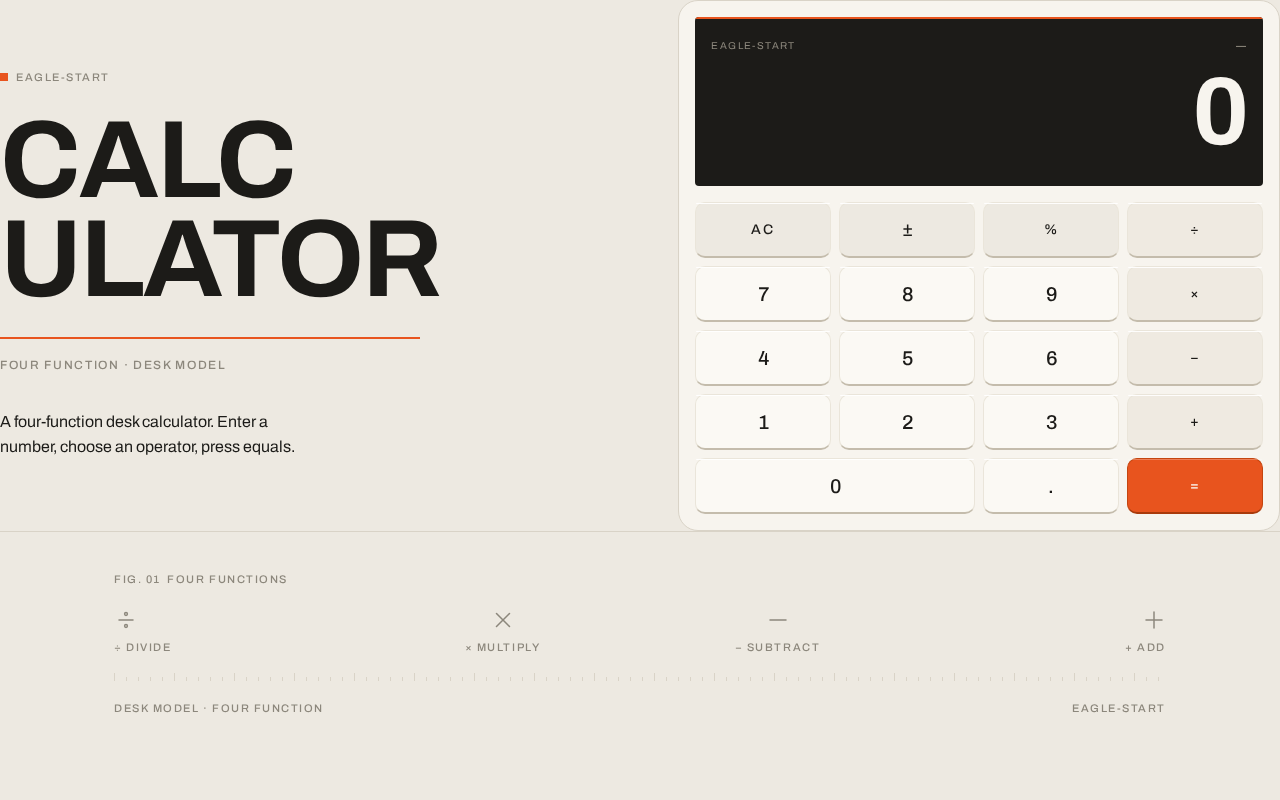
eagle-start
CALCULATOR
FOUR FUNCTION · DESK MODEL
A four-function desk calculator. Enter a number, choose an operator, press equals.
0
Press = to retry
Fig. 01Four functions
- ÷ Divide
- × Multiply
- − Subtract
- + Add
eagle-start
CALCULATOR
FOUR FUNCTION · DESK MODEL
A four-function desk calculator. Enter a number, choose an operator, press equals.
0
Press = to retry
Fig. 01Four functions
- ÷ Divide
- × Multiply
- − Subtract
- + Add
No comments yet. Be the first!