eagle-simple
 Diya Trivedi
start a project to build a simple single page design of calclator

Comments (0)
Sign in to leave a comment
System Requirements
System Requirements Document for eagle-simple
1. Introduction
eagle-simple is a simple calculator delivered as a single page. The product intent is narrow and exact: a person opens one page, enters numbers and operators, and reads the arithmetic result. There is no account, no navigation between destinations, and no workflow beyond basic calculation on that one page.
The audience is anyone who needs fast arithmetic — a public calculator user who wants a calm, exact, trustworthy tool rather than a playful one. The design brief follows Massimo Vignelli's systematic clarity: a strict grid, coded colours, flat keys, and a large tabular result numeral.
This document is the System Requirements Document for eagle-simple. It specifies the single-page calculator, its one active human persona, its page content and component coverage, its core user flow, and the visual, interaction, and technical constraints that govern delivery.
2. System Overview
eagle-simple is a single-page web calculator. The application consists of exactly one page, Calculator, which is both the public entry surface and the working calculator. A visitor arrives at the page, uses the keypad and operator keys to build an expression, and reads the result in a full-width result band. No other destination exists.
The active human actor is the Calculator user, who enters numbers and operators and reads the result. There are no other human personas. The application backend and database are provisioned infrastructure; the calculator's arithmetic is a client-side interaction on the single page, and no durable application-owned record of calculations is required by the accepted requirements.
Current delivery is a React frontend served as the single Calculator page, backed by a shared FastAPI process and a MariaDB database provisioned as scaffold infrastructure. The calculator page itself requires no authentication and no persisted user state.
Removed from scope
- Multi-page navigation or additional destinations (the design is explicitly a single page).
- User accounts, sign-in, or identity establishment (no accepted requirement calls for them; the page is public with no access requirement).
2a. Product Interpretation and Delivery Boundary
The product is one page and one job: arithmetic. The Calculator page is publicly reachable with no access requirement — a visitor lands directly on the calculator and can use it immediately. There is no anonymous pre-identity lifecycle, because no protected state, commitment, or durable actor-specific record exists that would require identity.
All accepted behavior lives on the single Calculator page. The shared backend and database are provisioned infrastructure that support the application; they do not introduce additional product surfaces, accounts, or stored calculation history. Nothing in the accepted requirements extends beyond this single page, and no future capabilities are specified.
2c. Page Content and Component Coverage
Calculator
The single page of eagle-simple. It is the public entry and the calculator itself: the user enters numbers and operators and reads the result here.
Information and state
- Current expression being entered (the sequence of digits and operators the user has pressed).
- Current result or displayed value, shown in the full-width result band.
- Press feedback state on each key (instant 80ms colour flip).
- Error state when an expression cannot be evaluated (for example division by zero or a malformed expression).
Primary actions
- Press digit keys (0–9) to enter numbers.
- Press operator keys (+, −, ×, ÷) to select an operation; operator keys are filled red.
- Press the equals key to evaluate the current expression and show the result in the result band.
- Press the clear key to reset the current expression and result; the clear key is filled yellow.
Supporting actions
- Read the result band to see the current value or result.
- Read the wide-tracked uppercase group labels above each key group.
Domain entities
- Expression: the ordered sequence of entered digits and operators.
- Result: the evaluated numeric value displayed in the result band.
- Key: a calculator control with a type (digit, operator, equals, clear) and a visual treatment (white flat key, red operator key, yellow clear key).
Component responsibilities
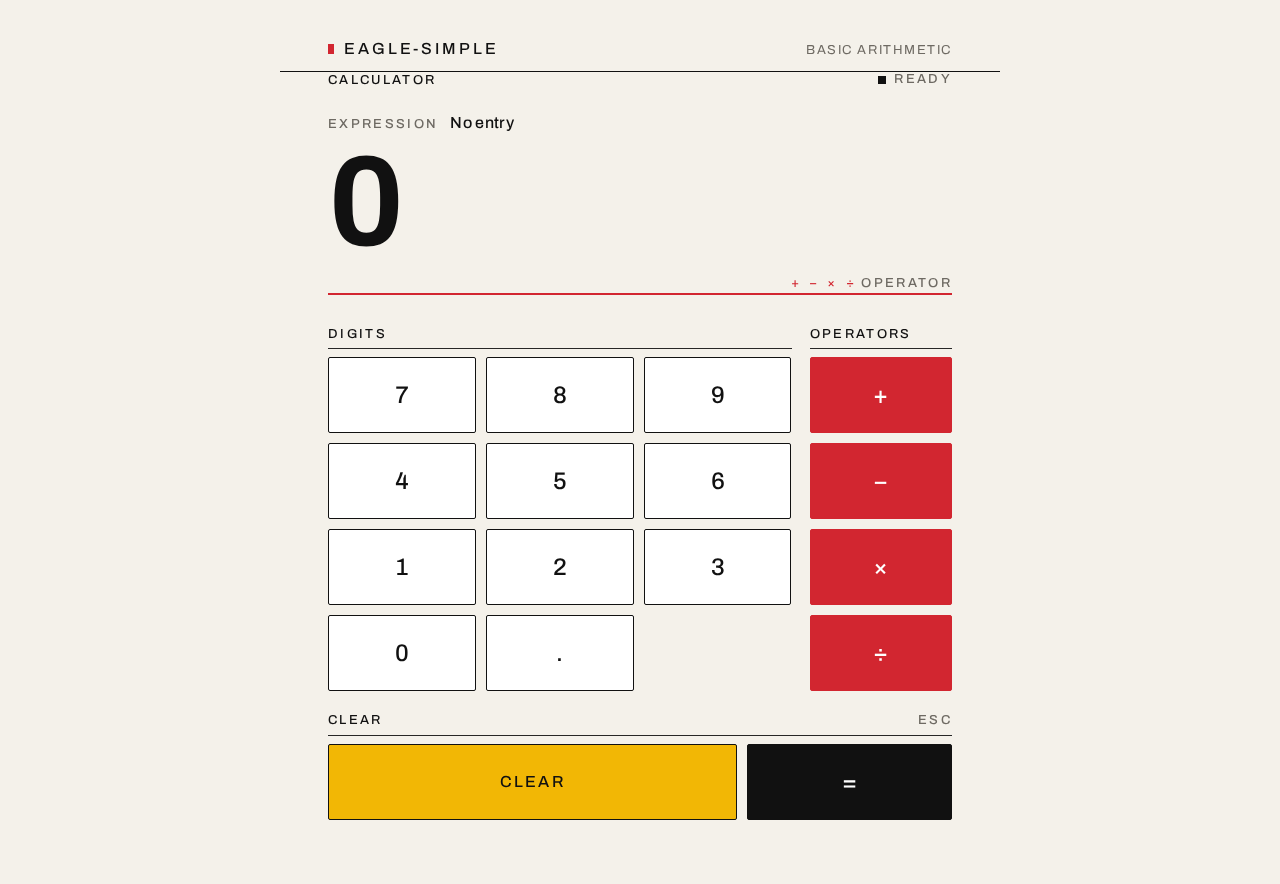
- Result band: full-width band above the keypad; displays the result numeral flush left on the grid under a thin red rule; swaps digits with no easing.
- Operator legend line: the thin red rule under the result that doubles as the operator legend line.
- Keypad: a 4-column grid of flat rectangular keys with 1px black borders and hard 2px corners.
- Key group labels: small wide-tracked uppercase labels above each key group, aligned to rule lines, like wayfinding signs.
- Key press feedback: instant 80ms colour flip on press; no bouncy animation.
States
- Loading: not applicable — the page renders its static calculator immediately; no asynchronous data is required to use it.
- Empty: initial state shows an empty or zero result band and a ready keypad.
- Success: pressing equals shows the evaluated result in the result band.
- Error: an unevaluable expression (such as division by zero) shows an error indication in the result band rather than a numeric result.
- Recovery: pressing the clear key resets the expression and result to the empty initial state, allowing the user to start again.
3. Functional Requirements
FR-1 — Single-page calculator (explicit) As a Calculator user, I should open a single page that is a calculator, so that I can do basic arithmetic in one place.
- Trigger/input: the user opens the application.
- Observable result: the Calculator page renders with a result band and a 4-column keypad.
- Access state: public, no access requirement.
- Failure/recovery: if the page fails to render, reloading restores the calculator.
- Continuation: the user proceeds to enter numbers and operators.
FR-2 — Enter numbers and operators (explicit) As a Calculator user, I should enter numbers and operators on the keypad, so that I can build the expression I want to calculate.
- Trigger/input: the user presses digit keys and operator keys.
- Observable result: the entered digits and operators appear in the expression/result display; each key gives an instant 80ms colour flip on press.
- Access state: public, no access requirement.
- Failure/recovery: pressing the clear key resets the expression.
- Continuation: the user presses equals to evaluate.
FR-3 — Read the result (explicit) As a Calculator user, I should read the result of my calculation, so that I know the answer.
- Trigger/input: the user presses the equals key after entering an expression.
- Observable result: the evaluated result appears in the full-width result band as a large numeral, flush left under the red rule.
- Access state: public, no access requirement.
- Failure/recovery: an unevaluable expression shows an error indication in the result band; the user presses clear to recover.
- Continuation: the user may clear and start a new calculation.
FR-4 — Clear the calculation (required_inference) As a Calculator user, I should clear the current expression and result, so that I can start a new calculation or recover from an error.
- Trigger/input: the user presses the clear key (yellow fill).
- Observable result: the expression and result band reset to the empty initial state.
- Access state: public, no access requirement.
- Failure/recovery: this is itself the recovery action for error and mistaken-entry states.
- Continuation: the user enters a new expression.
4. User Personas
Calculator user
Product context. The Calculator user arrives at the single Calculator page needing fast, exact arithmetic. They are not signing in, not managing anything, and not navigating — the page is the whole product. The design must feel calm and trustworthy, like a clear sign system, not playful.
Primary goal. Enter a calculation and read its correct result quickly, on one page.
Distinct accepted responsibilities.
- Enter numbers and operators using the keypad.
- Read the result shown in the result band.
- Clear the calculation to start again or recover from an error.
Relevant inputs or decisions. Which digits and operators to press, when to press equals to evaluate, and when to press clear to reset.
Interactions with other accepted participants. None. The Calculator user is the only active human actor; there is no counterparty, recipient, or other participant whose state changes as a result of the calculation.
Observable success. The result band shows the correct evaluated result for the entered expression, and the user can clear and repeat the calculation.
5. Core User Flows
Flow 1 — Perform a calculation
- Starting context. The Calculator user opens eagle-simple in a browser. No sign-in is required.
- Entry. The Calculator page renders: a full-width result band above a 4-column keypad, with wide-tracked uppercase group labels above each key group.
- Input. The user presses digit keys to enter the first number. Each key gives an instant 80ms colour flip; the digits appear in the display.
- Operator selection. The user presses an operator key (+, −, ×, ÷), which is filled red. The operator is recorded in the expression.
- Second input. The user presses digit keys to enter the second number.
- Commitment. The user presses the equals key. The expression is evaluated.
- Observable result. The result appears in the full-width result band as a large numeral (up to 128px), flush left under the thin red rule. The digits swap with no easing.
- Continuation. The user may press the clear key (yellow) to reset the expression and result and begin a new calculation.
Flow 2 — Recover from an error or mistaken entry
- Starting context. The user has entered an expression that cannot be evaluated (for example division by zero) or has made a mistaken entry.
- Observable state. The result band shows an error indication instead of a numeric result, or the display shows the mistaken expression.
- Recovery action. The user presses the clear key (yellow fill).
- Observable result. The expression and result band reset to the empty initial state.
- Continuation. The user re-enters the intended expression and presses equals to obtain the result.
6. Visuals Colors and Theme
The visual direction is authoritative: systematic clarity after Massimo Vignelli. The calculator must feel exact, calm, and trustworthy — a clear sign system, not a playful toy.
Palette (light mode)
- Background:
#F4F1EA— warm paper ground covering most of the page. - Surface:
#FFFFFF— flat white keys. - Text:
#111111— black type and rules carrying the structure. - Primary:
#D22630— red, marking operator keys and the result rule. - Accent:
#F2B705— yellow, marking the clear key only. - Muted:
#6E6A63— secondary labels and supporting text.
Typography
- Headings: Archivo — grotesque caps in medium and bold weights; tight tracking on the display, wide tracking on small labels.
- Body: Archivo.
- Type scale: 1.25 modular — 96 / 72 / 56 / 40 / 24 / 16 / 13.
- Display result:
clamp(56px, 12vw, 128px).
Shape language
- Hard 2px corners and 1px black rules.
- Keys are flat rectangles on a strict grid.
- No shadow; no radius above 2px.
Layout
- One centred column on a 12-column grid.
- A full-width result band sits above a 4-column keypad.
- Labels align to rule lines.
Imagery
- No photos. Thin black rules, tabular numerals, and colour-coded key groups are the only visual content.
Avoid
- Rounded pill keys and soft drop shadows.
- Blue or indigo accents.
- Gradient grounds and glass panels.
- Decorative icons inside keys.
- Bouncy press animation.
Readable text and controls stay whole at every viewport (375px, 768px, 1280px): headlines, labels, numbers, and controls stay entirely inside the viewport and their container, wrapping or scaling to fit, with no other element covering them.
7. Signature Design Concept
The first screen is the calculator itself. A huge black result numeral — up to 128px, set in Archivo with tight tracking — sits flush left on the warm paper ground (#F4F1EA) under a thin red rule (#D22630). The 4-column keypad fills the lower half with flat white keys bordered in 1px black, red-filled operator keys, and a single yellow-filled clear key.
The signature moves are:
- A full-width result band with a
clamp(56px, 12vw, 128px)numeral aligned flush left to the grid. - A thin red rule under the result that doubles as the operator legend line.
- Flat keys with 1px black borders, red fill for operators, and yellow fill for clear.
- Small wide-tracked uppercase labels above each key group, like wayfinding signs.
This concept recomposes only the accepted calculator content and controls — the result band, the keypad, and the key groups — into a single, exact, sign-like composition.
8. Interaction Model & Motion Direction
Interaction Model: Static (direction) Motion Tempo: still Hero Dimensionality: flat
Landing Hero Motion Brief
- Focal subject. The calculator itself: the full-width result band with its large black numeral, sitting above the 4-column keypad on the warm paper ground.
- Input → transformation → outcome thesis. The user presses keys (input); each key gives an instant 80ms colour flip and the entered digits and operators appear in the display (transformation); pressing equals swaps the result band digits with no easing to show the evaluated result (outcome).
- Motion vocabulary. Almost still. Instant 80ms colour flip on key press. Result band swaps digits with no easing. No bouncy press animation, no decorative motion.
- Composed first frame. A centred 12-column grid on
#F4F1EA. At the top, a thin red rule spans the column; beneath it, a large black result numeral flush left. Below, small wide-tracked uppercase group labels align to rule lines, and the 4-column keypad of flat white keys with red operator keys and a yellow clear key fills the lower half. - Reduced-motion state. With
prefers-reduced-motion, the page is fully usable as a static arrangement: the 80ms colour flip is retained as an instantaneous state change (or removed), and the result band updates without transition. All keys remain fully visible and operable.
9. Non-Functional Requirements
NFR-1 — Single page (explicit) The design must be a single page. No additional destinations, routes, or navigation may be introduced.
NFR-2 — Simplicity (explicit) The design must be a simple single-page calculator. No adjacent capabilities (history, memory, scientific functions, accounts) are in scope.
NFR-3 — Readable at every viewport (explicit, from design constraints)
Headlines, labels, numbers, and controls stay entirely inside the viewport and their container at 375px, 768px, and 1280px, wrapping or scaling (for example font-size: clamp(...)) to fit, with no other element covering them.
NFR-4 — Accessible contrast and legibility (required_inference)
Black text (#111111) on the warm paper ground (#F4F1EA) and on white keys (#FFFFFF) provides strong contrast; red operator keys (#D22630) and the yellow clear key (#F2B705) carry legible labels. Tabular numerals keep the result band stable as digits change.
NFR-5 — No authentication (explicit) The Calculator page has no access requirement; it is publicly reachable with no sign-in.
10. Tech Stack
- Frontend: React application UI rendering the single Calculator page.
- Backend: shared FastAPI process for application APIs and domain modules.
- Database: MariaDB for application-owned persistent data (provisioned scaffold infrastructure; the accepted calculator requirements do not require stored calculation history).
- Containerization: Docker / docker-compose for the frontend, backend, and database services.
11. Assumptions and Constraints
- A-1 (explicit) The product is a simple calculator.
- A-2 (explicit) The design is a single page; the page count is exactly one.
- A-3 (explicit) The single page is the public entry and the calculator; the user enters numbers and operators and reads the result there.
- A-4 (required_inference) The calculator supports the four basic operations (+, −, ×, ÷), digit entry, equals, and clear, as implied by the accepted keypad, operator keys, equals, and clear key in the design direction.
- A-5 (required_inference) Arithmetic is performed on the single page; no durable calculation history is stored, since no accepted requirement calls for it.
- A-6 (explicit) The Calculator page has no access requirement and no identity establishment.
- A-7 (explicit) The visual direction (Vignelli systematic clarity, the specified palette, Archivo typography, flat keys, strict grid) is authoritative for presentation.
12. Glossary
- Calculator page — the single page of eagle-simple; the public entry and the calculator itself.
- Calculator user — the sole active human persona; enters numbers and operators and reads the result.
- Result band — the full-width band above the keypad displaying the current value or evaluated result as a large numeral.
- Operator legend line — the thin red rule under the result band that doubles as the operator legend line.
- Keypad — the 4-column grid of flat rectangular keys.
- Operator key — a key for +, −, ×, or ÷, filled red.
- Clear key — the key that resets the expression and result, filled yellow.
- Expression — the ordered sequence of entered digits and operators.
- Result — the evaluated numeric value shown in the result band.
eagle-simple
Basic arithmetic
Calculator
Ready
ExpressionNo entry
0
Digits
Operators
Clear
eagle-simple
Basic arithmetic
Calculator
Ready
ExpressionNo entry
0
No comments yet. Be the first!