eagle-restaurant
 puskar acharya
🍽️ Restaurant QR-Based Ordering System 📄 Complete Development Prompt / Specification 🎯 Project Goal Build a web-based Restaurant QR Ordering System that allows customers to scan a QR code at their table, browse a digital menu, place orders, and manage billing—while restaurant staff can monitor and manage orders in real time. ⸻ 🧩 Core Requirements 1. 📱 Customer-Side Features 🔹 QR Code Scanning • Each table has a unique QR code • QR redirects to: https://yourdomain.com/menu?table_id=TABLE_NUMBER • System must automatically detect the table ID ⸻ 🔹 Interactive Digital Menu • Display: • Food image • Name • Description • Price • Category (e.g., Drinks, Snacks, Main Course) • Features: • Search & filter • Add to cart • Quantity selection ⸻ 🔹 Real-Time Order Placement • Customers can: • Add/remove items • Update quantity • Place order instantly • Order is sent to backend in real time ⸻ 🔹 Ordering by Table • Every order must include: • table_id • order_items • total_price • timestamp ⸻ 🔹 Digital Bill View • Show: • Ordered items • Quantity • Price per item • Subtotal • Tax & service charge • Final total • Bill updates automatically when items are added ⸻ 🔹 (Optional) Order Tracking • Status shown to customer: • Pending • Preparing • Ready • Served ⸻ 🧑🍳 2. Admin / Restaurant Features 🔹 Live Order Dashboard • Display all incoming orders: • Table number • Items ordered • Time • Status • Real-time updates (WebSocket / polling) ⸻ 🔹 Order Management • Staff can: • Accept order • Update status: • Pending → Preparing → Served • Mark as completed ⸻ 🔹 Menu Management • Admin panel must allow: • Add new items • Edit existing items • Delete items • Upload images • Categorize items ⸻ 💰 3. Accounting & Billing Module 🔹 Automatic Bill Generation • Bill created automatically when order is placed • Linked to: • table_id • order_id ⸻ 🔹 Real-Time Bill Updates • Bill updates dynamically as: • Items are added/removed ⸻ 🔹 Tax & Charges Calculation • System should support: • VAT (e.g., 13%) • Service charge (optional) • Discounts • Formula example: total = subtotal + tax + service_charge - discount ⸻ 🔹 Daily Sales Tracking • Store all transactions • Calculate: • Total revenue per day • Number of orders • Average order value ⸻ 🔹 Profit & Reports • Generate reports: • Daily / Weekly / Monthly • Most popular items • Revenue trends ⸻ 💳 4. Payment Integration 🔹 Payment Methods • Cash (manual confirmation) • Digital Wallets: • eSewa • Khalti ⸻ 🔹 Payment Status Tracking Each order must have: • paid • unpaid • pending ⸻ 🏗️ 5. System Architecture 🔹 Frontend • Tech: • HTML, CSS, JavaScript • OR React (preferred) • Features: • Mobile responsive • Fast loading ⸻ 🔹 Backend • Options: • Node.js (Express) • OR PHP (Laravel) • OR Java (Spring Boot) ⸻ 🔹 Database (MySQL) Tables required: • tables → table_id, qr_code • menu_items → id, name, price, category, image • orders → id, table_id, status, total_price • order_items → order_id, item_id, quantity • payments → order_id, method, status • reports (optional) ⸻ 🔹 QR Code Logic • Generate QR per table: https://yourdomain.com/menu?table_id=5 • Use any QR library (e.g., qrcode.js or backend generator) ⸻ ⚡ 6. Technical Expectations • REST API or GraphQL • Real-time updates (Socket.io recommended) • Secure endpoints (basic auth for admin) • Clean UI/UX • Error handling • Scalable design ⸻ 🚀 7. Optional Enhancements • Customer login system • Multi-language support • Waiter notification system • Table reservation system • AI-based recommendations ⸻ 📦 Final Deliverables • Fully working web app • Admin dashboard • Database schema • QR code system • Payment integration (test/demo acceptable) • Documentation ⸻
Comments (0)
Sign in to leave a comment
System Requirements
System Requirements Document (SRD) for Eagle-Restaurant
1. Introduction
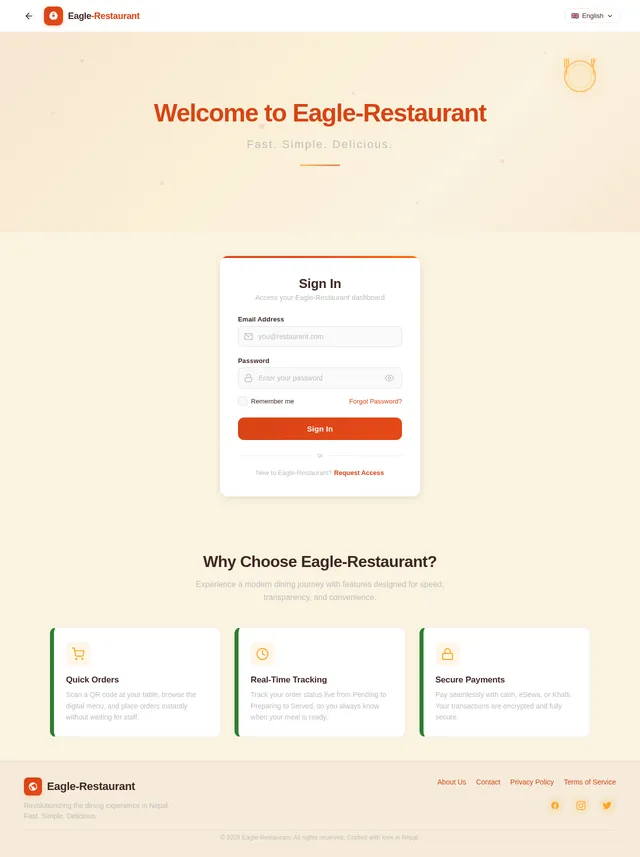
The Eagle-Restaurant project is a cutting-edge solution aimed at revolutionizing the dining experience in Nepal. By leveraging QR-based technology, this system allows customers to scan a QR code at their table, access a digital menu, place orders, and view their bills in real time. Restaurant staff will benefit from a centralized admin dashboard to manage orders, update menu items, and track sales. The system will also feature production-ready payment integrations with popular Nepali digital wallets, eSewa and Khalti, ensuring a seamless and modern payment experience.
This document outlines the functional and non-functional requirements, user personas, design concepts, and technical specifications for the Eagle-Restaurant project.
2. System Overview
The Eagle-Restaurant system is a web-based application designed to enhance the dining experience for both customers and restaurant staff. Key features include:
- Customer-Facing Features: QR code scanning, interactive digital menu, real-time order placement, and digital bill viewing.
- Admin Dashboard: Live order tracking, menu management, and sales reporting.
- Payment Integration: Production-ready support for cash and digital wallet payments (eSewa and Khalti).
- Scalability: Designed to handle multiple tables, orders, and real-time updates efficiently.
The system will be developed using modern technologies, ensuring a responsive, secure, and user-friendly interface.
3. Functional Requirements
Customer-Side Features
- As a Customer, I should be able to scan a QR code at my table to access the digital menu.
- As a Customer, I should be redirected to a URL like
https://yourdomain.com/menu?table_id=TABLE_NUMBERwith the table ID automatically detected. - As a Customer, I should be able to browse the menu with images, descriptions, prices, and categories (e.g., Drinks, Snacks, Main Course).
- As a Customer, I should be able to search and filter menu items.
- As a Customer, I should be able to add items to my cart, adjust quantities, and place an order instantly.
- As a Customer, I should be able to view my digital bill, including itemized details, tax, service charges, and the final total.
- As a Customer, I should be able to pay using cash, eSewa, or Khalti.
- As a Customer, I should be able to track my order status (e.g., Pending, Preparing, Ready, Served).
Admin Features
- As an Admin, I should be able to view all incoming orders in real time, categorized by table number and status.
- As an Admin, I should be able to update the status of orders (e.g., Pending → Preparing → Served).
- As an Admin, I should be able to add, edit, and delete menu items, including uploading images and categorizing items.
- As an Admin, I should be able to view daily, weekly, and monthly sales reports.
- As an Admin, I should be able to track payment statuses (paid, unpaid, pending).
- As an Admin, I should be able to generate reports on revenue trends, most popular items, and average order values.
4. User Personas
1. Customer
- Description: Restaurant patrons who scan QR codes to access the menu, place orders, and view bills.
- Goals: Seamless ordering and payment experience.
- Pain Points: Long wait times, unclear billing, and limited payment options.
2. Admin
- Description: Restaurant staff responsible for managing orders, updating the menu, and tracking sales.
- Goals: Efficient order management and accurate reporting.
- Pain Points: Manual processes, lack of real-time updates, and difficulty tracking payments.
5. Visuals Colors and Theme
Color Palette
The Eagle-Restaurant system will use a warm and inviting color scheme inspired by Nepali culture and cuisine:
- Background: #F5F3E7 (Soft Cream)
- Surface: #FFFFFF (Pure White)
- Text: #3E2723 (Deep Mocha)
- Accent: #FF6F00 (Spicy Orange)
- Muted Tones: #BDBDBD (Neutral Gray)
This palette reflects the warmth and hospitality of a restaurant environment while maintaining a clean and professional look.
6. Signature Design Concept
Interactive 3D Table Map with Real-Time Order Status
The homepage will feature an interactive 3D table map of the restaurant. Each table will be represented as a clickable icon, color-coded based on its status:
- Green: Available
- Yellow: Order Pending
- Orange: Order Preparing
- Blue: Ready to Serve
- Gray: Completed
When a customer scans a QR code, the corresponding table on the map will light up with a glowing animation. Admins can click on any table to view detailed order information, update statuses, or manage bills. The map will feature smooth transitions, hover effects, and subtle animations, creating a dynamic and engaging experience.
Additionally, the map will include a zoom-in feature for larger restaurants and a mini-map for quick navigation. The design will be responsive, ensuring usability across devices.
7. Non-Functional Requirements
- Performance: The system must handle up to 100 concurrent users with minimal latency.
- Security: All endpoints must be secured with authentication and HTTPS.
- Scalability: The architecture should support adding more tables and menu items without significant performance degradation.
- Localization: Support for Nepali currency (NPR) and VAT (13%).
- Reliability: The system should have 99.9% uptime.
- Accessibility: The system should be mobile-friendly and accessible to users with disabilities.
8. Tech Stack
Frontend
- React for Web
Backend
- Python with FastAPI
Database
- MySQL (with Alembic for migrations)
Payment Integration
- eSewa and Khalti (production-ready)
Real-Time Updates
- WebSocket for live order tracking
Containerization
- Docker and Docker-Compose
Server Orchestration
- Kubernetes
9. Assumptions and Constraints
- Each table will have a unique QR code linked to its ID.
- The system will operate in the Nepali timezone (NPT).
- VAT is fixed at 13%, and service charges are optional.
- Only one admin interface will be provided for all staff functionalities.
- Payment integration will be production-ready for eSewa and Khalti.
10. Glossary
- QR Code: A scannable code that redirects to a specific URL.
- eSewa/Khalti: Popular digital wallets in Nepal.
- VAT: Value-Added Tax, set at 13% in Nepal.
- NPT: Nepal Standard Time.
- WebSocket: A protocol for real-time communication between the client and server.
This concludes the updated System Requirements Document (SRD) for the Eagle-Restaurant project. Let me know if there’s anything else you’d like to refine or expand upon, Puskar!
No completed page designs yet.
Completed design pages will appear here when they are ready to preview.
No comments yet. Be the first!