eagle-dashboard
 ɪᴛᴏsʜɪ ʀɪɴ
AI Life Dashboard (personal command center) A website where users connect everything they do—study, fitness, goals, content, even mood—and AI helps them improve daily life in one place. What it does: Tracks study/work time automatically Suggests what to do next (like a smart mentor) Analyzes habits (sleep, focus, distractions) Gives daily plans based on your goals Can integrate with apps like Notion, Google Calendar, or Spotify Why this could succeed: People are overloaded with separate apps Everyone wants self-improvement but lacks consistency AI makes personalization actually possible now What makes it stand out Instead of being another productivity app, it acts like: “A coach that understands your life and tells you exactly what to do next.” Extra twist (this is important) Add a social layer: See anonymous stats of others your age Compete in focus/study streaks Join “grind rooms” (live focus sessions) Reality check This won’t succeed just because the idea is cool. It works only if: It’s simple to use (most fail here) It gives real value in 5 minutes It feels addictive but helpful

Comments (0)
Sign in to leave a comment
System Requirements
System Requirements Document (SRD)
Project Name: Eagle-Dashboard
1. Introduction
The Eagle-Dashboard is an AI-powered personal command center designed specifically for students aged 16–24. It integrates various aspects of daily life—study, fitness, goals, content, and even mood—into a single, seamless platform. The system leverages AI to provide actionable insights, habit analysis, and personalized daily plans, while also fostering social engagement through anonymous competition and live focus sessions.
This document outlines the system requirements for the Eagle-Dashboard, ensuring clarity and alignment with the project's vision.
2. System Overview
The Eagle-Dashboard is built to address the pain points of students who seek self-improvement but struggle with consistency. By acting as a "smart mentor," the platform not only tracks user activities but also provides real-time guidance on what to do next.
Key features include:
- Automatic tracking of study/work time.
- AI-generated daily plans tailored to user goals.
- Habit analysis, including sleep, focus, and distractions.
- Integration with popular apps like Notion, Google Calendar, and Spotify.
- Social features such as anonymous stats, focus streaks, and live "Grind Rooms."
The platform's core identity is its ability to tell users exactly what to do next, making it more than just a productivity tracker—it’s a system for achieving consistency and growth.
3. Functional Requirements
As User:
- I should be able to see my AI-generated "Today's Plan" upon logging in.
- I should be able to track my study/work time automatically.
- I should be able to view my daily consistency streak and receive notifications if I’m about to lose it.
- I should be able to join live "Grind Rooms" with a timer running (e.g., 25-minute focus sessions).
- I should be able to see anonymous stats like "Top 10% focus today" or "You studied more than 78% of users."
- I should be able to integrate my apps like Notion, Google Calendar, and Spotify.
- I should be able to analyze my habits, including sleep, focus, and distractions.
As Admin:
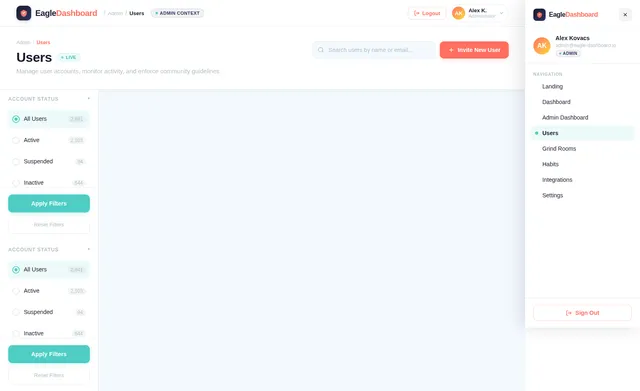
- I should be able to manage user accounts and monitor system performance.
- I should be able to moderate "Grind Rooms" and ensure compliance with community guidelines.
- I should be able to update AI models and system configurations as needed.
Additional Requirement:
- I should be able to selectively re-run and regenerate the System Requirements Document (SRD) based on updated user inputs or changes in project scope.
4. User Personas
1. Student User
- Age Range: 16–24
- Goals: Improve study habits, stay consistent, achieve personal and academic goals.
- Pain Points: Struggles with consistency, overwhelmed by multiple apps, lacks actionable guidance.
- Behavior: Regularly logs in to track progress, join Grind Rooms, and view AI-generated plans.
2. Admin
- Role: Oversees platform operations, ensures smooth functionality, and enforces community standards.
- Behavior: Monitors user activity, manages integrations, and updates system configurations.
5. Visuals Colors and Theme
Unique Color Palette for Eagle-Dashboard:
- Background: #F4F9FF (Soft Sky Blue)
- Surface: #FFFFFF (Pure White)
- Text: #1A1A2E (Deep Navy)
- Accent: #FF6F61 (Vivid Coral)
- Muted Tones: #B0BEC5 (Cool Gray)
This palette reflects a balance of calm productivity (soft blues and whites) with energizing accents (coral) to inspire focus and motivation.
6. Signature Design Concept
The "Grind Room Galaxy"
The homepage of Eagle-Dashboard will feature an interactive galaxy map where each star represents a live "Grind Room."
-
Visuals:
- A dark, starry background with subtle animations of twinkling stars.
- Each star glows brighter as more users join that Grind Room.
- Hovering over a star reveals details like "127 people focusing right now" and the room's timer status.
-
Interactions:
- Clicking on a star zooms into the room, transitioning the user into a minimalist focus interface.
- The transition includes a smooth zoom-in animation with a soft whooshing sound effect.
-
Micro-interactions:
- When users complete a focus session, their star "lights up" on the galaxy map, symbolizing their contribution to the community.
- A streak counter subtly animates with a glowing effect when updated.
This design concept creates an immersive, visually stunning first impression while reinforcing the platform's focus on community and productivity.
7. Non-Functional Requirements
- Performance: The system should handle up to 10,000 concurrent users in Grind Rooms without lag.
- Scalability: The platform must scale seamlessly as the user base grows.
- Security: User data must be encrypted and stored securely, with a focus on maintaining anonymity.
- Localization: Default settings should align with Indian locale (e.g., IST timezone, INR currency for any transactions).
- Accessibility: The platform must comply with WCAG 2.1 Level AA standards.
- Selective Re-run Capability: The system must allow user-triggered regeneration of the SRD to reflect updated requirements or changes in scope.
8. Tech Stack
Frontend:
- React for Web
Backend:
- Python
- FastAPI
Database:
- MySQL (with Alembic for migrations)
AI Models:
- GPT 5.4 for user-friendly responses
- Claude 4.6 Opas for academic or coding work
AI Tools:
- Langchain
- Litellm for LLM Routing
Orchestration:
- Docker for local orchestration
- Kubernetes for server-side orchestration
9. Assumptions and Constraints
-
Assumptions:
- Users will primarily access the platform via desktop or laptop.
- Students are comfortable with anonymous social interactions.
-
Constraints:
- The system must remain lightweight to ensure fast load times, even on low-end devices.
- All features must be optimized for a student audience, avoiding unnecessary complexity.
10. Glossary
- Grind Room: A live virtual space where users focus together, often with a timer running.
- Streak: A measure of daily consistency, motivating users to maintain regular engagement.
- Anonymous Stats: Aggregated, anonymized data that allows users to compare their performance with others.
- AI-generated Plan: A personalized daily schedule created by the system based on user goals and habits.
- Selective Re-run Capability: A feature allowing users to regenerate the SRD to reflect updated requirements or changes in project scope.
This concludes the System Requirements Document for Eagle-Dashboard.

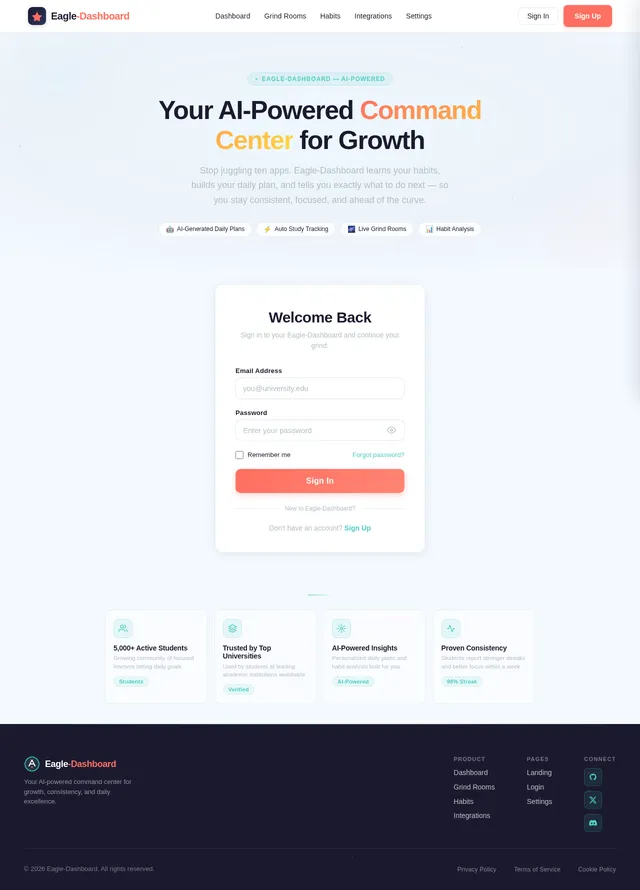
Your AI-Powered
Command Center for
Focus & Growth
Step into the Grind Room Galaxy — where AI-driven plans, live focus sessions, and anonymous competition transform how you study, build habits, and grow.
The Grind Room Galaxy
Every star is a live focus session. Hover to peek inside, click to join. Your galaxy of productivity awaits.
Why Students Choose Eagle-Dashboard
Three powerful pillars that turn scattered effort into consistent growth, every single day.
AI-Generated Plans
- Wake up to a personalized daily plan crafted by AI based on your goals and habits
- Smart prioritization that adapts as your day unfolds and tasks shift
- Actionable next steps so you always know exactly what to focus on
Live Grind Rooms
- Join live focus sessions with thousands of students grinding together in real-time
- Timed 25-minute sprints keep you locked in and accountable
- See who else is online and feel the energy of collective focus
Anonymous Competition
- See how you stack up: "Top 10% focus today" or "You studied more than 78% of users"
- Compete on focus streaks without revealing your identity
- Fuel your motivation through friendly, privacy-first leaderboards
AI That Works For You
Eagle-Dashboard uses advanced AI to analyze your habits, generate daily plans, and deliver real-time insights—so you always know what to do next.
Today's Plan Generation
Every morning, Eagle-Dashboard builds your perfect daily plan. Our AI analyzes your goals, deadlines, energy patterns, and past performance to craft a personalized schedule that maximizes your productivity.
- Adapts to your class schedule and commitments
- Prioritizes tasks by urgency and cognitive demand
- Recalibrates throughout the day as plans shift
Habit Analysis
Understand the patterns behind your performance. Eagle-Dashboard tracks sleep, focus duration, and distractions to reveal what helps you thrive and what holds you back.
- Sleep and focus correlation breakdowns
- Weekly and monthly trend visualizations
- Distraction pattern detection and alerts
Smart Notifications
Never miss a beat with context-aware alerts. Eagle-Dashboard knows when you're about to lose a streak, when your focus peaks, and when it's time to take a break—so you stay consistent without burnout.
- Streak protection alerts before you lose progress
- Optimal focus time suggestions based on your data
- Milestone celebrations and anonymous leaderboard nudges
Real-time Insights
Watch your progress unfold live. From focus hours to consistency scores, Eagle-Dashboard delivers dynamic, real-time analytics that help you make smarter decisions in the moment.
- Live focus session tracking with second-by-second data
- Comparative stats: see how you rank anonymously
- Instant feedback loops to reinforce positive habits
What Students Are Saying
Thousands of students are building better habits and crushing their goals with Eagle-Dashboard.
Eagle-Dashboard completely changed how I approach my study sessions. The AI-generated daily plans keep me on track, and the Grind Rooms make late-night studying feel less lonely.
I went from barely studying 2 hours a day to consistently hitting 6+ hours. The anonymous competition stats motivated me more than any app ever has.
The habit analysis showed me I was losing 2 hours daily to distractions. Now I get real-time nudges and my consistency streak is at 47 days and counting.
Connecting Notion and Google Calendar to Eagle-Dashboard means everything is in one place. The AI actually understands my schedule and builds plans around it.
The Grind Room Galaxy is such a cool concept. Seeing hundreds of students focused at the same time gives you this sense of community that makes grinding feel worth it.
My sleep and focus analytics helped me realize I work best from 9-11am. Eagle-Dashboard restructured my entire plan around that. Game changer.
Understand Your Patterns
Track sleep quality, focus duration, and distractions over time. AI-powered insights help you optimize your daily routine for peak performance.
Sleep Quality
Focus Duration
Distractions
Connect Your Tools
Seamlessly sync Eagle-Dashboard with the apps you already use. All your productivity tools, unified in one command center.
Notion
Sync notes & assignments
Google Calendar
Track deadlines & events
Spotify
Focus playlists & music
Todoist
Manage tasks & to-dos
Slack
Team notifications & alerts
Apple Health
Sleep & wellness data
Community Impact
Students grinding together, every single day
Ready to Start Your Grind?
Join thousands of students who transformed their study habits with AI-powered daily plans, live focus rooms, and real-time habit insights.
Frequently Asked Questions
Everything you need to know about Eagle-Dashboard and how it helps you stay consistent.
Getting Started
When you log in each day, our AI analyzes your goals, habits, calendar events, and past performance to generate a personalized "Today's Plan." It prioritizes tasks based on your energy patterns, deadlines, and focus history so you always know exactly what to do next.
Yes! Eagle-Dashboard offers a free tier for all students aged 16-24. You get access to AI-generated daily plans, basic habit tracking, and up to 5 Grind Room sessions per week. Premium features like advanced analytics and unlimited Grind Rooms are available with an upgrade.
Features
Our AI learns from your study patterns, sleep data, and focus metrics to suggest an optimized daily schedule. The more you use Eagle-Dashboard, the smarter it gets. Most users report a 40% improvement in task completion within the first two weeks of consistent use.
Eagle-Dashboard tracks your focus duration, distraction frequency, and sleep patterns over time. The AI identifies trends and correlations—like how your sleep quality impacts next-day focus—and provides actionable insights to help you build better habits and maintain your streak.
Social
Grind Rooms are live, virtual focus sessions where students study together in real time with a shared timer (e.g., 25-minute Pomodoro blocks). Simply browse the Galaxy Map on the homepage, pick a room that matches your vibe, and hit "Join." You'll see anonymous stats like "Top 10% focus today" to stay motivated.
Your stats—like focus hours, streaks, and consistency—are compared anonymously against other users. You'll see motivating benchmarks such as "You studied more than 78% of users this week" without revealing anyone's identity. It's designed to inspire, not pressure.
Integrations
Eagle-Dashboard integrates with Notion for task management, Google Calendar for scheduling, and Spotify for focus playlists. We're actively building integrations with more tools. Connected apps feed data into your AI-generated plans for a truly unified productivity experience.
Not at all. Eagle-Dashboard only reads your calendar data to understand your schedule and avoid conflicts when generating your daily plan. We never modify, delete, or create events in your connected accounts. Your data stays yours—always.
No comments yet. Be the first!