Panel 01. Self-hosted in your environment
dpdp-act-2023
by Dinesh
Dineshi want to build project to help companies comply with DPDP act 2023, means i want to build solution for clients which they can deploy in it their env (i want backend in java, springboot,mvn and frontend in react)

Comments (0)
Sign in to leave a comment
System Requirements
Page 1 of 16
System Requirements Document for dpdp-act-2023
1. Introduction
This document specifies a self-hosted compliance solution that helps companies comply with the Digital Personal Data Protection (DPDP) Act 2023 and the rules published thereunder in 2025. The product is delivered as software that each client deploys inside its own environment: a Java / Spring Boot / Maven backend and a React frontend, installed and operated by the client's own IT / Platform Administrator, with no requirement to send compliance data outside the client's infrastructure.
The intended audience is the client organization's compliance and platform staff:
- Compliance Officer — owns the organization's DPDP compliance posture and produces evidence for audits and regulators.
- Data Protection / Privacy Administrator — operates day-to-day privacy workflows: consent records, data-principal requests, and related records.
- IT / Platform Administrator (client-side deployer) — deploys and runs the backend and frontend inside the client's environment and manages access for the compliance team.
A binding precondition on all work described here: the applicable 2025 rules published regarding the DPDP Act must be researched and incorporated as the authoritative basis for the compliance workflows before implementation of those workflows begins.
Page 2 of 16
2. System Overview
The system is a compliance system of record. It maintains durable, client-owned records of consent, data-principal requests, and compliance evidence, and it presents the organization's compliance status against the obligations of the DPDP Act 2023 and the 2025 rules.
Current delivery is a first-party web application, self-hosted by the client:
- Backend: Java with Spring Boot, built with Maven.
- Frontend: React.
- Deployment: performed by the client inside the client's own environment.
Actors:
- The three personas above are the accepted active human actors.
- The deployed backend is a system actor that executes and persists compliance work; it is not a persona.
- No external provider or third-party hosted service is an accepted owner of any compliance capability.
Accepted behavior covers: anonymous explanation of the product and its self-hosted model; identity establishment and returning verification for the client's compliance and platform staff; a protected compliance overview; management of durable consent records; tracking and completion of data-principal request lifecycles; production and revisiting of compliance evidence; and management of compliance-team access by the client-side platform administrator.
Narrow exclusions: this document does not add adjacent account-management capabilities beyond first-use invitation acceptance, returning login, and the platform administrator's provisioning of compliance-team access; it does not add capabilities from the broader legal-tech or privacy-platform category that the source did not accept; and it does not place any compliance capability with an external or provider-owned surface.
Page 3 of 16
2a. Product Interpretation and Delivery Boundary
The product exists so that a company can demonstrate DPDP Act 2023 compliance without moving its compliance data out of its own environment. Everything the compliance team does — reviewing status, managing consent, handling data-principal requests, producing evidence — happens inside the instance the client deployed.
Access ownership is first-party and application-owned. The Landing page is anonymously reachable and explains the product, its intended company users, and the self-hosted deployment model. Identity is established through first-use invitation acceptance, and returning users verify through Login. Protected destinations require an established identity; the interaction that establishes access is never owned by the destination it protects.
The 2025 rules are in scope now, not later: they are the authoritative basis for the compliance workflows, and the work of researching and incorporating them precedes implementation of those workflows. The rulebook references surfaced in the interface are the visible expression of that incorporation.
Page 4 of 16
2b. Source Content Inventory
The reference directive for "2025 rules published regarding the DPDP Act 2023" is declared with uses: ["domain_context", "content_source"] and authority: authoritative. The verified factual content available from that directive, as carried into this document, is:
- Instrument: the rules published in 2025 regarding the DPDP Act 2023, which are the authoritative basis for the compliance workflows.
- Named rule references surfaced in the product: Rule 3(2), Rule 6(1)(a), Rule 8.
- Named regulatory fact carried by the interface: breach notification within 72 hours under the 2025 Rules.
- Named obligation stations in the compliance workflow: Notice, Consent, Purpose Limitation, Data Principal Request, Erasure, Breach Notification, Consent Manager.
- Named evidence recipient: the Data Protection Board.
No further verified factual entities, collection items, field values, dates, contacts, links, or media references were supplied by that directive; nothing beyond the above is asserted as verified content.
2c. Page Content and Component Coverage
Landing
- Information/state: anonymous public entry. Full-viewport wayfinding poster. Left two-thirds: a schematic transit-style map of the DPDP compliance workflow drawn in #1B3A6B lines on the #F4F1EA ground, with stations labelled in 13px uppercase Fira Sans Condensed — Notice, Consent, Purpose Limitation, Data Principal Request, Erasure, Breach Notification, Consent Manager. One route is drawn in #E4572E and labelled "2025 Rules: breach notification in 72 hours". Right one-third: a vertical stack of three numbered fact panels separated by 2px rules — "01 Self-hosted in your environment", "02 DPDP Act 2023 + 2025 Rules", "03 Evidence for the Data Protection Board". Above the map, a 48px Fira Sans Condensed headline spanning the full grid width, flush-left, ragged-right: "Compliance you can point to." Full-bleed horizontal bands separated by 2px rules, with the grid exposed.
- Primary action: the rectangular #E4572E CTA block cut into the bottom-left of the map, with white uppercase 13px tracked label "Request deployment brief".
- Supporting actions: entry into Login for returning users; navigation to the numbered sections once identity is established.
- Domain entities: DPDP obligation stations; the 2025 breach-notification rule; the self-hosted deployment model; the Data Protection Board as evidence recipient.
- Component responsibilities: hero map component (route lines, station labels, orange 2025-rules route); numbered fact-panel stack; full-width headline; CTA block; band separators; custom 24px-grid pictograms for each DPDP obligation drawn with 2px strokes in transit-pictogram style (consent, notice, erasure, grievance, breach, retention).
- States: loading — bands render immediately, no entrance choreography on content; empty — not applicable, content is static; success — page renders and CTA is reachable; error — if the deployment brief request cannot be submitted, an inline register-language message states the failure and the CTA remains available for retry; recovery — retry from the same CTA without losing page position.
Page 5 of 16
Login
- Information/state: anonymous identity-access surface for returning verification, shared by Compliance Officer, Data Protection / Privacy Administrator, and IT / Platform Administrator. Also the entry point for first-use invitation acceptance.
- Primary action: verify returning identity and enter the protected application.
- Supporting actions: accept a first-use invitation and establish identity; recover from a failed verification attempt.
- Domain entities: invited user identity; client organization membership; compliance-team access provisioned by the platform administrator.
- Component responsibilities: credential entry form; invitation-acceptance path; error region; focus rings in #1B3A6B.
- States: loading — submit control shows in-progress state, 150ms ease-out; empty — form presented with no pre-filled credentials; success — identity verified and the user continues to Dashboard; error — invalid or expired credentials or invitation produce a plain, specific message with no marketing language, and the form remains usable; recovery — re-entry of credentials or invitation, with no loss of the entered identifier.
Dashboard
- Information/state: protected shared overview for compliance status, the researched 2025-rule-based workflow context, and continuation into durable compliance work. 12-column grid with a 240px fixed left rail carrying numbered navigation (01 Consent, 02 Requests, 03 Reports, 04 Users) set in 13px tracked Fira Sans Condensed. Faint column guides drawn on the grid. A permanent right-rail "rulebook" strip lists numbered rule references (Rule 3(2), Rule 6(1)(a), Rule 8) that highlight in blue as the current screen touches them.
- Primary action: continue into the compliance workstream that needs attention.
- Supporting actions: read compliance status; read the 2025-rule context for the current screen; navigate to Consent, Requests, Reports, or Users.
- Domain entities: compliance status; consent records; data-principal requests; compliance evidence; 2025 rule references.
- Component responsibilities: numbered navigation rail; status summary; rulebook strip; deadline figures set at 20px in tabular numerals with the day count in #E4572E when inside 72 hours.
- States: loading — records appear instantly, no entrance choreography; empty — a plain register-language statement that no compliance records exist yet, with the route into the relevant section; success — status and deadlines render with tabular alignment; error — a specific failure message for the data that could not be loaded, with the rest of the overview still usable; recovery — retry the failed region without leaving the page.
Consent
- Information/state: protected recurring workspace for browsing and managing durable consent records and related DPDP obligations. Register table running edge-to-edge with sticky headers, right-aligned numerics, and a fixed action column. Each row carries a 3px left-edge colour bar and a matching coded chip: blue = open, amber = pending, orange = overdue, green = closed. Detail views are two-thirds record, one-third metadata sidebar of label/value pairs. Rulebook strip present.
- Primary action: manage a consent record through its lifecycle.
- Supporting actions: browse and filter the consent register; open a record's detail view; read and act on the related DPDP obligation; read the rule reference the current record touches.
- Domain entities: consent record; consent ID; consent expiry; notice; purpose limitation; data principal; consent manager; verification state.
- Component responsibilities: register table with sticky header and fixed action column; status bar and coded chip per row; tabular-numeral deadline column at 20px with day count in #E4572E inside 72 hours; record detail panel; metadata sidebar; rulebook strip.
- States: loading — rows appear instantly; empty — a plain statement that the consent register has no records, with the route to begin one; success — the record's new state is reflected in the row's colour bar and chip, with a 400ms sweep of the left status bar on state change; error — a specific message naming the record and the failed operation, with the register still readable; recovery — retry the operation from the record's action column.
Page 6 of 16
Requests
- Information/state: protected recurring workspace for tracking and completing data-principal request lifecycles and related records. Same register treatment as Consent: edge-to-edge table, sticky headers, right-aligned numerics, fixed action column, 3px left-edge status bar and coded chip per row, two-thirds record plus one-third metadata sidebar on detail, rulebook strip present.
- Primary action: advance a data-principal request through its lifecycle to completion.
- Supporting actions: browse and filter requests; open a request's detail view; record the request's outcome; read the rule reference the current request touches.
- Domain entities: data-principal request; request reference; request SLA; data principal; erasure; grievance; breach notification; request status.
- Component responsibilities: register table with sticky header and fixed action column; status bar and coded chip per row; oversized tabular-numeral deadline column at 20px with day count in #E4572E inside 72 hours; request detail panel; metadata sidebar; rulebook strip.
- States: loading — rows appear instantly; empty — a plain statement that no requests are recorded, with the route to record one; success — the request's new state is reflected in the row's colour bar and chip, with a 400ms sweep of the left status bar on state change; error — a specific message naming the request reference and the failed operation, with the register still readable; recovery — retry from the request's action column.
Reports
- Information/state: protected destination for producing and revisiting compliance evidence for audits or regulators. Register treatment consistent with the other protected workspaces; rulebook strip present.
- Primary action: produce compliance evidence for an audit or regulator.
- Supporting actions: revisit previously produced evidence; read the rule reference the current evidence touches.
- Domain entities: compliance evidence; audit; regulator; Data Protection Board; consent records; data-principal requests; 2025 rule references.
- Component responsibilities: evidence production control; evidence list with status bar and coded chip per row; tabular-numeral date column; rulebook strip.
- States: loading — evidence list appears instantly; empty — a plain statement that no evidence has been produced yet, with the route to produce it; success — the produced evidence appears in the list and is revisitable; error — a specific message stating which evidence could not be produced or retrieved, with the list still readable; recovery — retry production or retrieval from the same control.
Users
- Information/state: protected access-management workspace for the client-side platform administrator to manage compliance-team access. Register treatment consistent with the other protected workspaces.
- Primary action: provision compliance-team access.
- Supporting actions: review the current compliance-team access list; issue an invitation to a compliance-team member; read the status of an issued invitation.
- Domain entities: compliance-team member; invitation; access state; client organization.
- Component responsibilities: access list with status bar and coded chip per row; invitation control; tabular-numeral date column.
- States: loading — access list appears instantly; empty — a plain statement that no compliance-team access has been provisioned, with the route to issue the first invitation; success — the provisioned member or issued invitation appears in the list with its status; error — a specific message naming the member or invitation and the failed operation, with the list still readable; recovery — retry from the same control.
Page 7 of 16
3. Functional Requirements
FR-1 — Research the 2025 rules before implementation (explicit) As a Compliance Officer, I should have the compliance workflows built on the 2025 rules published regarding the DPDP Act 2023, so that the organization's compliance posture reflects the current regulatory basis.
- Trigger/input: the project's implementation work on compliance workflows.
- Observable result: the applicable 2025 rules are researched and incorporated as the authoritative basis for the compliance workflows before those workflows are implemented; the incorporated rule references are visible in the product's rulebook strip (Rule 3(2), Rule 6(1)(a), Rule 8) and in the 2025-rules route on the Landing map.
- Access state: not applicable — this is a precondition on the work, not a protected interaction.
- Failure/recovery: if a rule reference cannot be resolved to an applicable obligation, the workflow is not implemented against an assumed rule; the unresolved reference is retained and surfaced rather than silently dropped.
- Continuation: the incorporated rules become the basis for FR-4 through FR-9.
FR-2 — Understand the product and its self-hosted model before committing (explicit) As a Compliance Officer, I should be able to understand, without an account, what the solution does, who it is for, and that it is deployed in my own environment, so that I can decide whether to pursue it.
- Trigger/input: anonymous visit to Landing.
- Observable result: the DPDP compliance workflow is presented as a transit-style route map with its obligation stations, the 2025 breach-notification 72-hour rule is drawn as the single orange route, and the three numbered fact panels state self-hosting, the DPDP Act 2023 plus 2025 Rules basis, and evidence for the Data Protection Board.
- Access state: anonymous; no identity required.
- Failure/recovery: if the deployment brief request cannot be submitted, an inline register-language message states the failure and the CTA remains available for retry.
- Continuation: the visitor proceeds to Login to establish or verify identity.
FR-3 — Establish identity on first use and verify it on return (required_inference) As an invited compliance-team member, I should be able to accept my first-use invitation and, on later visits, verify my identity, so that my compliance work remains bound to me and resumable.
- Trigger/input: an invitation issued by the IT / Platform Administrator; or a returning visit to Login.
- Observable result: identity is established on first use and verified on return; the user continues into the protected application.
- Access state: Login is anonymously reachable; protected destinations remain unavailable until identity is established.
- Failure/recovery: invalid or expired credentials or invitation produce a plain, specific message; the form remains usable and the entered identifier is not lost.
- Continuation: the verified user continues to Dashboard.
FR-4 — Provision compliance-team access (required_inference) As an IT / Platform Administrator (client-side deployer), I should be able to provision compliance-team access in the deployed instance, so that invited users can use the protected workflows.
- Trigger/input: a compliance-team member requiring access.
- Observable result: the provisioned member or issued invitation appears in the Users access list with its status.
- Access state: protected; requires an established identity with platform-administrator access.
- Failure/recovery: a specific message names the member or invitation and the failed operation; the access list remains readable and the operation can be retried from the same control.
- Continuation: the invited user completes FR-3 and reaches the protected workflows.
FR-5 — Review compliance status and continue into the work that needs attention (required_inference) As a Compliance Officer, I should be able to see the organization's compliance status and the 2025-rule context for the current screen, so that I can continue into the workstream that needs attention.
- Trigger/input: entry to Dashboard after verification.
- Observable result: compliance status and deadlines render with tabular alignment; the rulebook strip highlights the rule references the current screen touches.
- Access state: protected; requires an established identity.
- Failure/recovery: a specific failure message for the data that could not be loaded, with the rest of the overview still usable; retry the failed region without leaving the page.
- Continuation: navigation into Consent, Requests, Reports, or Users.
FR-6 — Manage durable consent records (required_inference) As a Data Protection / Privacy Administrator, I should be able to browse and manage durable consent records and their related DPDP obligations, so that consent lifecycles are handled accurately and traceably.
- Trigger/input: a consent record requiring review or action.
- Observable result: the record's new state is reflected in the row's 3px left-edge colour bar and matching coded chip (blue = open, amber = pending, orange = overdue, green = closed), with a 400ms sweep of the left status bar on state change.
- Access state: protected; requires an established identity with access to the consent workspace.
- Failure/recovery: a specific message names the record and the failed operation; the register remains readable and the operation can be retried from the record's action column.
- Continuation: the record's updated state is visible in the register and on Dashboard.
FR-7 — Track and complete data-principal request lifecycles (required_inference) As a Data Protection / Privacy Administrator, I should be able to track and complete data-principal request lifecycles and their related records, so that requests are handled accurately and traceably.
- Trigger/input: a data-principal request requiring action.
- Observable result: the request's new state is reflected in the row's colour bar and coded chip, with a 400ms sweep of the left status bar on state change; the request's SLA is shown in the oversized tabular-numeral deadline column, with the day count in #E4572E when inside 72 hours.
- Access state: protected; requires an established identity with access to the requests workspace.
- Failure/recovery: a specific message names the request reference and the failed operation; the register remains readable and the operation can be retried from the request's action column.
- Continuation: the request's updated state is visible in the register and on Dashboard.
FR-8 — Produce and revisit compliance evidence (required_inference) As a Compliance Officer, I should be able to produce and revisit compliance evidence for audits or regulators, so that the organization can demonstrate DPDP compliance.
- Trigger/input: an audit or regulator requiring evidence.
- Observable result: the produced evidence appears in the Reports list and is revisitable.
- Access state: protected; requires an established identity with access to the reports destination.
- Failure/recovery: a specific message states which evidence could not be produced or retrieved; the list remains readable and the operation can be retried from the same control.
- Continuation: the evidence remains available for later revisiting.
FR-9 — Deploy and run the solution in the client's own environment (explicit) As an IT / Platform Administrator (client-side deployer), I should be able to deploy and run the Java / Spring Boot / Maven backend and the React frontend inside the client's own environment, so that the compliance team can use the solution without external hosting.
- Trigger/input: the client's deployment of the solution.
- Observable result: the backend and frontend run inside the client's environment and are available to the client's compliance staff.
- Access state: not applicable to the deployment act itself; the running instance then serves the anonymous Landing and Login surfaces and the protected destinations.
- Failure/recovery: a failed deployment leaves the client's environment in a state the administrator can inspect and retry; no compliance data is sent outside the client's environment as part of deployment or operation.
- Continuation: the administrator provisions compliance-team access (FR-4).
Page 8 of 16
4. User Personas
Compliance Officer
- Product context: works inside the client's own deployed instance as the owner of the organization's DPDP Act 2023 compliance posture. The work is audit-facing and high-consequence; the product is the system of record for it.
- Primary goal: demonstrate DPDP compliance without sending data outside the organization's environment.
- Distinct accepted responsibilities: reviewing compliance status and the 2025-rule context on Dashboard; producing and revisiting compliance evidence in Reports for audits or regulators; continuing into the consent and request workstreams when status requires it.
- Relevant inputs or decisions: compliance status and deadlines; the rule references the current screen touches; whether the organization's evidence is sufficient for an audit or regulator.
- Interactions with other accepted participants: depends on the Data Protection / Privacy Administrator's consent and request work as the substance of the evidence; depends on the IT / Platform Administrator for the deployed instance and for access.
- Observable success: the organization can point to produced evidence for the Data Protection Board, and the compliance status and deadlines are readable at a glance.
Data Protection / Privacy Administrator
- Product context: operates the day-to-day privacy workflows inside the deployed instance. The work is register work: rows, states, deadlines, and traceable outcomes.
- Primary goal: handle requests and consent lifecycles accurately and traceably within the client's own environment.
- Distinct accepted responsibilities: browsing and managing durable consent records and their related DPDP obligations; tracking and completing data-principal request lifecycles and their related records.
- Relevant inputs or decisions: consent verification state and expiry; request SLA and status; the rule reference the current record touches; the correct next state for a record.
- Interactions with other accepted participants: supplies the record-level substance the Compliance Officer relies on for evidence; receives access provisioned by the IT / Platform Administrator.
- Observable success: each record's state is correct and visible in its colour bar and coded chip, and deadlines inside 72 hours are unmissable.
Page 9 of 16
IT / Platform Administrator (client-side deployer)
- Product context: deploys and runs the Java / Spring Boot / Maven backend and React frontend inside the client's own environment, and manages access for the compliance team. This role's work is infrastructure and access, not compliance record work.
- Primary goal: have the solution installed, configured, and available to the client's compliance staff without external hosting.
- Distinct accepted responsibilities: deploying and running the backend and frontend in the client's environment; provisioning compliance-team access in Users; issuing invitations and reviewing their status.
- Relevant inputs or decisions: the client environment's deployment conditions; which compliance-team members require access.
- Interactions with other accepted participants: enables the Compliance Officer's and Data Protection / Privacy Administrator's work by making the instance available and by provisioning their access; the invited users then complete first-use invitation acceptance.
- Observable success: the instance runs in the client's environment and the compliance team can reach the protected workflows.
5. Core User Flows
Flow A — Compliance Officer evaluates the solution and reaches the compliance overview
- The Compliance Officer opens the Landing page anonymously. The full-viewport wayfinding poster renders: the DPDP compliance workflow as a transit-style route map in #1B3A6B on the #F4F1EA ground, with stations Notice, Consent, Purpose Limitation, Data Principal Request, Erasure, Breach Notification, and Consent Manager; the single #E4572E route labelled "2025 Rules: breach notification in 72 hours"; and the three numbered fact panels "01 Self-hosted in your environment", "02 DPDP Act 2023 + 2025 Rules", "03 Evidence for the Data Protection Board".
- The Compliance Officer reads the 48px headline "Compliance you can point to." and the fact panels, and decides the self-hosted model matches the organization's requirement that data not leave its environment.
- The Compliance Officer selects the rectangular #E4572E CTA block labelled "Request deployment brief". If the request cannot be submitted, an inline register-language message states the failure and the CTA remains available for retry.
- The Compliance Officer proceeds to Login and verifies identity. On failure, a plain specific message is shown and the entered identifier is preserved for re-entry.
- On success, the Compliance Officer reaches Dashboard: compliance status and deadlines render with tabular alignment, the numbered navigation rail shows 01 Consent, 02 Requests, 03 Reports, 04 Users, and the right-rail rulebook strip highlights the rule references the current screen touches.
- The Compliance Officer reads the status and deadlines — day counts inside 72 hours set in #E4572E — and continues into the workstream that needs attention.
Page 10 of 16
Flow B — Data Protection / Privacy Administrator manages a consent record
- The Data Protection / Privacy Administrator verifies identity at Login and reaches Dashboard.
- The administrator selects 01 Consent in the numbered navigation rail. The consent register renders edge-to-edge with sticky headers, right-aligned numerics, and a fixed action column; each row carries a 3px left-edge colour bar and a matching coded chip.
- The administrator reads the register's health from the colour bars and identifies a record needing action — for example an amber pending record or an orange overdue record whose expiry day count is set in #E4572E.
- The administrator opens the record's detail view: two-thirds record, one-third metadata sidebar of label/value pairs, with the rulebook strip showing the rule reference this record touches.
- The administrator takes the action that advances the record's lifecycle. On success, the row's colour bar and coded chip reflect the new state and the left status bar sweeps over 400ms.
- If the operation fails, a specific message names the record and the failed operation; the register remains readable and the administrator retries from the record's action column.
- The administrator continues to the next record, or moves to 02 Requests.
Flow C — Data Protection / Privacy Administrator completes a data-principal request lifecycle
- The Data Protection / Privacy Administrator verifies identity at Login and reaches Dashboard.
- The administrator selects 02 Requests. The request register renders with the same register treatment, and the oversized tabular-numeral deadline column shows each request's SLA, with the day count in #E4572E when inside 72 hours.
- The administrator opens a request's detail view and reads the record alongside its metadata sidebar and the rule reference the request touches.
- The administrator takes the action that advances the request toward completion. On success, the row's colour bar and coded chip reflect the new state, with the 400ms sweep of the left status bar.
- If the operation fails, a specific message names the request reference and the failed operation; the register remains readable and the administrator retries from the request's action column.
- The administrator continues with the remaining requests; the completed request's state is visible in the register and on Dashboard.
Flow D — Compliance Officer produces and revisits compliance evidence
- The Compliance Officer verifies identity at Login and reaches Dashboard.
- The Compliance Officer selects 03 Reports.
- The Compliance Officer produces compliance evidence for an audit or regulator. On success, the evidence appears in the Reports list and is revisitable.
- If production fails, a specific message states which evidence could not be produced; the list remains readable and the officer retries from the same control.
- The Compliance Officer revisits previously produced evidence when an audit or regulator requires it, reading the rule reference the current evidence touches in the rulebook strip.
- The Compliance Officer continues into Consent or Requests when the evidence shows a gap.
Page 11 of 16
Flow E — IT / Platform Administrator deploys the solution and provisions compliance-team access
- The IT / Platform Administrator deploys the Java / Spring Boot / Maven backend and the React frontend inside the client's own environment.
- The administrator confirms the instance is running and available to the client's compliance staff, with no compliance data sent outside the client's environment.
- If the deployment fails, the administrator inspects and retries; the environment is left in an inspectable state.
- The administrator verifies identity at Login and selects 04 Users.
- The administrator provisions compliance-team access by issuing an invitation. On success, the provisioned member or issued invitation appears in the access list with its status.
- If the operation fails, a specific message names the member or invitation and the failed operation; the list remains readable and the administrator retries from the same control.
- The administrator continues provisioning until the compliance team has the access it needs.
Flow F — Invited compliance-team member establishes identity on first use
- The invited compliance-team member receives the invitation issued in Flow E and opens Login.
- The member accepts the first-use invitation and establishes identity. On failure — an invalid or expired invitation — a plain, specific message is shown and the form remains usable with the entered identifier preserved.
- On success, the member reaches Dashboard and can continue into the protected workflows their access covers.
- On later visits, the member returns to Login and verifies identity to resume durable compliance work.
Page 12 of 16
6. Visuals Colors and Theme
The creative direction is authoritative for this section. Muse: Erik Spiekermann. Headline idea: typographic infrastructure for data protection — compliance as public wayfinding. The product is a compliance system of record: every screen is a form, a register, a deadline, or an evidence artefact.
Colour tokens — light mode
| Role | Hex | Use |
|---|---|---|
| Background | #F4F1EA | Warm paper ground; never #FFFFFF |
| Surface | #FFFFFF | Register surfaces |
| Text | #16181A | Near-black ink type |
| Primary | #1B3A6B | Deep transit blue — structure only: rules, headers, navigation, links, focus rings |
| Accent | #E4572E | Signal orange — reserved strictly for urgency: overdue DPDP deadlines, breach-clock countdowns, unverified consent, and the single CTA on each screen |
| Muted | #8A8578 | Secondary text and inactive structure |
| Status — verified/closed | #2E7D5B | Coded status alphabet |
| Status — pending review | #C9A227 | Coded status alphabet |
| Status — draft/archived | #6B7280 | Coded status alphabet |
Proportion: ~70% paper, 20% ink/blue structure, 7% coded status chips, 3% orange. Never place orange on blue. Never use blue for status meaning — blue is structure only. Every colour on screen must map to a status, a route, or a section boundary.
Typography
- Headings: Fira Sans — Fira Sans Condensed for section headers and register titles at 600–700 weight, uppercase with 0.04em tracking for table column heads and micro-labels; Fira Sans regular for long-form headings. Weight range (400/500/600/700) is the hierarchy tool, not size alone.
- Body: Fira Sans.
- Numbers, dates, and IDs: Fira Sans with tabular numerals — every deadline, consent ID, and request reference must align in a column.
- Scale: 1.250 modular on a 16px base, 8-pt rhythm — 48/38/30/24/20/17/15/13. Display 48px for page titles; 13px uppercase tracked for labels; 15–17px body at 1.55 line-height for register rows and legal text.
Shape language
- Rectilinear and honest. 4px radius on controls, 6px on cards and panels, 0px on table cells and rules.
- 1px hairlines in
#16181Aat 12% opacity divide everything; 2px solid rules in#1B3A6Bmark section boundaries. - Status is carried by a 3px left-edge colour bar on each row (blue = open, amber = pending, orange = overdue, green = closed).
- No shadows beyond a single
0 1px 2px rgba(22,24,26,0.06)on modals. - Buttons are rectangular with a 4px radius, never pills.
Layout
- 12-column grid with a 240px fixed left rail: persistent navigation with numbered sections (01 Consent, 02 Requests, 03 Reports, 04 Users).
- Content in a max-width 1280px column with a visible 24px gutter grid; the grid itself is a design element, drawn as faint column guides on the Dashboard.
- Register tables run edge-to-edge with sticky headers, right-aligned numerics, and a fixed action column.
- Detail views are two-thirds record, one-third metadata sidebar of label/value pairs.
- The Landing page inverts this: full-bleed horizontal bands separated by 2px rules, like a wayfinding poster, with the grid exposed.
Imagery
- Diagrammatic, not photographic. Custom pictograms for each DPDP obligation drawn on a 24px grid with 2px strokes, in transit-pictogram style — consent, notice, erasure, grievance, breach, retention.
- The Landing page uses a schematic map of the DPDP workflow (data principal → notice → consent → processing → request → erasure) rendered as a transit-style line diagram with coloured routes.
- Screenshots of the real interface are the only "product photography" — flat frames, no device mockups, no laptop-on-a-desk, no stock people.
Page 13 of 16
7. Signature Design Concept
The DPDP route map as the public entry. The Landing page is a full-viewport wayfinding poster, not a centred SaaS hero. The left two-thirds carry a schematic transit map of DPDP compliance drawn in #1B3A6B lines on the #F4F1EA ground, with stations labelled in 13px uppercase Fira Sans Condensed: Notice, Consent, Purpose Limitation, Data Principal Request, Erasure, Breach Notification, Consent Manager. One route is drawn in #E4572E and labelled "2025 Rules: breach notification in 72 hours", so the accent carries the single most urgent regulatory fact. The right one-third is a vertical stack of three numbered fact panels separated by 2px rules: "01 Self-hosted in your environment", "02 DPDP Act 2023 + 2025 Rules", "03 Evidence for the Data Protection Board". Above the map, a 48px Fira Sans Condensed headline spans the full grid width, flush-left, ragged-right: "Compliance you can point to." The primary CTA is a rectangular #E4572E block cut into the bottom-left of the map, with white uppercase 13px tracked label "Request deployment brief". No gradient, no blob, no centred stack, no blue button.
The concept recomposes only accepted content and controls: the obligation stations, the 2025 breach-notification rule, the self-hosted deployment fact, the DPDP Act 2023 plus 2025 Rules basis, the Data Protection Board as evidence recipient, and the entry into Login.
Page 14 of 16
8. Interaction Model & Motion Direction
Interaction Model: Static Motion Tempo: restrained Hero Dimensionality: flat
Landing Hero Motion Brief
- Focal subject: the schematic transit map of the DPDP compliance workflow on the
#F4F1EAground, with the single#E4572Eroute labelled "2025 Rules: breach notification in 72 hours". - Input → transformation → outcome thesis: as the visitor scrolls the full-bleed bands, each band's content fades in over 200ms, staggered 60ms per band, so the wayfinding poster assembles itself band by band and the visitor arrives at the CTA with the whole compliance route legible. No accepted behaviour is added; only the accepted content is revealed.
- Motion vocabulary: functional and short — 150ms ease-out on state changes, hover, and row expansion; 200ms opacity-only scroll reveals on the Landing page, staggered 60ms per band; a 400ms sweep of the left status bar when a request changes state; breach-clock digits counting down in real time with a single-pixel tick, no bounce. No entrance choreography on data — records appear instantly. Motion never delays a compliance action.
- Composed first frame: the map fully drawn in blue with the orange 2025-rules route, the 48px headline flush-left above it, the three numbered fact panels at right, and the orange CTA block cut into the bottom-left of the map.
- Reduced-motion state: scroll reveals are removed and all bands render immediately at full opacity; the status-bar sweep is replaced by an instant state change; the breach-clock digits continue to update their value without the tick animation. No compliance action is delayed or hidden.
9. Non-Functional Requirements
- NFR-1 — Self-hosted deployment (explicit): the solution must be deployable by clients in their own environment. Rationale: the client must be able to run the solution without external hosting, and compliance data must not be sent outside the client's environment.
- NFR-2 — Backend technology (explicit): the backend is restricted to Java, Spring Boot, and Maven. Rationale: explicit hard constraint in the authoritative source.
- NFR-3 — Frontend technology (explicit): the frontend is restricted to React. Rationale: explicit hard constraint in the authoritative source.
- NFR-4 — Regulatory basis (explicit): the applicable 2025 rules published regarding the DPDP Act 2023 must be researched and incorporated as the authoritative basis for the compliance workflows before implementation of those workflows begins. Rationale: explicit user instruction and the authoritative reference directive.
- NFR-5 — Legibility under pressure (required_inference): deadlines, consent IDs, and request references must be set in tabular numerals so they align in a column, and day counts inside 72 hours must be set in
#E4572E. Rationale: the accepted work is deadline-driven and audit-facing; misreading a deadline is a material failure of the accepted outcome. - NFR-6 — Traceability of state (required_inference): every register row must carry a 3px left-edge colour bar and a matching coded chip so that a record's state is readable without opening it. Rationale: the accepted outcome is that consent and request lifecycles are handled traceably.
- NFR-7 — Motion never delays compliance work (required_inference): motion is limited to 150ms state transitions, 200ms opacity-only Landing reveals, the 400ms status-bar sweep, and the breach-clock tick; records appear instantly. Rationale: the accepted work is high-consequence and deadline-bound.
Page 15 of 16
10. Tech Stack
- Backend: Java with Spring Boot, built with Maven. (explicit — user-specified)
- Frontend: React. (explicit — user-specified)
- Deployment: self-hosted by the client inside the client's own environment. (explicit — user-specified)
- Storage: a persistent store owned by the client's deployment, required to hold durable consent records, data-principal request records, compliance evidence, and compliance-team access records. (required_inference — the accepted outcomes are durable records and revisitable evidence)
- Containerization: Docker and docker-compose packaging to make the client-side deployment of the backend and frontend repeatable. (required_inference — supports the explicit self-hosted deployment constraint)
- Typography: Fira Sans and Fira Sans Condensed. (creative direction — authoritative)
11. Assumptions and Constraints
- A-1 (assumption): the client's environment provides the compute and persistent storage needed to run the Java / Spring Boot / Maven backend and the React frontend; the specific infrastructure is the client's choice.
- A-2 (assumption): the client's IT / Platform Administrator performs the deployment and is the party who provisions compliance-team access.
- A-3 (assumption): the applicable 2025 rules are researched as part of the work and are the authoritative basis for the compliance workflows; where a rule reference cannot be resolved to an applicable obligation, it is retained and surfaced rather than assumed.
- C-1 (constraint): backend technology is restricted to Java, Spring Boot, and Maven.
- C-2 (constraint): frontend technology is restricted to React.
- C-3 (constraint): the solution must be deployable by clients in their own environment.
- C-4 (constraint): the 2025 rules must be researched and incorporated before implementation of the compliance workflows.
- C-5 (constraint): the generic indigo/blue-on-white SaaS template is forbidden; the ground is warm paper
#F4F1EA, and the blue is deep transit#1B3A6Bused for structure only. - C-6 (constraint): Inter, Roboto, Arial, Helvetica, Poppins, and system-ui must not be used; Fira Sans and Fira Sans Condensed only.
- C-7 (constraint): no gradient blobs, glassmorphism, drop-shadowed floating cards, or any hero with a centred headline over a soft glow; no rounded pill buttons, 16px+ card radii, or playful illustration; no stock photography of handshakes, laptops, shields, padlocks, or "cyber" blue circuit boards; no bouncy or springy easing, no parallax on data tables, and no motion that delays a compliance action; no marketing superlatives — the tone is regulatory register language, plain and specific.
- C-8 (constraint): colour is never decorative — every colour on screen must map to a status, a route, or a section boundary; orange is never placed on blue, and blue is never used for status meaning.
Page 16 of 16
12. Glossary
- DPDP Act 2023 — the Digital Personal Data Protection Act, 2023, the Indian data protection statute this solution helps organizations comply with.
- 2025 Rules — the rules published in 2025 regarding the DPDP Act 2023; the authoritative basis for the compliance workflows in this solution.
- Data Principal — the individual to whom the personal data relates.
- Consent — the recorded permission of a data principal for processing, held as a durable record with its own lifecycle and expiry.
- Consent Manager — the role/station in the compliance workflow through which consent is managed.
- Notice — the notice given to a data principal in connection with processing.
- Purpose Limitation — the obligation that processing is confined to the stated purpose.
- Data Principal Request — a request made by a data principal, tracked through its own lifecycle with an SLA.
- Erasure — the obligation and workflow for removing personal data.
- Grievance — a data principal's complaint, handled as a DPDP obligation.
- Breach Notification — the obligation to notify a breach; under the 2025 Rules, within 72 hours.
- Retention — the obligation governing how long personal data is kept.
- Data Protection Board — the authority for which compliance evidence is produced.
- Rulebook strip — the permanent right-rail column of numbered rule references (Rule 3(2), Rule 6(1)(a), Rule 8) on protected pages, highlighting in blue as the current screen touches them.
- Register — the edge-to-edge table treatment used for consent records, requests, evidence, and access, with sticky headers, right-aligned numerics, a fixed action column, and a 3px left-edge status bar per row.
- Status alphabet — the coded colour set carried by the left-edge bar and matching chip: blue = open, amber = pending, orange = overdue, green = closed.
- Self-hosted deployment — the client installing and running the backend and frontend inside its own environment, with no external hosting.
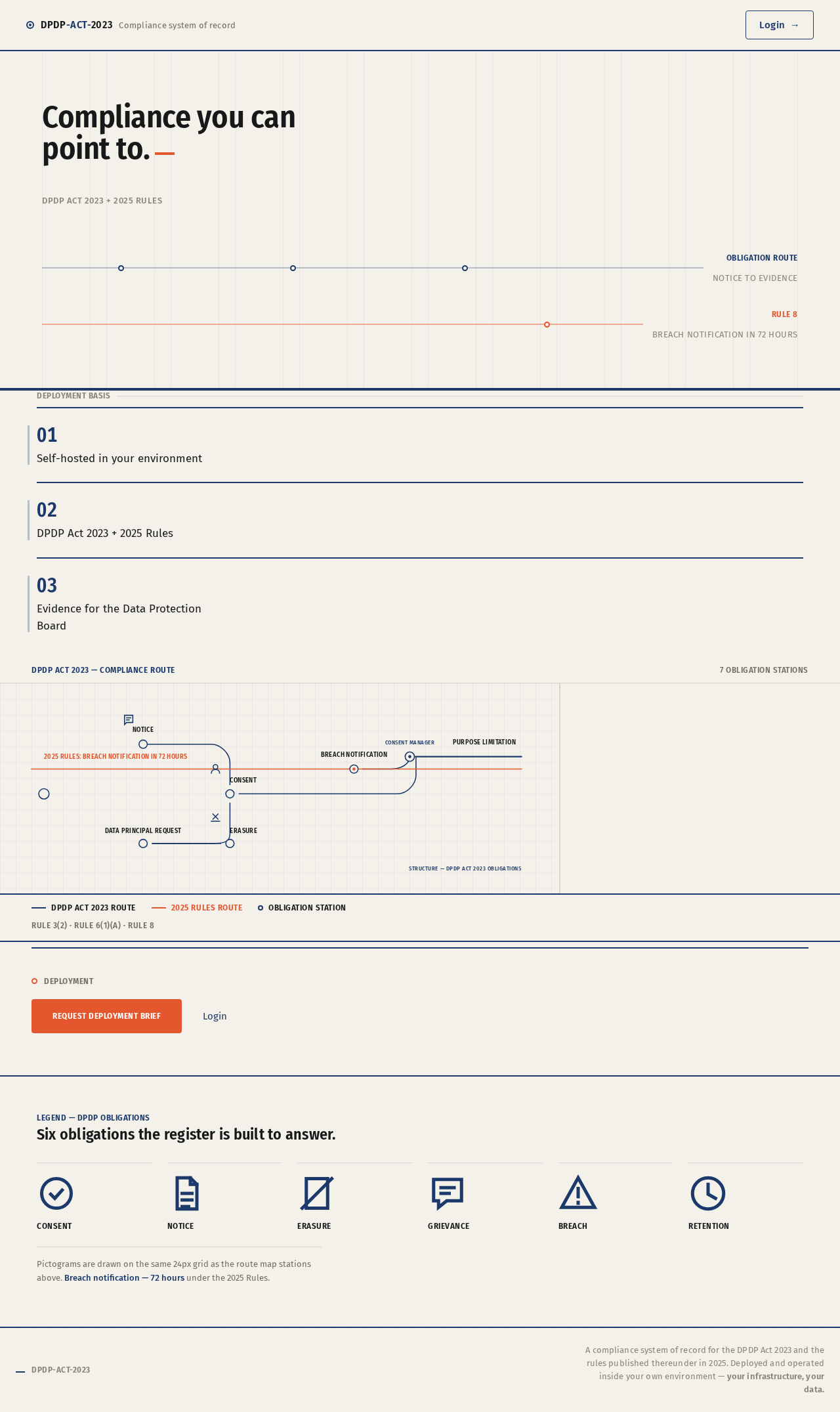
Compliance you can point to.
DPDP Act 2023 + 2025 Rules
Deployment basis
Panel 02. DPDP Act 2023 + 2025 Rules
Panel 03. Evidence for the Data Protection Board
- DPDP Act 2023 route
- 2025 Rules route
- Obligation station
Rule 3(2) · Rule 6(1)(a) · Rule 8
Deployment
Legend — DPDP obligations
Six obligations the register is built to answer.
- Consent
- Notice
- Erasure
- Grievance
- Breach
- Retention
Pictograms are drawn on the same 24px grid as the route map stations above. Breach notification — 72 hours under the 2025 Rules.
Compliance you can point to.
DPDP Act 2023 + 2025 Rules
Deployment basis
Panel 01. Self-hosted in your environment
Panel 02. DPDP Act 2023 + 2025 Rules
Panel 03. Evidence for the Data Protection Board
- DPDP Act 2023 route
- 2025 Rules route
- Obligation station
Rule 3(2) · Rule 6(1)(a) · Rule 8
Deployment
Legend — DPDP obligations
Six obligations the register is built to answer.
- Consent
- Notice
- Erasure
- Grievance
- Breach
- Retention
Pictograms are drawn on the same 24px grid as the route map stations above. Breach notification — 72 hours under the 2025 Rules.
No comments yet. Be the first!