Page 1 of 20
System Requirements Document for dog-grooming-salon
1. Introduction
Suds & Tails is a small dog-grooming salon. This document specifies a booking web app that lets pet owners book grooming appointments online, lets groomers see the appointments they must perform each day, and lets the salon owner keep the service list, prices, and groomer availability accurate so that customers always book against real, current salon information.
The product intent is a single, warm, legible booking and salon-operations surface for a neighbourhood business:
- Customers pick a service from bath, full groom, or nail trim, choose a groomer and a time slot, and receive a confirmation.
- Groomers see their daily schedule.
- The owner manages services, prices, and groomer availability.
The audience is pet owners who want booking to feel easy, warm, and a little joyful rather than clinical, plus the salon's own groomers and owner, who need a calm, readable schedule and admin surface underneath the charm.
Page 2 of 20
2. System Overview
The app is a first-party web application for Suds & Tails with three active human roles: Customer, Groomer, and Owner. It is delivered as a custom user interface backed by persistent server-side data, so that bookings, services, prices, availability, and schedules survive between visits and remain bound to the correct person.
Current delivery covers:
- An anonymous public entry that explains Suds & Tails and introduces its grooming booking service.
- Customer self-service enrollment and returning verified login for customers, groomers, and the owner.
- A three-step customer booking flow: choose a service (bath, full groom, nail trim) → choose a groomer → choose a time slot, ending in a confirmation.
- A groomer's daily schedule of their own appointments.
- Owner management of the salon service list, service prices, and groomer availability that customer booking reads from.
Groomer and Owner accounts are provisioned with their respective roles before they access role-restricted work; they do not self-enroll. Customers self-enroll.
Narrow exclusions: this document does not add payment processing, invoicing, marketing campaigns, inventory or retail sales, medical/veterinary records, multi-location franchise management, or customer-facing messaging/chat. Nothing in the source requests these, and they are not part of the current delivery.
Page 3 of 20
2a. Product Interpretation and Delivery Boundary
Delivery ownership. Suds & Tails owns the entire experience: the public landing surface, identity entry, the customer booking flow, the groomer schedule, and the owner admin surfaces are all first-party custom pages of this application. There is no provider-owned or external-only surface in the current delivery, and no headless-only delivery mode.
Access ownership. The application owns identity. Customers establish their own identity through self-service enrollment before their first booking, because a booking is a durable commitment that must remain bound to the correct pet owner and must be resumable on return. Groomers and the owner are provisioned with their roles rather than self-enrolling, because their access is to salon-internal work rather than to a self-started customer relationship. Returning customers, groomers, and the owner verify themselves through login to reach durable booking and salon records.
Anonymous versus protected. The Landing page is anonymously reachable and is the public entry. Login and Sign Up are themselves anonymously reachable entry surfaces — a protected destination cannot own the interaction that establishes access to itself. The booking flow pages, the groomer daily schedule, and the owner management pages are role-restricted and require an established, verified identity.
Current versus future. Everything specified in this document is current. No future-horizon requirements were stated by the user; nothing here is deferred.
2b. Source Content Inventory
Not applicable — no reference directive in this project declares a content_source, so no verified factual inventory is carried.
Page 4 of 20
2c. Page Content and Component Coverage
The page inventory below is the final, ordered page contract for this project. Each page appears exactly once.
Landing
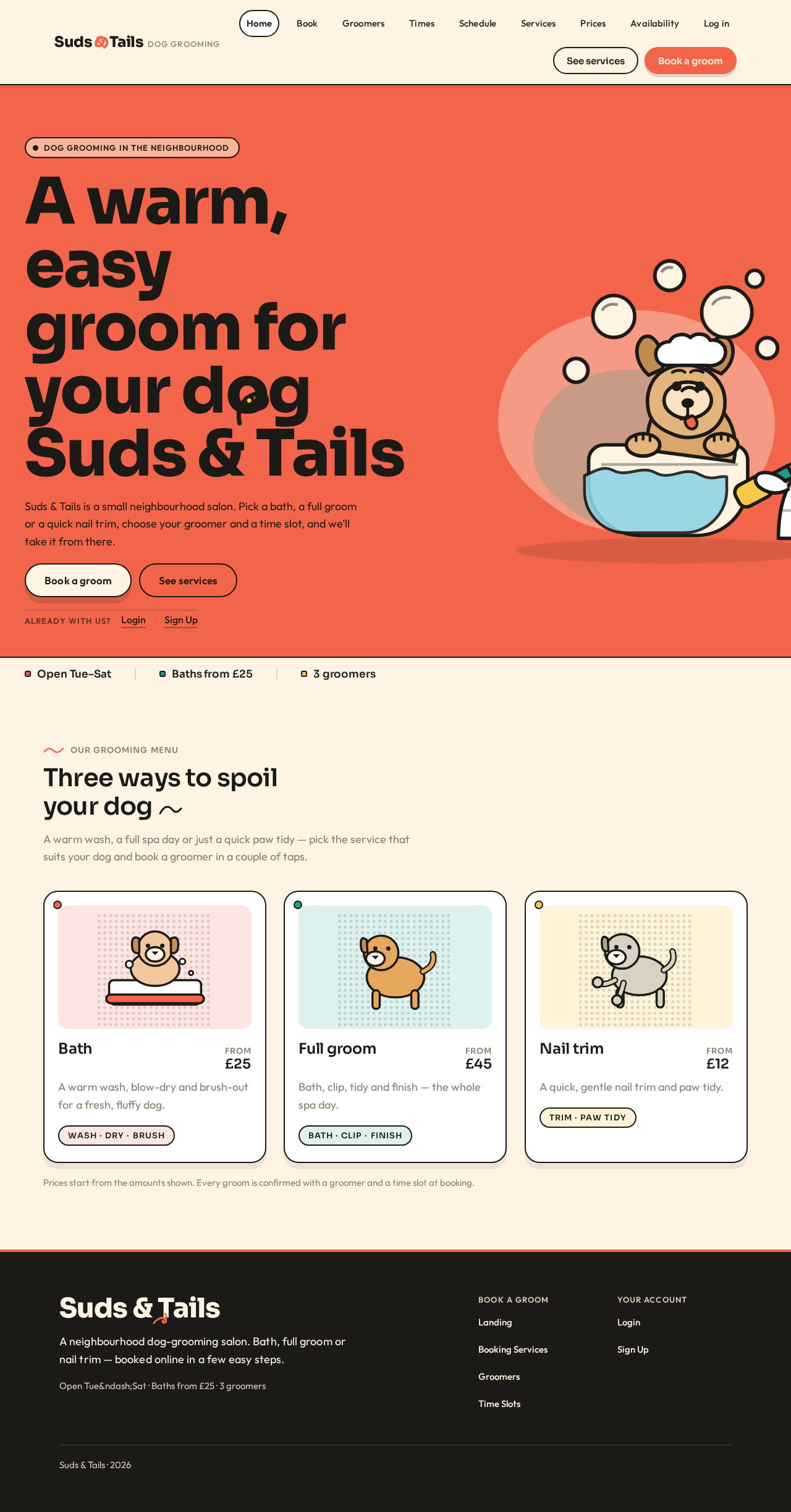
- Information/state: Anonymous public entry for Suds & Tails. Explains who the salon is and introduces its grooming booking service. Presents the salon name and wordmark, a short statement of what the salon does, and the three services offered (bath, full groom, nail trim) as an introduction to booking. Carries three quick facts: Open Tue–Sat, Baths from £25, 3 groomers.
- Primary actions: "Book a groom" (primary CTA, leads toward the booking flow, which requires an established customer identity). "See services" (secondary/ghost CTA, leads toward the service information that booking is built on).
- Supporting actions: Navigate to Login for returning customers, groomers, and the owner. Navigate to Sign Up for a new customer.
- Domain entities: Salon (Suds & Tails), Service (bath, full groom, nail trim), Groomer (as a count and as people), opening days, starting bath price.
- Component responsibilities: Full-bleed coral hero band with oversized left-aligned display headline; illustrated dog-and-groomer hero scene; cream pill primary CTA and ghost secondary CTA; thin cream strip of three quick facts; entry links to Login and Sign Up.
- States: Loading — static content, no data fetch required beyond the quick facts. Empty — not applicable; the landing content is fixed salon information. Success — the visitor understands the salon and can choose to book, sign up, or log in. Error — if the quick facts cannot be resolved, the hero and CTAs still render and the fact strip is omitted rather than showing placeholder values. Recovery — the visitor can still reach Sign Up, Login, and the service introduction.
Login
- Information/state: Anonymous entry surface for returning verification. Accepts the credentials of a returning Customer, Groomer, or Owner and establishes the verified session that unlocks that person's durable records.
- Primary actions: Submit credentials to log in.
- Supporting actions: Navigate to Sign Up if the visitor is a new customer. Return to Landing.
- Domain entities: Account identity, role (Customer, Groomer, Owner), session.
- Component responsibilities: Credential form; submit control; inline validation messaging; link to Sign Up; link back to Landing.
- States: Loading — submit control shows an in-progress state while credentials are verified. Empty — the form renders with empty fields. Success — the person is verified and continues to the destination appropriate to their role: Customer to the booking flow, Groomer to Daily Schedule, Owner to the management surfaces. Error — invalid credentials show a clear, non-revealing message and keep the entered identifier so the person can correct it. Recovery — the person can retry, or go to Sign Up if they are a new customer.
Page 5 of 20
Sign Up
- Information/state: Anonymous entry surface where a new Customer independently establishes their own identity before their first booking. Collects the minimum identity information needed to own a booking and to be recognized on return.
- Primary actions: Create the customer account.
- Supporting actions: Navigate to Login if the visitor already has an account. Return to Landing.
- Domain entities: Customer account identity, credentials, role (Customer).
- Component responsibilities: Enrollment form; submit control; inline validation messaging; link to Login; link back to Landing.
- States: Loading — submit control shows an in-progress state while the account is created. Empty — the form renders with empty fields. Success — the customer account exists and the customer continues into the booking flow to make their first booking. Error — an already-used identifier or invalid input is reported clearly against the offending field, and entered values are preserved. Recovery — the customer can correct the input and resubmit, or switch to Login.
Booking Services
- Information/state: Step one of the customer booking flow. Presents the salon's currently offered services — bath, full groom, nail trim — as they exist in the owner-maintained service list, with their current prices. Shows the three-step progress strip with Service as the active step.
- Primary actions: Select one service to book.
- Supporting actions: Move back out of the booking flow; review the selected service before continuing.
- Domain entities: Service (name, description, price), selection state, booking draft.
- Component responsibilities: Three-step progress strip (Service → Groomer → Time); illustrated service cards in a responsive 1/2/3-column grid, each with a thick ink border, rounded corners, offset shadow, and a service-specific dog illustration; price numerals set in the heading face; continue control.
- States: Loading — service cards show a loading placeholder while the owner-maintained service list is fetched. Empty — if the owner has no services currently offered, the page states that no services are available to book right now and offers no selection. Success — the chosen service is visibly selected and the customer can continue to groomer selection. Error — if the service list cannot be loaded, a clear message is shown with a retry action. Recovery — retry reloads the list; the customer can also leave the flow and return later without losing their account.
Groomers
- Information/state: Step two of the customer booking flow. Presents the salon's groomers as selectable people, in the context of the service already chosen. Shows the progress strip with Service completed and Groomer active.
- Primary actions: Select one groomer for the chosen service.
- Supporting actions: Go back to change the selected service; review the selected groomer before continuing.
- Domain entities: Groomer (name, portrait), selected service, booking draft.
- Component responsibilities: Three-step progress strip with the completed Service step filled; horizontal row of groomer portrait cards; selected-state treatment with thick ink outline; continue control; back control.
- States: Loading — groomer cards show a loading placeholder while groomers are fetched. Empty — if no groomer is available for the chosen service, the page says so plainly and offers a way back to change the service. Success — the chosen groomer is visibly selected and the customer can continue to time selection. Error — a failed load shows a clear message with a retry action. Recovery — retry reloads groomers; the customer can step back to the service step at any time.
Page 6 of 20
Time Slots
- Information/state: Step three of the customer booking flow. Presents the time slots that are actually available for the chosen groomer, derived from the availability the owner maintains. Shows the progress strip with Service and Groomer completed and Time active.
- Primary actions: Select one available time slot and commit the booking.
- Supporting actions: Go back to change the groomer or the service; review the full selection (service, groomer, time) before committing.
- Domain entities: Time slot (date, start time, availability), groomer, service, booking draft, booking.
- Component responsibilities: Three-step progress strip with two completed steps filled; wrapped grid of pill time-slot chips; unavailable slots shown as unavailable rather than selectable; summary of the chosen service, groomer, and time; commit control; back control.
- States: Loading — slot chips show a loading placeholder while availability is fetched. Empty — if the chosen groomer has no available slots, the page states this plainly and offers a way back to choose another groomer or another day. Success — the selected slot is visibly selected and the customer can commit the booking. Error — if the booking cannot be committed because the slot was taken in the meantime, the page says so clearly, refreshes availability, and returns the customer to slot selection with their service and groomer preserved. Recovery — the customer picks another slot and commits again, or steps back to change groomer or service.
Confirmation
- Information/state: The completed booking, presented to the customer. Shows the confirmed appointment details: the chosen service, the chosen groomer, and the chosen time slot, together with the customer's own booking reference. This is the durable record the customer can return to.
- Primary actions: Review the confirmed appointment details.
- Supporting actions: Return to the booking flow to book another appointment; leave the confirmation.
- Domain entities: Booking (service, groomer, time slot, customer, status = confirmed).
- Component responsibilities: Full teal confirmation colour block; illustrated dog holding a booking ticket; appointment details set on white sticker cards with numerals in the heading face; one-time tail-wag illustration loop; return-to-booking control.
- States: Loading — the confirmation details load for the just-committed booking. Empty — not applicable; a confirmation always describes a specific committed booking. Success — the confirmed appointment is fully readable: service, groomer, time, and reference. Error — if the confirmation cannot be retrieved, the page states that the booking was committed but the details could not be displayed, and offers a retry. Recovery — retry reloads the confirmation; the customer can also reach the same booking again after logging in.
Daily Schedule
- Information/state: The signed-in groomer's own appointments for the current day, ordered by time. Each appointment shows the dog's name, the service, the time, and the appointment status. The day's date and the groomer's own identity are shown as context.
- Primary actions: Read the day's appointments in time order.
- Supporting actions: Move between days to review the schedule; open an appointment's detail.
- Domain entities: Groomer (self), appointment (dog name, service, time, status), day.
- Component responsibilities: Narrow left rail carrying the day's date and the groomer's identity; wide right column of rounded appointment cards ordered by time; each card carries a left colour spine — coral for bath, teal for full groom, mustard for nail trim — so the day reads by colour before text; day navigation.
- States: Loading — appointment cards show a loading placeholder while the day's schedule is fetched. Empty — a day with no appointments states plainly that there are no appointments scheduled for that day. Success — the day's appointments are listed in time order with service colour spines and statuses. Error — a failed load shows a clear message with a retry action. Recovery — retry reloads the day; the groomer can move to another day and back.
Page 7 of 20
Service Management
- Information/state: The owner's management of the salon service list — the services customers choose from. Shows the current services, including bath, full groom, and nail trim, with their descriptions and whether each is currently offered.
- Primary actions: Add a service to the salon's list; edit an existing service's details; change whether a service is currently offered.
- Supporting actions: Review the list before and after changes; move to price management for a service.
- Domain entities: Service (name, description, offered state), owner (self).
- Component responsibilities: Service list with per-service edit controls; add-service control; offered/unavailable toggle per service; inline validation and confirmation of saved changes.
- States: Loading — the service list shows a loading placeholder while it is fetched. Empty — a salon with no services yet states that no services exist and prompts the owner to add the first one. Success — the change is saved and the updated service list is shown, and the change is what customers subsequently see on Booking Services. Error — a rejected or failed save is reported clearly against the affected service, and the owner's unsaved input is preserved. Recovery — the owner corrects the input and saves again, or discards the change.
Price Management
- Information/state: The owner's management of service prices — the prices customers see and book against. Shows each service alongside its current price.
- Primary actions: Set or change the price of a service.
- Supporting actions: Review prices across the service list; move to service management for a service's details.
- Domain entities: Service, price, owner (self).
- Component responsibilities: Price list keyed by service; per-service price input with numerals set in the heading face; save control; inline validation and confirmation of saved prices.
- States: Loading — the price list shows a loading placeholder while it is fetched. Empty — if no services exist yet, the page states that prices cannot be set until services exist and points to Service Management. Success — the new price is saved and shown, and is the price customers subsequently see on Booking Services. Error — an invalid or rejected price is reported clearly against the affected service, and the owner's input is preserved. Recovery — the owner corrects the price and saves again, or discards the change.
Availability
- Information/state: The owner's management of groomer availability — the source of truth that customer time-slot selection reads from. Shows each groomer's availability so the owner can see and adjust when each groomer can be booked.
- Primary actions: Set or change a groomer's availability.
- Supporting actions: Review availability across groomers; move between groomers.
- Domain entities: Groomer, availability (days and times a groomer can be booked), owner (self).
- Component responsibilities: Groomer selector; availability editor per groomer; save control; inline validation and confirmation of saved availability.
- States: Loading — availability shows a loading placeholder while it is fetched. Empty — a groomer with no availability set states this plainly and prompts the owner to set it. Success — the availability change is saved and shown, and is what customers subsequently book against on Time Slots. Error — a rejected or failed save is reported clearly against the affected groomer, and the owner's input is preserved. Recovery — the owner corrects the input and saves again, or discards the change.
Page 8 of 20
3. Functional Requirements
Each requirement below is a distinct story point with its provenance, lifecycle facts, and observable acceptance.
FR-1 — Customer books a grooming appointment
As a Customer, I should pick a service, choose a groomer and a time slot, and get a confirmation, so that I have a real appointment at Suds & Tails.
- Provenance: explicit.
- Actor: Customer (initiator). Indispensable participant: the chosen Groomer, whose day the booking lands in (see FR-6).
- Trigger/input: The customer has an established identity and enters the booking flow; selects one of bath, full groom, or nail trim; selects a groomer; selects an available time slot.
- Observable result/state change: A booking exists, bound to that customer, that service, that groomer, and that time slot, with status confirmed; the slot is no longer offered as available to others; the appointment appears in the groomer's schedule for that day.
- Access state: Role-restricted; requires an established, verified Customer identity.
- Material failure/recovery: If the chosen slot is taken before the booking is committed, the customer is told plainly, availability is refreshed, and the customer returns to slot selection with service and groomer preserved. If the service list or groomer list cannot be loaded, the customer is told and can retry.
- Continuation: The customer reaches Confirmation and can book another appointment; the booking remains retrievable on return.
FR-2 — Customer chooses from the salon's services
As a Customer, I should choose from the services the salon offers — bath, full groom, or nail trim — so that I book the grooming my dog actually needs.
- Provenance: explicit.
- Actor: Customer. Indispensable participant: the Owner, whose maintained service list is what the customer chooses from (see FR-8).
- Trigger/input: The customer enters the booking flow and views the currently offered services with their current prices.
- Observable result/state change: One service is selected into the booking draft.
- Access state: Role-restricted; requires an established, verified Customer identity.
- Material failure/recovery: If the service list cannot be loaded, a clear message with retry is shown; if no services are currently offered, the page says so and offers no selection.
- Continuation: The customer continues to groomer selection with the chosen service.
FR-3 — Customer chooses a groomer
As a Customer, I should choose a groomer for my chosen service, so that I know who will groom my dog.
- Provenance: explicit.
- Actor: Customer. Indispensable participant: the chosen Groomer, who is the person the appointment is assigned to.
- Trigger/input: The customer has selected a service and views the salon's groomers.
- Observable result/state change: One groomer is selected into the booking draft for the chosen service.
- Access state: Role-restricted; requires an established, verified Customer identity.
- Material failure/recovery: If groomers cannot be loaded, a clear message with retry is shown; if no groomer is available for the chosen service, the page says so and offers a way back to change the service.
- Continuation: The customer continues to time-slot selection for that groomer.
FR-4 — Customer chooses a time slot
As a Customer, I should choose an available time slot for my chosen groomer, so that the appointment fits my day and the groomer is genuinely free.
- Provenance: explicit.
- Actor: Customer. Indispensable participant: the chosen Groomer, whose availability bounds what can be offered.
- Trigger/input: The customer has selected a service and a groomer and views that groomer's available slots, derived from owner-maintained availability.
- Observable result/state change: One available time slot is selected into the booking draft; unavailable slots are shown as unavailable rather than selectable.
- Access state: Role-restricted; requires an established, verified Customer identity.
- Material failure/recovery: If availability cannot be loaded, a clear message with retry is shown; if the groomer has no available slots, the page says so and offers a way back to choose another groomer or day.
- Continuation: The customer commits the booking and reaches Confirmation.
FR-5 — Customer receives a confirmation
As a Customer, I should get a confirmation of my booking, so that I have a durable record of the service, groomer, and time I booked.
- Provenance: explicit.
- Actor: Customer. Indispensable participant: none beyond the customer — the confirmation is the customer's own receipt of the commitment made with the salon.
- Trigger/input: The customer commits the booking from time-slot selection.
- Observable result/state change: The booking is confirmed and its details — service, groomer, time slot, and booking reference — are presented to the customer and remain retrievable on return.
- Access state: Role-restricted; requires an established, verified Customer identity.
- Material failure/recovery: If the confirmation cannot be retrieved after the booking was committed, the page states that the booking was committed but the details could not be displayed, and offers a retry.
- Continuation: The customer can return to the booking flow to book another appointment, and can reach the same booking again after logging in.
FR-6 — Groomer sees their daily schedule
As a Groomer, I should see my daily schedule, so that I know which appointments I have for the day.
- Provenance: explicit.
- Actor: Groomer. Indispensable participant: the Customer whose booking appears — the appointment the groomer reads is the customer's committed booking (FR-1).
- Trigger/input: The groomer signs in and opens their schedule for a day.
- Observable result/state change: The groomer's own appointments for that day are listed in time order, each showing the dog's name, the service, the time, and the status, with a service colour spine.
- Access state: Role-restricted; requires a provisioned Groomer identity and verified login. A groomer sees their own schedule.
- Material failure/recovery: If the day's schedule cannot be loaded, a clear message with retry is shown; the groomer can move to another day and back.
- Continuation: The groomer can review other days and return to today.
FR-7 — Owner manages the salon service list
As the Owner, I should manage the services the salon offers, so that customers choose from an accurate list.
- Provenance: explicit.
- Actor: Owner. Indispensable participant: the Customer, who chooses from this list on Booking Services (FR-2).
- Trigger/input: The owner opens service management and adds a service, edits a service's details, or changes whether a service is currently offered.
- Observable result/state change: The salon service list is updated and persisted, and the updated list is what customers subsequently see when choosing a service.
- Access state: Role-restricted; requires a provisioned Owner identity and verified login.
- Material failure/recovery: A rejected or failed save is reported clearly against the affected service, and the owner's unsaved input is preserved so it can be corrected and saved again.
- Continuation: The owner can continue editing the list or move to price management.
FR-8 — Owner manages service prices
As the Owner, I should manage service prices, so that customers see and book against correct prices.
- Provenance: explicit.
- Actor: Owner. Indispensable participant: the Customer, who sees and books against these prices (FR-2).
- Trigger/input: The owner opens price management and sets or changes the price of a service.
- Observable result/state change: The service price is updated and persisted, and the updated price is what customers subsequently see when choosing a service.
- Access state: Role-restricted; requires a provisioned Owner identity and verified login.
- Material failure/recovery: An invalid or rejected price is reported clearly against the affected service, and the owner's input is preserved so it can be corrected and saved again.
- Continuation: The owner can continue adjusting prices across the service list.
FR-9 — Owner manages groomer availability
As the Owner, I should manage groomer availability, so that customers can only book times a groomer is genuinely free.
- Provenance: explicit.
- Actor: Owner. Indispensable participant: the Customer, whose time-slot choices are bounded by this availability (FR-4), and the Groomer, whose working time is being set.
- Trigger/input: The owner opens availability, selects a groomer, and sets or changes when that groomer can be booked.
- Observable result/state change: The groomer's availability is updated and persisted, and it is the availability customers subsequently book against on Time Slots.
- Access state: Role-restricted; requires a provisioned Owner identity and verified login.
- Material failure/recovery: A rejected or failed save is reported clearly against the affected groomer, and the owner's input is preserved so it can be corrected and saved again.
- Continuation: The owner can move between groomers and continue adjusting availability.
FR-10 — Customer self-service enrollment
As a Customer, I should be able to establish my own account before my first booking, so that I can start booking without waiting for the salon.
- Provenance: required_inference — required to make the accepted customer booking journey executable, since a booking is a durable commitment that must remain bound to the correct pet owner and be resumable on return.
- Actor: Customer. Indispensable participant: none beyond the customer — enrollment is the customer's own first-use step.
- Trigger/input: A new customer chooses to sign up and supplies the minimum identity information needed to own a booking.
- Observable result/state change: A Customer account exists with the Customer role, and the customer continues into the booking flow.
- Access state: Anonymous entry surface; the customer is not yet verified.
- Material failure/recovery: An already-used identifier or invalid input is reported clearly against the offending field, and entered values are preserved so the customer can correct and resubmit, or switch to Login.
- Continuation: The customer proceeds to choose a service, groomer, and time slot.
FR-11 — Returning verified login for customers, groomers, and the owner
As a Customer, Groomer, or Owner, I should be able to log in and be verified, so that I reach my own durable booking and salon records.
- Provenance: required_inference — required to make accepted durable records reachable on return and to keep each person's records bound to them.
- Actor: Customer, Groomer, or Owner. Indispensable participant: none beyond the returning person — this is their own re-entry step.
- Trigger/input: A returning person supplies their credentials on Login.
- Observable result/state change: The person is verified and continues to the destination appropriate to their role: Customer to the booking flow, Groomer to Daily Schedule, Owner to the management surfaces.
- Access state: Anonymous entry surface; the person is not yet verified.
- Material failure/recovery: Invalid credentials show a clear, non-revealing message and keep the entered identifier so the person can correct it; a new customer can switch to Sign Up.
- Continuation: The verified person reaches their own records and work.
FR-12 — Groomer and Owner accounts are provisioned with their roles
As the Owner, I should have groomer and owner accounts provisioned with their respective roles, so that role-restricted salon work is reached only by the right people.
- Provenance: required_inference — required so that groomer and owner role-restricted work is reachable by the correct people without inventing a self-service path the source never described.
- Actor: Owner (as the salon-side authority for who works there). Indispensable participant: the Groomer, whose account is provisioned so they can reach their own schedule.
- Trigger/input: A groomer or the owner is provisioned with their role before accessing role-restricted work.
- Observable result/state change: A Groomer account and an Owner account exist with their respective roles, and each reaches only the work their role owns.
- Access state: Provisioning precedes access; the provisioned person then verifies through Login.
- Material failure/recovery: If a provisioned person cannot verify, they are told plainly and can retry; they do not self-enroll into a salon role.
- Continuation: The groomer reaches Daily Schedule; the owner reaches Service Management, Price Management, and Availability.
FR-13 — Booking, service, price, availability, and schedule data persist
As a Customer, Groomer, or Owner, I should have booking, service, price, availability, and schedule data persist, so that I can return to it later.
- Provenance: required_inference — required so that accepted durable records survive between visits and remain bound to the correct person.
- Actor: Customer, Groomer, and Owner. Indispensable participant: none beyond the returning person.
- Trigger/input: Any accepted change — a committed booking, a service edit, a price change, an availability change — or a return visit.
- Observable result/state change: The change is stored and is what the relevant person sees on return: the customer's confirmed booking, the groomer's schedule, the owner's service list, prices, and availability.
- Access state: Persisted records are reached through verified login by the person they belong to.
- Material failure/recovery: If persisted data cannot be loaded, the affected page shows a clear message with a retry action rather than placeholder values.
- Continuation: Each person resumes their own work from where the persisted state left it.
Page 9 of 20
4. User Personas
Customer
Product context. A pet owner who brings their dog to Suds & Tails for grooming. They arrive at the app without an account, decide what their dog needs, and want the appointment settled quickly and warmly — not through a clinical form.
Primary goal. A confirmed appointment for the chosen service, groomer, and time.
Distinct accepted responsibilities. The customer is the only role that creates a booking. They choose one of the salon's services — bath, full groom, or nail trim — then choose a groomer, then choose an available time slot, and then receive a confirmation. They are also the only role that self-enrolls: they establish their own identity before their first booking and verify themselves on return.
Relevant inputs and decisions. Which service the dog needs; which groomer they want; which available time fits their day. Their decisions are constrained by what the salon actually offers and by when the chosen groomer is genuinely free.
Interactions with other accepted participants. The customer's booking is what the Groomer later reads in their daily schedule, so the customer's choice of groomer and time is the groomer's working day. The customer's choices are bounded by the Owner's maintained service list, prices, and groomer availability — the customer books against the owner's configuration, not against a fixed catalogue.
Observable success. A confirmed appointment showing the chosen service, groomer, and time, retrievable again after logging in.
Page 10 of 20
Groomer
Product context. A groomer who works at Suds & Tails and performs the booked services. They do not configure the salon and do not book on a customer's behalf; they need to know, calmly and quickly, what their day looks like.
Primary goal. Knowing which appointments they have for the day.
Distinct accepted responsibilities. The groomer reads their own daily schedule — the appointments assigned to them for a day, ordered by time, each showing the dog's name, the service, the time, and the status. Their work is read-only with respect to the salon's configuration and the customer's booking.
Relevant inputs and decisions. Which day they are looking at, and which appointment they are about to perform. The service colour spine lets them read the shape of the day by colour before reading any text.
Interactions with other accepted participants. The appointments the groomer sees are the Customer's committed bookings. The times they are booked are bounded by the availability the Owner has set for them. The groomer's account is provisioned with the Groomer role rather than self-enrolled.
Observable success. A day's appointments listed in time order, with service and status legible at a glance, and an honest empty state on a day with nothing booked.
Page 11 of 20
Owner
Product context. The owner of the small salon who runs the business configuration. They are the only role that shapes what customers can book, and they need the admin surface to be calm and legible underneath the app's warmth.
Primary goal. An up-to-date catalog of services and prices plus accurate groomer availability that customers can book against.
Distinct accepted responsibilities. The owner manages three things and only these three: the salon's service list, service prices, and groomer availability. They add and edit services and change whether each is currently offered; they set and change the price of each service; they set and change when each groomer can be booked.
Relevant inputs and decisions. Which services the salon offers and at what price; which groomers work and when they are free. Every one of these decisions immediately changes what customers see and can book.
Interactions with other accepted participants. The owner's service list and prices are what the Customer chooses from; the owner's availability is what bounds the Customer's time-slot choices and what shapes the Groomer's bookable day. The owner's account is provisioned with the Owner role rather than self-enrolled.
Observable success. Saved changes that persist and that customers subsequently book against, with clear reporting when a change is rejected so it can be corrected.
5. Core User Flows
Page 12 of 20
Flow A — A new customer books a grooming appointment
- The customer arrives at Landing anonymously. They read who Suds & Tails is, see the three services introduced, and see the quick facts (Open Tue–Sat, Baths from £25, 3 groomers).
- The customer chooses "Book a groom". Because booking is a durable commitment bound to them, they are taken to establish identity rather than into the booking flow directly.
- On Sign Up, the customer supplies the minimum identity information needed to own a booking and submits. Failure/recovery: if the identifier is already in use or input is invalid, the error is reported against the offending field, entered values are preserved, and the customer corrects and resubmits — or switches to Login if they already have an account.
- On success, the customer enters the booking flow at Booking Services. The three-step progress strip shows Service active.
- The customer reviews the salon's currently offered services — bath, full groom, nail trim — with their current prices, and selects the one their dog needs. Failure/recovery: if the service list cannot be loaded, a clear message with retry is shown; if no services are currently offered, the page says so and offers no selection.
- The customer continues to Groomers. The progress strip shows Service completed and Groomer active. The customer selects the groomer they want for the chosen service. Failure/recovery: if no groomer is available for that service, the page says so and the customer steps back to change the service.
- The customer continues to Time Slots. The progress strip shows Service and Groomer completed and Time active. The customer sees only the slots that are genuinely available for that groomer, derived from the owner's availability, and selects one.
- The customer commits the booking. Failure/recovery: if the slot was taken in the meantime, the page says so plainly, refreshes availability, and returns the customer to slot selection with their service and groomer preserved; they pick another slot and commit again.
- On success, the customer reaches Confirmation — a full teal block with the illustrated dog holding a booking ticket. The confirmed appointment details are set on white sticker cards: the chosen service, the chosen groomer, the chosen time slot, and the booking reference. A one-time tail-wag loop plays and stops under reduced motion.
- Continuation: the customer can return to the booking flow to book another appointment, and can reach the same confirmed booking again after logging in.
Flow B — A returning customer logs in and books again
- The customer arrives at Landing and chooses to log in.
- On Login, they supply their credentials. Failure/recovery: invalid credentials show a clear, non-revealing message and keep the entered identifier so they can correct it.
- On success, the customer is verified and continues into the booking flow, where their existing identity means the new booking is bound to them.
- They repeat steps 4–10 of Flow A: choose a service on Booking Services, choose a groomer on Groomers, choose an available slot on Time Slots, commit, and read the result on Confirmation.
- Continuation: the new booking joins their earlier confirmed bookings, all retrievable on return.
Flow C — A groomer reads their daily schedule
- The groomer has been provisioned with a Groomer account. They open Login and supply their credentials. Failure/recovery: if they cannot verify, they are told plainly and can retry; they do not self-enroll into a salon role.
- On success, the groomer is verified and continues to Daily Schedule.
- The narrow left rail shows the day's date and the groomer's own identity. The wide right column lists their appointments for that day in time order.
- Each appointment card shows the dog's name, the service, the time, and the status, with a left colour spine — coral for bath, teal for full groom, mustard for nail trim — so the groomer reads the shape of the day by colour before reading any text.
- Failure/recovery: if the day's schedule cannot be loaded, a clear message with retry is shown. On a day with nothing booked, the page states plainly that there are no appointments scheduled for that day.
- Continuation: the groomer moves to another day to review it, and returns to today.
Page 13 of 20
Flow D — The owner manages the service list
- The owner has been provisioned with an Owner account. They open Login and supply their credentials, then continue to the management surfaces.
- On Service Management, the owner reviews the salon's current services — including bath, full groom, and nail trim — with their descriptions and whether each is currently offered.
- The owner adds a service, edits an existing service's details, or changes whether a service is currently offered, and saves.
- Failure/recovery: a rejected or failed save is reported clearly against the affected service, and the owner's unsaved input is preserved so it can be corrected and saved again. If no services exist yet, the page prompts the owner to add the first one.
- On success, the updated list is shown and persisted.
- Continuation: the owner moves to Price Management for the affected service, or continues editing the list. The change is what customers subsequently see on Booking Services.
Flow E — The owner manages service prices
- The owner is signed in with the Owner role and opens Price Management.
- The page shows each service alongside its current price, with price numerals set in the heading face.
- The owner sets or changes the price of a service and saves.
- Failure/recovery: an invalid or rejected price is reported clearly against the affected service, and the owner's input is preserved so it can be corrected and saved again. If no services exist yet, the page states that prices cannot be set until services exist and points to Service Management.
- On success, the new price is shown and persisted.
- Continuation: the owner continues adjusting prices across the list. The change is the price customers subsequently see on Booking Services.
Flow F — The owner manages groomer availability
- The owner is signed in with the Owner role and opens Availability.
- The owner selects a groomer and reviews that groomer's current availability.
- The owner sets or changes when that groomer can be booked, and saves.
- Failure/recovery: a rejected or failed save is reported clearly against the affected groomer, and the owner's input is preserved so it can be corrected and saved again. A groomer with no availability set is stated plainly and the owner is prompted to set it.
- On success, the availability is shown and persisted.
- Continuation: the owner moves between groomers and continues adjusting availability. The change is what bounds customers' choices on Time Slots and what shapes the groomer's bookable day on Daily Schedule.
Page 14 of 20
6. Visuals Colors and Theme
The creative direction is authoritative for this section. The muse is Haraldur Thorleifsson; the headline idea is big-hearted boldness for Suds & Tails — a grooming salon that greets you like a wagging tail.
Colour tokens (light mode)
| Role | Hex | Use |
|---|
| Background | #FFF4E4 | Cream ground behind white cards |
| Surface | #FFFFFF | Cards and panels |
| Text | #1B1A17 | Ink black text for maximum readability |
| Primary | #F2654A | Coral — dominant brand colour: primary CTAs, the wordmark's tail, colour-blocked section grounds |
| Accent | #1E9E8A | Teal — secondary signal for groomer availability, success, and confirmation states |
| Muted | #8A7F6E | Warm grey-brown for metadata and secondary labels |
| Sticker accent | #F7C948 | Sunflower yellow — small sticker/character accent only, never behind body text |
Service colour spines on the groomer schedule: coral #F2654A for bath, teal #1E9E8A for full groom, mustard #F7C948 for nail trim.
Typography
- Headings: Sora. Sora ExtraBold for display headlines at very large sizes with tight tracking (
-0.02em) and sentence case; Sora SemiBold for section titles and card headings.
- Body and UI labels: Outfit Regular/Medium at generous line-height (
1.6) with slightly open tracking.
- Numerals: prices and times set in Sora SemiBold so they read like friendly signage.
- Scale (1.333 modular): display
clamp(44px, 9vw, 104px) / h1 clamp(34px, 5.5vw, 64px) / h2 clamp(26px, 3.6vw, 40px) / h3 24px / body 18px / small 15px / micro-label 13px uppercase tracked +0.08em.
Page 15 of 20
Shape language
Chunky rounded rectangles (20–28px radii) for cards and panels; pill buttons with 999px radius; soft offset shadows (0 10px 0 rgba(27,26,23,0.08)) that feel like sticker lift rather than glassy blur; occasional blob/organic shapes as decorative grounds behind illustration, never behind readable text; thick 2px ink outlines on selected states and tab-like controls.
Layout rhythm
Colour-blocked sections stacked vertically — a coral hero band, a cream booking band, a teal confirmation band — separated by full-width colour transitions rather than hairlines. The booking flow uses a visible three-step chunky progress strip (Service → Groomer → Time) pinned under the header. Service choices are large illustrated cards in a 1/2/3-column responsive grid. Groomer selection is a horizontal row of portrait cards. Time slots are pill chips in a wrapped grid. Groomer and owner dashboards use a two-column layout: a narrow left rail for the day's date and groomer identity, a wide right column of appointment cards ordered by time, each showing dog name, service chip, time, and status.
Imagery
Custom flat vector character illustration of dogs and groomers in the muse's warm, rounded style — a scruffy terrier in a tub, a corgi with a towel, a groomer holding clippers — used as spot art on the landing hero, empty states, and the confirmation screen. No stock photography in the hero. Small halftone or textured circular photo crops of real dogs may appear inside groomer portrait cards and testimonial chips, always inside a rounded frame.
Page 16 of 20
Avoid
Any blue or indigo primary/accent on a white or near-white ground; glassmorphism, frosted blur panels, or gradient blobs; a centred hero headline with subtext and a single generic button; Inter, Roboto, Arial, Helvetica, Open Sans, Lato, Poppins, or system-ui for headings or body; identical hover-lift card grids with no illustration or colour coding; clinical veterinary stock photography or cold medical blues; childish cartoon excess that undermines trust for the owner's admin surfaces; tiny grey metadata text below 13px on coloured grounds. The generic indigo/blue-on-white SaaS template is forbidden for this project.
7. Signature Design Concept
The public entry is a full-bleed coral band, not white. On the left, an oversized Sora ExtraBold headline set in ink (#1B1A17) at clamp(44px, 9vw, 104px) is stacked over three lines, with the words "Suds & Tails" carrying a small illustrated tail curling from the ampersand as a decorative accent that never covers the text. Beneath the headline sits a cream pill CTA "Book a groom" and a ghost CTA "See services", pinned left. On the right, a large hand-built vector scene of a dog mid-bath with bubbles and a groomer bleeds off the right edge of the viewport at 1280px, scaling down and moving below the headline at 375px. A thin cream strip at the very bottom carries three quick facts — Open Tue–Sat, Baths from £25, 3 groomers — in Sora SemiBold. No centred stack, no gradient blob, no blue button.
This concept only recomposes accepted content, states, and controls: the salon's identity, its three services as an introduction, the two entry actions, and the three quick facts. It introduces no new behaviour, page, or destination.
Page 17 of 20
8. Interaction Model & Motion Direction
Interaction Model: Animated
Motion Tempo: expressive
Hero Dimensionality: layered_2d
Landing Hero Motion Brief
- Focal subject: the hand-built vector scene of a dog mid-bath with bubbles and a groomer, bleeding off the right edge of the coral hero band.
- Input → transformation → outcome thesis: as the visitor arrives and scrolls, the coral hero band wipes in from the left, the oversized headline settles into place, and the illustrated dog-and-groomer scene resolves into its composed position — so the visitor's first impression is a warm, lively salon rather than a static form, and the two entry actions ("Book a groom", "See services") are the clear next step.
- Motion vocabulary: section colour blocks wipe in from the left on scroll; service and groomer cards scale in with a gentle spring at a 120ms stagger; hover pops a card up by 4px with a shadow increase; buttons compress to 96% on press; the confirmation screen plays a small tail-wag illustration loop once.
- Composed first frame: the coral band already filling the viewport, the ink headline stacked over three lines on the left with the tail curl at the ampersand, the cream pill and ghost CTAs pinned left beneath it, the dog-and-groomer scene composed on the right bleeding off the edge, and the thin cream quick-facts strip along the bottom.
- Reduced-motion state: all motion settles instantly and static card states are shown; the tail-wag loop does not play; the hero renders as its fully composed first frame.
Page 18 of 20
9. Non-Functional Requirements
NFR-1 — Readable text and controls stay whole at every viewport. Provenance: explicit (creative direction). Headlines, wordmarks, labels, numbers, cards' text, and controls stay entirely inside the viewport and their container at 375px, 768px, and 1280px, wrapping or scaling (for example font-size: clamp(...) with its mobile size) to fit, and no other element covers any part of them. Imagery, decoration, and motion may be cropped, bled off an edge, rotated, overlapped, or cut exactly as the direction asks, as long as they cover no readable text or control. Where a direction, requirement, or brief asks readable text or a control to be cropped, clipped, covered, or run off an edge, it is kept whole and the gesture is carried with imagery or decoration instead; for readable text and controls this rule takes precedence.
NFR-2 — Reduced motion is respected. Provenance: explicit (creative direction). All motion respects prefers-reduced-motion by settling instantly and showing static card states; the confirmation tail-wag loop stops. Moving and scrollable content stops and shows whole items: they wrap into rows, or sit in a horizontally scrollable row (overflow-x: auto) whose further items are reached by scrolling.
NFR-3 — Data persists and remains bound to the correct person. Provenance: required_inference. Booking, service, price, availability, and schedule data persist for later access, and each person reaches their own records through verified login. Rationale: accepted bookings are durable commitments and accepted salon configuration is durable business state; without persistence the accepted journeys cannot be resumed or trusted.
NFR-4 — Role-restricted work is reached only by the right role. Provenance: required_inference. The booking flow pages, the groomer daily schedule, and the owner management pages require an established, verified identity of the appropriate role. Rationale: a booking must remain bound to the correct customer, a groomer's schedule is their own working day, and the salon's service list, prices, and availability are the owner's business configuration.
NFR-5 — No blue or indigo primary/accent on a white or near-white ground. Provenance: explicit (creative direction). The palette stays coral/teal on cream; the generic indigo/blue-on-white SaaS template is forbidden for this project.
NFR-6 — Metadata on coloured grounds stays legible. Provenance: explicit (creative direction). Tiny grey metadata text below 13px is not placed on coloured grounds.
Page 19 of 20
10. Tech Stack
The user did not specify a technology stack. The following are coherent defaults, labelled as such, chosen to fit the accepted delivery shape (a first-party custom web UI with persistent server-side data).
- Frontend: React —
[Default — not specified by user]
- Backend: Python with FastAPI —
[Default — not specified by user]
- Storage: A relational database appropriate to bookings, services, prices, availability, and schedules, with persistence as required by NFR-3 —
[Default — not specified by user]
- Packaging and local run: Docker and docker-compose —
[Default — not specified by user]
- Deployment: Kubernetes is not required for this small salon application and is not included —
[Default — not specified by user]
11. Assumptions and Constraints
Assumptions
- A-1. Customers self-enroll; groomers and the owner are provisioned with their roles rather than self-enrolling. This follows the accepted planning scope and the fact that groomer and owner access is to salon-internal work rather than to a self-started customer relationship. (required_inference)
- A-2. A booking is a durable commitment bound to the customer who made it, and is retrievable on return through verified login. (required_inference)
- A-3. The salon's service list, prices, and groomer availability are the single source of truth that customer booking reads from; a customer can only book a service the owner currently offers, at the price the owner has set, at a time the owner has made available for the chosen groomer. (explicit)
- A-4. The three services named by the user — bath, full groom, nail trim — are the salon's services as they exist in the owner-maintained list; the owner may add and edit services within that list. (explicit)
- A-5. A groomer sees their own schedule, not other groomers' schedules. (required_inference, from "their daily schedule")
- A-6. The quick facts on the landing hero — Open Tue–Sat, Baths from £25, 3 groomers — are salon information supplied by the creative direction; if they cannot be resolved, the fact strip is omitted rather than showing placeholder values. (explicit, creative direction)
Constraints
- C-1. The current delivery is exactly the page inventory in section 2c: Landing, Login, Sign Up, Booking Services, Groomers, Time Slots, Confirmation, Daily Schedule, Service Management, Price Management, Availability. No pages are added, removed, merged, split, renamed, or reordered, and no page's access is changed.
- C-2. The active human roles are exactly Customer, Groomer, and Owner. No additional personas are introduced.
- C-3. The palette, typography, shape language, layout, motion, imagery, and avoid-list in sections 6–8 are binding for this project.
- C-4. Readable text and controls are never cropped, clipped, covered, or run off an edge at 375px, 768px, or 1280px (NFR-1).
- C-5. The generic indigo/blue-on-white SaaS template is forbidden for this project (NFR-5).
- C-6. No payment processing, invoicing, marketing campaigns, inventory or retail sales, medical/veterinary records, multi-location franchise management, or customer-facing messaging/chat is part of the current delivery.
Page 20 of 20
12. Glossary
- Suds & Tails — the small dog-grooming salon this app serves.
- Service — one of the grooming services the salon offers. The user named three: bath, full groom, and nail trim. Services are maintained by the owner and chosen by customers.
- Price — the amount associated with a service, set by the owner and shown to customers when they choose a service.
- Groomer — a person who works at the salon and performs booked services. A groomer reads their own daily schedule.
- Availability — the days and times a given groomer can be booked, set by the owner. It bounds which time slots customers can choose.
- Time slot — a specific bookable time for a chosen groomer, derived from that groomer's availability.
- Booking — a customer's committed appointment, binding one service, one groomer, one time slot, and one customer, with status confirmed.
- Confirmation — the durable record presented to the customer after a booking is committed, showing the service, groomer, time slot, and booking reference.
- Daily schedule — a groomer's own appointments for a given day, ordered by time, each showing the dog's name, the service, the time, and the status.
- Customer — a pet owner who books grooming at Suds & Tails. Self-enrolls and verifies on return.
- Owner — the owner of the salon, who manages the service list, prices, and groomer availability.
- Role-restricted — reachable only with an established, verified identity of the appropriate role.
 Hemen Ashodia


No comments yet. Be the first!