divine-start
 Diya Trivedi
start a project to build a simpke single page design of claculator

Comments (0)
Sign in to leave a comment
System Requirements
System Requirements Document for divine-start
1. Introduction
divine-start is a simple calculator delivered as a single-page design. The product intent is narrow and complete: one page on which a visitor can enter numbers and arithmetic operators to build a calculation, see the current expression and the computed result, and clear the calculation to start over. There is no account, no saved history, no marketing surface, and no second page.
The audience is the anonymous everyday visitor — the "Calculator User" — who wants fast, correct arithmetic from a precise, quiet instrument. The design register is calm competence: the calculator is treated as a single designed object floating in a large paper-white silence, not as a dashboard, a toy, or a pitch.
2. System Overview
divine-start is a single-page web calculator. The page opens anonymously and immediately presents the working instrument: a display panel showing the current expression and the computed result, and a keypad of digits and arithmetic operators. The visitor builds an expression, evaluates it, reads the result, and can clear everything to begin again.
Current delivery consists of:
- Calculator — the one and only page. It is the public entry surface and the working surface at once: it hosts digit and operator entry, evaluation with a visible expression and result, and clearing to start over.
- Shared backend (FastAPI) — the application API process. It serves the frontend and hosts any domain modules the calculator needs. It is reused for all feature APIs rather than adding new services.
- Database (MariaDB) — provisioned application-owned persistent storage. The accepted calculator behavior is stateless per visit (no saved history, no accounts), so no domain entities, authentication, or schema are required by the current requirements; the database remains available infrastructure.
- Frontend (React) — the application UI that renders the Calculator page.
Actors: the Calculator User (the single accepted active human persona) and the application itself. There are no other human personas, no providers, and no external destinations in the current scope.
Removed from scope
- None. No concept was explicitly removed by the user; the scope is simply limited to the single-page calculator described above.
2a. Product Interpretation and Delivery Boundary
The product is one page and one job. The Calculator page is anonymously reachable — no sign-in, no account, no identity of any kind is required or established, because the accepted behavior creates no durable actor-specific state, commitment, or value transfer that would need to be bound to a person. Each visit begins with an empty calculation and ends when the visitor leaves; nothing is saved between visits.
The calculator's arithmetic is a first-party capability: the page owns entry, evaluation, display of expression and result, and clearing. The shared backend and database are delivery infrastructure, not additional product surfaces. There is no future horizon stated by the user; nothing is deferred.
2b. Source Content Inventory
Not applicable — no reference directive with content_source was supplied.
2c. Page Content and Component Coverage
Calculator
The single page. Anonymous access; no identity, no persistence across visits.
Information and state
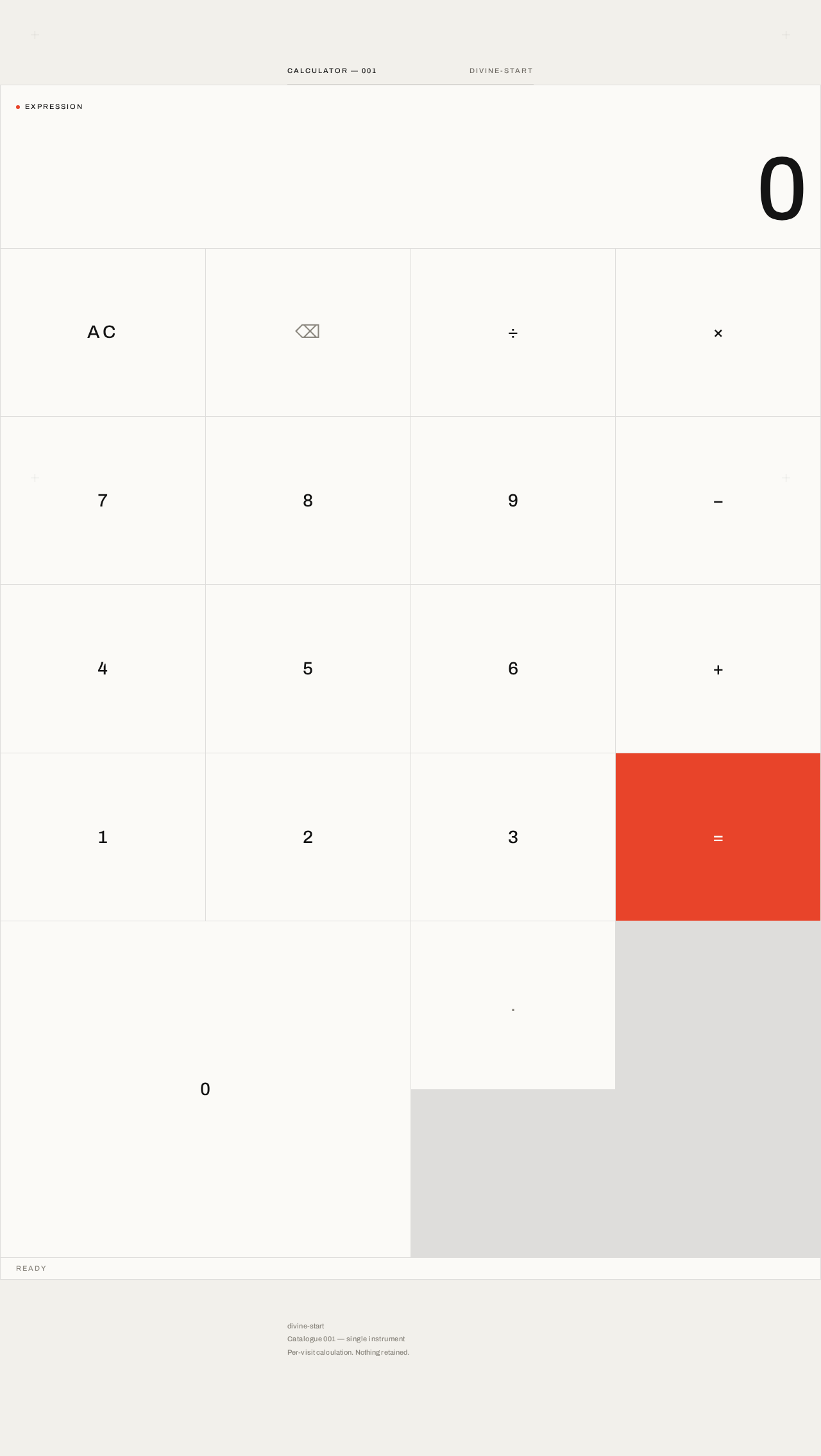
- Current expression: the sequence of entered numbers and operators, shown in a small all-caps tracked label line above the display, labeled
EXPRESSION, with a single 6px spot-red dot beside the label. - Current result / display value: the oversized right-aligned tabular numeral in the display panel — the running value before evaluation and the computed result after evaluation.
- Idle/empty state: display shows
0, expression line empty or showing the placeholder label only. - Building state: expression line grows as digits and operators are entered; display shows the current operand or running value.
- Evaluated state: display shows the computed result; the expression line retains the evaluated expression so the visitor can see what produced the result.
- Error state: when an expression cannot be evaluated (for example division by zero or a malformed operator sequence), the display shows a clear error indication instead of a number, and the visitor can clear to recover.
Primary actions
- Digit keys
0–9: append a digit to the current number. - Decimal point key: begin or extend a fractional number.
- Operator keys
+,−,×,÷: set the pending arithmetic operator; the active operator is marked with the spot red. - Equals key
=: evaluate the current expression and show the result. This is the only key carrying the spot red as a filled surface. - Clear key: reset the expression and display to the empty state so the visitor can start over.
Supporting actions and controls
- Every key is a real, focusable, keyboard-operable control with an accessible name; the keypad also responds to physical keyboard digit, operator, Enter/equals, and clear input.
- No other controls exist on the page.
Domain entities
- Calculation (in-memory, per visit): the ordered sequence of entered tokens (numbers and operators) and the derived result or error. Not persisted.
Component responsibilities
- Page frame: warm paper ground (#F2F0EB), one centred column (max-width 420px mobile / 480px desktop), printer's crosshair registration marks at the four page corners, single 300ms opacity fade on load.
- Header label: all-caps
CALCULATOR — 001at 11px with 0.18em letterspacing, followed by a hairline 1px rule. - Display panel: bordered panel at the top of the instrument;
EXPRESSIONmicro-label with red dot; oversized Archivo numerals (clamp 64px–140px), tight tracking, tabular numerals, right-aligned. - Keypad grid: 4×5 flush grid of flat rectangular keys separated by 1px hairline rules rather than gaps; digits in ink, secondary keys in muted grey, equals key in spot red, active operator marked in spot red.
- Metadata block: three short muted 11px lines below the instrument; no marketing copy, no feature list, no CTA.
States
- Loading: single 300ms opacity fade on load; removed under
prefers-reduced-motion. - Empty: display
0, no expression. - Success: correct computed result shown in the display after equals.
- Error: unevaluable expression shown as an error in the display; clear key restores the empty state.
- Recovery: clear always returns the page to the empty state from any state.
3. Functional Requirements
FR-1 — Single-page calculator delivery (explicit) As a Calculator User, I should get the entire calculator on one single page, so that I never navigate away to do arithmetic.
- Trigger: opening the product.
- Observable result: the Calculator page loads with the instrument visible; there is no second page, route, or destination.
- Access: anonymous; no identity required.
- Failure/recovery: if the page fails to load, reloading returns the same single page.
- Continuation: the visitor proceeds directly to entry.
FR-2 — Enter numbers and arithmetic operators (explicit) As a Calculator User, I should enter numbers and arithmetic operators to build a calculation, so that I can express the arithmetic I want performed.
- Trigger: pressing digit keys, the decimal point, and operator keys (
+,−,×,÷) on the keypad or the physical keyboard. - Observable result: the entered digits and operators appear in the expression line and display; the active operator is marked with the spot red.
- Access: anonymous.
- Failure/recovery: malformed sequences (for example two operators in a row) are handled by the calculator without losing the visitor's work; the visitor can clear to reset.
- Continuation: the visitor continues entering or presses equals.
FR-3 — See the current expression and the computed result (explicit) As a Calculator User, I should see the current expression and the computed result, so that I can verify what I entered and read the answer.
- Trigger: entering tokens, and pressing the equals key.
- Observable result: the expression line shows the entered expression; the display shows the running value and, after equals, the computed result in oversized tabular numerals.
- Access: anonymous.
- Failure/recovery: when the expression cannot be evaluated (for example division by zero), the display shows a clear error indication rather than a wrong number.
- Continuation: the visitor reads the result, continues calculating from it, or clears.
FR-4 — Clear the calculation and start over (explicit) As a Calculator User, I should clear the calculation and start over, so that I can begin a fresh calculation at any time.
- Trigger: pressing the clear key.
- Observable result: the expression and display reset to the empty state (
0, no expression). - Access: anonymous.
- Failure/recovery: clear works from every state, including the error state.
- Continuation: the visitor begins a new calculation.
FR-5 — Keyboard operation of the instrument (required_inference) As a Calculator User, I should operate the calculator from the physical keyboard as well as by pointer, so that entry is fast and the instrument is usable without a mouse.
- Trigger: typing digits, operators, Enter (equals), and the clear key.
- Observable result: the same expression and result updates as pointer entry.
- Access: anonymous.
- Failure/recovery: unrecognized keys are ignored without altering the calculation.
- Continuation: the visitor continues entry or evaluates.
4. User Personas
Calculator User
Product context. An anonymous everyday visitor who arrives at divine-start to do a quick piece of arithmetic. They have no account, no history, and no expectation of one; the page is the whole product. They meet the calculator as a single designed object on a quiet paper ground.
Primary goal. Get a correct result from a simple, single-screen calculator with as little friction as possible.
Distinct accepted responsibilities.
- Enter numbers and arithmetic operators to build a calculation.
- Read the current expression and the computed result.
- Clear the calculation and start over.
Inputs and decisions. The visitor decides which numbers and which operator to enter, when to press equals, and when to clear. Their inputs are keypad presses (or physical keyboard input) of digits, a decimal point, the four arithmetic operators, equals, and clear.
Interactions with other participants. None. The Calculator User is the only human actor; the application evaluates and displays. No counterparty, recipient, or beneficiary is affected by the calculation.
Observable success. The display shows the correct computed result for the expression they built, the expression remains visible so they can confirm what was evaluated, and clearing returns the instrument to a clean empty state ready for the next calculation.
5. Core User Flows
Flow 1 — Perform a calculation
- The Calculator User opens divine-start. The Calculator page loads anonymously with a single 300ms opacity fade; the display shows
0and the expression line is empty. - The visitor presses digit keys to enter the first number. The digits appear in the display and the expression line.
- The visitor presses an operator key (
+,−,×, or÷). The operator is appended to the expression and marked with the spot red as the active operator. - The visitor enters the second number. The display shows the current operand.
- The visitor presses the equals key. The equals key flashes spot red for 120ms; the display digits crossfade over 140ms to the computed result, shown in oversized tabular numerals, while the expression line retains the evaluated expression.
- The visitor reads the result. They may continue calculating from it, start a new expression, or clear.
Failure and recovery. If the expression cannot be evaluated (for example division by zero), the display shows a clear error indication instead of a number. The visitor presses the clear key to return to the empty state and begins again.
Flow 2 — Clear and start over
- From any state of the Calculator page — mid-entry, after a result, or in an error state — the visitor presses the clear key.
- The expression line empties and the display resets to
0. - The visitor begins a new calculation (Flow 1, step 2).
Flow 3 — Keyboard entry
- With the Calculator page focused, the visitor types digits and operators on the physical keyboard.
- The expression and display update exactly as with pointer entry; the active operator is marked in spot red.
- The visitor presses Enter to evaluate; the result appears in the display as in Flow 1, step 5.
- The visitor presses the clear key to reset, as in Flow 2.
Failure and recovery. Keys the calculator does not recognize are ignored and leave the calculation unchanged.
6. Visuals Colors and Theme
The creative direction is authoritative: an austere reference after Peter Saville — one centred artefact, coded spot colour, sparse metadata, gallery-like silence.
Headline. The instrument, not a pitch.
Colour tokens (light mode)
| Role | Hex | Use |
|---|---|---|
| Background | #F2F0EB | Warm paper-white page ground |
| Surface | #FBFAF7 | Slightly brighter card/display surface |
| Text | #141414 | Ink black type, keypad digits, rules |
| Primary | #141414 | Ink black for primary controls |
| Accent | #E8442A | Saville red — equals key, active operator, single 6px dot; never more than 5% of the screen |
| Muted | #8A867E | Labels, metadata, secondary keys |
| Hairline | #141414 at 12% opacity | 1px rules and keypad separators |
No gradients. No shadows beyond a single 1px hairline. No blue or indigo anywhere.
Typography
- Family: Archivo for both headings and body.
- Weight: 500, set small and precise for labels and metadata.
- Display numerals: Archivo at
clamp(64px, 12vw, 140px), tracking-0.03em, tabular numerals, right-aligned. - Keypad digits:
clamp(20px, 3.2vw, 28px). - Micro-labels: all-caps 11px with
0.18emletterspacing. - Scale (1.25 modular): 11 / 13 / 16 / 20 / 28 / 44 / 72 / 140.
Shape language
- 0px radius everywhere — keys, display panel, card.
- Hairline 1px rules in ink at 12% opacity.
- Keys are flat rectangles separated by hairlines rather than gaps, forming one gridded instrument.
- One circular element only: a 6px red dot beside the display label.
Layout
- One centred column: max-width 420px on mobile, 480px on desktop, floating in a vast paper ground with generous top and bottom silence.
- Above the instrument: all-caps label
CALCULATOR — 001and a hairline rule. - Display panel at the top of the instrument; below it a 4×5 keypad grid with flush hairline separators.
- Below the instrument: a sparse metadata block of three short muted 11px lines — no marketing copy, no feature list.
- At 768px and 1280px the instrument stays centred and narrow; the silence around it grows rather than the card.
- Printer's crosshair registration marks at the four page corners.
Imagery. None. No photography, no illustration, no 3D. The calculator itself is the only visual artefact.
7. Signature Design Concept
The first screen is the instrument. A vast warm-paper field (#F2F0EB) carries the calculator centred as a single bordered artefact at 420–480px wide. Its display panel is filled with oversized Archivo numerals (clamp(64–140px)) in ink, right-aligned like a coded readout, with a tiny 6px red dot and the all-caps label EXPRESSION above it. Below the display, the keypad is a flush hairline grid of flat ink-on-paper keys — separated by 1px ink rules rather than gaps, so the instrument reads as one gridded object — with only the equals key carrying the spot red (#E8442A). Above the instrument, a single all-caps line CALCULATOR — 001 and a hairline rule; below it, three muted metadata lines. Printer's crosshair marks sit at the four page corners like registration marks on a sleeve. The composition is deliberately small inside a large silence — gallery-like, coded, and impossible to mistake for a centred SaaS hero with a gradient blob.
8. Interaction Model & Motion Direction
Interaction Model: Static (direction) Motion Tempo: still Hero Dimensionality: flat
Landing Hero Motion Brief
- Focal subject: the calculator as a single bordered artefact — display panel with oversized tabular numerals above a flush hairline keypad grid.
- Input → transformation → outcome thesis: a key press fills the key with ink for 80ms with a 1px inset shift; the pressed digit or operator appears in the expression line and display; pressing equals flashes the spot red for 120ms and the display digits crossfade over 140ms from the expression to the computed result. The outcome is a correct, legible result in the same still instrument.
- Motion vocabulary: instant and mechanical — 80ms key fill, 120ms equals flash, 140ms display crossfade, a single 300ms opacity fade on load. No bounce, no hover lift, no entrance animation beyond the load fade.
- Composed first frame: warm paper ground, crosshair marks at the corners,
CALCULATOR — 001and a hairline rule above, the instrument centred with0in the display and the red dot besideEXPRESSION, three muted metadata lines below. - Reduced-motion state: the load fade and the equals flash are removed; key fill and display updates remain instant and fully usable.
9. Non-Functional Requirements
- Single page (explicit). The design must be a single page. No additional routes, pages, or destinations may be introduced.
- Anonymous access (required_inference). The Calculator page is reachable without identity; no sign-in, account, or session continuity is established, because the accepted behavior creates no durable actor-specific state.
- No persistence of calculations (required_inference). Calculations are in-memory per visit; nothing is saved to the database or restored on return.
- Readable text and controls (explicit design constraint). Headlines, labels, numbers, and controls stay entirely inside the viewport and their container at 375px, 768px, and 1280px, wrapping or scaling (for example
clamp(...)with its mobile size) to fit; no other element covers any part of them. - Accessibility (required_inference). Every key is a focusable, keyboard-operable control with an accessible name;
prefers-reduced-motionremoves the load fade and equals flash while leaving a fully usable static arrangement. - Correct arithmetic (required_inference). Evaluation of entered expressions produces correct results for the four arithmetic operators and decimal numbers; unevaluable expressions surface a clear error rather than a wrong number.
10. Tech Stack
- Frontend: React application UI rendering the single Calculator page.
- Backend: shared FastAPI process for application APIs and domain modules; reused for any calculator feature API rather than adding a new service.
- Database: MariaDB, provisioned application-owned persistent storage. Not required by current calculator behavior (no saved history, no accounts); retained as available infrastructure.
- Containerization: Docker / docker-compose with the provisioned services —
frontend,backend,database. - Typography: Archivo (headings and body).
11. Assumptions and Constraints
- A-1 (explicit). The product is a single page; the page-count constraint is exact at one.
- A-2 (explicit). The calculator supports the four arithmetic operators, decimal numbers, equals, and clear — the everyday arithmetic implied by "simple calculator."
- A-3 (required_inference). Calculations are ephemeral per visit; no accounts, history, or saved state exist.
- A-4 (required_inference). The page is anonymously reachable; no identity establishment is needed.
- A-5 (required_inference). The provisioned MariaDB database is infrastructure only and does not justify domain entities, authentication, or an ER diagram for the current scope.
- A-6 (design). The creative direction (Peter Saville austere reference) governs palette, typography, shape, layout, and motion; the generic indigo/blue-on-white SaaS template is forbidden.
12. Glossary
- Calculator User — the single accepted active human persona: an anonymous visitor performing everyday arithmetic.
- Expression — the ordered sequence of entered numbers and operators shown in the expression line.
- Result — the computed value shown in the display after evaluation.
- Instrument — the calculator itself, treated as a single designed object: display panel plus keypad grid.
- Spot red (Saville red) — the single accent colour
#E8442A, reserved for the equals key, the active operator, and the 6px dot beside the display label. - Hairline — a 1px rule in ink at 12% opacity used for separators and rules.
- Clear — the action that resets the expression and display to the empty state.
Calculator — 001divine-start
Ready
Calculator — 001divine-start
Ready
No comments yet. Be the first!