
divine-senior

byTesting Card

Develop the AI application SENIOR RED-TEAM IN A CONSOLE AI-orchestrated automated + manual security testing across web, mobile, API, AI/LLM, network, cloud, thick-client, source code and red-team ops. One agent. One senior tester. Every surface.

LandingFindingsConsole
Landing

Comments (0)

No comments yet. Be the first!

System Requirements

System Requirement Document
Page 1 of 5

System Requirements Document for Divine-Senior

Introduction

The project "Divine-Senior" aims to develop an AI application named SENIOR RED-TEAM. This application will conduct both automated and manual security testing across various platforms, utilizing one agent and one senior tester to cover every surface.

System Overview

The SENIOR RED-TEAM application is designed to enhance security testing processes by integrating AI orchestration with manual oversight. It will support testing across web, mobile, API, AI/LLM, network, cloud, thick-client, source code, and red-team operations. The system will streamline security assessments by leveraging AI capabilities alongside human expertise.

Page 2 of 5

Functional Requirements as Story Points

  • As a security tester, I should be able to conduct automated security testing across web platforms.
  • As a security tester, I should be able to conduct automated security testing across mobile platforms.
  • As a security tester, I should be able to conduct automated security testing across API platforms.
  • As a security tester, I should be able to conduct automated security testing across AI/LLM platforms.
  • As a security tester, I should be able to conduct automated security testing across network platforms.
  • As a security tester, I should be able to conduct automated security testing across cloud platforms.
  • As a security tester, I should be able to conduct automated security testing across thick-client platforms.
  • As a security tester, I should be able to conduct automated security testing across source code.
  • As a security tester, I should be able to conduct automated security testing across red-team operations.
  • As a senior tester, I should be able to oversee manual security testing across all platforms.
  • As an agent, I should be able to integrate AI orchestration in security testing processes.

User Personas

  • Security Tester: Responsible for executing automated security tests across various platforms.
  • Senior Tester: Oversees manual security testing and ensures comprehensive coverage.
  • Agent: Facilitates AI orchestration in security testing.

Core User Flows

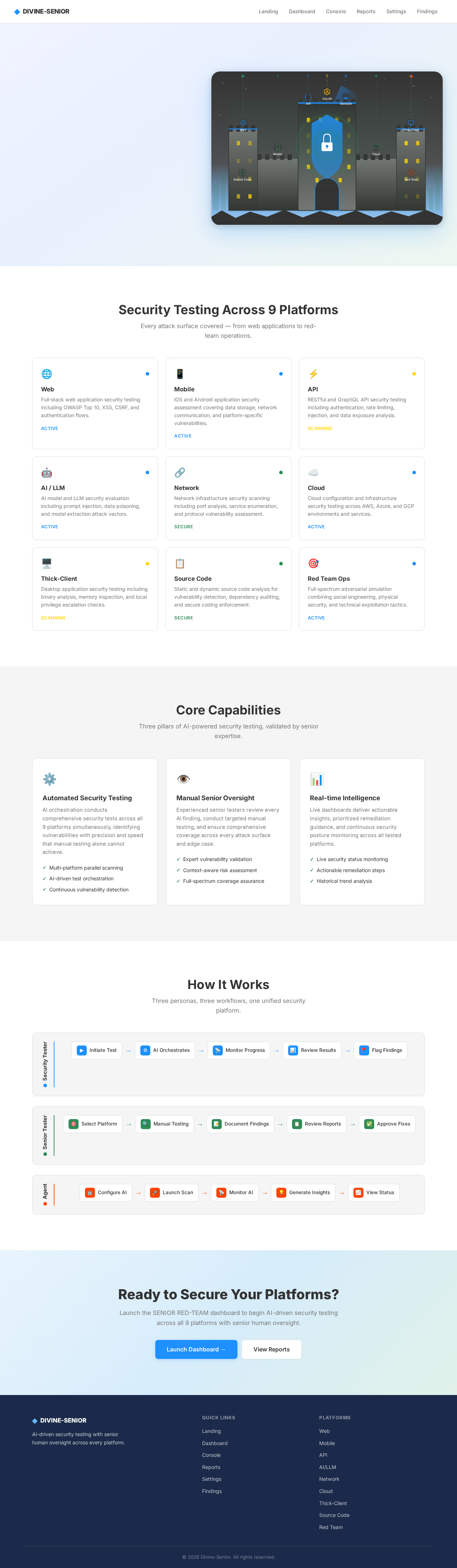
  • Security Tester initiates automated tests -> AI orchestrates testing across platforms -> Results are reviewed by Senior Tester.
  • Senior Tester conducts manual testing -> Identifies vulnerabilities -> Reports findings for remediation.
  • Agent integrates AI orchestration -> Enhances testing efficiency -> Provides insights for continuous improvement.
Page 3 of 5

Visuals Colors and Theme

[Default — not specified by user]

  • primary: #1E90FF (Dodger Blue)
  • primary_light: #63B8FF (Light Dodger Blue)
  • secondary: #2E8B57 (Sea Green)
  • accent: #FF4500 (Orange Red)
  • highlight: #FFD700 (Gold)
  • bg: #F5F5F5 (White Smoke)
  • surface: #FFFFFF (White)
  • text: #333333 (Dark Gray)
  • text_muted: #777777 (Gray)
  • border: #DDDDDD (Light Gray)

Signature Design Concept

The homepage of Divine-Senior will feature an interactive security dashboard. Users will see a dynamic map of interconnected nodes representing different platforms (web, mobile, API, etc.). As users hover over each node, detailed information about the security status and recent tests will animate into view. Clicking a node will expand it into a detailed report, showcasing vulnerabilities and remediation steps. This interactive map will be built using motion/react for smooth animations and transitions.

Page 4 of 5

Landing Hero Motion Brief

The landing hero will depict a digital fortress being continuously scanned by a network of AI-driven sensors. As inputs (representing different platforms) approach the fortress, they transform into data streams that illuminate the fortress's defenses. The animation will loop every 10 seconds, showing the transformation of inputs into secure outcomes. The composition will include layers such as the fortress, data streams, and platform icons, all animated using motion/react for a seamless experience.

Interaction Model & Motion Direction

  • Intended Interaction Model: Animated
  • The landing page will feature moderate scroll-triggered reveals and hover transitions, enhancing the user experience with interactive elements that respond to user actions.

Non-Functional Requirements

  • The system must ensure secure access control for all users.
  • The application should be scalable to handle multiple concurrent security tests.
  • The system should provide real-time updates and notifications.
Page 5 of 5

Tech Stack

  • Frontend: React for Web
  • Backend: Python, FastAPI
  • Database: MySQL or MariaDB, use Alembic for migrations
  • AI Models: GPT 5.4 for user-friendly response
  • Local Orchestration: Docker, docker-compose
  • Server-side Orchestration: Kubernetes

Assumptions and Constraints

  • The application will be used primarily in India, considering local security standards and regulations.
  • The system must integrate seamlessly with existing security tools and platforms.

Glossary

  • AI Orchestration: The use of AI to manage and automate complex processes.
  • Red-Team Operations: Simulated cyber-attacks to test the effectiveness of security measures.
  • Thick-Client: A client application that performs the bulk of data processing operations.

This document outlines the comprehensive requirements for the Divine-Senior project, ensuring a robust and efficient security testing application.

Landing design preview
Landing: View Info
Dashboard: View Security Map
Console: Configure AI Orchestration
Console: Launch Multi-Platform Scan
Console: Monitor AI Testing
Reports: Generate Insights
Dashboard: View Node Status
Settings: Tune Orchestration Rules
Landing design preview
Landing: View Info
Dashboard: View Security Map
Console: Configure AI Orchestration
Console: Launch Multi-Platform Scan
Console: Monitor AI Testing
Reports: Generate Insights
Dashboard: View Node Status
Settings: Tune Orchestration Rules