
divine-school

byKavya Dave

school management system

LandingEnrollmentLoginSettingsNotificationsMessages
Landing

Comments (0)

No comments yet. Be the first!

System Requirements

System Requirement Document
Page 1 of 5

Divine-School System Requirements Document

Introduction

The Divine-School project aims to develop a comprehensive school management system tailored to the needs of educational institutions in India. This system will streamline administrative tasks, enhance communication, and improve the overall efficiency of school operations.

System Overview

The Divine-School management system will serve as an integrated platform for managing various school functions, including student enrollment, attendance tracking, grade management, timetable scheduling, and communication between teachers, students, and parents. The system will be designed to accommodate the specific requirements of Indian schools, including compliance with local educational standards and practices.

Functional Requirements as Story Points

  • As an Admin, I should be able to manage student enrollment and registration.
  • As a Teacher, I should be able to record and track student attendance.
  • As a Teacher, I should be able to input and manage student grades.
  • As a Student, I should be able to view my grades and attendance records.
  • As a Parent, I should be able to monitor my child's academic progress and attendance.
  • As an Admin, I should be able to create and manage class timetables.
  • As a Teacher, I should be able to communicate with students and parents through the system.
  • As a Student, I should be able to receive notifications about school events and announcements.
  • As an Admin, I should be able to generate reports on various school metrics.
Page 2 of 5

User Personas

  • Admin: Responsible for managing the overall operations of the school, including student enrollment, timetable scheduling, and report generation.
  • Teacher: Manages classroom activities, records attendance, inputs grades, and communicates with students and parents.
  • Student: Accesses personal academic records, receives notifications, and participates in school activities.
  • Parent: Monitors their child's academic progress and communicates with teachers.

Core User Flows

  • Admin enrolls new students -> Admin schedules classes -> Teacher records attendance -> Teacher inputs grades -> Student views grades -> Parent monitors progress.
  • Teacher communicates with parents -> Parent receives notifications -> Parent responds to teacher queries.

Visuals Colors and Theme

  • primary: #3A7CA5 (a calm blue representing trust and reliability)
  • primary_light: #5FA9D3 (a lighter blue for hover states and secondary UI)
  • secondary: #F2B138 (a warm yellow for highlights and secondary elements)
  • accent: #D94F5C (a vibrant red for CTAs and important notifications)
  • highlight: #F2D7A7 (a soft beige for hover states and active indicators)
  • bg: #FFFFFF (a clean white background for clarity)
  • surface: #F4F4F9 (a light gray for cards and panels)
  • text: #333333 (a dark gray for primary text)
  • text_muted: #777777 (a muted gray for secondary text and labels)
  • border: #E0E0E0 (a subtle gray for borders)
Page 3 of 5

Signature Design Concept

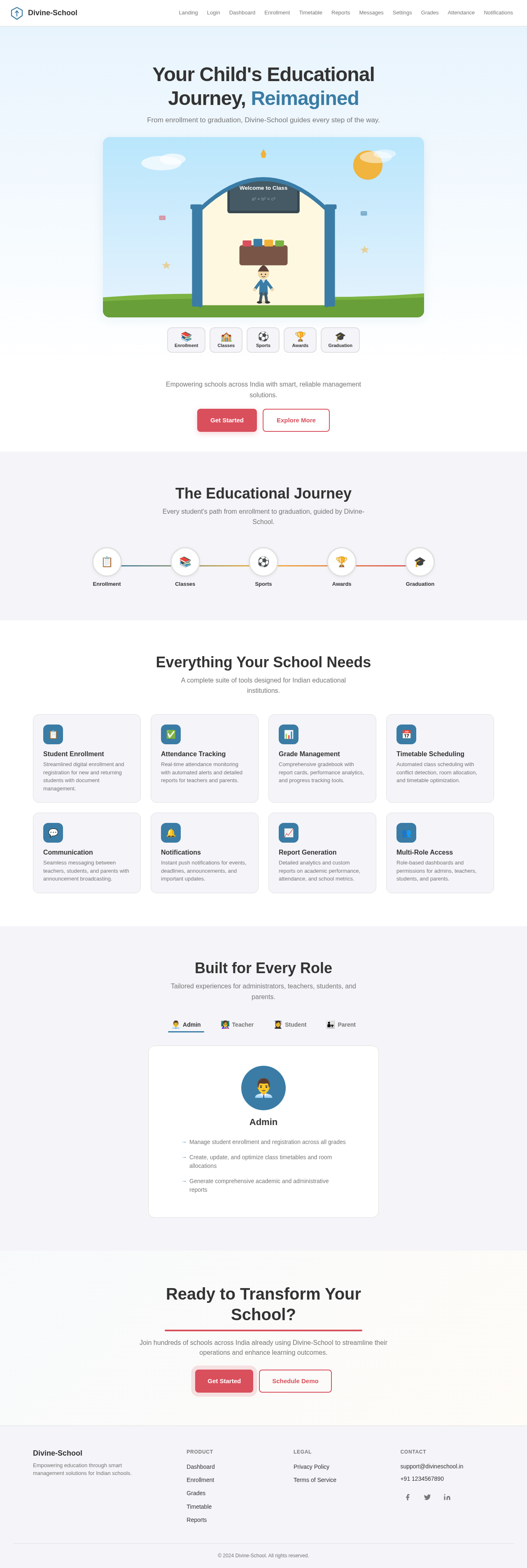
The Divine-School homepage will feature an interactive "Educational Journey" animation. As users scroll, they will see a timeline of a student's journey through school, from enrollment to graduation. Each stage will be represented by animated icons and illustrations that transform as the user interacts with them. For instance, clicking on the "Enrollment" icon will expand it to show details about the enrollment process. This concept will be implemented using motion/react for smooth transitions and interactions.

Landing Hero Motion Brief

The landing page will open with a scene of a classroom that transforms into various school environments as the user scrolls. The animation will depict students engaging in different activities, such as attending classes, participating in sports, and receiving awards. The loop will last 10 seconds, showcasing the transformation of students through their educational journey. The animation will be responsive and maintain clarity in reduced-motion settings.

Interaction Model & Motion Direction

The intended interaction model for the Divine-School landing page is "animated." This will include moderate scroll-triggered reveals, hover transitions, and spring physics on interactive elements. Each section of the landing page will have a distinctive core mechanic, such as kinetic typography or morphing SVGs, to engage users and convey the school's dynamic environment.

Page 4 of 5

Non-Functional Requirements

  • The system must be scalable to accommodate the growing number of users.
  • The system must ensure data security and privacy, complying with local regulations.
  • The system should be accessible on various devices, including desktops, tablets, and smartphones.
  • The system must provide a user-friendly interface for all user personas.

Tech Stack

  • Frontend: React for Web
  • Backend: Python with FastAPI
  • Database: MySQL or MariaDB, using Alembic for migrations
  • Local Orchestration: Docker, docker-compose
  • Server-Side Orchestration: Kubernetes

Assumptions and Constraints

  • The system will be deployed in an Indian educational context, adhering to local educational standards.
  • The system will support both English and Hindi languages for user interfaces.
  • Internet connectivity is assumed to be stable for accessing the system's features.
Page 5 of 5

Glossary

  • Admin: The user responsible for managing school operations.
  • Teacher: The user responsible for classroom management and student evaluation.
  • Student: The user who is enrolled in the school and accesses academic information.
  • Parent: The user who monitors their child's academic progress and communicates with teachers.

This document outlines the requirements and design considerations for the Divine-School project, ensuring a comprehensive and user-friendly school management system.

Landing design preview
Landing: View Info
Login: Sign In
Dashboard: View Overview
Enrollment: Register Student
Enrollment: Manage Students
Timetable: Create Schedule
Timetable: Manage Classes
Reports: Generate Reports
Messages: Send Announcement
Settings: Manage Account
Landing design preview
Landing: View Info
Login: Sign In
Dashboard: View Overview
Enrollment: Register Student
Enrollment: Manage Students
Timetable: Create Schedule
Timetable: Manage Classes
Reports: Generate Reports
Messages: Send Announcement
Settings: Manage Account