divine-employee
 Ashish Sg
Create a complete Employee Management System (EMS) web application. Requirements: 1. Technology Stack: - Frontend: HTML, CSS, JavaScript (or React) - Backend: Node.js with Express (or PHP / Django) - Database: MySQL (or MongoDB) 2. Features: Admin Panel: - Admin login/logout authentication - Dashboard with total employees, departments, attendance stats - Add / Edit / Delete Employees - Manage Departments - Assign roles and permissions - Salary management system - Generate reports (PDF/Excel) Employee Panel: - Employee login/logout - View profile & update details - Attendance marking (Check-in / Check-out) - Leave request system - View salary slips 3. Attendance System: - Daily attendance tracking - Late / Half-day detection - Monthly report generation 4. Leave Management: - Apply for leave - Approve/Reject by admin - Leave history tracking 5. UI/UX: - Modern responsive design - Sidebar navigation - Dashboard analytics charts 6. Security: - JWT Authentication - Password hashing - Role-based access control 7. Additional Features: - Search & filter employees - Notifications system - Export data to Excel/PDF 8. Deliverables: - Complete frontend + backend code - Database schema - API endpoints - Folder structure - Setup instructions Make the code clean, well-structured, and production-ready.

Comments (0)
Sign in to leave a comment
System Requirements
System Requirements Document (SRD)
Project Name: divine-employee
1. Introduction
The divine-employee project is an Employee Management System (EMS) designed to streamline employee-related operations for organizations in India. This web application will provide a robust platform for managing employees, departments, attendance, salaries, and leave requests, while ensuring security, scalability, and ease of use.
This document outlines the system requirements for the development of the divine-employee website, incorporating the features and functionalities requested by Ashish Sg. The system will cater to both administrators and employees, offering tailored interfaces and tools for each user persona.
2. System Overview
The divine-employee EMS will be a web-based application with the following objectives:
- Simplify employee management processes.
- Provide secure access to sensitive data like salaries and attendance records.
- Enable real-time attendance tracking and leave management.
- Offer analytics and reporting tools for administrators.
- Ensure scalability to accommodate organizations of varying sizes.
The system will consist of two primary user interfaces:
- Admin Panel: For managing employees, departments, attendance, salaries, and generating reports.
- Employee Panel: For employees to view and update their profiles, mark attendance, apply for leave, and access salary slips.
The website will be developed using modern technologies to ensure responsiveness, security, and performance.
3. Functional Requirements
Admin Panel
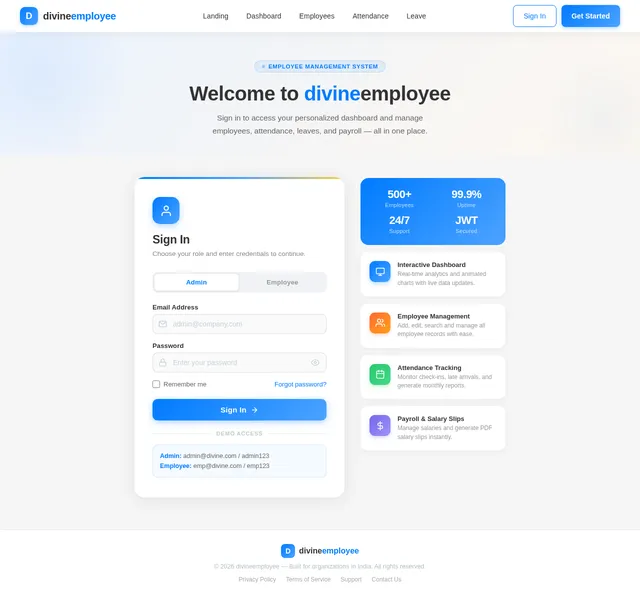
- As Admin, I should be able to log in and log out securely.
- As Admin, I should see a dashboard with total employees, departments, and attendance stats.
- As Admin, I should be able to add, edit, and delete employees.
- As Admin, I should be able to manage departments.
- As Admin, I should be able to assign roles and permissions to employees.
- As Admin, I should be able to manage salaries and generate salary slips.
- As Admin, I should be able to generate reports in PDF and Excel formats.
Employee Panel
- As Employee, I should be able to log in and log out securely.
- As Employee, I should be able to view my profile and update my details.
- As Employee, I should be able to mark attendance (Check-in / Check-out).
- As Employee, I should be able to apply for leave.
- As Employee, I should be able to view my leave history.
- As Employee, I should be able to view my salary slips.
Attendance System
- As Admin, I should be able to track daily attendance.
- As Admin, I should be able to detect late arrivals and half-days.
- As Admin, I should be able to generate monthly attendance reports.
Leave Management
- As Employee, I should be able to apply for leave.
- As Admin, I should be able to approve or reject leave requests.
- As Employee, I should be able to view my leave history.
UI/UX
- As User, I should experience a modern responsive design.
- As User, I should navigate the website easily using a sidebar navigation menu.
- As Admin, I should see dashboard analytics charts for quick insights.
Security
- As User, I should have secure authentication using JWT.
- As User, I should have my password hashed for security.
- As Admin, I should be able to enforce role-based access control.
Additional Features
- As Admin, I should be able to search and filter employees.
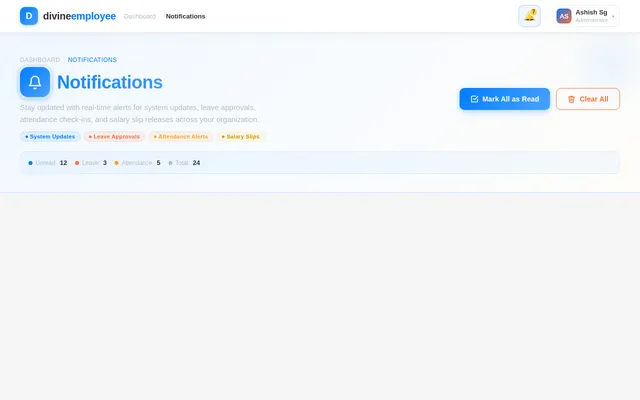
- As User, I should receive notifications for important updates.
- As Admin, I should be able to export data to Excel and PDF formats.
4. User Personas
Admin
- Role: Organization manager or HR personnel.
- Responsibilities: Manage employees, departments, attendance, salaries, and leave requests.
Employee
- Role: Organization staff member.
- Responsibilities: Update profile, mark attendance, apply for leave, and view salary slips.
5. Visuals Colors and Theme
Color Palette
The divine-employee website will feature a professional yet vibrant color scheme to reflect its modern and efficient identity:
- Background:
#F5F5F5(Light Gray) - Surface:
#FFFFFF(White) - Text:
#333333(Dark Charcoal) - Accent:
#007BFF(Bright Blue) - Muted Tones:
#B0BEC5(Soft Steel Gray)
6. Signature Design Concept
Home Page Design: Interactive Dashboard with Animated Analytics
The homepage of the divine-employee website will feature an interactive dashboard that dynamically updates analytics charts and stats based on real-time data.
Key Features:
- Animated Charts: Pie charts, bar graphs, and line charts will animate as data loads, providing a visually engaging experience.
- Hover Interactions: Hovering over charts will display detailed tooltips with additional data insights.
- Dynamic Widgets: Widgets for attendance, departments, and salaries will update in real-time, giving users a sense of immediacy.
- Background Animation: A subtle gradient animation will flow across the background, creating a modern and polished look.
- Micro-Interactions: Buttons and icons will have smooth hover effects and transitions, enhancing the user experience.
This design will make the website feel alive and responsive, leaving a lasting impression on users.
7. Non-Functional Requirements
- The system should support at least 500 concurrent users.
- The website should load within 3 seconds for optimal performance.
- The system should comply with GDPR and Indian data protection laws.
- The database should be optimized for scalability and reliability.
8. Tech Stack
Frontend
- React for Web
Backend
- Python
- FastAPI
Database
- MySQL (with Alembic for migrations)
AI Tools
- GPT 5.4 for user-friendly responses
Local Orchestration
- Docker
- docker-compose
Server-Side Orchestration
- Kubernetes
9. Assumptions and Constraints
Assumptions
- Users will have access to modern browsers like Chrome, Firefox, or Edge.
- The system will primarily cater to organizations in India.
Constraints
- The system must be compatible with mobile and desktop devices.
- The database must handle sensitive data securely.
10. Glossary
- EMS: Employee Management System.
- JWT: JSON Web Token, used for secure authentication.
- GDPR: General Data Protection Regulation, a data protection law.
- UI/UX: User Interface/User Experience.
- API: Application Programming Interface.

Streamline Employee Management
Modern, Secure, Scalable EMS for Organizations in India. Simplify operations, track attendance, manage salaries, and empower your workforce—all in one platform.
Everything You Need to Manage Your Workforce
Built for organizations in India, our platform combines powerful tools with enterprise-grade security to transform your HR operations.
Simplify Operations
Automate employee onboarding, department management, and daily workflows. Reduce manual HR tasks by up to 70% with a unified, intuitive platform.
Real-Time Insights
Track attendance, monitor leave balances, and generate analytical reports instantly. Make data-driven decisions with live dashboards and exportable charts.
Enterprise Security
Protect sensitive salary and attendance data with JWT authentication, encrypted storage, and role-based access control built for Indian compliance standards.
Powerful Features for Modern HR
Everything you need to manage your workforce efficiently — from daily attendance to comprehensive analytics.
Attendance Tracking
Track daily attendance in real-time with automated check-in and check-out. Detect late arrivals, half-days, and generate comprehensive monthly attendance reports effortlessly.
- Real-time check-in & check-out
- Late arrival & half-day detection
- Monthly attendance reports
Leave Management
Streamline leave applications with an intuitive interface. Employees apply for leave with a few clicks while admins approve or reject requests with full visibility into team availability.
- Easy leave application flow
- Admin approval workflow
- Complete leave history tracking
Salary Management
Manage salaries and generate detailed salary slips with precision. Automate calculations, handle deductions, and provide employees with transparent access to their compensation details.
- Automated salary calculations
- Downloadable salary slips
- PDF & Excel export support
Analytics & Reporting
Gain actionable insights with powerful dashboard analytics. Visualize employee metrics, department statistics, and attendance trends through interactive charts and exportable reports.
- Interactive dashboard charts
- Department-wise analytics
- Export reports in PDF & Excel
Powerful Tools for HR Administrators
Everything you need to manage employees, departments, and organizational operations from a single, intuitive dashboard.
Employee Management
- Add, edit, and remove employee records
- Search and filter across departments
- Track employee status and history
- Bulk import via Excel uploads
Department Management
- Create and organize departments
- Assign department heads and teams
- Monitor department-wise headcount
- Cross-department transfer workflows
Dashboard Analytics
- Real-time attendance and leave stats
- Interactive charts and visual insights
- Department-wise performance metrics
- Monthly trend analysis at a glance
Role & Permissions
- Define custom roles for staff
- Granular feature-level access control
- Role-based navigation and visibility
- Enforce security with JWT auth
Report Generation
- Export reports in PDF and Excel
- Monthly attendance and salary reports
- Leave balance and usage summaries
- Custom date-range filtering
Everything You Need at Your Fingertips
Empower yourself with tools to manage attendance, apply for leave, access salary slips, and keep your profile up to date.
Profile Management
View and update your personal details, contact information, and employment records in one place.
- Edit personal information
- Upload profile photo
- View employment history
Attendance Check-in/out
Mark your daily attendance with a single click. Track your check-in and check-out times in real time.
- One-click check-in/out
- Real-time attendance log
- Late arrival detection
Leave Application
Apply for leave, track your remaining balance, and view complete leave history with approval status.
- Submit leave requests
- View leave balance
- Track approval status
Salary Slips
Access detailed salary breakdowns, download monthly pay slips, and review your compensation history.
- Monthly salary details
- Download pay slips as PDF
- View deductions & bonuses
Notifications
Stay informed with real-time alerts for leave approvals, salary updates, company announcements, and more.
- Real-time push alerts
- Leave & salary updates
- Company announcements
Built With Modern Technologies
divine-employee is powered by a robust, scalable technology stack designed for enterprise-grade performance and security.
Frontend
4 technologies
React
Component UI library
TypeScript
Type-safe JavaScript
Tailwind CSS
Utility-first styling
Redux Toolkit
State management
Backend
4 technologies
Node.js
Runtime environment
Express
Web framework
JWT Auth
Secure tokens
REST API
Scalable endpoints
Database
4 technologies
MongoDB
NoSQL document store
Mongoose
ODM for MongoDB
Redis
In-memory caching
Aggregation
Analytics pipelines
Infrastructure
4 technologies
Docker
Containerization
AWS
Cloud hosting
Nginx
Reverse proxy
CI/CD
Automated deploys
React
Component UI library
TypeScript
Type-safe JavaScript
Tailwind CSS
Utility-first styling
Redux Toolkit
State management
Node.js
Runtime environment
Express
Web framework
JWT Auth
Secure tokens
REST API
Scalable endpoints
MongoDB
NoSQL document store
Mongoose
ODM for MongoDB
Redis
In-memory caching
Aggregation
Analytics pipelines
Docker
Containerization
AWS
Cloud hosting
Nginx
Reverse proxy
CI/CD
Automated deploys
Trusted & Secure Platform
Your employee data is protected by multiple layers of enterprise-grade security, ensuring compliance and peace of mind for your organization.
JWT Authentication
Industry-standard JSON Web Token authentication ensures secure, stateless sessions for every user. Passwords are hashed with bcrypt before storage.
Secure AuthData Encryption
All sensitive data is encrypted at rest and in transit using AES-256 and TLS 1.3 protocols, keeping salary records and personal information fully protected.
AES-256GDPR Compliance
Built with privacy by design. Full compliance with data protection regulations ensures your organization meets Indian IT Act and global GDPR standards.
Certified CompliantEnterprise Scalability
Architected to handle 500+ concurrent users without performance degradation. Horizontally scalable infrastructure grows with your organization.
500+ UsersReady to Transform Your HR Operations?
Join hundreds of organizations across India already using Divine Employee to streamline attendance, manage salaries, and empower their workforce with a modern, secure platform.
Frequently Asked Questions
Everything you need to know about Divine Employee. Can't find what you're looking for? Reach out to our support team.
Still have questions? We're here to help.
Contact Support →
No comments yet. Be the first!