divine-bank
 Kyle Downing
Objective Generate the system requirements document in bank-ach. Project context and inputs User request: make me alegal bank i can use to issue debit cards and also enter account and routing and pull funds and send ACH and check balance of an account and have a number to call for customer service so i can get cash out a bank in person, then on seperate tab make spot to enter url and it audit and then add every system or processor or tool or ai needed to get url and bank operating live and can comete any transaction autorepair and completly rebuild whole site and optimize to make better and legal Work to perform Translate the recorded product brief into explicit capabilities, actors, scope and constraints. Describe each declared page and its purpose; retain source-backed technical and visual requirements. Separate stated requirements from assumptions and surface unresolved details for review. Expected output A reviewable system requirements document for this project.

Comments (0)
Sign in to leave a comment
System Requirements
System Requirements Document for divine-bank
1. Introduction
divine-bank is a reviewable system requirements specification for a legal banking product that lets an account holder issue debit cards, enter external account and routing numbers to pull funds into their account, send ACH transfers, check an account balance, and reach a customer service phone number so they can get cash out at a bank in person. On a separate tab, the same product provides a URL audit surface where an operator enters a URL, runs an audit, and then adds every system, processor, tool, or AI needed to get that URL and the bank operating live — including the ability to complete any transaction with autorepair and to completely rebuild and optimize the whole site to make it better and legal.
The audience is two-fold: account holders who need to trust routing numbers and ACH rails, and site auditors/operators who need dense, unambiguous system state. The document translates the recorded product brief into explicit capabilities, actors, scope, and constraints; describes each declared page and its purpose; retains source-backed technical and visual requirements; and separates stated requirements from assumptions while surfacing unresolved details for review.
2. System Overview
divine-bank is delivered as a first-party web application with an application-owned identity layer, a durable banking state layer, and a separate-tab operator console for URL auditing, operating-stack assembly, and site rebuild/optimization. The bank side covers debit card issuance, external account funding ("pull funds" via entered account and routing numbers), outbound ACH transfers, balance checking, paying for anything needed directly out of the account, and a customer service phone channel that supports in-person cash withdrawal at a bank branch. The operator side covers URL audit, operating-stack provisioning, transaction autorepair, and full site rebuild/optimization toward a better and legal state.
The application runs as a small set of services: a shared FastAPI backend process serving both the bank APIs and the operator APIs, a MariaDB database for application-owned durable state, a React frontend, Redis for shared caching, job state, and coordination, and a LiteLLM gateway (backed by its own PostgreSQL instance) for the backend's model-provider calls used by audit analysis, autorepair, and rebuild optimization.
Actors are the Bank customer, the Customer service caller, and the Site auditor/operator. The bank must be legal, the URL audit entry point must live on a separate tab from the bank functionality, and the customer service phone number exists specifically so the user can get cash out at a bank in person.
2a. Product Interpretation and Delivery Boundary
divine-bank is a first-party application. Identity is application-owned: a new customer self-enrolls through Sign Up, and returning customers and operators verify through Login. Protected banking and operator destinations require an authenticated session; the Landing, Login, and Sign Up surfaces are anonymously reachable so that a visitor can learn about the product and establish access before reaching protected state.
The bank functionality (Accounts, Debit Cards, Pull Funds, ACH Transfers, Payments, Support) and the operator functionality (URL Audit, Operating Stack, Rebuild) are both current. The URL Audit entry point is delivered on its own browser-tab surface, distinct from the bank functionality, per the explicit constraint. The Operating Stack and Rebuild surfaces are operator-only and follow from the audit.
Out of scope for this document: any capability not named in the authoritative requirement thread — for example, adjacent consumer features such as budgeting, bill pay, peer-to-peer payments, or investment products are not introduced. "Pay for anything needed out of account" is scoped to paying for the items the product itself requires (operating-stack components, processors, tools, AI/model usage, and rebuild work) from the customer's account balance; it does not introduce general bill pay, merchant checkout, or peer-to-peer payments. The document does not assert that divine-bank is a chartered depository institution; it specifies the product surface and the operating stack the operator assembles to make the URL and bank operate live and legally. Regulatory licensing, charter, and sponsor-bank arrangements are surfaced as unresolved details in Section 11 rather than invented.
2b. Source Content Inventory
No content_source reference directive was supplied; this section is intentionally omitted.
2c. Page Content and Component Coverage
Landing
- Purpose: Anonymous public entry that explains the bank product — debit card, ACH, balance, support phone, and the separate URL audit capability — before sign-in.
- Information/state: Oversized headline "Banking you can read like a map."; a horizontal ACH rail diagram (five numbered nodes on a signal-red line); a white account-card panel showing a live-looking balance in Fira Code numerals with a hairline rule; a thin top strip of four colour-coded line labels (red Accounts, yellow Audit, green ACH, teal Support) as the site's wayfinding legend.
- Primary actions: "Open an account" CTA pinned as a solid red block at the rail's terminus (routes to Sign Up); a secondary "Sign in" link (routes to Login).
- Supporting actions: Navigate to the URL Audit tab via the wayfinding legend.
- Domain entities: Product capability summary; illustrative balance display; ACH rail schematic.
- Component responsibilities: Wayfinding legend strip; hero headline block; ACH rail diagram; account-card panel; primary CTA block.
- States: Loading (skeleton for the account-card panel); empty (no live balance — show a labelled illustrative figure); success (panel renders); error (panel fails to load — show a static illustrative figure with a muted note); recovery (retry control on the panel).
Login
- Purpose: Returning verification for bank customers and site auditors/operators accessing durable account and operational state.
- Information/state: Email and password fields; error region; link to Sign Up.
- Primary actions: Submit credentials to establish a session.
- Supporting actions: Navigate to Sign Up; navigate back to Landing.
- Domain entities: User identity; session.
- Component responsibilities: Credential form; validation messaging; session establishment.
- States: Loading (submit disabled with progress); empty (blank form); success (redirect to Accounts for customers, URL Audit for operators); error (invalid credentials — inline message, form preserved); recovery (retry; link to Sign Up if no account).
Sign Up
- Purpose: Self-service enrollment for a new bank customer independently beginning to use the bank product.
- Information/state: Name, email, password, and confirmation fields; consent acknowledgement that the bank must be legal and that identity will be verified.
- Primary actions: Create the customer identity and establish a session.
- Supporting actions: Navigate to Login; return to Landing.
- Domain entities: Customer identity; account record created on enrollment.
- Component responsibilities: Enrollment form; validation; account creation; session establishment.
- States: Loading (submit disabled with progress); empty (blank form); success (redirect to Accounts with a newly created account); error (duplicate email, weak password, or validation failure — inline messages, form preserved); recovery (correct and resubmit; link to Login if already enrolled).
Accounts
- Purpose: Owner for checking the balance of the customer's account.
- Information/state: Account balance in Fira Code tabular numerals; routing number broken into its 9 digits in a ruled 3×3 grid; account number; last-sync time in the right-hand metadata gutter.
- Primary actions: Refresh balance; copy routing and account numbers.
- Supporting actions: Navigate to Debit Cards, Pull Funds, ACH Transfers, Support.
- Domain entities: Account; balance; routing number; account number; last-sync timestamp.
- Component responsibilities: Balance display; routing-number anatomy grid; metadata gutter; refresh control.
- States: Loading (skeleton numerals); empty (no account yet — prompt to complete enrollment); success (balance and numbers render); error (balance unavailable — show last-known value with a stale marker and a retry control); recovery (retry; contact Support).
Debit Cards
- Purpose: Owner for issuing and managing a debit card on the customer's account.
- Information/state: Issued cards list with status; card issue form; card details (masked PAN, expiry, status).
- Primary actions: Issue a new debit card; view card status.
- Supporting actions: Navigate to Accounts, Pull Funds, ACH Transfers, Support.
- Domain entities: Debit card; card status; linked account.
- Component responsibilities: Card list; issue form; status chips with left status bar.
- States: Loading (card list skeleton); empty (no cards — prompt to issue); success (card issued, appears in list with status); error (issuance failed — inline message with retry); recovery (retry issuance; contact Support).
Pull Funds
- Purpose: Owner for entering account and routing numbers to pull funds into the account.
- Information/state: External account and routing number fields; amount field; source-account label; confirmation summary.
- Primary actions: Submit a pull-funds request.
- Supporting actions: Navigate to Accounts, Debit Cards, ACH Transfers, Support.
- Domain entities: External account; routing number; pull-funds transfer; transfer status.
- Component responsibilities: Entry form; validation of routing/account format; confirmation step; status display.
- States: Loading (submit disabled with progress); empty (blank form); success (transfer initiated, status shown, balance updates on settlement); error (invalid routing/account or insufficient authorization — inline message, form preserved); recovery (correct and resubmit; contact Support).
ACH Transfers
- Purpose: Owner for sending ACH transfers.
- Information/state: Recipient account and routing numbers; amount; memo; transfer list with status; in-flight indicator (thin signal-red progress rule sweeping under the active row).
- Primary actions: Send an ACH transfer; review transfer status.
- Supporting actions: Navigate to Accounts, Debit Cards, Pull Funds, Support.
- Domain entities: ACH transfer; recipient account; transfer status; memo.
- Component responsibilities: Transfer form; transfer list with left status bars; in-flight progress rule; autorepair status surface for failed transfers.
- States: Loading (list skeleton); empty (no transfers — prompt to send); success (transfer sent, status shown, balance updates on settlement); error (transfer failed — status bar red, autorepair offered, retry control); recovery (autorepair attempt; manual retry; contact Support).
Support
- Purpose: Displays the customer service phone number for arranging in-person cash withdrawal.
- Information/state: Customer service phone number at 44px Fira Sans on a full-width ink-on-yellow band; in-person cash-withdrawal instruction beside it.
- Primary actions: Call the customer service number (tel: link).
- Supporting actions: Navigate to Accounts, Debit Cards, Pull Funds, ACH Transfers.
- Domain entities: Support phone number; withdrawal instruction.
- Component responsibilities: Phone band; instruction text; tel: link.
- States: Loading (static — no async state); empty (not applicable — number is always present); success (number and instruction render); error (not applicable); recovery (not applicable).
URL Audit
- Purpose: Separate-tab entry point that accepts a URL and runs an audit.
- Information/state: URL input; sign-style tab strip; numbered audit ledger (01 DNS, 02 TLS, 03 processor, 04 ledger, 05 KYC, …) where each row is a ruled line with a left status bar.
- Primary actions: Submit a URL to run the audit.
- Supporting actions: Navigate to Operating Stack and Rebuild after audit; return to bank tab.
- Domain entities: Audited URL; audit finding; audit status.
- Component responsibilities: URL form; tab strip; audit ledger; status bars; link to Operating Stack.
- States: Loading (ledger rows populate progressively); empty (no URL submitted — prompt); success (ledger complete, findings shown); error (URL unreachable or audit failed — inline message with retry); recovery (retry; adjust URL).
Operating Stack
- Purpose: After audit, adds the systems, processors, tools, and AI needed to get the URL and bank operating live.
- Information/state: Schematic rail diagram of processors, KYC, ledger, card issuer, and AI autorepair as numbered nodes on a horizontal line with connector rules; per-node status.
- Primary actions: Add/confirm the required stack components for the audited URL.
- Supporting actions: Navigate to URL Audit and Rebuild.
- Domain entities: Stack component; component status; audited URL.
- Component responsibilities: Rail diagram; node status; add/confirm controls.
- States: Loading (diagram skeleton); empty (no audit yet — prompt to run URL Audit); success (stack assembled, statuses shown); error (component provisioning failed — node marked red with retry); recovery (retry provisioning; return to URL Audit).
Rebuild
- Purpose: Owner for completely rebuilding and optimizing the whole site to be better and legal.
- Information/state: Rebuild scope summary; optimization findings; legality checklist; rebuild status.
- Primary actions: Trigger a full site rebuild and optimization.
- Supporting actions: Navigate to URL Audit and Operating Stack.
- Domain entities: Rebuild job; optimization finding; legality check.
- Component responsibilities: Rebuild trigger; status display; findings list; legality checklist.
- States: Loading (rebuild in progress with progress rule); empty (no rebuild yet — prompt); success (rebuild complete, findings and legality checks shown); error (rebuild failed — inline message with retry); recovery (retry; return to URL Audit).
3. Functional Requirements
Each requirement is a distinct story point with provenance, lifecycle facts, and observable acceptance.
FR-01 — Issue debit cards (explicit) As a Bank customer, I should issue a debit card on my account so that I can spend from my balance.
- Trigger/input: authenticated customer selects "Issue card" on Debit Cards.
- Observable result: a new card appears in the card list with a status; card details (masked PAN, expiry) are shown.
- Access: authenticated customer session.
- Failure/recovery: issuance failure shows an inline message with retry; customer may contact Support.
- Continuation: customer returns to Accounts to confirm balance, or to ACH Transfers.
FR-02 — Enter account and routing numbers to pull funds (explicit) As a Bank customer, I should enter an external account and routing number to pull funds into my account so that I can fund my balance.
- Trigger/input: authenticated customer enters external account and routing numbers and an amount on Pull Funds and confirms.
- Observable result: a pull-funds transfer is initiated with a visible status; balance updates on settlement.
- Access: authenticated customer session.
- Failure/recovery: invalid routing/account or authorization failure shows an inline message with the form preserved; customer may retry or contact Support.
- Continuation: customer reviews status on Pull Funds or Accounts.
FR-03 — Send ACH transfers (explicit) As a Bank customer, I should send ACH transfers so that I can move funds out to a recipient account.
- Trigger/input: authenticated customer enters recipient account and routing numbers, amount, and memo on ACH Transfers and confirms.
- Observable result: an ACH transfer is created with a visible status; an in-flight progress rule sweeps under the active row; balance updates on settlement.
- Access: authenticated customer session.
- Failure/recovery: a failed transfer shows a red status bar and offers autorepair; customer may retry or contact Support.
- Continuation: customer reviews the transfer list or returns to Accounts.
FR-04 — Check account balance (explicit) As a Bank customer, I should check the balance of my account so that I know my available funds.
- Trigger/input: authenticated customer opens Accounts or refreshes.
- Observable result: balance renders in Fira Code tabular numerals with routing number in a 3×3 grid and last-sync time.
- Access: authenticated customer session.
- Failure/recovery: balance unavailable shows the last-known value with a stale marker and a retry control; customer may contact Support.
- Continuation: customer proceeds to Debit Cards, Pull Funds, or ACH Transfers.
FR-05 — Customer service phone number for in-person cash withdrawal (explicit) As a Customer service caller, I should see and call the customer service phone number so that I can get cash out at a bank in person.
- Trigger/input: caller opens Support (authenticated) or reads the number from the Landing wayfinding legend.
- Observable result: the phone number renders at 44px Fira Sans on an ink-on-yellow band with the in-person cash-withdrawal instruction; the tel: link initiates a call.
- Access: Support is role-restricted to authenticated customers; the number is also surfaced on the public Landing legend.
- Failure/recovery: if the call cannot connect, the caller may retry the tel: link.
- Continuation: the caller completes the withdrawal arrangement with the human agent.
FR-06 — URL audit on a separate tab (explicit) As a Site auditor/operator, I should enter a URL on a separate tab and have it audited so that I know what the site needs to operate live.
- Trigger/input: authenticated operator enters a URL on URL Audit and submits.
- Observable result: a numbered audit ledger (01 DNS, 02 TLS, 03 processor, 04 ledger, 05 KYC, …) populates with per-row status bars.
- Access: authenticated operator session; the surface is a separate browser tab from the bank functionality.
- Failure/recovery: unreachable URL or audit failure shows an inline message with retry.
- Continuation: operator proceeds to Operating Stack.
FR-07 — Add every system, processor, tool, or AI needed to operate live (explicit) As a Site auditor/operator, I should add every system, processor, tool, or AI needed to get the URL and bank operating live so that the audited site can run.
- Trigger/input: authenticated operator opens Operating Stack after an audit and confirms/adds required components.
- Observable result: a schematic rail diagram shows processors, KYC, ledger, card issuer, and AI autorepair as numbered nodes with per-node status.
- Access: authenticated operator session.
- Failure/recovery: a failed component shows a red node with retry; operator may return to URL Audit.
- Continuation: operator proceeds to Rebuild.
FR-08 — Complete any transaction with autorepair (explicit) As a Site auditor/operator, I should have any transaction completed with autorepair so that failed transactions recover automatically.
- Trigger/input: a transaction (pull funds or ACH) fails; autorepair is invoked from the transfer status surface.
- Observable result: the transfer status updates to repaired or remains failed with a clear reason.
- Access: authenticated operator session for operator-initiated repair; the customer sees the resulting status.
- Failure/recovery: if autorepair cannot complete, the transfer remains failed with a manual retry and Support path.
- Continuation: operator reviews the transfer list; customer sees the updated status.
FR-09 — Completely rebuild and optimize the whole site to be better and legal (explicit) As a Site auditor/operator, I should completely rebuild and optimize the whole site to make it better and legal so that the site is compliant and improved.
- Trigger/input: authenticated operator triggers a rebuild on Rebuild.
- Observable result: rebuild status progresses; optimization findings and a legality checklist are shown on completion.
- Access: authenticated operator session.
- Failure/recovery: a failed rebuild shows an inline message with retry; operator may return to URL Audit.
- Continuation: operator reviews findings and legality checks.
FR-10 — Reviewable system requirements document (explicit) As a Site auditor/operator, I should have a reviewable system requirements document describing capabilities, actors, scope, constraints, each declared page and its purpose, separating stated requirements from assumptions and surfacing unresolved details, so that the project can be reviewed.
- Trigger/input: this document.
- Observable result: the document is present and reviewable.
- Access: not applicable (document artifact).
- Failure/recovery: not applicable.
- Continuation: review and sign-off.
FR-11 — Self-service enrollment (required_inference) As a Bank customer, I should enroll through Sign Up so that I can establish an account and reach protected banking state.
- Trigger/input: anonymous visitor submits the Sign Up form.
- Observable result: a customer identity and account are created; a session is established; the customer lands on Accounts.
- Access: anonymous entry; protected state unavailable until enrollment completes.
- Failure/recovery: duplicate email, weak password, or validation failure shows inline messages with the form preserved; the visitor may correct and resubmit or go to Login.
- Continuation: customer proceeds to Accounts.
FR-12 — Returning verification (required_inference) As a Bank customer or Site auditor/operator, I should verify through Login so that I can resume durable account and operational state.
- Trigger/input: returning user submits credentials on Login.
- Observable result: a session is established; customers land on Accounts, operators on URL Audit.
- Access: anonymous entry; protected state unavailable until verification completes.
- Failure/recovery: invalid credentials show an inline message with the form preserved; the user may retry or go to Sign Up.
- Continuation: user proceeds to their destination.
FR-13 — Role-appropriate authorization before URL Audit, Operating Stack, and Rebuild actions (required_inference) As a Site auditor/operator, I should be authorized before performing URL Audit, Operating Stack, and Rebuild actions so that operational state is protected.
- Trigger/input: an authenticated user attempts an operator action.
- Observable result: authorized operators proceed; unauthorized users are blocked with a clear message.
- Access: authenticated operator session.
- Failure/recovery: unauthorized attempt shows a message and a path to Login.
- Continuation: authorized operator proceeds; unauthorized user returns to Login.
4. User Personas
Bank customer
- Product context: The requester wants a usable bank account. Their recurring work is moving money in and out of their account and confirming balances.
- Primary goal: Completed transfers and an accurate view of funds.
- Distinct accepted responsibilities: Issue debit cards (FR-01); enter account and routing numbers to pull funds (FR-02); send ACH transfers (FR-03); check account balance (FR-04); self-enroll (FR-11); verify on return (FR-12).
- Relevant inputs or decisions: External account and routing numbers; recipient account and routing numbers; amount; memo; card issuance decision.
- Interactions with other accepted participants: Sees the customer service phone number on Support and calls the Customer service caller channel; sees autorepair outcomes on failed transfers (FR-08).
- Observable success: A new card appears in the card list; a pull-funds transfer is initiated and settles; an ACH transfer is sent and settles; the balance renders accurately with routing number and last-sync time.
- Constraints: The bank must be legal; the customer service phone number exists so the customer can get cash out at a bank in person.
Customer service caller
- Product context: The requester wants a phone number to call for customer service so they can get cash out at a bank in person.
- Primary goal: Reach a human support channel to resolve account issues and arrange in-person cash withdrawal.
- Distinct accepted responsibilities: See and call the customer service phone number (FR-05).
- Relevant inputs or decisions: Which account issue to raise; which branch to visit for in-person withdrawal.
- Interactions with other accepted participants: Receives the call from the Bank customer; coordinates with the Bank customer on the withdrawal.
- Observable success: The request is handled and the in-person withdrawal is arranged.
- Constraints: The phone number exists specifically so the user can get cash out at a bank in person.
Site auditor/operator
- Product context: On a separate tab, the requester wants to enter a URL and have it audited, then have every system, processor, tool, or AI needed to get the URL and bank operating live added, with the ability to complete any transaction, autorepair, and completely rebuild and optimize the whole site to make it better and legal.
- Primary goal: Audit a site, review the required operating stack, and drive repair/rebuild actions to a live, compliant state.
- Distinct accepted responsibilities: URL audit on a separate tab (FR-06); add every system, processor, tool, or AI needed to operate live (FR-07); complete any transaction with autorepair (FR-08); completely rebuild and optimize the whole site to be better and legal (FR-09); review the requirements document (FR-10); verify on return (FR-12); role-appropriate authorization (FR-13).
- Relevant inputs or decisions: The URL to audit; which stack components to add/confirm; whether to trigger autorepair; whether to trigger a rebuild.
- Interactions with other accepted participants: Sees the customer's failed transfers on the transfer status surface; the customer sees the resulting status.
- Observable success: The audit ledger completes; the operating stack is assembled with per-node status; autorepair resolves or clearly reports a failed transaction; the rebuild completes with findings and a legality checklist.
- Constraints: The URL audit entry point must be on a separate tab from the bank functionality; the rebuilt and optimized site must be made better and legal.
5. Core User Flows
Flow A — Bank customer enrolls and checks balance
- Anonymous visitor lands on Landing and reads the wayfinding legend and ACH rail diagram.
- Visitor selects "Open an account" and arrives at Sign Up.
- Visitor enters name, email, password, and confirmation, acknowledges the legality consent, and submits.
- On success, a customer identity and account are created and a session is established; the customer lands on Accounts.
- Accounts renders the balance in Fira Code tabular numerals, the routing number in a 3×3 grid, the account number, and the last-sync time.
- If the balance is unavailable, the customer sees the last-known value with a stale marker and a retry control; the customer retries or contacts Support.
- Continuation: the customer proceeds to Debit Cards, Pull Funds, or ACH Transfers.
Flow B — Bank customer issues a debit card
- Authenticated customer opens Debit Cards.
- Customer selects "Issue card" and confirms.
- On success, the new card appears in the card list with a status and masked PAN and expiry.
- On failure, an inline message appears with a retry control; the customer may retry or contact Support.
- Continuation: the customer returns to Accounts to confirm balance.
Flow C — Bank customer pulls funds from an external account
- Authenticated customer opens Pull Funds.
- Customer enters the external account number, routing number, and amount, and reviews the confirmation summary.
- Customer submits; a pull-funds transfer is initiated with a visible status.
- On success, the balance updates on settlement; the customer reviews status on Pull Funds or Accounts.
- On failure (invalid routing/account or authorization), an inline message appears with the form preserved; the customer corrects and resubmits or contacts Support.
- Continuation: the customer proceeds to ACH Transfers or Accounts.
Flow D — Bank customer sends an ACH transfer
- Authenticated customer opens ACH Transfers.
- Customer enters the recipient account and routing numbers, amount, and memo, and confirms.
- An ACH transfer is created with a visible status; a thin signal-red progress rule sweeps under the active row while the transfer is in flight.
- On success, the balance updates on settlement; the customer reviews the transfer list.
- On failure, the status bar turns red and autorepair is offered; the customer may invoke autorepair, retry manually, or contact Support.
- Continuation: the customer returns to Accounts.
Flow E — Customer service caller arranges in-person cash withdrawal
- The caller (a Bank customer) opens Support or reads the number from the Landing wayfinding legend.
- Support renders the customer service phone number at 44px Fira Sans on an ink-on-yellow band with the in-person cash-withdrawal instruction.
- The caller selects the tel: link to initiate the call.
- The caller reaches the human support channel and arranges the in-person cash withdrawal at a bank branch.
- On failure to connect, the caller retries the tel: link.
- Continuation: the caller completes the withdrawal arrangement.
Flow F — Site auditor/operator audits a URL on a separate tab
- Authenticated operator opens the URL Audit tab (a separate browser-tab surface with a sign-style tab strip).
- Operator enters a URL and submits.
- A numbered audit ledger (01 DNS, 02 TLS, 03 processor, 04 ledger, 05 KYC, …) populates with per-row status bars.
- On success, the ledger completes and findings are shown.
- On failure (unreachable URL or audit failure), an inline message appears with a retry control; the operator retries or adjusts the URL.
- Continuation: the operator proceeds to Operating Stack.
Flow G — Site auditor/operator assembles the operating stack
- Authenticated operator opens Operating Stack after an audit.
- The schematic rail diagram shows processors, KYC, ledger, card issuer, and AI autorepair as numbered nodes with per-node status.
- Operator confirms/adds the required components for the audited URL.
- On success, the stack is assembled with statuses shown.
- On failure, a failed component shows a red node with a retry control; the operator retries or returns to URL Audit.
- Continuation: the operator proceeds to Rebuild.
Flow H — Site auditor/operator completes a transaction with autorepair
- A transaction (pull funds or ACH) fails and appears on the transfer status surface with a red status bar.
- Authenticated operator invokes autorepair.
- On success, the transfer status updates to repaired; the customer sees the updated status.
- On failure, the transfer remains failed with a manual retry and Support path; the operator reviews the transfer list.
- Continuation: the operator returns to Operating Stack or Rebuild.
Flow I — Site auditor/operator rebuilds and optimizes the whole site
- Authenticated operator opens Rebuild.
- Operator triggers a full site rebuild and optimization.
- Rebuild status progresses with a progress rule.
- On success, optimization findings and a legality checklist are shown.
- On failure, an inline message appears with a retry control; the operator retries or returns to URL Audit.
- Continuation: the operator reviews findings and legality checks.
Flow J — Returning user verifies
- Returning customer or operator opens Login.
- User submits credentials.
- On success, a session is established; customers land on Accounts, operators on URL Audit.
- On failure, an inline message appears with the form preserved; the user retries or goes to Sign Up.
- Continuation: the user proceeds to their destination.
6. Visuals Colors and Theme
Muse: Erik Spiekermann. Headline: "Banking you can read like a map."
The register is a regulated financial utility — a bank that must feel lawful, legible, and reachable, plus an operator console for auditing a URL and standing up an operating stack. Institutional confidence, not fintech hype: the calm authority of a transit system that moves real money.
Colour tokens (light mode):
- Background:
#F4EFE6(warm paper ground, ~70% of the page) - Surface:
#FFFFFF(forms, tables, panels) - Text:
#1B1A17(ink for all type) - Primary:
#B02418(signal red — CTAs, active tab, ACH line code, error-adjacent states) - Accent:
#F0B429(signal yellow — audit/secondary line and highlight fills; always paired with ink text, never white on yellow) - Muted:
#6E675C(metadata and labels) - Hairline rule:
#D8D0C2(dominant structural element) - Data colours: green and teal line codes introduced only as data colours in status chips and the operating-stack diagram, never as page chrome.
Typography:
- Headings: Fira Sans at 600–700,
-0.01emtracking, sentence case, no all-caps headlines; all-caps reserved for 11–12px letter-spaced wayfinding labels and table column headers at0.08emtracking. - Body: Fira Sans.
- Scale (1.25 modular): display
clamp(40px, 7vw, 88px)/ h2clamp(28px, 3.6vw, 44px)/ h324px/ body17pxwith1.55line-height / label12pxcaps. - Mono numerals for balances and routing numbers: Fira Code.
Shape language: Rectangular and honest — 2px radius on inputs and buttons (nearly square), 0px on tables and panels, 1px hairline rules in #D8D0C2 as the dominant structural element. No blobs, no pills, no soft shadows. Status is a 6px solid bar on the left edge of a row, like a transit line.
Layout: A 12-column grid with a persistent left rail (72px collapsed / 240px expanded) carrying numbered sections 01 Accounts, 02 Cards, 03 Pull Funds, 04 ACH, 05 Support, 06 URL Audit, 07 Operating Stack, 08 Rebuild — each with its own line colour. Content sits in a single wide column with a right-hand metadata gutter showing routing number, account number, and last-sync time. URL Audit and Operating Stack live in their own browser-tab surface with a top tab strip styled as a wayfinding sign, not a nav bar.
Imagery: Diagrammatic only — a schematic ACH rail diagram (originating bank → Fed → receiving bank) drawn as colour-coded lines with numbered nodes, a routing-number anatomy diagram, and a small pictogram set (card, arrow-in, arrow-out, phone, magnifier, wrench) drawn at 2px stroke in ink. No photography, no stock people, no 3D renders.
Avoid: Blue or indigo primary on white; no #2563EB-family accents anywhere; glassmorphism, frosted panels, gradient blobs or floating cards with hover-lift; rounded pill buttons and 16px+ radii; photography of people, 3D product renders or abstract 3D primitives; centred headline + subtext + single CTA hero composition; all-caps headlines or letterspaced display type as the main voice; decorative animation, parallax or scroll-scrubbed motion; generic icon-library card grids for the audit results or operating stack.
Readability: Readable text and controls stay whole at every viewport — headlines, wordmarks, labels, numbers, cards' text and controls stay entirely inside the viewport and their container at 375px, 768px, and 1280px, wrapping or scaling (for example font-size: clamp(...) with its mobile size) to fit, and no other element covers any part of them. Imagery, decoration, and motion may be cropped, bled off an edge, rotated, overlapped, or cut exactly as the direction asks, as long as they cover no readable text or control. Moving and scrollable content may cross the viewport or container edge by design; judge it by whether it actually moves or scrolls and whether every item becomes fully readable as it passes. With prefers-reduced-motion, provide a usable static arrangement: wrap items into rows or allow horizontal scrolling so each item can be brought fully into view.
7. Signature Design Concept
The landing first screen is a full-width wayfinding board, not a centred SaaS hero. A 12-column grid places the left 7 columns as an oversized Fira Sans headline — "Banking you can read like a map." at clamp(40px, 7vw, 88px), ink on paper, flush-left — and beneath it a single horizontal ACH rail diagram running the full viewport width: five numbered nodes on a signal-red line with the CTA "Open an account" pinned as a solid red block at the line's terminus. The right 5 columns are a white "account card" panel showing a live-looking balance in Fira Code numerals with a hairline rule beneath. Above the whole composition, a thin top strip of four colour-coded line labels (red Accounts, yellow Audit, green ACH, teal Support) acts as the site's wayfinding legend. No gradient, no illustration, no button in the centre.
The signature moves carry through the product: a colour-coded transit legend as the global navigation (four thin line bars repeated as the left edge of every section header and as the active-tab indicator); every number as infrastructure (balances, routing and account numbers in Fira Code tabular numerals at 40px with the routing number broken into its 9 digits in a ruled 3×3 grid that highlights each digit group on focus); the URL Audit tab as a real separate-tab surface with a sign-style tab strip and a numbered audit ledger (01 DNS, 02 TLS, 03 processor, 04 ledger, 05 KYC…) where each row is a ruled line with a left status bar, not a card grid; the Operating Stack page as a schematic rail diagram — processors, KYC, ledger, card issuer, AI autorepair — as numbered nodes on a horizontal line with connector rules, so the stack is read as a route rather than a list of logos; and Support as a full-width ink-on-yellow band pinned above the footer carrying the customer-service number at 44px Fira Sans with the in-person cash-withdrawal instruction beside it, styled like a platform sign rather than a help widget.
8. Interaction Model & Motion Direction
Interaction Model: Animated Motion Tempo: restrained Hero Dimensionality: flat
Landing Hero Motion Brief
- Focal subject: The horizontal ACH rail diagram — five numbered nodes on a signal-red line with the "Open an account" CTA pinned as a solid red block at the line's terminus.
- Input → transformation → outcome thesis: As the visitor's pointer or focus moves along the rail, the active node's label and the corresponding line colour resolve from muted to full ink; the CTA block remains pinned at the terminus. The transformation is a state change on the rail, not a new capability — it recomposes accepted content (the ACH rail, the CTA, the wayfinding legend) only.
- Motion vocabulary: Functional and short — 120–180ms linear/ease-out state changes; a 400ms slide when switching the audit tab; one purposeful loop — a thin signal-red progress rule that sweeps under the active ACH row while a transfer is in flight. No parallax, no hover lift.
- Composed first frame: The wayfinding legend strip at top; the oversized headline flush-left in the left 7 columns; the ACH rail diagram running the full viewport width beneath it with the CTA pinned at the terminus; the white account-card panel in the right 5 columns with a live-looking balance in Fira Code numerals and a hairline rule beneath.
- Reduced-motion state: The sweep collapses to a static filled rule; the rail's active-node state resolves without transition; the audit-tab slide becomes an instant swap. The static arrangement wraps items into rows or allows horizontal scrolling so each item can be brought fully into view.
9. Non-Functional Requirements
- Legality (explicit): The bank must be legal; the rebuilt and optimized site must be made better and legal. Rationale: explicit hard constraint in the authoritative user evidence. Acceptance: the Rebuild surface shows a legality checklist; the bank product surfaces a legality consent at Sign Up.
- Separate-tab URL audit (explicit): The URL audit entry point must be on a separate tab from the bank functionality. Rationale: explicit hard constraint. Acceptance: URL Audit is delivered as its own browser-tab surface with a sign-style tab strip, distinct from the bank destinations.
- Customer service phone number for in-person cash withdrawal (explicit): The customer service phone number exists so the user can get cash out at a bank in person. Rationale: explicit hard constraint. Acceptance: Support renders the number at 44px Fira Sans on an ink-on-yellow band with the in-person cash-withdrawal instruction; the number is also surfaced on the Landing wayfinding legend.
- Durable state (required_inference): Account balances, cards, transfers, audit findings, operating-stack status, and rebuild findings persist across sessions so that returning users resume durable state. Rationale: indispensable for the accepted lifecycles.
- Application-owned identity (required_inference): Self-service enrollment and returning verification establish a session; protected destinations require an authenticated session. Rationale: indispensable for actor continuity across durable banking and operational state.
- Role-appropriate authorization (required_inference): URL Audit, Operating Stack, and Rebuild actions require an authenticated operator session; bank destinations require an authenticated customer session. Rationale: indispensable to protect operational state.
- Readability at every viewport (explicit): Readable text and controls stay whole at 375px, 768px, and 1280px; no other element covers any part of them;
prefers-reduced-motionprovides a usable static arrangement. - AI autorepair (explicit): Any transaction can be completed with autorepair; the AI autorepair node appears in the Operating Stack rail diagram.
- Background automation (required_inference): Audit, operating-stack provisioning, autorepair, and rebuild run as background jobs with observable status. Rationale: indispensable for the accepted operator lifecycles.
- Generated documents (required_inference): The requirements document (FR-10) is a generated, reviewable artifact.
10. Tech Stack
- Frontend: React (web) — single-page application with the 12-column grid, persistent left rail, and separate-tab URL Audit surface.
- Backend: Python / FastAPI — shared backend serving the bank APIs (accounts, cards, pull funds, ACH transfers, support) and the operator APIs (URL audit, operating stack, autorepair, rebuild).
- Storage: Relational database for durable banking and operational state (accounts, cards, transfers, audit findings, stack status, rebuild findings).
- Background worker: A separate process for audit, operating-stack provisioning, autorepair, and rebuild jobs, so long-running work does not block request handling.
- Deployment: Docker / docker-compose for local and single-host deployment; Kubernetes only if deployment requires it.
- Typography: Fira Sans (headings and body) and Fira Code (mono numerals) — self-hosted or served via a font CDN.
11. Assumptions and Constraints
Assumptions (narrow, labeled):
- A-01 (required_inference): divine-bank is delivered as a first-party web application with an application-owned identity layer; self-service enrollment and returning verification are the access mechanics.
- A-02 (required_inference): The bank functionality and the operator functionality share one backend process and one database; the URL Audit surface is a separate browser tab, not a separate service.
- A-03 (required_inference): Long-running audit, provisioning, autorepair, and rebuild work runs in a background worker process.
- A-04 (required_inference): The customer service phone number is a human support channel; the in-person cash withdrawal is arranged with the human agent, not executed by the application.
- A-05 (required_inference): The "live-looking balance" on the Landing account-card panel is illustrative for anonymous visitors; the real balance is shown on Accounts after authentication.
Constraints (explicit):
- C-01: The bank must be legal; the rebuilt and optimized site must be made better and legal.
- C-02: The URL audit entry point must be on a separate tab from the bank functionality.
- C-03: The customer service phone number exists so the user can get cash out at a bank in person.
Unresolved details for review:
- U-01: The regulatory licensing, charter, and sponsor-bank arrangements that make divine-bank a legal bank are not specified in the source; they must be resolved before the bank operates live.
- U-02: The specific processors, KYC provider, ledger, and card issuer that the Operating Stack assembles are not named in the source; the operator confirms/adds them after the audit.
- U-03: The scope of "completely rebuild the whole site" — whether it applies to the divine-bank site itself or to the audited URL — is not fully specified; the Rebuild surface is scoped to the audited URL and the divine-bank site.
- U-04: The customer service phone number itself is not supplied in the source; it must be provisioned before Support can render it.
- U-05: The exact audit checks beyond the numbered ledger (01 DNS, 02 TLS, 03 processor, 04 ledger, 05 KYC, …) are not enumerated in the source; the ledger is extensible.
12. Glossary
- ACH — Automated Clearing House; the network used to send and receive electronic bank transfers.
- ACH transfer — An outbound transfer sent from the customer's account to a recipient account over the ACH network.
- Autorepair — The AI-driven mechanism that attempts to complete a failed transaction automatically.
- Debit card — A card issued on the customer's account that spends from the account balance.
- Operating stack — The set of systems, processors, tools, and AI needed to get a URL and the bank operating live.
- Pull funds — A transfer that pulls money into the customer's account from an external account identified by its account and routing numbers.
- Rebuild — The full site rebuild and optimization that makes the site better and legal.
- Routing number — The 9-digit number identifying a bank, displayed in a ruled 3×3 grid on Accounts.
- URL audit — The audit of a URL entered on the separate URL Audit tab, producing a numbered ledger of findings.
- Wayfinding legend — The thin top strip of four colour-coded line labels (red Accounts, yellow Audit, green ACH, teal Support) that acts as the site's global navigation.
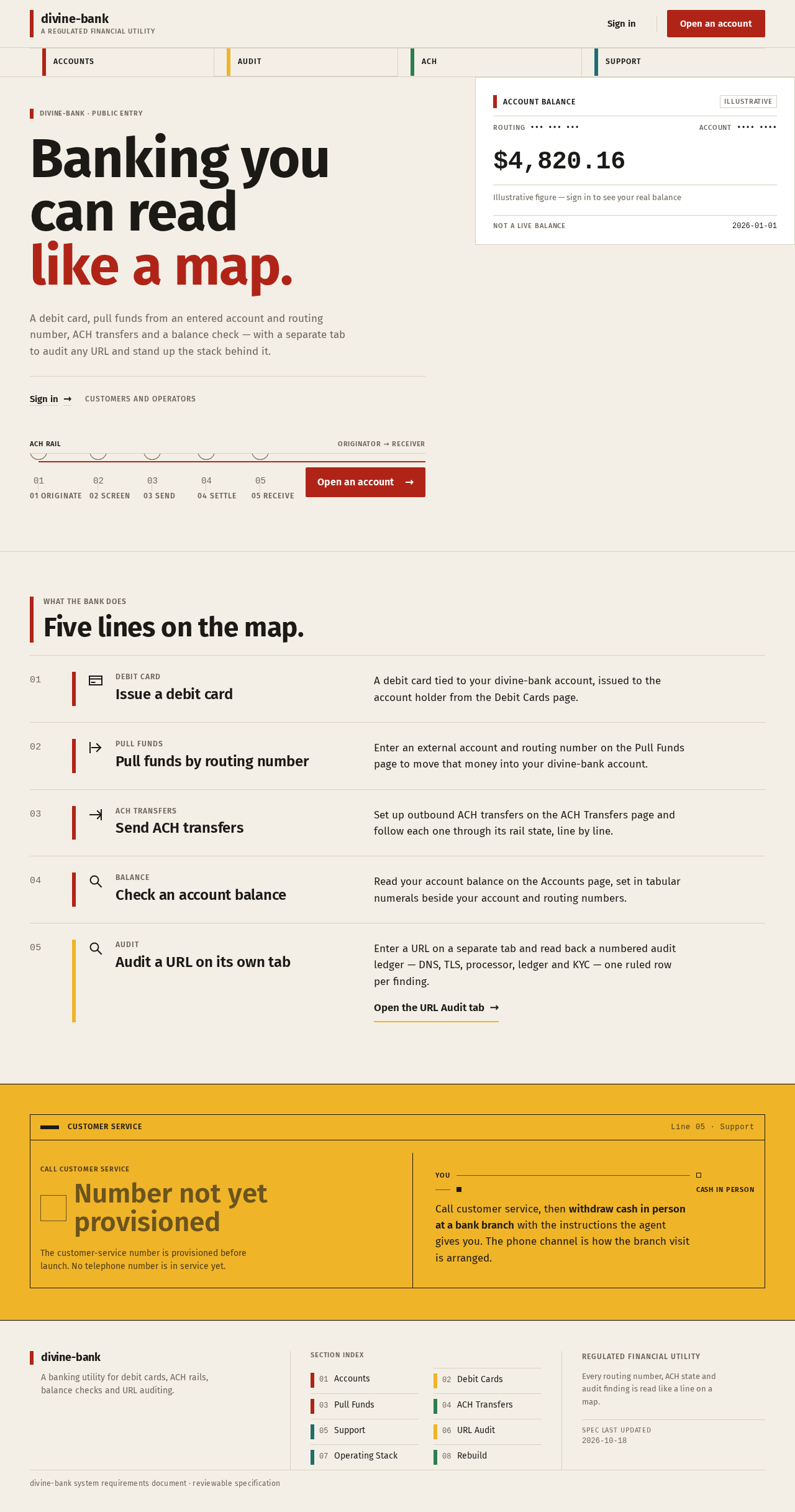
divine-bank · public entry
Banking you can read like a map.
A debit card, pull funds from an entered account and routing number, ACH transfers and a balance check — with a separate tab to audit any URL and stand up the stack behind it.
Account balance
Illustrative$4,820.16
Illustrative figure — sign in to see your real balance
What the bank does
Five lines on the map.
Debit card
Issue a debit card
A debit card tied to your divine-bank account, issued to the account holder from the Debit Cards page.
Pull funds
Pull funds by routing number
Enter an external account and routing number on the Pull Funds page to move that money into your divine-bank account.
ACH transfers
Send ACH transfers
Set up outbound ACH transfers on the ACH Transfers page and follow each one through its rail state, line by line.
Balance
Check an account balance
Read your account balance on the Accounts page, set in tabular numerals beside your account and routing numbers.
Audit
Audit a URL on its own tab
Enter a URL on a separate tab and read back a numbered audit ledger — DNS, TLS, processor, ledger and KYC — one ruled row per finding.
Open the URL Audit tab
Customer service
Line 05 · SupportThe customer-service number is provisioned before launch. No telephone number is in service yet.
Call customer service, then withdraw cash in person at a bank branch with the instructions the agent gives you. The phone channel is how the branch visit is arranged.
divine-bank · public entry
Banking you can read like a map.
A debit card, pull funds from an entered account and routing number, ACH transfers and a balance check — with a separate tab to audit any URL and stand up the stack behind it.
Account balance
Illustrative$4,820.16
Illustrative figure — sign in to see your real balance
What the bank does
Five lines on the map.
Debit card
Issue a debit card
A debit card tied to your divine-bank account, issued to the account holder from the Debit Cards page.
Pull funds
Pull funds by routing number
Enter an external account and routing number on the Pull Funds page to move that money into your divine-bank account.
ACH transfers
Send ACH transfers
Set up outbound ACH transfers on the ACH Transfers page and follow each one through its rail state, line by line.
Balance
Check an account balance
Read your account balance on the Accounts page, set in tabular numerals beside your account and routing numbers.
Audit
Audit a URL on its own tab
Enter a URL on a separate tab and read back a numbered audit ledger — DNS, TLS, processor, ledger and KYC — one ruled row per finding.
Open the URL Audit tab
Customer service
Line 05 · SupportThe customer-service number is provisioned before launch. No telephone number is in service yet.
Call customer service, then withdraw cash in person at a bank branch with the instructions the agent gives you. The phone channel is how the branch visit is arranged.
No comments yet. Be the first!