digital-safety-reporting
 Jake Ducharme
Prompt 1 — Establish the project and requirements I’m building ClearSignal, a digital-safety reporting and learning workspace, starting from a separate experimental copy of my existing GuardAd prototype. This is a contained product experiment that may become a working product if the result is strong. Shared product brief ClearSignal helps people document and understand digital experiences that may affect safety or wellbeing, then share useful, reviewed information when they choose. A concern might involve advertising, suspicious contact, scams, privacy practices, risky product features, or harmful content. The first version should stay focused on one complete workflow: Document a concern → review it → make a decision → optionally share a redacted summary. The reporter controls whether a submission stays private or is considered for public sharing. Submissions and evidence are private by default. Nothing becomes public automatically. This is an educational and reporting tool, not an emergency service, law-enforcement system, clinical tool, or way to monitor a child. Do not claim that a report proves wrongdoing. Do not make legal or safety determinations automatically. Initial user roles Visitor: reads public, approved summaries and product information. Reporter: submits concerns, manages their own reports, and controls sharing consent. Reviewer: reviews assigned reports, requests clarification, redacts information, and recommends a decision. Administrator: manages reviewer access, report categories, and escalations. First-version scope Include account creation and sign-in, a guided report form, private evidence attachments, reporter report history, reviewer queue, clarification requests and replies, review decisions, redacted public summaries, and a public library of approved summaries. Include realistic demo records clearly labeled as fictional. Do not build company accounts, public comments, community voting, reputation scores, automated investigations, external agency submissions, payment features, or social networking in this version. Your task Create the System Requirements Document for this exact first version. Define user needs, functional requirements, nonfunctional requirements, role permissions, report states, privacy defaults, and acceptance criteria. Identify assumptions and unresolved decisions separately. Keep requirements testable and keep the build small enough for a one-month platform experiment. Do not implement code yet. Present the requirements for review and approval before proceeding. Prompt 2 — Map user flows and permissions Continue the ClearSignal project using the approved requirements as the source of truth. The product purpose is to help people document digital-safety concerns, have them reviewed, and optionally share redacted summaries. Reports and evidence are private by default; no submission is published automatically. Do not expand the approved first-version scope. Map the complete flows for: A visitor reading public summaries. A reporter creating an account and submitting a concern. A reporter submitting without public-sharing consent. A reporter opting in to consideration for a redacted public summary. A reviewer requesting clarification and receiving the reporter’s reply. A reviewer recommending a decision and an administrator approving or returning it. A reporter viewing the status and history of their own report. An administrator managing reviewer access. For every flow, show the screens, actions, validation, success states, errors, and permission checks. Define what each role can view and change. Include edge cases such as a withdrawn report, a failed evidence upload, a reporter changing sharing consent, duplicate submissions, and a report rejected from publication. Preserve the rule that only an administrator-approved, redacted summary with explicit reporter consent may appear publicly. Do not expose private evidence, identifying details, reviewer notes, or reporter identity in the public library. Produce screen-by-screen user flows and an updated permission matrix for review. Do not implement until approved. Prompt 3 — Design the experience Continue ClearSignal from its approved requirements and user flows. Keep the same scope and privacy rules: reports and evidence are private by default; public sharing requires explicit reporter consent, redaction, and administrator approval. Design a calm, trustworthy, accessible responsive web application for adults reporting digital-safety concerns. Avoid alarmist colors, fear-based copy, surveillance imagery, child-targeted engagement patterns, and gamification. The interface should communicate that a concern can be documented without proving intent or wrongdoing. Create and review designs for: Public landing page and approved-summary library. Sign-up and sign-in. Guided report submission, including category selection, narrative, optional link, optional evidence upload, and sharing-consent choice. Reporter dashboard and report detail/history. Reviewer queue, report review, clarification request, redaction, and decision recommendation. Administrator review and approval of a proposed public summary. Empty, loading, error, upload-failure, and access-denied states. Use plain language, clear progress indicators, keyboard-accessible controls, readable contrast, mobile layouts, and explicit privacy explanations at the point of choice. Mark all synthetic reports and public examples as fictional demo data. Deliver clickable designs and a concise design system. Do not invent new features or start implementation until the designs are approved. Prompt 4 — Plan architecture and data Continue ClearSignal using only the approved requirements, flows, and designs. Before implementation, propose the simplest maintainable architecture supported by 8080 and the imported repository. Explain any recommended changes to the starter code before making them. Define the data model for users and roles, reports, evidence metadata and private file storage, clarification exchanges, review assignments, review events, redactions, consent history, and public summaries. Every report should have a traceable status history. Store consent changes as auditable events. Specify server-side authorization rules. Reporters may access only their own reports and evidence. Reviewers may access only reports assigned to them. Administrators may manage the queue. Public users may access only approved public summaries. Never rely on hiding interface elements as the only permission check. Specify file validation, size limits, safe storage, error handling, and protections against exposing private files through public URLs. Identify authentication, database, storage, and deployment services the project requires; do not assume credentials or external integrations are available. Keep personal information to the minimum needed for this workflow. Produce architecture diagrams, the data model, API or backend-function boundaries, security rules, environment-variable requirements, and a phased task plan with dependencies and acceptance criteria. Flag anything that could create cost or require my account setup. Wait for approval before building.


Comments (0)
Sign in to leave a comment
System Requirements
System Requirements Document for digital-safety-reporting
1. Introduction
ClearSignal is a digital-safety reporting and learning workspace. It helps people document and understand digital experiences that may affect safety or wellbeing, then share useful, reviewed information when they choose. A concern might involve advertising, suspicious contact, scams, privacy practices, risky product features, or harmful content.
The first version stays focused on one complete workflow: Document a concern → review it → make a decision → optionally share a redacted summary. The reporter controls whether a submission stays private or is considered for public sharing. Submissions and evidence are private by default, and nothing becomes public automatically.
ClearSignal is an educational and reporting tool. It is not an emergency service, a law-enforcement system, a clinical tool, or a way to monitor a child. It does not claim that a report proves wrongdoing, and it does not make legal or safety determinations automatically. The interface must communicate that a concern can be documented without proving intent or wrongdoing.
The product is a contained experiment built from a separate experimental copy of the existing GuardAd prototype. It may become a working product if the result is strong, but the build must stay small enough for a one-month platform experiment.
Audience. Adults reporting digital-safety concerns, reviewers assessing and redacting those reports, administrators managing the review pipeline, and visitors reading approved public summaries. The application is a calm, trustworthy, accessible responsive web application for adults.
2. System Overview
ClearSignal is a responsive web application with four active human roles and one complete reporting lifecycle.
Current delivery. A first-party web application with application-owned identity. Reporters self-enroll and sign in; reviewers and administrators are provisioned by an administrator and sign in. Public visitors read the landing page and the approved-summary library without an account. All report content, evidence, clarification exchanges, review notes, and consent history are private and reachable only through server-side authorization checks.
Actors.
- Visitor — reads public, approved summaries and product information. No account.
- Reporter — creates an account, submits concerns through a guided report form with optional link and private evidence attachments, manages their own reports, controls sharing consent, replies to clarification requests, and views status and history of their own reports.
- Reviewer — works the assigned review queue, reviews assigned reports, requests clarification from the reporter, redacts information, and recommends a decision. Reviewers may access only reports assigned to them.
- Administrator — manages reviewer access, report categories, and escalations, manages the queue, and approves or returns proposed public summaries. Administrators are the only role that can approve a redacted summary for publication.
Accepted behavior. Account creation and sign-in; a guided report form; private evidence attachments; reporter report history; reviewer queue; clarification requests and replies; review decisions; redacted public summaries; and a public library of approved summaries. Realistic demo records are included and clearly labeled as fictional.
Ownership. The application owns identity, report state, evidence storage, consent history, review events, redactions, and public summaries. No external agency, provider, or third-party service owns any accepted product outcome. Authentication, database, storage, and deployment services are required but no credentials or external integrations may be assumed available.
Narrow exclusions (current version). Company accounts, public comments, community voting, reputation scores, automated investigations, external agency submissions, payment features, and social networking are not built in this version. The approved first-version scope is not expanded.
2a. Product Interpretation and Delivery Boundary
ClearSignal is delivered as a first-party web application. Everything a reporter, reviewer, or administrator does — enrolling, signing in, filing a concern, attaching evidence, replying to a clarification, redacting, recommending, approving, managing access — happens inside ClearSignal's own surfaces. Nothing in the accepted workflow is delegated to a provider-owned or external destination, and no accepted outcome depends on an external agency, integration, or credential.
Public reading is anonymous. The landing page and the approved-summary library are reachable without an account, and they expose only administrator-approved, redacted summaries. Private evidence, identifying details, reviewer notes, and reporter identity never appear there.
Protected work requires identity. Reporters establish their own identity through self-service enrollment because no provisioning or invitation boundary exists for them. Reviewers and administrators are provisioned by an administrator before they can reach assigned review work or administrative controls. Identity and session continuity exist to bind durable report state, consent, and decisions to the correct participant; they do not create differentiated visibility beyond the role boundaries stated in this document.
The current horizon is the single reporting lifecycle described above. Anything outside it — company accounts, public comments, community voting, reputation scores, automated investigations, external agency submissions, payment features, social networking — is out of scope for this version and is not represented in any page, flow, or requirement.
2b. Source Content Inventory
Not applicable. No reference directive declares content_source; the GuardAd prototype reference supplies only structure_reference and feature_reference.
2c. Page Content and Component Coverage
Landing
- Information/state. Anonymous public entry. Explains what ClearSignal is, who it is for, the four-stage workflow (Document → Review → Decide → optionally Share), and the educational limits: not an emergency service, not law enforcement, not a clinical tool, not child monitoring; a report does not prove wrongdoing. States that reports and evidence are private by default and nothing is published automatically.
- Primary actions. Start a report (routes an unauthenticated visitor to Sign Up); Read approved summaries (routes to Library).
- Supporting actions. Sign in (routes to Login).
- Domain entities. Public product information; workflow stages; concern categories as descriptive pictograms.
- Component responsibilities. Hero information panel with headline, explanatory paragraph, and two controls; flat line-drawn four-stage workflow diagram with stage 04 marked optional; privacy statement line; persistent top bar with wordmark and role lane indicator; left-margin section number rail.
- States. Loading (static content, no blocking spinner); empty (not applicable — static content); success (rendered); error (static content failure shows a plain-language retry); recovery (retry reloads the page).
Library
- Information/state. Public list of administrator-approved, redacted summaries. Each row shows category, approval date, and status chip, against the redacted summary text. Only approved summaries appear. No private evidence, identifying details, reviewer notes, or reporter identity.
- Primary actions. Open a summary to read it in full.
- Supporting actions. Filter or scan by category; return to Landing.
- Domain entities. Public summary (redacted text, category, approval date, status).
- Component responsibilities. Single-column ruled reading list of wide rows; three-column metadata rail against a nine-column summary; sticky all-caps column headers; state chip with 3px left border and spelled-out state name; fictional demo data label on synthetic examples.
- States. Loading (row skeleton); empty (plain-language message that no summaries have been approved yet, with a link to Landing); success (rows rendered); error (plain-language message with retry); recovery (retry re-requests the list).
Sign Up
- Information/state. Anonymous self-service enrollment for reporters. Explains what an account is for, that reports and evidence are private by default, and that public sharing requires explicit consent plus redaction plus administrator approval.
- Primary actions. Create account.
- Supporting actions. Go to Login; return to Landing.
- Domain entities. Account (minimal personal information), role assignment (reporter).
- Component responsibilities. Enrollment form with labeled fields, inline validation, plain-language privacy explanation at the point of choice, and a link to Login.
- States. Loading (submit in progress, control disabled); empty (blank form); success (account created, routed to Reports); error (field-level validation messages; duplicate-account message; generic failure with retry); recovery (correct the field and resubmit).
Login
- Information/state. Returning verification for reporters, provisioned reviewers, and provisioned administrators. Does not reveal whether an account exists beyond a generic failure message.
- Primary actions. Sign in.
- Supporting actions. Go to Sign Up; return to Landing.
- Domain entities. Account, session.
- Component responsibilities. Credential form with labeled fields, inline validation, generic failure messaging, and a link to Sign Up.
- States. Loading (submit in progress, control disabled); empty (blank form); success (routed to the role's landing surface — Reports for reporters, Review Queue for reviewers, Admin Approval for administrators); error (invalid credentials message; generic failure with retry); recovery (re-enter credentials).
Reports
- Information/state. The signed-in reporter's own report history and status overview. Shows each report's ID in tabular numerals, category, submitted date, and status chip. Shows only the signed-in reporter's reports.
- Primary actions. Open a report (routes to Report Details); start a new report (routes to New Report).
- Supporting actions. Scan and sort the list; read status chips.
- Domain entities. Report (ID, category, submitted date, status), status history.
- Component responsibilities. Left rail report list beside a detail pane on desktop, collapsing to stacked list-then-detail on mobile; ruled rows with 1px separators; state chips with spelled-out state names; empty-state panel.
- States. Loading (row skeleton); empty (plain-language message that no reports exist yet, with a Start a report control); success (rows rendered); error (plain-language message with retry); recovery (retry re-requests the list).
New Report
- Information/state. Guided concern intake with clear progress indicators. Steps cover category selection, narrative, optional link, optional evidence upload, and sharing-consent choice. Privacy is explained at the point of choice.
- Primary actions. Select a category; enter narrative; add an optional link; attach optional evidence; choose sharing consent; submit the report.
- Supporting actions. Move between steps; save progress within the session; cancel and return to Reports.
- Domain entities. Report (category, narrative, optional link, status), evidence attachment (file metadata), consent choice.
- Component responsibilities. Step indicator with a 3px orange underline marking the active step; category selection control; narrative field with a capped reading measure; optional link field; evidence upload control with file validation feedback; two-column ruled consent comparison headed KEEP PRIVATE and CONSIDER FOR PUBLIC SUMMARY with aligned label/value consequence rows and a 4px green top rule plus check glyph on the selected panel; submit control.
- States. Loading (submit in progress, control disabled); empty (no evidence attached — the attachment step shows an optional, non-blocking empty state); success (report created, routed to Report Details with a confirmation of the chosen consent); error (field-level validation; failed evidence upload with a plain-language message and a retry that does not discard the rest of the form; submission failure with retry); recovery (retry the failed step or the submission without losing entered content).
Report Details
- Information/state. The reporter's private workspace for one report: status, traceable status history, consent history, evidence metadata, clarification activity, withdrawal control, and lifecycle outcomes including a report rejected from publication. Shows only the reporter's own report.
- Primary actions. Change sharing consent; withdraw the report; open the clarification exchange; view status history.
- Supporting actions. Return to Reports; view evidence metadata.
- Domain entities. Report, status history, consent history (auditable events), evidence metadata, clarification exchange, review outcome.
- Component responsibilities. Status chip with spelled-out state; status history list with tabular-numeral timestamps; consent history list; evidence metadata list; withdrawal control with confirmation; link to Clarifications; outcome panel explaining a rejection from publication in plain language.
- States. Loading (panel skeleton); empty (no clarification activity yet — a plain-language note, not an error); success (report rendered); error (plain-language message with retry); recovery (retry re-requests the report); access-denied (a report not owned by the signed-in reporter returns an access-denied state, not a hidden control).
Clarifications
- Information/state. The focused exchange for one report: reviewer clarification requests and the reporter's replies, in order, with timestamps. Reporters see their own reports' exchanges; reviewers see exchanges for reports assigned to them.
- Primary actions. Reporter: reply to a clarification request. Reviewer: send a clarification request.
- Supporting actions. Return to Report Details or the review surface.
- Domain entities. Clarification exchange (request, reply, timestamps, participants).
- Component responsibilities. Ordered thread with 160ms fade-and-rise append; labeled reply field; send control; participant labels that do not expose reporter identity to anyone outside the assigned reviewer and administrator.
- States. Loading (thread skeleton); empty (no clarification requests yet — plain-language note); success (thread rendered, reply appended); error (send failure with plain-language message and retry that preserves the typed reply); recovery (retry send); access-denied (an exchange for a report the actor may not access returns an access-denied state).
Review Queue
- Information/state. The reviewer's assigned queue. Full-width ruled ledger rows with sticky all-caps header, tabular-numeral report IDs, and fixed columns for category, submitted date, status, and assignment. Shows only reports assigned to the signed-in reviewer.
- Primary actions. Open an assigned report for review.
- Supporting actions. Scan and sort the queue.
- Domain entities. Review assignment, report (ID, category, submitted date, status).
- Component responsibilities. Ruled ledger with 1px row separators and alternating row tint; sticky column headers; state chips; two-line stacked row at 768px rather than shrinking type.
- States. Loading (row skeleton); empty (plain-language message that no reports are assigned, with no invented action); success (rows rendered); error (plain-language message with retry); recovery (retry re-requests the queue); access-denied (a non-reviewer reaching this surface returns an access-denied state).
Redaction
- Information/state. The reviewer's workspace for removing identifying or private information from a proposed public representation of an assigned report. Shows the proposed public text and the redaction controls.
- Primary actions. Mark and remove identifying or private information; save the redacted representation.
- Supporting actions. Return to the review surface.
- Domain entities. Redaction (redacted representation, reviewer, timestamp), report.
- Component responsibilities. Proposed-public-text editor with redaction marking; save control; plain-language explanation that redaction is required before any public summary can be approved.
- States. Loading (editor skeleton); empty (no proposed public text yet — plain-language note); success (redaction saved, confirmation shown); error (save failure with plain-language message and retry that preserves the redaction); recovery (retry save); access-denied (a report not assigned to the reviewer returns an access-denied state).
Review Decision
- Information/state. The reviewer's workspace for recording a recommendation on an assigned report, including whether the report is recommended for publication as a redacted summary or rejected from publication.
- Primary actions. Record a decision recommendation; submit it for administrator approval.
- Supporting actions. Return to Review Queue; open Redaction; open Clarifications.
- Domain entities. Review event (recommendation, reviewer, timestamp), report, redaction.
- Component responsibilities. Recommendation control with labeled options; rationale field; submit control; plain-language note that the recommendation is not final and that only an administrator can approve publication.
- States. Loading (form skeleton); empty (no recommendation recorded yet); success (recommendation submitted, status moves to awaiting administrator approval); error (submit failure with plain-language message and retry that preserves the recommendation); recovery (retry submit); access-denied (a report not assigned to the reviewer returns an access-denied state).
Admin Approval
- Information/state. The administrator's workspace for approving or returning reviewer recommendations and proposed public summaries. Shows the recommendation, the redacted representation, and the reporter's consent state. Approval is the only path to publication.
- Primary actions. Approve a redacted summary for publication; return a recommendation to the reviewer.
- Supporting actions. Open the report for context; open the redaction; return to the queue.
- Domain entities. Public summary (approval state, approver, timestamp), review event, redaction, consent record.
- Component responsibilities. Approval panel showing recommendation, redacted text, and consent state side by side; approve control; return control with a reason field; plain-language statement that publication requires explicit reporter consent, redaction, and administrator approval.
- States. Loading (panel skeleton); empty (no recommendations awaiting approval — plain-language note); success (approved summary published to Library, or recommendation returned to the reviewer); error (action failure with plain-language message and retry); recovery (retry the action); access-denied (a non-administrator reaching this surface returns an access-denied state).
Reviewer Access
- Information/state. The administrator's controls for managing reviewer access: which accounts hold the reviewer role and whether that access is active.
- Primary actions. Grant reviewer access to an account; revoke reviewer access.
- Supporting actions. Scan the reviewer list.
- Domain entities. Account, role assignment (reviewer), access state.
- Component responsibilities. Ruled list of reviewer accounts with tabular-numeral identifiers; grant and revoke controls with confirmation; plain-language explanation that reviewers may access only reports assigned to them.
- States. Loading (row skeleton); empty (plain-language message that no reviewers are provisioned yet, with a grant control); success (access granted or revoked, list updated); error (action failure with plain-language message and retry); recovery (retry the action); access-denied (a non-administrator reaching this surface returns an access-denied state).
Categories
- Information/state. The administrator's controls for maintaining the report categories used by intake. Categories cover advertising, suspicious contact, scams, privacy practices, risky product features, and harmful content.
- Primary actions. Add a category; rename a category; deactivate a category.
- Supporting actions. Scan the category list.
- Domain entities. Report category (name, active state).
- Component responsibilities. Ruled list of categories with active-state chips; add, rename, and deactivate controls; plain-language note that deactivated categories remain on existing reports.
- States. Loading (row skeleton); empty (plain-language message that no categories exist, with an add control); success (category added, renamed, or deactivated, list updated); error (action failure with plain-language message and retry); recovery (retry the action); access-denied (a non-administrator reaching this surface returns an access-denied state).
Escalations
- Information/state. The administrator's workspace for managing report escalations within the approved workflow. Shows escalated reports with their status and the reason for escalation.
- Primary actions. Escalate a report; resolve an escalation.
- Supporting actions. Open the report for context; return to the queue.
- Domain entities. Escalation (report, reason, state, timestamps), report.
- Component responsibilities. Ruled list of escalated reports with state chips; escalate and resolve controls with a reason field; plain-language note that escalation is an internal queue-management action and does not itself change publication state.
- States. Loading (row skeleton); empty (plain-language message that no reports are escalated); success (escalation created or resolved, list updated); error (action failure with plain-language message and retry); recovery (retry the action); access-denied (a non-administrator reaching this surface returns an access-denied state).
3. Functional Requirements
Identity and Access
FR-1 — Reporter self-service enrollment [required_inference]
As a prospective Reporter, I should be able to create an account so that I can submit and manage my own concerns.
- Trigger/input: Anonymous visitor opens Sign Up and submits the enrollment form.
- Observable result: An account with the reporter role exists and the reporter is signed in.
- Access state: Anonymous entry; the enrollment interaction itself is reachable without an account.
- Failure/recovery: Field-level validation errors are shown inline; a duplicate-account condition shows a plain-language message; a generic failure offers retry without discarding entered fields.
- Continuation: The reporter lands on Reports with an empty-state prompt to start a report.
FR-2 — Returning verification [required_inference]
As a Reporter, Reviewer, or Administrator, I should be able to sign in so that I can reach my durable protected work.
- Trigger/input: Actor opens Login and submits credentials.
- Observable result: A session bound to the correct account and role.
- Access state: Anonymous entry; protected state remains unavailable until identity is established.
- Failure/recovery: Invalid credentials produce a generic message that does not reveal whether an account exists; retry is available.
- Continuation: Reporters land on Reports; reviewers land on Review Queue; administrators land on Admin Approval.
FR-3 — Administrator-granted reviewer access [required_inference]
As an Administrator, I should be able to grant and revoke reviewer access so that only provisioned reviewers can work assigned reports.
- Trigger/input: Administrator opens Reviewer Access and grants or revokes the reviewer role for an account.
- Observable result: The account's reviewer access state changes and the reviewer list reflects it.
- Access state: Administrator-only; enforced server-side.
- Failure/recovery: Action failure shows a plain-language message with retry.
- Continuation: A granted reviewer can sign in and reach Review Queue; a revoked reviewer can no longer reach assigned review work.
FR-4 — Server-side authorization on every private resource [explicit]
As the system, I should enforce authorization on the server for every report, evidence item, clarification exchange, review event, redaction, and consent record so that hiding interface elements is never the only permission check.
- Trigger/input: Any request for a private resource.
- Observable result: The request is allowed only when the actor's role and ownership or assignment permit it; otherwise it is refused.
- Access state: Reporters may access only their own reports and evidence; reviewers may access only reports assigned to them; administrators may manage the queue; public users may access only approved public summaries.
- Failure/recovery: A refused request returns an access-denied state, not a hidden control.
- Continuation: The actor is returned to a surface they are permitted to use.
Reporting
FR-5 — Guided report submission [explicit]
As a Reporter, I should be able to submit a concern through a guided report form so that I can document what happened without proving intent or wrongdoing.
- Trigger/input: Reporter opens New Report and completes category selection, narrative, optional link, optional evidence upload, and sharing-consent choice.
- Observable result: A report exists with the entered content, the chosen consent, and an initial status.
- Access state: Reporter-only; the report is bound to the signed-in reporter.
- Failure/recovery: Field-level validation is shown inline; a submission failure offers retry without discarding entered content.
- Continuation: The reporter lands on Report Details with the chosen consent confirmed.
FR-6 — Category selection from administrator-maintained categories [explicit]
As a Reporter, I should be able to select a category for my concern so that it can be routed and understood.
- Trigger/input: Reporter selects one category from the active categories during intake.
- Observable result: The report records the selected category.
- Access state: Reporter-only during intake.
- Failure/recovery: If no category is selected, submission is blocked with a plain-language validation message.
- Continuation: The reporter proceeds to the narrative step.
FR-7 — Optional link attachment [explicit]
As a Reporter, I should be able to add an optional link to my report so that I can point to where the concern occurred.
- Trigger/input: Reporter enters a link during intake, or leaves the field empty.
- Observable result: The report records the link when provided and remains valid when omitted.
- Access state: Reporter-only.
- Failure/recovery: A malformed link shows a plain-language validation message and does not block the rest of the form.
- Continuation: The reporter proceeds to the evidence step.
FR-8 — Private evidence attachment [explicit]
As a Reporter, I should be able to attach evidence privately so that reviewers can understand my concern without the evidence ever becoming public.
- Trigger/input: Reporter uploads one or more files during intake.
- Observable result: Evidence is stored privately with metadata recorded against the report; the file is never reachable through a public URL.
- Access state: Reporter-only for upload; accessible afterward only to the owning reporter and to reviewers assigned to the report.
- Failure/recovery: A failed upload shows a plain-language message and a retry that does not discard the rest of the form; validation failures name the reason (unsupported type, size limit exceeded).
- Continuation: The reporter proceeds to the consent step, or submits without evidence since attachment is optional.
FR-9 — Sharing-consent choice at the point of choice [explicit]
As a Reporter, I should be able to choose whether my submission stays private or is considered for public sharing, with the consequences explained in plain language where I choose.
- Trigger/input: Reporter selects KEEP PRIVATE or CONSIDER FOR PUBLIC SUMMARY on the consent step.
- Observable result: The report records the chosen consent as an auditable event.
- Access state: Reporter-only.
- Failure/recovery: If no consent is selected, submission is blocked with a plain-language validation message.
- Continuation: The reporter submits the report and sees the chosen consent confirmed on Report Details.
FR-10 — Submitting without public-sharing consent [explicit]
As a Reporter, I should be able to submit a concern that stays private so that my report is never considered for publication.
- Trigger/input: Reporter selects KEEP PRIVATE and submits.
- Observable result: The report exists with private-only consent; it is never eligible for a public summary.
- Access state: Reporter-only.
- Failure/recovery: Submission failure offers retry without discarding content.
- Continuation: The reporter can still receive clarification requests and a review decision; the report simply cannot be published.
FR-11 — Opting in to consideration for a redacted public summary [explicit]
As a Reporter, I should be able to opt in to consideration for a redacted public summary so that useful reviewed information can be shared when I choose.
- Trigger/input: Reporter selects CONSIDER FOR PUBLIC SUMMARY and submits.
- Observable result: The report becomes eligible for review toward a redacted public summary, subject to redaction and administrator approval.
- Access state: Reporter-only.
- Failure/recovery: Submission failure offers retry without discarding content.
- Continuation: The report enters the review pipeline; nothing is published at this point.
FR-12 — Reporter report history and status [explicit]
As a Reporter, I should be able to view the status and history of my own reports so that I know where each concern stands.
- Trigger/input: Reporter opens Reports and selects a report.
- Observable result: The report's current status, traceable status history, consent history, and evidence metadata are shown.
- Access state: Reporter-only; only the reporter's own reports are listed and reachable.
- Failure/recovery: A load failure shows a plain-language message with retry; a report not owned by the reporter returns an access-denied state.
- Continuation: The reporter can open the clarification exchange, change consent, or withdraw the report.
FR-13 — Reporter changes sharing consent [explicit]
As a Reporter, I should be able to change my sharing consent after submission so that I keep control of whether my report is considered for public sharing.
- Trigger/input: Reporter changes the consent choice on Report Details.
- Observable result: The new consent is recorded as an auditable event and the report's publication eligibility changes accordingly.
- Access state: Reporter-only.
- Failure/recovery: A save failure shows a plain-language message with retry; the previous consent remains in effect until the change succeeds.
- Continuation: Withdrawing consent removes the report from publication consideration; granting consent makes it eligible again subject to redaction and administrator approval.
FR-14 — Reporter withdraws a report [explicit]
As a Reporter, I should be able to withdraw my report so that it is no longer considered for publication.
- Trigger/input: Reporter confirms withdrawal on Report Details.
- Observable result: The report moves to a withdrawn state, its status history records the change, and it is no longer eligible for publication.
- Access state: Reporter-only.
- Failure/recovery: A failed withdrawal shows a plain-language message with retry and leaves the report in its prior state.
- Continuation: The withdrawn report remains visible in the reporter's history with a withdrawn status chip.
FR-15 — Duplicate submission handling [explicit]
As a Reporter, I should be told when a submission looks like a duplicate so that I do not accidentally file the same concern twice.
- Trigger/input: Reporter submits content closely matching an existing report of their own.
- Observable result: A plain-language notice identifies the likely duplicate and offers the choice to continue or open the existing report.
- Access state: Reporter-only.
- Failure/recovery: If the check cannot run, submission proceeds normally rather than blocking the reporter.
- Continuation: The reporter either opens the existing report or confirms and submits the new one.
Review
FR-16 — Reviewer assigned queue [explicit]
As a Reviewer, I should be able to see the reports assigned to me so that I can work through my review responsibilities.
- Trigger/input: Reviewer opens Review Queue.
- Observable result: A ruled ledger of assigned reports with ID, category, submitted date, status, and assignment.
- Access state: Reviewer-only; only reports assigned to the signed-in reviewer appear.
- Failure/recovery: A load failure shows a plain-language message with retry; a non-reviewer reaching the surface returns an access-denied state.
- Continuation: The reviewer opens an assigned report for review.
FR-17 — Reviewer requests clarification [explicit]
As a Reviewer, I should be able to request clarification from the reporter so that I can understand the concern before recommending a decision.
- Trigger/input: Reviewer sends a clarification request from the report's clarification exchange.
- Observable result: The request is recorded in the exchange and the report's status reflects that it is awaiting the reporter's reply.
- Access state: Reviewer-only, and only for reports assigned to that reviewer.
- Failure/recovery: A send failure shows a plain-language message with retry that preserves the typed request.
- Continuation: The reviewer waits for the reporter's reply and can continue reviewing other assigned reports.
FR-18 — Reporter replies to a clarification request [explicit]
As a Reporter, I should be able to reply to a clarification request so that the reviewer has the information needed to continue.
- Trigger/input: Reporter opens Clarifications for their report and sends a reply.
- Observable result: The reply is appended to the exchange and the report's status reflects that the reply has been received.
- Access state: Reporter-only, and only for the reporter's own report.
- Failure/recovery: A send failure shows a plain-language message with retry that preserves the typed reply.
- Continuation: The reviewer sees the reply and resumes the review.
FR-19 — Reviewer redacts information [explicit]
As a Reviewer, I should be able to redact identifying or private information so that a proposed public summary contains nothing that could identify the reporter or expose private evidence.
- Trigger/input: Reviewer marks and removes identifying or private information in the proposed public representation and saves.
- Observable result: A redacted representation is stored against the report with the reviewer and timestamp.
- Access state: Reviewer-only, and only for reports assigned to that reviewer.
- Failure/recovery: A save failure shows a plain-language message with retry that preserves the redaction.
- Continuation: The redacted representation is available for the reviewer's decision recommendation and for administrator approval.
FR-20 — Reviewer recommends a decision [explicit]
As a Reviewer, I should be able to recommend a decision so that an administrator can approve or return it.
- Trigger/input: Reviewer records a recommendation, including whether the report is recommended for publication as a redacted summary or rejected from publication, and submits it.
- Observable result: A review event is recorded and the report moves to awaiting administrator approval.
- Access state: Reviewer-only, and only for reports assigned to that reviewer.
- Failure/recovery: A submit failure shows a plain-language message with retry that preserves the recommendation.
- Continuation: The recommendation appears in the administrator's approval workspace.
FR-21 — Administrator approves or returns a recommendation [explicit]
As an Administrator, I should be able to approve or return a reviewer's recommendation so that only correct, consented, redacted summaries reach the public library.
- Trigger/input: Administrator reviews the recommendation, the redacted representation, and the reporter's consent state, then approves or returns with a reason.
- Observable result: Approval publishes the redacted summary to the public library; returning sends the recommendation back to the reviewer with the reason recorded.
- Access state: Administrator-only.
- Failure/recovery: An action failure shows a plain-language message with retry; the recommendation remains pending until the action succeeds.
- Continuation: An approved summary appears in Library; a returned recommendation reappears in the reviewer's work.
FR-22 — Report rejected from publication [explicit]
As a Reporter, I should be able to see that my report was rejected from publication so that I understand the outcome.
- Trigger/input: A recommendation or approval results in the report not being published.
- Observable result: The report's status history records the rejection and Report Details shows a plain-language outcome explanation.
- Access state: Reporter-only for the reporter's own report.
- Failure/recovery: A load failure shows a plain-language message with retry.
- Continuation: The report remains private in the reporter's history; the reporter may change consent or withdraw it.
Public Sharing
FR-23 — Public library of approved summaries [explicit]
As a Visitor, I should be able to read approved, redacted summaries so that I can learn from reviewed information.
- Trigger/input: Visitor opens Library.
- Observable result: A single-column ruled reading list of administrator-approved, redacted summaries with category, approval date, and status.
- Access state: Anonymous; only approved public summaries are reachable.
- Failure/recovery: A load failure shows a plain-language message with retry; an empty library shows a plain-language empty state.
- Continuation: The visitor opens a summary to read it in full.
FR-24 — Publication requires consent, redaction, and administrator approval [explicit]
As the system, I should publish a summary only when explicit reporter consent, reviewer redaction, and administrator approval are all present, so that nothing becomes public automatically.
- Trigger/input: Any attempt to make a report public.
- Observable result: The summary appears in Library only when all three conditions hold; otherwise it does not appear.
- Access state: Enforced server-side; no client state can bypass it.
- Failure/recovery: A missing condition leaves the report private and surfaces the missing condition to the administrator.
- Continuation: The report remains in the review pipeline until the conditions are met or the report is rejected.
FR-25 — Public library excludes private material [explicit]
As the system, I should exclude private evidence, identifying details, reviewer notes, and reporter identity from the public library so that publication never exposes private material.
- Trigger/input: Any read of a public summary.
- Observable result: Only redacted summary text, category, approval date, and status are returned.
- Access state: Anonymous read of approved summaries only.
- Failure/recovery: A request for private material through a public path is refused.
- Continuation: The visitor continues reading approved summaries.
Administration
FR-26 — Administrator manages report categories [explicit]
As an Administrator, I should be able to manage report categories so that intake reflects the concerns ClearSignal covers.
- Trigger/input: Administrator adds, renames, or deactivates a category on Categories.
- Observable result: The category list changes and intake offers the active categories.
- Access state: Administrator-only.
- Failure/recovery: An action failure shows a plain-language message with retry.
- Continuation: New reports use the updated category set; existing reports keep their recorded category.
FR-27 — Administrator manages escalations [explicit]
As an Administrator, I should be able to manage escalations so that reports needing attention are tracked within the approved workflow.
- Trigger/input: Administrator escalates a report or resolves an escalation on Escalations.
- Observable result: The escalation is recorded or resolved with its reason and state.
- Access state: Administrator-only.
- Failure/recovery: An action failure shows a plain-language message with retry.
- Continuation: The escalated report remains visible in the escalation list until resolved.
FR-28 — Administrator manages the queue [explicit]
As an Administrator, I should be able to manage the review queue so that reports reach reviewers.
- Trigger/input: Administrator assigns or reassigns a report to a reviewer.
- Observable result: The review assignment changes and the report appears in the assigned reviewer's queue.
- Access state: Administrator-only.
- Failure/recovery: An action failure shows a plain-language message with retry.
- Continuation: The assigned reviewer can open the report; a reassigned report leaves the previous reviewer's queue.
Traceability and Demo Data
FR-29 — Traceable status history [explicit]
As the system, I should record a traceable status history for every report so that its progression can be understood.
- Trigger/input: Any status change on a report.
- Observable result: A status history entry with the new status and timestamp is recorded and shown on Report Details.
- Access state: Visible to the owning reporter, the assigned reviewer, and administrators.
- Failure/recovery: A failed history write prevents the status change from being reported as successful.
- Continuation: The history remains the authoritative record of the report's progression.
FR-30 — Consent changes as auditable events [explicit]
As the system, I should store consent changes as auditable events so that the reporter's choices are traceable.
- Trigger/input: Any consent change, including the initial choice at submission.
- Observable result: A consent history entry with the new consent and timestamp is recorded and shown on Report Details.
- Access state: Visible to the owning reporter, the assigned reviewer, and administrators.
- Failure/recovery: A failed consent write prevents the change from being reported as successful.
- Continuation: The consent history remains the authoritative record of publication eligibility.
FR-31 — Fictional demo records [explicit]
As a Visitor or Reporter, I should see realistic demo records clearly labeled as fictional so that I can understand the product without mistaking demo content for real reports.
- Trigger/input: Demo records are present in the library and in demo report history.
- Observable result: Every synthetic report and public example carries a visible fictional demo data label.
- Access state: Demo public examples appear only in Library; demo reports appear only in the demo reporter's own history.
- Failure/recovery: If the label cannot be rendered, the demo record is not shown.
- Continuation: Real reports and real summaries are never labeled as fictional.
4. User Personas
Visitor
Product context. The Visitor arrives without an account, usually from a search or a shared link, and reads ClearSignal's public material. They are not filing anything and are not being asked to.
Primary goal. Find useful, reviewed information about digital experiences that may affect safety or wellbeing, and understand what ClearSignal is and is not.
Distinct responsibilities. Browsing the public library of approved redacted summaries; reading the landing page's explanation of the workflow and its educational limits. The Visitor never submits, reviews, or administers anything.
Inputs and decisions. Which summary to open; whether the material answers their question; whether they want to start a report of their own.
Interactions with other participants. The Visitor sees only the output of the full pipeline — summaries that a Reporter consented to, a Reviewer redacted, and an Administrator approved. They never see the Reporter, the Reviewer, or any private material.
Observable success. The Visitor reads a summary in full and understands that it describes a documented concern, not a proven wrongdoing, and that reports and evidence are private by default.
Reporter
Product context. An adult who has experienced something online that may affect their safety or wellbeing — advertising, suspicious contact, a scam, a privacy practice, a risky product feature, or harmful content — and wants to document it without having to prove intent or wrongdoing.
Primary goal. Document a concern completely, have it reviewed, and decide for themselves whether it is considered for public sharing.
Distinct responsibilities. Creating an account; completing the guided report form with category, narrative, optional link, and optional private evidence; choosing and later changing sharing consent; replying to reviewer clarification requests; viewing status and history of their own reports; withdrawing a report.
Inputs and decisions. The category that best fits the concern; the narrative; whether to include a link; whether to attach evidence; the consent choice between keeping the report private and considering it for a redacted public summary; whether to reply to a clarification request; whether to withdraw.
Interactions with other participants. The Reporter receives clarification requests from the Reviewer and replies to them. The Reporter's consent is a precondition for any public summary, and the Administrator's approval is the final gate. The Reporter never sees reviewer notes or other reporters' material.
Observable success. The report exists with a traceable status history, the Reporter's consent is recorded as an auditable event, and — only if the Reporter consented, a Reviewer redacted, and an Administrator approved — a redacted summary appears publicly without identifying the Reporter.
Reviewer
Product context. A provisioned reviewer working a queue of assigned reports. Their work is dense and procedural: read the concern, decide whether it is clear enough, ask for what is missing, remove anything identifying, and recommend an outcome.
Primary goal. Produce a reviewed report with a clarification exchange where needed and a decision recommendation forwarded for administrator approval.
Distinct responsibilities. Working the assigned queue; reviewing assigned reports; requesting clarification from the reporter; redacting identifying or private information from a proposed public representation; recommending a decision, including recommending rejection from publication.
Inputs and decisions. The report's category, narrative, link, and evidence; whether the concern is clear enough to review or needs clarification; which details are identifying or private and must be removed; whether to recommend publication as a redacted summary or rejection.
Interactions with other participants. The Reviewer sends clarification requests to the Reporter and receives replies. The Reviewer's recommendation goes to the Administrator, who approves or returns it. The Reviewer may access only reports assigned to them and never sees another reviewer's assignments.
Observable success. The assigned report carries a recorded recommendation, a redacted representation where publication is recommended, and a clarification exchange where one was needed — all without exposing private material.
Administrator
Product context. The administrator owns the pipeline rather than individual reports: who may review, what categories exist, which reports need escalation, and what actually becomes public.
Primary goal. Keep a correctly staffed review pipeline and ensure public summaries appear only when they are administrator-approved, redacted, and backed by explicit reporter consent.
Distinct responsibilities. Granting and revoking reviewer access; managing report categories; managing escalations; managing the review queue; approving or returning reviewer recommendations and proposed public summaries.
Inputs and decisions. Which accounts hold reviewer access; which categories intake should offer; which reports need escalation and when an escalation is resolved; which reviewer receives a report; whether a recommendation and its redacted representation meet the bar for publication, or should be returned with a reason.
Interactions with other participants. The Administrator provisions Reviewers and receives their recommendations. The Administrator's approval is the only path by which a Reporter's consented, redacted report reaches the Visitor. The Administrator never publishes a report without explicit reporter consent.
Observable success. Reviewers are correctly provisioned, categories match the concerns ClearSignal covers, escalations are tracked and resolved, and every public summary in the library is administrator-approved, redacted, and consented.
5. Core User Flows
Flow 1 — Visitor reads public summaries
- Starting context. The Visitor is not signed in and has no account.
- Landing. The Visitor opens Landing and reads what ClearSignal is, the four-stage workflow, and the educational limits — that a concern can be documented without proving intent or wrongdoing, and that ClearSignal is not an emergency service, law-enforcement system, clinical tool, or child-monitoring tool.
- Enter the library. The Visitor selects Read approved summaries and arrives at Library.
- Browse. Library shows a single-column ruled reading list of approved, redacted summaries. Each row shows category, approval date, and a status chip with the state name spelled out. Synthetic examples carry a visible fictional demo data label.
- Read. The Visitor opens a summary and reads it in full. No private evidence, identifying details, reviewer notes, or reporter identity are present.
- Observable result. The Visitor has read reviewed information and understands it describes a documented concern, not a proven wrongdoing.
- Failure/recovery. If the list fails to load, Library shows a plain-language message with retry. If no summaries have been approved, Library shows a plain-language empty state with a link back to Landing.
- Next step. The Visitor may start a report, which routes to Sign Up.
Flow 2 — Reporter creates an account and submits a concern
- Starting context. The Visitor decides to document a concern and selects Start a report on Landing.
- Enrollment. Sign Up explains what an account is for and that reports and evidence are private by default. The Visitor submits the enrollment form.
- Validation and success. Field-level errors appear inline; a duplicate-account condition shows a plain-language message. On success the account exists with the reporter role and the Reporter is signed in.
- Empty history. Reports shows an empty state with a Start a report control.
- Intake — category. On New Report the Reporter selects one category from the active categories. The step indicator marks the active step with a 3px orange underline.
- Intake — narrative. The Reporter writes the narrative. The reading measure is capped so the text stays comfortable.
- Intake — optional link. The Reporter adds a link or leaves it empty. A malformed link shows a plain-language validation message without blocking the rest of the form.
- Intake — evidence. The Reporter attaches evidence. Evidence is stored privately and is never reachable through a public URL.
- Intake — consent. The Reporter sees two ruled panels headed KEEP PRIVATE and CONSIDER FOR PUBLIC SUMMARY, with consequences listed as aligned label/value rows. The selected panel is marked by a 4px green top rule and a check glyph. Privacy is explained here, in plain language, at the point of choice.
- Commitment. The Reporter submits. The report is created with the entered content and the chosen consent recorded as an auditable event.
- Observable result. Report Details shows the report with its initial status, its status history, and the chosen consent confirmed.
- Failure/recovery. A failed evidence upload shows a plain-language message and a retry that does not discard the rest of the form. A submission failure offers retry without losing entered content.
- Next step. The Reporter waits for review and can return to Reports at any time.
Flow 3 — Reporter submits without public-sharing consent
- Starting context. The Reporter is completing intake on New Report.
- Choice. On the consent step the Reporter selects KEEP PRIVATE. The panel's consequence rows state plainly that the report will not be considered for a public summary.
- Commitment. The Reporter submits.
- Observable result. The report exists with private-only consent, recorded as an auditable event. It is never eligible for a public summary.
- Continuation. The report still enters review: the Reporter can receive clarification requests and a review decision, and can view status and history on Report Details.
- Failure/recovery. Submission failure offers retry without discarding content.
- Next step. The Reporter may later change consent on Report Details if they choose.
Flow 4 — Reporter opts in to consideration for a redacted public summary
- Starting context. The Reporter is completing intake on New Report.
- Choice. On the consent step the Reporter selects CONSIDER FOR PUBLIC SUMMARY. The consequence rows state plainly that the report may be considered for a redacted public summary, that redaction is required, that an administrator must approve it, and that nothing is published automatically.
- Commitment. The Reporter submits.
- Observable result. The report exists with publication-consideration consent, recorded as an auditable event. Nothing is public at this point.
- Continuation. The report enters the review pipeline. If the Reviewer recommends publication, the Reviewer redacts identifying and private information, and the Administrator approves or returns the recommendation.
- Failure/recovery. Submission failure offers retry without discarding content.
- Next step. The Reporter can follow progress on Report Details and can withdraw consent at any time.
Flow 5 — Reviewer requests clarification and receives the reporter's reply
- Starting context. The Reviewer is signed in and opens Review Queue, which shows only reports assigned to them as a ruled ledger with tabular-numeral IDs and fixed columns.
- Open. The Reviewer opens an assigned report and reads the category, narrative, optional link, and evidence metadata.
- Decision to ask. The concern is not clear enough to review. The Reviewer opens the report's clarification exchange and sends a clarification request.
- Observable result (reviewer side). The request is recorded in the exchange and the report's status reflects that it is awaiting the reporter's reply.
- Reporter's side. The Reporter sees the request on Clarifications, reads it, and sends a reply. The reply appends to the thread with a 160ms fade-and-rise. The report's status reflects that the reply has been received.
- Observable result (reporter side). The Reporter's reply is recorded and visible to the assigned Reviewer.
- Resume. The Reviewer sees the reply and resumes the review.
- Failure/recovery. A failed send on either side shows a plain-language message with retry that preserves the typed text. A reviewer opening a report not assigned to them gets an access-denied state, not a hidden control.
- Next step. The Reviewer proceeds to redaction and a decision recommendation.
Flow 6 — Reviewer recommends a decision and an administrator approves or returns it
- Starting context. The Reviewer has finished reviewing an assigned report and, where publication is being considered, has redacted identifying and private information on Redaction.
- Redaction. The Reviewer marks and removes identifying or private information from the proposed public representation and saves. The redacted representation is stored with the reviewer and timestamp.
- Recommendation. On Review Decision the Reviewer records a recommendation — publication as a redacted summary, or rejection from publication — with a rationale, and submits it. The surface states plainly that the recommendation is not final and that only an administrator can approve publication.
- Observable result (reviewer side). A review event is recorded and the report moves to awaiting administrator approval.
- Administrator's side. The Administrator opens Admin Approval and sees the recommendation, the redacted representation, and the reporter's consent state side by side.
- Decision. The Administrator approves, or returns the recommendation with a reason.
- Observable result (approval). The redacted summary is published to Library. It appears with category, approval date, and status, and contains no private evidence, identifying details, reviewer notes, or reporter identity.
- Observable result (return). The recommendation goes back to the Reviewer with the reason recorded, and the report stays private.
- Reporter's side. The Reporter sees the outcome on Report Details. A rejection from publication is explained in plain language and recorded in the status history.
- Failure/recovery. An action failure on either side shows a plain-language message with retry; the recommendation remains pending until the action succeeds. A non-administrator reaching Admin Approval gets an access-denied state.
- Next step. An approved summary is readable by Visitors; a returned recommendation reappears in the Reviewer's work.
Flow 7 — Reporter views the status and history of their own report
- Starting context. The Reporter is signed in and opens Reports.
- List. Reports shows only the Reporter's own reports, each with ID in tabular numerals, category, submitted date, and a status chip with the state name spelled out.
- Open. The Reporter opens a report and lands on Report Details.
- Read. Report Details shows the current status, the traceable status history with timestamps, the consent history as auditable events, evidence metadata, and any clarification activity.
- Observable result. The Reporter knows exactly where the concern stands and what has happened to it.
- Available actions. The Reporter can change sharing consent, withdraw the report, or open the clarification exchange.
- Failure/recovery. A load failure shows a plain-language message with retry. A report not owned by the Reporter returns an access-denied state.
- Next step. The Reporter may change consent, withdraw, or reply to a clarification request.
Flow 8 — Administrator manages reviewer access
- Starting context. The Administrator is signed in and opens Reviewer Access.
- List. The surface shows the accounts holding the reviewer role and whether that access is active, as a ruled list with tabular-numeral identifiers.
- Grant. The Administrator grants reviewer access to an account and confirms. The list updates.
- Observable result (grant). The account can sign in and reach Review Queue, where it sees only reports assigned to it.
- Revoke. The Administrator revokes reviewer access from an account and confirms. The list updates.
- Observable result (revoke). The account can no longer reach assigned review work; a request for it returns an access-denied state.
- Failure/recovery. An action failure shows a plain-language message with retry. A non-administrator reaching Reviewer Access gets an access-denied state.
- Next step. The Administrator can assign reports to the provisioned reviewers from the queue.
Flow 9 — Reporter withdraws a report
- Starting context. The Reporter is on Report Details for one of their own reports.
- Action. The Reporter selects withdraw and confirms.
- Observable result. The report moves to a withdrawn state, the status history records the change, and the report is no longer eligible for publication.
- Continuation. The withdrawn report remains visible in the Reporter's history with a withdrawn status chip.
- Failure/recovery. A failed withdrawal shows a plain-language message with retry and leaves the report in its prior state.
Flow 10 — Reporter changes sharing consent after submission
- Starting context. The Reporter is on Report Details for a report that is still in the pipeline.
- Action. The Reporter changes the consent choice.
- Observable result. The new consent is recorded as an auditable event and the report's publication eligibility changes accordingly.
- Continuation. Withdrawing consent removes the report from publication consideration; granting consent makes it eligible again, still subject to redaction and administrator approval.
- Failure/recovery. A save failure shows a plain-language message with retry; the previous consent remains in effect until the change succeeds.
Flow 11 — Evidence upload fails
- Starting context. The Reporter is on the evidence step of New Report.
- Action. The Reporter attaches a file that fails validation or fails to upload.
- Observable result. A plain-language message names the reason — unsupported type or size limit exceeded — or reports the upload failure.
- Recovery. The Reporter retries the upload. The rest of the form is not discarded.
- Continuation. Because evidence is optional, the Reporter may also submit without it.
Flow 12 — Duplicate submission is detected
- Starting context. The Reporter submits content closely matching an existing report of their own.
- Observable result. A plain-language notice identifies the likely duplicate and offers the choice to continue or open the existing report.
- Decision. The Reporter opens the existing report, or confirms and submits the new one.
- Failure/recovery. If the check cannot run, submission proceeds normally rather than blocking the Reporter.
Flow 13 — Administrator manages categories and escalations
- Starting context. The Administrator is signed in.
- Categories. On Categories the Administrator adds, renames, or deactivates a category. Intake offers the active categories; existing reports keep their recorded category.
- Escalations. On Escalations the Administrator escalates a report or resolves an escalation with a reason. The escalation list reflects the state.
- Observable result. Intake reflects the updated category set and reports needing attention are tracked within the approved workflow.
- Failure/recovery. An action failure shows a plain-language message with retry. A non-administrator reaching either surface gets an access-denied state.
6. Visuals Colors and Theme
The visual system follows the supplied creative direction: typographic infrastructure for a calm reporting workspace, in the manner of Erik Spiekermann — humanist sans typography applied as wayfinding infrastructure, with signal colours used like transit lines to encode report states and role lanes.
Headline. ClearSignal reads as a public institution's information system: warm paper ground, honest rules, numbered sections, and type that carries hierarchy through weight rather than decoration. It is not a security product, not a crisis hotline, and not a consumer app.
Colour tokens (light mode).
| Role | Hex | Use |
|---|---|---|
| Background (paper) | #F4F1EA | Page ground; warm paper rather than clinical white |
| Surface | #FFFFFF | Working surfaces only: forms, report cards, queue rows |
| Text (ink) | #16181A | All reading text — 15.8:1 on paper, 17.4:1 on white |
| Primary | #0F3D2E | Navigation bar, section rules, primary buttons, approved/published state lane |
| Accent | #E4572E | Single hot accent: active wizard step, needs-clarification chip, one hero underline |
| Muted | #6B6A63 | Metadata, timestamps, helper text, inactive states |
| Row tint | #FAF8F3 | Alternating row tint in reviewer and administrator ledgers |
State colours (transit logic; always paired with a text label, never colour alone).
| State | Hex |
|---|---|
| Approved | #0F3D2E |
| In review | #1F6FB2 |
| Awaiting reporter reply | #B8860B |
| Withdrawn / closed | #6B6A63 |
| Needs attention | #E4572E |
Proportion: ~70% paper/white, ~20% ink text and rules, ~7% green, ~3% orange. No blue-indigo anywhere; the review-lane blue #1F6FB2 is a desaturated transit blue used only inside state chips, never as a brand colour or button.
Typography. Headings and body both use Fira Sans. Headings at 600–700 with tight tracking (−0.02em) and mixed case — never all-caps for headlines. All-caps is reserved exclusively for micro-labels: category tags, state chips, table column headers, step indicators, at 11–12px with +0.14em tracking and 600 weight. Hierarchy is carried by weight and size, not by colour or decoration. Numerals are tabular throughout for report IDs, dates, and queue counts.
Type scale. 1.333 modular scale anchored at 16px body: 16 / 21 / 28 / 38 / 51 / 68. Display headline clamp(34px, 6.2vw, 68px); section headline clamp(26px, 3.4vw, 38px); card title 21px; body 16px / 1.6 line-height; micro-label 11px / +0.14em. Reading measure capped at 68ch for narrative text and 42ch for consent copy.
Shape language. Rectilinear and honest. 2px corner radius on inputs and buttons, 4px on cards and panels, 0px on section blocks and images. No pills, no blobs, no soft continuous curves. Structure is expressed with rules: 1px ink-tinted horizontal rules between list rows, 2px rules under section headers, a 3px left border on state chips and on the active wizard step. Every container has a visible edge — nothing floats. Iconography is a small stroke-consistent set (1.75px strokes, square caps) drawn to the same 8px grid as the type, in the spirit of transit pictograms.
Layout. A strict 12-column grid on a 1280px canvas with 24px gutters and 64px outer margins; 8 columns at 768px with 32px margins; 4 columns at 375px with 20px margins. The public library is a single-column reading list of wide rows — a 3-column metadata rail (category, date, status) against a 9-column summary — not a grid of cards. The reporter dashboard is a left rail (report list, 4 columns) beside a detail pane (8 columns) on desktop, collapsing to stacked list-then-detail on mobile. Reviewer and administrator surfaces use a dense tabular layout: fixed column widths, alternating row tint at #FAF8F3, sticky column headers. Every screen carries a persistent top bar: wordmark left, role lane indicator, and the current report's ID in tabular numerals right. Sections are separated by full-width 2px rules, and section numbers (01, 02, 03) sit in the left margin as wayfinding.
Imagery. Diagrammatic and documentary, never illustrative for its own sake. Line-drawn process diagrams showing the four-stage workflow (document → review → decide → optionally share) with square-capped strokes in ink and green. Schematic pictograms for the six concern categories. No stock photography of faces, no surveillance imagery, no padlocks-and-shields security clichés, no 3D renders, no character illustration. Where a visual anchor is needed, a single large typographic or diagrammatic composition replaces a photo.
Readable text and controls. Headlines, wordmarks, labels, numbers, card text, and controls stay entirely inside the viewport and their container at 375px, 768px, and 1280px, wrapping or scaling (for example font-size: clamp(...) with its mobile size) to fit, with no other element covering any part of them. Imagery and decoration may be cropped, bled, rotated, or overlapped as the direction asks, as long as they cover no readable text or control.
7. Signature Design Concept
The public entry is composed as an information panel, not a marketing splash — a public information poster that happens to be an application.
Composition. A full-width paper-ground hero on #F4F1EA. The left 7 columns carry an oversized Fira Sans headline at clamp(34px, 6.2vw, 68px), flush-left and ragged-right, reading "Document a concern. Understand it. Share only what you choose." The words "Share only what you choose" are underlined by a single 4px #E4572E rule that extends 24px past the text's right edge — the one hot accent on the page. Beneath it, a single 42ch paragraph in 16px ink explains that a concern can be documented without proving intent or wrongdoing. Below that, two controls sit side by side: a solid deep-green #0F3D2E Start a report button and a text-link Read approved summaries with a 1px underline.
Right 5 columns. A flat line-drawn four-stage workflow diagram in ink and green on the paper ground: four numbered stations — 01 Document, 02 Review, 03 Decide, 04 Share — connected by a horizontal rule. Each station is labelled in 11px all-caps with +0.14em tracking. Station 04 is marked optional and rendered in muted grey rather than green, so the product's privacy promise is stated as a diagram before it is stated as copy.
Below the diagram. A single line of 13px muted text: "Reports and evidence are private by default. Nothing is published automatically."
What it refuses. No gradient, no blob, no centred stack, no floating device mockup, no stock photo, no padlock or shield iconography, no urgency badge. The hero recomposes only accepted content — the workflow stages, the privacy defaults, and the two entry controls — and introduces no new behavior, page, or destination.
8. Interaction Model & Motion Direction
Interaction Model: Static Motion Tempo: restrained Hero Dimensionality: flat
Landing Hero Motion Brief.
- Focal subject. The four-stage workflow diagram — four numbered stations on a single horizontal rule, with station 04 Share marked optional in muted grey.
- Input → transformation → outcome thesis. On load, the four stations and their connecting rule settle into place in sequence, left to right, so the visitor reads the workflow as a route rather than a list; the outcome is a composed first frame in which the optional final stage is visibly set apart from the three required ones. No accepted behavior is added — the diagram depicts only the documented workflow.
- Motion vocabulary. Functional and short, in the manner of a well-made sign changing state: 140–180ms ease-out on hover and focus, 220ms on panel and step transitions. The report wizard's step indicator slides its 3px orange underline between steps. State chips cross-fade between colour and label with no bounce. Clarification threads append with a 160ms fade-and-rise of 4px. No parallax, no scroll-jacking, no ambient loops, no particle fields.
- Composed first frame. Paper ground, headline flush-left with the single orange underline, 42ch paragraph, two controls, and the four-station diagram already legible — the page reads as a finished poster even before any motion runs.
- Reduced-motion state.
prefers-reduced-motionremoves all transitions except an instant opacity change; the diagram appears fully composed with no sequencing.
9. Non-Functional Requirements
NFR-1 — Privacy defaults [explicit]
Submissions and evidence are private by default, and nothing becomes public automatically. Only an administrator-approved, redacted summary with explicit reporter consent may appear publicly. Rationale: the reporter controls whether a submission stays private or is considered for public sharing.
NFR-2 — Server-side authorization [explicit]
Authorization is enforced on the server for every private resource. Reporters may access only their own reports and evidence; reviewers may access only reports assigned to them; administrators may manage the queue; public users may access only approved public summaries. Hiding interface elements is never the only permission check. Rationale: stated hard constraint.
NFR-3 — Private file storage and URL protection [explicit]
Evidence is stored privately with metadata recorded against the report, and private files must not be exposed through public URLs. File validation, size limits, safe storage, and error handling are specified and enforced. Rationale: stated hard constraint.
NFR-4 — Traceability [explicit]
Every report has a traceable status history, and consent changes are stored as auditable events. Rationale: stated data-model requirement.
NFR-5 — Minimal personal information [explicit]
Personal information is kept to the minimum needed for this workflow. Rationale: stated hard constraint.
NFR-6 — Accessibility [explicit]
Keyboard-accessible controls, readable contrast, plain language, clear progress indicators, and mobile layouts. State is never conveyed by colour alone — every state chip carries its state name in text. Rationale: stated design requirement.
NFR-7 — Responsive layout [explicit]
The application is a responsive web application that works at 375px, 768px, and 1280px. Reviewer and administrator ledgers collapse to two-line stacked rows at 768px rather than shrinking type. Rationale: stated design requirement.
NFR-8 — Tone and content constraints [explicit]
No alarmist colours, fear-based copy, surveillance imagery, child-targeted engagement patterns, or gamification. The interface communicates that a concern can be documented without proving intent or wrongdoing. Rationale: stated design requirement.
NFR-9 — No automatic determinations [explicit]
The product does not claim that a report proves wrongdoing and does not make legal or safety determinations automatically. Rationale: stated hard constraint.
NFR-10 — Demo data labeling [explicit]
All synthetic reports and public examples are marked as fictional demo data. Rationale: stated hard constraint.
NFR-11 — Scope and build size [explicit]
The build stays small enough for a one-month platform experiment, and the approved first-version scope is not expanded. Rationale: stated hard constraint.
NFR-12 — No assumed credentials or integrations [explicit]
Authentication, database, storage, and deployment services the project requires are identified, but credentials and external integrations are not assumed to be available. Anything that could create cost or require account setup is flagged. Rationale: stated hard constraint.
NFR-13 — Approval gates before implementation [explicit]
No code is implemented until requirements, flows, designs, and architecture are each presented and approved in sequence. Rationale: stated hard constraint.
10. Tech Stack
Source-specified. ClearSignal starts from a separate experimental copy of the existing GuardAd prototype, and the architecture must be the simplest maintainable one supported by port 8080 and the imported repository. Recommended changes to the starter code are explained before they are made. No credentials or external integrations are assumed available.
Application. React for the responsive web client. Python with FastAPI for the server-side API and authorization boundary.
Storage. A relational database for users and roles, reports, evidence metadata, clarification exchanges, review assignments, review events, redactions, consent history, and public summaries. Private file storage for evidence, reachable only through authorized server-side access and never through a public URL.
Packaging and deployment. Docker and docker-compose for local and single-host deployment. Kubernetes is not required for a one-month platform experiment and is not included unless deployment later requires it.
Environment variables. Authentication, database, and storage configuration are supplied through environment variables. Required variables are documented, and no credential values are assumed present.
[Default — not specified by user] Specific database engine, object-storage provider, and hosting provider are left to the architecture phase, where they are identified and flagged for cost or account setup.
11. Assumptions and Constraints
Assumptions
- A-1. The GuardAd prototype is available as a separate experimental copy and supplies structure and feature reference only; ClearSignal's own scope is defined by this document.
[explicit] - A-2. Reporters self-enroll because no provisioning or invitation boundary is established for them; reviewers and administrators are provisioned by an administrator.
[required_inference] - A-3. Identity and session continuity exist to bind durable report state, consent, and decisions to the correct participant, and do not create differentiated visibility beyond the role boundaries stated here.
[required_inference] - A-4. The six concern categories named in the brief — advertising, suspicious contact, scams, privacy practices, risky product features, harmful content — are the initial category set, maintained by an administrator.
[explicit] - A-5. Evidence attachment is optional, so a report is valid without it.
[explicit] - A-6. A report rejected from publication remains private in the reporter's history rather than being deleted.
[required_inference] - A-7. Duplicate detection compares a reporter's new submission against their own existing reports only.
[required_inference]
Constraints
- C-1. Do not build company accounts, public comments, community voting, reputation scores, automated investigations, external agency submissions, payment features, or social networking in this version.
[explicit] - C-2. Do not expand the approved first-version scope.
[explicit] - C-3. Submissions and evidence are private by default; nothing becomes public automatically.
[explicit] - C-4. Only an administrator-approved, redacted summary with explicit reporter consent may appear publicly.
[explicit] - C-5. Do not expose private evidence, identifying details, reviewer notes, or reporter identity in the public library.
[explicit] - C-6. Reporters may access only their own reports and evidence; reviewers may access only reports assigned to them; administrators may manage the queue; public users may access only approved public summaries.
[explicit] - C-7. Never rely on hiding interface elements as the only permission check.
[explicit] - C-8. Do not claim that a report proves wrongdoing and do not make legal or safety determinations automatically.
[explicit] - C-9. This is an educational and reporting tool, not an emergency service, law-enforcement system, clinical tool, or a way to monitor a child.
[explicit] - C-10. Do not assume credentials or external integrations are available.
[explicit] - C-11. Keep personal information to the minimum needed for this workflow.
[explicit] - C-12. Do not implement code until the requirements, flows, designs, and architecture are each approved in sequence.
[explicit] - C-13. Keep the build small enough for a one-month platform experiment.
[explicit] - C-14. Avoid alarmist colors, fear-based copy, surveillance imagery, child-targeted engagement patterns, and gamification.
[explicit] - C-15. Mark all synthetic reports and public examples as fictional demo data.
[explicit]
Unresolved Decisions
- U-1. Which authentication mechanism and which database and object-storage services to use, and whether any of them create cost or require account setup. To be resolved in the architecture phase and flagged before implementation.
- U-2. The exact file-validation rules and size limits for evidence uploads.
- U-3. The precise set of review decision outcomes beyond publication recommendation and rejection from publication.
- U-4. How duplicate detection is implemented and how closely content must match to trigger the notice.
- U-5. Whether escalation carries any state change beyond internal queue tracking.
- U-6. The retention and deletion policy for withdrawn reports and their evidence.
- U-7. Which changes to the imported GuardAd starter code are recommended, to be explained before they are made.
12. Glossary
- ClearSignal — The digital-safety reporting and learning workspace defined by this document.
- Concern — A digital experience that may affect safety or wellbeing, such as advertising, suspicious contact, a scam, a privacy practice, a risky product feature, or harmful content.
- Report — A reporter's documented concern, including its category, narrative, optional link, optional evidence, consent state, and status history.
- Evidence — A privately stored file attached to a report, with metadata recorded against the report and never reachable through a public URL.
- Consent — The reporter's recorded choice between keeping a submission private and considering it for a redacted public summary. Changes are stored as auditable events.
- Clarification exchange — The ordered thread of a reviewer's clarification request and the reporter's reply for one report.
- Review assignment — The binding of a report to a reviewer, which determines which reports that reviewer may access.
- Review event — A recorded reviewer action on a report, including a decision recommendation.
- Redaction — The reviewer's removal of identifying or private information from a proposed public representation of a report.
- Public summary — An administrator-approved, redacted summary of a report, published to the public library only when explicit reporter consent, reviewer redaction, and administrator approval are all present.
- Public library — The anonymous, publicly readable list of approved public summaries.
- Status history — The traceable record of a report's status changes.
- State chip — The labelled status indicator used across reporter, reviewer, and public surfaces, with a 3px left border encoding the state lane and the state name always spelled out.
- Escalation — An administrator's internal queue-management action marking a report as needing attention within the approved workflow.
- Fictional demo data — Synthetic reports and public examples included in the product and visibly labeled as fictional.
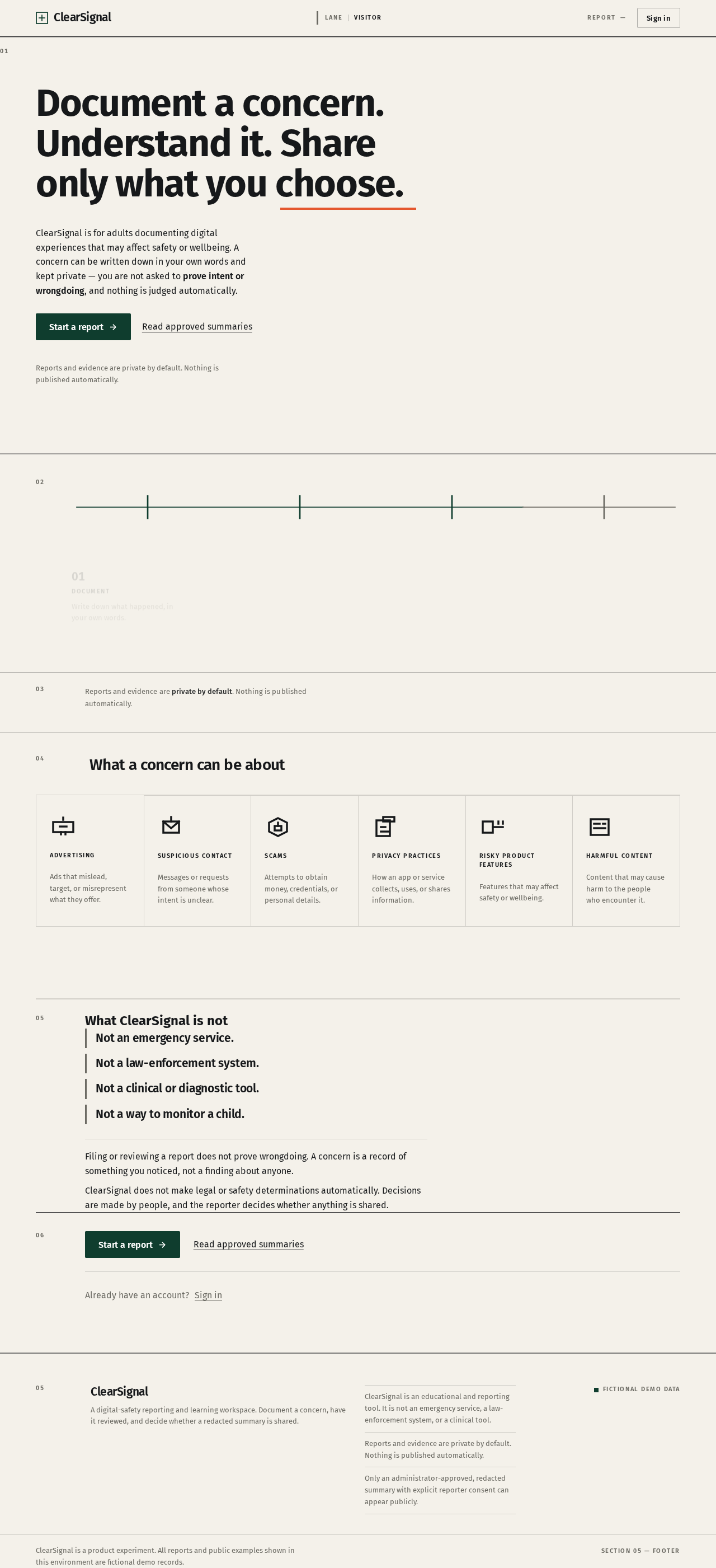
Document a concern. Understand it. Share only what you choose.
ClearSignal is for adults documenting digital experiences that may affect safety or wellbeing. A concern can be written down in your own words and kept private — you are not asked to prove intent or wrongdoing, and nothing is judged automatically.
Already have an account?Sign in
Reports and evidence are private by default. Nothing is published automatically.
The ClearSignal workflow
- 01DocumentWrite down what happened, in your own words.
- 02ReviewA reviewer reads the concern and may ask a clarifying question.
- 03DecideA decision is recommended and an administrator approves or returns it.
- 04ShareOptionalOnly if you consented, a redacted summary may be published.
- 01DocumentWrite down what happened, in your own words.
- 02ReviewA reviewer reads the concern and may ask a clarifying question.
- 03DecideA decision is recommended and an administrator approves or returns it.
- 04ShareOptionalOnly if you consented, a redacted summary may be published.
03
Reports and evidence are private by default. Nothing is published automatically.
What a concern can be about
Advertising
Ads that mislead, target, or misrepresent what they offer.
Suspicious contact
Messages or requests from someone whose intent is unclear.
Scams
Attempts to obtain money, credentials, or personal details.
Privacy practices
How an app or service collects, uses, or shares information.
Risky product features
Features that may affect safety or wellbeing.
Harmful content
Content that may cause harm to the people who encounter it.
What ClearSignal is not
- Not an emergency service.
- Not a law-enforcement system.
- Not a clinical or diagnostic tool.
- Not a way to monitor a child.
Filing or reviewing a report does not prove wrongdoing. A concern is a record of something you noticed, not a finding about anyone.
ClearSignal does not make legal or safety determinations automatically. Decisions are made by people, and the reporter decides whether anything is shared.
Already have an account?Sign in
Document a concern. Understand it. Share only what you choose.
ClearSignal is for adults documenting digital experiences that may affect safety or wellbeing. A concern can be written down in your own words and kept private — you are not asked to prove intent or wrongdoing, and nothing is judged automatically.
Already have an account?Sign in
Reports and evidence are private by default. Nothing is published automatically.
The ClearSignal workflow
- 01DocumentWrite down what happened, in your own words.
- 02ReviewA reviewer reads the concern and may ask a clarifying question.
- 03DecideA decision is recommended and an administrator approves or returns it.
- 04ShareOptionalOnly if you consented, a redacted summary may be published.
- 01DocumentWrite down what happened, in your own words.
- 02ReviewA reviewer reads the concern and may ask a clarifying question.
- 03DecideA decision is recommended and an administrator approves or returns it.
- 04ShareOptionalOnly if you consented, a redacted summary may be published.
03
Reports and evidence are private by default. Nothing is published automatically.
What a concern can be about
Advertising
Ads that mislead, target, or misrepresent what they offer.
Suspicious contact
Messages or requests from someone whose intent is unclear.
Scams
Attempts to obtain money, credentials, or personal details.
Privacy practices
How an app or service collects, uses, or shares information.
Risky product features
Features that may affect safety or wellbeing.
Harmful content
Content that may cause harm to the people who encounter it.
What ClearSignal is not
- Not an emergency service.
- Not a law-enforcement system.
- Not a clinical or diagnostic tool.
- Not a way to monitor a child.
Filing or reviewing a report does not prove wrongdoing. A concern is a record of something you noticed, not a finding about anyone.
ClearSignal does not make legal or safety determinations automatically. Decisions are made by people, and the reporter decides whether anything is shared.
Already have an account?Sign in
No comments yet. Be the first!