digital-safety-reporting
 Jake Ducharme
Prompt 1 — Establish the project and requirements I’m building ClearSignal, a digital-safety reporting and learning workspace, starting from a separate experimental copy of my existing GuardAd prototype. This is a contained product experiment that may become a working product if the result is strong. Shared product brief ClearSignal helps people document and understand digital experiences that may affect safety or wellbeing, then share useful, reviewed information when they choose. A concern might involve advertising, suspicious contact, scams, privacy practices, risky product features, or harmful content. The first version should stay focused on one complete workflow: Document a concern → review it → make a decision → optionally share a redacted summary. The reporter controls whether a submission stays private or is considered for public sharing. Submissions and evidence are private by default. Nothing becomes public automatically. This is an educational and reporting tool, not an emergency service, law-enforcement system, clinical tool, or way to monitor a child. Do not claim that a report proves wrongdoing. Do not make legal or safety determinations automatically. Initial user roles Visitor: reads public, approved summaries and product information. Reporter: submits concerns, manages their own reports, and controls sharing consent. Reviewer: reviews assigned reports, requests clarification, redacts information, and recommends a decision. Administrator: manages reviewer access, report categories, and escalations. First-version scope Include account creation and sign-in, a guided report form, private evidence attachments, reporter report history, reviewer queue, clarification requests and replies, review decisions, redacted public summaries, and a public library of approved summaries. Include realistic demo records clearly labeled as fictional. Do not build company accounts, public comments, community voting, reputation scores, automated investigations, external agency submissions, payment features, or social networking in this version. Your task Create the System Requirements Document for this exact first version. Define user needs, functional requirements, nonfunctional requirements, role permissions, report states, privacy defaults, and acceptance criteria. Identify assumptions and unresolved decisions separately. Keep requirements testable and keep the build small enough for a one-month platform experiment. Do not implement code yet. Present the requirements for review and approval before proceeding. Prompt 2 — Map user flows and permissions Continue the ClearSignal project using the approved requirements as the source of truth. The product purpose is to help people document digital-safety concerns, have them reviewed, and optionally share redacted summaries. Reports and evidence are private by default; no submission is published automatically. Do not expand the approved first-version scope. Map the complete flows for: A visitor reading public summaries. A reporter creating an account and submitting a concern. A reporter submitting without public-sharing consent. A reporter opting in to consideration for a redacted public summary. A reviewer requesting clarification and receiving the reporter’s reply. A reviewer recommending a decision and an administrator approving or returning it. A reporter viewing the status and history of their own report. An administrator managing reviewer access. For every flow, show the screens, actions, validation, success states, errors, and permission checks. Define what each role can view and change. Include edge cases such as a withdrawn report, a failed evidence upload, a reporter changing sharing consent, duplicate submissions, and a report rejected from publication. Preserve the rule that only an administrator-approved, redacted summary with explicit reporter consent may appear publicly. Do not expose private evidence, identifying details, reviewer notes, or reporter identity in the public library. Produce screen-by-screen user flows and an updated permission matrix for review. Do not implement until approved. Prompt 3 — Design the experience Continue ClearSignal from its approved requirements and user flows. Keep the same scope and privacy rules: reports and evidence are private by default; public sharing requires explicit reporter consent, redaction, and administrator approval. Design a calm, trustworthy, accessible responsive web application for adults reporting digital-safety concerns. Avoid alarmist colors, fear-based copy, surveillance imagery, child-targeted engagement patterns, and gamification. The interface should communicate that a concern can be documented without proving intent or wrongdoing. Create and review designs for: Public landing page and approved-summary library. Sign-up and sign-in. Guided report submission, including category selection, narrative, optional link, optional evidence upload, and sharing-consent choice. Reporter dashboard and report detail/history. Reviewer queue, report review, clarification request, redaction, and decision recommendation. Administrator review and approval of a proposed public summary. Empty, loading, error, upload-failure, and access-denied states. Use plain language, clear progress indicators, keyboard-accessible controls, readable contrast, mobile layouts, and explicit privacy explanations at the point of choice. Mark all synthetic reports and public examples as fictional demo data. Deliver clickable designs and a concise design system. Do not invent new features or start implementation until the designs are approved. Prompt 4 — Plan architecture and data Continue ClearSignal using only the approved requirements, flows, and designs. Before implementation, propose the simplest maintainable architecture supported by 8080 and the imported repository. Explain any recommended changes to the starter code before making them. Define the data model for users and roles, reports, evidence metadata and private file storage, clarification exchanges, review assignments, review events, redactions, consent history, and public summaries. Every report should have a traceable status history. Store consent changes as auditable events. Specify server-side authorization rules. Reporters may access only their own reports and evidence. Reviewers may access only reports assigned to them. Administrators may manage the queue. Public users may access only approved public summaries. Never rely on hiding interface elements as the only permission check. Specify file validation, size limits, safe storage, error handling, and protections against exposing private files through public URLs. Identify authentication, database, storage, and deployment services the project requires; do not assume credentials or external integrations are available. Keep personal information to the minimum needed for this workflow. Produce architecture diagrams, the data model, API or backend-function boundaries, security rules, environment-variable requirements, and a phased task plan with dependencies and acceptance criteria. Flag anything that could create cost or require my account setup. Wait for approval before building.


Comments (0)
Sign in to leave a comment
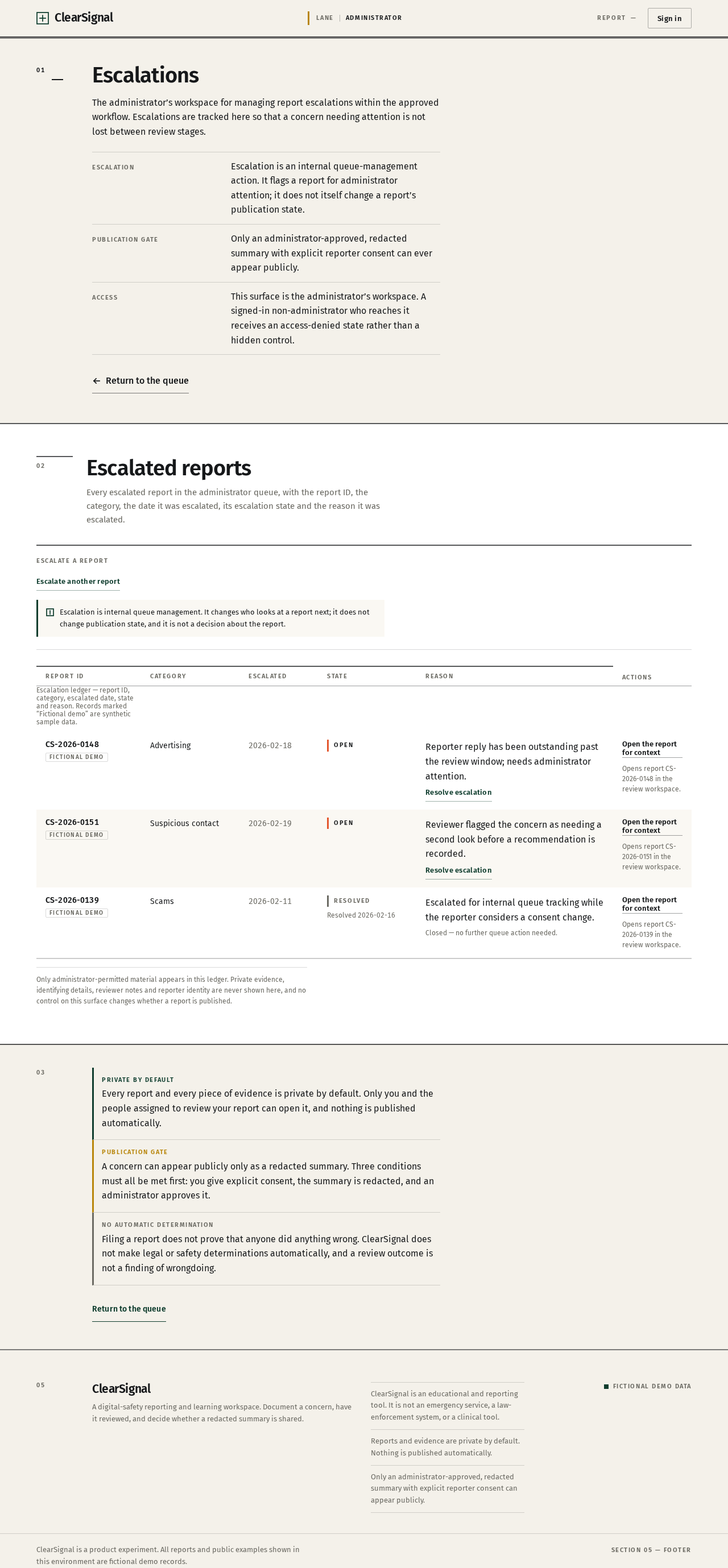
01Escalations
Escalations
The administrator’s workspace for managing report escalations within the approved workflow. Escalations are tracked here so that a concern needing attention is not lost between review stages.
- EscalationEscalation is an internal queue-management action. It flags a report for administrator attention; it does not itself change a report’s publication state.
- Publication gateOnly an administrator-approved, redacted summary with explicit reporter consent can ever appear publicly.
- AccessThis surface is the administrator’s workspace. A signed-in non-administrator who reaches it receives an access-denied state rather than a hidden control.
Escalated reports
Every escalated report in the administrator queue, with the report ID, the category, the date it was escalated, its escalation state and the reason it was escalated.
Escalate a report
Escalation is internal queue management. It changes who looks at a report next; it does not change publication state, and it is not a decision about the report.
| Report ID | Category | Escalated | State | Reason | Actions |
|---|---|---|---|---|---|
| CS-2026-0148Fictional demo | Advertising | 2026-02-18 | OPEN | Reporter reply has been outstanding past the review window; needs administrator attention. | Open the report for contextOpens report CS-2026-0148 in the review workspace. |
| CS-2026-0151Fictional demo | Suspicious contact | 2026-02-19 | OPEN | Reviewer flagged the concern as needing a second look before a recommendation is recorded. | Open the report for contextOpens report CS-2026-0151 in the review workspace. |
| CS-2026-0139Fictional demo | Scams | 2026-02-11 | RESOLVEDResolved 2026-02-16 | Escalated for internal queue tracking while the reporter considers a consent change. Closed — no further queue action needed. | Open the report for contextOpens report CS-2026-0139 in the review workspace. |
Only administrator-permitted material appears in this ledger. Private evidence, identifying details, reviewer notes and reporter identity are never shown here, and no control on this surface changes whether a report is published.
Privacy defaults and the publication gate
Every report and every piece of evidence is private by default. Only you and the people assigned to review your report can open it, and nothing is published automatically.
A concern can appear publicly only as a redacted summary. Three conditions must all be met first: you give explicit consent, the summary is redacted, and an administrator approves it.
Filing a report does not prove that anyone did anything wrong. ClearSignal does not make legal or safety determinations automatically, and a review outcome is not a finding of wrongdoing.
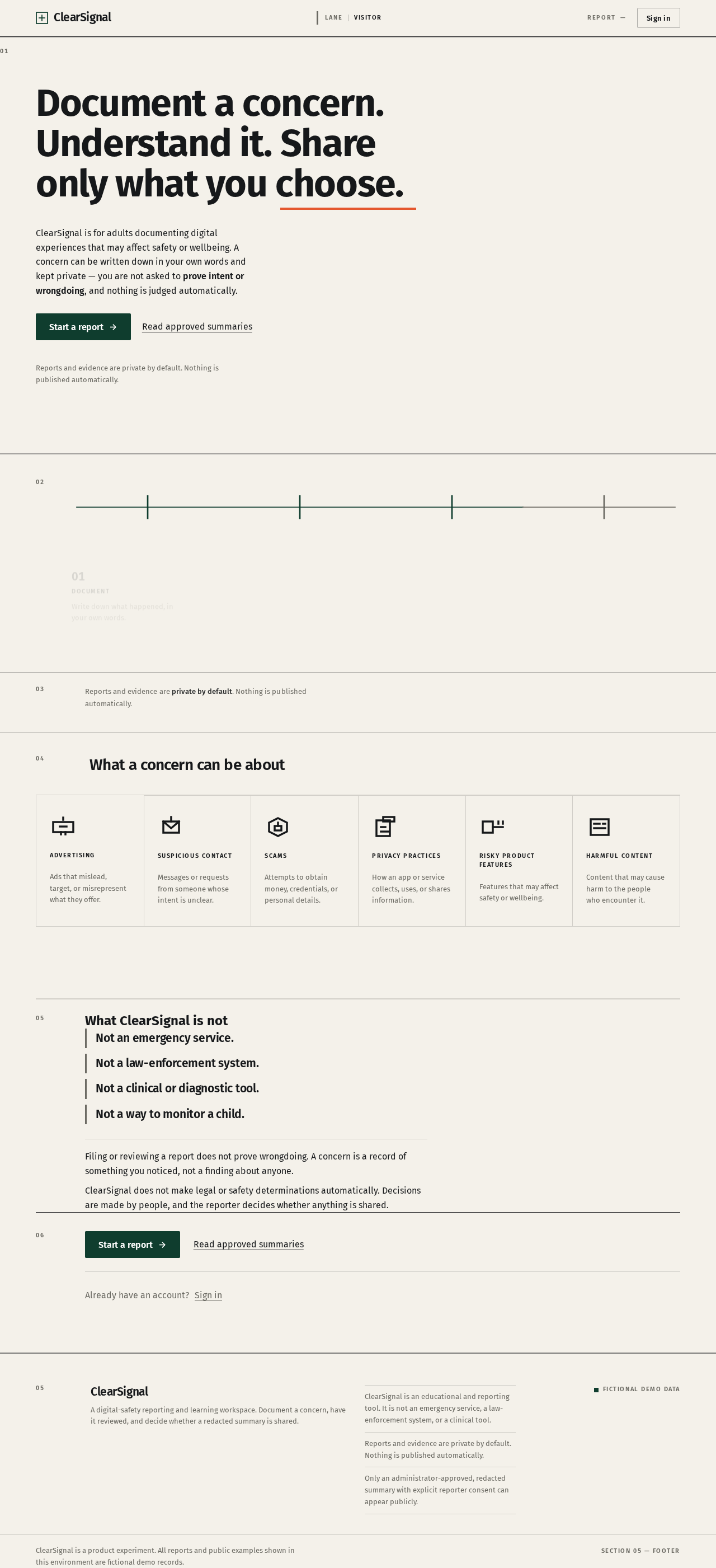
Document a concern. Understand it. Share only what you choose.
ClearSignal is for adults documenting digital experiences that may affect safety or wellbeing. A concern can be written down in your own words and kept private — you are not asked to prove intent or wrongdoing, and nothing is judged automatically.
Already have an account?Sign in
Reports and evidence are private by default. Nothing is published automatically.
The ClearSignal workflow
- 01DocumentWrite down what happened, in your own words.
- 02ReviewA reviewer reads the concern and may ask a clarifying question.
- 03DecideA decision is recommended and an administrator approves or returns it.
- 04ShareOptionalOnly if you consented, a redacted summary may be published.
- 01DocumentWrite down what happened, in your own words.
- 02ReviewA reviewer reads the concern and may ask a clarifying question.
- 03DecideA decision is recommended and an administrator approves or returns it.
- 04ShareOptionalOnly if you consented, a redacted summary may be published.
03
Reports and evidence are private by default. Nothing is published automatically.
What a concern can be about
Advertising
Ads that mislead, target, or misrepresent what they offer.
Suspicious contact
Messages or requests from someone whose intent is unclear.
Scams
Attempts to obtain money, credentials, or personal details.
Privacy practices
How an app or service collects, uses, or shares information.
Risky product features
Features that may affect safety or wellbeing.
Harmful content
Content that may cause harm to the people who encounter it.
What ClearSignal is not
- Not an emergency service.
- Not a law-enforcement system.
- Not a clinical or diagnostic tool.
- Not a way to monitor a child.
Filing or reviewing a report does not prove wrongdoing. A concern is a record of something you noticed, not a finding about anyone.
ClearSignal does not make legal or safety determinations automatically. Decisions are made by people, and the reporter decides whether anything is shared.
Already have an account?Sign in
No comments yet. Be the first!