devops-finops
 Social Collage
Build a multi-tenant SaaS Unified DevOps & FinOps Control Plane web application using Next.js (App Router), TypeScript, Tailwind CSS, Shadcn UI, PostgreSQL (with Prisma or Drizzle ORM), and Redis (BullMQ) for background jobs. ### 1. Core Product Goal A single-pane-of-glass developer dashboard that unifies: - **Version Control & Release Timeline:** Track Git commits, branches, PR authors, and environment mappings (Dev, Staging, Production). - **Deployment Records & Quick Actions:** CI/CD pipeline statuses (Queued, Building, Success, Failed), build durations, searchable error logs, and one-click rollback triggers. - **Server & Storage Health:** Real-time CPU, RAM, network I/O, disk usage %, storage exhaustion forecasts (e.g., "Disk full in 12 days"), and deployment markers overlaid on latency/error graphs. - **Estimated Billing & FinOps:** Month-to-date cloud spend, linear/AI month-end bill projections, per-environment cost breakdowns, and threshold anomaly alerts. ### 2. Multi-Tenant Architecture & Security Requirements - **Strict Tenant Isolation:** Implement a shared-database, shared-schema model where every core table (`organizations`, `projects`, `repositories`, `deployments`, `servers`, `server_metrics`, `billing_snapshots`, `integrations`) includes an `organization_id` (tenant ID). Enforce PostgreSQL Row-Level Security (RLS) policies on all tenant-scoped tables. - **Auth & RBAC:** Implement multi-tenant Organization support with Role-Based Access Control (`OWNER`, `ADMIN`, `DEVELOPER`, `VIEWER`). Restrict destructive actions (production rollbacks, deleting servers, updating API keys) to `OWNER` and `ADMIN` roles. - **Encrypted Credential Vault:** Create an abstraction layer using AES-256-GCM envelope encryption for storing tenant integration credentials (GitHub App installation tokens, AWS Cross-Account Role ARNs with unique `ExternalId`, and server agent ingest keys). ### 3. Data Ingestion & API Endpoints - **GitHub Webhook Receiver (`/api/webhooks/github`):** Verify `X-Hub-Signature-256`, map the repository to the corresponding `organization_id`, and enqueue deployment/push events into BullMQ. - **Server Agent Telemetry Endpoint (`/api/v1/ingest/metrics`):** Authenticate via tenant-scoped Bearer API key (`sk_live_...`), validate payload (`cpu_percent`, `ram_used_mb`, `ram_total_mb`, `disk_used_gb`, `disk_total_gb`), and batch-insert into `server_metrics`. - **Billing & Cloud Sync Worker:** Create a scheduled BullMQ worker that fetches or simulates daily cloud cost breakdowns per environment and calculates a projected month-end total. ### 4. Frontend UI & UX Specifications - **Design System:** Sleek, high-density dark-mode-first developer UI (Linear/Vercel aesthetic) using Slate/Zinc neutral tones, monospace fonts (`JetBrains Mono`) for commit hashes, IP addresses, and logs, and crisp status badges. - **Layout:** - Left sidebar with Organization Switcher, Project Selector, and navigation (`Overview`, `Deployments`, `Infrastructure & Storage`, `Billing & FinOps`, `Integrations`, `Team & Settings`). - Top bar with live environment filter (`All`, `Production`, `Staging`, `Development`) and time-range selector (`1h`, `24h`, `7d`, `30d`). - **Main Overview View:** 1. **KPI Summary Cards:** Active


Comments (0)
Sign in to leave a comment
System Requirements
System Requirements Document for Unified DevOps & FinOps Control Plane
1. Introduction
The Unified DevOps & FinOps Control Plane is a multi-tenant SaaS web application that gives developer and platform teams a single pane of glass over four concerns that are usually scattered across separate tools: version control and release history, CI/CD deployment records and rollback actions, server and storage health, and estimated cloud billing with FinOps projections.
The product is built for organizations that run multiple projects across Development, Staging, and Production environments and need to answer, in one place: what shipped, did it succeed, is the infrastructure healthy, and what will this month cost. Each organization is a tenant with strict data isolation, role-based access control, and an encrypted credential vault for its integrations.
This document is the System Requirements Document for the project named devops-finops. It specifies the current delivery: the accepted pages, the ingestion endpoints and background workers, the tenant-isolation and security model, and the dark-mode-first developer UI.
2. System Overview
The control plane is delivered as a Next.js (App Router) web application with a shared backend process that serves the application APIs, the GitHub webhook receiver, the server-agent telemetry endpoint, and the domain modules behind the dashboard. PostgreSQL stores all tenant-scoped application data under Row-Level Security. Redis with BullMQ runs the background jobs: processing GitHub push/deployment events and the scheduled billing and cloud-cost sync.
The active human actors are the Organization Owner, Organization Admin, Developer, and Viewer. Anonymous visitors reach the Landing page; new users enroll through Sign Up and become the OWNER of a new organization; returning users verify identity through Login. All dashboard pages require login, and the Integrations page is restricted to OWNER and ADMIN.
Current delivery covers: organization and project context switching, the Overview KPI band and release timeline, deployment records with pipeline status, build durations, searchable error logs and one-click rollback, infrastructure and storage health with forecasts and deployment markers on latency/error graphs, billing and FinOps with month-to-date spend, month-end projections, per-environment breakdowns and anomaly alerts, integration credential management in the encrypted vault, and team and settings with member roles.
Removed from scope
- None. No concept from the authoritative requirement thread was removed or superseded.
2a. Product Interpretation and Delivery Boundary
The product is a first-party, application-owned control plane. Identity is application-owned: a new user self-enrolls through Sign Up and creates an organization as its OWNER; returning users verify identity through Login before reaching any protected organization data. The Landing page is the anonymous entry surface and does not expose tenant data.
All dashboard destinations (Overview, Deployments, Infrastructure & Storage, Billing & FinOps, Team & Settings) require login. Integrations is additionally restricted to the OWNER and ADMIN roles because it manages encrypted credentials and API keys. Destructive actions — production rollbacks, deleting servers, and updating API keys — are restricted to OWNER and ADMIN across the product, regardless of which page surfaces the control.
Data enters the system through two machine-facing boundaries that are not human pages: the GitHub webhook receiver at /api/webhooks/github and the server-agent telemetry endpoint at /api/v1/ingest/metrics. Both are owned by the shared backend. The scheduled billing and cloud sync worker runs in the background on BullMQ and writes daily cost breakdowns and month-end projections that the Billing & FinOps page reads.
Nothing in the current scope is deferred to a future horizon; the future section records no additional accepted requirements.
2c. Page Content and Component Coverage
Landing
- Information/state: Anonymous public entry. Product name and purpose, the four unified concerns (version control and release timeline, deployment records and quick actions, server and storage health, estimated billing and FinOps), and the audience (developer and platform teams running multiple environments). No tenant data is shown.
- Primary action: "Open control plane" call to action leading to Login (returning users) or Sign Up (new users).
- Supporting actions: Navigate to Sign Up to create an organization; navigate to Login.
- Domain entities: None persisted; presentation only.
- Component responsibilities: Full-bleed near-black hero with a serif headline spanning the viewport in two lines, a hot orange rule under the headline with the CTA at left, and a restrained supporting band describing the four unified concerns. Header with product wordmark and Login/Sign Up links.
- States: Loading (static content, no data fetch); empty/success not applicable; error not applicable; recovery: if a CTA target is unreachable, the visitor can retry from the same page.
Login
- Information/state: Anonymous identity-verification surface for returning users. Email and password inputs; inline validation messages.
- Primary action: Submit credentials to verify identity and reach the dashboard.
- Supporting actions: Navigate to Sign Up if the visitor has no account; return to Landing.
- Domain entities: User identity and organization membership (read on successful verification).
- Component responsibilities: Centered form on the dark ground with hairline rules, sharp corners, and a single accent on the submit control; error region for invalid credentials.
- States: Loading (submit in progress, control disabled); empty (blank form); success (redirect to Overview with the user's organization context); error (invalid credentials or verification failure, with a retry path); recovery (re-enter credentials or go to Sign Up).
Sign Up
- Information/state: Anonymous self-service enrollment. Inputs for the new user's identity and the new organization's name; the enrolling user becomes the organization's OWNER.
- Primary action: Create the account and organization, then enter the dashboard as OWNER.
- Supporting actions: Navigate to Login if the visitor already has an account; return to Landing.
- Domain entities: User, Organization, and the OWNER membership created at enrollment.
- Component responsibilities: Enrollment form with organization-name field, validation, and a clear statement that the creator becomes OWNER; hairline-ruled layout consistent with the design system.
- States: Loading (submission in progress); empty (blank form); success (organization created, redirect to Overview); error (validation failure or enrollment failure, with a retry path); recovery (correct inputs and resubmit, or switch to Login).
Overview
- Information/state: The active organization and project context, the live environment filter (All, Production, Staging, Development) and time-range selector (1h, 24h, 7d, 30d) from the top bar, the KPI Summary Cards band, and the release timeline showing Git commits, branches, PR authors, and environment mappings.
- Primary action: Scan the KPI band and release timeline for the selected environment and time range.
- Supporting actions: Change organization via the Organization Switcher; change project via the Project Selector; change environment filter; change time range; follow a commit or deployment entry into Deployments.
- Domain entities: Organization, Project, Repository, Deployment, commit/branch/PR-author records, environment mappings, KPI aggregates.
- Component responsibilities: Left sidebar with Organization Switcher, Project Selector, and navigation; top bar with environment filter and time-range selector; oversized KPI band with tabular numerals and monospace units; release timeline rows with monospace commit hashes and status badges.
- States: Loading (skeleton rows in the KPI band and timeline); empty (no repositories or deployments yet for the selected project, with guidance to connect an integration); success (populated KPI band and timeline); error (data fetch failure with retry); recovery (retry, or switch project/organization).
Deployments
- Information/state: Deployment records for the active organization and project, each with CI/CD pipeline status (Queued, Building, Success, Failed), build duration, associated commit/branch/PR author, environment, and searchable error logs.
- Primary action: Search and read deployment records and error logs to find and fix failures.
- Supporting actions: Filter by environment and time range; search error logs; trigger a one-click rollback (OWNER and ADMIN only; production rollbacks restricted to OWNER and ADMIN).
- Domain entities: Deployment, Repository, commit/branch/PR author, environment, error log entries, rollback action.
- Component responsibilities: Deployment table with crisp status badges and monospace build durations; log viewer in monospace; search input over error logs; rollback control that is visible but disabled with an explanatory reason for DEVELOPER and VIEWER.
- States: Loading (table and log skeleton); empty (no deployments for the filter, with guidance); success (records and logs shown); error (fetch failure or rollback failure with retry); recovery (retry fetch, re-run rollback after resolving the failure, or adjust filters).
Infrastructure & Storage
- Information/state: Server inventory with real-time CPU, RAM, network I/O, and disk usage %, storage exhaustion forecasts (for example "Disk full in 12 days"), and latency/error graphs with deployment markers overlaid.
- Primary action: Read server and storage health and correlate latency/error changes with deployment markers.
- Supporting actions: Filter by environment and time range; select a server; delete a server (OWNER and ADMIN only).
- Domain entities: Server, server_metrics (cpu_percent, ram_used_mb, ram_total_mb, disk_used_gb, disk_total_gb), deployment markers, forecast values.
- Component responsibilities: Server list with monospace IP addresses and status dots; metric panels for CPU, RAM, network I/O, and disk usage; forecast callout; latency/error graph with deployment markers; delete control gated to OWNER and ADMIN.
- States: Loading (metric panels and graph skeleton); empty (no servers reporting yet, with guidance to install the agent and use the ingest key); success (live metrics, forecasts, and markers); error (fetch failure or delete failure with retry); recovery (retry, or re-check agent connectivity and ingest key).
Billing & FinOps
- Information/state: Month-to-date cloud spend, linear/AI month-end bill projections, per-environment cost breakdowns, and threshold anomaly alerts.
- Primary action: Read spend, projections, breakdowns, and anomaly alerts for the active organization and project.
- Supporting actions: Filter by environment and time range; inspect an anomaly alert.
- Domain entities: billing_snapshots (daily per-environment cost breakdowns), projected month-end total, anomaly thresholds and alerts.
- Component responsibilities: Oversized spend and projection numerals with monospace currency units; per-environment breakdown rows; anomaly alert list with status badges; note when figures are simulated versus fetched.
- States: Loading (spend and projection skeleton); empty (no billing snapshots yet, with guidance that the sync worker populates daily); success (spend, projection, breakdowns, alerts); error (fetch failure with retry); recovery (retry, or wait for the next scheduled sync).
Integrations
- Information/state: Integration credentials stored in the encrypted vault: GitHub App installation tokens, AWS Cross-Account Role ARNs with unique ExternalId, and server agent ingest keys (
sk_live_...). Accessible to OWNER and ADMIN only. - Primary action: Add or update integration credentials, which are encrypted with AES-256-GCM envelope encryption before storage.
- Supporting actions: View masked credential metadata; update an API key (OWNER and ADMIN only); copy a server agent ingest key for agent configuration.
- Domain entities: Integration, encrypted credential material, ExternalId, ingest key.
- Component responsibilities: Integration cards per provider with masked secrets and monospace identifiers; forms for GitHub App installation token, AWS Role ARN with ExternalId, and ingest key; update controls gated to OWNER and ADMIN.
- States: Loading (integration list skeleton); empty (no integrations connected, with guidance); success (credentials saved and masked); error (validation or save failure with retry); recovery (correct the credential and resubmit). DEVELOPER and VIEWER do not reach this page.
Team & Settings
- Information/state: Organization members and their roles (OWNER, ADMIN, DEVELOPER, VIEWER), plus organization and project settings context.
- Primary action: Review members and their assigned roles.
- Supporting actions: Switch organization; review project settings; navigate to Integrations (OWNER and ADMIN only).
- Domain entities: Organization, membership, role assignments.
- Component responsibilities: Member table with role badges; organization and project settings sections with hairline rules; role labels rendered exactly as OWNER, ADMIN, DEVELOPER, VIEWER.
- States: Loading (member table skeleton); empty (only the OWNER present, with guidance); success (members and roles listed); error (fetch failure with retry); recovery (retry).
3. Functional Requirements
FR-1 — Multi-tenant control plane foundation (explicit) As an Organization Owner I should have a multi-tenant SaaS control plane built with Next.js (App Router), TypeScript, Tailwind CSS, Shadcn UI, PostgreSQL (Prisma or Drizzle ORM), and Redis (BullMQ) for background jobs, so that my organization's DevOps and FinOps data lives in one application.
- Trigger/input: Application deployment and organization provisioning.
- Observable result: The application runs with the specified stack and background job processing.
- Access: Login required for dashboard surfaces.
- Failure/recovery: If a background job fails, the job is retried and the affected page shows an error state with retry.
- Continuation: The user proceeds to the dashboard.
FR-2 — Single-pane-of-glass dashboard (explicit) As a Developer I should see version control, deployments, infrastructure health, and FinOps unified in one dashboard, so that I do not switch between separate tools.
- Trigger/input: Opening Overview with an active organization and project.
- Observable result: KPI Summary Cards and the release timeline render for the selected environment and time range.
- Access: Login required.
- Failure/recovery: Fetch failure shows an error state with retry.
- Continuation: The user navigates to the relevant detail page.
FR-3 — Version control and release timeline (explicit) As a Developer I should track Git commits, branches, PR authors, and environment mappings for Dev, Staging, and Production, so that I know what shipped where.
- Trigger/input: GitHub push/deployment events processed by the webhook receiver and BullMQ worker.
- Observable result: The release timeline shows commits with monospace hashes, branches, PR authors, and environment mappings.
- Access: Login required.
- Failure/recovery: Missing events show an empty state with guidance to check the integration.
- Continuation: The user opens Deployments for detail.
FR-4 — Deployment records with pipeline status and durations (explicit) As a Developer I should see deployment records with CI/CD pipeline statuses (Queued, Building, Success, Failed) and build durations, so that I can judge release health.
- Trigger/input: Opening Deployments with environment and time-range filters.
- Observable result: A table of deployments with crisp status badges and build durations.
- Access: Login required.
- Failure/recovery: Fetch failure shows an error state with retry.
- Continuation: The user searches logs or triggers a rollback.
FR-5 — Searchable error logs (explicit) As a Developer I should search deployment error logs, so that I can find and fix failures.
- Trigger/input: A search query in the Deployments log search.
- Observable result: Matching log lines render in monospace.
- Access: Login required.
- Failure/recovery: No matches show an empty result state; fetch failure shows retry.
- Continuation: The user fixes the issue or triggers a rollback.
FR-6 — One-click rollback (explicit) As an Organization Owner or Organization Admin I should trigger a one-click rollback from a deployment record, so that I can recover a bad release quickly.
- Trigger/input: Selecting rollback on a deployment.
- Observable result: A rollback is initiated and the deployment record reflects the new state.
- Access: Login required; production rollbacks restricted to OWNER and ADMIN.
- Failure/recovery: Rollback failure shows an error with retry; DEVELOPER and VIEWER see the control disabled with an explanatory reason.
- Continuation: The user monitors the resulting deployment status.
FR-7 — Server and storage health (explicit) As a Developer I should see real-time CPU, RAM, network I/O, disk usage %, and storage exhaustion forecasts (for example "Disk full in 12 days"), so that I can act before an outage.
- Trigger/input: Telemetry ingested through
/api/v1/ingest/metricsand rendered on Infrastructure & Storage. - Observable result: Metric panels and forecast callouts update for the selected environment and time range.
- Access: Login required.
- Failure/recovery: No reporting servers show an empty state with agent guidance; fetch failure shows retry.
- Continuation: The user inspects graphs or deletes a decommissioned server.
FR-8 — Deployment markers on latency/error graphs (explicit) As a Developer I should see deployment markers overlaid on latency/error graphs, so that I can correlate incidents with releases.
- Trigger/input: Opening Infrastructure & Storage with a time range.
- Observable result: Markers appear at deployment times on the graphs.
- Access: Login required.
- Failure/recovery: Missing markers show an empty overlay state; fetch failure shows retry.
- Continuation: The user opens the related deployment.
FR-9 — Estimated billing and FinOps (explicit) As an Organization Owner I should see month-to-date cloud spend, linear/AI month-end bill projections, per-environment cost breakdowns, and threshold anomaly alerts, so that I can control cost.
- Trigger/input: The scheduled billing and cloud sync worker writing daily breakdowns; opening Billing & FinOps.
- Observable result: Spend, projection, breakdowns, and alerts render.
- Access: Login required.
- Failure/recovery: No snapshots show an empty state; fetch failure shows retry.
- Continuation: The user inspects an anomaly alert.
FR-10 — Shared-database, shared-schema tenant model (explicit)
As an Organization Owner I should have every core table (organizations, projects, repositories, deployments, servers, server_metrics, billing_snapshots, integrations) carry an organization_id, so that tenant data is structurally scoped.
- Trigger/input: Schema definition and every write path.
- Observable result: Every core row is bound to an organization.
- Access: Enforced at the data layer.
- Failure/recovery: A write without tenant scope is rejected.
- Continuation: Normal operation.
FR-11 — PostgreSQL Row-Level Security (explicit) As an Organization Owner I should have RLS policies enforced on all tenant-scoped tables, so that one tenant can never read another's data.
- Trigger/input: Any query against tenant-scoped tables.
- Observable result: Only rows for the active organization are returned.
- Access: Enforced at the database layer.
- Failure/recovery: Cross-tenant access attempts return no rows.
- Continuation: Normal operation.
FR-12 — RBAC roles (explicit) As an Organization Owner I should assign OWNER, ADMIN, DEVELOPER, or VIEWER roles to members, so that access matches responsibility.
- Trigger/input: Membership role assignment.
- Observable result: Team & Settings shows each member's role; page and action access follows the role.
- Access: Login required.
- Failure/recovery: Invalid role assignment is rejected with an error.
- Continuation: The member uses the product under the assigned role.
FR-13 — Destructive action restriction (explicit) As an Organization Owner or Organization Admin I should be the only roles able to perform production rollbacks, delete servers, and update API keys, so that destructive changes are controlled.
- Trigger/input: Attempting a destructive action.
- Observable result: OWNER and ADMIN succeed; DEVELOPER and VIEWER see the control disabled with an explanatory reason.
- Access: Login required; role-gated.
- Failure/recovery: Denied attempts show a clear message.
- Continuation: The user continues with permitted actions.
FR-14 — Encrypted credential vault (explicit) As an Organization Owner or Organization Admin I should store GitHub App installation tokens, AWS Cross-Account Role ARNs with unique ExternalId, and server agent ingest keys through an abstraction layer using AES-256-GCM envelope encryption, so that tenant credentials are protected at rest.
- Trigger/input: Saving a credential on Integrations.
- Observable result: The credential is encrypted before storage and shown masked.
- Access: Integrations restricted to OWNER and ADMIN.
- Failure/recovery: Save failure shows an error with retry.
- Continuation: The credential is used by ingestion and sync jobs.
FR-15 — GitHub webhook receiver (explicit)
As a Developer I should have /api/webhooks/github verify X-Hub-Signature-256, map the repository to the corresponding organization_id, and enqueue deployment/push events into BullMQ, so that release data flows in automatically.
- Trigger/input: A GitHub webhook delivery.
- Observable result: Verified events are enqueued and later reflected in the timeline and deployments.
- Access: Machine-facing; signature-verified.
- Failure/recovery: Invalid signatures are rejected; unmapped repositories are not enqueued.
- Continuation: The worker processes the event.
FR-16 — Server agent telemetry endpoint (explicit)
As a Developer I should have /api/v1/ingest/metrics authenticate via a tenant-scoped Bearer API key (sk_live_...), validate payload fields (cpu_percent, ram_used_mb, ram_total_mb, disk_used_gb, disk_total_gb), and batch-insert into server_metrics, so that server health is current.
- Trigger/input: An agent POST with a Bearer key and metric payload.
- Observable result: Valid batches are inserted and appear on Infrastructure & Storage.
- Access: Machine-facing; tenant-scoped key.
- Failure/recovery: Invalid keys or payloads are rejected with an error; the agent retries.
- Continuation: Metrics render on the dashboard.
FR-17 — Scheduled billing and cloud sync worker (explicit) As an Organization Owner I should have a scheduled BullMQ worker fetch or simulate daily cloud cost breakdowns per environment and calculate a projected month-end total, so that FinOps figures stay current.
- Trigger/input: The schedule firing.
- Observable result:
billing_snapshotsare written and the projection updates on Billing & FinOps. - Access: Background process.
- Failure/recovery: A failed run is retried; the page shows the last successful data with a staleness note.
- Continuation: The next scheduled run proceeds.
FR-18 — Dark-mode-first developer UI (explicit) As a Developer I should use a sleek, high-density dark-mode-first UI (Linear/Vercel aesthetic) with Slate/Zinc neutral tones, JetBrains Mono for commit hashes, IP addresses, and logs, and crisp status badges, so that dense data is fast to scan.
- Trigger/input: Any page render.
- Observable result: The design system applies consistently.
- Access: Login required for dashboard pages.
- Failure/recovery: Not applicable.
- Continuation: Normal use.
FR-19 — Sidebar and top bar layout (explicit) As a Developer I should have a left sidebar with Organization Switcher, Project Selector, and navigation (Overview, Deployments, Infrastructure & Storage, Billing & FinOps, Integrations, Team & Settings), and a top bar with a live environment filter (All, Production, Staging, Development) and time-range selector (1h, 24h, 7d, 30d), so that I can move and scope quickly.
- Trigger/input: Selecting an organization, project, environment, or time range.
- Observable result: The dashboard re-scopes to the selection.
- Access: Login required.
- Failure/recovery: A failed re-scope shows an error with retry.
- Continuation: The user continues in the new scope.
FR-20 — KPI Summary Cards (explicit) As a Developer I should see KPI Summary Cards on the Main Overview View, so that I get an at-a-glance status.
- Trigger/input: Opening Overview.
- Observable result: The KPI band renders for the selected scope.
- Access: Login required.
- Failure/recovery: Fetch failure shows an error with retry.
- Continuation: The user drills into a detail page.
FR-21 — Self-service enrollment and organization creation (required_inference) As a new user I should complete self-service enrollment and create an organization as OWNER, so that I can begin using the control plane.
- Trigger/input: Submitting the Sign Up form.
- Observable result: The account and organization are created and the user enters the dashboard as OWNER.
- Access: Anonymous entry.
- Failure/recovery: Validation or enrollment failure shows an error with retry.
- Continuation: The user lands on Overview.
FR-22 — Returning identity verification (required_inference) As a returning user I should verify my identity before access to protected organization data, so that tenant data stays private.
- Trigger/input: Submitting the Login form.
- Observable result: The user reaches the dashboard with their organization context.
- Access: Anonymous entry; protected pages require login.
- Failure/recovery: Invalid credentials show an error with retry.
- Continuation: The user proceeds to Overview.
FR-23 — Role-gated destructive and credential actions (required_inference) As an Organization Owner or Organization Admin I should be the only roles able to perform rollbacks, delete servers, update API keys, and manage integration credentials, so that sensitive operations stay controlled.
- Trigger/input: Attempting a gated action.
- Observable result: OWNER and ADMIN succeed; DEVELOPER and VIEWER are blocked with an explanatory reason.
- Access: Login required; role-gated.
- Failure/recovery: Denied attempts show a clear message.
- Continuation: The user continues with permitted actions.
4. User Personas
Organization Owner
- Product context: Created the organization through Sign Up and holds the OWNER role. Owns the organization's projects, servers, and integrations.
- Primary goal: Keep the organization's releases, infrastructure, and cloud spend under control while protecting credentials and destructive operations.
- Distinct responsibilities: Performs production rollbacks, deletes servers, updates API keys, and manages integration credentials in the encrypted vault. Reviews billing and FinOps projections and anomaly alerts. Reviews members and roles on Team & Settings.
- Inputs/decisions: Decides when to roll back a production deployment, when to decommission a server, when to rotate an API key, and how to respond to cost anomalies.
- Interactions: Works alongside Organization Admins (shared destructive rights), Developers (who surface failures), and Viewers (read-only).
- Observable success: Rollbacks complete, servers are removed, credentials are saved masked, and spend projections and alerts are visible.
Organization Admin
- Product context: Holds the ADMIN role in an existing organization. Manages the organization with the same destructive rights as the owner.
- Primary goal: Operate the control plane day to day with full authority over destructive actions and credentials.
- Distinct responsibilities: Performs production rollbacks, deletes servers, updates API keys, and manages integration credentials. Reviews deployments, infrastructure, and billing.
- Inputs/decisions: Decides on rollbacks, server deletion, and credential updates; reviews anomaly alerts.
- Interactions: Coordinates with the Owner on organization-level decisions and with Developers on failures.
- Observable success: Destructive actions and credential updates succeed; dashboards reflect current state.
Developer
- Product context: Holds the DEVELOPER role. Tracks commits, branches, and deployments across environments.
- Primary goal: Find and fix failures quickly using pipeline status, error logs, and metrics.
- Distinct responsibilities: Reads pipeline status, searches error logs, reads metrics and forecasts, and correlates deployment markers with latency/error graphs. Cannot perform destructive actions or manage credentials.
- Inputs/decisions: Decides which failure to investigate and which deployment to inspect.
- Interactions: Escalates rollbacks and server changes to the Owner or Admin; consumes the release timeline produced by webhook ingestion.
- Observable success: The failing deployment and its logs are found; the fix path is clear.
Viewer
- Product context: Holds the VIEWER role. Reads dashboards for deployments, infrastructure health, and billing.
- Primary goal: Stay informed without changing anything.
- Distinct responsibilities: Reads Overview, Deployments, Infrastructure & Storage, Billing & FinOps, and Team & Settings. Has no access to destructive actions or the Integrations page.
- Inputs/decisions: Decides what to review; takes no destructive action.
- Interactions: Consumes information produced by Developers, Admins, and the Owner.
- Observable success: Dashboards render current data for the selected scope.
5. Core User Flows
Flow A — New user enrolls and creates an organization (Organization Owner)
- The visitor opens Landing and reads the product purpose and the four unified concerns.
- The visitor selects "Open control plane" and chooses Sign Up.
- On Sign Up, the visitor enters identity details and an organization name; the page states the creator becomes OWNER.
- The visitor submits. On success, the account and organization are created and the user enters the dashboard as OWNER on Overview.
- Failure/recovery: validation or enrollment failure shows an error; the user corrects inputs and resubmits, or switches to Login.
- Continuation: the Owner configures integrations and invites the team via Team & Settings.
Flow B — Returning user verifies identity (any role)
- The user opens Login from Landing or a direct link.
- The user enters credentials and submits.
- On success, the user reaches Overview with their organization context.
- Failure/recovery: invalid credentials show an error; the user retries or goes to Sign Up.
- Continuation: the user proceeds to their destination page.
Flow C — Developer investigates a failed deployment
- The Developer opens Overview and scans the KPI band and release timeline for the selected environment and time range.
- The Developer follows a deployment entry into Deployments.
- On Deployments, the Developer reads the pipeline status (Queued, Building, Success, Failed) and build duration, then searches the error logs.
- The Developer identifies the failure and its log lines.
- Failure/recovery: no matches show an empty result; fetch failure shows retry.
- Continuation: the Developer escalates a rollback to the Owner or Admin, or fixes the issue.
Flow D — Owner or Admin performs a production rollback
- The Owner or Admin opens Deployments for the Production environment.
- The Owner or Admin selects a failed or problematic deployment and triggers the one-click rollback.
- The system initiates the rollback and the deployment record reflects the new state.
- Failure/recovery: rollback failure shows an error with retry.
- Continuation: the Owner or Admin monitors the resulting deployment status.
Flow E — Developer correlates an incident with a release
- The Developer opens Infrastructure & Storage with a time range.
- The Developer reads CPU, RAM, network I/O, disk usage %, and the storage exhaustion forecast.
- The Developer inspects the latency/error graphs with deployment markers overlaid.
- The Developer correlates the marker with the incident and opens the related deployment.
- Failure/recovery: no reporting servers show an empty state with agent guidance; fetch failure shows retry.
- Continuation: the Developer reports findings or escalates.
Flow F — Owner or Admin deletes a server
- The Owner or Admin opens Infrastructure & Storage.
- The Owner or Admin selects a server and chooses delete.
- The system removes the server and the list updates.
- Failure/recovery: delete failure shows an error with retry.
- Continuation: the Owner or Admin confirms the remaining inventory.
Flow G — Owner or Admin manages integration credentials
- The Owner or Admin opens Integrations.
- The Owner or Admin adds or updates a GitHub App installation token, an AWS Cross-Account Role ARN with unique ExternalId, or a server agent ingest key.
- The system encrypts the credential with AES-256-GCM envelope encryption and stores it masked.
- Failure/recovery: validation or save failure shows an error with retry.
- Continuation: the credential is used by webhook ingestion, telemetry, or the billing sync worker.
Flow H — Owner reviews billing and FinOps
- The Owner opens Billing & FinOps.
- The Owner reads month-to-date spend, the linear/AI month-end projection, per-environment breakdowns, and threshold anomaly alerts.
- The Owner inspects an anomaly alert.
- Failure/recovery: no snapshots show an empty state; fetch failure shows retry.
- Continuation: the Owner decides on cost action.
Flow I — Owner or Admin reviews team and roles
- The Owner or Admin opens Team & Settings.
- The Owner or Admin reviews members and their OWNER, ADMIN, DEVELOPER, or VIEWER roles.
- The Owner or Admin navigates to Integrations if credential work is needed.
- Failure/recovery: fetch failure shows retry.
- Continuation: the Owner or Admin returns to the dashboard.
Flow J — GitHub webhook ingestion (system)
- GitHub delivers a push or deployment event to
/api/webhooks/github. - The backend verifies
X-Hub-Signature-256, maps the repository to theorganization_id, and enqueues the event into BullMQ. - The worker processes the event and updates the release timeline and deployment records.
- Failure/recovery: invalid signatures are rejected; unmapped repositories are not enqueued.
- Continuation: the Developer sees the event on Overview and Deployments.
Flow K — Server agent telemetry ingestion (system)
- The agent POSTs a batch to
/api/v1/ingest/metricswith a tenant-scoped Bearer key (sk_live_...). - The backend validates
cpu_percent,ram_used_mb,ram_total_mb,disk_used_gb, anddisk_total_gb, and batch-inserts intoserver_metrics. - The metrics render on Infrastructure & Storage.
- Failure/recovery: invalid keys or payloads are rejected; the agent retries.
- Continuation: the Developer reads the updated metrics.
Flow L — Scheduled billing sync (system)
- The scheduled BullMQ worker fires.
- It fetches or simulates daily cloud cost breakdowns per environment and calculates the projected month-end total.
- It writes
billing_snapshots, and Billing & FinOps reflects the new figures. - Failure/recovery: a failed run is retried; the page shows the last successful data with a staleness note.
- Continuation: the next scheduled run proceeds.
6. Visuals Colors and Theme
The creative direction is authoritative: editorial swagger for a dark control plane, after Tobias van Schneider. Dark editorial ground, one hot accent, oversized type — a dense dashboard that feels authored, not templated.
- Mode: Dark-mode-first.
- Colors (dark mode):
- Background:
#0E0F11(near-black ground, ~80% of the page) - Surface:
#17181B - Text:
#F2EFE9(warm off-white, ~15% with hairlines) - Primary:
#F2EFE9 - Accent:
#FF4A1C(hot orange, one signal only — e.g., the active environment filter rule) - Muted:
#8A8D93 - Status indicators: success
#16A34A, warning#FACC15, critical#EF4444
- Background:
- Typography:
- Headings: Instrument Serif, regular weight, tight leading, large sizes.
- Body: Space Grotesk.
- Monospace: JetBrains Mono for commit hashes, IP addresses, and logs.
- Scale: 1.5 modular — 96/64/40/24/16/13, with monospace 13 for data.
- Shape language: Sharp corners, hairline 1px rules, full-bleed blocks. No shadows and no rounded cards.
- Layout: Left rail sidebar with org switcher; top bar holds environment and time filters; main grid stacks an oversized KPI band over data rows.
- Imagery: Monochrome graph lines, deployment markers, and ruled tables. Data is the image.
7. Signature Design Concept
The public entry is a full-bleed near-black first screen. A serif headline — "Every deployment, server and bill in one view" — spans the viewport in two lines at 64px mobile to 96px desktop, set in Instrument Serif with tight leading. A single hot orange #FF4A1C rule runs under the headline, with the "Open control plane" CTA at left. The subline reads "Track releases, infrastructure health and cloud spend across every environment." Below, a restrained band presents the four unified concerns as hairline-ruled labels with status dots, echoing the sidebar rows of the dashboard. No rounded glass cards, no gradients, no blue-indigo accents, no decorative illustration — the composition is type, rule, and data.
8. Interaction Model & Motion Direction
Interaction Model: Animated Motion Tempo: restrained Hero Dimensionality: flat
Landing Hero Motion Brief
- Focal subject: The serif headline spanning the viewport in two lines, with the hot orange rule beneath it and the CTA at left.
- Input → transformation → outcome thesis: On load, the headline reveals with a slow type reveal; the orange rule draws across under it; the CTA and subline crossfade in. The outcome is a composed, authored first frame that invites "Open control plane".
- Motion vocabulary: Slow type reveals and crossfades; hover swaps a row image; no bounce.
- Composed first frame: Near-black ground, two-line serif headline, orange rule, CTA at left, hairline-ruled concern band below.
- Reduced-motion state: Static arrangement with the headline, rule, CTA, and concern band fully visible; no reveal or crossfade.
9. Non-Functional Requirements
- Tenant isolation (explicit): Shared database, shared schema; every core table (
organizations,projects,repositories,deployments,servers,server_metrics,billing_snapshots,integrations) includesorganization_id; PostgreSQL RLS policies enforced on all tenant-scoped tables. - RBAC (explicit): OWNER, ADMIN, DEVELOPER, VIEWER roles; destructive actions (production rollbacks, deleting servers, updating API keys) restricted to OWNER and ADMIN.
- Credential encryption (explicit): AES-256-GCM envelope encryption abstraction for GitHub App installation tokens, AWS Cross-Account Role ARNs with unique ExternalId, and server agent ingest keys.
- Webhook integrity (explicit):
X-Hub-Signature-256verification on/api/webhooks/github. - Telemetry authentication (explicit): Tenant-scoped Bearer API key (
sk_live_...) on/api/v1/ingest/metrics. - UI (explicit): Dark-mode-first, high-density, Slate/Zinc neutral tones, JetBrains Mono for hashes, IPs, and logs, crisp status badges.
- Readability (explicit): Headlines, labels, numbers, cards' text and controls stay entirely inside the viewport and their container at 375px, 768px, and 1280px, wrapping or scaling to fit; no element covers readable text or controls.
- Background processing (explicit): Redis with BullMQ for webhook event processing and the scheduled billing and cloud sync worker.
10. Tech Stack
- Frontend: Next.js (App Router), TypeScript, Tailwind CSS, Shadcn UI.
- Backend: Shared FastAPI process for application APIs and domain modules, including
/api/webhooks/githuband/api/v1/ingest/metrics. - Database: PostgreSQL with Prisma or Drizzle ORM, with Row-Level Security.
- Queue/cache: Redis with BullMQ for background jobs.
- AI: LiteLLM gateway for the backend's model-provider calls (used for the linear/AI month-end projection).
- Infrastructure: docker-compose services — backend, database (MariaDB for application-owned persistent data), frontend, litellm, postgres (supporting LiteLLM), redis.
11. Assumptions and Constraints
- Assumption: The enrolling user becomes the organization's OWNER (required_inference).
- Assumption: Identity is application-owned; Login and Sign Up are anonymous entry surfaces; all dashboard pages require login; Integrations is restricted to OWNER and ADMIN.
- Assumption: The billing sync worker may fetch or simulate daily cloud cost breakdowns; the UI notes when figures are simulated.
- Constraint: Destructive actions are restricted to OWNER and ADMIN.
- Constraint: Integration credentials are stored with AES-256-GCM envelope encryption.
- Constraint: GitHub webhook requests must verify
X-Hub-Signature-256. - Constraint: Server agent telemetry must authenticate with a tenant-scoped Bearer API key (
sk_live_...). - Constraint: The UI is dark-mode-first.
12. Glossary
- Organization: A tenant; the unit of isolation and RBAC.
- Project: A grouping of repositories, deployments, servers, and billing within an organization.
- Environment: Dev/Development, Staging, or Production mapping for deployments and costs.
- Deployment: A CI/CD release record with pipeline status, build duration, and logs.
- Rollback: A one-click action reverting a deployment, restricted to OWNER and ADMIN for production.
- Server agent: A process posting telemetry to
/api/v1/ingest/metricswith a tenant-scoped key. - Ingest key: A tenant-scoped Bearer API key (
sk_live_...) used by the server agent. - Billing snapshot: A daily per-environment cloud cost record used for projections.
- Envelope encryption: AES-256-GCM encryption of tenant credentials with a wrapping key.
- RLS: PostgreSQL Row-Level Security enforcing tenant isolation.
- BullMQ: Redis-backed queue for webhook events and the scheduled billing sync.
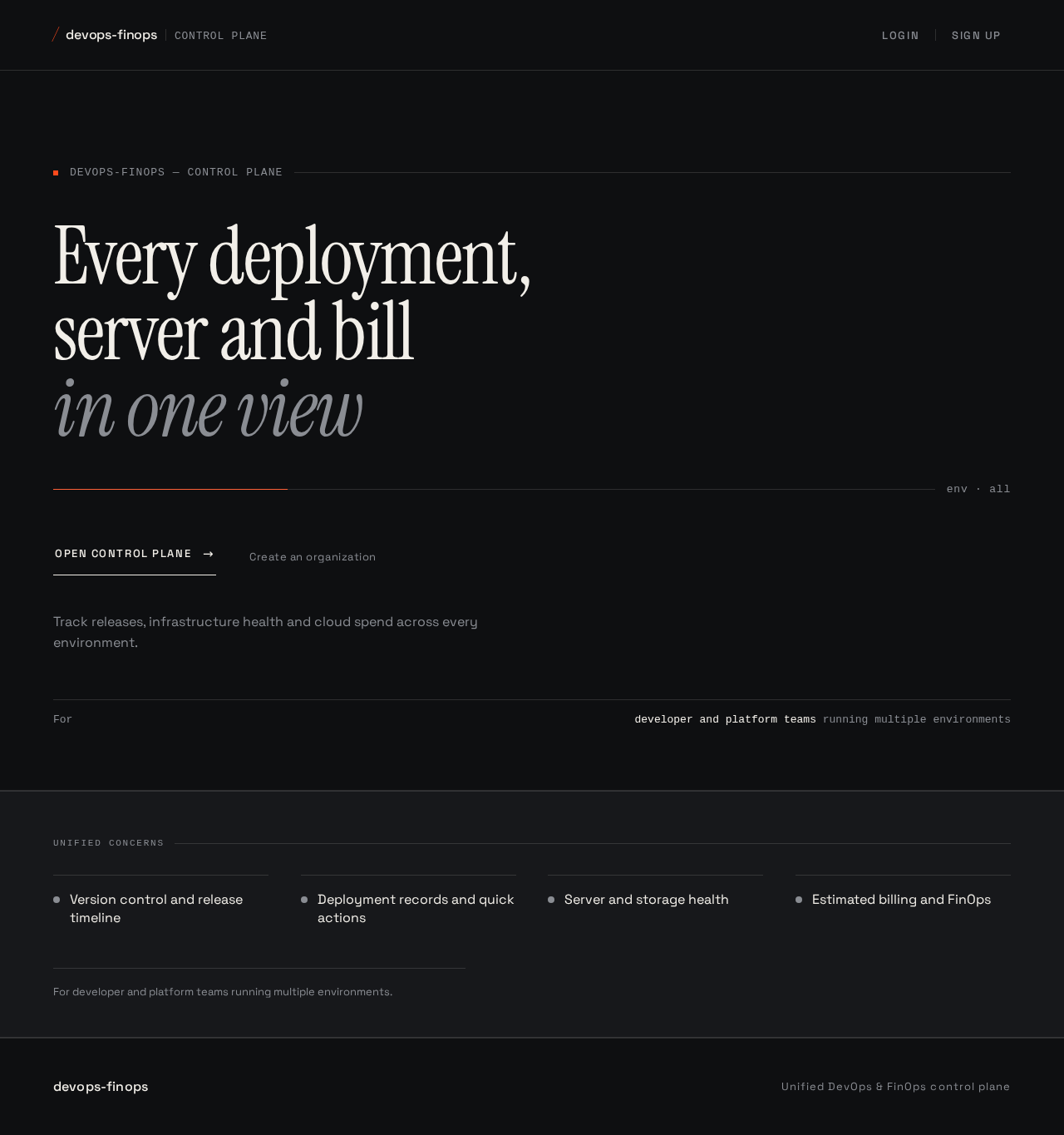
Every deployment,server and billin one view
Track releases, infrastructure health and cloud spend across every environment.
Unified concerns
- Version control and release timeline
- Deployment records and quick actions
- Server and storage health
- Estimated billing and FinOps
For developer and platform teams running multiple environments.
Every deployment,server and billin one view
Track releases, infrastructure health and cloud spend across every environment.
Unified concerns
- Version control and release timeline
- Deployment records and quick actions
- Server and storage health
- Estimated billing and FinOps
For developer and platform teams running multiple environments.
No comments yet. Be the first!